
daywood
662 posts


i should never be sharing this but f*ck it
seedance 2.0 + claude code + tiktok is THE best combo for AI videos
i cracked the formula for generating videos that look hyper realistic & make your audience feel like "holy shit this person gets me"
i'm finally sharing my FULL system with you..
here's what you're getting:
- my prompting method for realistic voices (works every time)
- my realistic human movements & breathing claude skill (this is key for realistic videos)
- my exact method on how to make infinite length videos that maintain consistency
- how to get AI tools for dirt cheap (90% off)
RT + reply 'UGC' and i'll send you the step-by-step system (must follow so i can dm)
English

I'm giving away the Claude Code skills we use to manage $300k/mo in ad spend at ColdIQ.
4X ROAS on $1M+ spent.
Ivan, our head of growth, built them off 300+ hours running ad campaigns for our clients. They run Google, Meta, and LinkedIn ads from the terminal in plain English:
→ bulk edits across platforms
→ custom audiences from CRM lists
→ creative fatigue detection before CTR dips
→ bid adjustments at scale
→ performance audits across periods
Reply "ads" and I'll send the full repo. Must be following.

English

Seedance 2.0 = 550+ videos a day
Fully realistic UGC ads — cinematic lighting, natural movement, clean pacing — all powered by AI.
UGC cost: $1
Production time: minutes
Scale: basically unlimited
I’ve got this crazy workflow running right now that creates, tests, and scales short-form ads automatically... nonstop.
It’s already live and campaigns are scaling.
If you want me to share the full setup, just comment “UGC”
English

I built an AI Influencer automation in Arcads
... that Automatically Create UGC Videos while you sleep
Comment “UGC” and I’ll send you the full workflow 👀
English
daywood retweetledi

🇨🇳 Chinese Scholar — Your military is killing innocent children
🇮🇱 Israeli General — No, we didn’t
🇨🇳 Chinese — Stop lying. You people have murdered more than 70,000 children in Palestine 🔥
This is what courage looks like. Right on the face of Zionist 🫡
English
daywood retweetledi

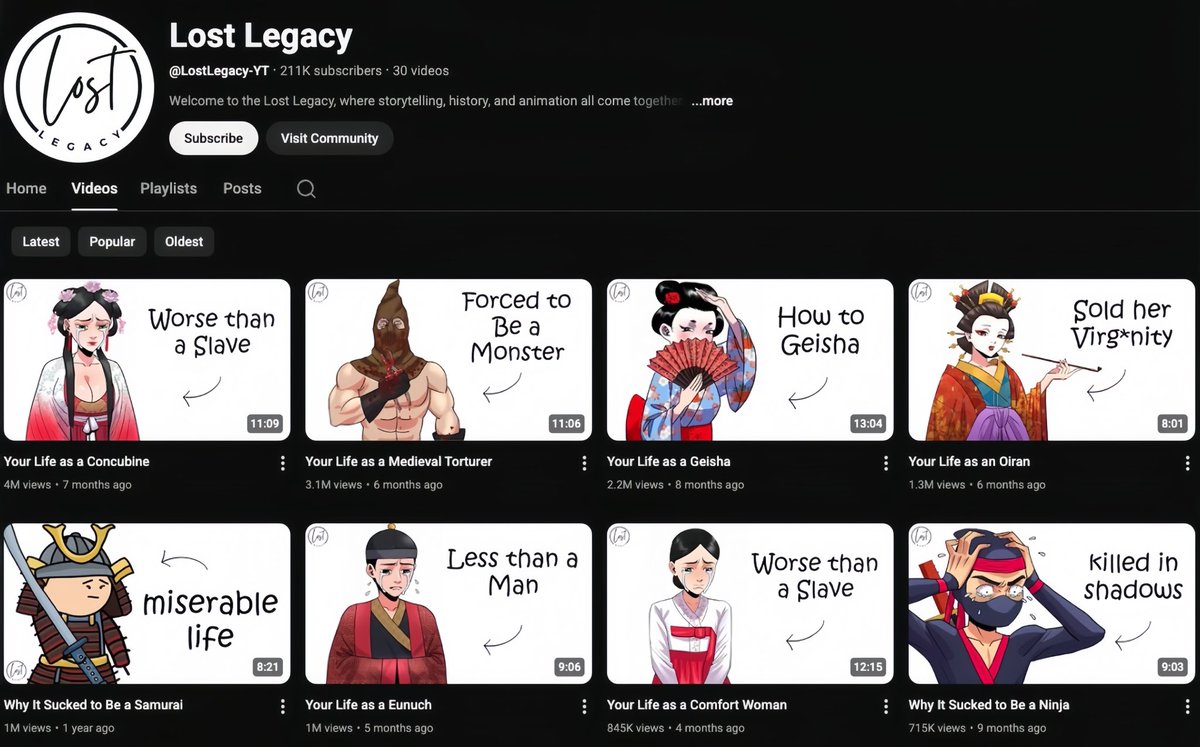
I just discovered a way to run a 2D animation YouTube channel using ONLY AI.
Everything in one tool:
• Script
• Voiceover
• Animation
• Thumbnail
No editing skills. No team.
Just type → generate → upload.
Want the full tutorial?
Comment “2D”
Retweet
Follow (so I can DM)
English
daywood retweetledi

We're giving away the prompt we used to make this AI UGC video.
Getting Sora 2 to output hyper-realistic, consistent footage isn't just about the tool. The prompt has to be structured in a very specific way... character description, cinematography, camera motion, lighting, dialogue, audio, authenticity keywords. Get it wrong and the footage looks off.
Get it right and everything downstream becomes easier.
We’re sharing the exact Claude template we use as step one of our AI UGC workflow. It takes a basic brief (who the subject is, where they are, what they're saying, what device it should look like, their accent) and structures all of that into the exact format Sora 2 needs automatically.
It sits at the start of a full workflow that runs through Sora 2 for the hook, ElevenLabs for voice cloning, ChatGPT for subject consistency, Nano Banana for B-roll generation and Kling for animation. The whole thing is broken down in the latest D2C Diaries episode.
But this prompt is the foundation. Without it, the rest of the workflow is harder than it needs to be.
If you're building in this space or testing AI UGC for your brand, this is worth having.
Retweet this post and comment PROMPT and I’ll send it over.
English

daywood retweetledi

MakeUGC V.2 + 7 AI Agents = 550 videos every single day.
Fully realistic ads — cinematic lighting, lifelike motion, perfect pacing — all 100% AI-generated.
Cost: $0
Production time: minutes
Scale: infinite
One autonomous AI engine that creates, tests, and publishes short-form ads — continuously.
It’s live. Campaigns are scaling right now.
Want the full workflow?
Like + Repost 🔁 👍🏼
Comment “V2” and I’ll DM you the breakdown.
(Must be following.)
@sumitdoriya21
English
daywood retweetledi

FINAL 1 HOUR.
85% OFF + 2 YEARS Nano Banana Pro UNLIMITED + ALL Kling Models.
This is the LAST DOOR to unlock generations on TOP models.
Biggest discount we'll EVER run.
Only for 1 hour: retweet & reply for 10 credits
English

Everyone is hyped about Google Gemini Pro… but barely anyone knows how to actually use it to replace real work.
I collected 300+ mega prompts that turn Gemini into a full-blown productivity engine.
Comment "AI" and I’ll DM you everything.
English
daywood retweetledi
LAST 8 HOURS of UNLIMITED KLING MOTION CONTROL for a MONTH 🧩
+ UNLIMITED Kling 2.6, Kling 2.5, Kling O1 & Kling Edit.
Secure your offer NOW ⚡️
For 9h: Retweet & reply - get 220 credits in DM
English

Contact sheet prompting is the hottest AI video technique right now 🤯
If you've seen this technique blowing up, here's why it works:
You feed AI one image, and it generates a grid of consistent shots—same face, same outfit, different angles and poses.
Instant storyboarding. Full creative control. No reshoots.
But doing it manually is brutal:
→ Write the prompt from scratch
→ Generate the contact sheet
→ Crop each frame by hand
→ Feed frames into a video model one at a time
→ Repeat for every single product
That's hours of work per campaign.
This n8n automation handles everything:
→ Upload a character image + product image
→ AI analyzes both and writes the contact sheet prompt
→ Nano Banana Pro generates a 6-frame grid
→ System extracts each frame automatically
→ Kling 2.5 creates smooth transitions between frames
→ 5 video clips land in Airtable ready to use
No manual cropping.
No frame-by-frame prompting.
No tedious busywork.
What you get in Airtable:
- AI-generated creative prompt
- Hero image (model + product)
- Full 6-frame contact sheet
- 5 cinematic video clips
- Approval gates before each step
All inside n8n + Airtable.
Contact sheet prompting on complete autopilot.
I recorded a 20-minute Loom showing exactly how I built this.
Want the walkthrough + the full n8n workflow + Airtable base?
> Like this post
> Comment "CONTACT"
And I'll send it over (must be following so I can DM)
English