
Ciao retweetledi
Ciao
1.5K posts


Ciao retweetledi

🤯太震撼了!
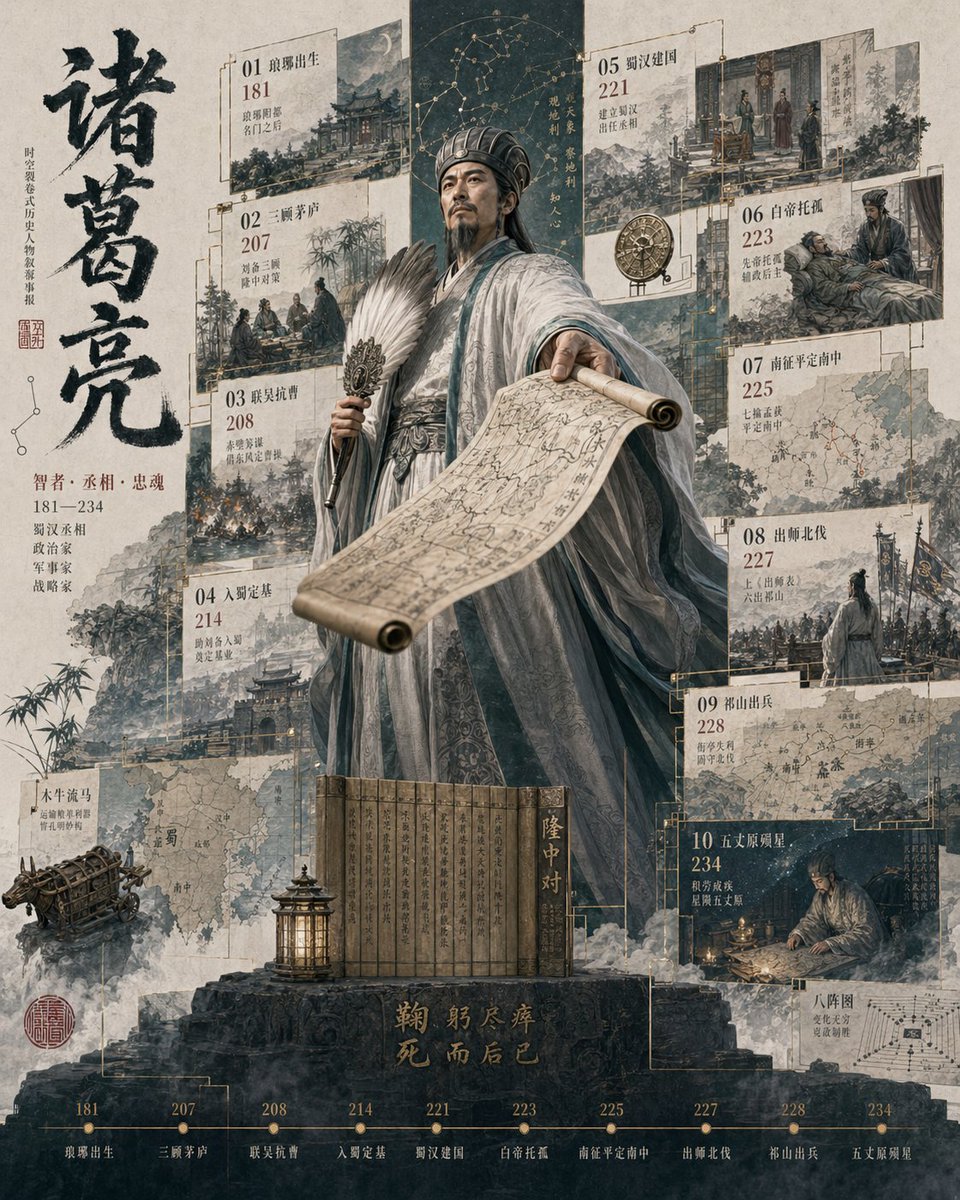
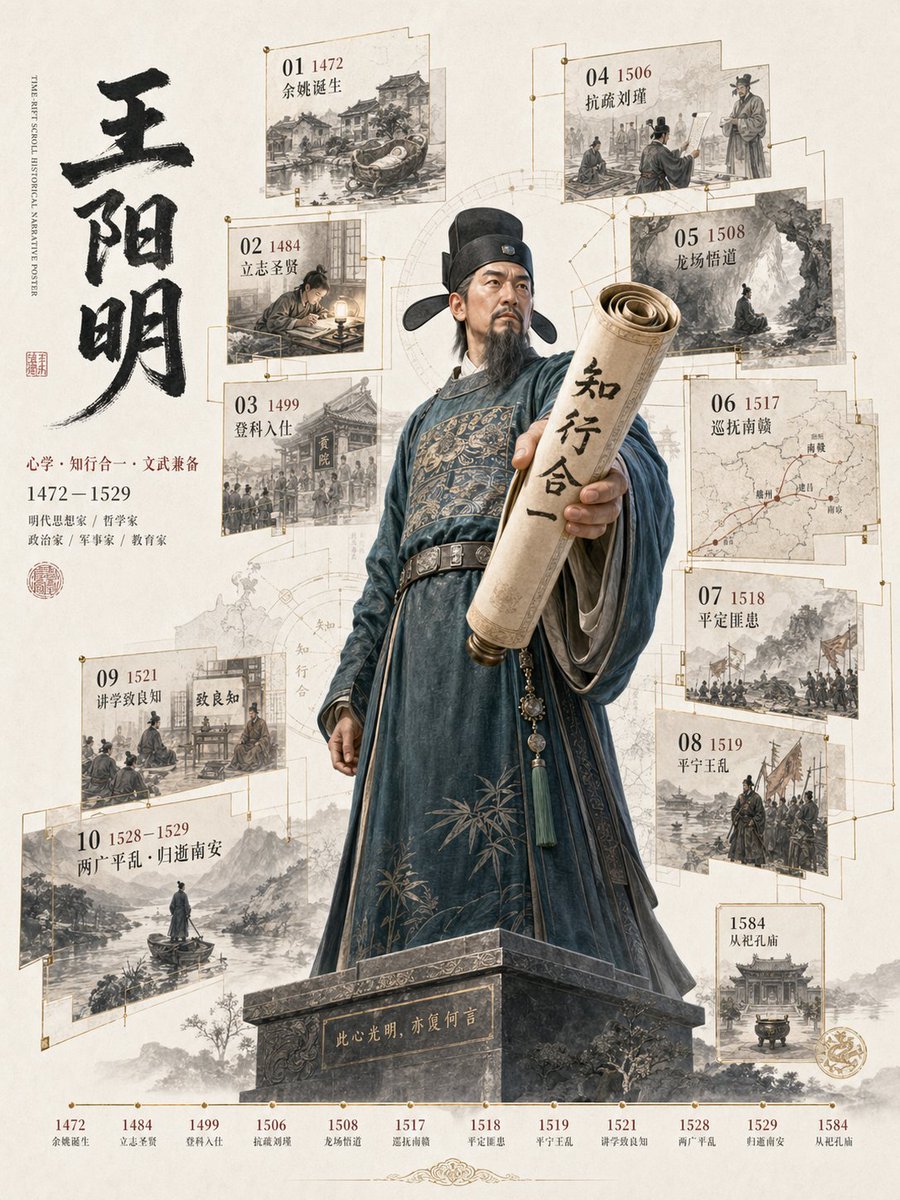
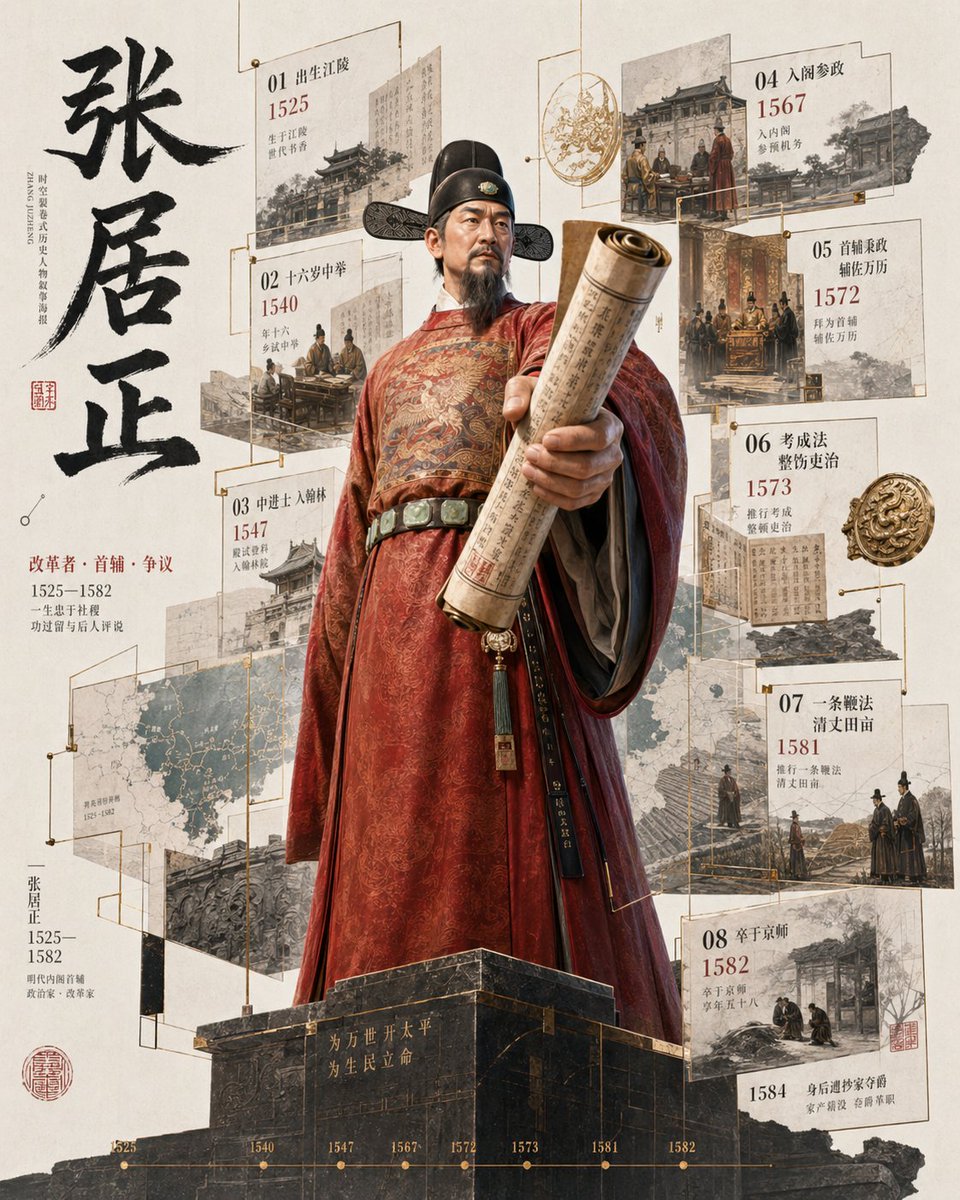
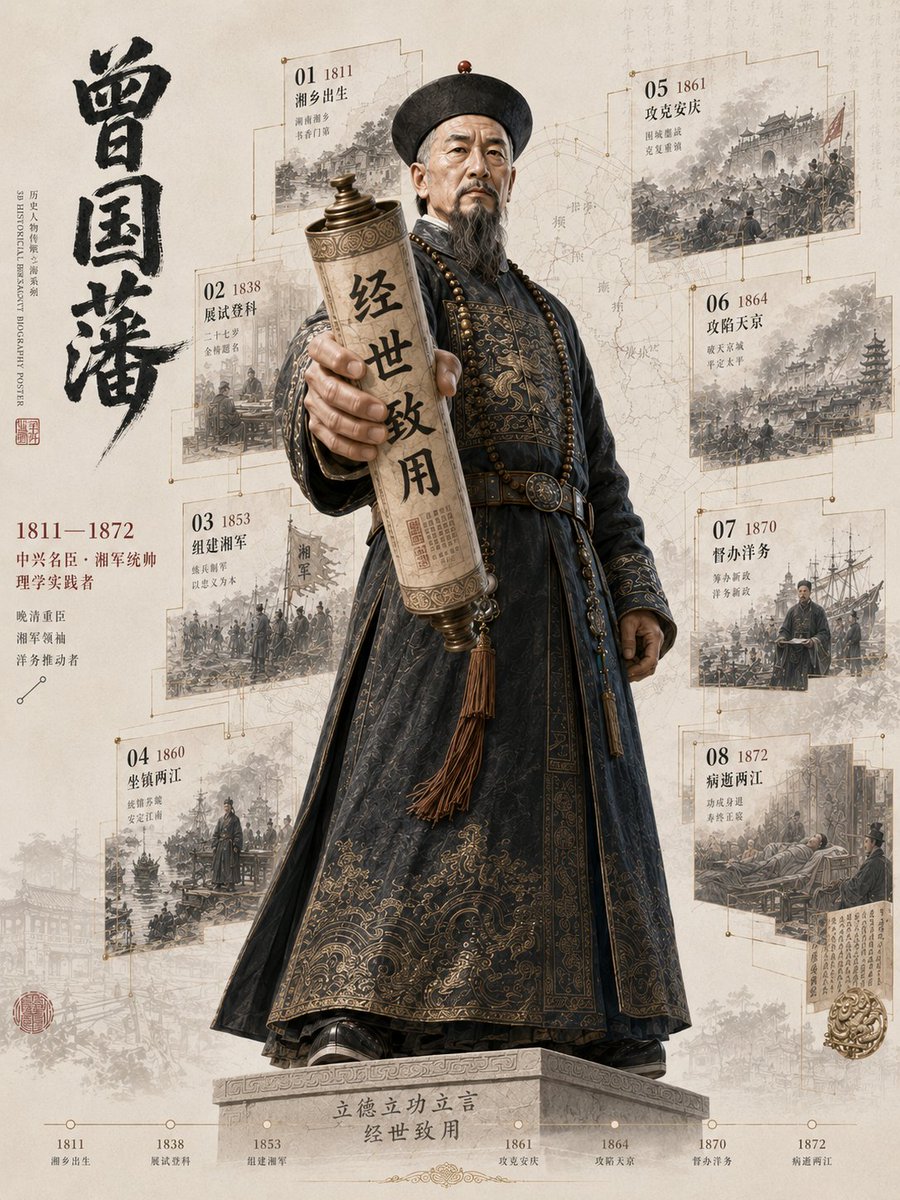
我用ChatGPT-Image2全新生成《3D历史人物立像档案》,气场爆炸!🔥
把一个人的一生,浓缩成一座可以阅读的历史立像:
诸葛亮、王阳明、张居正、曾国藩
中央是全身3D人物,手中的书卷破框而出
一生高光画面散落在时光碎片里,人物立体气场逼人!
提示词参考评论区👇
中文
Ciao retweetledi

What AI is doing right now is insane.🤯
ChatGPT Image 2 turns your ideas into full storyboards with cast and scenes… then Seedance 2 turns those into full cinematic shots.
Exact prompts below 👇
English
Ciao retweetledi

GPT Image 2 + Seedance 2 = cartoon chase scene.
I wanted to see how far I could push storyboard-to-video consistency, so I created a full 15-second cat vs mouse sequence inside a completely destroyed house.
The process was actually simple:
- generated a 3x3 cinematic storyboard sheet in GPT Image 2
- designed every frame like a real animation pre-production sketch
- added camera directions, motion cues, timing notes, and destruction progression
- used Seedance 2 to animate the entire sequence into one continuous cinematic shot flow
What surprised me most was how well Seedance 2.0 understood the visual continuity between frames. The flying debris, motion blur, exaggerated jumps, and camera movement felt surprisingly cohesive.
.
.
.
English
Ciao retweetledi

GPT Image 2 ile storyboard çizdim,
sonra Seedance 2.0 ile bunu tam animasyon sahnesine çevirdim
Bir rakun.
Bir donut.
Ve tamamen kontrolden çıkan çizgi film kaosu.
Storyboard → cinematic cartoon video dönüşümü gerçekten deli hissettiriyor.
AI artık sadece görsel üretmiyor, timing ve slapstick komedi de kurabiliyor
Ve en absürt kısmı:
Bunun tamamını sadece 10 dakikada yaptım.
Türkçe
Ciao retweetledi

GPT Image 2 + Seedance 2.0 Prompt Share
Tried using IPA + FACS for a contemporary performance piece where live singing and choreography happen simultaneously. Not sure how much of it actually worked technically but I think the final result turned out pretty interesting.
I also ended up color-coding the storyboard annotations because otherwise annotations were confusing the model. Different colors helped separate body movement, camera motion, framing and lighting directions from the actual environment and character drawings.
You can find color-coded storyboard prompt + seedance 2.0 prompt in the replies.
English
Ciao retweetledi

Fun interactive science app ideas | Part 3
Played around with generating 3D biological structures and made an app to explore them interactively
UI Design
GPT Images 2
Code
Gemini 3.1 Pro
More demos ↓
English
Ciao retweetledi

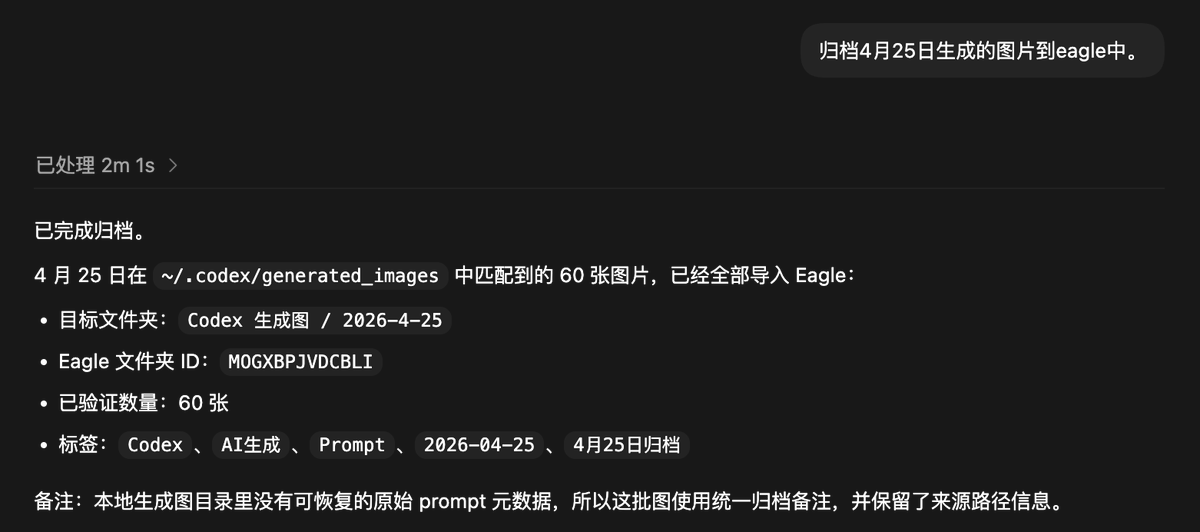
现在我生图基本都交给 Codex 了,尤其是各种自动化任务。
昨天一天,它给我跑了 300 多张图。
但有个问题:这些图默认都会存在 Codex 的本地生成目录里,而我平时管理图片、视频、参考素材,主要都在 Eagle 里。
正好 Eagle 提供了 MCP,可以让 Agent 操作 Eagle App 里的大部分能力。
所以我干脆写了一个 Skill:codex-image-to-eagle
它主要有两种用法:
1.手动调用
比如直接对 Agent 说:
“帮我把今天所有 Codex 生成的图归档到 Eagle。”
2.自动调用
在自动化生图任务里加一个 hook:每生成一张图,就自动归档到 Eagle。
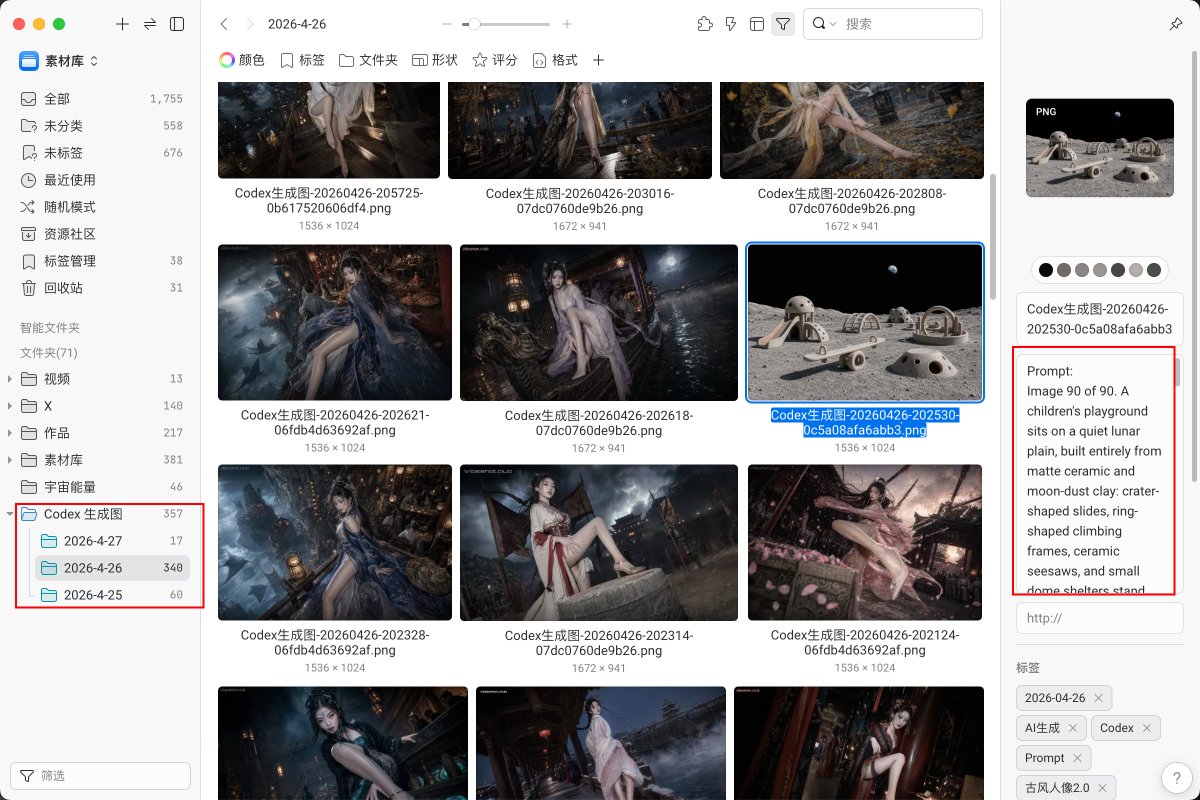
归档时会自动按日期分类,更重要的是:
每张图对应的 prompt 也会一起写进 Eagle 注释里。
这样之后翻图、复盘、找提示词、做二次创作,就不用再到处翻文件夹了。
我已经把这个 Skill 开源了:
github.com/vibeshotclub/v…
你可以直接让自己的 Agent 安装,基本开箱即用。
前提是:你得有 Eagle,并且开启 Eagle MCP。
如果你还不知道 Eagle 是什么,建议你了解一下。
这几乎是我们社群里玩 AIGC 的人手一个的本地图片 / 视频资源管理神器。
古一@MANISH1027512
什么是自动化内容工厂? 在codex中设置自动化10分钟跑一次,每次3张,风格高度统一,但每一张却完全不一样,所有元素都会打乱重组,张张出片,张张有惊喜。 这套模板很快会上架到vibeshot.club,敬请期待。
中文
Ciao retweetledi


Ciao retweetledi

ChatGPT-Image-2.0 × Seedance 2.0|ゲームUI切り替え🐰
まさかAIでここまでのUI切り替えができるとは思わなかった。ChatGPT-Image-2.0でのUIデザインはすでにかなり精度が高い。
Seedance 2.0で動画化する段階ではまだ課題あり。「操作レベル」での精密なコントロールは依然として難しい。
AEやUnityなら一度フローを構築すれば安定して再現できるが、AIはまだ「生成ベース」で、言語だけで結果を完全に固定するのは難しい。
それでも効率は確実に上がっている。
以前はUI一式を組むのに最低でも1週間。
今回は初回でも約3時間で一通り完成。
100%の一致を求めなければ、その後の再現はかなり速い。
PPTやプロダクトデモ用途なら、すでに十分実用レベル。
ゲーム業界、変わり始めている🤯
GPT Image 2.0 × Seedance 2.0 on @higgsfield
KANA@KanaWorks_AI
ChatGPT-Image-2.0 × Seedance 2.0 アクション系ゲーム: ハメ技 🤣 作り方: Step 1:ChatGPT-Image-2.0で画面を生成 Prompt ➕ image Generate a Boss battle game screenshot inspired by (a certain movie, a certain game, a certain style). Third-person perspective. The protagonist is named (Character 1), with the weapon (frying pan). In the item bar, there is a healing (gourd), and another item is (poison darts). The Boss is image2, named (Character 2), with the weapon (vajra). The scene is set at (the entrance of ruins in an open forest). Step 2:Seedance 2.0で動画化 Prompt Share 122 Cinematic action combat game visuals, presented in a single continuous shot. Highly immersive, fast-paced, with extremely impactful combat feedback. The protagonist is Rabbit KANA, wielding a (frying pan). The Boss is White Tiger Ascetic, wielding a (vajra). [Environment] An ancient, ruined stone battlefield. The ground is covered with cracks and scattered debris. Dust and thin mist float in the air. The overall tone is dark, with high-contrast lighting, strong volumetric light and particle effects. A gentle wind flows through the scene, creating an oppressive yet epic atmosphere. [Opening – Ranged Probe] A white rabbit adventurer crouches on a distant high ground, wearing a yellow jacket. The rabbit rapidly throws three daggers emitting green smoke toward the distant White Tiger Boss. The daggers strike the Boss’s body, bursting into green smoke. The White Tiger triggers hit reactions and sound effects. [Battle Trigger] The rabbit leaps down from the high ground, with the camera following the fast descent, landing directly in front of the Boss. The rabbit draws its weapon — a frying pan. War drums begin, and Boss battle music starts. A health bar appears above the White Tiger. The rabbit slowly circles the Boss. [High-Speed Melee] Both sides instantly engage in high-speed melee combat. The White Tiger swings the vajra with heavy, powerful motions, generating strong visual effects and shockwaves. The rabbit rolls forward into close range and delivers precise attacks with the frying pan. The White Tiger’s health decreases. The White Tiger retaliates with sweeping, slashing, and heavy strikes using the vajra, while the rabbit performs multiple precise parries. [Parry & Opening] The rabbit seizes the moment and executes a perfect parry, triggering a powerful impact sound and visual feedback. The Boss enters a staggered state, freezing briefly before dropping to one knee. [Execution Animation] The rabbit leaps into the air above the White Tiger and unleashes its ultimate attack. The frying pan channels overwhelming thunder as a massive lightning dragon descends from the sky. Lightning and the frying pan strike simultaneously. The rabbit lands calmly with its back to the camera. Behind it, the White Tiger collapses with a heavy crash, kicking up dust and debris. [Final Frame] At the center of the screen, large red calligraphic text appears: “勝” [Technical Specifications] Hyper-realistic, cinematic lighting, 8K resolution, 30fps, no subtitles, no watermark, only essential UI elements retained. Rich details, dynamic camera, motion blur, strong composition. ゲームをプレイする中で、世界を探索したり、さまざまな遊び方を発見したりすることは大きな楽しみの一つです。実は、AI生成も同じです。AIと対戦し、協力するような、とても面白いゲームです。皆さんが楽しく遊べることを願っています🐰❤️🔥
日本語
Ciao retweetledi

昨天很多人问我:
这组「毛绒城市节日海报」到底是怎么做出来的?
答案不是一句 prompt。
我真正用的是:
参考图 → 风格拆解 → JSON 化 → 换主题批量生成
今天把这个方法讲清楚。
想要最后那份「风格 JSON + 通用 Prompt 模板」的话,先收藏,这条看到最后。
👇


Vigo Zhao@VigoCreativeAI
最近看到一张韩国节日海报,第一眼就被抓住了。 不是因为构图多复杂,而是它把“城市旅游海报”做成了一个巨型毛绒玩具世界。 于是我把原图风格提取成 JSON,再用同一套视觉语言生成了两张新图: Cherry Market Day 和 Harbor Light Fest。 这个风格真的很适合做城市活动视觉。 👇
中文
Ciao retweetledi

GPT Image 2 x Seedance 2.0 Anime Style Racing on flora
i share a simple workflow to help the model understand scene order more clearly when working with anime style pages ⬇️
DStudioproject@D_studioproject
GPT Image 2 x Seedance 2.0 Anime Style on dreamina you can make it into live action too⬇️
English
Ciao retweetledi

Generated this video by chatting with a single agent ✨
I told @heyglif that I wanted to create this anime short.
It made the storyboard with GPT-Image-2 and then animated it with Seedance 2.
Such an easy way to get controllable video generation!
English
Ciao retweetledi

GPT Image 2 is insanely good...I generated a 360° equirectangular panorama in Happycapy with just a skill + prompt.
Step 1: Select the generate-image skill
Step 2: Enter a prompt like: “Use a frontend 360 viewer to display an equirectangular image of […] using the GPT-Image-2 model.”
Wanna see how you all get creative with this
English
Ciao retweetledi

Imagine every pixel on your screen, streamed live directly from a model. No HTML, no layout engine, no code. Just exactly what you want to see.
@eddiejiao_obj, @drewocarr and I built a prototype to see how this could actually work, and set out to make it real. We're calling it Flipbook. (1/5)
English
Ciao retweetledi
Ciao retweetledi

Ciao retweetledi

Gemini vs Claude
Claude has started to get really damn good at design.
Prompt below ↓
English
Ciao retweetledi

Ciao retweetledi
