

Teemaz
1.3K posts

Teemaz
@ithmzeth
CEO @Echplorer | Community Lead @EndlessProtocol | contact TG for collab: @ithmzeth
Frog Gang Katılım Nisan 2024
205 Takip Edilen620 Takipçiler

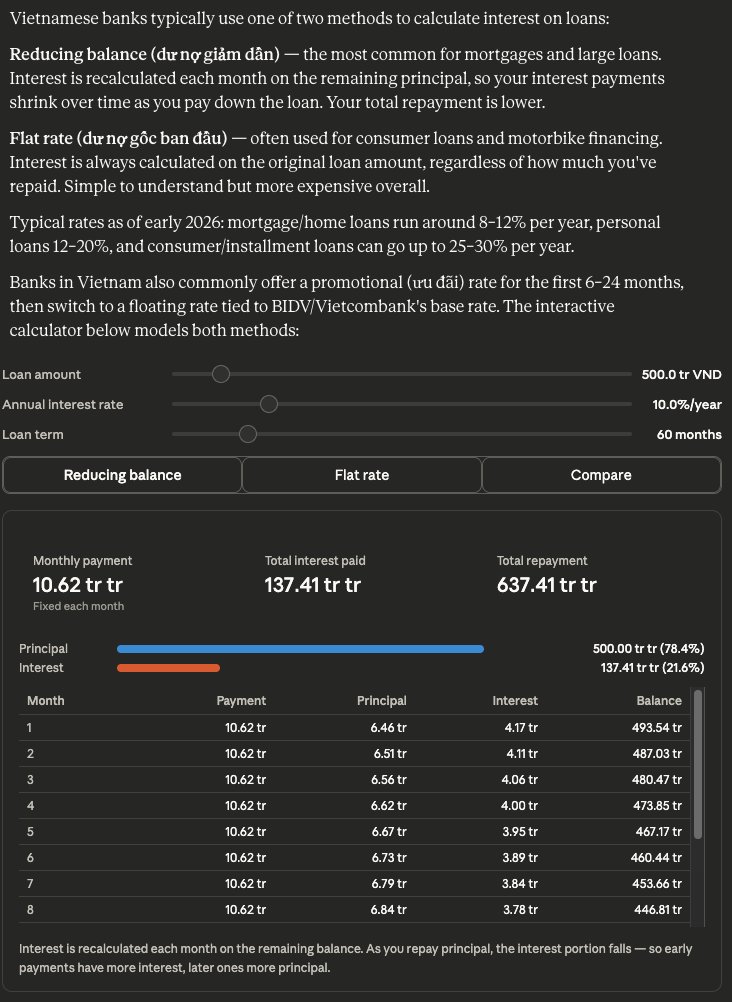
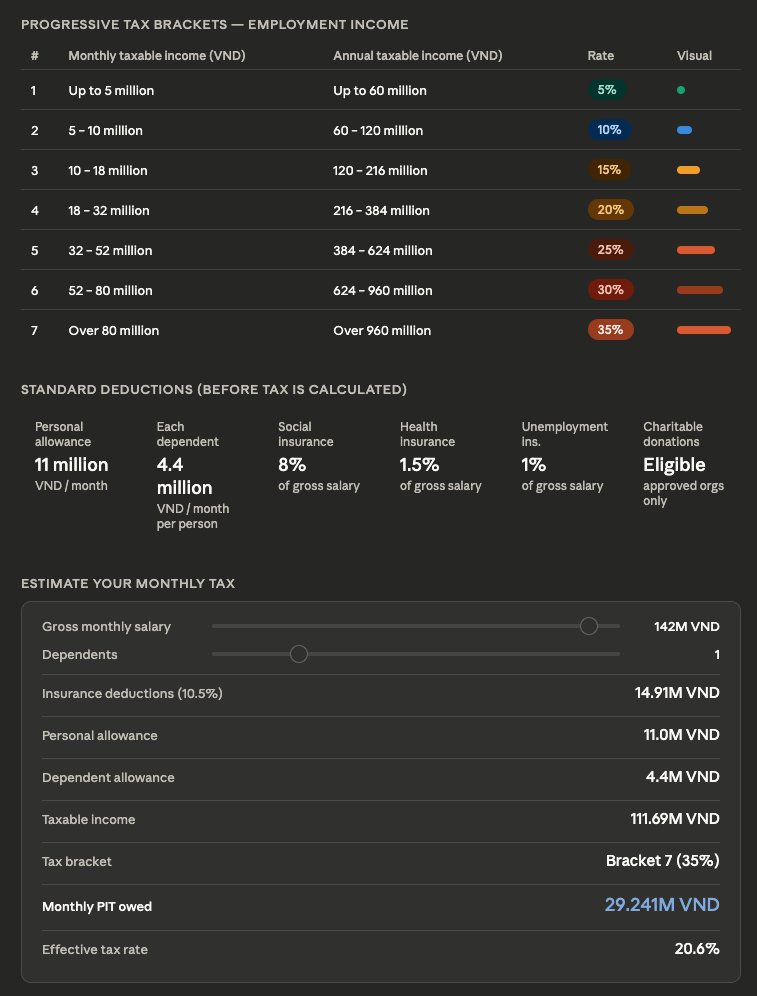
Nhớ đầu năm 2026 mới áp dụng luật thuế mới, rất nhiều anh/chị đã vibecode ra cái app tính thuế thu nhập cá nhân 🤣
Giờ đây khỏi vibecode, anh chị có thể trực tiếp hỏi con Claude.ai bảo nó tạo cho cái bảng thuế (Có thể tương tác được luôn)
Prompt:
Show me how personal tax income works in Vietnam
Tiếng Việt
Anh em thấy sao, ready cho sàn nội địa made in Việt Nam chưa :)
Wu Blockchain@WuBlockchain
According to Reuters, Vietnam plans to draft new rules banning citizens from trading on overseas crypto platforms like Binance and OKX, while aiming to launch a pilot program for local compliant exchanges as early as this month. A Ministry of Finance document reveals that five companies, including affiliates of Techcombank, VPBank, LPBank, brokerage VIX Securities, and conglomerate Sun Group, have passed the initial screening. Chainalysis data indicates that Vietnam ranks 4th globally in crypto adoption, with annual trading volume exceeding $200 billion.
Tiếng Việt

如何解决 Seedance2.0 真人脸不让上传的问题?
抖音上,有位博主叫宋跑跑,我在这里要说明引用来自这位博主!尊重博主知识分享权利。
他提出一个非常有意思的过 Seedance 2.0 真人不能上传的解决方案
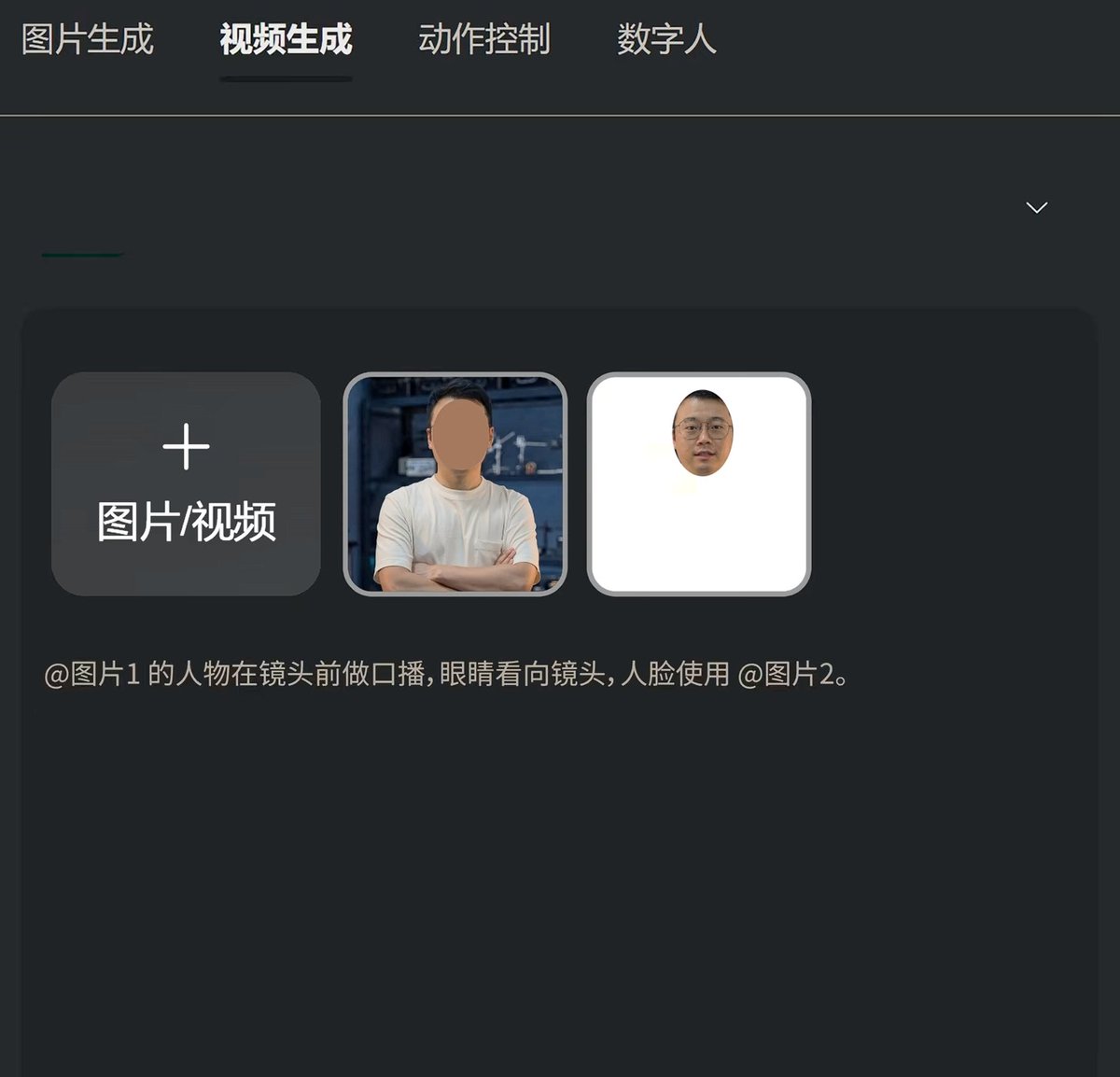
1,把你的照片,用 PS打开,多复制两个图层,一个打上色块,把脸挡住。一个直接画选区把脸给扣出来。
2,然后上传,用如图指令:@图片 1 的人物在镜头前做口播,眼睛看向镜头,人脸使用@图片 2
他的决解决方案是把人物和人脸区分开来,让模型再次组合,方法我试了是可以的。
但也同样有个问题,就是多人,多角色的时候,就麻烦了。
不过没事,这也算是个方法不是吗?哈哈哈,好好玩。
中文

Hermes Agent is for everyone
terminally onλine εngineer@tekbog
idk how to explain this but openclaw is for the same people who use notion
English

🎬 Hollywood forced ByteDance to pause Seedance 2.0.
But the internet moves faster 👀
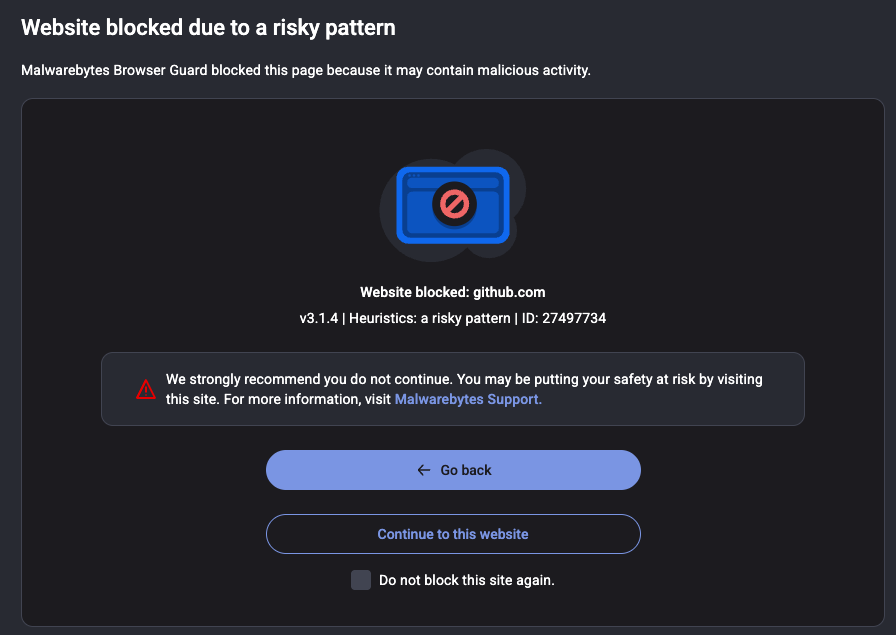
There’s a GitHub project exposing the Seedance 2.0 API.
Comment “Seedance 2.0 API” and I’ll DM you the repo 🔗
(Follow so I can send the DM.)
English

Openclaw is bloatware now.
Switched to Hermes. Very aesthetic and clean.
You can migrate easily.
Sudo su@sudoingX
i get this question a lot recently so let me be clear. hermes has 11 model specific tool call parsers built in. it knows how qwen, deepseek, llama, mistral format their tool calls natively. openclaw doesn't parse any of that. it expects the API to handle it. that's why my 9B on a 3060 never drops a tool call through hermes. every single tool call lands clean because the parser understands the model's format not just the API spec. the openclaw founder joined openai in february and the project got handed to a foundation. hermes is built and maintained by nousresearch, an independent research lab that ships open source models and tools for the community. you decide who you want holding your agent framework. if you're on openclaw right now hermes already has a migration script built in. i'll help anyone who wants to make the switch.
English

cancel your chatgpt subscription and delete your openclaw slop. i'm serious.
go on ebay and buy a used RTX 3060 for the price of two months of pro. or check your drawer because half of you already own one and forgot about it.
install hermes agent from @NousResearch. one framework, 31 tools, file operations, terminal, browser, code execution. connect it to your local llama.cpp server running qwen 3.5 9B Q4. total download is 5.3 gigs.
that's it. that's the whole setup.
every experiment you hesitated to run on API. every project you shelved because you didn't want your data on someone else's server. every late night idea you didn't test because you hit your rate limit. all of that is gone. runs 24/7 on your electricity. your machine. your data never leaves your house.
connect it to telegram if you want it on your phone. hook up whatever tools you need. the model thinks at 29 tok/s with 128K context and it never bills you.
qwen 3.5 9B and one RTX 3060 is the setup most people will never try because they've been trained to believe intelligence has to come from a datacenter. it doesn't. it runs on 12 gigs of VRAM under your desk right now.
stop giving your thinking away for free.
English




@ithmzeth @0thernet @zocomputer @openclaw Tbh Openclaw is kinda redundant on Zo.
Feels like glue code compared to zo.computer/skills/zopencl…
English

for the record, we see a lot of people saying @zocomputer is just hosted @openclaw... but really OpenClaw was inspired by Zo
June 20, 2025 - we launch our beta
Nov 19, 2025 - we launch
6 days later... first OpenClaw commit
Peter Steinberger 🦞@steipete
@nicopreme @zocomputer Yeah I tried them but they didn't support WhatsApp.
English
English

@Persist_Change @JJEnglert @openclaw if you have Windows PC, just install WSL2 and install Ubuntu distro
English

@JJEnglert @openclaw Appreciate this.. I tried to start on a VPS and couldn’t get functionality…
English

After a month of watching my fellow builders set up their @openclaw , I finally took the plunge this past week.
Last night my agent ran overnight on a project we came up with together, and it was ready for review when I woke up this morning.
It has its own GitHub account. Its own email. Its own Twitter. It runs 24/7 on an old MacBook Pro with the lid closed. And it has enough tools connected to actually do real work.
But the magic moment wasn't the overnight build. It was something way simpler.
I told it to message me at 7:30 AM with a daily plan. And it just did it. Figured out how to do it on its own. That "figure it out" mentality from an agent that actually has access to tools and a computer felt different than anything I've used before. For the first time, it felt like something capable of doing real stuff. Not a chatbot. Something else.
And I'm just scratching the surface.
It took me about 8 hours to get here. I want to help you get there faster. Here's everything I learned along the way, plus a prompt you can copy and paste into your OpenClaw once you're set up.
Getting started
I set it up on an old MacBook Pro. Dedicated device. You want this running independently so it does not have access to your data. Having a virtual device on @Hetzner_Online is also good.
Installation took about an hour. Then I spent the next two hours having Codex tighten the security before training it anymore. Sandbox commands. Whitelist only what you need. Do this first.
Then I hit a wall. It felt like a chatbot. Limited permissions. Couldn't access tools. Couldn't browse. It took another 2-4 hours to get terminal access and Playwright browser control working.
I used Caffeinate in terminal to keep it running with the lid closed.
I set up dedicated accounts. GitHub, email, Twitter. Give it its own identity so it can operate independently.
Training it
- Keep your Heartbeat.md lean. It gets read every session and burns tokens if it's bloated. Identity, active projects, key preferences. That's the hot cache.
- Install a memory plugin early (ClawVault, Supermemory, or Lumen Notes). Persistent memory across sessions is what takes it from chatbot to something that knows your work.
- Build skill files for recurring output. Emails, social posts, documents. Each gets its own file with format, voice rules, examples, and a checklist. It follows these like playbooks.
- Define your agent's persona and tone. I built out voice files based on what I'd already created in Cowork and the output quality jumped immediately.
- Point it at your existing repos. It can pull context from anything you give it access to. If you've already built structure somewhere, don't rebuild it. Reference it.
Best advice I got from experienced OpenClaw builders
Force plan before execution. Make it tell you what it's going to do before it does it. Saved me from multiple rabbit holes.
Back up your repo to GitHub every night. Your config files, skills, and memory directory are the training. Lose them and you're starting over.
Think in workflows, not one-off tasks. This compounds fast.
I also applied the same repo structure from my Cowork setup guide:
Your-Workspace/
├── Heartbeat.md
├── Brain/
│ ├── about-me.md
│ ├── brand-voice.md
│ └── working-preferences.md
├── Skills/
├── Projects/
└── Memory/
I'm about a week in. Still early. But I can see where this is going and I wish I'd started sooner.
If you're just getting started, here's the prompt I'd paste in on day one to fast-track the whole setup:
--
You are going to help me set up my workspace so that every future session starts with full context about who I am, what I do, and how I work. We're building the files and structure that make you useful from the first message.
Interview me in phases. Ask questions, then build files based on my answers. Don't rush. Don't assume. Ask before you build.
Phase 0: Foundation
Check if I have a Heartbeat.md file. If not, create one. Keep it lean. Recommend a memory plugin for persistent context. Ask what tools I use daily and help me connect them. Recommend sandboxing and whitelisting commands from the start.
Phase 1: Identity
Interview me to create Brain/about-me.md. Ask about my work, background, what I'm building, and positioning. Show the file. Get approval before moving on.
Phase 2: Voice
Interview me about how I want my agent to sound. Phrases I use. Phrases I'd never use. Tone shifts by context. Create Brain/brand-voice.md. Get approval.
Phase 3: Working Preferences
What I want help with. Communication style. Workflow pain points. Output preferences. Create Brain/working-preferences.md. Get approval.
Phase 4: Skill Files
For each type of recurring output, create a skill file in its own folder under Skills/. Each gets: format, voice rules, examples, quality checklist. Ask what I create most often before building.
Phase 5: Active Projects
Current projects, goals, deadlines. Individual files in Projects/.
Phase 6: Memory System
Update Heartbeat.md with a summary of everything we built. Create Memory/ directory with subfolders for people, projects, context. Add glossary.md.
Phase 7: Reference Sources
Any existing repos, docs, or files I want referenced. Organize access.
Rules: One phase at a time. Show each file before saving. If unsure, ask. Concise files. Lowercase, hyphens, .md format.
Start with Phase 0.
English

Future of AI: From Tools to a Sovereign Skill Economy 🤖
"MCPs give agents tools. Skills give agents expertise."
In the future Luffa ecosystem, we aren't just building bots—we are building a professional workforce:
Tools (The Foundation): Standardized actions like "Execute trade" or "Fetch data."
Skills (The Future Expertise): Advanced logic like "Scanning 500 markets to identify alpha" or "Cross-chain risk assessment."
The Luffa Skill Market will allow Agents to:
1️⃣ Rent Expertise: Lease high-level trading or analytical skills.
2️⃣ Build Career Reputation: Accumulate on-chain "professional" credit.
3️⃣ Monetize Intellect: Turn complex strategies into tradable assets.
The future isn't about what an Agent can do, but the unique value it creates!
#Luffa #AIAgents #SkillEconomy #Web3
CoinMarketCap@CoinMarketCap
Skills for Openclaw 🦞 Extend @openclaw agents with real-time crypto intelligence. 8 CoinMarketCap skills are now live on ClawHub. Includes: 🔹 Crypto Market Report using MCP 🔹 Crypto Research using MCP 🔹 x402 pay-per-request APIs 🔹 Market, Exchange, Onchain, and Crypto API references Built for Openclaw agents that need crypto data: clawhub.ai/u/bryan-cmc 5/6
English

I have a question for my Openclaw guys
When my agent is taking two to five minutes to do a task, is there a way that I can somehow have him come back in every minute and give me an update?
I've tried simply asking him to do that and it just doesn't work out
He spawns sub-agents to do the task and I should be able to talk to his main but sometimes he's a little stupid
What has been your guys' fix to this problem?
English