Human 1st above All Else

24.3K posts

Human 1st above All Else banner
Human 1st above All Else

Human 1st above All Else

@jazza2z

Father, Activist, Commentator: We were all HUMAN until Race disconnected us, Religion separated us, Politics divided us, and Wealth classified us!

West Harlem, Manhattan Katılım Kasım 2016
6.1K Takip Edilen5.5K Takipçiler
Human 1st above All Else retweetledi

Ruben Hassid
Ruben Hassid@rubenhassid·
How to actually set up Claude in 7 minutes: (and never re-do it after this setup) 1. Pick the right model. ☑ Open the Claude desktop app ☑ Set Opus 4.7 for complex tasks ☑ Turn ON Extended Thinking 2. Create your 'Cowork' folder. ☑ 3 subfolders: About me, Outputs & Templates ☑ ABOUT ME holds your 3 context files ☑ Claude reads them for every single task 3. Write your Global Instructions. ☑ Settings → Cowork → Edit Global Instructions ☑ A persistent prompt before every task ☑ Tells Claude what to read, and when 4. Connect your daily tools. ☑ Gmail, Gamma, Drive, Granola ☑ All your tools in one place ☑ No more copy-paste between 12 tabs 5. Install Wispr .ai (it's free). ☑ Turns your voice → text ☑ Pick a hold-key (mine = Shift) ☑ Typing at 60 wpm is the bottleneck 6. Open your Cowork folder in Obsidian. ☑ Install Obsidian (free) ☑ Open Cowork as a vault ☑ Edit context files without leaving flow state 7. Save your top 3 workflows as Skills. ☑ Click any chat → "Turn into a Skill" ☑ /linkedin, /brief, /report = instant ☑ Reuse what already works 8. Build one Project per recurring deliverable. ☑ One Project = one type of output ☑ Files + instructions live inside ☑ Never re-explain the same task twice 9. Restart the chat at message 20. ☑ Long chats burn 30x more tokens ☑ Ask Claude to summarize → paste in new chat ☑ Fresh start = better results, lower bill Full guide + prompts at how-to-ai.guide (save this - small habits = big leverage over time)
Ruben Hassid tweet media
Ruben Hassid@rubenhassid

x.com/i/article/2052…

English
33
119
696
63.2K
Human 1st above All Else retweetledi
Ruben Hassid
Ruben Hassid@rubenhassid·
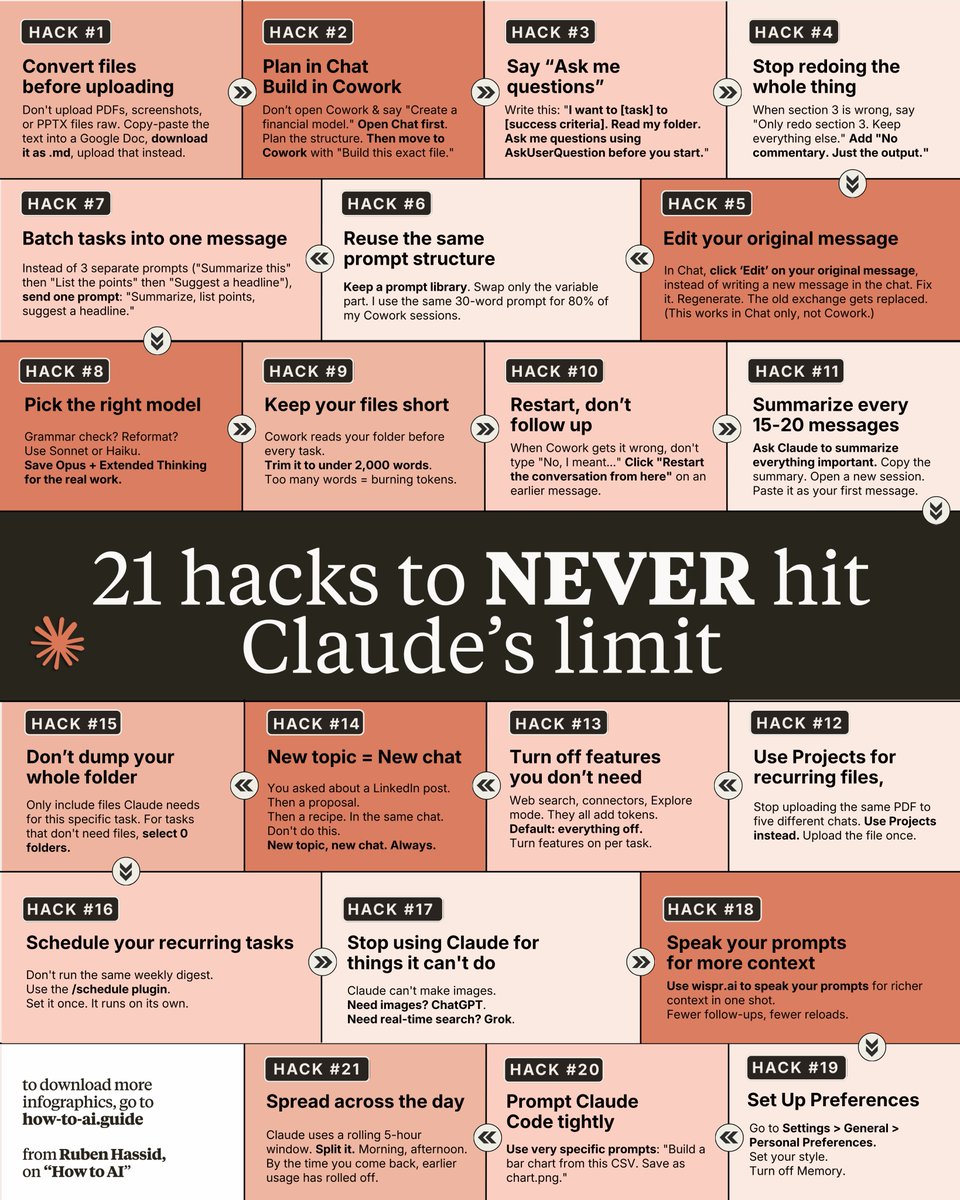
Don't upgrade to the $100 Claude plan (yet). These 21 hacks make the $20/month plan enough: 1. You upload PDFs raw. One page = 3,000 tokens. Fix: Paste the text into a Google doc. Download as .md format. Under 200 tokens. 2. You build files inside Cowork too early. Fix: Plan in Chat first. Move to Cowork only when you know exactly what you want. 3. You write 500-word prompts that reload. Fix: Write 29 words instead: "I want to [task] to [goal]. Ask me questions using AskUserQuestion." 4. You say "redo the whole thing" to fix section 3. Fix: "Only redo section 3. Keep everything else. No commentary. Just the output." 5. You send 3 separate messages for 3 tasks. Fix: One message, three tasks. "Summarize this, list the points, suggest a headline." 6. You type "No, I meant," stacking on the history. Fix: Click 'Edit' on your original message. Fix it. Regenerate. 7. You rewrite prompts from scratch every time. Fix: Keep a prompt library. Same structure, swap the variable. 8. You use Opus for a simple grammar check. Fix: Sonnet for quick tasks. Save Opus + Extended Thinking for deep work. 9. Your about-me file is 22,000 words (too long). Fix: Trim to under 2,000 words. End sessions with "Write a session-notes .md." Paste my .md file prompt: ruben.substack.com/p/youre-just-a… 10. You never restart & keep stacking long chats. Fix: When Cowork goes sideways, click "Restart the conversation from here" on an earlier message. 11. You never summarize before things get long. Fix: Every 15-20 messages → summarize, copy the brief, start a fresh session. 12. You use Projects for recurring files. Fix: Use Projects. Upload once. Every chat inside references it without re-burning tokens. 13. You dump 50 files into Cowork "just in case." Fix: Only include what this task needs. Zero folders for quick tasks like email drafts. 14. You keep 3 topics in 1 chat. Claude re-reads all. Fix: New topic = new chat. Always. Dead context is dead tokens. 15. You leave search & connectors on by default. Fix: Default everything off. Turn features on per task, not per account. 16. You manually run the same report every week. Fix: Use /schedule. "Every Monday at 7am, create my weekly briefing." 17. You let Claude Code explore your whole repo. Fix: Be specific. "Build a bar chart from this CSV. Save as chart .png." 18. You skip Personal Preferences & waste setup. Fix: Settings → Personal Preferences. Set your tone and style once. 19. You type lazy prompts like "make it better." Fix: Speak your prompts with wispr .ai. Richer context in one shot. 20. You burn your whole limit in one morning. Fix: Claude runs on a rolling 5-hour window. Split it. 21. You use Claude for things it can't do. Fix: Know your tools. Images → Gemini. Real-time search → Grok. To download my exact .md files: 1. Go to how-to-ai.guide. 2. Subscribe for free. Open my welcome email. 3. Hit the automatic reply button inside. 4. Go to the Notion link in the second mail. 5. Copy-paste prompts, too.
Ruben Hassid tweet media
Ruben Hassid@rubenhassid

x.com/i/article/2042…

English
59
308
1.7K
152.8K
Human 1st above All Else retweetledi
𝐎𝐩𝐨𝐥𝐨𝐭𝐑𝐨𝐧𝐧𝐢𝐞
Russell Westbrook must be the "kindest teammate" behind the scenes: He Left an $8k tip for housekeepers in the NBA Bubble He Once gave Clint Capela a luxury bracelet right off his wrist because Capela liked it He Sends Jordans and tracksuits to every team staffer every year One of the most misunderstood players ever.👑🫡
𝐎𝐩𝐨𝐥𝐨𝐭𝐑𝐨𝐧𝐧𝐢𝐞 tweet media
English
34
184
3.1K
150.3K
Human 1st above All Else retweetledi
Ruben Hassid
Ruben Hassid@rubenhassid·
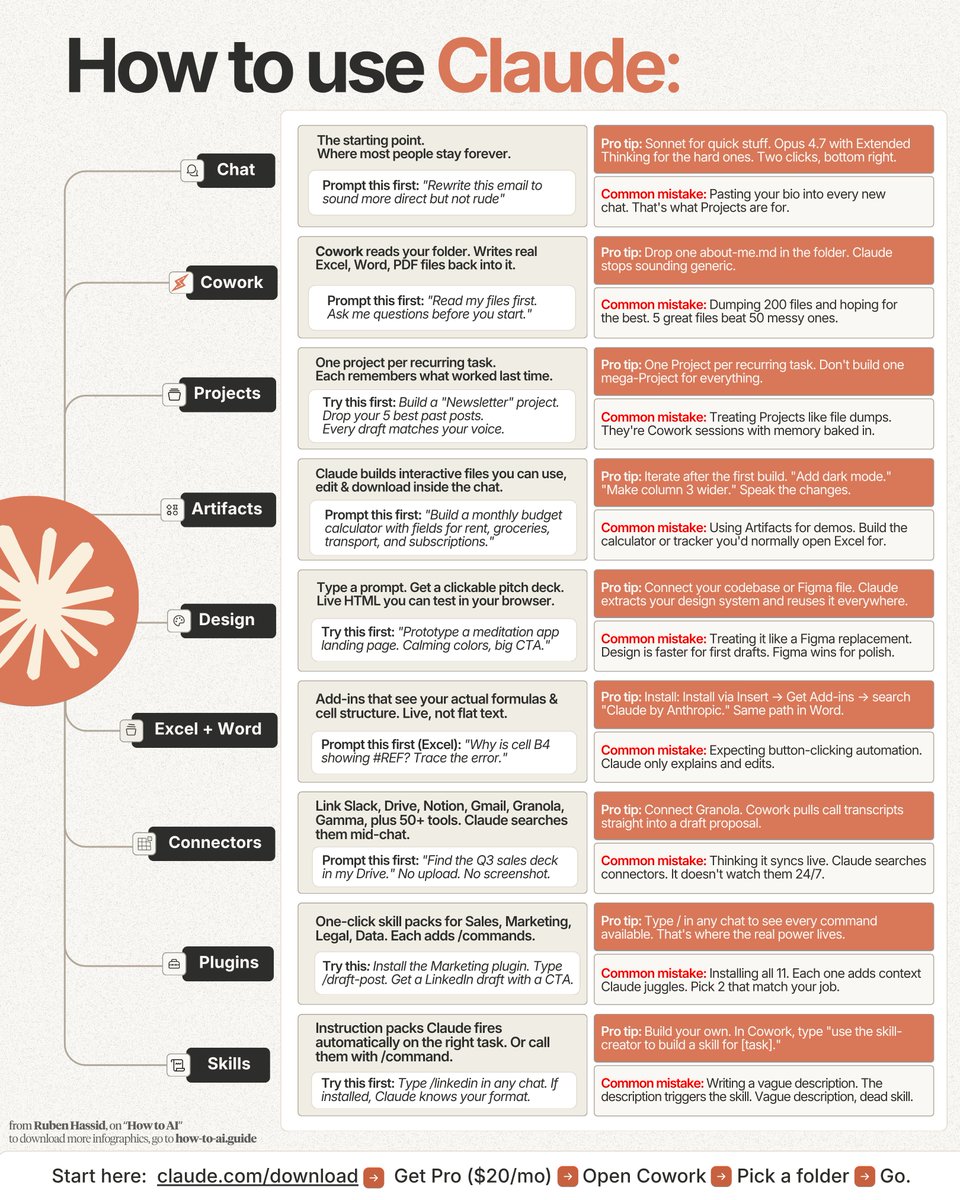
Don't read another guide on how to master Claude Here's every feature on one page (with prompts): How to (actually) use Claude in 2026: 1. Stop opening Chat for everything 2. Download the Claude desktop app. 2. Pay for the monthly $20 plan. 3. Open the Cowork (it's the best). 4. You must create a "Cowork" folder on your PC. 5. To download my folder, go here: how-to-ai.guide. 6. Don't pay anything. It's free in the welcome email. 7. Then get my Notion with text files to download. 8. I made a guide for the next steps for Cowork. 9. Copy my entire setup: claude-co.work --- 1. Chat → just like ChatGPT. ☑ Select Opus 4.7 with Extended Thinking on. ☑ Sonnet for quick stuff. Opus for the hard ones. ☑ I barely use chat now. I only use Cowork. 2. Cowork → the only one that matters right now. ☑ Create 4 folders under one main folder 'Cowork': ☑ 'About me', 'templates', 'projects', 'Output. md' ☑ To download mine, go to how-to-ai.guide. ☑ Pay nothing. Get the link to download in the mail. 3. Projects → Cowork with memory baked in. ☑ One Project per recurring task. ☑ Drop your 5 best past outputs inside. ☑ Don't build one mega-Project for everything. 4. Artifacts → interactive files inside the chat. ☑ It builds calculators, trackers you can edit live. ☑ Try "Build a monthly budget calculator with rent.." ☑ Iterate: "Add dark mode." "Make column 3 wider." 5. Design → live HTML in your browser. ☑ Connect your Figma. It extracts your system. ☑ Faster than Figma for first drafts. ☑ Prompt: "Prototype a meditation app landing page. Calming colors, big CTA." 6. Excel + Word → add-ins that see your real cells. ☑ Insert → Get Add-ins → "Claude by Anthropic." ☑ It explains & edits. It doesn't click buttons. ☑ Prompt: "Why is cell B4 showing # REF? Trace the error." 7. Connectors → Claude inside your tools. ☑ Settings → Connectors → Browse → click "Add." ☑ Slack, Drive, Gamma, Granola. 50+ tools. Free. ☑ Prompt: "Find the Q3 sales deck in my Drive." 8. Plugins → pre-built skill packs for your role. ☑ Customize → Browse plugins → Install. Also free. ☑ Don't install all 11. Pick 2 that match your job. ☑ Type / to trigger: /draft-post, /build-dashboard. 9. Skills → teach Claude once, reuse forever. ☑ Type: "use skill-creator to build a skill for [task]." ☑ Trigger with /command: /linkedin, /contract. ☑ One good Skill replaces an entire SOP document. 10. Code → a revolution for developers. ☑ It writes, debugs & ships. No copy-pasting. ☑ Skip if you don't code. Cowork is Claude Code. ☑ Turn on "Auto accept edits" before you start. ♻️ Repost this image to use Claude better.
Ruben Hassid tweet media
Ruben Hassid@rubenhassid

x.com/i/article/2052…

English
27
82
538
41K
Human 1st above All Else retweetledi
Guri Singh
Guri Singh@heygurisingh·
1 laptop. 1 Claude account. 1 prompt stack. = $10k/month in freelance clients on autopilot. I just compiled the exact workflow I used to land 7 clients in 30 days into a 38-page playbook. Was going to sell it for $197. But I'm dropping it FREE for the next 24 hours only. After that it goes behind the paywall and never comes back. Here's how to grab it: → Like this post → Comment "Need" → Follow me (so I can DM you) That's it. I'll send the full guide straight to your inbox.
Guri Singh tweet media
English
279
50
359
24.7K
Human 1st above All Else retweetledi
Manu Sisti
Manu Sisti@Manu_Sisti·
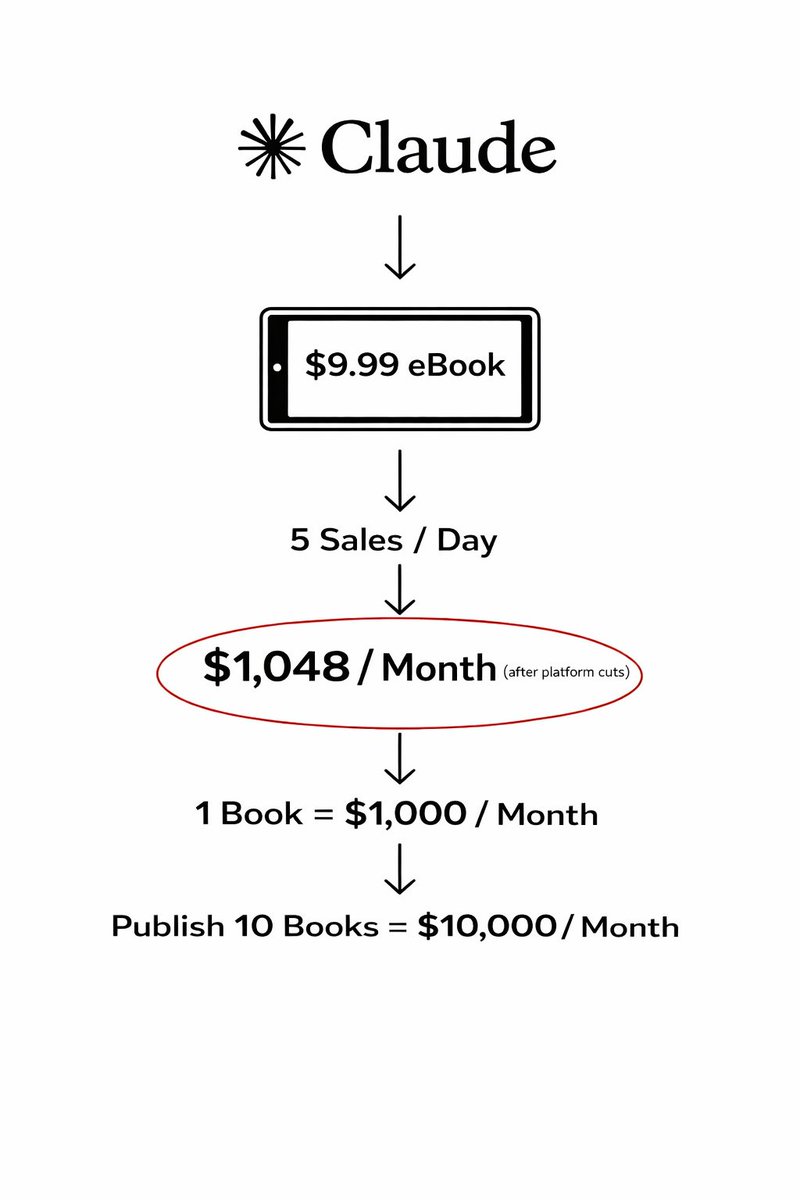
I'm convinced. AI eBooks are THE most reliable path to $10k a month in 2026. No webistes, sales funnel or a big team needed. Only Claude, ChatGPT and 1 hour every day. I’m finally giving away acess to a training that'll show you how to create these AI eBooks for FREE. (All my personal prompts included) Comment "Send" and I will DM you: (Must follow me to get DM). FREE for 24 hrs only
Manu Sisti tweet media
English
369
65
285
35.1K
Human 1st above All Else retweetledi
ZohaibAi
ZohaibAi@ZohaibAi__sf·
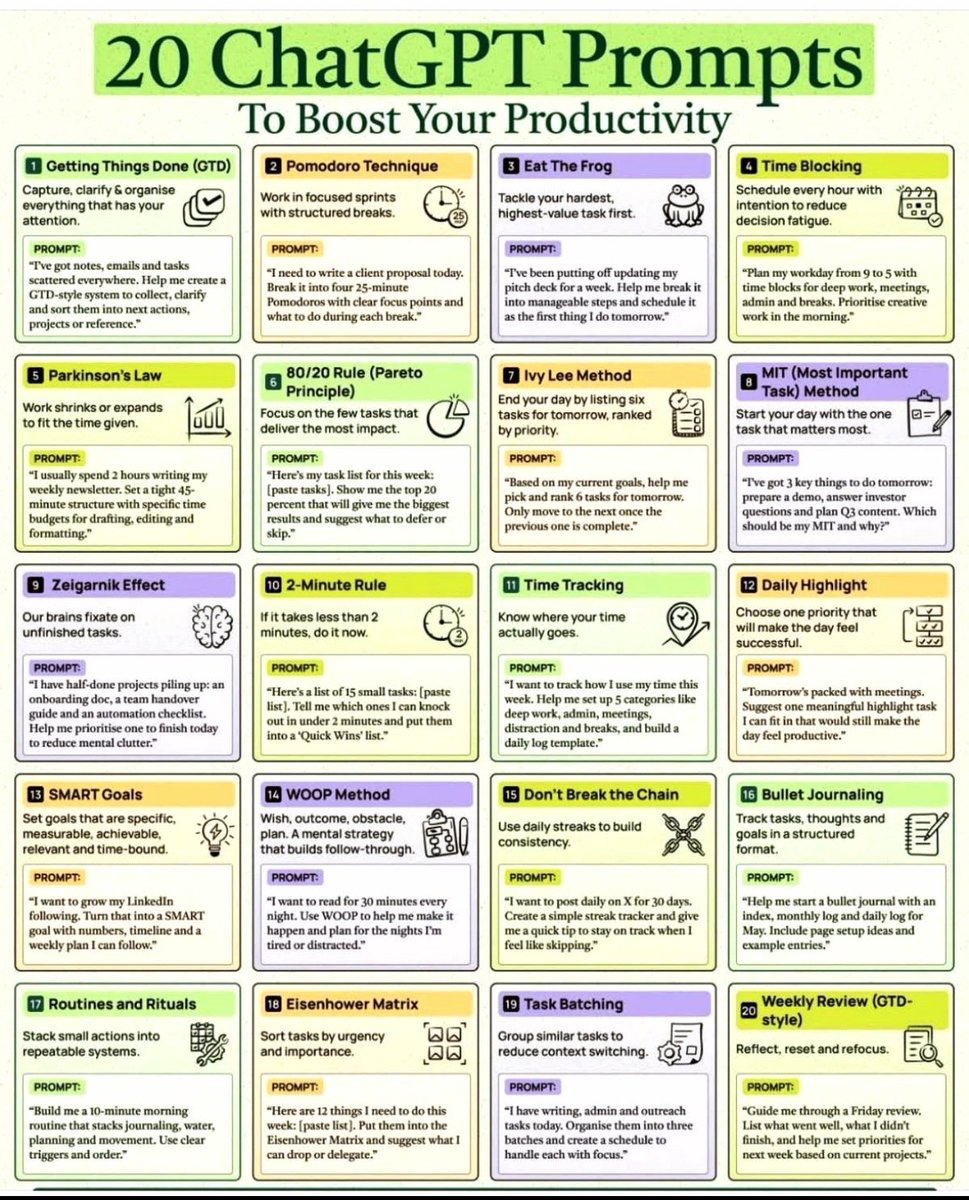
Your productivity problem probably isn’t laziness. It’s decision fatigue. Too many tasks. Too many tabs. Too many half-finished things living rent-free in your head. That’s where ChatGPT becomes powerful (in the best way). 👀 I put together 20 high-impact prompts that turn ChatGPT into: • A productivity coach • A focus partner • A daily planner • A habit tracker • A time management system • A built-in accountability partner Inside, you’ll learn how to actually use: → Pomodoro Technique → Time Blocking → Eisenhower Matrix → SMART Goals → Ivy Lee Method → GTD Framework → Task Batching → Weekly Reviews → And more This isn’t “viral AI fluff.” It’s a practical system used by students, creators, freelancers, and founders to get more done—consistently. Because the real difference between overwhelmed and productive people? Better systems. Not more effort. 📌 Save this. ⏳ Use 1 prompt per day for the next 20 days. Your workflow will feel completely different. Follow for more AI systems, prompts, and productivity frameworks 🚀
ZohaibAi tweet media
English
31
53
135
2.8K
Human 1st above All Else retweetledi
NIJ Ruvos
NIJ Ruvos@nahidulislam404·
Claude Opus 4.7 is like a Ferrari you're driving like a Ford Focus. That's why I created the ultimate Claude Opus 4.7 user guide with everything you need to truly get the most out of it. 12 chapters. Ready-to-copy prompts. Real-world use cases. Automations. How to monetize it. Comparison vs. ChatGPT and Gemini. FREE for 24 hours only! Just: 1. Like this post 2. Comment "OPUS" 3. Follow me to receive a DM
NIJ Ruvos tweet media
English
600
86
733
44.3K
Human 1st above All Else retweetledi
Shruti Codes
Shruti Codes@Shruti_0810·
All Paid Courses (Free for First 4500 People) 𝗣𝗮𝗶𝗱 𝗖𝗼𝘂𝗿𝘀𝗲 𝗙𝗥𝗘𝗘 (PART - 1) 1. Artificial Intelligence 2. Machine Learning 3. Prompt Engineering 4. Claude,Chatgpt,Grok 5. Data Analytics 6. AWS Certified 7. Data Science 8. BIG DATA 9. Python 10. Ethical Hacking (72 Hours only ) To get- 1. Follow me to get DM 2. Like + RT 3. Reply " All "
Shruti Codes tweet media
English
6.2K
3.5K
8.8K
1M
Human 1st above All Else retweetledi
Suppressed Voices
Suppressed Voices@supressedvoic·
Don't stay silent if you see this, share, or reply with a dot.
Suppressed Voices tweet media
English
163
1K
2.7K
22.6K
Human 1st above All Else retweetledi
Iran Embassy Hungary
Iran Embassy Hungary@IRANinHUNGARY·
Don't stop talking about Gaza! Hiroshima: 15,000-ton bomb/ 900 km² Gaza: 70,000 tons of bombs / 365 km² #Gaza
English
79
2.7K
6.8K
111.1K
Human 1st above All Else retweetledi
Farm Girl Carrie 👩‍🌾
Farm Girl Carrie 👩‍🌾@FarmGirlCarrie·
Should we remind him? 👇 Butt out Barry!
Farm Girl Carrie 👩‍🌾 tweet media
English
39
296
479
5.5K
Human 1st above All Else retweetledi
Niyetsel
Niyetsel@niyetsel·
DON'T SKIP THIS, IT'S A SIGN! It's no coincidence you came across this tweet. Follow me and just leave a dot. I'm going to tell you something that will really surprise you.
Niyetsel tweet media
English
5.4K
800
18.3K
771.7K