OLAJIDE

19.8K posts

OLAJIDE banner
OLAJIDE

OLAJIDE

@jickson234

Data Analyst X web3 🧠 | DeFi & InfoFi yaps only | Exploring data-driven insights & trends | @NetworkNoya 👾| If it’s signal, I’m tuned in.

Katılım Mayıs 2025
3K Takip Edilen1.7K Takipçiler
OLAJIDE retweetledi
Dr. God Abeg ooo
Dr. God Abeg ooo@josh_uglyasf·
We barely see gospel like this spread and go viral
English
81
2.2K
4.3K
141.2K
OLAJIDE retweetledi
Chidi Ebere
Chidi Ebere@chidirolex·
ESG Data Analytics TikTok LIVE Session Day 2. We went from: Business Understanding → Data Understanding → Dashboard Build Built: - Overview Page - Environmental Dashboard This is how real data analysts work. Follow to see the full ESG project unfold youtu.be/YYZxBE_EUXw
YouTube video
YouTube
English
1
3
5
167
Wittig Lyon
Wittig Lyon@ibn_wittig·
Our bundle of joy is here A bouncy baby girl ❤️ Mother & daughter are both fine and well.
English
255
146
1.7K
60.8K
Man United Fan Club
Man United Fan Club@manufcnow·
🚨Leaked footage of how Man United sold Garnacho to Chelsea. 😂
English
426
4.7K
26.7K
1.5M
OLAJIDE retweetledi
Joseph Opene
Joseph Opene@Joseph_opene·
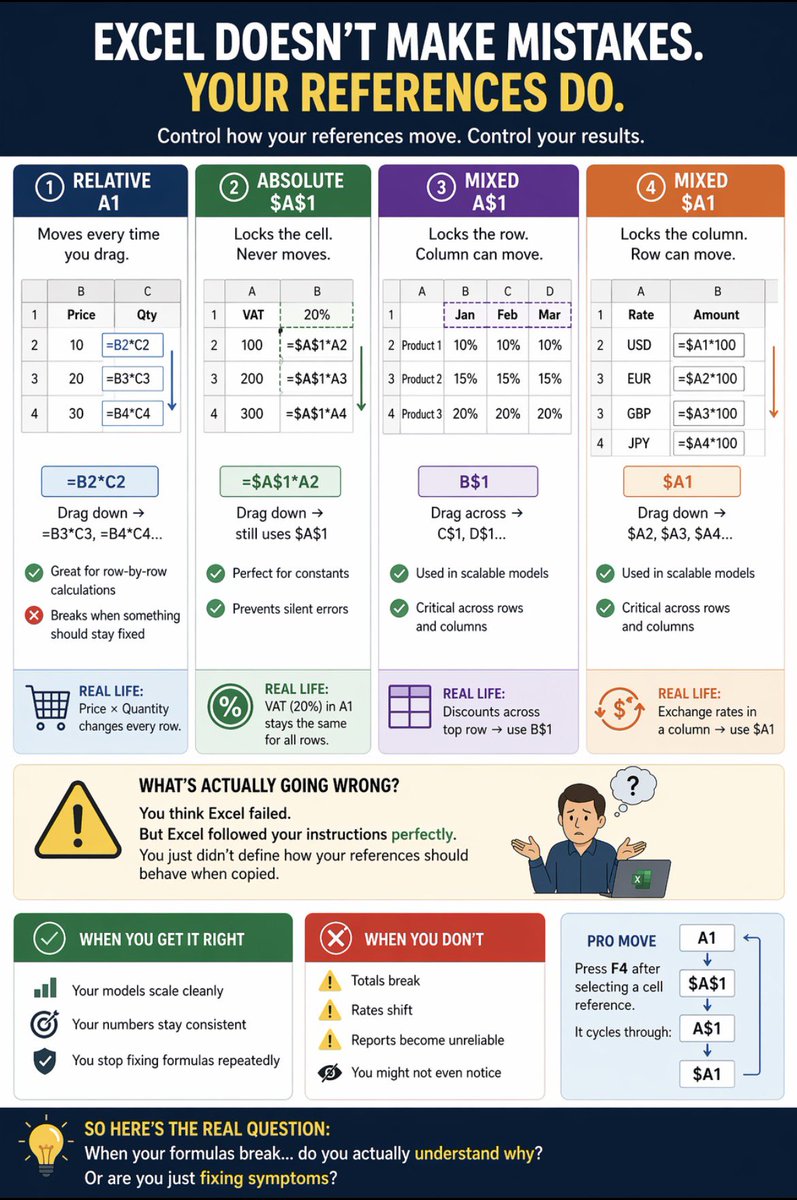
Here’s the truth most people won’t tell you: Your Excel model isn’t wrong. You are. And it shows up the moment you drag a formula, and everything breaks. Most Excel errors don’t come from complex formulas. They come from one thing: 👉 You don’t control how your references move So Excel does exactly what you told it to do, and your numbers quietly go off. No warning. No error message. Just wrong results. Let me show you what’s really happening: The rule is simple: • Don’t want it to move at all → use $A$1 • Don’t want it to move down → use A$1 • Don’t want it to move across → use $A1 • Want it to move freely → use A1 If you don’t control movement, your model will break. 1️⃣ Relative Reference (A1) This is the default. And where most mistakes start. You write: =B2*C2 Drag it down → Excel shifts it: =B3C3, =B4C4 ✔ Works for row-by-row calculations ❌ Breaks when something should stay fixed Real life: You’re calculating total sales (Price × Quantity). Works, until you introduce a constant. 2️⃣ Absolute Reference ($A$1) This is control. You lock the cell so it never moves. =$A$1*B2 Drag it down → still uses $A$1 ✔ Perfect for constants ✔ Prevents silent errors Real life: VAT (20%) sits in A1. Every calculation must use that exact cell. Without this? Your tax logic quietly breaks. 3️⃣ Mixed Reference (A$1 or $A1) This is where most analysts get exposed. You lock part of the reference: • A$1 → Row locked • $A1 → Column locked ✔ Used in scalable models ✔ Critical for working across rows and columns Real life: • Discounts across top row → use B$1 • Exchange rates in a column → use $B2 Miss this, and your logic collapses at scale. What’s actually going wrong? You think Excel failed. But Excel followed your instructions perfectly. You just didn’t define how your references should behave when copied. When you get it right: • Your models scale cleanly • Your numbers stay consistent • You stop fixing formulas repeatedly When you don’t: • Totals break • Rates shift • Reports become unreliable And worst of all, you might not even notice. Pro move most people ignore: Press F4 after selecting a cell reference. It cycles through: A1 → $A$1 → A$1 → $A1 One key. Full control. So here’s the real question: When your formulas break. Do you actually understand why? Or are you just fixing symptoms? #Excel #DataAnalytics #PowerBI #DataSkills #AnalyticsTips
Joseph Opene tweet media
GIF
GIF
GIF
English
1
8
23
559
Kent
Kent@FamozzyyK·
God added a beautiful girl to this family. @ManUtd has a new fan. Congratulations to me and mine 🎊
Kent tweet mediaKent tweet mediaKent tweet mediaKent tweet media
English
394
468
4.4K
76.8K
OLAJIDE retweetledi
Jimmy
Jimmy@OboniiX·
Stop struggling to find datasets for your data projects. Here are 24 high-quality websites where you can get real-world datasets 🧵👇🏾
English
7
54
252
13.5K
OLAJIDE retweetledi
NOYA.ai
NOYA.ai@NetworkNoya·
NOYANS, we have extra time and loyal Noyans get extra perks. ⭐ We have partnered with @Surgexyz_ and we are competing in the Ignition Race. Bonus Stars are dropping for our most dedicated community members. Here is everything you need to know. 👇
NOYA.ai tweet media
English
38
23
108
4.6K
Pamela
Pamela@PamelaNjoku2·
Thank God I don collect my 3 points before them sack rosemary 😂😂😂
Pamela tweet media
English
126
664
6.3K
66.9K
OLAJIDE retweetledi
Chidi Ebere
Chidi Ebere@chidirolex·
I’m planning to try out the TikTok Live feature as part of our ESG & Sustainability Week, and I’d love to have you join in. Starting this week, I’ll be going live by 7 pm daily for 30 minutes to 1 hour to work through the ESG Power BI Project together in real time 🫣. Drop Links to your TikTok so I can follow as well. @dataanalyst.playbook" target="_blank" rel="nofollow noopener">tiktok.com/@dataanalyst.p…
English
9
3
15
1.2K
OLAJIDE retweetledi
Joseph Opene
Joseph Opene@Joseph_opene·
If your SQL results still need Excel cleanup, you’re doing it wrong. When I started working with SQL, my queries ran, but my results were messy. Extra spaces. Inconsistent casing. Null values everywhere. It felt like cleaning a house with a broken broom. That’s when I realized SQL isn’t just about pulling data, it’s also about cleaning it. And once I learned the right functions, my workflow shifted completely I remember a project where customer names came in all sorts of formats “john doe”, “JOHN DOE”, “ John Doe ” At first, it looked unfixable. But with a mix of TRIM(), UPPER(), and REPLACE(), the dataset went from chaos to clean in minutes. That was the moment SQL stopped feeling like just a query tool, and started feeling like a data workshop 👉Here are 20 SQL functions that changed everything for me: Text Cleanup TRIM(): Remove leading and trailing spaces LTRIM(): Remove spaces from the left side RTRIM(): Remove spaces from the right side UPPER(): Convert text to uppercase LOWER(): Convert text to lowercase REPLACE(): Replace parts of a string SUBSTRING(): Extract part of a string LEFT(): Extract characters from the left side RIGHT(): Extract characters from the right side Set 2: Null & Type Handling CAST(): Change data type CONVERT(): Change data type with formatting option COALESCE(): Handle nul values NULLIF(): Return null if two expressions are equal ISNULL(): Replace null with a specified value CONCAT(): Combine multiple columns Set 3: Quick Checks LEN() / LENGTH(): Get the length of a string CHARINDEX() / INSTR(): Find the position of a substring ROUND(): Round numeric values ABS(): Return absolute value Set 4: Date Handling DATEPART() / EXTRACT(): Extract parts of a date (Year, Month, Day) Cleaning data with these functions completely changed the quality of my reports. Instead of patching issues downstream in Excel or Power BI, I could fix them at the source faster, cleaner, and more reliable. Here’s the pro move: Don’t just use these one by one. Start nesting them - TRIM(UPPER(REPLACE())) and watch messy raw data transform into analysis-ready datasets. So let me ask you which SQL cleaning function do you lean on the most in your daily work ??
Joseph Opene tweet mediaJoseph Opene tweet mediaJoseph Opene tweet mediaJoseph Opene tweet media
English
0
10
23
533
Șanya11🗿
Șanya11🗿@Sanyaa011·
what do we call this outfit ??
Șanya11🗿 tweet media
English
1.6K
377
2.6K
526.6K
OLAJIDE
OLAJIDE@jickson234·
@abazwhyllzz I am sure the husband will give his wife from the swallow he collected when the camera is off.
English
0
0
0
159
𝔸b𝕒𝕫𝕫
𝔸b𝕒𝕫𝕫@abazwhyllzz·
Tinubu economy no dey affect this family😂
English
203
229
1.8K
60.1K