LEERON

2.6K posts

LEERON banner
LEERON

LEERON

@leeron

Vibe Builder | Termura: Open-source AI Terminal for macOS • Jotaid: The markdown note-taking app that thinks with you.

Katılım Mart 2007
17 Takip Edilen653 Takipçiler
Kiet
Kiet@FlyaKiet·
Blazingly fast terminal switching in @superset_sh v2 No more delay, reattach, weird output tokens when switching terminal. WebGL rendering pipeline. Explicit UX for persisted terminal, browser and chat as well. Already daily driving it internally, coming soon!
English
40
11
277
38.5K
LEERON
LEERON@leeron·
We really only need to keep track of the stuff that actually matters to us. jotaid.com
English
0
0
0
10
LEERON
LEERON@leeron·
To be honest, does everyone actually need their own LLM-powered wiki? Probably not. A lot of it definitely comes down to knowledge anxiety. People love the feeling of owning information, even if they never actually use it. It’s like a digital security blanket to stop us from feeling behind.
Andrej Karpathy@karpathy

Farzapedia, personal wikipedia of Farza, good example following my Wiki LLM tweet. I really like this approach to personalization in a number of ways, compared to "status quo" of an AI that allegedly gets better the more you use it or something: 1. Explicit. The memory artifact is explicit and navigable (the wiki), you can see exactly what the AI does and does not know and you can inspect and manage this artifact, even if you don't do the direct text writing (the LLM does). The knowledge of you is not implicit and unknown, it's explicit and viewable. 2. Yours. Your data is yours, on your local computer, it's not in some particular AI provider's system without the ability to extract it. You're in control of your information. 3. File over app. The memory here is a simple collection of files in universal formats (images, markdown). This means the data is interoperable: you can use a very large collection of tools/CLIs or whatever you want over this information because it's just files. The agents can apply the entire Unix toolkit over them. They can natively read and understand them. Any kind of data can be imported into files as input, and any kind of interface can be used to view them as the output. E.g. you can use Obsidian to view them or vibe code something of your own. Search "File over app" for an article on this philosophy. 4. BYOAI. You can use whatever AI you want to "plug into" this information - Claude, Codex, OpenCode, whatever. You can even think about taking an open source AI and finetuning it on your wiki - in principle, this AI could "know" you in its weights, not just attend over your data. So this approach to personalization puts *you* in full control. The data is yours. In Universal formats. Explicit and inspectable. Use whatever AI you want over it, keep the AI companies on their toes! :) Certainly this is not the simplest way to get an AI to know you - it does require you to manage file directories and so on, but agents also make it quite simple and they can help you a lot. I imagine a number of products might come out to make this all easier, but imo "agent proficiency" is a CORE SKILL of the 21st century. These are extremely powerful tools - they speak English and they do all the computer stuff for you. Try this opportunity to play with one.

English
1
0
0
38
LEERON
LEERON@leeron·
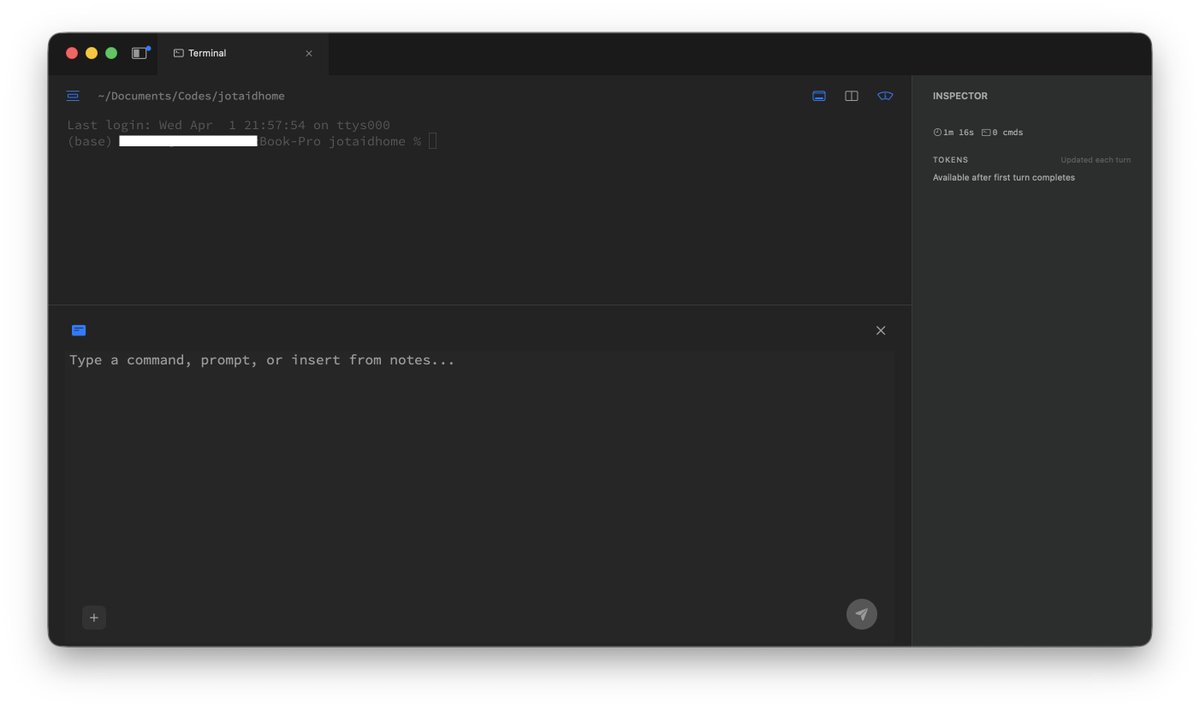
Termura - a native macOS terminal built for AI coding - Multi-line composer (cmd-k) - Draft, revise & send in one shot - Quote & ask from terminal output (right-click) - Send notes directly to terminal - Capture output to markdown notes - Dual-pane side-by-side terminals - GPU-rendered via Metal (libghostty) - Session persistence, branching & export ...
LEERON tweet media
English
1
0
0
40
LEERON
LEERON@leeron·
@rohanpaul_ai Jotaid is basically Karpathy’s "LLM knowledge base" vision come to life. It has already turned that entire logic into a polished, out-of-the-box product. jotaid.com
English
1
0
0
41
Rohan Paul
Rohan Paul@rohanpaul_ai·
Karpathy's setup keeps a 400K-word research knowledge-base without RAG for LLM query. Dump sources into raw/. Let an LLM turn them into linked Markdown. Let it add summaries, concepts, and backlinks. View it in Obsidian. Ask the wiki questions with an LLM. Let it make notes, slides, or charts. Feed those outputs back into the wiki. Run checks for gaps and errors.
Rohan Paul tweet media
Andrej Karpathy@karpathy

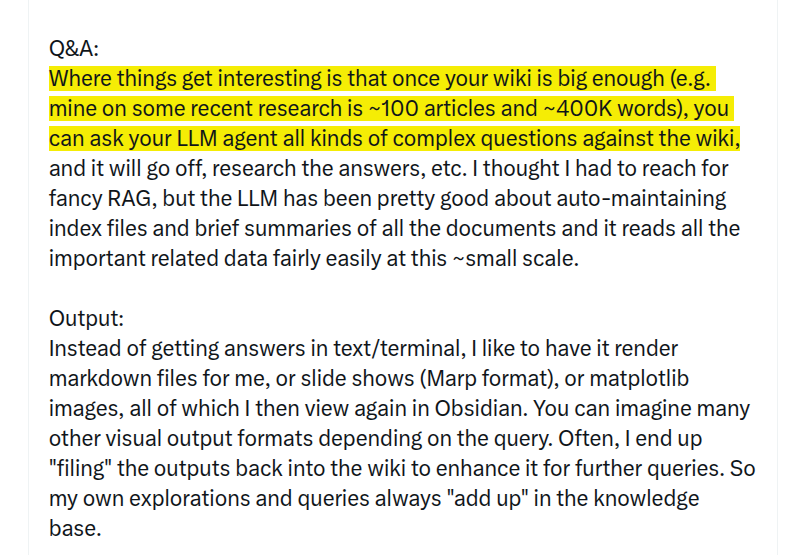
LLM Knowledge Bases Something I'm finding very useful recently: using LLMs to build personal knowledge bases for various topics of research interest. In this way, a large fraction of my recent token throughput is going less into manipulating code, and more into manipulating knowledge (stored as markdown and images). The latest LLMs are quite good at it. So: Data ingest: I index source documents (articles, papers, repos, datasets, images, etc.) into a raw/ directory, then I use an LLM to incrementally "compile" a wiki, which is just a collection of .md files in a directory structure. The wiki includes summaries of all the data in raw/, backlinks, and then it categorizes data into concepts, writes articles for them, and links them all. To convert web articles into .md files I like to use the Obsidian Web Clipper extension, and then I also use a hotkey to download all the related images to local so that my LLM can easily reference them. IDE: I use Obsidian as the IDE "frontend" where I can view the raw data, the the compiled wiki, and the derived visualizations. Important to note that the LLM writes and maintains all of the data of the wiki, I rarely touch it directly. I've played with a few Obsidian plugins to render and view data in other ways (e.g. Marp for slides). Q&A: Where things get interesting is that once your wiki is big enough (e.g. mine on some recent research is ~100 articles and ~400K words), you can ask your LLM agent all kinds of complex questions against the wiki, and it will go off, research the answers, etc. I thought I had to reach for fancy RAG, but the LLM has been pretty good about auto-maintaining index files and brief summaries of all the documents and it reads all the important related data fairly easily at this ~small scale. Output: Instead of getting answers in text/terminal, I like to have it render markdown files for me, or slide shows (Marp format), or matplotlib images, all of which I then view again in Obsidian. You can imagine many other visual output formats depending on the query. Often, I end up "filing" the outputs back into the wiki to enhance it for further queries. So my own explorations and queries always "add up" in the knowledge base. Linting: I've run some LLM "health checks" over the wiki to e.g. find inconsistent data, impute missing data (with web searchers), find interesting connections for new article candidates, etc., to incrementally clean up the wiki and enhance its overall data integrity. The LLMs are quite good at suggesting further questions to ask and look into. Extra tools: I find myself developing additional tools to process the data, e.g. I vibe coded a small and naive search engine over the wiki, which I both use directly (in a web ui), but more often I want to hand it off to an LLM via CLI as a tool for larger queries. Further explorations: As the repo grows, the natural desire is to also think about synthetic data generation + finetuning to have your LLM "know" the data in its weights instead of just context windows. TLDR: raw data from a given number of sources is collected, then compiled by an LLM into a .md wiki, then operated on by various CLIs by the LLM to do Q&A and to incrementally enhance the wiki, and all of it viewable in Obsidian. You rarely ever write or edit the wiki manually, it's the domain of the LLM. I think there is room here for an incredible new product instead of a hacky collection of scripts.

English
24
25
287
53.9K
LEERON
LEERON@leeron·
@lexfridman @karpathy Jotaid’s design philosophy is a perfect match for Karpathy’s LLM knowledge base framework.
English
1
0
1
136
Lex Fridman
Lex Fridman@lexfridman·
Same, I have a similar setup. A mix of Obsidian, Cursor (for md), and vibe-coded web terminals as front-end. Since I do a podcast, the number/diversity of research interests is very large. But the knowledge-base approach has been working great. For answers, I often have it generate dynamic html (with js) that allows me to sort/filter data and to tinker with visualizations interactively. Another useful thing is I have the system generate a temporary focused mini-knowledge-base for a particular topic that I then load into an LLM for voice-mode interaction on a long 7-10 mile run. So it becomes an interactive podcast while I run, where I ask it questions and listen to the answers to learn more. Anyway, heading out for a run now, thanks for the write-up 👊
English
189
219
5.6K
623.9K
Andrej Karpathy
Andrej Karpathy@karpathy·
LLM Knowledge Bases Something I'm finding very useful recently: using LLMs to build personal knowledge bases for various topics of research interest. In this way, a large fraction of my recent token throughput is going less into manipulating code, and more into manipulating knowledge (stored as markdown and images). The latest LLMs are quite good at it. So: Data ingest: I index source documents (articles, papers, repos, datasets, images, etc.) into a raw/ directory, then I use an LLM to incrementally "compile" a wiki, which is just a collection of .md files in a directory structure. The wiki includes summaries of all the data in raw/, backlinks, and then it categorizes data into concepts, writes articles for them, and links them all. To convert web articles into .md files I like to use the Obsidian Web Clipper extension, and then I also use a hotkey to download all the related images to local so that my LLM can easily reference them. IDE: I use Obsidian as the IDE "frontend" where I can view the raw data, the the compiled wiki, and the derived visualizations. Important to note that the LLM writes and maintains all of the data of the wiki, I rarely touch it directly. I've played with a few Obsidian plugins to render and view data in other ways (e.g. Marp for slides). Q&A: Where things get interesting is that once your wiki is big enough (e.g. mine on some recent research is ~100 articles and ~400K words), you can ask your LLM agent all kinds of complex questions against the wiki, and it will go off, research the answers, etc. I thought I had to reach for fancy RAG, but the LLM has been pretty good about auto-maintaining index files and brief summaries of all the documents and it reads all the important related data fairly easily at this ~small scale. Output: Instead of getting answers in text/terminal, I like to have it render markdown files for me, or slide shows (Marp format), or matplotlib images, all of which I then view again in Obsidian. You can imagine many other visual output formats depending on the query. Often, I end up "filing" the outputs back into the wiki to enhance it for further queries. So my own explorations and queries always "add up" in the knowledge base. Linting: I've run some LLM "health checks" over the wiki to e.g. find inconsistent data, impute missing data (with web searchers), find interesting connections for new article candidates, etc., to incrementally clean up the wiki and enhance its overall data integrity. The LLMs are quite good at suggesting further questions to ask and look into. Extra tools: I find myself developing additional tools to process the data, e.g. I vibe coded a small and naive search engine over the wiki, which I both use directly (in a web ui), but more often I want to hand it off to an LLM via CLI as a tool for larger queries. Further explorations: As the repo grows, the natural desire is to also think about synthetic data generation + finetuning to have your LLM "know" the data in its weights instead of just context windows. TLDR: raw data from a given number of sources is collected, then compiled by an LLM into a .md wiki, then operated on by various CLIs by the LLM to do Q&A and to incrementally enhance the wiki, and all of it viewable in Obsidian. You rarely ever write or edit the wiki manually, it's the domain of the LLM. I think there is room here for an incredible new product instead of a hacky collection of scripts.
English
2.8K
7K
58.2K
20.8M
LEERON
LEERON@leeron·
@elvissun Jotaid’s design philosophy is a perfect match for Karpathy’s framework.
English
0
0
0
145
Elvis
Elvis@elvissun·
I've been maintaining my LLM knowledge base for over a year borrowed a few things from karpathy's llm knowledge base setup. primarily LLM "health checks" - i'm trying it with a stochastic approach right now having accumulated 1107 files across 4 years, it's too big for context window. no way to just "organize it." so this is what zoe is doing: cron picks 10 random files per night. she reads each one, finds connections, adds links, deletes empty stubs, stamps it reviewed. tune up or down and eventually the vault will stay fresh.
Elvis tweet media
Andrej Karpathy@karpathy

LLM Knowledge Bases Something I'm finding very useful recently: using LLMs to build personal knowledge bases for various topics of research interest. In this way, a large fraction of my recent token throughput is going less into manipulating code, and more into manipulating knowledge (stored as markdown and images). The latest LLMs are quite good at it. So: Data ingest: I index source documents (articles, papers, repos, datasets, images, etc.) into a raw/ directory, then I use an LLM to incrementally "compile" a wiki, which is just a collection of .md files in a directory structure. The wiki includes summaries of all the data in raw/, backlinks, and then it categorizes data into concepts, writes articles for them, and links them all. To convert web articles into .md files I like to use the Obsidian Web Clipper extension, and then I also use a hotkey to download all the related images to local so that my LLM can easily reference them. IDE: I use Obsidian as the IDE "frontend" where I can view the raw data, the the compiled wiki, and the derived visualizations. Important to note that the LLM writes and maintains all of the data of the wiki, I rarely touch it directly. I've played with a few Obsidian plugins to render and view data in other ways (e.g. Marp for slides). Q&A: Where things get interesting is that once your wiki is big enough (e.g. mine on some recent research is ~100 articles and ~400K words), you can ask your LLM agent all kinds of complex questions against the wiki, and it will go off, research the answers, etc. I thought I had to reach for fancy RAG, but the LLM has been pretty good about auto-maintaining index files and brief summaries of all the documents and it reads all the important related data fairly easily at this ~small scale. Output: Instead of getting answers in text/terminal, I like to have it render markdown files for me, or slide shows (Marp format), or matplotlib images, all of which I then view again in Obsidian. You can imagine many other visual output formats depending on the query. Often, I end up "filing" the outputs back into the wiki to enhance it for further queries. So my own explorations and queries always "add up" in the knowledge base. Linting: I've run some LLM "health checks" over the wiki to e.g. find inconsistent data, impute missing data (with web searchers), find interesting connections for new article candidates, etc., to incrementally clean up the wiki and enhance its overall data integrity. The LLMs are quite good at suggesting further questions to ask and look into. Extra tools: I find myself developing additional tools to process the data, e.g. I vibe coded a small and naive search engine over the wiki, which I both use directly (in a web ui), but more often I want to hand it off to an LLM via CLI as a tool for larger queries. Further explorations: As the repo grows, the natural desire is to also think about synthetic data generation + finetuning to have your LLM "know" the data in its weights instead of just context windows. TLDR: raw data from a given number of sources is collected, then compiled by an LLM into a .md wiki, then operated on by various CLIs by the LLM to do Q&A and to incrementally enhance the wiki, and all of it viewable in Obsidian. You rarely ever write or edit the wiki manually, it's the domain of the LLM. I think there is room here for an incredible new product instead of a hacky collection of scripts.

English
16
8
288
29.9K
LEERON
LEERON@leeron·
@omarsar0 @karpathy My Jotaid’s design philosophy is a perfect match for Karpathy’s "LLM knowledge base" framework. Basically, while Karpathy is busy hacking together scripts to build this system manually, Jotaid has already turned that entire logic into a polished, out-of-the-box product.
English
0
0
0
46
elvis
elvis@omarsar0·
Building a personal knowledge base for my agents is increasingly where I spend my time these days. Like @karpathy, I also use Obsidian for my MD vaults. What's different in my approach is that I curate research papers on a daily basis and have actually tuned a Skill for months to find high-signal, relevant papers. I was reviewing and curating papers manually for some time, but now it's all automated as it has gotten so good at capturing what I consider the best of the best. There are so many papers these days, so this is a big deal. You all get to benefit from that with the papers I feature in my timeline and on @dair_ai. The papers are indexed using @tobi qmd cli tool (all of it in markdown files along with useful metadata). So good for semantic search and surfacing insights, unlike anything out there. I am a visual person, so I then started to experiment with how to leverage this personal knowledge base of research papers inside my new interactive artifact generator (mcp tools inside my agent orchestrator system). The result is what you see in the clip. 100s of papers with all sorts of insights visualized. I keep track of research papers daily, so believe me when I tell you that this system is absolutely insane at surfacing insights. This is the result of months of tinkering on how to index research and leverage agent automations for wikification and robust documentation. But this is just the beginning. The visual artifact (which is interactive too) can be changed dynamically as I please. I can prompt my agent to throw any data at it. I can add different views to the data. Different interactions. I feel like this is the most personalized research system I have ever built and used, and it's not even close. The knowledge that the agents are able to surface from this basic setup is already extremely useful as I experiment with new agentic engineering concepts. I feel like this knowledge layer and the higher-level ones I am working on will allow me to maximize other automation tools like autoresearch. The research is only as good as the research questions. And the research questions are only as good as the insights the agents have access to. Where I am spending time now is on how to make this more actionable. I am obsessed about the search problem here. The automations, autoresearch, ralph research loop (I built one months ago) are easier to build but are only as good as what you feed them. Work in progress. More updates soon. Back to building.
Andrej Karpathy@karpathy

LLM Knowledge Bases Something I'm finding very useful recently: using LLMs to build personal knowledge bases for various topics of research interest. In this way, a large fraction of my recent token throughput is going less into manipulating code, and more into manipulating knowledge (stored as markdown and images). The latest LLMs are quite good at it. So: Data ingest: I index source documents (articles, papers, repos, datasets, images, etc.) into a raw/ directory, then I use an LLM to incrementally "compile" a wiki, which is just a collection of .md files in a directory structure. The wiki includes summaries of all the data in raw/, backlinks, and then it categorizes data into concepts, writes articles for them, and links them all. To convert web articles into .md files I like to use the Obsidian Web Clipper extension, and then I also use a hotkey to download all the related images to local so that my LLM can easily reference them. IDE: I use Obsidian as the IDE "frontend" where I can view the raw data, the the compiled wiki, and the derived visualizations. Important to note that the LLM writes and maintains all of the data of the wiki, I rarely touch it directly. I've played with a few Obsidian plugins to render and view data in other ways (e.g. Marp for slides). Q&A: Where things get interesting is that once your wiki is big enough (e.g. mine on some recent research is ~100 articles and ~400K words), you can ask your LLM agent all kinds of complex questions against the wiki, and it will go off, research the answers, etc. I thought I had to reach for fancy RAG, but the LLM has been pretty good about auto-maintaining index files and brief summaries of all the documents and it reads all the important related data fairly easily at this ~small scale. Output: Instead of getting answers in text/terminal, I like to have it render markdown files for me, or slide shows (Marp format), or matplotlib images, all of which I then view again in Obsidian. You can imagine many other visual output formats depending on the query. Often, I end up "filing" the outputs back into the wiki to enhance it for further queries. So my own explorations and queries always "add up" in the knowledge base. Linting: I've run some LLM "health checks" over the wiki to e.g. find inconsistent data, impute missing data (with web searchers), find interesting connections for new article candidates, etc., to incrementally clean up the wiki and enhance its overall data integrity. The LLMs are quite good at suggesting further questions to ask and look into. Extra tools: I find myself developing additional tools to process the data, e.g. I vibe coded a small and naive search engine over the wiki, which I both use directly (in a web ui), but more often I want to hand it off to an LLM via CLI as a tool for larger queries. Further explorations: As the repo grows, the natural desire is to also think about synthetic data generation + finetuning to have your LLM "know" the data in its weights instead of just context windows. TLDR: raw data from a given number of sources is collected, then compiled by an LLM into a .md wiki, then operated on by various CLIs by the LLM to do Q&A and to incrementally enhance the wiki, and all of it viewable in Obsidian. You rarely ever write or edit the wiki manually, it's the domain of the LLM. I think there is room here for an incredible new product instead of a hacky collection of scripts.

English
137
444
4.5K
458.6K
LEERON
LEERON@leeron·
Just saw @karpathy’s take on LLMs as "knowledge compilers" and it’s spot on. We used to treat LLMs like search engines, but the real play is: Ingest → Compile → Link. I realized Jotaid is basically this workflow turned into a product: > Auto-Ingest: No scripts needed—just use the built-in browser/clipboard. > Auto-Compile: AI turns messy fragments into structured insights. > Auto-Link: It finds the 80% of hidden connections for you. Stop using your brain for memorization. Let Jotaid handle the "knowledge manipulation" so you can focus on the big picture. 🧠✨
LEERON tweet media
Andrej Karpathy@karpathy

LLM Knowledge Bases Something I'm finding very useful recently: using LLMs to build personal knowledge bases for various topics of research interest. In this way, a large fraction of my recent token throughput is going less into manipulating code, and more into manipulating knowledge (stored as markdown and images). The latest LLMs are quite good at it. So: Data ingest: I index source documents (articles, papers, repos, datasets, images, etc.) into a raw/ directory, then I use an LLM to incrementally "compile" a wiki, which is just a collection of .md files in a directory structure. The wiki includes summaries of all the data in raw/, backlinks, and then it categorizes data into concepts, writes articles for them, and links them all. To convert web articles into .md files I like to use the Obsidian Web Clipper extension, and then I also use a hotkey to download all the related images to local so that my LLM can easily reference them. IDE: I use Obsidian as the IDE "frontend" where I can view the raw data, the the compiled wiki, and the derived visualizations. Important to note that the LLM writes and maintains all of the data of the wiki, I rarely touch it directly. I've played with a few Obsidian plugins to render and view data in other ways (e.g. Marp for slides). Q&A: Where things get interesting is that once your wiki is big enough (e.g. mine on some recent research is ~100 articles and ~400K words), you can ask your LLM agent all kinds of complex questions against the wiki, and it will go off, research the answers, etc. I thought I had to reach for fancy RAG, but the LLM has been pretty good about auto-maintaining index files and brief summaries of all the documents and it reads all the important related data fairly easily at this ~small scale. Output: Instead of getting answers in text/terminal, I like to have it render markdown files for me, or slide shows (Marp format), or matplotlib images, all of which I then view again in Obsidian. You can imagine many other visual output formats depending on the query. Often, I end up "filing" the outputs back into the wiki to enhance it for further queries. So my own explorations and queries always "add up" in the knowledge base. Linting: I've run some LLM "health checks" over the wiki to e.g. find inconsistent data, impute missing data (with web searchers), find interesting connections for new article candidates, etc., to incrementally clean up the wiki and enhance its overall data integrity. The LLMs are quite good at suggesting further questions to ask and look into. Extra tools: I find myself developing additional tools to process the data, e.g. I vibe coded a small and naive search engine over the wiki, which I both use directly (in a web ui), but more often I want to hand it off to an LLM via CLI as a tool for larger queries. Further explorations: As the repo grows, the natural desire is to also think about synthetic data generation + finetuning to have your LLM "know" the data in its weights instead of just context windows. TLDR: raw data from a given number of sources is collected, then compiled by an LLM into a .md wiki, then operated on by various CLIs by the LLM to do Q&A and to incrementally enhance the wiki, and all of it viewable in Obsidian. You rarely ever write or edit the wiki manually, it's the domain of the LLM. I think there is room here for an incredible new product instead of a hacky collection of scripts.

English
1
0
0
43
LEERON
LEERON@leeron·
@kepano @karpathy My markdown and AI setup. It uses backlinks, graph,theme recognition, and co-occurrence matrices, and you can even switch to a card view if you're into that. jotaid.com
English
0
0
4
558
kepano
kepano@kepano·
I like @karpathy's Obsidian setup as a way to mitigate contamination risks. Keep your personal vault clean and create a messy vault for your agents. I prefer my personal Obsidian vault to be high signal:noise, and for all the content to have known origins. Keeping a separation between your personally-created artifacts and agent-created artifacts prevents contaminating your primary vault with ideas you can't source. If you let the two mix too much it will likely make Obsidian harder to use as a representation of *your* thoughts. Search, bases, quick switcher, backlinks, graph, etc, will no longer be scoped to your knowledge. Only once your agent-facing workflow produces useful artifacts would I bring those into the primary vault.
Andrej Karpathy@karpathy

LLM Knowledge Bases Something I'm finding very useful recently: using LLMs to build personal knowledge bases for various topics of research interest. In this way, a large fraction of my recent token throughput is going less into manipulating code, and more into manipulating knowledge (stored as markdown and images). The latest LLMs are quite good at it. So: Data ingest: I index source documents (articles, papers, repos, datasets, images, etc.) into a raw/ directory, then I use an LLM to incrementally "compile" a wiki, which is just a collection of .md files in a directory structure. The wiki includes summaries of all the data in raw/, backlinks, and then it categorizes data into concepts, writes articles for them, and links them all. To convert web articles into .md files I like to use the Obsidian Web Clipper extension, and then I also use a hotkey to download all the related images to local so that my LLM can easily reference them. IDE: I use Obsidian as the IDE "frontend" where I can view the raw data, the the compiled wiki, and the derived visualizations. Important to note that the LLM writes and maintains all of the data of the wiki, I rarely touch it directly. I've played with a few Obsidian plugins to render and view data in other ways (e.g. Marp for slides). Q&A: Where things get interesting is that once your wiki is big enough (e.g. mine on some recent research is ~100 articles and ~400K words), you can ask your LLM agent all kinds of complex questions against the wiki, and it will go off, research the answers, etc. I thought I had to reach for fancy RAG, but the LLM has been pretty good about auto-maintaining index files and brief summaries of all the documents and it reads all the important related data fairly easily at this ~small scale. Output: Instead of getting answers in text/terminal, I like to have it render markdown files for me, or slide shows (Marp format), or matplotlib images, all of which I then view again in Obsidian. You can imagine many other visual output formats depending on the query. Often, I end up "filing" the outputs back into the wiki to enhance it for further queries. So my own explorations and queries always "add up" in the knowledge base. Linting: I've run some LLM "health checks" over the wiki to e.g. find inconsistent data, impute missing data (with web searchers), find interesting connections for new article candidates, etc., to incrementally clean up the wiki and enhance its overall data integrity. The LLMs are quite good at suggesting further questions to ask and look into. Extra tools: I find myself developing additional tools to process the data, e.g. I vibe coded a small and naive search engine over the wiki, which I both use directly (in a web ui), but more often I want to hand it off to an LLM via CLI as a tool for larger queries. Further explorations: As the repo grows, the natural desire is to also think about synthetic data generation + finetuning to have your LLM "know" the data in its weights instead of just context windows. TLDR: raw data from a given number of sources is collected, then compiled by an LLM into a .md wiki, then operated on by various CLIs by the LLM to do Q&A and to incrementally enhance the wiki, and all of it viewable in Obsidian. You rarely ever write or edit the wiki manually, it's the domain of the LLM. I think there is room here for an incredible new product instead of a hacky collection of scripts.

English
82
167
3K
485.2K
LEERON
LEERON@leeron·
@karpathy You should try out my markdown and AI setup. It uses backlinks, theme recognition, and co-occurrence matrices—and you can even switch to a card view if you're into that. jotaid.com
English
0
0
1
82
LEERON
LEERON@leeron·
@bcherny I know this is a real pain, so I built a GUI for the CLI tool to make editing way faster. You can even add images and notes—yeah, actual notes. Is anyone interested in checking this app out?
LEERON tweet mediaLEERON tweet media
English
0
0
1
43
Boris Cherny
Boris Cherny@bcherny·
Today we're excited to announce NO_FLICKER mode for Claude Code in the terminal It uses an experimental new renderer that we're excited about. The renderer is early and has tradeoffs, but already we've found that most internal users prefer it over the old renderer. It also supports mouse events (yes, in a terminal). Try it: CLAUDE_CODE_NO_FLICKER=1 claude
Curt Tigges@CurtTigges

@bcherny @UltraLinx please at least fix the uncontrollable scrolling/flickering before the next 3000 features

English
665
708
10.3K
2.9M
LEERON
LEERON@leeron·
@yazins Nice. I'm actually working on a note-taking app myself.
English
0
0
0
114
yazin
yazin@yazins·
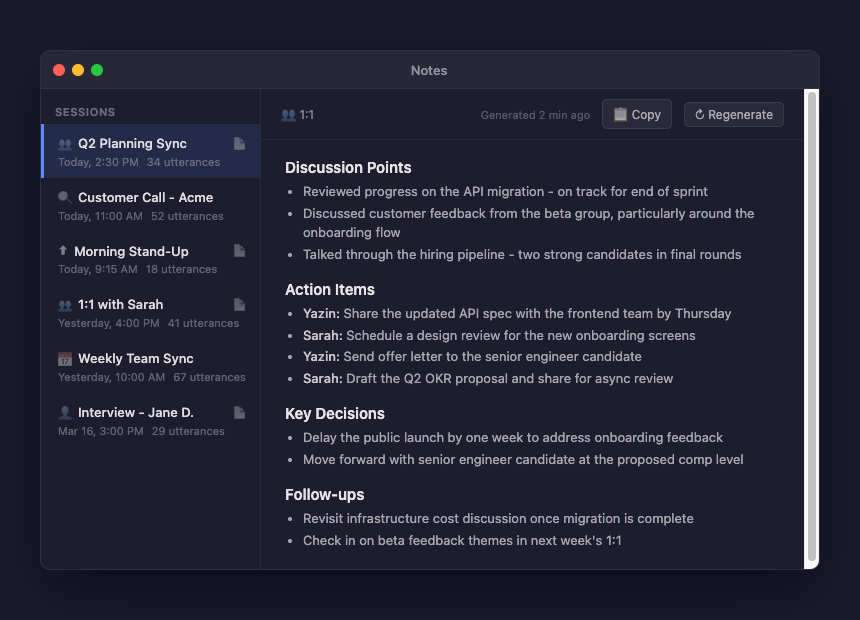
Just shipped the biggest update to OpenOats (prev OpenGranola: the open-source meeting copilot for macOS): Meeting Templates + AI Notes ✨ Pick a template before your meeting (1:1, Customer Discovery, Hiring, Stand-Up, Weekly) and after it ends, generate structured notes from the full transcript with one click. Notes stream in real-time as the LLM writes them. Browse past sessions, regenerate with different templates, copy to clipboard. Also fixed a subtle bug where the last ~3 seconds of audio could be lost when stopping a session. Now the app gracefully drains all buffered speech before closing. 4 new files, 1,277 lines added. All open source. github.com/yazinsai/OpenO…
yazin tweet media
yazin@yazins

OpenGranola now runs 100% locally with Ollama. LLM suggestions, knowledge base embeddings, transcription — all on your Mac, nothing hits the network. Just point it at Ollama instead of OpenRouter in settings and you're done. github.com/yazinsai/OpenG…
English
53
16
352
69.8K
LEERON
LEERON@leeron·
Every insight from your AI conversations disappears the moment you close the tab. ① Open your note/analysis in Jotaid ② Send a snapshot to Claude in one click ③ Ask it to explain the relationships ④ Select the valuable parts of its response ⑤ Save as a new note instantly No copy-paste. No app switching. For the first time, what you think with AI actually stays.
English
0
0
1
22
LEERON
LEERON@leeron·
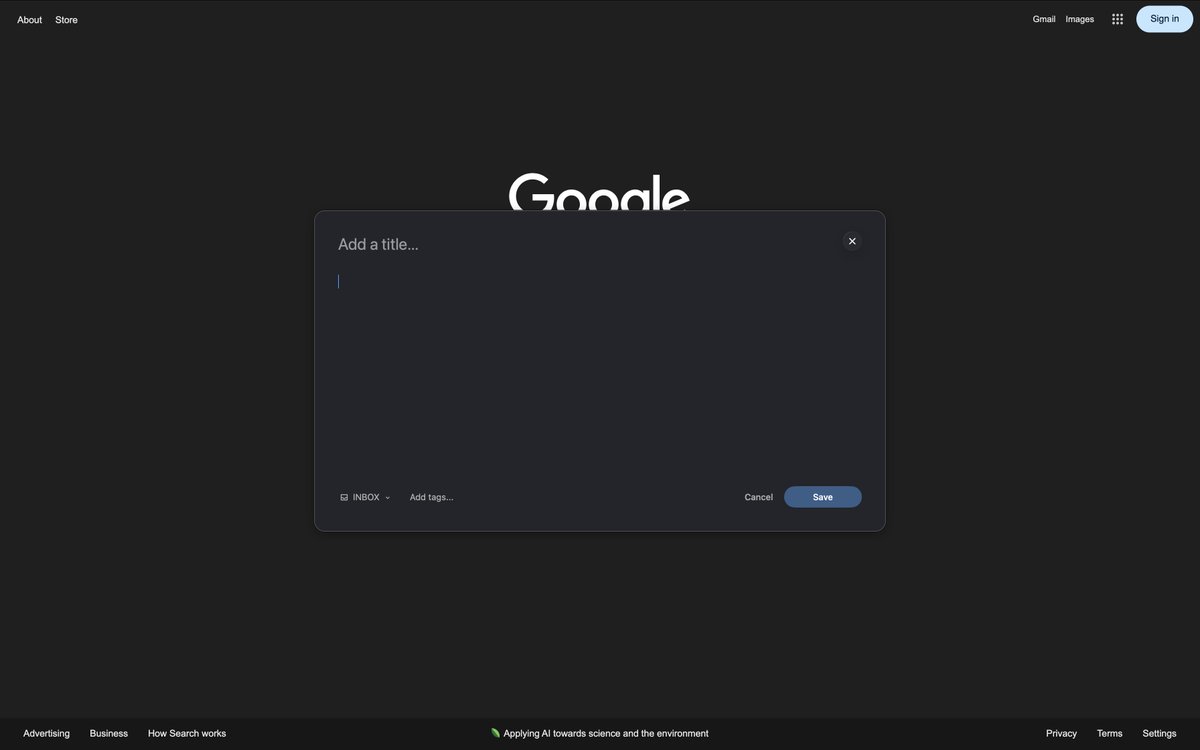
4. Quick Capture No matter what app you're in, you can pull up a window instantly with a global hotkey to jot down your thoughts on the fly.
LEERON tweet media
English
0
0
0
18
LEERON
LEERON@leeron·
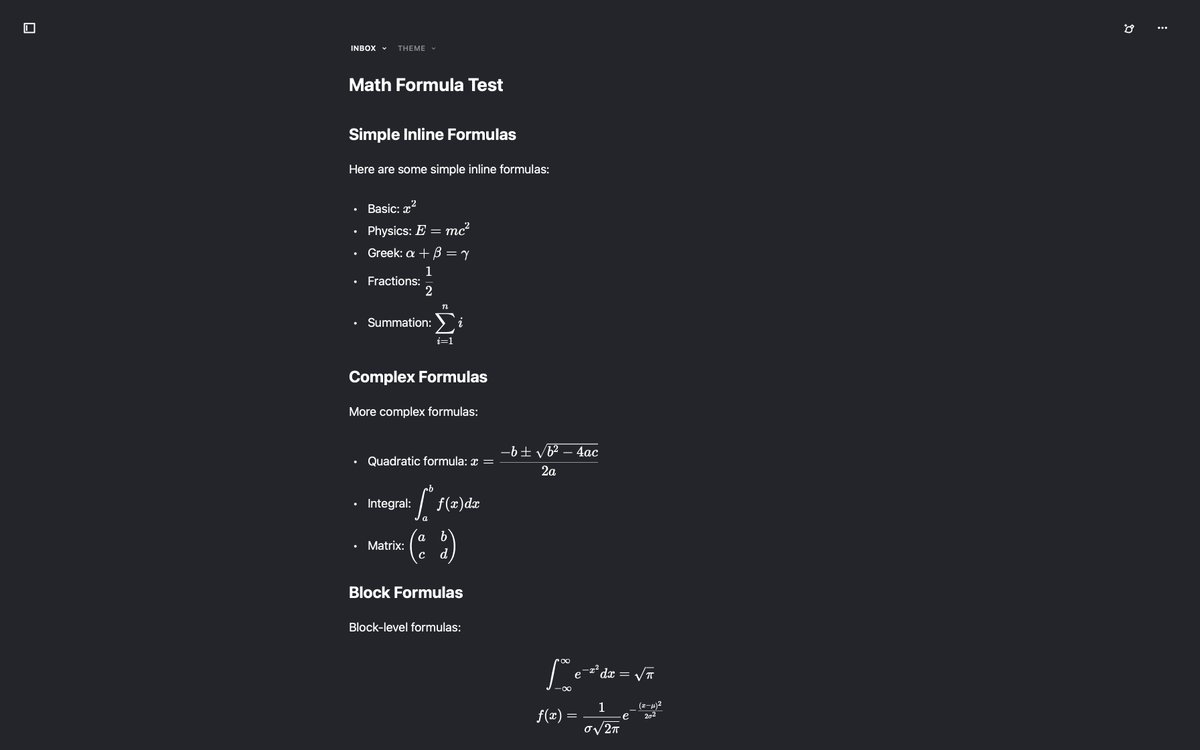
3. LaTeX Equations It supports both inline and block-level rendering for math formulas, plus just about everything else, including Mermaid diagrams.
LEERON tweet media
English
1
0
0
52
LEERON
LEERON@leeron·
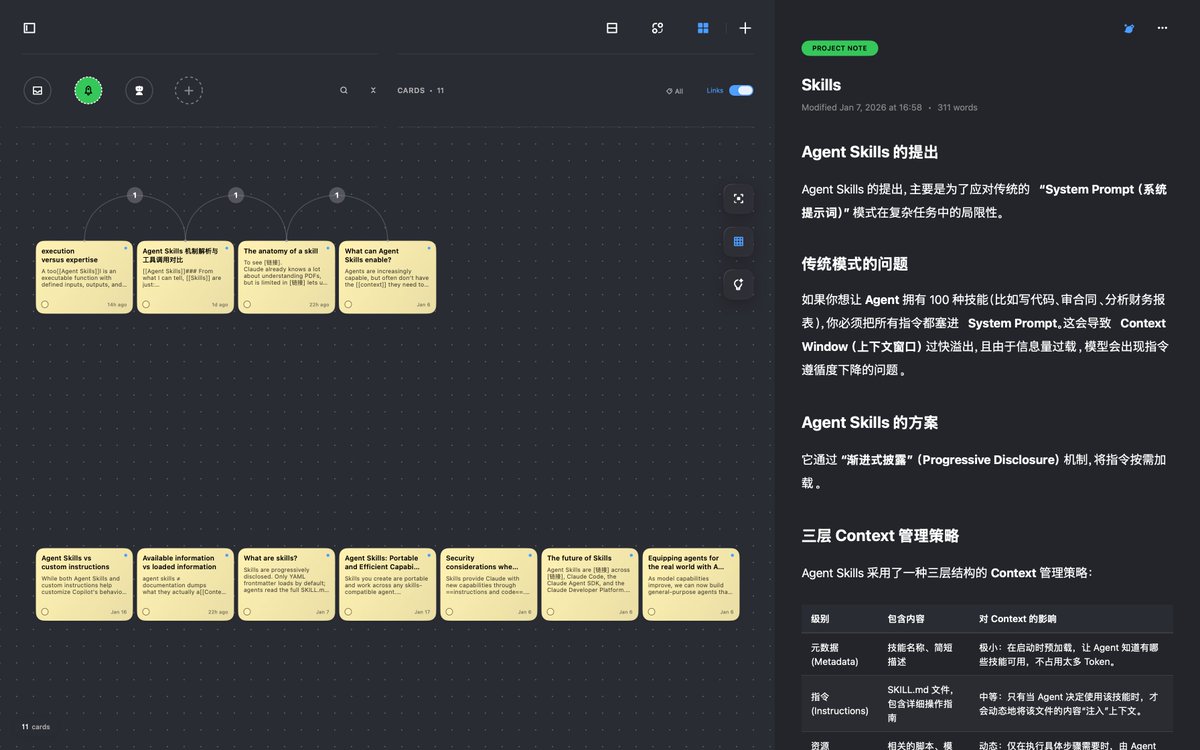
Jotaid: A Markdown note-taking app built for both capturing & thinking. I’ve been vibing on this for a few months now. It’s over 100k lines of code, and honestly, I spent most of that time refactoring and polishing it to get the quality just right. It supports pretty much all Markdown formats and features AI-assisted brainstorming, backlinking with co-occurrence matrices, and a dedicated card/canvas mode that integrates seamlessly with your design thinking workflow. If this sounds like your thing, definitely keep an eye out! I’m in the final stages of polishing it up before submitting it to the App Store. Here are a few macOS screenshots—I'll share the iOS ones next time. 1. Card Mode This lets you preview and organize your notes as cards. You can drag them around, group them however you like, and flip through previews on the right. Plus, there are some pretty cool AI features tucked in there.
LEERON tweet media
English
1
0
0
42