Nagarjun NM

3.4K posts

Nagarjun NM banner
Nagarjun NM

Nagarjun NM

@nagarjun_nm

ಕನ್ನಡಿಗ, #SoftwareEngineer by profession. Passionate for new #technologies

Bengaluru, India Katılım Nisan 2015
1.5K Takip Edilen101 Takipçiler
Nagarjun NM retweetledi
Ayaan 🐧
Ayaan 🐧@twtayaan·
🔍 What is Observability? Most people think it’s just monitoring. It’s not. Observability = knowing what’s happening inside your system without guessing. It answers 3 simple questions: 1. What is happening? 2. Why is it happening? 3. How is it happening? 1. Metrics: → What’s happening (CPU, memory, latency, traffic) 2. Logs → Why it happened (Errors, events, debug info) 3. Traces → How it happened (Request flow across services) Metrics = What Logs = Why Traces = How If you don’t have observability, you’re just guessing in production.
Ayaan 🐧 tweet media
English
8
130
612
20.3K
Nagarjun NM retweetledi
Jasmin
Jasmin@AI_with_jasmin·
CLAUDE + STOCKS = CHEAT CODE Use these 7 prompts to research, track, and plan trades like a pro: (Save this for later)
Jasmin tweet media
English
29
54
151
16.2K
Nagarjun NM retweetledi
Nikki Siapno
Nikki Siapno@NikkiSiapno·
Top 5 Deployment Patterns
Nikki Siapno tweet media
Nikki Siapno@NikkiSiapno

Most developers picture the process like this: Plan → Build → Test → Release But every stage depends on something often overlooked. That process above is typically described through the SDLC. 𝟭. 𝗣𝗹𝗮𝗻 ↳ Define requirements and architecture 𝟮. 𝗕𝘂𝗶𝗹𝗱 ↳ Implement features and integrate systems 𝟯. 𝗧𝗲𝘀𝘁 ↳ Validate behavior, performance, and reliability 𝟰. 𝗥𝗲𝗹𝗲𝗮𝘀𝗲 ↳ Deploy safely to production 𝟱. 𝗠𝗮𝗶𝗻𝘁𝗲𝗻𝗮𝗻𝗰𝗲 ↳ Monitor systems, fix issues, and iterate But every stage ultimately depends on the same foundation: a reliable development environment. 𝗜𝗳 𝗲𝗻𝘃𝗶𝗿𝗼𝗻𝗺𝗲𝗻𝘁𝘀 𝗱𝗶𝗳𝗳𝗲𝗿 between developers, CI, and production, teams start seeing: → broken CI pipelines → onboarding delays → dependency conflicts → “works on my machine” bugs That’s why many teams are starting to treat environments as 𝗽𝗮𝗿𝘁 𝗼𝗳 𝘁𝗵𝗲 𝗦𝗗𝗟𝗖 𝗶𝘁𝘀𝗲𝗹𝗳, not just a setup step. Tools like Flox help with this by letting teams define reproducible development environments, so the same setup runs across developers, CI, and production. Because when environments are reproducible, the SDLC becomes much smoother from build to release. Try it out for free: lucode.co/flox-z7xd What else would you add? ♻️ Repost to help others learn and grow. 🙏 Thanks to @floxdevelopment for sponsoring this post. ➕ Follow Nikki Siapno to become good at system design.

English
1
74
306
15.4K
Nagarjun NM retweetledi
Neo Kim
Neo Kim@systemdesignone·
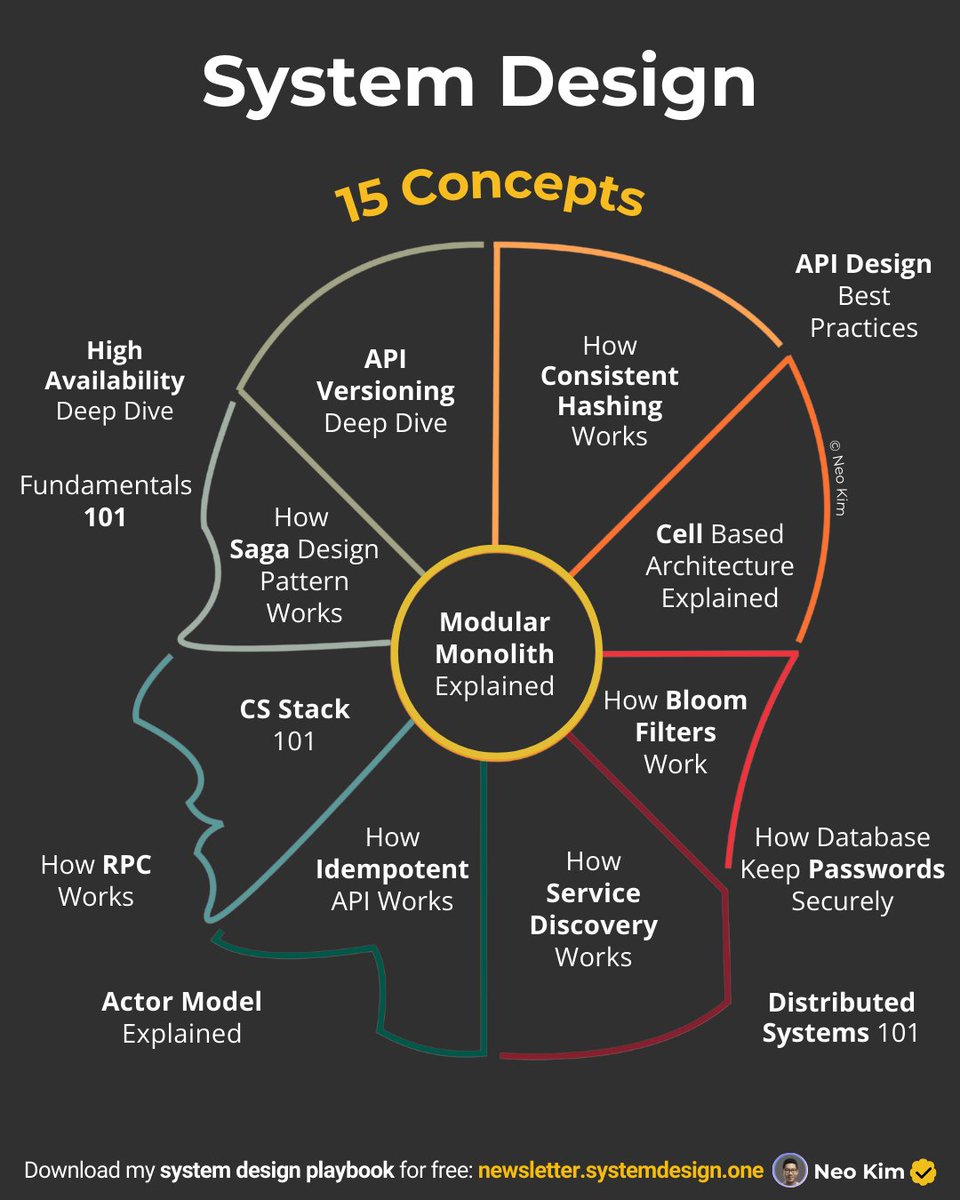
15 posts that'll teach you 15 system design concepts:
Neo Kim tweet media
English
7
20
136
7.7K
Nagarjun NM retweetledi
Swapna Kumar Panda
Swapna Kumar Panda@swapnakpanda·
Certainly one of the BEST channels for System Design: @hello_interview" target="_blank" rel="nofollow noopener">youtube.com/@hello_intervi… 1. API Design youtube.com/watch?v=DQ57zY… 2. Sharding youtube.com/watch?v=L521gi… 3. Caching youtube.com/watch?v=1NngTU… 4. Concurrency youtube.com/watch?v=d8rmos… 5. Data Modeling youtube.com/watch?v=TUcPS6… 6. Rate Limitter youtube.com/watch?v=TUcPS6… 7. DB Indexing youtube.com/watch?v=BHCSL_… 8. CAP Theorem youtube.com/watch?v=VdrEq0… 9. Kafka youtube.com/watch?v=DU8o-O… 10. Redis youtube.com/watch?v=fmT5nl… 11. System Design of Uber, WhatsApp, Bitly, etc. youtube.com/playlist?list=…
YouTube video
YouTube
YouTube video
YouTube
YouTube video
YouTube
YouTube video
YouTube
YouTube video
YouTube
YouTube video
YouTube
YouTube video
YouTube
YouTube video
YouTube
YouTube video
YouTube
Swapna Kumar Panda tweet media
English
10
153
662
44.4K
Nagarjun NM retweetledi
Shraddha Bharuka
Shraddha Bharuka@BharukaShraddha·
Stop burning tokens on Claude Code. Use this instead 👇 A free GitHub repo (80K⭐) that turns your CLI into a high-performance AI coding system. Link → github.com/affaan-m/every… Why it’s different: → Token optimization Smart model selection + lean prompts = lower cost → Memory persistence Auto-save/load context across sessions (No more losing the thread) → Continuous learning Turns your past work into reusable skills → Verification loops Built-in evals to make sure code actually works → Subagent orchestration Handles large codebases with iterative retrieval Most people think Claude struggles with complex repos. It doesn’t. They’re just not using the right setup. This fixes that. Bookmark this for your AI stack. ♻️ #AI #Claude #AIAgents #LLM #GenAI #DevTools
Shraddha Bharuka tweet media
English
18
294
1.8K
150.2K
Nagarjun NM retweetledi
Dr Milan Milanović
Dr Milan Milanović@milan_milanovic·
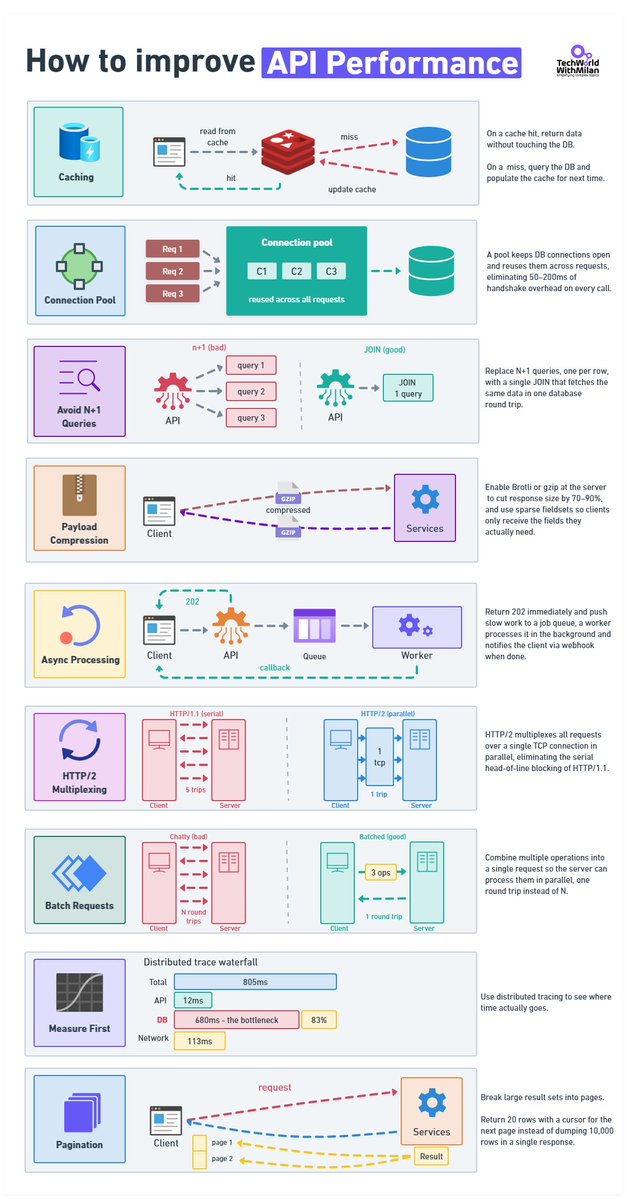
𝗧𝗼𝗽 𝗦𝘁𝗿𝗮𝘁𝗲𝗴𝗶𝗲𝘀 𝘁𝗼 𝗜𝗺𝗽𝗿𝗼𝘃𝗲 𝗔𝗣𝗜 𝗣𝗲𝗿𝗳𝗼𝗿𝗺𝗮𝗻𝗰𝗲 𝟭. 𝗖𝗮𝗰𝗵𝗶𝗻𝗴 A cache hit never touches the database. On a miss, you query the DB and write to cache so the next caller doesn't pay the same cost. The part that engineers usually get wrong is invalidation. TTL is easy to implement and will absolutely serve stale data at the worst moment. Event-driven invalidation is accurate, but now you have a new thing that can break. 𝟮. 𝗖𝗼𝗻𝗻𝗲𝗰𝘁𝗶𝗼𝗻 𝗣𝗼𝗼𝗹𝗶𝗻𝗴 When you open a new connection, for each request, a few things happen: TCP handshake, TLS, Auth, etc. This takes 50–200ms, or even more. Pool your connections. 𝟯. 𝗔𝘃𝗼𝗶𝗱 𝗡+𝟭 𝗤𝘂𝗲𝗿𝗶𝗲𝘀 Every slow codebase I've worked in had this problem. You fetch a list of records, then loop through them and query related data for each. And it works fine locally with 10 rows, but in production with 2,000, it's 2,001 database round-trips per request. We can fix this with one JOIN. Also, we need to index the columns in your WHERE clause. Before you change anything, run a profiler and verify this is actually the problem. I've assumed N+1 before and been wrong. 𝟰. 𝗣𝗮𝘆𝗹𝗼𝗮𝗱 𝗖𝗼𝗺𝗽𝗿𝗲𝘀𝘀𝗶𝗼𝗻 This is something usually forgotten. A 120 KB JSON response becomes roughly 18 KB. If you're not doing this, you're sending the client unnecessary work. You can choose Brotli or gzip. 𝟱. 𝗔𝘀𝘆𝗻𝗰 𝗣𝗿𝗼𝗰𝗲𝘀𝘀𝗶𝗻𝗴 Operations that take seconds don't belong inside an HTTP response. Return 202, put the job on a queue, process it in the background, fire a webhook when it's done. Your p99 will thank you. 𝟲. 𝗛𝗧𝗧𝗣/𝟮 HTTP/1.1 runs one request at a time per connection. That made sense in 1997. HTTP/2 multiplexes everything over a single TCP connection, allowing all requests to be in flight at once, with header compression on top. If your infrastructure supports it and you haven't switched, worth looking at why not. 𝟳. 𝗕𝗮𝘁𝗰𝗵𝗶𝗻𝗴 Ten API calls are 10 round-trips, but also 10 times the latency cost. Let clients bundle operations into one request and process them in parallel on the server. In REST: POST /batch or GET /users?ids=1,2,3. GraphQL handles this without you having to think about it. 𝟴. 𝗠𝗲𝗮𝘀𝘂𝗿𝗲 𝗙𝗶𝗿𝘀𝘁 Set up OpenTelemetry and look at actual traces before touching anything. I've watched teams spend weeks optimizing the wrong layer. Here is a real example: API handler: 12ms, network: 113ms, DB query: 680ms. Everyone was looking at the API layer, but the problem was that it was sitting in the database the whole time. An afternoon of instrumentation would have shown them that almost immediately. 𝟵. 𝗣𝗮𝗴𝗶𝗻𝗮𝘁𝗶𝗼𝗻 Never return 10,000 rows. Return 20 with a cursor for the next page. Offset pagination scans and discards rows on every call, at page 500 you're scanning 10,000 rows to show 20. Cursor-based picks up exactly where it left off.
Dr Milan Milanović tweet media
English
10
66
367
16.4K
Nagarjun NM retweetledi
Dhanian 🗯️
Dhanian 🗯️@e_opore·
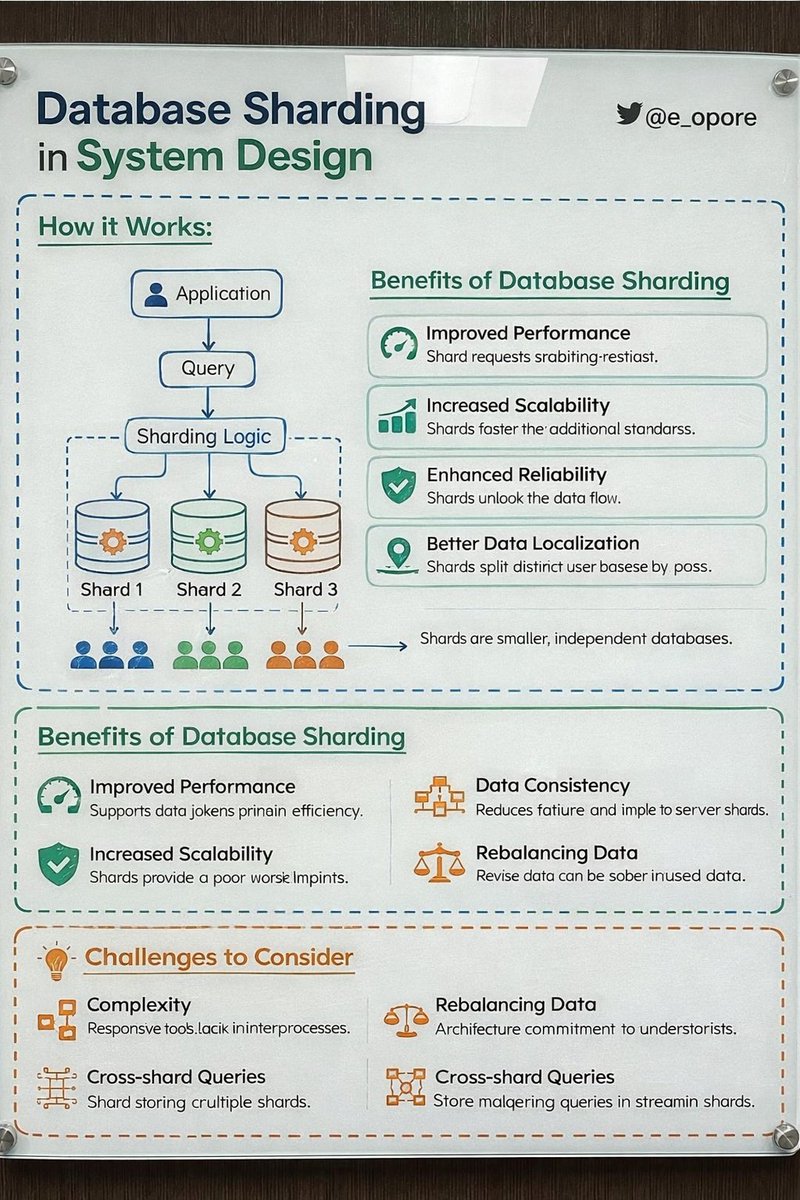
DATABASE SHARDING IN SYSTEM DESIGN → Database Sharding is a technique used to split a large database into smaller, independent databases called shards. → Each shard stores a portion of the data, allowing systems to scale horizontally and handle large volumes of traffic and data. → WHY DATABASE SHARDING IS IMPORTANT → Handles massive datasets efficiently → Improves query performance → Enables horizontal scaling across servers → Reduces load on a single database → Essential for high-traffic applications → HOW DATABASE SHARDING WORKS → Client Request → Application Server → Application Server → Sharding Logic determines shard → Request → Routed to correct database shard → Shard → Processes query and returns result Example: → Users with IDs 1–1M → Shard A → Users with IDs 1M–2M → Shard B → Users with IDs 2M–3M → Shard C → TYPES OF SHARDING → 1. RANGE-BASED SHARDING → Data divided by ranges of values Example: → UserID 1–1000 → Shard A → UserID 1001–2000 → Shard B Pros → Simple to implement Cons → Risk of uneven data distribution → 2. HASH-BASED SHARDING → Hash function determines shard location Example: → Hash(UserID) % Number_of_Shards Pros → Even data distribution Cons → Harder to rebalance shards → 3. DIRECTORY-BASED SHARDING → Lookup table maps keys to shards Pros → Flexible data placement Cons → Requires maintaining shard mapping → SHARDING IN SYSTEM DESIGN ARCHITECTURE → Client → API Server → API Server → Shard Router / Middleware → Router → Determines correct shard → Query → Sent to specific shard database Often combined with: → Load Balancers → Caching systems (Redis) → Replication for high availability → SHARDING BENEFITS → Horizontal scalability → Faster queries on smaller datasets → Improved fault isolation → Supports massive user growth → SHARDING CHALLENGES → Complex application logic → Difficult cross-shard queries → Rebalancing shards can be expensive → Requires careful shard key selection → SHARD KEY SELECTION A good shard key should: → Distribute data evenly → Avoid hotspots → Support common query patterns → Maintain predictable routing Examples → User ID → Geographic region → Customer ID → SHARDING VS REPLICATION → Replication → Copies same data across nodes for availability → Sharding → Splits data across nodes for scalability Large-scale systems usually combine both: → Sharding for scaling data → Replication for reliability → REAL-WORLD SYSTEMS USING SHARDING → Social media platforms → E-commerce systems → Financial transaction systems → Large-scale SaaS platforms → TIP → Database sharding distributes data across multiple servers → Enables horizontal scalability and high performance → Requires careful shard key design and system architecture → Essential for modern large-scale distributed systems 📘 Grab the System Design Handbook: codewithdhanian.gumroad.com/l/ntmcf
Dhanian 🗯️ tweet media
English
10
73
378
10.1K
Nagarjun NM retweetledi
DevopsCube
DevopsCube@devopscube·
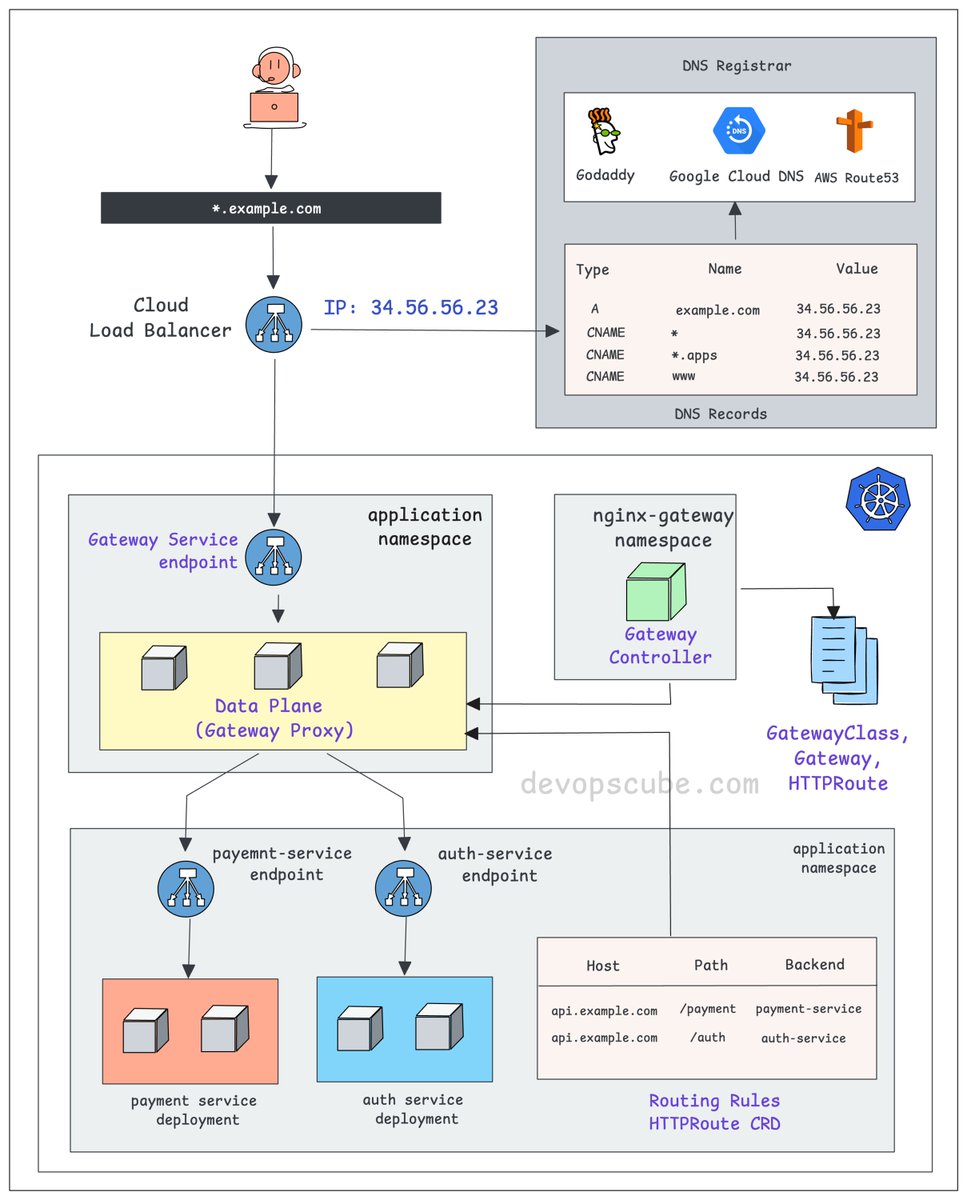
From DNS to Pod: How k8s Gateway API actually works. - You create a DNS record pointing to your cloud Load Balancer IP. - The Load Balancer forwards traffic to a Kubernetes Service, specifically the Gateway Service endpoint. - This Service points to the gateway proxy pods. These could be nginx, Envoy, or any compatible proxy. - The Gateway Controller (Ex: Nginx Fabric) watches for HTTPRoute, GRPCRoute, and similar resources. - When you apply these routes, the controller automatically configures the gateway proxy with the right configuration. - The HTTPRoute resource is what decides where your traffic actually goes. For example, /payment to payment-service, /auth to auth-service So the full traffic flow looks like this 👇 DNS to Cloud LB to Gateway Service to Gateway Proxy to your backend Service and finally to your Pod. If you understand the Ingress flow well, relating it to the Gateway API is very easy. A key difference is that in the classic Ingress model, the controller itself acts as the proxy. In the Gateway API, the controller configures and manages dedicated proxy instances (Gateways), creating a clear separation of concerns. We share such DevOps/MLOps concepts and deep dives in my newsletter. 𝗥𝗲𝗮𝗱 𝗶𝘁 𝗵𝗲𝗿𝗲 (𝟭𝟬𝟬% 𝗳𝗿𝗲𝗲): newsletter.devopscube.com Over to you… Are you using Gateway API in production? If yes, would love to hear your experience with it. ♻️ If this helped, repost it so others can learn too. #kubernetes
DevopsCube tweet media
English
6
87
421
14.8K
Nagarjun NM retweetledi
Anton Martyniuk
Anton Martyniuk@AntonMartyniuk·
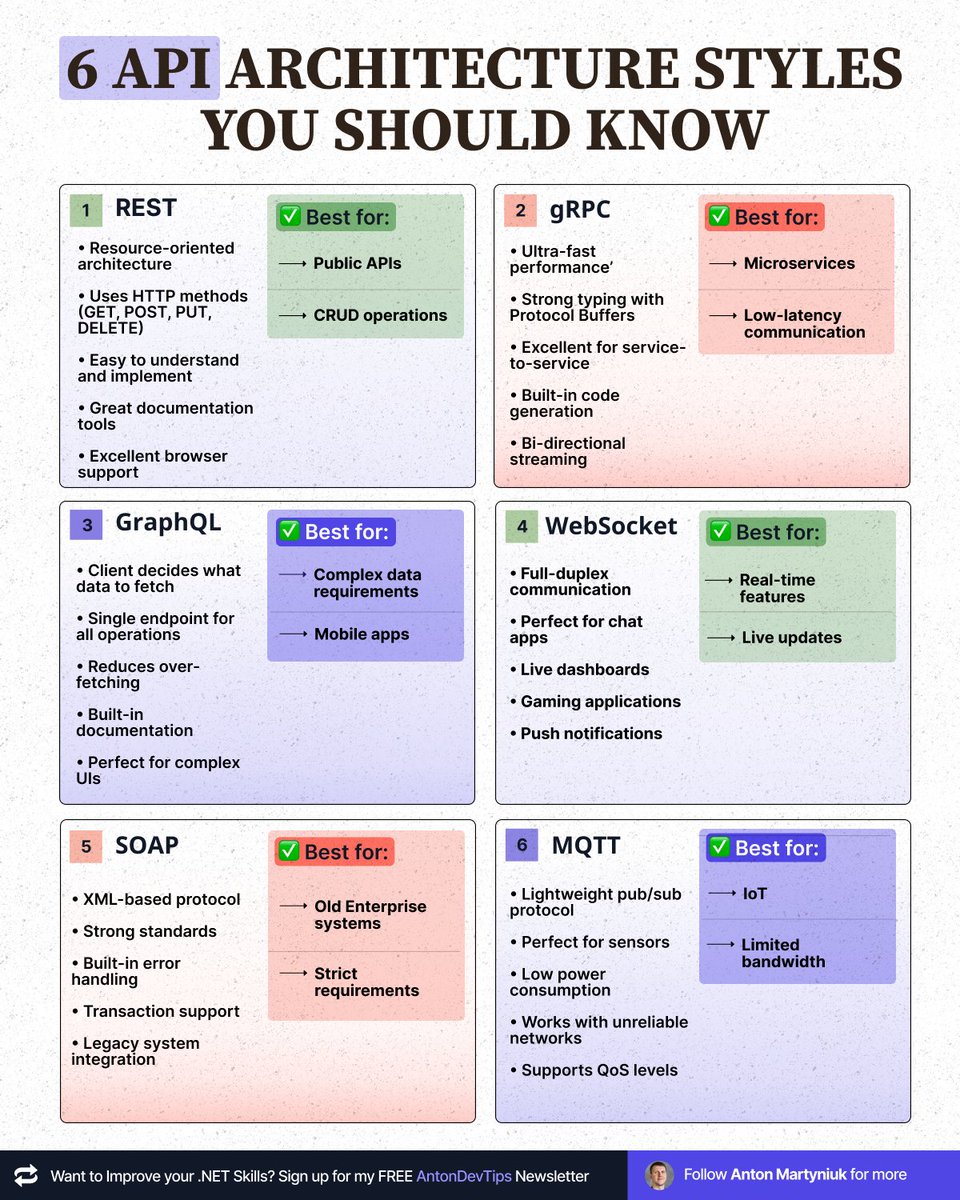
𝟲 𝗔𝗣𝗜 𝗔𝗿𝗰𝗵𝗶𝘁𝗲𝗰𝘁𝘂𝗿𝗲 𝗦𝘁𝘆𝗹𝗲𝘀 𝗬𝗼𝘂 𝗦𝗵𝗼𝘂𝗹𝗱 𝗞𝗻𝗼𝘄 Choosing the wrong API style can cost you months of development. Here's when to use each one 👇 𝟭. 𝗥𝗘𝗦𝗧 ✅ Best for: Public APIs, CRUD operations • Resource-oriented architecture • Uses HTTP methods (GET, POST, PUT, DELETE) • Easy to understand and implement • Great documentation tools • Excellent browser support 𝟮. 𝗴𝗥𝗣𝗖 ✅ Best for: Microservices, low-latency communication • Ultra-fast performance • Strong typing with Protocol Buffers • Excellent for service-to-service • Built-in code generation • Bi-directional streaming 𝟯. 𝗚𝗿𝗮𝗽𝗵𝗤𝗟 ✅ Best for: Complex data requirements, mobile apps • Client decides what data to fetch • Single endpoint for all operations • Reduces over-fetching • Built-in documentation • Perfect for complex UIs • Can act as a single endpoint instead of a BFF for each frontend • For .NET the best implementation is provided by open-source "HotChocolate GraphQL" 𝟰. 𝗪𝗲𝗯𝗦𝗼𝗰𝗸𝗲𝘁 ✅ Best for: Real-time features, live updates • Full-duplex communication • Perfect for chat apps • Live dashboards • Gaming applications • Push notifications 𝟱. 𝗦𝗢𝗔𝗣 ✅ Used in old Enterprise systems, strict requirements • XML-based protocol • Strong standards • Built-in error handling • Transaction support • Legacy system integration 𝟲. 𝗠𝗤𝗧𝗧 ✅ Best for: IoT, limited bandwidth • Lightweight pub/sub protocol • Perfect for sensors • Low power consumption • Works with unreliable networks • Supports QoS levels 𝗤𝘂𝗶𝗰𝗸 𝗗𝗲𝗰𝗶𝘀𝗶𝗼𝗻 𝗚𝘂𝗶𝗱𝗲: Need real-time? → WebSocket/MQTT Need speed? → gRPC Need flexibility? → GraphQL Need simplicity? → REST Need IoT support? → MQTT Need enterprise features? → REST. Don't use SOAP, it's legacy. The key? Pick based on your actual needs, not hype. 📌 Save this post for future reference! —— ♻️ Repost to help others choose the right API architecture ➕ Follow me ( @AntonMartyniuk ) to improve your .NET and Architecture Skills
Anton Martyniuk tweet media
English
4
53
222
5.5K
Nagarjun NM retweetledi
Jason Luongo
Jason Luongo@JasonL_Capital·
BREAKING: AI can now research stocks like a senior hedge fund analyst (for free) No more $2,000/month Bloomberg Terminal Here are 10 Claude prompts I use every day that replaced hours of manual research (Save this for later)
Jason Luongo tweet media
English
38
281
1.5K
384.9K
Nagarjun NM retweetledi
Dhanian 🗯️
Dhanian 🗯️@e_opore·
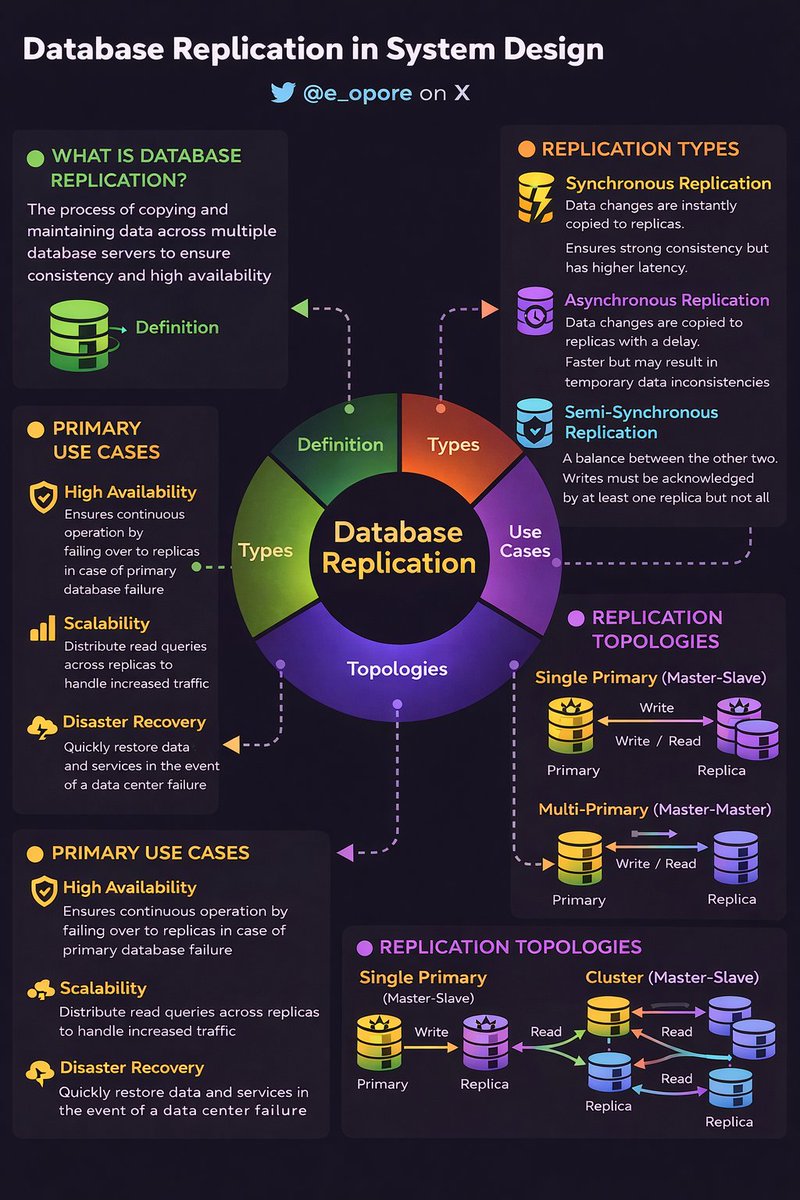
DATABASE REPLICATION IN SYSTEM DESIGN → Database Replication is the process of copying and maintaining database data across multiple servers. → It ensures high availability, fault tolerance, and scalability in distributed systems. WHY DATABASE REPLICATION MATTERS → Improves system availability → Enables read scalability → Provides disaster recovery → Reduces single point of failure → Enhances performance for global users HOW DATABASE REPLICATION WORKS → Client → Write Request → Primary (Master) Database → Primary → Records change in log (WAL / Binlog) → Primary → Sends updates to Replica(s) → Replica → Applies changes → Stays synchronized → Read Requests → Routed to Replicas TYPES OF DATABASE REPLICATION 1. MASTER–SLAVE (PRIMARY–REPLICA) → One Primary handles writes → Multiple Replicas handle reads → Simple to implement → Common in web applications 2. MASTER–MASTER (ACTIVE–ACTIVE) → Multiple nodes handle both reads and writes → Data synchronized between nodes → Higher complexity → Requires conflict resolution strategies 3. SYNCHRONOUS REPLICATION → Write confirmed only after replicas acknowledge → Strong consistency → Higher latency 4. ASYNCHRONOUS REPLICATION → Primary commits write immediately → Replicas update later → Lower latency → Risk of temporary inconsistency REPLICATION STRATEGIES IN SYSTEM DESIGN → Read Scaling → Route read-heavy traffic to replicas → Geo-Replication → Place replicas in multiple regions → Failover Mechanism → Promote replica if primary fails → Load Balancer → Distribute read queries efficiently DATABASE REPLICATION & HIGH AVAILABILITY → Primary failure → Automatic failover to replica → Health checks → Monitor replication lag → Backup nodes → Prevent downtime → Reduces service disruption REPLICATION CHALLENGES → Replication Lag → Delay between primary and replicas → Data Conflicts (in multi-master setups) → Network Partition Issues → Increased operational complexity REPLICATION VS SHARDING → Replication → Copies same data across nodes (availability + read scaling) → Sharding → Splits data across nodes (write + storage scaling) → Large-scale systems → Use both together BEST PRACTICES → Monitor replication lag continuously → Automate failover → Use read/write separation carefully → Combine replication with backups → Test disaster recovery plans Quick Tip → Database replication improves availability and performance → Enables read scaling and disaster recovery → Requires careful consistency management → Essential for scalable and resilient system design 📘 Grab the System Design Handbook: codewithdhanian.gumroad.com/l/ntmcf
Dhanian 🗯️ tweet media
English
15
89
403
9.9K