Ola Muse

494 posts

Ola Muse banner
Ola Muse

Ola Muse

@ola_ose

CEO and Co-Founder https://t.co/pw3spfvdNg | LLM Ops, Open Telemetry, Deep LLM Tracing and Insights Observability for AI Agents and Applications

California, USA Katılım Mayıs 2018
1.5K Takip Edilen625 Takipçiler
Ola Muse retweetledi
Karthik Kalyan
Karthik Kalyan@karthikkalyan90·
With @workflowsdk, setting up something as important as an onboarding email sequence becomes very easy. An onboarding email sequence is one of the most common ways to nurture newly signed-up users. Typically it starts with a welcome email upon sign-up, followed by a couple of nudges with a gap of 2–3 days in between. Setting it up usually involves: - Writing cron jobs to query the database and run the sequence periodically - Saving the state of the sequence for each user in the database - Wiring up basic observability so you can debug when something goes wrong And if you want to make changes to the sequence and iterate on it, there's friction - you're updating cron schedules, migration scripts, and state machines all at once. With @workflowsdk, the entire sequence is just a function. Each email is a step. Each delay is a sleep(). The state is managed for you. Observability is built in. And iterating is as simple as editing the function and redeploying. Here's a simple example sequence built with @resend and @workflowsdk 👇
Karthik Kalyan tweet media
English
4
3
69
8.4K
Ola Muse retweetledi
Afterpass - Digital legacy
Afterpass - Digital legacy@afterpassai·
AfterPass is a privacy-first "dead man's switch" platform for managing your digital legacy. Talk about it, no more what if? plan now
English
0
1
1
13
Ola Muse retweetledi
Voultron Games
Voultron Games@voultrongames·
Momentum doesn’t wait. • Live gameplay • Real players winning • SUI staked, Points stacking • Creators onboarding, networks growing This is an ecosystem in motion. Play smart. Build early. Move now.🏂
English
1
4
12
98
Ola Muse retweetledi
Voultron Games
Voultron Games@voultrongames·
This was always inevitable. MAINNET IS LIVE!!! The tables are real now. Same game. Real stakes. Let’s play.
Voultron Games tweet media
English
13
10
25
489
Ola Muse retweetledi
Karthik Kalyan
Karthik Kalyan@karthikkalyan90·
🔥Ok, so we have built the fastest observability dashboard that is: - private - stores all the traces natively on your browser - can ingest close to half a million spans and still load smoothly - can be queried and filtered using SQL - session links are shareable for collaboration - OTEL compatible and no sign up required Just hit get started, get your OTEL ingestion endpoint, start sending traces. You can treat these as ephemeral dashboards that can be used either for load testing, development or even for production briefly if you are running a/b tests. We are cooking more stuff on top of this, but just wanted to get this out sooner. Also, bonus points for guessing how this is made possible.
English
1
3
16
1.5K
Ola Muse retweetledi
Jay Thakrar
Jay Thakrar@JayThakrar·
Excited to introduce @HeyZestAI (built by @langtrace_ai)! Zest is the fastest platform to launch AI agents as virtual teammates in Slack. Zest connects to all your 3rd party apps, including @linear, @NotionHQ, @HubSpot, @Google Workspace, and more. As a result, agents built on Zest are Slack-native, understand your business, and can complete end-to-end tasks across multiple tools. Any employee can create their own AI agent on Zest; it is built to help your team with everyday tasks, freeing you up to focus on what matters most. Think of it as an extra pair of hands that can help you with things like: -> Searching in Slack -> Summarizing Conversations -> Creating drafts of documents from conversations -> Converting docs into tickets on Linear To get started, it’s as simple as 3 steps: 1. Connect Zest to your Slack Workspace 2. Create your AI agents and connect your favorite 3rd party tools 3. Configure and customize your AI agents (optional) Ready to leverage Zest to augment your team with virtual coworkers? Sign up via link below.
English
1
1
11
1.3K
Ola Muse retweetledi
Karthik Kalyan
Karthik Kalyan@karthikkalyan90·
Introducing: MCP code execution mode for MCP tools in ctx-zip - a token efficient way to run tool call loops by generating a file tree of all available tools from connected MCP servers. This file tree is automatically created in a sandbox environment with tools(such as ls, cat and grep) exposed for doing file system operations for progressive exposure. This is directly inspired from @AnthropicAI 's latest blog post - Code execution with MCP. Works out of the box for @aisdk. Has sandbox support for - @vercel sandbox - @e2b - local file system for local development
Karthik Kalyan tweet media
English
3
8
103
11.1K
Ola Muse retweetledi
Zest
Zest@HeyZestAI·
Excited to introduce Zest, a no-code platform to launch AI agents as virtual team mates in Slack. Zest connects to all your 3rd party apps, including Linear, Notion, Hubspot, Google Workspace, and more. As a result, agents built on Zest are Slack-native, understand your business, and can complete end-to-end tasks across multiple tools. Any employee can create their own AI agent on Zest; it is built to help your team with everyday tasks, freeing you up to focus on what matters most. Think of it as an extra pair of hands that can help you with things like: -> Searching in Slack -> Summarizing Conversations -> Creating drafts of documents from conversations -> Converting docs into tickets on Linear To get started, it’s as simple as 3 steps: 1. Connect Zest to your Slack Workspace 2. Create your AI agents and connect your favorite 3rd party tools 3. Configure and customize your AI agents (optional) Ready to leverage Zest to augment your team with virtual coworkers? Sign up via link below.
English
1
4
9
617
Ola Muse retweetledi
Karthik Kalyan
Karthik Kalyan@karthikkalyan90·
Finally, I thoroughly enjoyed diving deeper into the open source code base of this workflow development kit. Kudos to the @vercel team - @rauchg, @cramforce and all for shipping this. If my understanding of any of this is factually incorrect, feel free to correct me in the comments. I look forward to using as well as contributing to this open source project in the coming months.
English
1
1
15
2.1K
Ola Muse retweetledi
Karthik Kalyan
Karthik Kalyan@karthikkalyan90·
Additional Notes 1. Directive typos The SWC plugin handles typos in directives with an edit distance <= 1 - meaning, if you write 'use setp' instead of 'use step', it will through a compilation error asking if you meant 'use step'. It can handles substitution ('use setp'), insertion ('use sstep'), deletion ('use tep'). 2. Dead Code Elimination in Workflow/Client Modes The SWC plugin automatically removes unused code in workflow and client modes to reduce bundle size. 3. Deterministic Execution with VM Context Workflows execute in a sandboxed Node.js VM context with: - Fixed timestamp - Date.now() returns the workflow start time during replay - Seeded random - Math.random() uses the runId as seed for determinism - Isolated globals - No access to process env vars or filesystem All of this guarantees deterministic replays. 4. Event Sourcing - Every Step is an Event Every step execution creates an immutable event stored in the event log. On replay, the workflow doesn't re-execute steps - it just reads from the event log. This makes workflows resilient, time travel debuggable and auditable.
English
1
1
13
2.3K
Ola Muse retweetledi
Karthik Kalyan
Karthik Kalyan@karthikkalyan90·
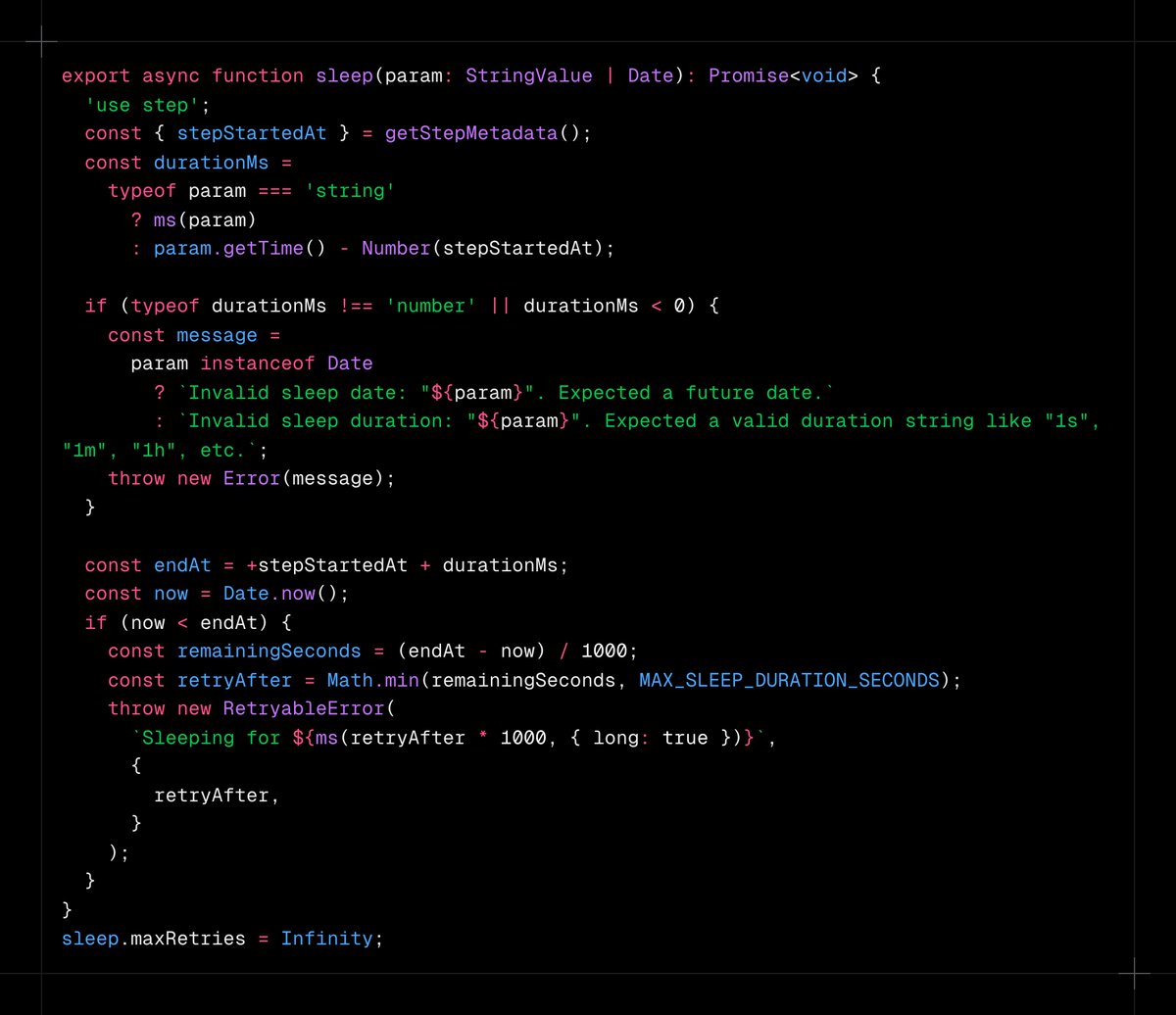
Sleep Some interesting observations with the implementation of the Sleep() function. await sleep("3d"); What's interesting here is that, the sleep function itself is a durable step with a 'use step' directive. But, one minor issue can be observed here: There is MAX_SLEEP_DURATION_SECONDS which is set to the following: MAX_SLEEP_DURATION_SECONDS = ms('23h') / 1000; This means, even if you set a duration thats greater than a day, it will still wake up, and create a retry event and go back to sleep until the duration is reached. And this will continue to happen until the duration is reached. So if you sleep("3d"), then there is going to be a retry after every 23 hours until 3 days are reached in total 4 retries(23h + 23h + 23h + 3h) are done. This is likely due to the limitation of Vercel Queues when run using the Vercel world. But, because this is hard coded, the same behavior is replicated for other world implementations as well.
Karthik Kalyan tweet media
English
2
1
9
2.6K
Ola Muse retweetledi
Karthik Kalyan
Karthik Kalyan@karthikkalyan90·
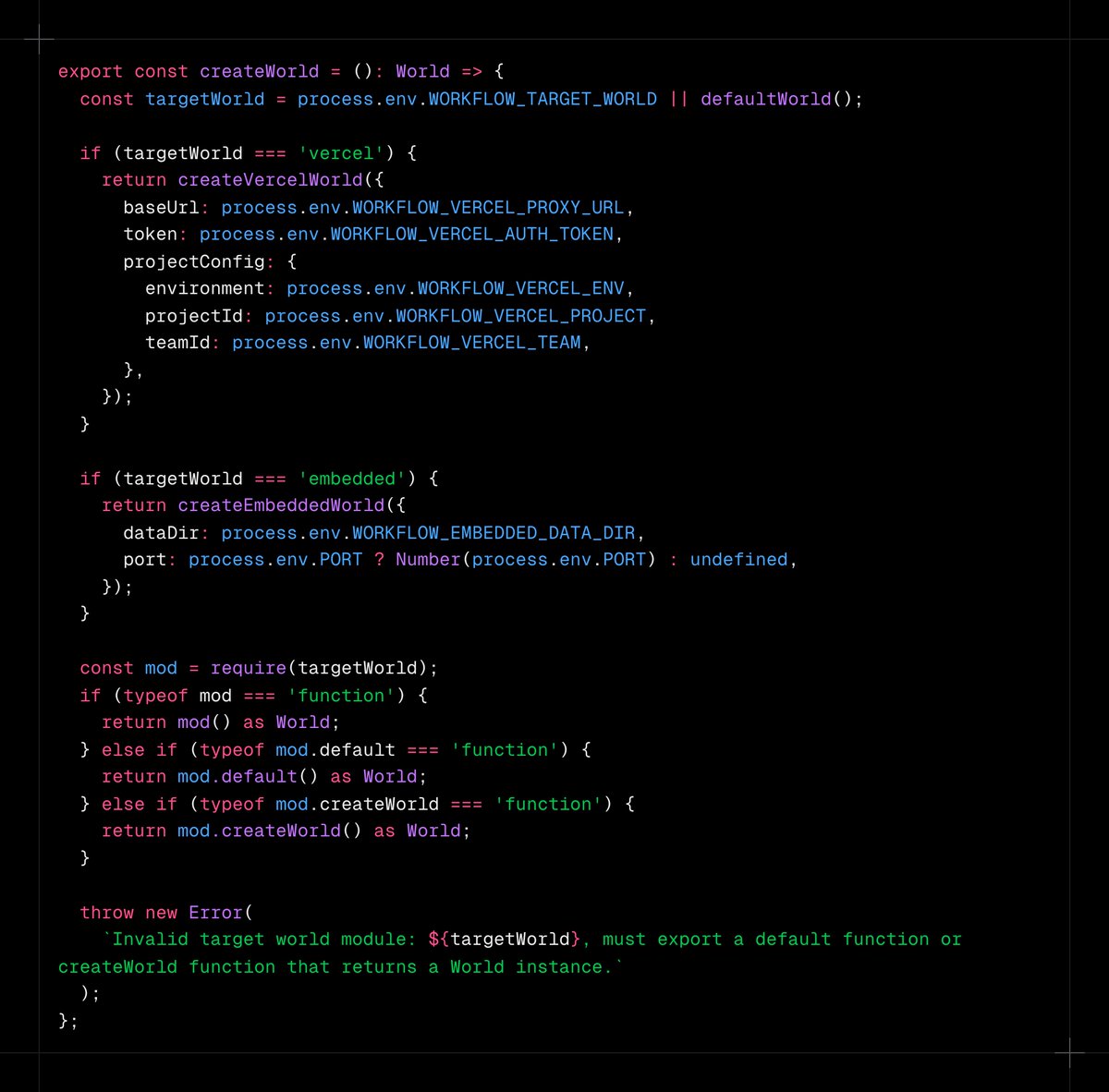
The runtime uses a singleton pattern to inject a world as a dependency. If the workflow code is deployed to Vercel, it uses the target world as vercel and vercel automatically brings it's set of components behind the scenes. If you are running it locally, it uses the 'embedded' targetWorld. In the case of 'embedded' world, it uses 1. in memory queue where events are processed immediately with http polling 2. json files on disk for storage Essentially, World = Database Driver + Message Queue + Object Storage + Auth The thing with this world interface is that, you can write and implement your own custom world that uses different components for the queue, storage and auth. This makes it quite powerful for portability and self- hosting capability.
Karthik Kalyan tweet media
English
1
1
10
3.1K
Ola Muse retweetledi
Karthik Kalyan
Karthik Kalyan@karthikkalyan90·
The World Interface Now, lets take a step back and understand how the workflow code we write does not know or care about WHERE the data is stored and HOW queues work. This is where the "World" interface comes into the picture. The world interface defines the different components needed for this system to work, namely: 1. Queue - for queuing the steps of a workflow 2. Storage - for storing the run results 3. Streamer - for handling large payloads 4. AuthProvider - Auth and health checks
Karthik Kalyan tweet media
English
1
1
8
3.1K
Ola Muse retweetledi
Karthik Kalyan
Karthik Kalyan@karthikkalyan90·
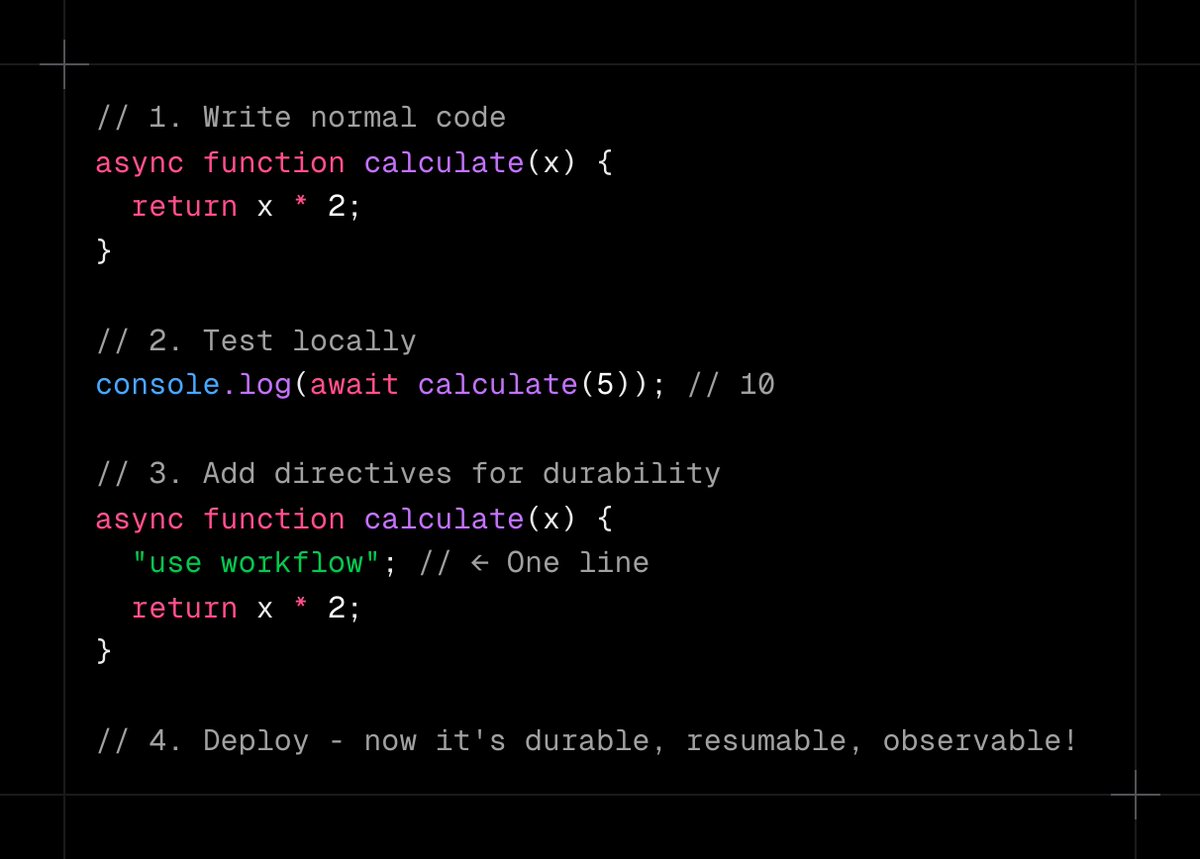
But, lets take a step back. Why directives and why do all this complex compilation? Developer Experience! While its a debated topic at the moment, building workflows with durable steps without needing to learn any new language semantics and by simply including a 'use workflow' and a 'use step' directive, your code becomes durable, resumable and observable.
Karthik Kalyan tweet media
English
3
1
12
3.5K
Ola Muse retweetledi
Karthik Kalyan
Karthik Kalyan@karthikkalyan90·
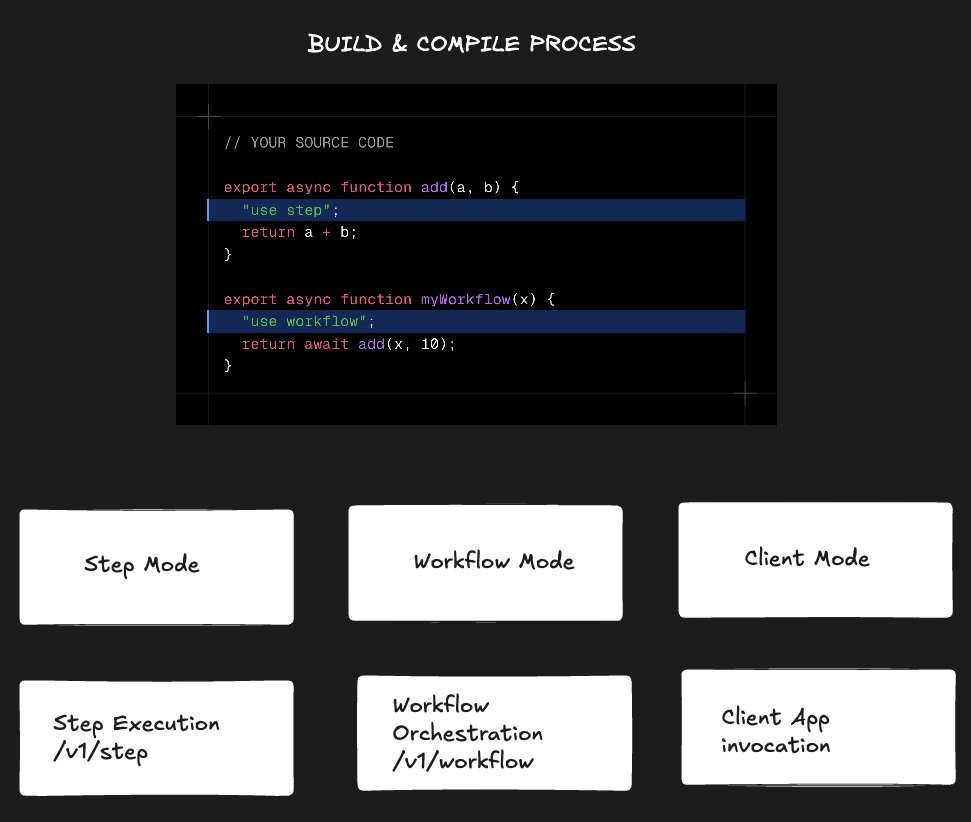
So what does the compiler plugin do with these directives? The compiler plugin operates in 3 modes to compile and transform the code for 3 separate scenarios: 1. Step mode: In this mode, step directives are removed, the function body is kept intact for actual execution, and the function is registered using registerStepFunction() so it can be invoked by the runtime. 2. Workflow mode: This mode transforms the code for the workflow orchestration. The result of this step is that STEP functions become stubs that either queue the step or return cached results from the event log. WORKFLOW functions have their directives removed but keep their orchestration logic intact (since they need to coordinate the steps). 3. Client mode: This mode transforms functions into proxy calls: step functions are replaced with runStep() calls, and workflow functions are replaced with start() calls. These proxies make API requests to execute the steps/workflows remotely. Importantly, these three modes produce three separate bundles from the same source code. Each bundle serves a different purpose in the distributed workflow system. All three modes are invoked automatically by the Workflow CLI (@workflow/cli) when you run npx workflow build. The CLI builds the same source code three times: 1. Step mode bundle → deployed to /.well-known/workflow/v1/step 2. Workflow mode bundle → deployed to /.well-known/workflow/v1/flow 3. Client mode bundle → output to .swc/client.js for your application to import
Karthik Kalyan tweet media
English
1
1
8
4.1K
Ola Muse retweetledi
Karthik Kalyan
Karthik Kalyan@karthikkalyan90·
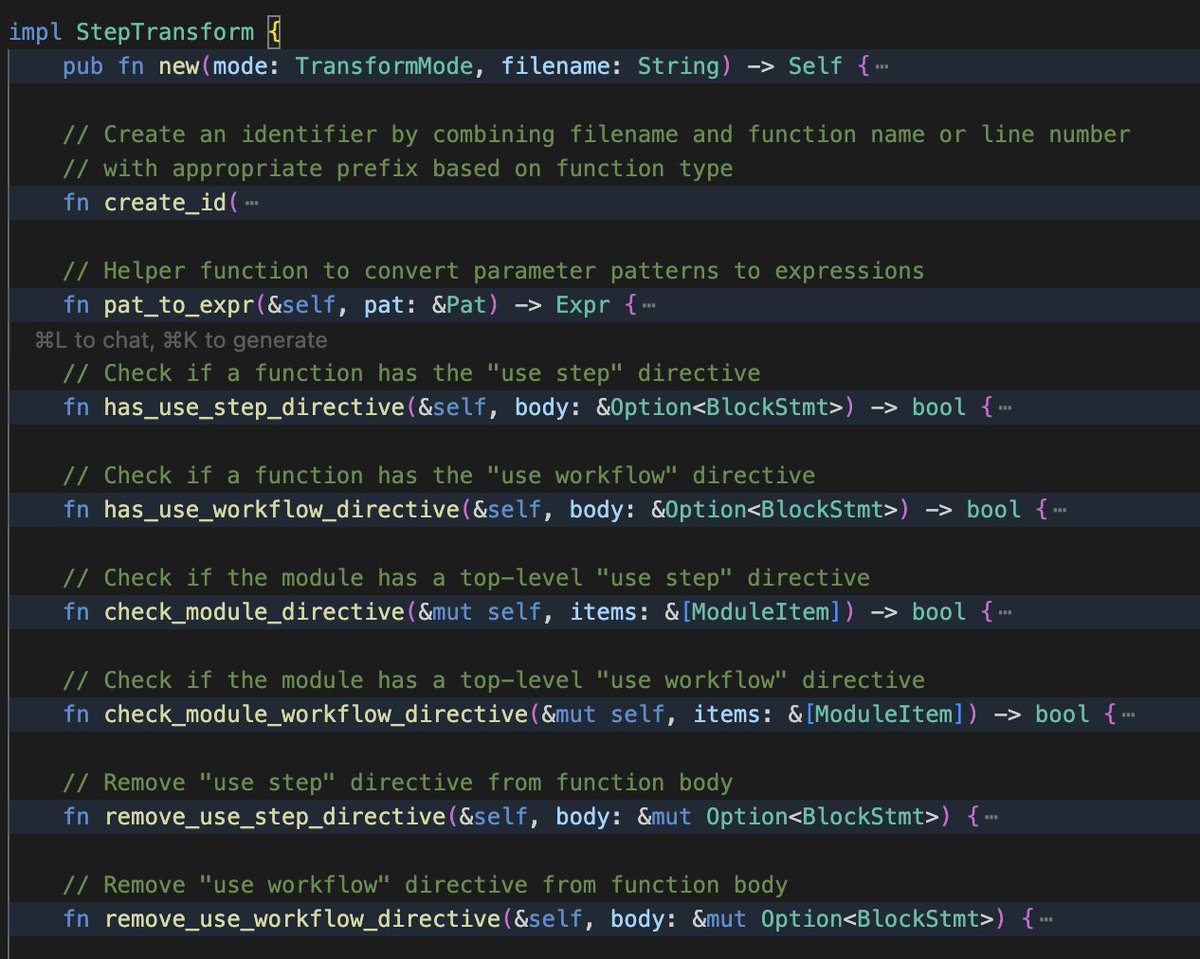
The Compilation Plugin Let's start with the compilation process. The workflow development kit uses SWC Plugin with a visitor pattern for source code transformation. Before I go further, what is SWC? SWC expands to Speedy Web Compiler which is primarily used for transpiling, bundling and minification of js code. It's rust based and 20x faster than it's predecessor babel. What is a SWC plugin? Plugins are a way to introduce custom compilation steps in the main process in order to mutate the source code in a custom manner. This is precisely where the directives, 'use step' and 'use workflow' get transformed to something else. But, how can you modify the source code in predictable ways in order to replace the directives with some other code? In order to do this, we need a Abstract Syntax Tree(AST) representation of the source code which is a data structure that can be mutated predictably. Compilers like SWC build this natively. Additionally, the SWC library exposes helper functions like the Visitor pattern that modifies the AST when you write a plugin. In the workflow development kit, this plugin does the heavy lifting of this source code transformation. The plugin code notably is about 3500 lines of rust code and it's interesting to read and understand if you are decent with rust. The SWC plugin is compiled to WebAssembly (WASM), which allows the Rust code to run in Node.js during the build process. This gives you the performance of Rust with the portability of JavaScript tooling. Finally, all of this transformation happens at build time (via the CLI's build command), not at runtime, so your deployed code already contains the transformed versions.
Karthik Kalyan tweet media
English
1
1
17
5K
Ola Muse retweetledi
Karthik Kalyan
Karthik Kalyan@karthikkalyan90·
Behind the elegant and seemingly simple looking 'use workflow' and 'use step' directives of the new workflow development kit from @vercel lies a bunch of compiler engineering. I was curious and decided to dive deeper into the open source code. Buckle up and read this post if you are curious too. The workflow development kit(WDK) from Vercel is a new piece of developer infrastructure that let's developers write workflows and durable functions. Durable functions are stateful workflows in a serverless environment. Ordinary functions are stateless: once they finish, their context disappears. But a durable function can be paused (suspended) while waiting for an external event or timer, and later resumed from exactly where it left off with full context preserved. If you are building something that requires maintaining the state, you would typically need to store the state in a database and maintain all the baggage that comes with it. WDK aims to make this part easier.
Karthik Kalyan tweet media
English
17
22
260
69.4K
Ola Muse retweetledi
Karthik Kalyan
Karthik Kalyan@karthikkalyan90·
Slack is an incredible product surface for building agents. We have built a pretty powerful platform that lets you create and deploy agents as Slack bots in under 2 minutes. As soon as they are installed, they instantly know everything about what's happening in your Slack that is most relevant to you. They continue to gather this knowledge and are available to assist you at all times. Here's a quick demo of the first time install experience(or the landing experience as @rauchg puts it). Feels truly magical to see it take this current shape after months of hard work. I will continue to share more demos in the coming days. DM me for access if you would like to take this for a spin.
English
0
3
7
564
Ola Muse retweetledi
Karthik Kalyan
Karthik Kalyan@karthikkalyan90·
Most Agent <-> Slack integrations suck. We had to build a bunch of infra to make building and running agents on Slack feel native. The agents we run on Slack - can stream back messages - can provide status updates using native slack status bar - is stateful and has deep context across channels - has 2 trigger modes - tagging and event based - can be part added to a DM, group messages and channels - can be instructed to send messages on channels or DM other members - can access native slack features like setting reminders All of this is possible because we treated Slack as the primary interface rather as an "integration". Hit me up if you are interested in building and running agents on Slack.
English
2
1
5
625
Ola Muse
Ola Muse@ola_ose·
Uploaded @HeyZestAI Brochure into @OpenAI Sora with the prompt " create a quick commercial for this" 👇
English
0
0
1
42