

Osvaldo Mercado
5.3K posts

Osvaldo Mercado
@omercadocoss
Escribo de mis XPs en tech como líder de equipos, código & data, mezclados con temas random. En Espanglish.
🇲🇽 con frio en 🇨🇦 Katılım Mart 2017
1.2K Takip Edilen1.2K Takipçiler
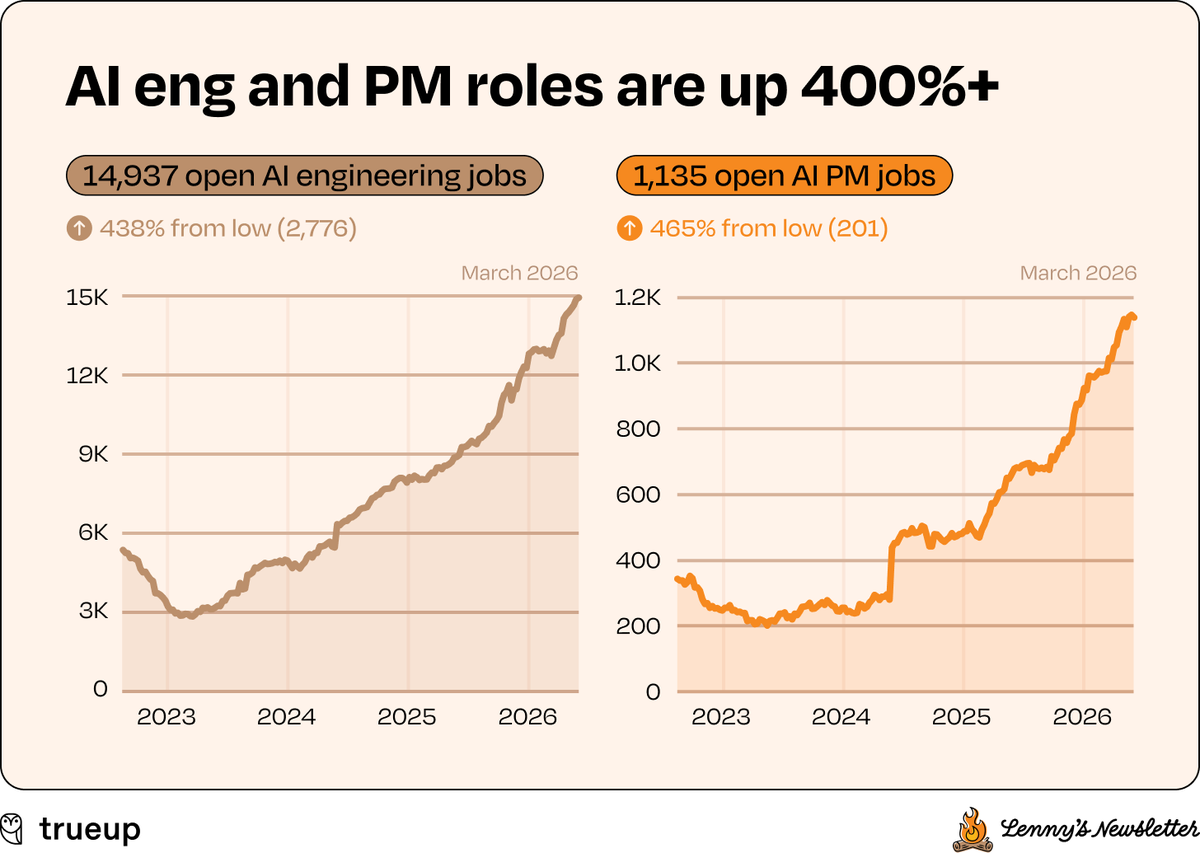
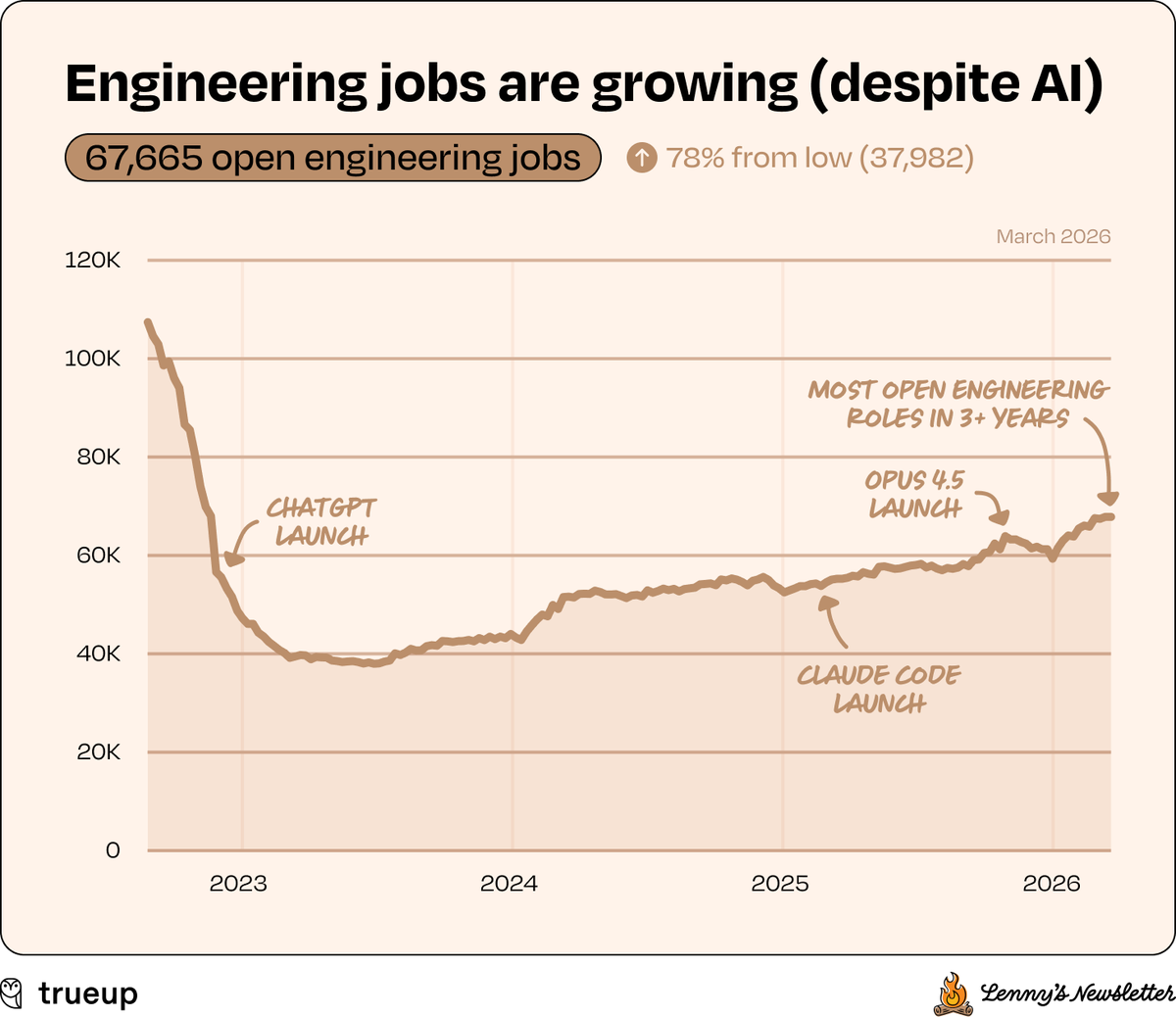
Se ha venido diciendo en varios canales y maneras: nunca ha sido tan importante el entender producto que al día de hoy. Las gráficas muestran ya esta realidad.
Los días (y chistes... malos por cierto) de estarse peleando con un PM terminaron.
Las buenas noticias x @lennysan
Español
Osvaldo Mercado retweetledi

Este ladder me ha gustado bastante. Si, de las primeras que ha habido pero de las que más siento que se han asemejado al día a día.
Por otro lado, refleja muy bien la cultura y lo que buscan en Zappier el hecho de que se cambió al poco tiempo de haber salido.
Wade Foster@wadefoster
Today we released our new AI Fluency Rubric. We use it for every hire, focusing on what they’ve actually built. Last May we open-sourced V1. Hundreds of companies used it to screen candidates and develop teams. It worked. But the floor moved fast. An updated look at the 3 levels of AI fluency at @Zapier: 1. Capable: "I use AI to operate at a meaningfully higher level." 2. Adoptive: "I orchestrate AI and build systems that elevate how I work." 3. Transformative: "I re-engineer how work happens." We evaluate theses across 4 dimensions: Mindset, Strategy, Building, and Accountability. We're sharing V2 publicly for the same reason we shared V1: every company needs a framework for this, and most don't have one yet. Don’t see your role? See all departments / learn more here: zpr.io/xQq5PHMDChrL
Español
Osvaldo Mercado retweetledi

Mexico is the absolute outlier in the OECD: workers log the most hours on Earth (~2,200+ annually) yet deliver relatively little economic output per hour—despite huge advantages like proximity to the USA.
Something went seriously wrong.
My take: the education system.
Even grads from top STEM unis often have shockingly weak fundamentals (based on interviews).
Sure, brilliant Mexicans exist, but the system fails the average citizen badly.
Work smarter, not longer.
Fix education → unlock potential.
Study math, just ask Peru 🇵🇪

English
@silvercorp Dos conocidos les ha tocado layoff y sus posiciones absorbidas por India.
Español

Un amigo me contó que está viendo movimientos de Ingeniería de México a India.
¿les está pasando en donde trabajan?
Español
La plática más casual, real y non-hyped sobre como Claude Code cambia el día a día, los roles y procesos dentro de una organización viene de @Pragmatic_Eng
@pragmaticengineer/note/p-189707865?r=72gw6" target="_blank" rel="nofollow noopener">substack.com/@pragmaticengi…
Español
Pónganle la vacuna antirrábica a este perro tuitazo.
Yesi Days 🤓@silvercorp
La IA no está reemplazando devs. Está reemplazando a los que necesitan 3 Sprints para sentirse importantes y mandar algo a prod. La industria ha cambiado más rápido de lo que esperábamos, y si eres de los que para todo dicen "es que clean code..." ya tienes un pie fuera.
Español
El nuevo "yo sí deployeo en viernes" es "yo sí dejo que los agentes mergien sin revisar".
Español
Acabo de hacer un benchmark sencillo corriendo *casi* los mismos prompts en Opus 4.6 que había corrido en 4.5 y si me dejó bien mal parado.
Llegó a 1/3 de las tareas que 4.5.
Me siento como en arcade que le metes la moneda y no funciona.
Español
El mejor articulo que he leído en las últimas semanas del cambio en SWE, y que reúne diferentes temas de forma sencilla.
La gente que sepa construir productos está en muchísima demanda. La gente que sabe codear puede estar viendo su skillset siendo menos valorado.
Ian Tracey@ian_dot_so
Español
@silvercorp Yo estoy recomendado está lista para personas que están iniciando / algunas skills de código:
- Code academy: AI Maker bootcamp: learn to build with AI tools
- Datacamp: Developing AI Systems with the OpenAI API
- Libro de O'Reilly que ya sugirieron
- AI Snake Oil (libro)
Español
¿Cuál es su curso favorito de Data o IA? Gracias 😀
Se que es amplio el concepto pero esa es la idea
Español
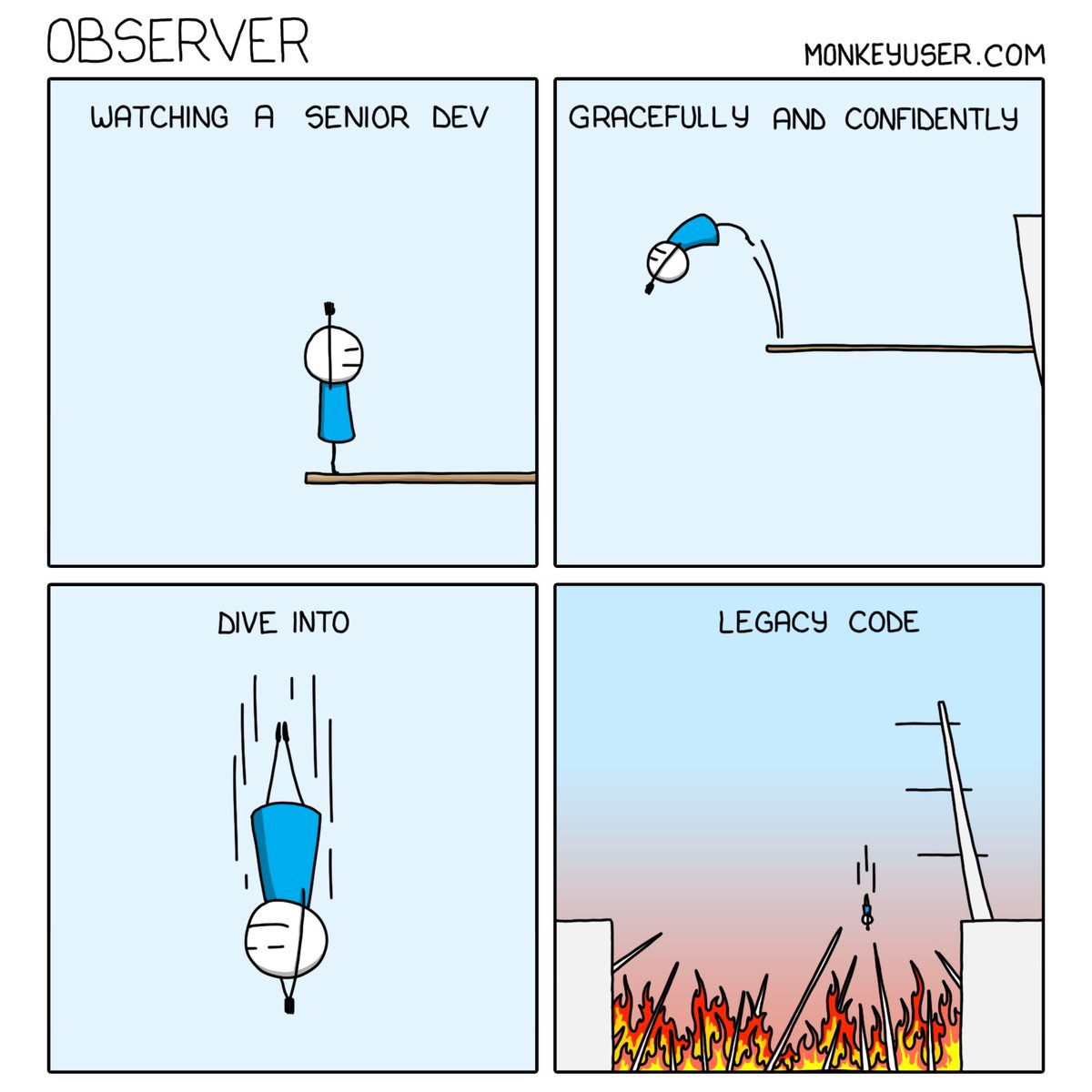

The tide is shifting.
You won’t be missed, stupid gdpr.
Ole Lehmann@itsolelehmann
The EU is about to kill GDPR as we know it. After 7 years of: • Crushing European innovation & startups • Making American tech giants even stronger Brussels finally admits it: GDPR was an economic disaster. Here's why this rollback could save Europe's dying tech scene 🧵:
English

todo lo que se generó en comisiones el año pasado en showslink ya se logró en este primer cuarto del año. 🥺
qué chingón es hacer software.
Español
Muy buena info para comenzar en temas de seguridad. Es un tema a invertirle constantemente y aquí lo resume de manera excelente; algunas herramientas se terminan usando por conveniencia pero revisa qué das a cambio.
Andrej Karpathy@karpathy
I wrote a quick new post on "Digital Hygiene". Basically there are some no-brainer decisions you can make in your life to dramatically improve the privacy and security of your computing and this post goes over some of them. Blog post link in the reply, but copy pasting below too. Every now and then I get reminded about the vast fraud apparatus of the internet, re-invigorating my pursuit of basic digital hygiene around privacy/security of day to day computing. The sketchiness starts with major tech companies who are incentivized to build comprehensive profiles of you, to monetize it directly for advertising, or sell it off to professional data broker companies who further enrich, de-anonymize, cross-reference and resell it further. Inevitable and regular data breaches eventually runoff and collect your information into dark web archives, feeding into a whole underground spammer / scammer industry of hacks, phishing, ransomware, credit card fraud, identity theft, etc. This guide is a collection of the most basic digital hygiene tips, starting with the most basic to a bit more niche. Password manager. Your passwords are your "first factor", i.e. "something you know". Do not be a noob and mint new, unique, hard passwords for every website or service that you sign up with. Combine this with a browser extension to create and Autofill them super fast. For example, I use and like 1Password. This prevents your passwords from 1) being easy to guess or crack, and 2) leaking one single time, and opening doors to many other services. In return, we now have a central location for all your 1st factors (passwords), so we must make sure to secure it thoroughly, which brings us to... Hardware security key. The most critical services in your life (e.g. Google, or 1Password) must be additionally secured with a "2nd factor", i.e. "something you have". An attacker would have to be in possession of both factors to gain access to these services. The most common 2nd factor implemented by many services is a phone number, the idea being that you get a text message with a pin code to enter in addition to your password. Clearly, this is much better than having no 2nd factor at all, but the use of a phone number is known to be extremely insecure due to the SIM swap attack. Basically, it turns out to be surprisingly easy for an attacker to call your phone company, pretend they are you, and get them to switch your phone number over to a new phone that they control. I know this sounds totally crazy but it is true, and I have many friends who are victims of this attack. Therefore, purchase and set up hardware security keys - the industrial strength protection standard. In particular, I like and use YubiKey. These devices generate and store a private key on the device secure element itself, so the private key is never materialized on a suspiciously general purpose computing device like your laptop. Once you set these up, an attacker will not only need to know your password, but have physical possession of your security key to log in to a service. Your risk of getting pwned has just decreased by about 1000X. Purchase and set up 2-3 keys and store them in different physical locations to prevent lockout should you physically lose one of the keys. The security keys support a few authentication methods. Look for "U2F" in the 2nd factor settings of your service as the strongest protection. E.g. Google and 1Password support it. Fallback on "TOTP" if you have to, and note that your YubiKeys can store TOTP private keys, so you can use the YubiKey Authenticator app to access them easily through NFC by touching your key to the phone to get your pin when logging in. This is significantly better than storing TOTP private keys on other (software) authenticator apps, because again you should not trust general purpose computing devices. It is beyond the scope of this post to go into full detail, but basically I strongly recommend the use of 2-3 YubiKeys to dramatically strengthen your digital security. Biometrics. Biometrics are the third common authentication factor ("something you are"). E.g. if you're on iOS I recommend setting up FaceID basically everywhere, e.g. to access the 1Password app and such. Security questions. Dinosaur businesses are obsessed with the idea of security questions like "what is your mother's maidan name?", and force you to set them up from time to time. Clearly, these are in the category of "something you know" so they are basically passwords, but conveniently for scammers, they are easy to research out on the open internet and you should refuse any prompts to participate in this ridiculous "security" exercise. Instead, treat security questions like passwords, generate random answers to random questions, and store them in your 1Password along with your passwords. Disk encryption. Always ensure that your computers use disk encryption. For example, on Macs this total no-brainer feature is called "File Vault". This feature ensures that if your computer gets stolen, an attacker won't be able to get the hard disk and go to town on all your data. Internet of Things. More like @internetofshit. Whenever possible, avoid "smart" devices, which are essentially incredibly insecure, internet-connected computers that gather tons of data, get hacked all the time, and that people willingly place into their homes. These things have microphones, and they routinely send data back to the mothership for analytics and to "improve customer experience" lol ok. As an example, in my younger and naive years I once purchased a CO2 monitor from China that demanded to know everything about me and my precise physical location before it would tell me the amount of CO2 in my room. These devices are a huge and very common attack surface on your privacy and security and should be avoided. Messaging. I recommend Signal instead of text messages because it end-to-end encrypts all your communications. In addition, it does not store metadata like many other apps do (e.g. iMessage, WhatsApp). Turn on disappearing messages (e.g. 90 days default is good). In my experience they are an information vulnerability with no significant upside. Browser. I recommend Brave browser, which is a privacy-first browser based on Chromium. That means that basically all Chrome extensions work out of the box and the browser feels like Chrome, but without Google having front row seats to your entire digital life. Search engine. I recommend Brave search, which you can set up as your default in the browser settings. Brave Search is a privacy-first search engine with its own index, unlike e.g. Duck Duck Go which basically a nice skin for Bing, and is forced into weird partnerships with Microsoft that compromise user privacy. As with all services on this list, I pay $3/mo for Brave Premium because I prefer to be the customer, not the product in my digital life. I find that empirically, about 95% of my search engine queries are super simple website lookups, with the search engine basically acting as a tiny DNS. And if you're not finding what you're looking for, fallback to Google by just prepending "!g" to your search query, which will redirect it to Google. Credit cards. Mint new, unique credit cards per merchant. There is no need to use one credit card on many services. This allows them to "link up" your purchasing across different services, and additionally it opens you up to credit card fraud because the services might leak your credit card number. I like and use privacy dot com to mint new credit cards for every single transaction or merchant. You get a nice interface for all your spending and notifications for each swipe. You can also set limits on each credit card (e.g. $50/month etc.), which dramatically decreases the risk of being charged more than you expect. Additionally, with a privacy dot com card you get to enter totally random information for your name and address when filling out billing information. This is huge, because there is simply no need and totally crazy that random internet merchants should be given your physical address. Which brings me to... Address. There is no need to give out your physical address to the majority of random services and merchants on the internet. Use a virtual mail service. I currently use Earth Class Mail but tbh I'm a bit embarrassed by that and I'm looking to switch to Virtual Post Mail due to its much strong commitments to privacy, security, and its ownership structure and reputation. In any case, you get an address you can give out, they receive your mail, they scan it and digitize it, they have an app for you to quickly see it, and you can decide what to do with it (e.g. shred, forward, etc.). Not only do you gain security and privacy but also quite a bit of convenience. Email. I still use gmail just due to sheer convenience, but I've started to partially use Proton Mail as well. And while we're on email, a few more thoughts. Never click on any link inside any email you receive. Email addresses are extremely easy to spoof and you can never be guaranteed that the email you got is a phishing email from a scammer. Instead, I manually navigate to any service of interest and log in from there. In addition, disable image loading by default in your email's settings. If you get an email that requires you to see images, you can click on "show images" to see them and it's not a big deal at all. This is important because many services use embedded images to track you - they hide information inside the image URL you get, so when your email client loads the image, they can see that you opened the email. There's just no need for that. Additionally, confusing images are one way scammers hide information to avoid being filtered by email servers as scam / spam. VPN. If you wish to hide your IP/location to services, you can do so via VPN indirection. I recommend Mullvad VPN. I keep VPN off by default, but enable it selectively when I'm dealing with services I trust less and want more protection from. DNS-based blocker. You can block ads by blocking entire domains at the DNS level. I like and use NextDNS, which blocks all kinds of ads and trackers. For more advanced users who like to tinker, pi-hole is the physical alternative. Network monitor. I like and use The Little Snitch, which I have installed and running on my MacBook. This lets you see which apps are communicating, how much data and when, so you can keep track of what apps on your computer "call home" and how often. Any app that communicates too much is sus, and should potentially be uninstalled if you don't expect the traffic. I just want to live a secure digital life and establish harmonious relationships with products and services that leak only the necessary information. And I wish to pay for the software I use so that incentives are aligned and so that I am the customer. This is not trivial, but it is possible to approach with some determination and discipline. Finally, what's not on the list. I mostly still use Gmail + Gsuite because it's just too convenient and pervasive. I also use 𝕏 instead of something exotic (e.g. Mastodon), trading off sovereignty for convenience. I don't use a VoIP burner phone service (e.g. MySudo) but I am interested in it. I don't really mint new/unique email addresses but I want to. The journey continues. Let me know if there are other digital hygiene tips and tricks that should be on this list. Link to blog post version in the reply, on my brand new Bear ʕ•ᴥ•ʔ blog cute 👇
Español
Osvaldo Mercado retweetledi

En @googlemexico estamos iniciando una serie de charlas acerca de temas de ingeniería, el Jueves 27 de Marzo tenemos la primera. Es una gran oportunidad para platicar conocer lo que estamos construyendo desde CDMX. No faltes, hay cupo limitado
rsvp.withgoogle.com/events/dev-new…
Español
@neuranne @jsramirezt checate lo que están haciendo con los libros que salen.
Español

This is fascinating – all published within a few days of my book launch. Two workbooks, a biography, and... a cookbook?! You got to respect the hustle

English