
Sabitlenmiş Tweet
Pete Bernardo
5.8K posts


Pete Bernardo
@petebernardo
I make a decent pizza. 🍕🇮🇹🙌🏼 🏎️ ⚽🏀
Atlanta Katılım Nisan 2008
1.3K Takip Edilen1.2K Takipçiler
English


Imagine telling an F1 team in 1980 that their 16 second pitstop could be done in 1.8 seconds if they tried hard enough.
English
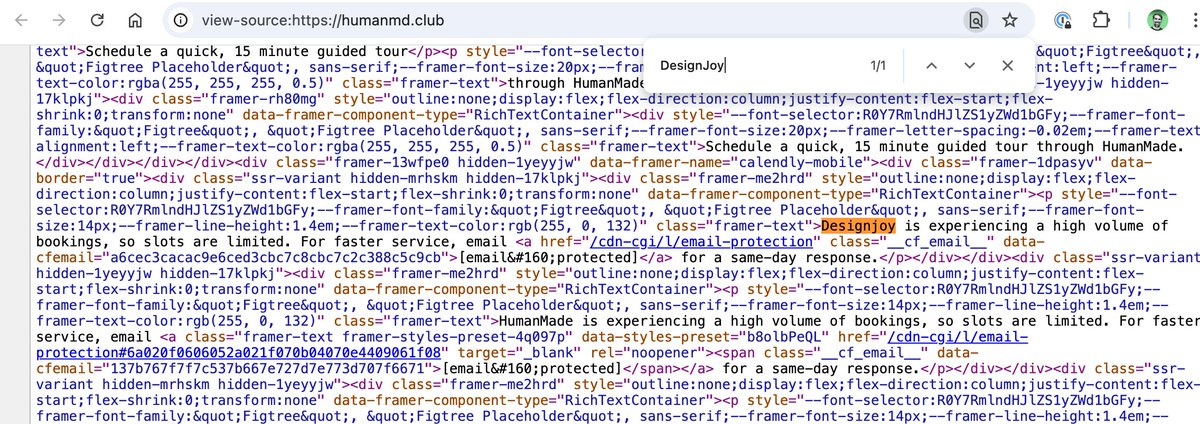

One of the most blatant rip offs of my brand and agency I've ever seen.
Even the name itself is inspired by one of my other companies.
All design assets stolen from me.
And the logo was stolen directly from @supercut_video.
humanmd.club
English


@Shpigford @robbyrussell I think you might know the answer :)
English
i have no idea what this does and at this point i'm too afraid to ask...
English

@mattstauffer Looking solid, long way from Goodwork Decatur
English

I'm deep into recording my next course. The topic on this one is *very different*--I don't know if we have anything else like it in the Laravel community or even much outside of it. I'm very, very excited about everything I'm sharing here. Definitely my most personal course.

English
@Stammy Sometimes, there is a notebook-style layout in ChatGPT that I find enjoyable. You basically converse about the deliverable you are working on.
English

one minor annoyance i have with ChatGPT and Claude is that when you reply to a response they scroll your question to the top... but very often i'm still reading the previous but see something i want to ask about, then another after but i have to do this scroll dance each time
i know this is definitely more of a power user issue and shouldn't be the core way of interacting but would love some sort of threaded replies and/or way to highlight and ask
especially for deep research where you're dealing with gobs of text you may want to reference in replies
English
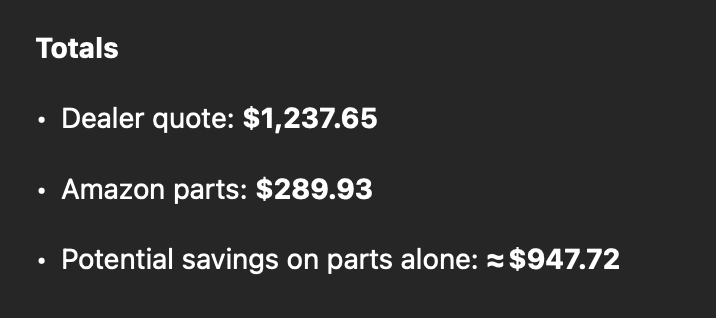
Reason #4838348 AI continues to blow my mind... Got frustrated with a MacBook issue that's driven me nuts for weeks, finally turned to ChatGPT, and had the answer in under 2 mins. 100% understand how this is going to eat Google's lunch. Unreal.

English
The additional ways I find myself leveraging AI change daily. So incredible.
English

Excuse me @stripe? This is absurd!
"Provide the last 3 months of bank statements for all bank accounts you use for your business, including accounts not linked to Stripe. These statements should show your available cash resources to cover any refunds or disputes as they arise."

English

@msfeldstein Is there a way to reference indexed docs in the rules?
English

Project Rules can be auto-attached to any composer/agent request based on filename globbing, or the agent can grab one based on its description. These rules are checked into your codebase so anyone can make use of them.

English
One of the things I've been working on at @cursor_ai is beefing up Cursor Rules. We want Agent to be as powerful as the most knowledgable person on your team. Here's how we use them at Cursor. 🧵

English
@Shpigford o man, you just brought back a ton of memories :)
English
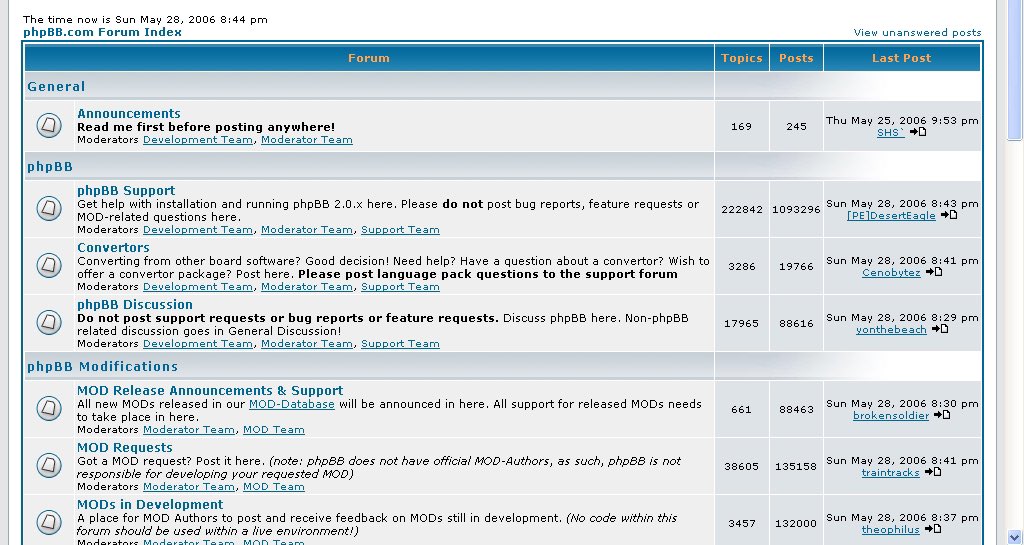
I’m not sure that’s how copyright restrictions work, Chat

English
@andrew_w_bass @cursor_ai Also, how are you thinking about Chat vs Composer? Composer seem "better" especially with the linting check but chat make more sense in my head to talk through the issues/change.
English

Here's mine:
# .cursorrules
Use the following guidelines as you build your project. This document reflects your preferences for:
- **Hono** (with typed stacks per [Hono Docs](hono.dev/docs/concepts/…))
- **TanStack Router** (React SPA)
- **Tailwind CSS** + **shadcn components**
- **Drizzle** (with **Postgres** as the database)
- **End-to-End Type Safety**
- **Easy Deployment** (Cloudflare, AWS, Vercel)
## Project Instructions
Use the project specification and guidelines as you build the app.
**Write the complete code for every step.** Do not get lazy.
Your goal is to completely finish whatever I ask for.
## Overview
This is an XML parsing tool for XML responses from OpenAI’s **o1 pro** model in ChatGPT.
## Tech Stack
- **Server**: [Hono](hono.dev) for server routes and API
- Following [Hono Stacks](hono.dev/docs/concepts/…) for typed Env bindings
- **Frontend**:
- [React](react.dev) + [TanStack Router](tanstack.com/router/latest/…) for SPA
- [Tailwind CSS](tailwindcss.com) for utility-first styling
- [shadcn](ui.shadcn.com) for pre-built Tailwind-based UI components
- **ORM**: [Drizzle](orm.drizzle.team) for Postgres
- **Icons**: [lucide-react](lucide.dev)
- **Hosting**: Should be easy to host on **Cloudflare**, **AWS**, or **Vercel**
## Project Structure
Below is a recommended structure for your **Hono + React (SPA)** application with **TanStack Router**. Feel free to adapt it as needed but keep the separation of logic from presentation.
├─ server/
│ ├─ index.ts # Hono server entry point
│ ├─ routes/ # Hono routes (REST endpoints, etc.)
│ ├─ db/ # Drizzle setup/config (Postgres)
│ └─ ...
├─ client/
│ ├─ main.tsx # ReactDOM.createRoot entry for the SPA
│ ├─ App.tsx # Main React component for the app
│ ├─ router/
│ │ ├─ index.ts # Exports the main TanStack Router instance or config
│ │ ├─ root.route.ts # Example “root” route (TanStack Router)
│ │ ├─ dash/
│ │ │ ├─ index.route.ts # Example route for /dash
│ │ │ └─ settings.route.ts # Example route for /dash/settings
│ │ └─ route-trees.ts # Example file exporting structured route trees
│ ├─ logic/ # Business logic, custom hooks, data fetching
│ ├─ components/
│ │ └─ ui/ # shadcn components (e.g., button.tsx, badge.tsx, etc.)
│ ├─ lib/ # Client-side utility code
│ ├─ assets/ # Static/media assets
│ └─ ...
├─ types/ # Shared type definitions (client + server)
│ ├─ index.ts # Barrel export for all types
│ └─ ...
├─ vite.config.ts # Vite configuration
├─ .env.example # Example environment file
├─ .env.local # Local environment file (never commit)
└─ ...
## Rules
Follow these rules when building the project.
### General Rules
- Use `@` to import anything from the project unless otherwise specified
- End-to-End Type Safety
# Naming Conventions
- Use kebab-case for filenames and folder names unless otherwise specified.
### Environment Rules
1. **Environment Variables**
- If you update environment variables, update the `.env.example` file accordingly.
- All environment variables should go in `.env.local` (never committed).
- Do **not** expose sensitive variables to the frontend.
- **For Vite-based client-side env variables**:
- Vite only exposes env variables prefixed with `VITE_`.
- Access them using `import.meta.env.VITE_SOME_VARIABLE` in your client code.
- Example `.env.local`:
```
VITE_API_URL="api.example.com"
```
- Then in client code:
```ts
const apiUrl = import.meta.env.VITE_API_URL;
```
2. **Server-Side Access**
- Access environment variables in Hono server code (using `process.env.VARIABLE_NAME`), but do not leak secrets.
### Type Rules
1. **Type Importing**
- When importing types, use `@/types` for clarity.
- Example: `import { MyType } from "@/types"`.
2. **Filename Conventions**
- Name type definition files like `example-types.ts`.
- All types should go in the `types` folder; re-export them from `types/index.ts`.
3. **Prefer Interfaces**
- Prefer interfaces over type aliases for data shapes, unless a union type or advanced features require a type alias.
**Example**:
```ts
// types/actions-types.ts
export type ActionState =
| { isSuccess: true; message: string; data: T }
| { isSuccess: false; message: string; data?: never };
```
then export from `types/index.ts`
```ts
// types/index.ts
export * from './actions-types';
```
### Frontend Rules
We are building a **Single Page Application (SPA)** with **TanStack Router** and React. No React Server Components are required. Prefer **shadcn** components for UI elements.
1. **Structure**
- Put route definitions in `client/router/`.
- Keep logic (data fetching, API calls, state mgmt, custom hooks) in `client/logic/`.
- Store shadcn components in `client/components/ui/`.
2. **Routing**
- All routing is handled by TanStack Router. Keep your route definitions strongly typed.
- Use asynchronous data fetching as needed; prefer to keep business logic in `client/logic/` or custom hooks.
3. **Components**
- Use `div` unless another HTML tag is a better semantic fit.
- Separate main parts of a component’s JSX with extra blank lines for clarity.
- Use `lucide-react` for icons.
- Keep presentational components “dumb” if possible (handle data manipulation in your logic layer).
- When using **shadcn** components, keep them in `client/components/ui/` for consistency and ease of updates.
4. **Fetching Data**
- Use `useQuery` from `@tanstack/react-query` for fetching data.
- Use `useMutation` from `@tanstack/react-query` for creating, updating, and deleting data.
- In general, prefer to use `useQuery` and render a shadcn skeleton component while the data is loading. Stay away from `useEffect` and `useState` for data fetching.
**Example**:
```tsx
// client/components/ui/example-component.tsx
import { Button } from '@/client/components/ui/button';
import { LucideIcon } from 'lucide-react';
interface ExampleProps {
items: string[];
}
export function ExampleComponent({ items }: ExampleProps) {
return (
();
app.route('/example', exampleRoute);
export default app;
```
#### Client Server Communication
Follow the [Hono Stacks](hono.dev/docs/concepts/…) for client server communication.
1. Hono is used for the API.
Example:
```ts
const route = app.get(
'/hello',
zValidator('query', z.object({ name: z.string() })),
(c) => {
const { name } = c.req.valid('query');
return c.json({ message: `Hello! ${name}` });
}
);
```
2. Validate with Zod to receive the value of the query parameter.
Example:
```ts
import { zValidator } from '@hono/zod-validator';
import { z } from 'zod';
app.get(
'/hello',
zValidator(
'query',
z.object({
name: z.string()
})
),
(c) => {
const { name } = c.req.valid('query');
return c.json({
message: `Hello! ${name}`
});
}
);
```
3. Sharing the Types
- To emit an endpoint specification, export its type.
```ts
const route = app.get(
'/hello',
zValidator(
'query',
z.object({
name: z.string()
})
),
(c) => {
const { name } = c.req.valid('query');
return c.json({
message: `Hello! ${name}`
});
}
);
export type AppType = typeof route;
```
4. Create a client object by passing the AppType type to hc as generics.
```ts
import { AppType } from './server';
import { hc } from 'hono/client';
const client = hc('/api');
const res = await client.hello.$get({
query: {
name: 'Hono'
}
});
```
**Client Server Example with Hono and React**
API Server:
```ts
// functions/api/[[route]].ts
import { Hono } from 'hono';
import { handle } from 'hono/cloudflare-pages';
import { z } from 'zod';
import { zValidator } from '@hono/zod-validator';
const app = new Hono();
const schema = z.object({
id: z.string(),
title: z.string()
});
type Todo = z.infer;
const todos: Todo[] = [];
const route = app
.post('/todo', zValidator('form', schema), (c) => {
const todo = c.req.valid('form');
todos.push(todo);
return c.json({
message: 'created!'
});
})
.get((c) => {
return c.json({
todos
});
});
export type AppType = typeof route;
export const onRequest = handle(app, '/api');
```
The client with React and React Query:
```tsx
// src/App.tsx
import {
useQuery,
useMutation,
QueryClient,
QueryClientProvider
} from '@tanstack/react-query';
import { AppType } from '../functions/api/[[route]]';
import { hc, InferResponseType, InferRequestType } from 'hono/client';
const queryClient = new QueryClient();
const client = hc('/api');
export default function App() {
return (
);
}
const Todos = () => {
const query = useQuery({
queryKey: ['todos'],
queryFn: async () => {
const res = await client.todo.$get();
return await res.json();
}
});
const $post = client.todo.$post;
const mutation = useMutation<
InferResponseType,
Error,
InferRequestType['form']
>(
async (todo) => {
const res = await $post({
form: todo
});
return await res.json();
},
{
onSuccess: async () => {
queryClient.invalidateQueries({ queryKey: ['todos'] });
},
onError: (error) => {
console.log(error);
}
}
);
return (
);
};
```
### Database Rules
- All database operation should go through drizzle ORM on the server.
- Use the `db/schema.ts` file to define the database schema.
- Use the `createdAt` and `updatedAt` columns to track when a row was created and last updated.
- When creating a relationship, always create a many to many relationship, even if it is a one to one relationship.
{items.map((item) => (
);
}
```
### Server Rules
Since we use **Hono** for the server:
1. **Hono Setup**
- Create routes in `server/routes`.
- Mount them in `server/index.ts` or a similar entry file:
```ts
import { Hono } from 'hono';
import { exampleRoute } from '@/server/routes/example-route';
// Example typed Env binding (see Hono Stacks docs)
interface Bindings {
DATABASE_URL: string;
}
const app = new Hono{item}
))}
-
{query.data/?.todos.map((t…) => (
- todo.id}>{todo.title} ))}
English
Having a well crafted @cursor_ai rules file is a competitive advantage.
English
@andrew_w_bass @cursor_ai I've been tweaking my rules lately, so it's great to see your example. Do you know if you need to mention the docs in the rules if you have already indexed them in the other section? Have you run into the "Apply" parsing breaking when using o1? I don't see it in C3.5, only o1
English

@ianlandsman I think you have to look at what he says through the lens of "founder"... overly ambitious and delusional, but with a vision pointed in the right direction. In the grand scheme of things, he misses a deadline by a few years...seems like par for anything big.
English
@ianlandsman I’m confused by the pessimism. Sure, he’s flawed, but most of these influential engineers were. In engineering, I appreciate his focus on pushing critical things instead of just improving vacuums or phones. Also, a booster is 20 stories tall, and they caught it.
English