

Martin Reinhard
49 posts


BitLocker Recovery Key Cleanup: Fixing the 200-Key Limit
If you hit the 200 BitLocker recovery key limit in Entra, silent encryption will fail. Until now, there has been no easy fix and no automatic cleanup.
In a previous post, we showed you a glimpse of the BitLocker recovery key cleanup feature in the latest Windows Insider build. Now, let’s take a closer look (AKA A Rudy Deep Dive).
How does it actually work?
How does it clean up stale keys and fix the 200-key limit?
How do you trigger it yourself with PowerShell and the Entra Certificate?
patchmypc.com/bitlocker-reco…
#Intune #MSIntune #Windows #Windows11 #Entra #Security #PatchMypc #bitlocker #TPM #WindowsUpdates
English
@IntuneSuppTeam Just to be clear, the filter is correct. In the preview, the affected Surface device shows up as expected.
Right now, running larger rollouts with Autopilot is a huge pain. 😡
English
@IntuneSuppTeam I initially thought the issue was related to Incident IT1180739 and had already been fixed. But the problem is back. A Win32 app with Required intent and an exclude filter (device.manufacturer -startsWith "Microsoft") is still installing during ESP on a Surface device. 🤷♂️
English
Hi @IntuneSuppTeam, is there a reason why Win32 app assignment filters aren’t applied during the ESP, or should that actually work?
English
@IntuneSuppTeam Is it possible that the "Turn off the Store application" setting also blocks Intune deployment of Store apps, contrary to what's described here? ➔ #considerations" target="_blank" rel="nofollow noopener">learn.microsoft.com/en-us/windows/…
English
While we're at it: the assignment section of the Firewall policies is buggy too. In the filter selection, only the first three filters (alphabetically) are selectable. Not exactly the quality I expect from an enterprise-grade workplace management tool. @IntuneSuppTeam 😡
English
@IntuneSuppTeam @MSIntune Intune Endpoint Security – Windows Firewall policies seem totally broken! Once created, settings can't be changed. The 'Next' button on the config page is greyed out after any edit. Can you please fix this ASAP? 🤯
English
@IntuneSuppTeam A bit disappointing that, once again, the community (MVP and Mr. DLL @Mister_MDM) had to provide proof of a Microsoft issue through DLL reviews. -> patchmypc.com/bitlocker-reco…
Microsoft support case has seen no progress for several weeks... @IntuneSuppTeam @DeviceDeploy
English

@rem_ch Hi Martin, 👋 Could you DM us the Support case number, we'd be happy to take a look! ^MM
English

So when Intune manages BitLocker and you "suspend" BL to do let's say a BIOS update, and Intune syncs, it will add another recovery key password on the device. You can rinse and repeat and get like 12 keys. @IntuneSuppTeam tells me this is "as designed". Why? @DeviceDeploy
English
@JankeSkanke @MSEndpointMgr @modaly_it @sandy_tsang Thanks for the quick response! It's unfortunate, as the workbook would have filled some gaps in the Windows Update for Business reports.
English
![Jan Ketil Skanke [MVP]](https://pbs.twimg.com/profile_images/1498931545570172928/ehpamsCh.jpg)
@rem_ch @MSEndpointMgr @modaly_it @sandy_tsang I am sorry, that report has not been maintained for years and are not in pair with the new data schema and will not longer work.
English
@MSEndpointMgr @modaly_it @JankeSkanke @sandy_tsang Hi everyone! Quick question: Should your Windows Update Compliance Dashboard V8.0 also work with Windows Update for Business Reports data? I can’t find the WaasDeploymentStatus table in the Log Analytics workspace. Any ideas?
English
@DeviceDeploy @IntuneSuppTeam @brookspeppin @AasawariNavathe ...I have an open Microsoft support case for this issue. Maybe you could take a look at it? Feel free to reach out if you'd like the tracking ID.
English
@DeviceDeploy @IntuneSuppTeam @brookspeppin @AasawariNavathe I'm so sorry, I completely missed your response! I agree, 200 is definitely more than enough—as long as the client doesn't hit the limit on their own. ;)
The device only has one active key.
English
@IntuneSuppTeam @brookspeppin @AasawariNavathe @DeviceDeploy ....the recovery key limit of 200 fills up without being noticed, and afterward, there is no solution!? @IntuneSuppTeam @brookspeppin @DeviceDeploy @AasawariNavathe
English
@IntuneSuppTeam @brookspeppin @AasawariNavathe @DeviceDeploy Are there any insights or answers to this great question? Unfortunately, the problem still persists! Cleaning up on the client side using "Remove-BitLockerKeyProtector" definitely does not solve the issue. Recovery keys in Entra are never cleaned up...
English
@IntuneSuppTeam @MSIntune ...would be nice if the WindowsLAPS Policy type is completed with an option to enable the Built-in local Administrator Account
English
📣 Have you heard? #Windows LAPS is now available in public preview with @MSIntune!
▶️ Learn more: msft.it/6012g33r6
#MSIntune
English
@IntuneSuppTeam any news on this problem? I notice this behavior in every tenant.....just test it yourself
English
@rem_ch Thanks for the info! We're looking into this, and we'll keep you updated! ^MS
English
@IntuneSuppTeam Is there any way the device install stauts from a Win32 app deployment provides useful output?
Each device is listed at least twice in the device status overview. (user & system). with the current filters you will not get any useful results.
English
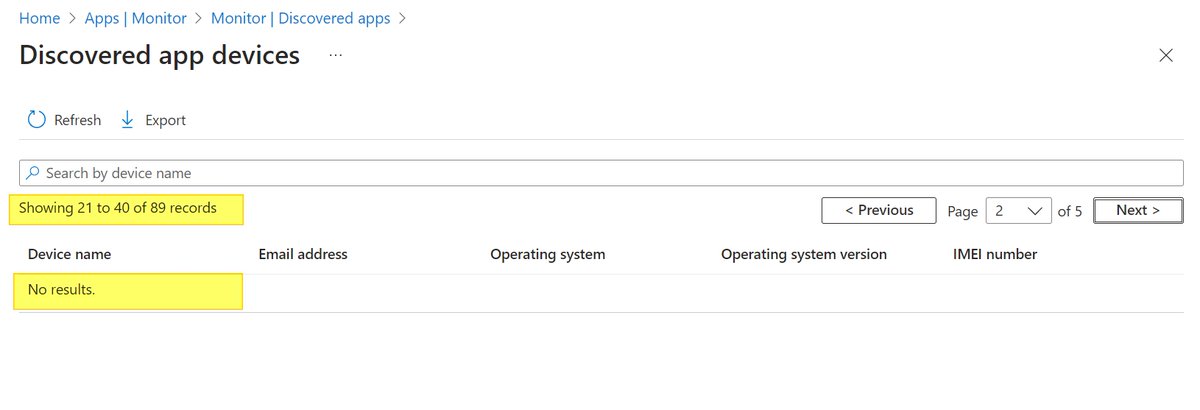
@SCCM_Avenger @RealMarkPowell unfortunately, the "discovered apps" is not really useful in its current state. from the second page on, no results are displayed. I can reproduce the problem in any tenant.... so please test it yourself
English

@RealMarkPowell I'm going to break myself into jail here but (hold my beer, watch this), lol.
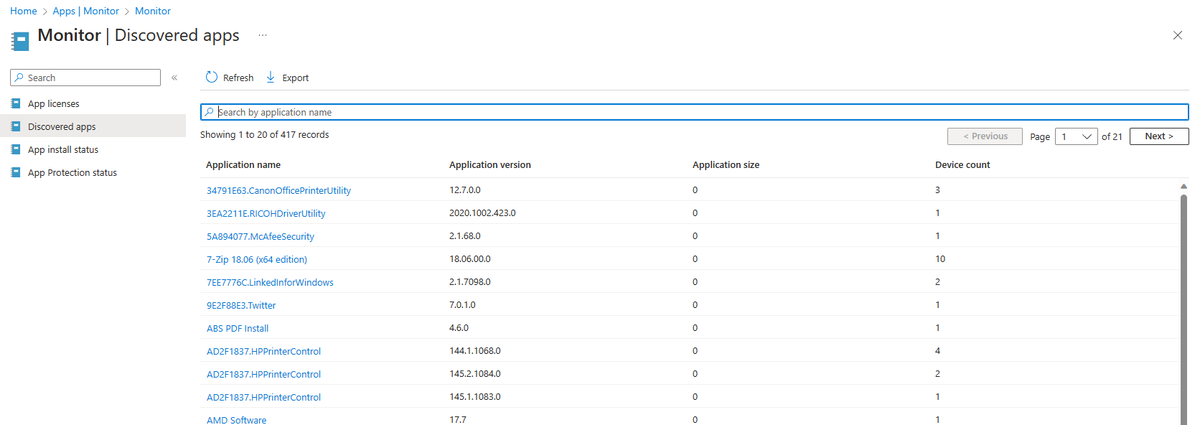
Have you looked at the "Discovered apps" report? This report will tell you the apps installed and the devices there installed on.
English
Lets talk about Inventory in Microsoft Intune. What's wrong with it? What changes would you make? Be blunt, no holding back, we are listening. #Intune #Cloudonly #MSIntune #configmgr
GIF
English
Martin Reinhard retweetledi


English