rootwraith

68 posts

rootwraith banner
rootwraith

rootwraith

@rootwraith

Katılım Eylül 2024
223 Takip Edilen14 Takipçiler
rootwraith retweetledi
Mahir 🇹🇷🇬🇧
Mahir 🇹🇷🇬🇧@ScrewderiaF1·
Toto Wolff on his way to take back the engine they gave to McLaren
English
58
2.2K
27K
346.1K
rootwraith retweetledi
Sean Metcalf
Sean Metcalf@PyroTek3·
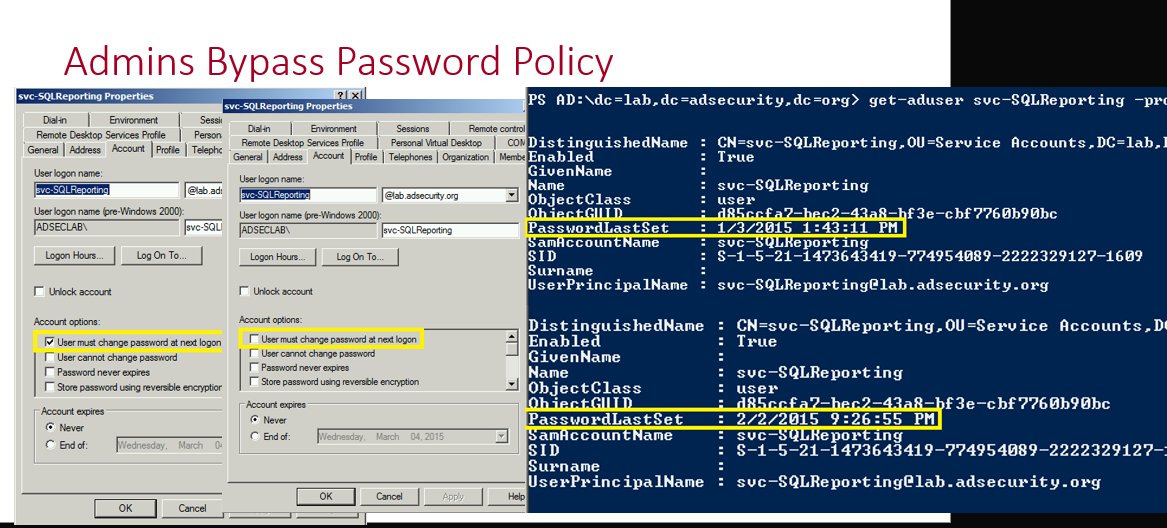
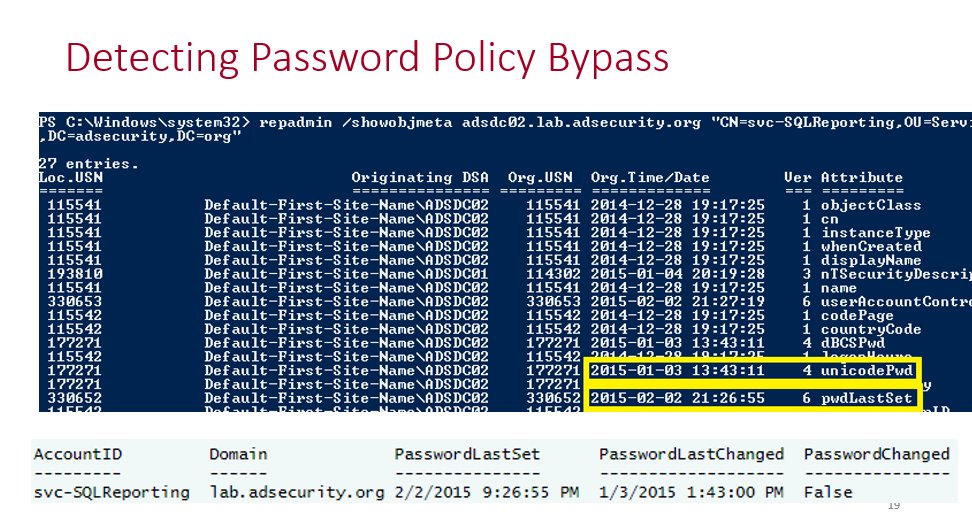
In Active Directory, there is a method that’s been around for many years which changes the password last set date but not the actual password. This is what I call a “fake password change” since the account appears to have a recent password when scanning for old passwords based on password last set, but the underlying password hasn’t actually changed. I spoke about this in my 2015 @BSidesCharm talk which was my first conference talk. More details including step-by-step screenshots are here: adsecurity.org/?p=4969 Why does this happen? There are times where service account (or admin accounts) need to have password changes, but someone doesn’t want to do the work to change them. The ability to fake a password change requires modify rights on the pwdLastSet attribute which provides the ability to check/uncheck the setting “User must change password at next logon”. This setting is enabled when you want the user to change their own password when they logon. How does this work? This is simple to do when you have rights on the target account (in this example the password last changed in August 2025). We open up Active Directory Users and Computers (ADUC), double-click on the target account to open up the account properties and then click on the Account tab. From here we check the box for “User must change password at next logon” and click Apply. The PasswordLastSet date is now blank. Which makes it seem like the account has never had a password set. We continue with our process where we uncheck the box for “User must change password at next logon” we checked and then click Apply. After performing this action, the password change date has now been set to the current date and time even though the password itself hasn’t been changed since August 2025. We have successfully faked a password change! Why does this happen? This happens because the “User must change password at next logon” option is used to force a user to change their password at next logon. With it checked, Active Directory is waiting for the user to attempt to logon which is when the user is directed to change their password. During this time the PasswordLastSet value is blank since it is waiting for a new password. Once the user changes their password, the checkbox is effectively removed and the current date and time are set for the user’s passwordlastset property (technically this is the “pwdlastset” attribute, but the AD PowerShell cmdlets use that property). An attacker could use this technique for an account with an old password they discover and have control of the account (with the ability to flip this bit). This would show that the password changed without it actually changing. Detect fake Active Directory password changes at scale I wrote a PowerShell script that will scan either the Active Directory Admins or All Users in the domain to see if there’s a fake password change that has been performed on them. github.com/PyroTek3/Activ…
Sean Metcalf tweet mediaSean Metcalf tweet mediaSean Metcalf tweet media
English
6
154
976
98.4K
rootwraith retweetledi
Haakon Wibe
Haakon Wibe@HaakonWibe·
Look.. it's a Conditional Access policy simulator built by an infra architect guy who got tired of squinting at What If results 🫠 Shiny graphs yay! 🔗ca.haakonwibe.com No sign-in needed, click Sample Data and play around. Or connect to your own data - all's in browser.
GIF
English
15
105
588
59K
rootwraith
rootwraith@rootwraith·
Ah yes, modern elegance.
rootwraith tweet media
English
0
0
0
8
rootwraith retweetledi
The Hacker News
The Hacker News@TheHackersNews·
🚨 CISA confirms active exploitation of a critical VMware vCenter Server flaw. CVE-2024-37079 allows remote code execution via a DCE/RPC heap overflow if an attacker has network access. 🔗 Details → thehackernews.com/2026/01/cisa-a…
English
9
91
223
33.8K
rootwraith retweetledi
Horizon Secured
Horizon Secured@horizon_secured·
🔒 Secure Bits 💡 Did you know 𝘆𝗼𝘂 𝗰𝗮𝗻 𝗵𝗶𝗱𝗲 𝗗𝗼𝗺𝗮𝗶𝗻 𝗔𝗱𝗺𝗶𝗻𝘀 from standard discovery—even from other admins? Active Directory is a “𝗿𝗲𝗮𝗱-𝗺𝗮𝗻𝘆” 𝗱𝗶𝗿𝗲𝗰𝘁𝗼𝗿𝘆 by design. But 𝗟𝗶𝘀𝘁 𝗢𝗯𝗷𝗲𝗰𝘁 𝗠𝗼𝗱𝗲 (𝗟𝗢𝗠) can change that. 🕵️‍♂️ Martin Handl shows how to leverage LOM to make Tier-0 accounts completely invisible to lower-tier admins. 🔧 𝗛𝗼𝘄 𝗶𝘁 𝘄𝗼𝗿𝗸𝘀: 1️⃣ 𝗘𝗻𝗮𝗯𝗹𝗲 𝗟𝗶𝘀𝘁 𝗢𝗯𝗷𝗲𝗰𝘁 𝗠𝗼𝗱𝗲 (𝗟𝗢𝗠) Set dSHeuristics=001 in AD’s Configuration partition. No restart needed—takes effect instantly across the forest. 2️⃣ 𝗨𝘀𝗲 𝘀𝗽𝗲𝗰𝗶𝗮𝗹 𝗔𝗖𝗟 𝗰𝗼𝗺𝗯𝗶𝗻𝗮𝘁𝗶𝗼𝗻𝘀: On the parent OU: Deny List contents On the Tier-0 object itself: Deny List object Together, this hides the object—even if a user has read access on the directory. 3️⃣ 𝗟𝗲𝘁 𝗔𝗱𝗺𝗶𝗻𝗦𝗗𝗛𝗼𝗹𝗱𝗲𝗿 𝗽𝗿𝗼𝗰𝗲𝘀𝘀 𝗱𝗼 𝘁𝗵𝗲 𝘄𝗼𝗿𝗸: Apply custom ACLs to the AdminSDHolder container—those propagate automatically to all protected Tier-0 accounts every hour. Bonus: Martin provides a PowerShell script to apply/revert this across any OU. 👁️ 𝗪𝗵𝗮𝘁’𝘀 𝘁𝗵𝗲 𝗲𝗳𝗳𝗲𝗰𝘁? From the viewpoint of Tier-1 or Tier-2 users (like helpdesk or server admins), the hidden accounts don’t exist. No group listing, no LDAP enumeration, no PowerShell output. 📌 𝗨𝘀𝗲 𝗿𝗲𝘀𝗽𝗼𝗻𝘀𝗶𝗯𝗹𝘆: Hiding is not a replacement for proper security controls (Tiering, Security Baselines, LAPS, Role Separation, ..., ). But it adds another layer—obscurity that frustrates attackers and tools alike. 📄 𝗙𝘂𝗹𝗹 𝗽𝗼𝘀𝘁 + 𝗣𝗼𝘄𝗲𝗿𝗦𝗵𝗲𝗹𝗹 𝘀𝗰𝗿𝗶𝗽𝘁 by Martin Handl: iqunit.com/become-an-invi… (use auto-translation from German, it is definitely worth it!). 𝗛𝗶𝗱𝗶𝗻𝗴 𝗰𝗮𝗻 𝗯𝗲 𝗮𝗹𝘀𝗼 𝘂𝘀𝗲𝗱 𝗯𝘆 𝗮𝗻 𝗮𝘁𝘁𝗮𝗰𝗸𝗲𝗿, are you sure nothing hides in your Active Directory? How do you search for something like that? ✅ PS: I got you covered, 𝗔𝗗𝗣𝗿𝗼𝗯𝗲 can discover hidden accounts... #ActiveDirectory #CyberSecurity #WindowsSecurity #RedTeam #LOM #ListObjectMode #T0 IQunit IT GmbH Martin Handl @BlueTeamDave
Horizon Secured tweet media
English
2
70
374
27.4K
rootwraith retweetledi
Matt Johansen
Matt Johansen@mattjay·
Chat is this for real? Gartner didn’t even put Claude Code or Codex on the quadrant at all? GitHub the leader?
Matt Johansen tweet media
English
40
5
80
22.9K
rootwraith retweetledi
spencer
spencer@techspence·
I can’t wait to still be talking about Active Directory security ten years from now.. 😅🙏
English
32
24
288
20.5K
rootwraith retweetledi
ALI TAJRAN
ALI TAJRAN@alitajran·
Set up clear Naming Standards for your Conditional Access policies! Many organizations have Conditional Access (CA) policies set up in Microsoft Entra ID, but often there are too many, and their names don't make it easy to understand what they do. A good naming convention helps you quickly locate policies and understand their purpose without needing to open each one in the Microsoft Entra admin center. Microsoft recommends that you name your policy to show: - A Sequence Number - The cloud apps it applies to - The response - Who it applies to - When it applies A descriptive name helps you to keep an overview of your Conditional Access implementation. Additionally, the Sequence Number is helpful if you need to reference a policy during a conversation. For example, you can say: Policy CA01 and CA03 are interfering with each other. Please disable policy CA01 so we can troubleshoot this issue together. #Microsoft365 #EntraID #Cybersecurity
ALI TAJRAN tweet media
English
5
20
134
10.8K
rootwraith retweetledi
Matt Levy | Microsoft Security MVP
If you are an Entra ID Admin tasked with cleaning up Enterprise Applications and App Registrations, you might be considering "ripping the band aid off" and using the "Scream Test". I recently published a blog post about the pitfalls of the scream test: buff.ly/GfZfVwL
Matt Levy | Microsoft Security MVP tweet media
English
0
11
60
3.9K
rootwraith retweetledi
Dr. Nestori Syynimaa
Dr. Nestori Syynimaa@DrAzureAD·
New #AADInternals version is finally out now: ▪ Moved endpoint related stuff to new module: AADInternals-Endpoints ▪ Added blue team stuff: Get app consent info, find backdoors, convert SID<>Entra ID Object ID, find abusable dynamic groups ▪ Added red team stuff: Get ESTSAUTH cookies, export Intune certificate, invoke PS scripts as system or other users See full change log at: #version-info" target="_blank" rel="nofollow noopener">aadinternals.com/aadinternals/#…
Dr. Nestori Syynimaa tweet media
English
7
117
411
27.2K
rootwraith retweetledi
Horizon3.ai
Horizon3.ai@Horizon3ai·
NodeZero just became the first AI to fully solve the Game of Active Directory (GOAD) in 14 minutes — 50x faster than human experts! The future of cyber warfare is algorithms vs algorithms with humans by exception. NodeZero is leading the way.
English
6
41
188
220.8K
rootwraith retweetledi
spencer
spencer@techspence·
How to harden your environment better than 90% of organizations [Part 1] 1. Run PingCastle 2. Run Locksmith 3. Run ADeleginator Bonus: Run PurpleKnight, AppLocker Inspector (if you use AppLocker), and ScriptSentry (if you have logon scripts) Then fix all the findings. What else?
English
24
98
738
46K