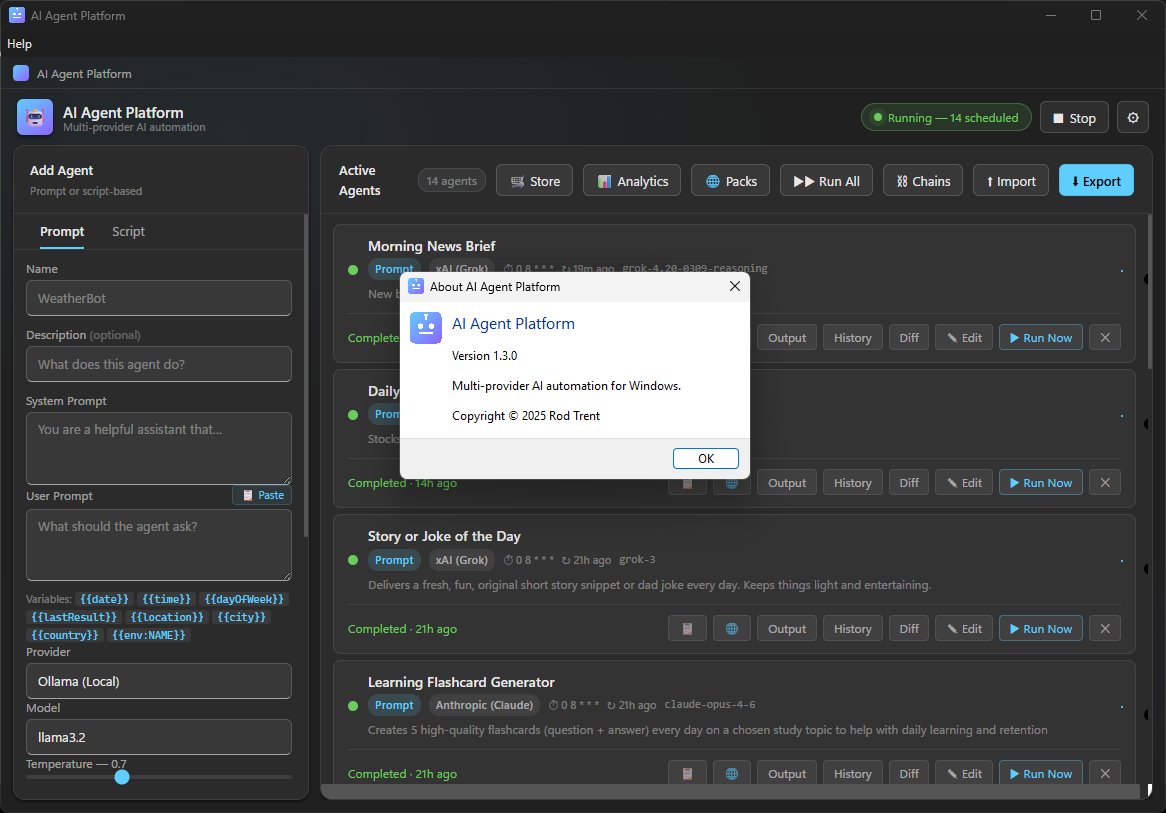
Full blog post on Friday, but AI Agent Platform v1.3.0 is out.
The agents were already good. The infrastructure around them wasn't keeping up.
v1.3.0 fixes that:
🗂️ Agent Groups — organize your fleet into named collections. Run an entire group from the header or right from the system tray with a single click.
🔌 MCP Server Integration — attach any Model Context Protocol server to an agent and the LLM gets live access to real tools, real data, and real APIs before every run. This is the biggest architectural leap in the platform's history.
📡 Outbound Webhooks — every agent completion can now POST its output to Slack, Teams, Power Automate, or any HTTP endpoint. Agents that find things should tell people. Now they do.
📊 Output Diffing — a single click shows exactly what changed between the current run and the last one. Perfect for monitoring agents.
📅 Automatic Date/Time Context — every agent now knows today's date and your approximate location automatically. No more {{date}} variables you forgot to add.
⛓️ Chain Graph + Cycle Detection — visualize your entire agent chain graph and catch circular dependencies before they cause problems at runtime.
Open source. MIT license. Windows 11. Built with Electron.
👉 lnkd.in/gc-HGUZR
#CloudPolicyPreferences, the community tool for setting Group Policy Style settings on #MSIntune devices, has hit version 1.0.18.
✅ Multi-Admin Approval
✅ Azure OpenAI integration
✅ Threat detection reporting
✅ Feedback Hub
cloudpolicypreferences.com
So good it's skipping a few versions. Driver Automation Tool v10.0.0 is coming hard and fast. #MSIntune package testing underway, and hoping to have this #CheckedInByFriday#ConfigMgr#SCCM
Intune 2603 finally fixes RBAC scope tag pain with Scoped Permissions.
I took a deep dive into how it works & which real‑world problems it solves 👇
@verboonjanic/a-deep-dive-into-the-new-intune-scoped-rbac-permissions-3ffb6a9cee74" target="_blank" rel="nofollow noopener">medium.com/@verboonjanic/…
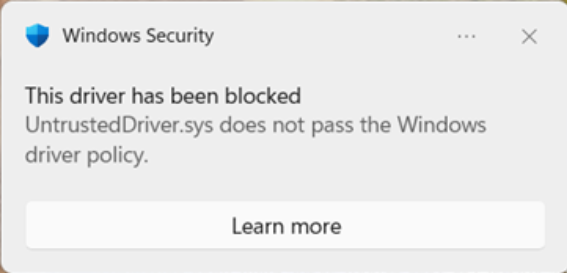
Advancing Windows driver security: Removing trust for the cross-signed driver program
A great step towards a more secure Windows platform, rollout in evolution mode starts in April!
#Windowstechcommunity.microsoft.com/blog/windows-i…
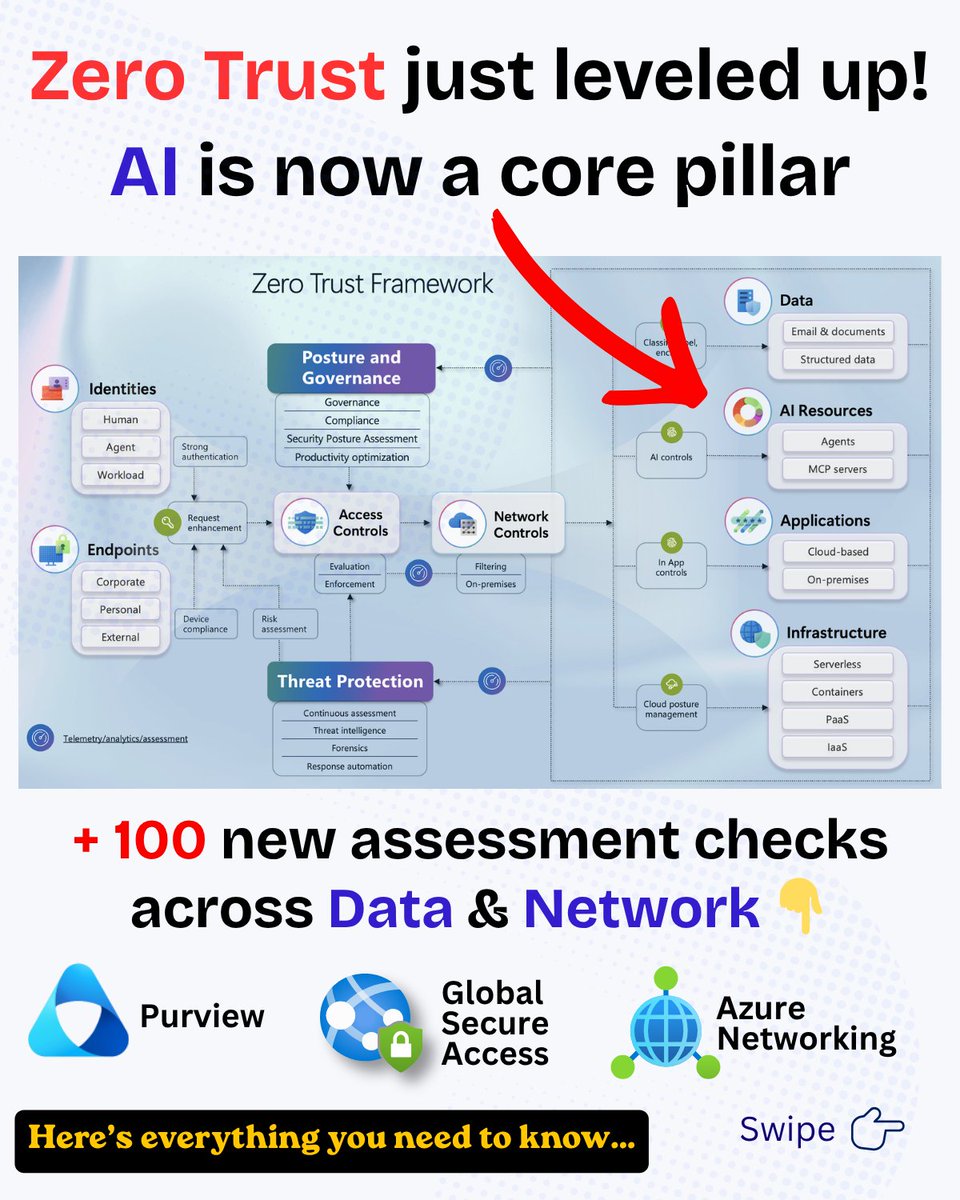
Folks, we just released a major update to our Zero Trust Workshop and Zero Trust Assessment
Zero Trust now includes AI
100+ new assessment checks across:
• Data
• Network
🧵👇
1/8
🚀 AccessLens v1.6.0 just dropped
The Gap Analysis engine just got a major upgrade.
🛡️ 70 security checks
📊 10 categories
📚 5 frameworks
Now detects:
🌍 Risky locations
⚠️ Dangerous exclusions
🔐 Real MFA bypass gaps
📈 Expanded CIS coverage
🧠 Policy relationship analysis
See what your policies are really doing.
Try it free → 🔗accesslens.co.uk
Accelerate Your Zero Trust Journey - A comprehensive framework from Microsoft to help organizations adopt a Zero Trust strategy and deploy security solutions end-to-end — now with a new AI pillar for securing agents and AI resources
microsoft.github.io/zerotrustasses…
Microsoft have finally started to update the 𝐄𝐧𝐭𝐫𝐚 𝐋𝐢𝐜𝐞𝐧𝐬𝐞 𝐔𝐭𝐢𝐥𝐢𝐬𝐚𝐭𝐢𝐨𝐧 𝐢𝐧𝐬𝐢𝐠𝐡𝐭𝐬 blade! > ourcloudnetwork.com/microsoft-upda…
It's been over 6 months since I sat down with the Microsoft product owner for this feature and gave my feedback, and it's great to see some improvements appearing in the UX this morning!
#Entra#Microsoft#License
Technology and the future of our industry will be defined by two things: frontier models, and the products through which they are experienced. For some time, I’ve been thinking about how we best tackle these huge challenges, and today I’m excited to be evolving our structure at Microsoft AI, ensuring we’re positioned to succeed in both.
I came to Microsoft with an overriding mission: to create Superintelligence that delivers a transformative, positive impact for millions of people. This requires us to build frontier models, at scale, pushing the boundaries of what’s possible. Everything else follows from this. It's the foundation for our future as a company. With our ambitious, long-term frontier scale compute roadmap locked, we now have everything we need to build truly SOTA models.
The next phase of this plan is to restructure our organization to enable me to focus all my energy on our Superintelligence efforts and be able to deliver world class models for Microsoft over the next 5 years. These models will enable us to build enterprise tuned lineages that help improve all our products across the company. They’ll also enable us to deliver the COGS efficiencies necessary to be able to serve AI workloads at the immense scale required in the coming years. Achieving all this will be a huge challenge, and I’m committing everything we have – and I have personally – to make it happen.
To that end, I’ve been working hard with other leaders in the background for a while now to define a strategy to unify Copilot by bringing together the Consumer and Commercial efforts as one. We all know this makes sense. Every user – whether at home or at work – will be able to enjoy the full benefit of what we are all building. Today, we’re combining these organizations into a single, unified Copilot org. @JacobAndreou has demonstrated himself to be an outstanding leader for the product experience and clearly has the product instincts, the operational range, and the conviction to make Copilot a great success.
Jacob will retain a dotted line to me, and I’ll stay directly involved in much of the day-to-day operation of MAI and supporting Jacob to drive all areas of product strategy. To ensure that the models we build and the products we ship are mutually reinforcing, we are establishing a Copilot Leadership Team that includes me, Jacob, Charles Lamanna, Perry Clarke, and Ryan Roslansky. This will enable us to focus our brand strategy, our product roadmap, our models and our core infrastructure as one to deliver the best experiences possible for all our users.
Thank you to the team for everything you’ve done over the last few years. I know how hard everyone has been pushing to help the company adapt to this new era.
We really do have an incredible opportunity to redefine Microsoft for this agentic revolution. Let’s keep driving hard in this next chapter!
blogs.microsoft.com/blog/2026/03/1…
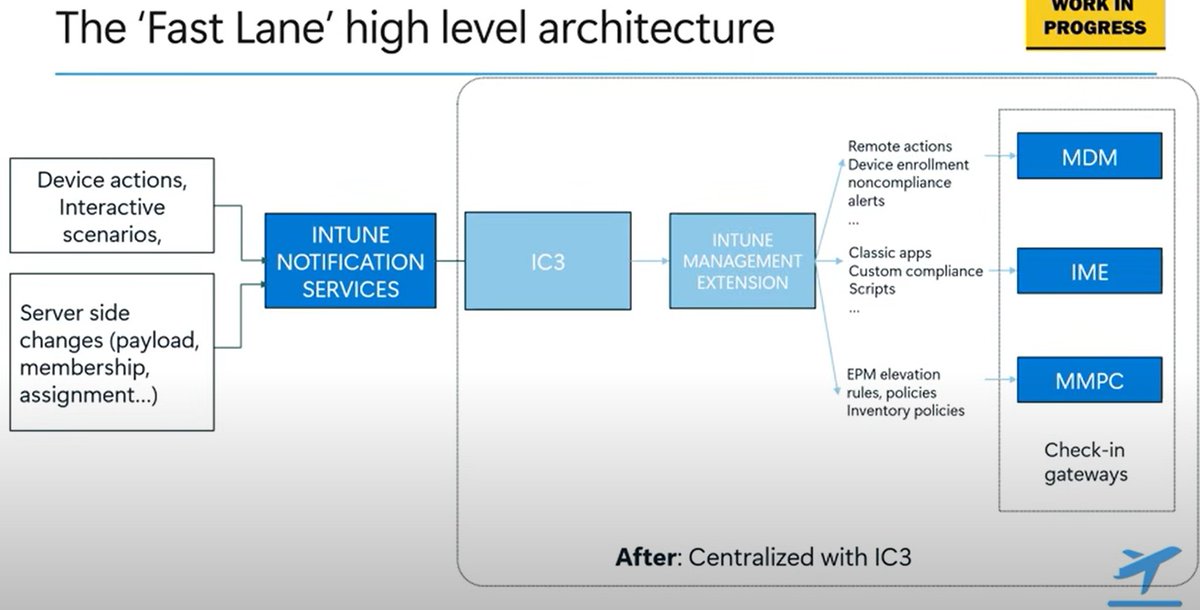
The Fast Lane.... IC3..... Do I need to say anything more?
It's even bigger than I thought....
Win32Apps/PowerShell script/All remote actions /MMP-C policies....
I only got 1 thing to say... Shiver Me Timbers... that's is mindblowing...
I guess I need to poke around the IME a bit more the next few weeks
patchmypc.com/blog/intune-ti…#Intune#MSIntune#Windows#Windows11
🚀 Join the Autopilot Monitor Private Preview and transform how you troubleshoot Windows Autopilot.
Gain deep insights, real-time visibility, and faster root-cause analysis during enrollment.
👉 autopilotmonitor.com#WindowsAutopilot#MSIntune#Microsoft#Windows
Identity just got a new front door ✨
Microsoft is previewing a new homepage for myaccount.microsoft.com
Users can now:
🔔 See expiring groups
⚡ Approve access requests
🔐 Setup MFA
👤 Get personalized recommendations
All in one unified portal experience.
Big improvement for identity UX.
Announcing Copilot Cowork, a new way to complete tasks and get work done in M365.
When you hand off a task to Cowork, it turns your request into a plan and executes it across your apps and files, grounded in your work data and operating within M365’s security and governance boundaries.
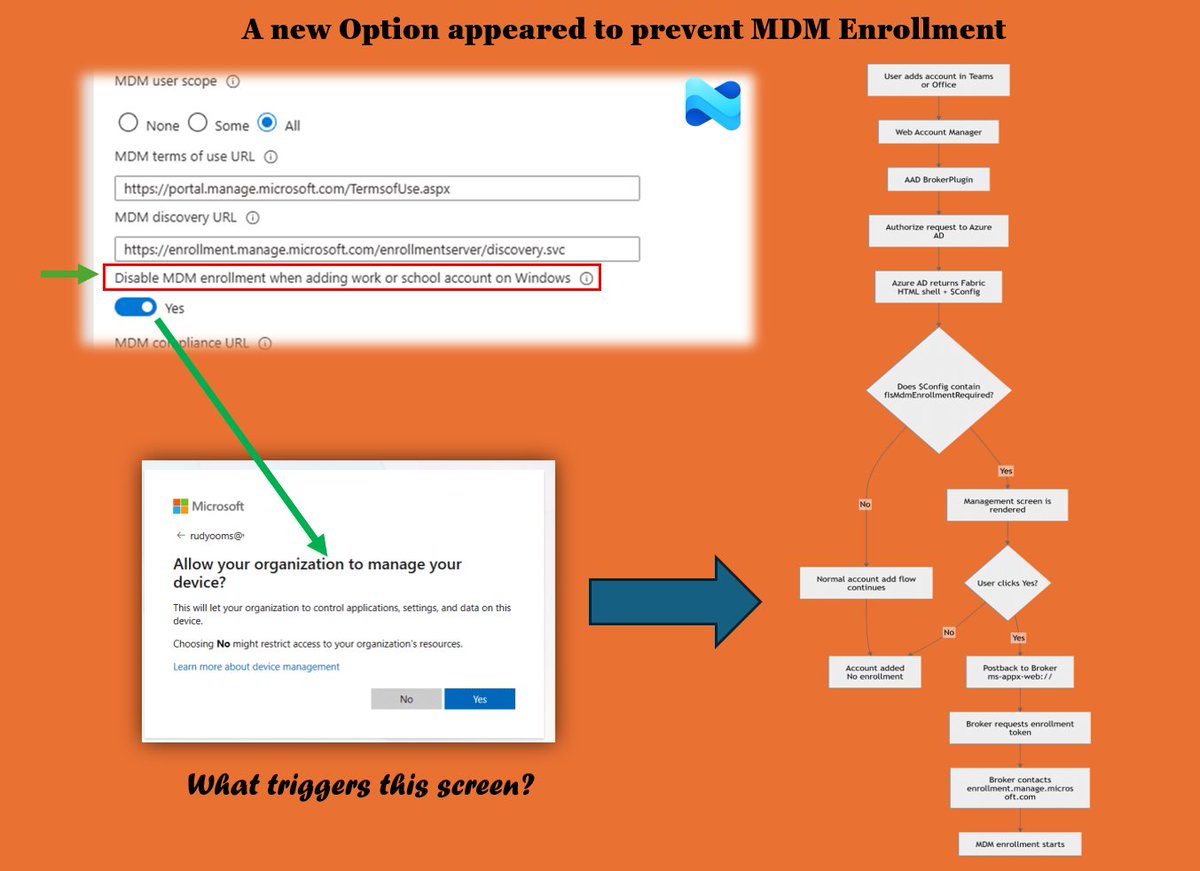
Disable MDM Enrollment When Adding a Work or School Account on Windows
Everyone seems to be talking about the new setting that prevents automatic MDM enrollment when a user adds a work or school account from Teams or Office. I wrote about this new setting earlier, mainly focusing on how to enable it and the problem it was meant to solve.
Now that the feature finally behaves the way it should, it was time to look a bit deeper and figure out what actually determines whether Windows shows the “Allow my organization to manage my device” screen.
That decision turns out to be made much earlier in the authentication flow than most people expect.
In this blog I walk through where that signal originates and how Windows ultimately decides whether that screen appears. If you ever need to troubleshoot why the prompt shows up or suddenly stops appearing, understanding this flow can make things a lot easier.
patchmypc.com/blog/disable-m…#Intune#MSIntune




![Maurice Daly [MVP]](https://pbs.twimg.com/profile_images/1182232265255981056/RrKR33Pc.jpg)
![Maurice Daly [MVP] tweet media](https://pbs.twimg.com/media/HEp4m2XacAAo3A0.jpg)
![Maurice Daly [MVP] tweet media](https://pbs.twimg.com/media/HEp4xWWbgAEmTIs.jpg)
![Maurice Daly [MVP] tweet media](https://pbs.twimg.com/media/HEp40OXaUAASUG-.jpg)
![Maurice Daly [MVP] tweet media](https://pbs.twimg.com/media/HEqIhHNWkAAOlvC.png)
![Maurice Daly [MVP] tweet media](https://pbs.twimg.com/media/HEqIjpHWcAAYxsB.jpg)