Simon Telek | Google Ads

5.5K posts

Simon Telek | Google Ads banner
Simon Telek | Google Ads

Simon Telek | Google Ads

@simontelek

Google Ads | eCom | Scaling eCommerce Brands from 6 Figures to 7 Figures With Google & Meta Ads - Guaranteed ROI Increase @ https://t.co/wNV4mCaVh4

Get your FREE audit Katılım Mart 2020
236 Takip Edilen1.4K Takipçiler
Sabitlenmiş Tweet
Simon Telek | Google Ads
Simon Telek | Google Ads@simontelek·
Running Google Ads in eCom? If you save one post today, this should be it. Most PMAX campaigns I audited this year had flaws in their segmentation logic. Here is the smartest way to restructure your campaigns: Segment products based on real performance data. Not by category. Not by intuition. By math. Here’s the play: Split your catalog into 4 performance-based tiers: HIGH PERFORMERS - High ROAS high spend - These are your heroes. Feed them more budget. LOSERS - Low ROAS, high spend - These are bleeding money. Cut them or restructure. UNPROVEN - High OR low ROAS - But low spend, not enough data. Don’t judge them yet. ZOMBIES $0 spent. No impressions. No clicks. No data. (Check out my post earlier on how to revive them) ⫘⫘⫘⫘⫘⫘⫘⫘⫘⫘⫘⫘⫘⫘⫘⫘⫘⫘⫘⫘⫘⫘⫘ The way to visualize it: X-axis: ROAS Y-axis: Spend Then set 2 thresholds: A ROAS threshold A Cost threshold Every product falls into one of the 4 categories 🟢 High ROAS + High Spend? → High-performer 🔴 Low ROAS + High Spend? → Losers 🟡 Low Spend? Doesn’t matter ROAS → Unproven ⚫ $0 Spend? → Zombies ⫘⫘⫘⫘⫘⫘⫘⫘⫘⫘⫘⫘⫘⫘⫘⫘⫘⫘⫘⫘⫘⫘⫘ Now, Why is this crucial to consider? When you lump all your products into one campaign, Google over-allocates budget to “known performers” and completely ignores products with potential. That’s how you end up with: 10 products eating 90% of budget New or high-margin SKUs getting zero exposure This segmentation gives you: - Control - Data clarity - Better chance for all products to do better You don’t need fancy software to do this. Just export your product performance report by item ID. 1. Use a 90-day window. 2. Slice the data using those thresholds. 3. Build campaigns based on the segments. That's it. Drop me a DM if you have any questions.
Simon Telek | Google Ads tweet media
English
6
0
12
735
Simon Telek | Google Ads
Simon Telek | Google Ads@simontelek·
Google Ads Tip #32 Starting fresh on the platform? Don’t go straight to PMAX. Here’s why: When launching a brand new ecom account, PMAX gives you zero visibility. You won’t know which products, keywords, or audiences are actually working. Instead, do this: Start with Standard Shopping + Search You get full control. You can see real search terms. You’ll know exactly what’s driving performance. Test product viability & gather signal Which SKUs convert? Which keywords trigger purchases? What price points hold up in auctions? THEN layer in Performance Max Use it once you have data to guide structure. PMAX becomes a smart amplifier, ....instead of a black-box. The move is simple: Learn what works → then scale it. Control first, scale second. PMAX is powerful. But it’s only smart if you are.
English
5
2
17
507
Mark
Mark@MarkPivko·
@simontelek PMAX is good for all-around, but retargeting needs to be separated. Got it
English
1
0
1
19
Simon Telek | Google Ads
Simon Telek | Google Ads@simontelek·
Hard pill to swallow: PMAX ≠ a retargeting strategy. If you’re only using PMAX only for retargeting, You’re leaving money on the table. Let me explain: Most eCom brands assume PMAX handles retargeting “well enough.” No, it doesn’t. Yes, PMAX does some retargeting, But it’s not designed to do it well. It’s a jack-of-all-trades campaign. It blends everything together: cold, warm, brand, non-brand, remark… all in one black box. Here’s the problem: When you don’t separate retargeting into its own campaign, You give up control. You can’t dial in your bids, can’t test creatives properly, can’t even see how warm traffic performs on its own. So here’s the move: Keep PMAX running as your catch-all. But add a dedicated Display Retargeting on top. We consistently see 100–200% higher ROAS from standalone retargeting campaigns, compared to what PMAX delivers on its own. Why? Because you can: ➢ Use a better bid strategy ➢ Segment your audiences properly ➢ Exclude recent buyers ➢ Run specific creatives for returning visitors ➢ Control frequency ➢ Actually see the numbers In short: PMAX ≠ a retargeting strategy. Let it run in the background. But build real retargeting on top of it and watch your ROAS climb.
English
10
0
12
312
Waleed Asif
Waleed Asif@waleed_contact·
@simontelek PMAX is great but retargeting deserves its own lane.
English
1
0
1
16
Simon Telek | Google Ads
Simon Telek | Google Ads@simontelek·
@markoscales Depends on account size, but usually homepage, category page, product page, cart abandoners, previous purchasers and all visitors
English
0
0
1
20
CJ Christensen
CJ Christensen@CJChristen94478·
@simontelek Absolutely. Relying solely on PMAX for retargeting is like ignoring a 5% defect rate—both bleed margins quietly.
English
1
0
1
18
Waleed Asif
Waleed Asif@waleed_contact·
@simontelek sometimes reps surprise you even if they want your budget
English
1
0
1
9
Simon Telek | Google Ads
Simon Telek | Google Ads@simontelek·
Running Google Ads in eCom? If you save one post today, this should be it. Most PMAX campaigns I audited this year had flaws in their segmentation logic. Here is the smartest way to restructure your campaigns: Segment products based on real performance data. Not by category. Not by intuition. By math. Here’s the play: Split your catalog into 4 performance-based tiers: HIGH PERFORMERS - High ROAS high spend - These are your heroes. Feed them more budget. LOSERS - Low ROAS, high spend - These are bleeding money. Cut them or restructure. UNPROVEN - High OR low ROAS - But low spend, not enough data. Don’t judge them yet. ZOMBIES $0 spent. No impressions. No clicks. No data. (Check out my post earlier on how to revive them) ⫘⫘⫘⫘⫘⫘⫘⫘⫘⫘⫘⫘⫘⫘⫘⫘⫘⫘⫘⫘⫘⫘⫘ The way to visualize it: X-axis: ROAS Y-axis: Spend Then set 2 thresholds: A ROAS threshold A Cost threshold Every product falls into one of the 4 categories 🟢 High ROAS + High Spend? → High-performer 🔴 Low ROAS + High Spend? → Losers 🟡 Low Spend? Doesn’t matter ROAS → Unproven ⚫ $0 Spend? → Zombies ⫘⫘⫘⫘⫘⫘⫘⫘⫘⫘⫘⫘⫘⫘⫘⫘⫘⫘⫘⫘⫘⫘⫘ Now, Why is this crucial to consider? When you lump all your products into one campaign, Google over-allocates budget to “known performers” and completely ignores products with potential. That’s how you end up with: 10 products eating 90% of budget New or high-margin SKUs getting zero exposure This segmentation gives you: - Control - Data clarity - Better chance for all products to do better You don’t need fancy software to do this. Just export your product performance report by item ID. 1. Use a 90-day window. 2. Slice the data using those thresholds. 3. Build campaigns based on the segments. That's it. Drop me a DM if you have any questions.
Simon Telek | Google Ads tweet media
English
6
0
12
735
Simon Telek | Google Ads
Simon Telek | Google Ads@simontelek·
@leadgen_x I like short and impactful pitches though. When people are “building relationships” it often shines through that it’s only for the money. I prefer straight communication. If the pitch is good, relationship will be built either way.
English
1
0
1
45
Bright ✝️
Bright ✝️@leadgen_x·
𝕏 isn’t what it used to be. Pitch on the first DM and you kill your chances of getting deals. Do this instead: • Build relationships • Share insights • Help first (for free) Even when everyone else gets ignored... You get more deals and easily close clients.
English
36
0
59
1.2K
Bright ✝️
Bright ✝️@leadgen_x·
@simontelek I love the reverse engineering part You'd probably make better judgments about your actions if you see stuff from the lens of the prospect
English
1
0
1
18
Simon Telek | Google Ads
Simon Telek | Google Ads@simontelek·
Many accounts don’t have a tracking problem. They have a settings problem. I’ve audited dozens where conversion tracking works, but conversions are set up wrong. Here’s the one question you need to answer: Do you know the difference between Primary vs Secondary conversions? Let’s break it down: PRIMARY CONVERSIONS → Show in the “Conversions” column → Used for Smart Bidding → Google optimizes for these SECONDARY CONVERSIONS → Show in the “All Conversions” column → Not used for bidding → Just for reporting For Ecom Accounts: Set “Purchase” to Primary. Always. That’s your north star. If you want Smart Bidding to work, you need to feed it real buyer data. Want better ROAS? Then optimize for buyers, it’s that simple What About Calls? Ask yourself: Would I be happy paying for this action? → Yes? Set to Primary → No? Set to Secondary In ecom, calls are usually irrelevant. Don’t waste optimization power on them. What To Do Now? Go to: Tools > Conversions > Summary If you see a bunch of random actions marked as Primary? Fix it. Keep it tight. Only include what drives actual revenue. If you’re not intentional with your conversion setup, Google will optimize for noise. Train the machine to chase what matters. And your results will follow.
Simon Telek | Google Ads tweet media
English
7
0
9
275
Adam | Facebook Ads
Adam | Facebook Ads@majoradamviktor·
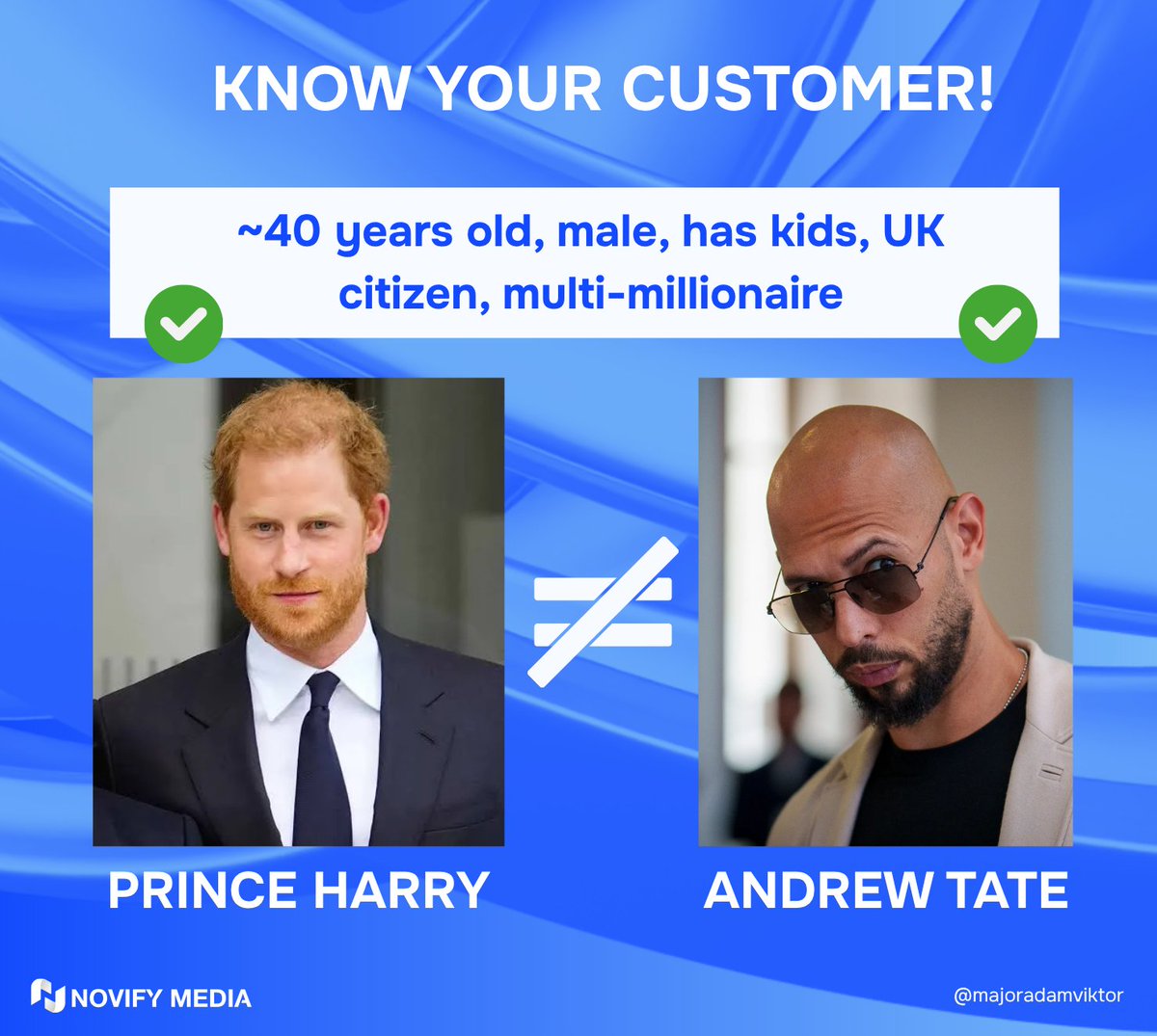
Target audience ≠ "age & gender" That's just scratching the surface. --- Knowing your customer means clarity at every level: 👩 Demographics 32-year-old mother, working full time in finance 🎯 Benefits sought Time-saving, safe for family, premium feel 💡 Psychographics: Values health, invests in convenience, follows TikTok moms 📊 Behaviour: Buys 2x/month, loyal customer, compares prices on Amazon -- When you know this… copy writes itself. Angles become obvious. Positioning gets sharp. Brands don’t scale on guesses... They scale on clarity.
Adam | Facebook Ads tweet media
English
7
0
27
565
Mark
Mark@MarkPivko·
@simontelek Interesting, I’ve seen so much pushed about PMAX I’d assume it would be the first place to start.
English
1
0
1
23
Arijan Janeš
Arijan Janeš@ArijanJanes·
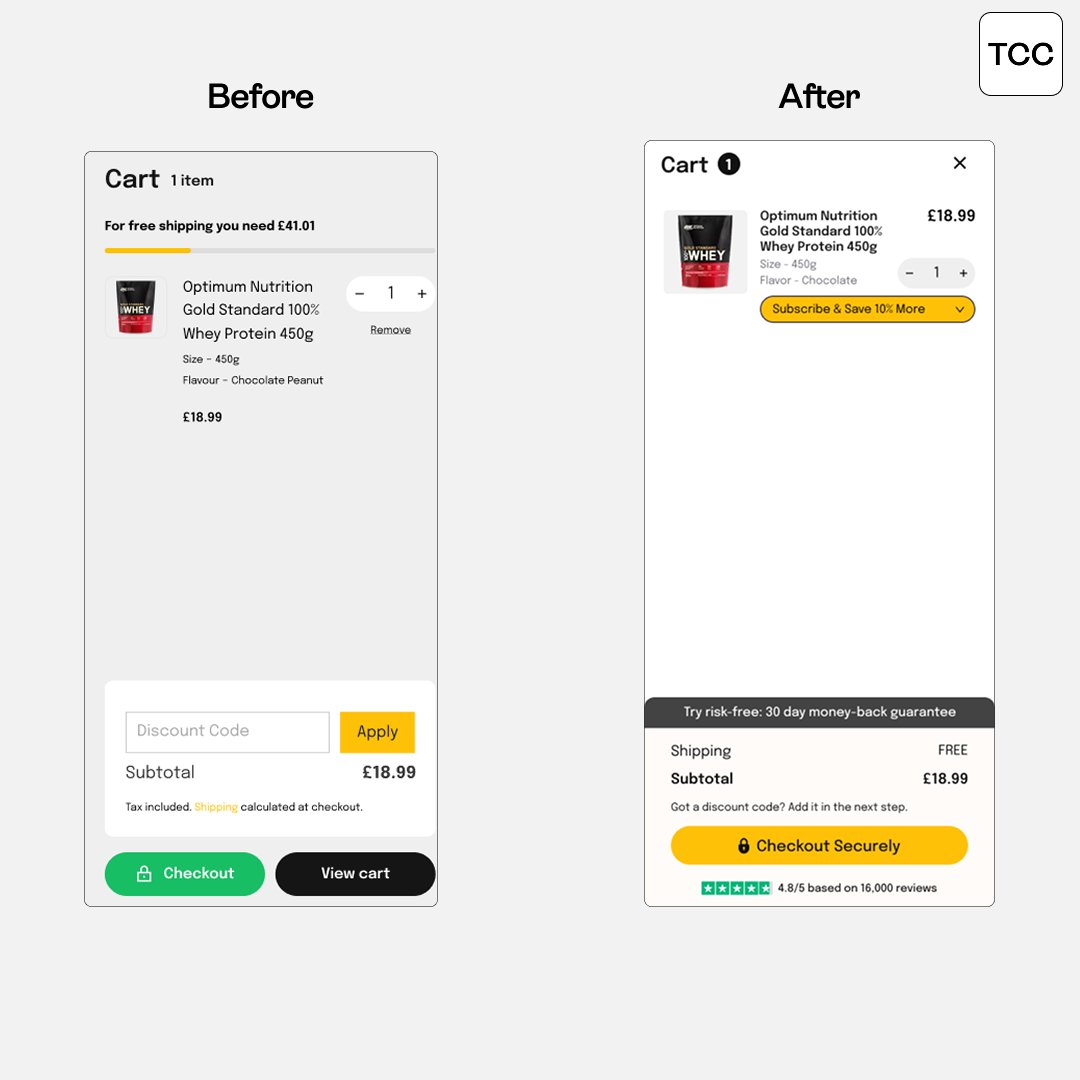
Here's a cart optimization with 3 variations we designed for this supplements brand. Testing out new structures of the cart. Version 1 - Simple, CVR-focused with the upsell on subscriptions
Arijan Janeš tweet media
English
7
0
20
1.4K
Adam | Facebook Ads
Adam | Facebook Ads@majoradamviktor·
Logos don’t differentiate your brand. Positioning does. Especially in fashion. ----- Most fashion brands obsess over: → Minimalist logo → Neutral color palette → Premium photoshoot ------ But here’s the truth: Your customer isn’t buying your design aesthetic. They’re buying the identity your brand lets them step into. ------ Positioning answers 3 non-negotiables: 1️⃣ Who it’s for Are you for the everyday “quiet luxury” professional? The bold Gen Z trend-hacker? The practical urban woman who wants “functional chic”? 2️⃣ Why it matters Do you solve the pain of cheap fast fashion that doesn’t last? Or the pain of luxury brands that feel out of touch? What change do you want to make in the world? Why are your products different? If you can’t articulate why your existence matters in the market, you’ll blend into it. 3️⃣ Why you vs others What’s the edge that competitors can’t easily copy? – Material innovation? – Radical transparency? – Cultural resonance? ------- For instance Everlane didn’t win with a logo. They won by owning “radical transparency” in pricing + supply chain. That was their moat.
Adam | Facebook Ads tweet media
English
8
1
21
943
Arijan Janeš
Arijan Janeš@ArijanJanes·
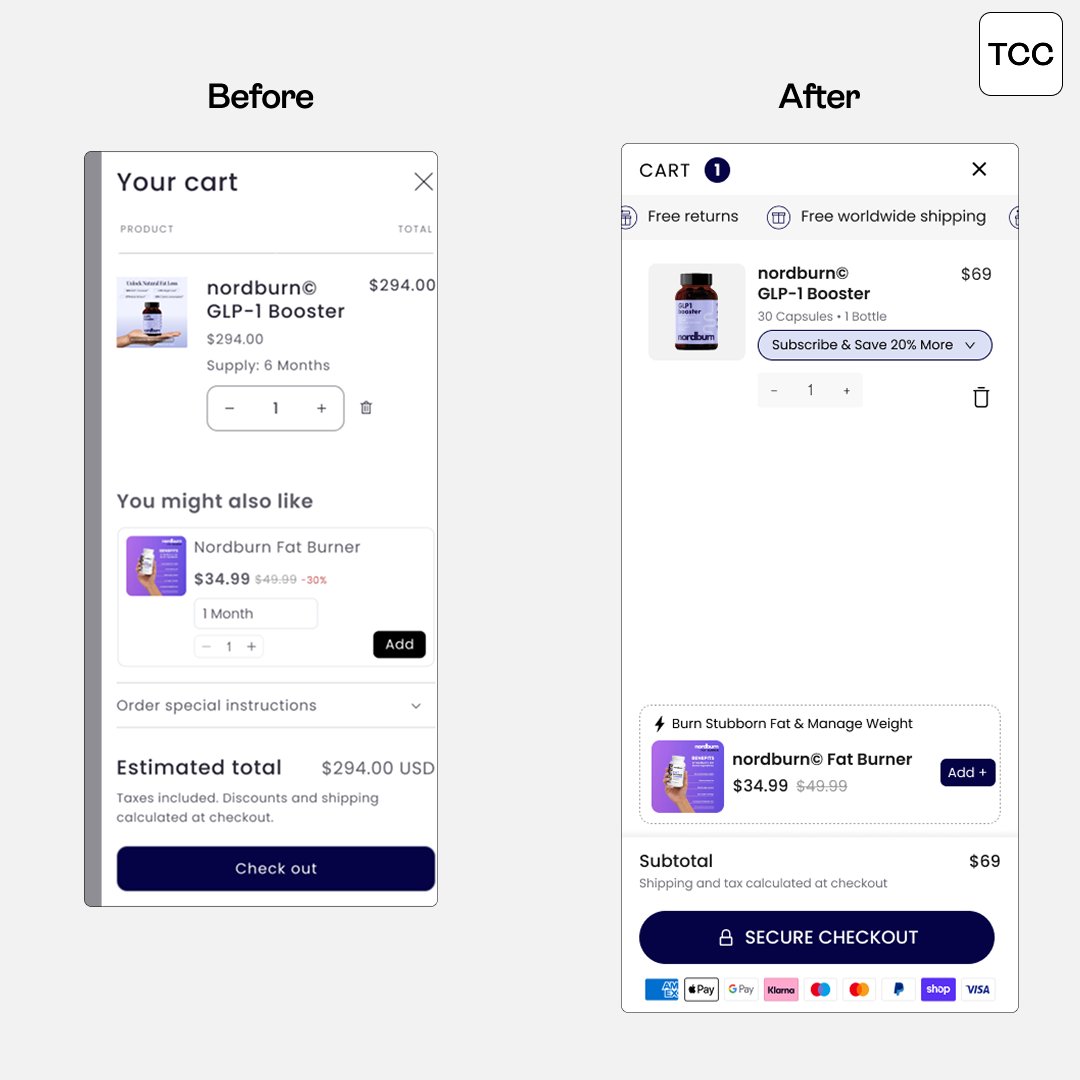
95% of your customers will go through your cart. Absolutely VITAL to optimize and test it. Have subscriptions? Upsell them inside cart. Low AOV? Include a progress bar + upsells. High drop-off? Remove upsells, add social proof. So much stuff that can be done here inside the cart, it's unreal how many people sleep on it. Most people just install an app, take 20 minutes to set it up, and call it a day. No strategy, no thought process behind it. Most importantly, no results. Here's a design mockup we recently made for this fat loss brand. -> Added free shipping & returns callout to the top -> Included a subscription upsell in product card -> Enabled dynamic upsells, positioned them as upgrades -> Added secure checkout + payment badges.
Arijan Janeš tweet media
English
5
1
31
2.2K
Hercules
Hercules@herculesdey·
@simontelek Google tells you what's failing listen to it and cut the dead weight.
English
1
0
1
13
Simon Telek | Google Ads
Simon Telek | Google Ads@simontelek·
The Easiest Way to Improve Your RSAs: Don’t launch a new test. Just clean up your current one. Here’s how: Go into your responsive search ads Hit “View asset details” Look for any headlines or descriptions marked “Low” That’s your cleanup list. Google literally tells you what it doesn’t like. ➡ Remove the underperforming asset ➡ Replace it with a fresh one ➡ Let Google test it again If a headline is tagged Low, delete it and try something more direct or benefit-driven. You don’t need a full restructure to improve performance. You just need to keep feeding the algo better ingredients. Small tests, big upside. Do this weekly and your ads will keep getting stronger.
English
2
0
6
193