Suhel Ansari

9.8K posts

Suhel Ansari

Suhel Ansari

@sohail_here

Katılım Eylül 2010
4.4K Takip Edilen776 Takipçiler
Suhel Ansari retweetledi
Marco Russo
Marco Russo@marcorus·
Should you use DAX user-defined functions (UDFs) or calculation groups? The question is legit; the answer is that both have a role. For years, we used calculation groups as a surrogate for functions. But now that we have the real thing, we can use both, each one in the right place. Video and article:  sqlbi.com/articles/dax-u… #powerbi #dax #udf
Marco Russo tweet media
English
0
7
40
1.9K
Suhel Ansari retweetledi
Kurt Buhler
Kurt Buhler@kurtbuhler·
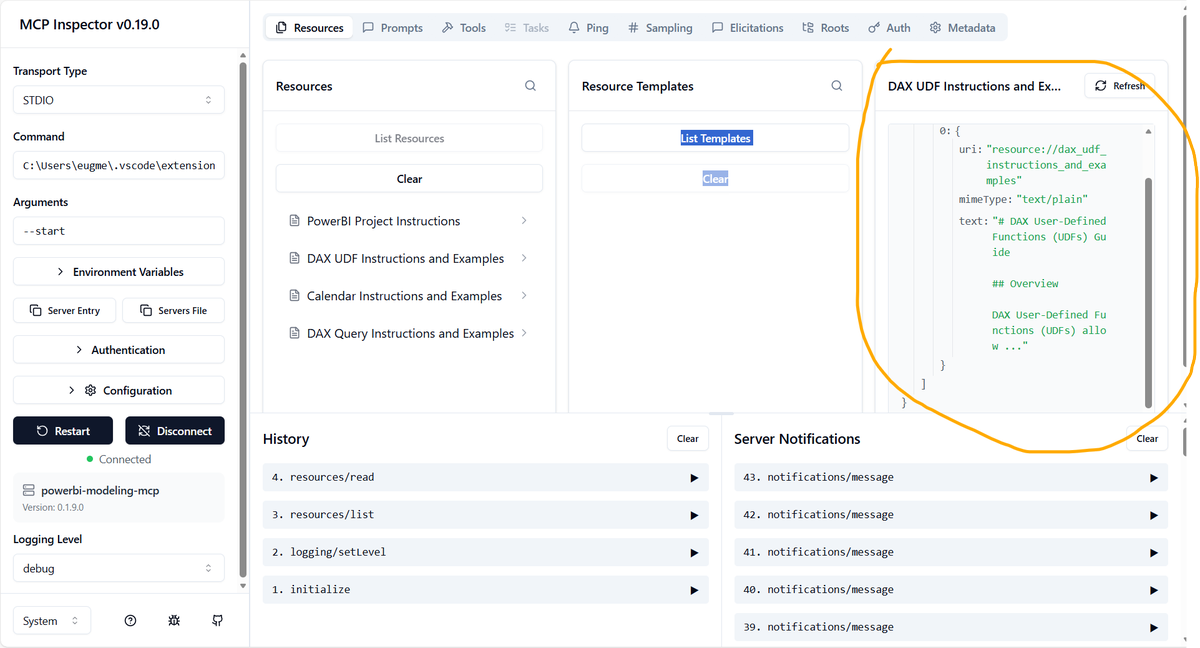
Here's a repo where I'll publish skills for agentic development in Power BI. I just added a skill that lets agents like Claude Code connect to and modify a model in Power BI Desktop directly, without extra tools. github.com/data-goblin/po…
English
6
16
168
11.6K
Suhel Ansari retweetledi
Nikola Ilic
Nikola Ilic@DataMozart·
Capacity never goes down! With the new Capacity overage billing feature, just announced by Amir Netz at #FabCon Atlanta!
Nikola Ilic tweet media
English
0
4
12
1K
Suhel Ansari retweetledi
Nikola Ilic
Nikola Ilic@DataMozart·
What SHOULD happen? A brand new workload, Fabric Planning, may help you look into the future. Just announced at #FabCon Atlanta
Nikola Ilic tweet media
English
0
2
12
713
Suhel Ansari retweetledi
Nikola Ilic
Nikola Ilic@DataMozart·
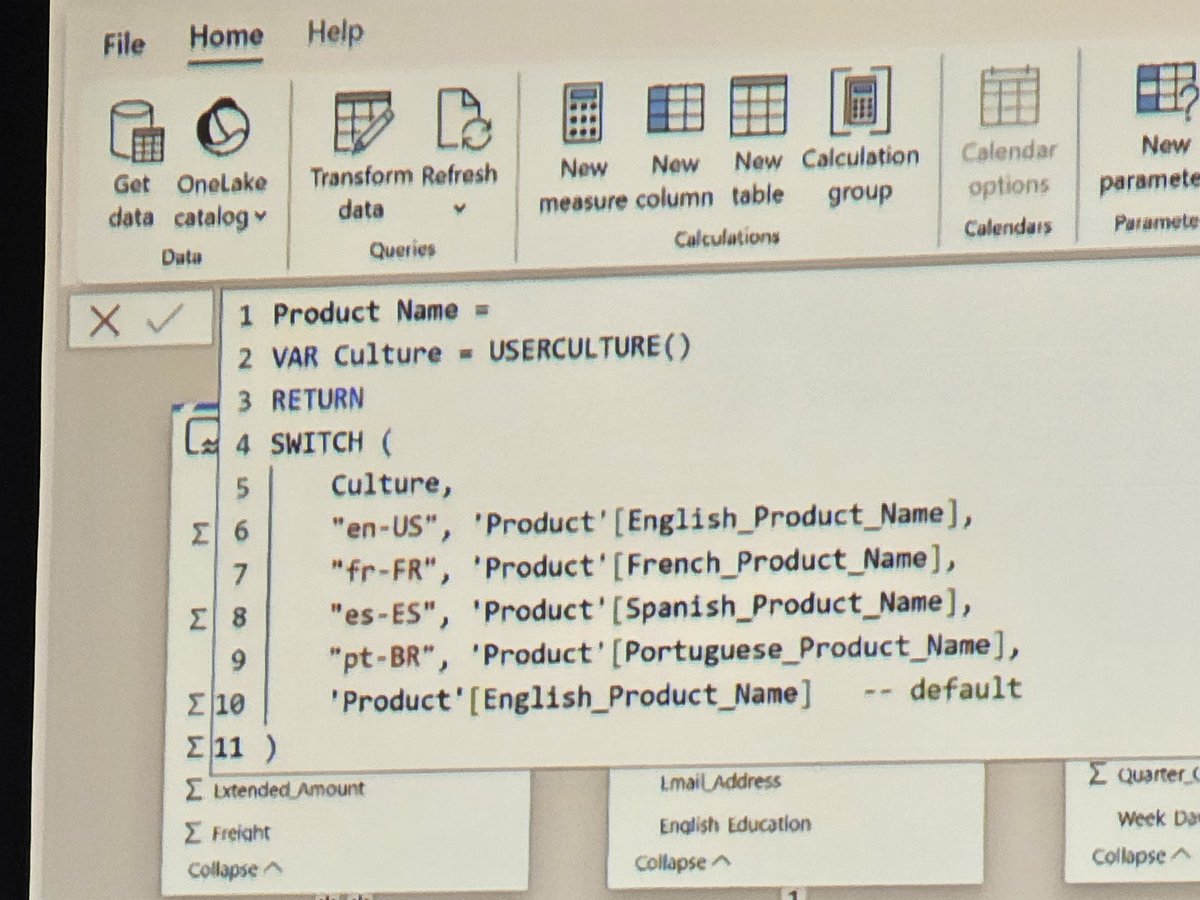
DAX calculated columns max now be aware of the user context!!! Bye bye translation headaches. Just introduced by Christian Wade and Phil Seamark at #FabCon Atlanta! This opens a whole new world of possibilities.
Nikola Ilic tweet mediaNikola Ilic tweet media
English
1
1
33
1.7K
Suhel Ansari retweetledi
Tableau Public
Tableau Public@tableaupublic·
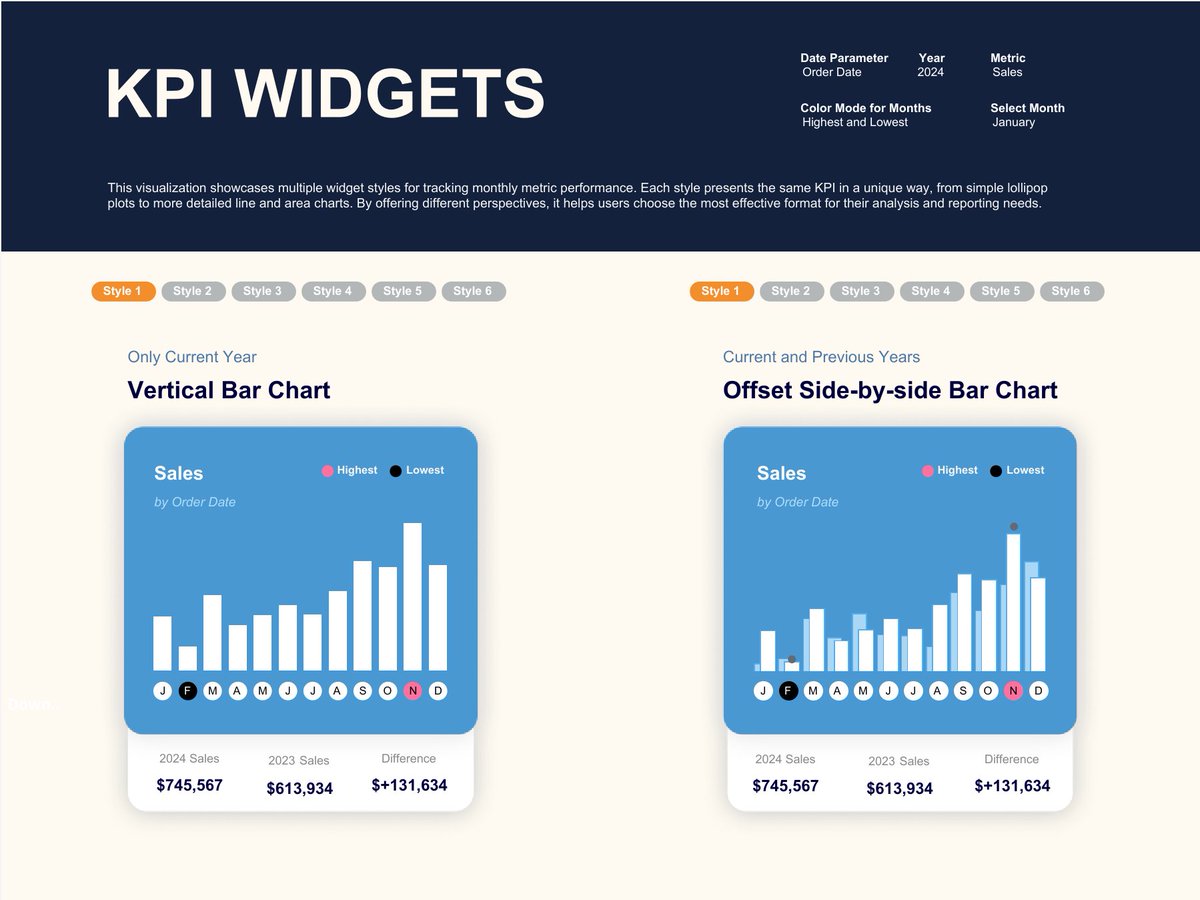
In this #VizOfTheDay, @Babajide_Tobi showcases 12 widget styles for tracking monthly performance, from lollipop plots to area charts. Explore the viz to see how you can customize your KPI widget. tabsoft.co/44DuhMi
Tableau Public tweet media
English
0
11
54
2.4K
Suhel Ansari retweetledi
Chandeep Chhabra
Chandeep Chhabra@chandeep2786·
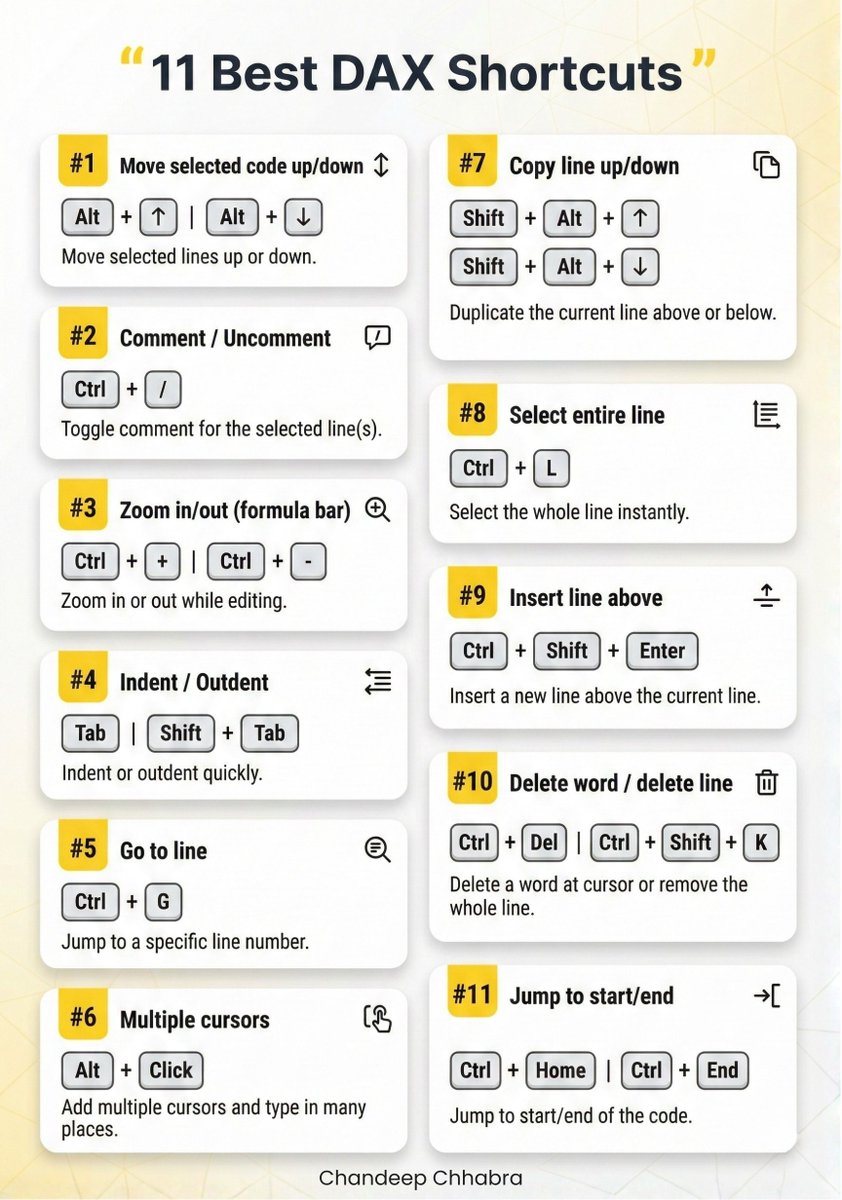
Do you use keyboard shortcuts while writing #DAX? These 11 can seriously speed things up.
Chandeep Chhabra tweet media
English
2
13
70
2.5K
Suhel Ansari retweetledi
Dera | Power BI Developer 💛✨
You’re building reports, and you’re still writing the same logic over and over for every KPI 😭 - MoM again. - PY again. - Color coding again. Let me involve you and show you how to do it better. Data analysts, imagine this: You have 5 KPIs, and you want to calculate MoM, PY, and apply color coding for all of them 😅 Writing separate DAX formulas for each KPI? That would be Repetitive, Messy, & Hard to maintain. ✅Instead, you create a User-Defined Function (UDF). ✅Define the logic once (MoM, PY, color rules) 📍Call that function inside your measures 📍Reference it across all KPIs Now all 5 KPIs follow the same calculations and formatting automatically ✅ - Cleaner model. - Consistent logic. - Saves you time. The image below gives you an overview of the implementation. If you need the documentation, breaking every code down step-by-step + implementation, comment “document” and I'll DM you👇 #DataAnalytics #DataFam #UDF
Dera | Power BI Developer 💛✨ tweet media
English
45
23
145
8.5K
Suhel Ansari retweetledi
Sumit Mittal
Sumit Mittal@bigdatasumit·
5 Free Courses for aspiring Data Engineer. 1. Python for Data Engineers - youtube.com/watch?v=Q4nbwe… 2. Complete SQL For Data Engineers - youtube.com/watch?v=GlCcM4… 3. Data Engineering mock Interviews - youtube.com/watch?v=HDNxFi… 4. Azure Data Engineer Project - youtube.com/watch?v=d3Vw3V… 5. Git & Git Hub for Data Engineers - youtube.com/watch?v=C8MBky… I hope this will help all the aspiring Data Engineers. PS~ My new Data Engineering Batch is starting on coming Saturday. DM to know more! #bigdata #databricks #apachespark
YouTube video
YouTube
YouTube video
YouTube
YouTube video
YouTube
YouTube video
YouTube
YouTube video
YouTube
Sumit Mittal tweet media
English
9
186
698
27K
Suhel Ansari retweetledi
Alex Freberg
Alex Freberg@Alex_TheAnalyst·
Databricks. You can learn it in just 2 hours in this weeks video! Learn how to: 1. Import Data from flat files and connect to Data Sources 2. Analyze data using SQL Editor and Notebooks 3. Visualize and Create Dashboards 4. Use AI to code and talk with our Databases The best thing is you can do all of this for Free! I'll be do more videos on Databricks in the future and may create a "Learn Databricks in under 5 hours (Advanced)" or something like that :) youtube.com/watch?v=CoqZTt…
YouTube video
YouTube
English
10
122
621
41.2K
Suhel Ansari retweetledi
Chandeep Chhabra
Chandeep Chhabra@chandeep2786·
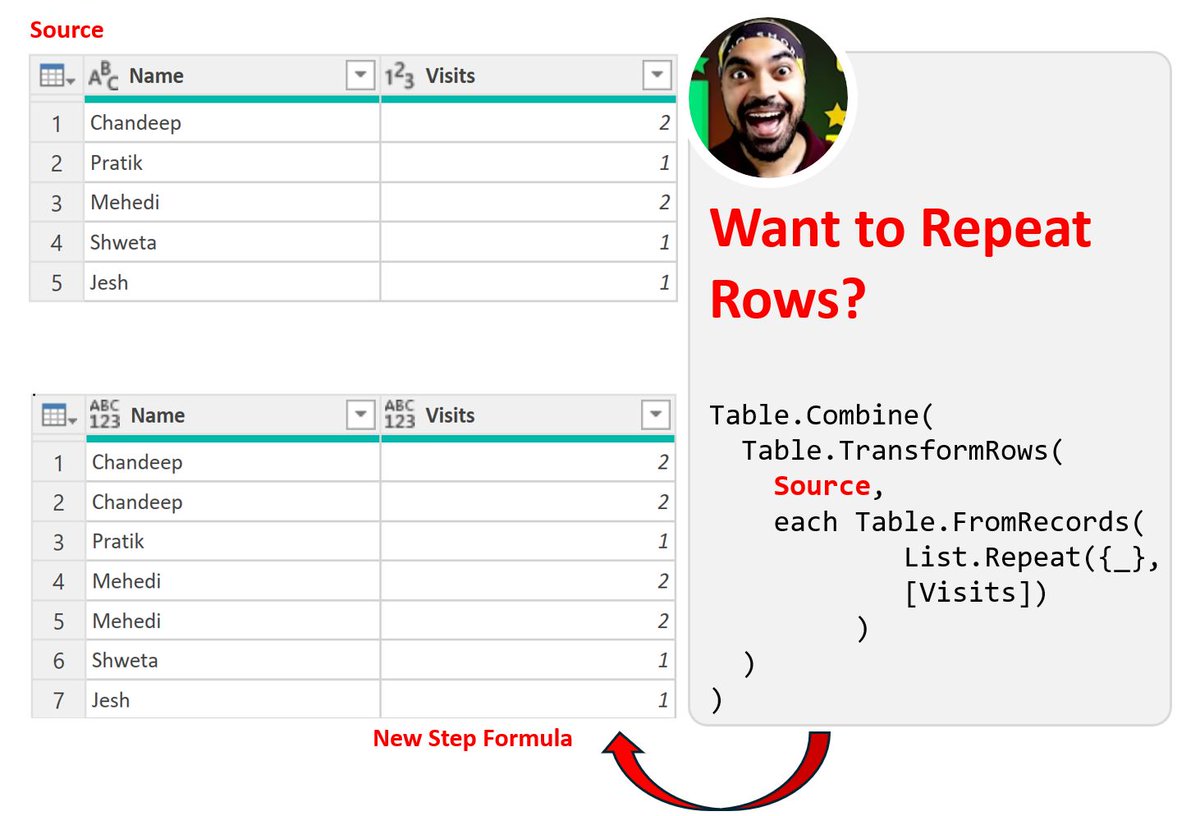
Want to repeat rows based on a column value? 🔁 This Power Query trick does it. No loops, no manual work. Clean, simple, and super handy! 😎 {M}joy! → products.goodly.co.in/learn-m-powerq…
Chandeep Chhabra tweet media
English
0
3
30
1.4K
Suhel Ansari retweetledi
Dera | Power BI Developer 💛✨
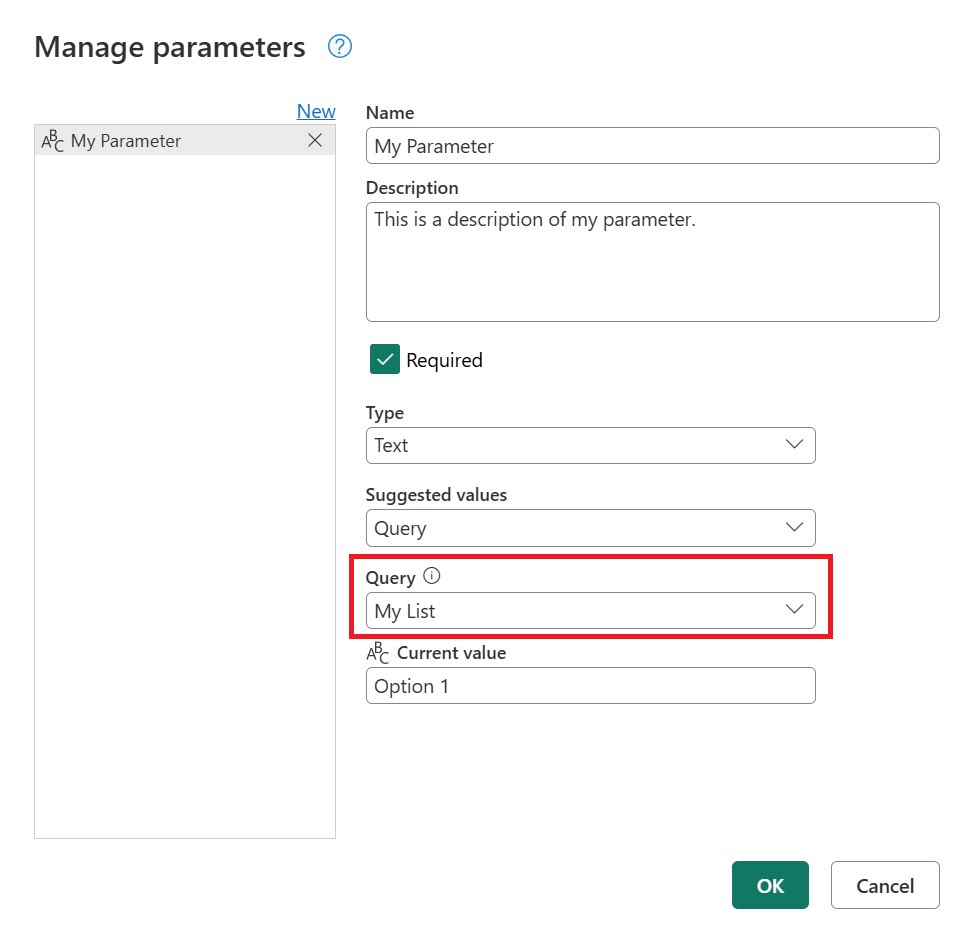
𝐏𝐀𝐑𝐓 3: 𝐔𝐧𝐝𝐞𝐫𝐬𝐭𝐚𝐧𝐝𝐢𝐧𝐠 𝐐𝐮𝐞𝐫𝐲 𝐏𝐚𝐫𝐚𝐦𝐞𝐭𝐞𝐫𝐬 𝐢𝐧 𝐏𝐨𝐰𝐞𝐫 𝐁𝐈 Another type of parameter that often gets overlooked is the 𝐐𝐮𝐞𝐫𝐲 𝐏𝐚𝐫𝐚𝐦𝐞𝐭𝐞𝐫. This one isn’t used at a 𝐯𝐢𝐬𝐮𝐚𝐥 𝐥𝐞𝐯𝐞𝐥. While field and numeric parameters help inside the dashboard, 𝐐𝐮𝐞𝐫𝐲 𝐏𝐚𝐫𝐚𝐦𝐞𝐭𝐞𝐫𝐬 𝐰𝐨𝐫𝐤 𝐚𝐭 𝐭𝐡𝐞 𝐝𝐚𝐭𝐚 𝐬𝐨𝐮𝐫𝐜𝐞 𝐥𝐞𝐯𝐞𝐥. They give you more control over what data gets loaded into Power BI before you even start building visuals. Here’s how I use them: 📍 Filtering Data at the Source Instead of loading an entire dataset, a query parameter lets you load only what you need. For example, loading flights for a specific year, route, or airline. 📍 Switching Between Environments You can set parameters for Dev, Test, and Production servers. Changing the value switches the entire model to the selected environment instantly. 📍 Dynamic File Paths If you work with multiple Excel files or folders, a parameter lets you change the file path without breaking the query or rewriting connections. 📍 User-Controlled Refresh Users can choose which dataset they want to load, making refresh faster and lighter, especially for large models. Query parameters are perfect when you want Power BI to be • lighter • faster • and more flexible even before the report opens. What’s your experience with using query parameters in your projects? #PowerBI #DataAnalytics #BusinessIntelligence #DataVisualization
Dera | Power BI Developer 💛✨ tweet media
Dera | Power BI Developer 💛✨@_DeraIJ

𝐏𝐚𝐫𝐭 2: 𝐃𝐲𝐧𝐚𝐦𝐢𝐜 𝐅𝐢𝐥𝐭𝐞𝐫𝐢𝐧𝐠 𝐰𝐢𝐭𝐡 𝐏𝐚𝐫𝐚𝐦𝐞𝐭𝐞𝐫𝐬 When to use Field Parameters vs Numeric Parameters (with examples) Parameters can do a lot, but knowing when to use each type depends on what your data needs. 📍 𝐅𝐢𝐞𝐥𝐝 𝐏𝐚𝐫𝐚𝐦𝐞𝐭𝐞𝐫𝐬 Use this when you want to switch fields inside one visual. It’s perfect when your visual has the same structure but different data points to explore. Examples: • Switching a KPI card between Delay %, Flight Volume, and On-Time Rate • Switching a bar chart between Airlines, Routes, or Regions • Switching a line chart between Monthly Delays, Monthly Cancellations, or Monthly Departures Field parameters answer the question, “𝐖𝐡𝐚𝐭 𝐝𝐨 𝐲𝐨𝐮 𝐰𝐚𝐧𝐭 𝐭𝐨 𝐬𝐞𝐞? ” 📍 𝐍𝐮𝐦𝐞𝐫𝐢𝐜 𝐏𝐚𝐫𝐚𝐦𝐞𝐭𝐞𝐫𝐬 Use this when you want users to control a number inside the report. Perfect for adjusting values or running scenarios. Examples: • Setting a custom delay threshold (e.g., highlight flights above 20 minutes) • Running a what-if analysis on ticket prices or fuel cost changes • Adjusting ranges for a KPI target dynamically • Allowing users to change the number of top routes shown (Top 5, Top 10, Top 15) Numeric parameters answer the question, “𝐇𝐨𝐰 𝐝𝐨 𝐲𝐨𝐮 𝐰𝐚𝐧𝐭 𝐭𝐨 𝐯𝐢𝐞𝐰 𝐢𝐭?” 𝘐𝘯 𝘴𝘪𝘮𝘱𝘭𝘦 𝘵𝘦𝘳𝘮𝘴:  📍 𝐅𝐢𝐞𝐥𝐝 𝐩𝐚𝐫𝐚𝐦𝐞𝐭𝐞𝐫𝐬 𝐜𝐡𝐚𝐧𝐠𝐞 𝐰𝐡𝐚𝐭 𝐲𝐨𝐮 𝐚𝐧𝐚𝐥𝐲𝐳𝐞.    📍 𝐍𝐮𝐦𝐞𝐫𝐢𝐜 𝐩𝐚𝐫𝐚𝐦𝐞𝐭𝐞𝐫𝐬 𝐜𝐡𝐚𝐧𝐠𝐞 𝐡𝐨𝐰 𝐲𝐨𝐮 𝐚𝐧𝐚𝐥𝐲𝐳𝐞 𝐢𝐭. Follow for part 3, where I'll talk about the last type of parameter in Power BI, which is the 𝑸𝒖𝒆𝒓𝒚 𝑷𝒂𝒓𝒂𝒎𝒆𝒕𝒆𝒓. #PowerBI #DataAnalytics #BusinessIntelligence #DataVisualization

English
0
12
72
3.7K
Suhel Ansari retweetledi
Dera | Power BI Developer 💛✨
𝐏𝐚𝐫𝐭 2: 𝐃𝐲𝐧𝐚𝐦𝐢𝐜 𝐅𝐢𝐥𝐭𝐞𝐫𝐢𝐧𝐠 𝐰𝐢𝐭𝐡 𝐏𝐚𝐫𝐚𝐦𝐞𝐭𝐞𝐫𝐬 When to use Field Parameters vs Numeric Parameters (with examples) Parameters can do a lot, but knowing when to use each type depends on what your data needs. 📍 𝐅𝐢𝐞𝐥𝐝 𝐏𝐚𝐫𝐚𝐦𝐞𝐭𝐞𝐫𝐬 Use this when you want to switch fields inside one visual. It’s perfect when your visual has the same structure but different data points to explore. Examples: • Switching a KPI card between Delay %, Flight Volume, and On-Time Rate • Switching a bar chart between Airlines, Routes, or Regions • Switching a line chart between Monthly Delays, Monthly Cancellations, or Monthly Departures Field parameters answer the question, “𝐖𝐡𝐚𝐭 𝐝𝐨 𝐲𝐨𝐮 𝐰𝐚𝐧𝐭 𝐭𝐨 𝐬𝐞𝐞? ” 📍 𝐍𝐮𝐦𝐞𝐫𝐢𝐜 𝐏𝐚𝐫𝐚𝐦𝐞𝐭𝐞𝐫𝐬 Use this when you want users to control a number inside the report. Perfect for adjusting values or running scenarios. Examples: • Setting a custom delay threshold (e.g., highlight flights above 20 minutes) • Running a what-if analysis on ticket prices or fuel cost changes • Adjusting ranges for a KPI target dynamically • Allowing users to change the number of top routes shown (Top 5, Top 10, Top 15) Numeric parameters answer the question, “𝐇𝐨𝐰 𝐝𝐨 𝐲𝐨𝐮 𝐰𝐚𝐧𝐭 𝐭𝐨 𝐯𝐢𝐞𝐰 𝐢𝐭?” 𝘐𝘯 𝘴𝘪𝘮𝘱𝘭𝘦 𝘵𝘦𝘳𝘮𝘴:  📍 𝐅𝐢𝐞𝐥𝐝 𝐩𝐚𝐫𝐚𝐦𝐞𝐭𝐞𝐫𝐬 𝐜𝐡𝐚𝐧𝐠𝐞 𝐰𝐡𝐚𝐭 𝐲𝐨𝐮 𝐚𝐧𝐚𝐥𝐲𝐳𝐞.    📍 𝐍𝐮𝐦𝐞𝐫𝐢𝐜 𝐩𝐚𝐫𝐚𝐦𝐞𝐭𝐞𝐫𝐬 𝐜𝐡𝐚𝐧𝐠𝐞 𝐡𝐨𝐰 𝐲𝐨𝐮 𝐚𝐧𝐚𝐥𝐲𝐳𝐞 𝐢𝐭. Follow for part 3, where I'll talk about the last type of parameter in Power BI, which is the 𝑸𝒖𝒆𝒓𝒚 𝑷𝒂𝒓𝒂𝒎𝒆𝒕𝒆𝒓. #PowerBI #DataAnalytics #BusinessIntelligence #DataVisualization

Dera | Power BI Developer 💛✨ tweet media
Dera | Power BI Developer 💛✨@_DeraIJ

𝐔𝐬𝐢𝐧𝐠 𝐏𝐚𝐫𝐚𝐦𝐞𝐭𝐞𝐫𝐬 𝐭𝐨 𝐒𝐚𝐯𝐞 𝐒𝐩𝐚𝐜𝐞 𝐢𝐧 𝐘𝐨𝐮𝐫 𝐃𝐚𝐬𝐡𝐛𝐨𝐚𝐫𝐝: 𝐏𝐚𝐫𝐭 1 One thing I’ve learned while building dashboards/reports is that you don’t always need multiple visuals to show multiple views. Sometimes a single field parameter is enough. I use field parameters on a KPI card, so while the KPI displays different metrics, it also acts as a switch that updates the visuals on the page. It’s one of the easiest ways to save space and keep everything clean. Here’s a simple example: A parameter can switch between • Delay Percentage • Total Flights • Average Delay Time • On-time Arrival Rate Once you click any of these options on the card/parameters, the charts below automatically update to reflect that selected metric. This helps to… 📍 reduce clutter 📍 keep the design simple 📍 improve performance 📍 give users more control #PowerBI #DataAnalytics #BusinessIntelligence #DataVisualization

English
1
6
46
6K