Square Support

93.4K posts

Square Support banner
Square Support

Square Support

@SquareSupport

Official @Square Support. 🌎 Live help when you need it. Ayuda en vivo cuando la necesite. Aide en direct quand vous en avez besoin. お気軽にご質問をお寄せください!


San Francisco Katılım Nisan 2010
13 Takip Edilen46.4K Takipçiler
godess piggy
godess piggy@piggybenjaola1·
@CashApp @Square Can I pay with bitcoin if the seller does not have it enabled yet? If so, how? Or do I have to ask them to turn it on??
English
2
0
9
111
Cash App
Cash App@CashApp·
Paying with bitcoin just got better (₿‿₿) Pay over Lightning at eligible @Square businesses and get 5% back in bitcoin instantly. Discover nearby local sellers on the Bitcoin Map. Earn up to $30/month. Learn more: cash.app/help/us/en-us/…
Cash App tweet media
English
49
83
513
72.6K
duchovlet
duchovlet@duchovlet·
@amesChri1 @weebly @Square It has been an absolute nightmare. And that's putting it in the most mild terms possible. I am going to die of an aneurysm or a heart attack because of @Square I will be calling the attorney general of California on Monday to lodge a complaint about @Square
English
3
0
1
8
duchovlet
duchovlet@duchovlet·
1/? Let me tell you... @Square is an ABSOLUTE $hitShow. I have been on the phone & in chat FOR DAYS trying to get something SIMPLE resolved. Transferred from one chat agent to another REPEATEDLY for 3 freaking hours yesterday. Disconnected phone calls.
English
1
0
0
22
Square Support
Square Support@SquareSupport·
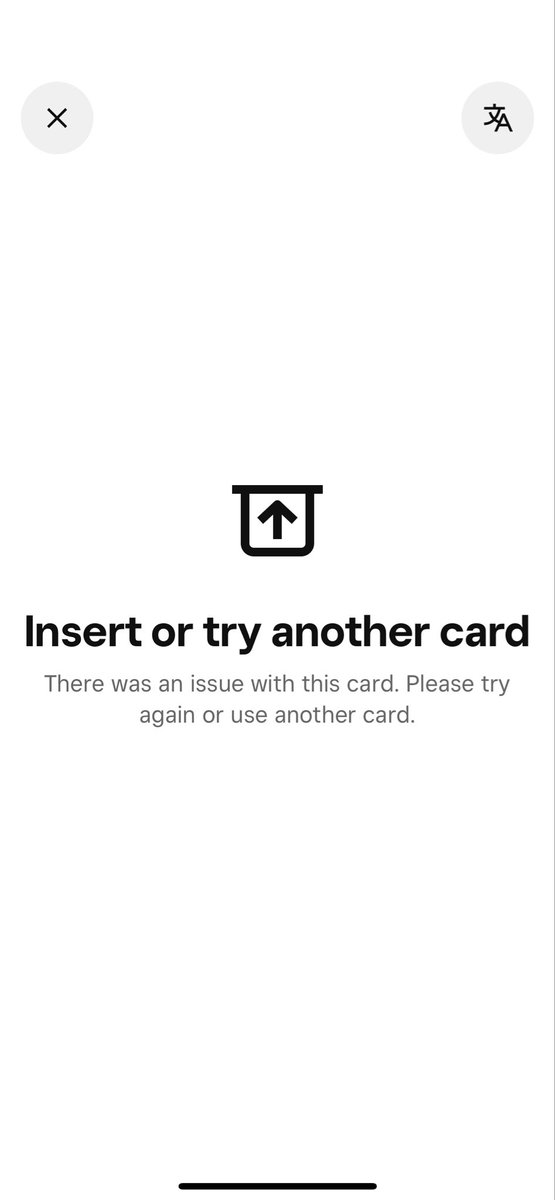
Hi Rob, Was there anything common to the cards that were erroring - eg debit or credit, particular brands or banks? It's possible what you were seeing was a partner banking/network outage. If you are happy to provide some account details via this secure form ( forms-prod.sprinklr.com/secure-forms/2… ) we can take a look and see if we can determine what was going on - also, do you have the rough date/time of the transactions in question?
English
0
0
0
11
hi
hi@Rob_from_AUS·
@SquareSupport Getting this brand new error popping up. Some cards are not working - that 100% should be.
hi tweet media
English
1
0
0
0
Square Support
Square Support@SquareSupport·
@PepeRgb20 Not at the moment. We don’t have any timelines to share right now, but it’s something the team is aware of, and if we’re able to launch Bitcoin payments in additional markets in future, we’ll be sure to communicate that widely.
English
1
0
1
15
Square
Square@Square·
Proof of Merch Pay with bitcoin or dollars over lightning ⚡️ @TheBitcoinConf
English
10
20
122
10.8K
Bill
Bill@Ch1llb1llz·
@SquareAU Hi All, if anyone has tips on how to alert Square that hardware sent to me has been lost in transit that would be great. I’ve tried all the ai bots suggestion's over the last months, currently it’s seems I have 15 days to return items that I haven’t received. Cheers
English
1
0
0
20
Matt Pāz
Matt Pāz@matt__paz·
@CashApp @gladstein @Square Can I pay with bitcoin if the seller does not have it enabled yet? If so, how? Or do I have to ask them to turn it on?
English
7
1
21
240
₿tc Wes🍊
₿tc Wes🍊@ReghostroWes·
@CashApp @Square I have visited the merchants in my local area that have a square pos and they still don't accept ₿itcoin. Is there going to be an auto update or will I need to keep trying to get them onboard?
English
1
0
11
209
Square Support
Square Support@SquareSupport·
@rsinvestgr67812 We would have to work via DM if you want to work with us on social media, but from there we can gather your account information and look at your case history for you. But, you can also reach out via squareup.com/contact if you would like to work over email.
English
1
0
0
22
Ray Trades
Ray Trades@rsinvestgr67812·
@SquareSupport please share with me the email and i can send an email with all the case explanation. If support is provided as promissed here, it is only fair for me to post positive review and delete this one -lets see
English
1
0
0
6
Ray Trades
Ray Trades@rsinvestgr67812·
If you guys looking for a payment processing and website builder "all-in-one" type of service DO NOT GO TO SQUARE -just had a customer service hung up on me and didn't solve my issue @Square
English
2
0
2
149
Square Support
Square Support@SquareSupport·
@lexsportscards Per the Instagram DM you sent us, we've submitted an internal request for an Account Manager give you a call as soon as possible.
English
0
0
0
15
Dreamweaver1984
Dreamweaver1984@lexsportscards·
@SquareSupport Hilarious you just routed me to the same forms and numbers Iv tried for a week to get thru to
English
2
0
1
5
Dreamweaver1984
Dreamweaver1984@lexsportscards·
@Square customer service is so ass I’m About to switch away cause no one can get on the phone My business is successful and Iv run all my stuff thru them and I can’t even get a call back
English
1
0
1
26
Square Support
Square Support@SquareSupport·
Thanks for reaching out. For your security, we can’t make changes to your account via social media channels. If you can still sign in, you can update your phone number from your Square Dashboard by going to Settings → Account & Settings → Personal information → Sign in & security and editing your phone number there. If you’re locked out or no longer have access to your old number, please get in touch with our Support team here so they can securely help update your details: squareup.com/help/contact.
English
0
0
0
4
What
What@RonaldThomasCa1·
@Square the phone number associated with my account has changed
English
1
0
0
0
Square Support
Square Support@SquareSupport·
Tap to Pay on Android requires Google-certified builds that pass Play Integrity and NFC attestation checks — GrapheneOS opts out of those programs, so it can't be used as a card reader. You can still use Square on GrapheneOS just fine with a separate Square Reader plugged in or paired via Bluetooth. It's only the phone-as-reader flow that's blocked.
English
0
0
1
22
GoopyNwild
GoopyNwild@GoopyNwild·
@Square hey, why can't I accept NFC payments if I choose to use GrapheneOS?
English
1
0
0
11
Sarah109
Sarah109@Sarah10924173·
@AmritaAhuja @WSJCFO @blocks @CashApp @Square My account balance has been held by Square for over 1000 days. I have contacted Square multiple times but have never received any information regarding the release of the funds. Moreover, it has already exceeded the 90-day holding period that Square initially promised.
English
1
0
0
1
Amrita Ahuja
Amrita Ahuja@AmritaAhuja·
Connected with finance and operations leaders across industries at @WSJCFO Summit. The conversations reinforced what we’ve seen @blocks for some time: the pace of change with intelligence tools is quickening. We’re seeing resilience across our @CashApp customers and @Square sellers, and we’re working to put AI-driven products in their hands as they navigate what’s ahead. Photo: Nikki Ritcher for WSJ Leadership Institute
Amrita Ahuja tweet media
English
1
5
14
1.9K
Square Support
Square Support@SquareSupport·
Good question - by "your own ordering flow," yes, that would mean a custom page you build and host (it could be a subdomain of your existing site). Unfortunately, it can't share the same cart as your Square Online Store - Square Online's cart is a closed, session-based system with no API access to add/remove items or sync state.
English
0
0
0
24
Inna's Kitchen Culinaria
Inna's Kitchen Culinaria@InnasKitchen·
@SquareSupport I need to manage preorder settings for a category of items, not individually. I thought this would be possible via the API but the preorder settings appear to be completely hidden. Please message me with options. Thanks
English
1
0
0
36
D J D
D J D@Diezel333·
I signed up for @Square as a small business owner as my point of sale system in February as I was a loyal @CashApp @block person. my onboarding team changed during the layoffs. It's almost May and my onboarding is still in-process! Some hardware was faulty and my data upload is still not working after getting the premium package. Please help get this right ! @jack
English
2
0
0
103
Jeff Newman
Jeff Newman@BluegrassChef·
@SquareSupport Yes I guess that’s our setup. Older terminal and a star printer. It’s worked for years.
English
1
0
0
12
Jeff Newman
Jeff Newman@BluegrassChef·
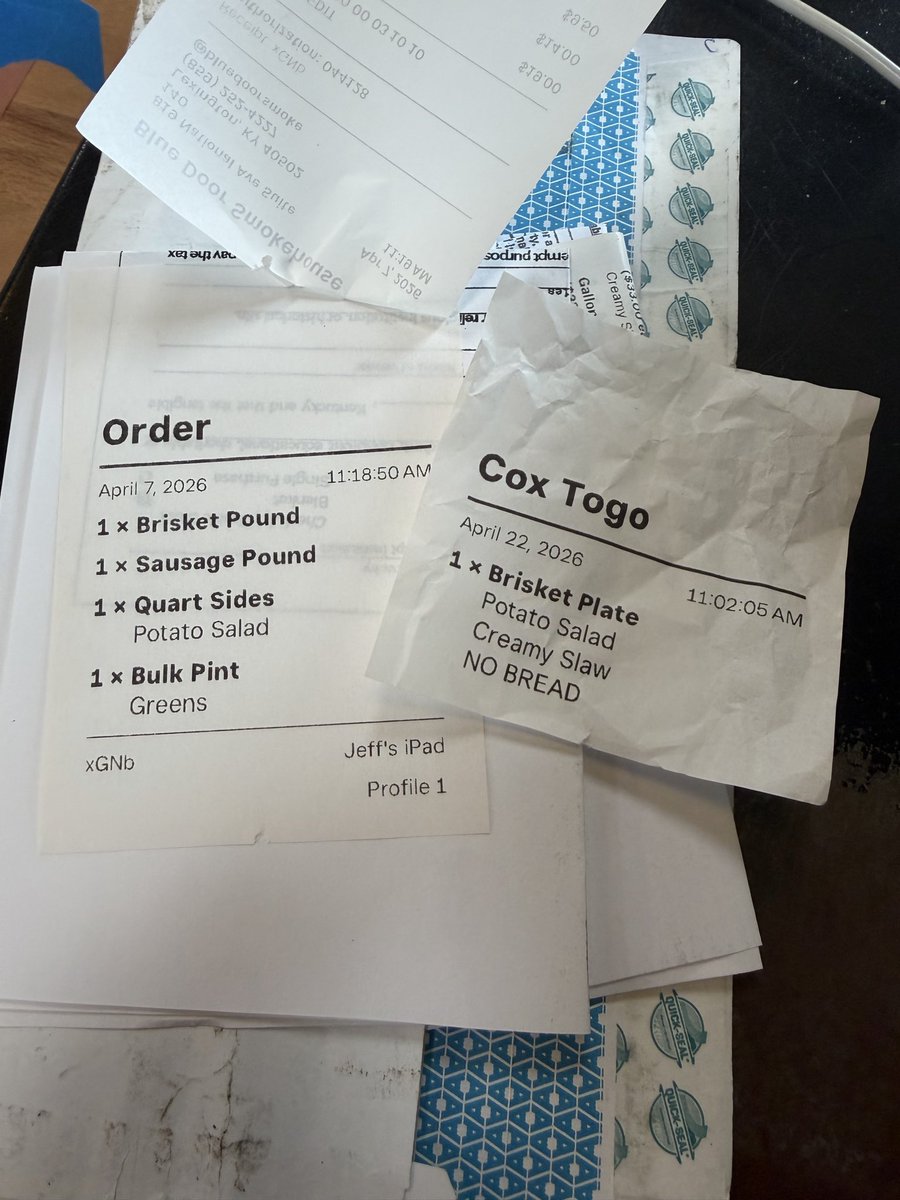
@SquareSupport our receipts recently changed and stopped including the footer with the receipt number. We aren’t finding a solution in the settings. Please advise. Thanks.
Jeff Newman tweet media
English
1
0
0
37
Jeff Newman
Jeff Newman@BluegrassChef·
@SquareSupport I am away from restaurant now but I will Try Friday. However, we have been using Square for 12 years and are generally very effective at our own troubleshooting so I believe we may have some kind of bug.
English
1
0
0
14
Square Support
Square Support@SquareSupport·
@BluegrassChef Is this only showing on printed receipts? Open one of the affected payments in Transactions > select payment > View receipt and see if the receipt number shows on the digital receipt. It may be worth moving this to DM in case we need to file a bug for you! twitter.com/messages/compo…
English
1
0
0
27
Square Support
Square Support@SquareSupport·
Are you by chance using a Square Terminal and printing to an external receipt printer? If so, your current setup where the iPad is linked to Square Terminal (CT2) and the external printer handles customer receipts, the paper receipt won’t include the receipt number footer. That’s a limitation of this specific flow rather than something you can turn on in settings. The receipt number is still available in your Dashboard and on digital receipts, but it just isn’t printed on those CT2 external-printer receipts right now.
English
3
0
0
40
Jeff Newman
Jeff Newman@BluegrassChef·
@SquareSupport That option does not appear to be available in the receipts section.
English
1
0
0
11