Pitt (Swift && Tips)

4.6K posts

Pitt (Swift && Tips) banner
Pitt (Swift && Tips)

Pitt (Swift && Tips)

@swiftandtips

This is Swift && Tips! Discovering how Swift works under the hood. Created by Pitt.

California, USA Katılım Kasım 2020
237 Takip Edilen5.1K Takipçiler
Sabitlenmiş Tweet
Pitt (Swift && Tips)
Pitt (Swift && Tips)@swiftandtips·
🦸‍♂️ Faster than learning another language, stronger than 2 codebases! The Skip Framework lets your Swift app fly on iOS & Android from a single codebase 🚀 Watch my full video for setup, gotchas, and tips to unleash your cross-platform powers 👇 youtu.be/GsAvOamcUqc

YouTube video
YouTube
Pitt (Swift && Tips) tweet media
English
1
1
19
4K
Pitt (Swift && Tips) retweetledi
Swift Language
Swift Language@SwiftLang·
Swift 6.3 has landed! 🚀 This release brings community-driven Android support into the official toolchain, along with major improvements to C interoperability, the build system, and embedded Swift. Read more: swift.org/blog/swift-6.3… #AndroidDev #iOSDev
Swift Language tweet media
English
13
187
871
146.9K
Pitt (Swift && Tips)
Pitt (Swift && Tips)@swiftandtips·
Macbook Neo works great with Emulators! That stage (with reflections) is hard to emulate for some computers.
English
0
0
0
689
Pitt (Swift && Tips)
Pitt (Swift && Tips)@swiftandtips·
For just $599, the MacBook Neo is the most beautiful laptop in its price range ❤️ And this blue color doesn’t show fingerprints like previous MacBook Air models 🙌🏻 I will publish a review in a few days. Stay tuned 😌
Pitt (Swift && Tips) tweet media
English
0
0
4
964
Pitt (Swift && Tips)
Pitt (Swift && Tips)@swiftandtips·
@viajaVolaris Ya te mande mensaje y sigo bloqueado. La pagina internamente devuelve el codigo de error 401. Llevo tres dias intentando y nada…
Español
1
1
0
36
Pitt (Swift && Tips)
Pitt (Swift && Tips)@swiftandtips·
@viajaVolaris estoy intentando comprar un vuelo con la tarjeta Invex 2.0 y 3 veces me ha salido error en la pagina. No me sale ningun cargo, y las operadoras dicen que todo bien con mi tarjeta. Hay algún problema con tu pagina? Gracias por tu atención.
Español
1
1
0
674
Pitt (Swift && Tips)
Pitt (Swift && Tips)@swiftandtips·
@VibeTreeApp Thank you for the info! I learned this from the hard way. I couldn’t find anything in the Apple’s doc. Is this documented somewhere?
English
0
0
0
27
Vibe Tree
Vibe Tree@VibeTreeApp·
Looks like you’re driving the countdown with a repeating timer from the app side and pushing updates to the live activity on each tick? iOS throttles those content state updates pretty aggressively so not every tick actually makes it to the display, that’s why it jumps. Have you tried using Text(timerInterval: start…end, countsDown: true) in the widget view instead? Lets the system handle the rendering locally so it ticks perfectly without needing any updates from the app
English
2
0
1
48
Pitt (Swift && Tips)
Pitt (Swift && Tips)@swiftandtips·
I have a problem with Live Activities. Can you help me? 🙏🏻
English
3
0
5
1.2K
Chris Sántavy
Chris Sántavy@chrissantavy·
@swiftandtips I had similar error messages but not related to live activities. It rectified itself by installing an earlier release of Xcode then installing the latest release ( not betas or RCs)
English
1
0
0
74
Pitt (Swift && Tips)
Pitt (Swift && Tips)@swiftandtips·
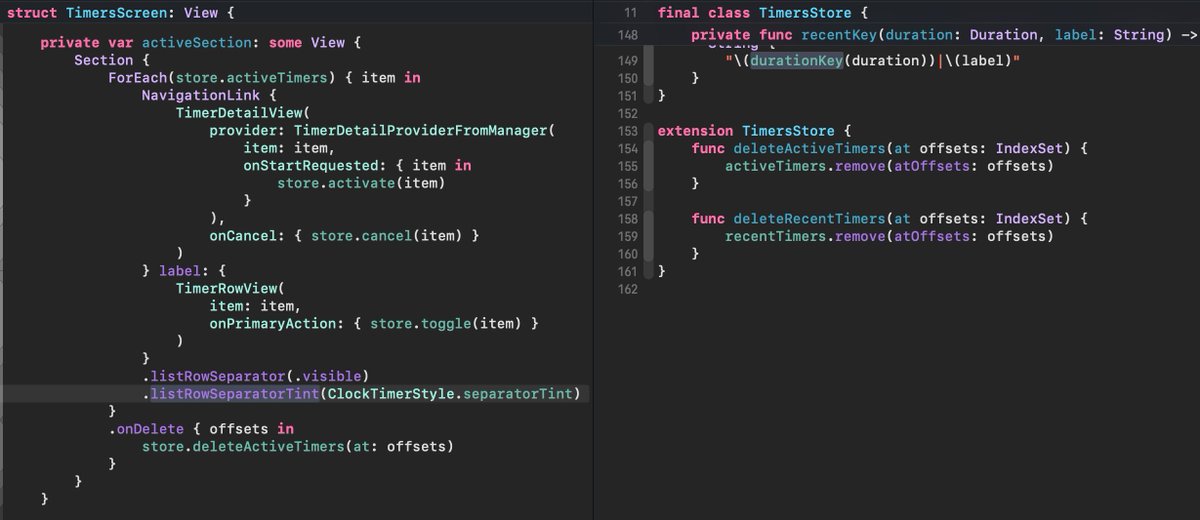
Well, after many hours of investigation, I had to create a UIViewRepresentable to manage the deletion and table updates in a more flexible way. And Ta-da!! No glitch anymore!! The cost?... x4 more code just to fix the issue. This is when you have to choose your tradeoffs...
Pitt (Swift && Tips) tweet media
Pitt (Swift && Tips)@swiftandtips

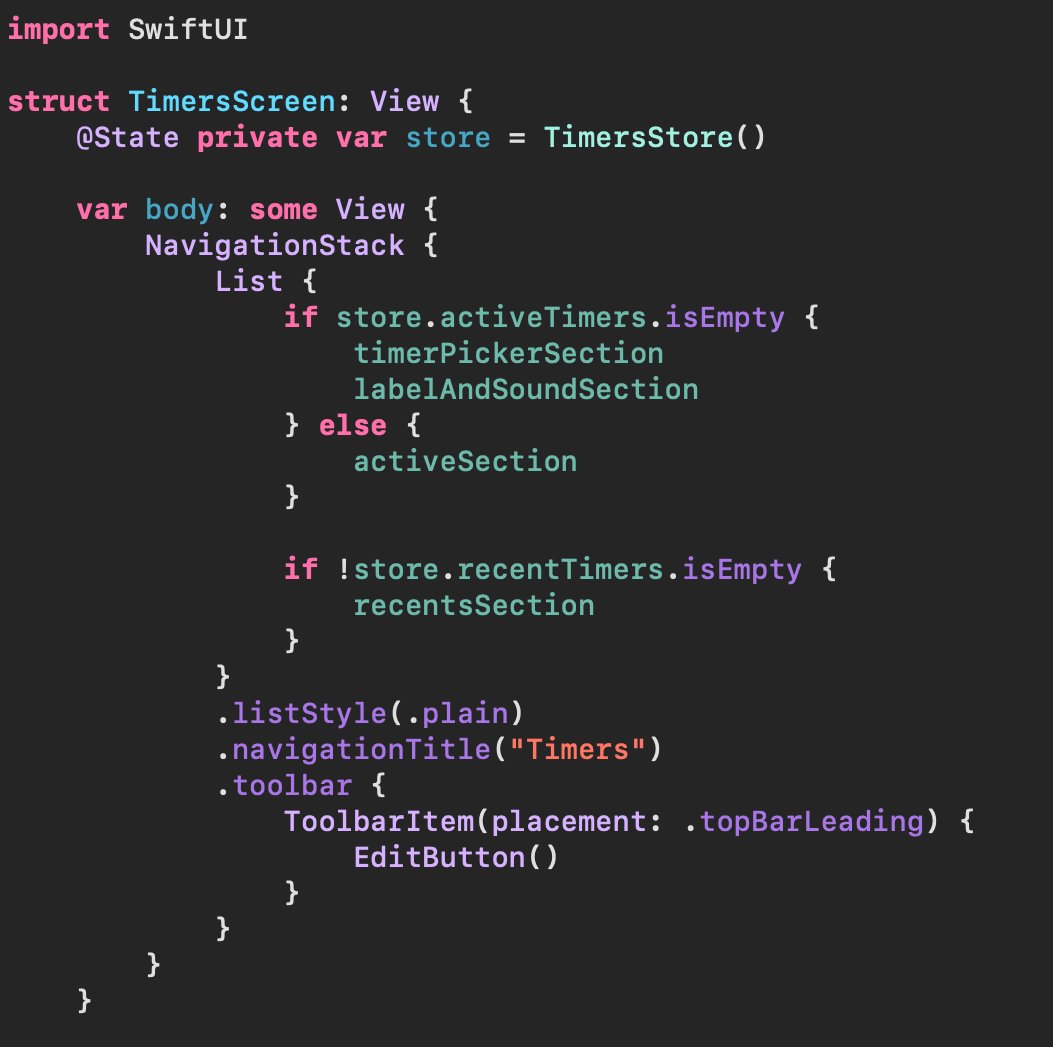
I’m using SwiftUI’s onDelete to remove a row from a List. The list conditionally shows a picker + label as a header when there are no active items. When deleting the last row, I get a weird layout glitch. Has anyone run into something similar when deleting rows in List?

English
2
1
20
4.4K
Zac
Zac@twodayslate·
@swiftandtips UIKit is the right solution. SwiftUI is so broken. With AI the amount of code doesn’t matter anymore.
English
1
0
1
92
Pitt (Swift && Tips)
Pitt (Swift && Tips)@swiftandtips·
I’m using SwiftUI’s onDelete to remove a row from a List. The list conditionally shows a picker + label as a header when there are no active items. When deleting the last row, I get a weird layout glitch. Has anyone run into something similar when deleting rows in List?
Pitt (Swift && Tips) tweet mediaPitt (Swift && Tips) tweet media
English
3
1
14
8.5K
Mohamed Abdelhak
Mohamed Abdelhak@mohamed_hak·
@swiftandtips Ideally, the .navigationDestination modifier should be attached to the direct child view of your NavigationStack. NavigationStack { List { } .navigationDestination(for: Item.self) { item in // your destination } }
English
1
0
1
43
Scott Matthewman
Scott Matthewman@scottm·
@swiftandtips Feels like lots of _ = print(), .onChange and/or Instruments debugging might be the next steps to try! Good luck and if there’s anything I can do, please ask
English
1
0
0
15
Pitt (Swift && Tips)
Pitt (Swift && Tips)@swiftandtips·
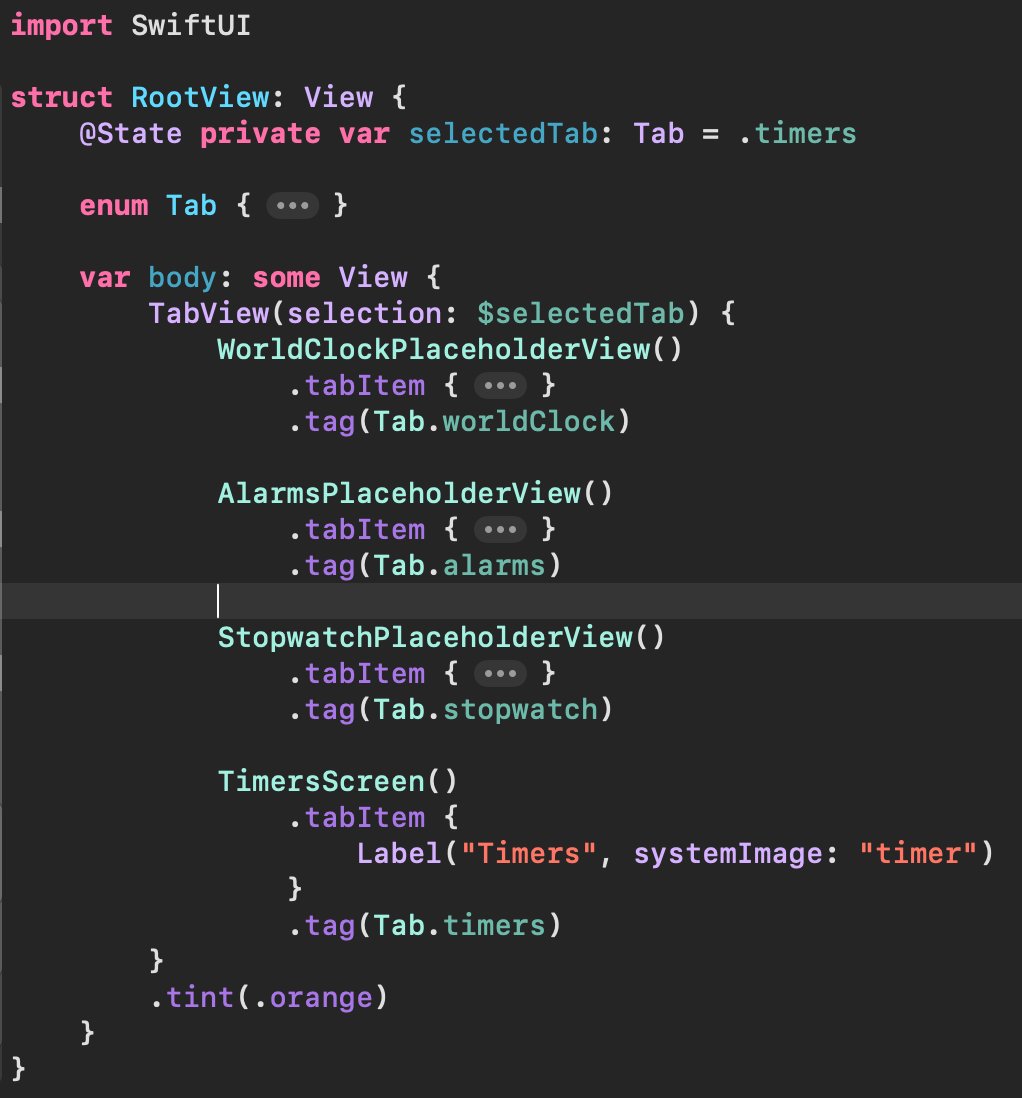
I'm recreating the layout of clock app in iOS. I'm setting timers as the selected tab, but when app starts, I'm seeing the animation transitioning from Tab 1 to Tab 4. Do you have any idea on how to start the app without this animation? Is this happening due to Liquid Glass?
Pitt (Swift && Tips) tweet media
English
3
0
4
1.4K
Pitt (Swift && Tips)
Pitt (Swift && Tips)@swiftandtips·
@scottm I tried that too (with a simple Text view)and I got the same "issue". I'm not making any load in the TimersScreen. I'm also using Xcode 26.3. I don't know what is different in my environment.
English
1
0
0
72
Scott Matthewman
Scott Matthewman@scottm·
@swiftandtips I’ve tried with an “empty” setup – tabs directly in ContentView, with each tab’s content being a ContentUnavailableView. I can’t replicate. Could there be some setup in one of of the tabs, or RootView’s parents, that is causing a delay in the initial rendering loops?
English
1
0
1
15