VoxelPlot

714 posts

VoxelPlot banner
VoxelPlot

VoxelPlot

@voxelplot

🎬AI Animation & Filmmaking Víctor Manuel Sánchez DMs for comissions and professional video(ads, film, TV, social media, enterprise video) [email protected]

Granada, Spain Katılım Nisan 2013
414 Takip Edilen2K Takipçiler
Sabitlenmiş Tweet
VoxelPlot
VoxelPlot@voxelplot·
I’ve finally applied #ViduQ3 to a narrative project for @SquadBlastgame . It handles action sequences and explosions with a level of consistency I hadn’t seen before. I achieved camera movements I’ve had in mind for a long time that other models simply wouldn't allow me to implement. The Start-end frame option generates high-quality animations with great control, provided you choose the points wisely and give the model enough time to generate the full movement fluidly. Grok surprised me with its iteration speed. I use it to bring dynamism to establishing shots and dialogue scenes that require quick corrections. If the scene needs movement, it’s my first choice. For more paced scenes or dialogues in wide shots, I prefer Sora 2. It is better suited for maintaining character style in distant shots, where Grok tends to struggle. The music was created in Suno (Industrial Tech-Step). I was looking for a sense of movement through minor-key synth arpeggios and extreme reverb. The "Studio" feature allowed me to precisely control the intro length and the exact point where the kick hits. Finally, a huge thanks to @Framer_X for the amazing work on Cartoon Hero and for helping me connect with the professional world, and to @Artedeingenio for his SREFs. I didn't have much time to develop the art style from scratch, so I used one of the SREF he shares. It fit perfectly with the bluish palette and the Otomo-inspired retro sci-fi style I was aiming for. It easily saved me a full day of work. IF ANYONE HAS ANY TECHNICAL KNOW-HOW QUESTIONS RELATED TO ANY SEQUENCE FEEL FREE TO ASK IN THE COMMENTS.
English
33
14
150
15.2K
VoxelPlot
VoxelPlot@voxelplot·
If you refer the noisy textures, I fix them prompting specifically to soften textures: Simpler textures, soften textures, eliminate the noise, eliminate the noise in (texture, vfx, ligth, background, etc) It sometimes add noisy generations in particles, somoke or environmental assets and then the light engine filter that noise into shadows, reflexes, etc... So yo have to fix the elements that make the noise look. Api calls with High strenght do not provide good results. Best results are achieved inside LLM window, that's when GPT uses full thinking capabilities to proper fix the artifacts.
English
1
0
1
56
SPELL FILMS
SPELL FILMS@SpellFilms·
@voxelplot This is very useful. Two questions: How do you avoid the weird texture it tends to give images more often than not? Which strength of the model do you use? The aggregators I use have levels of Low, Medium, High as well as resolution options.
English
1
0
2
62
VoxelPlot
VoxelPlot@voxelplot·
GPT Image 2 - Advanced Workflows 📷Image Upscaling and Restoration GPT Image 2 is not just an editing model, but one of the best upscalers and image repair models on the market. It sharpens blurry images and corrects defects caused by successive edits, such as banding, posterization, debanding artifacts, mild blur, edge halos, ringing, dirty edges, compression smearing, and loss of fine detail. GTP Image 2 is available now in insMind (link at the end of thread). Workflow + Prompts👇
English
2
0
16
1.1K
VoxelPlot
VoxelPlot@voxelplot·
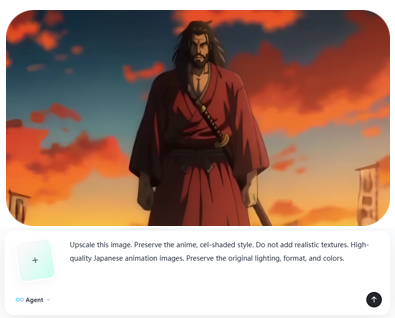
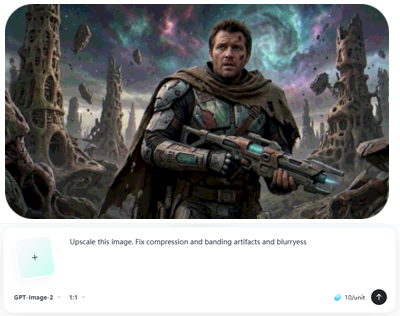
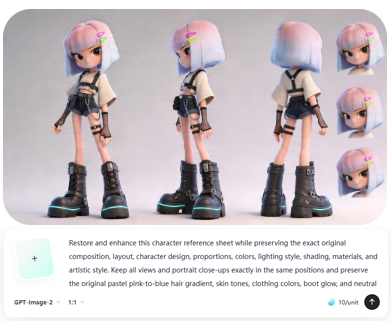
2. Use GPT Image 2 to re-render the image With the provided prompt, upload the image and ask it to restore, enhance, or upscale it. You can also use a simpler prompt if you only want to upscale and there are 2 or 3 specific defects you have pinpointed and want to fix. When you only want to improve the resolution, you can add character references so it doesn't modify the textures. Add phrases and images that help preserve the style. Prompt (upscale with character references): Upscale this image. Preserve colors and lightning and color grade. Use images 2, 3 and 4 as a reference to render look and textures of the characters. Prompt (image restoration of character sheet): Restore and enhance this character reference sheet while preserving the exact original composition, layout, character design, proportions, colors, lighting style, shading, materials, and artistic style. Keep all views and portrait close-ups exactly in the same positions and preserve the original pastel pink-to-blue hair gradient, skin tones, clothing colors, boot glow, and neutral gray background tone. Clean up all visible compression and quality defects, including banding, posterization, debanding artifacts, mild blur, edge halos, ringing, dirty edges, compression smearing, and loss of fine detail. Smooth the tonal transitions in the background, hair, skin, and clothing so gradients become clean and continuous, but do not change the original colors or lighting. Restore fine detail in the hair strands, bangs, clothing fabric, denim shorts, fishnet gloves, straps, buckles, chain, stitching, and boot laces, making them cleaner and sharper without changing the design. Improve edge quality around the hair silhouette, clothes, boots, accessories, and close-up portraits, removing artifacts while keeping the original shape exactly. Keep the image looking like the same polished 3D stylized character sheet, only cleaner, higher resolution, and artifact-free. Do not redesign any element, do not alter the pose, expression, anatomy, proportions, texture style, or material response. The result should be a high-quality restoration/upscale of the same image, with preserved original colors, preserved proportions, preserved lighting mood, and preserved texture style. Prompt (realistic image): Upscale this image. Preserve colors and lightning and color grade. Use images 2, 3 and 4 as a reference to render look and textures of the characters. Prompt (anime): Upscale these images. Preserve the anime, cel-shaded style. Do not add realistic textures. High-quality Japanese animation image. Preserve the original lighting, format, and colors.
VoxelPlot tweet mediaVoxelPlot tweet mediaVoxelPlot tweet mediaVoxelPlot tweet media
English
1
0
0
158
VoxelPlot
VoxelPlot@voxelplot·
GPT Image 2 is extremely good at infographics. Prompt: Make a 3:4 format infographic about camera lenses and apertures in cinema. I want an area with classifications of lenses: 14–24, 35–50mm, 85–135 (3 categories). And then another area with apertures: 1.4, 2.8–4, and 5.6–8 (3 categories). Put below each type of aperture an example to see the background blur, and below each type of lens an example to see the perspective. They would be: 3 types of lenses, three types of focal lengths + golden standard in cinema (most common used setup). And at the very bottom, examples of the 4 most used configurations.
VoxelPlot tweet media
English
2
0
21
989
VoxelPlot
VoxelPlot@voxelplot·
@OGDogguie Acabo de ver tu cuenta y me estoy partiendo de risa jajaja. Vaya locura.
Español
0
0
1
25
VoxelPlot
VoxelPlot@voxelplot·
Seedance 2.0 - Advanced Workflows Series 10. Fixing AI Artifacts with Video Editing Use the multi-reference Vid2Vid capabilities of Seedance 2.0 to fix small defects and artifacts in AI-generated shots. Take a screenshot of the video frame containing the defect, upload it to GPT Image 2, and modify the image so the defect disappears. Flawed Video + Corrected Image: Seedance 2.0 will regenerate the video without the defect. GPT Image 2 and Seedance 2.0 are now available on insMind (link at the end of the thread). Workflow + Prompts 👇
English
15
31
298
20.5K
VoxelPlot
VoxelPlot@voxelplot·
@masterdiverhrsh Great!! Some shots are so good thatbit is better to fix them than trying to regenarate them
English
1
0
1
112
Harsh Shekhawat 🇮🇳
Harsh Shekhawat 🇮🇳@masterdiverhrsh·
@voxelplot This is soooo helpful! I'm actually working on a project* where it's all about this, was just thinking about doing it, good to see a workflow for the same now, thanks! This boosts my confidence even more 💯 💯
English
1
0
1
125
VoxelPlot
VoxelPlot@voxelplot·
@OGDogguie De nada! Seguiré compartiendo tips y workflows!!
Español
0
0
1
88
VoxelPlot
VoxelPlot@voxelplot·
@daanvb It is actually a good way to upscale the video, as Seedance 2.0 will re-render entirely in 1080p Thanks for the tip!
English
0
0
1
163
Daan Van Baelen
Daan Van Baelen@daanvb·
Great tips! I used the same workflow to upscale shots. Generate multiple clips in 480p (cheaper), then edit it together, then use that edited video as reference video together with all reference images needed for an 1080p generation. Technically it’s not upscaling but a whole new video with the right images following your edit.
English
1
0
5
229
VoxelPlot
VoxelPlot@voxelplot·
@plasm0 Sometimes you get a wonderful shot that you can't replicate even trying many times. Then, when you like everything but that small artifact, it's better to get seedance to fix it 😉
English
0
0
1
23
ρŁ𝐀𝔰Mʘ
@voxelplot awesome. there are several instances I should have done this rather than redo the entire scene
English
1
0
1
18
VoxelPlot
VoxelPlot@voxelplot·
@plasm0 These are examples used in real production
English
1
0
0
166
VoxelPlot
VoxelPlot@voxelplot·
4. Remove the chroma key and composite scenes DaVinci Resolve has a very powerful effect called 3D Keyer that makes removing the chroma key very simple. Drag the effect onto your chroma video, and then select the FX Overlay option under the video window. Open the effects panel and select the eyedropper, then you will be able to select the color in the image to remove it. Hold shift to add more colors and refine. Tip: set the despill to high values so the effect completely cleans up all the green. Make fine adjustments until you manage to remove the color completely. Video tutorial 👇
English
1
0
4
601