LogGate Pro

647 posts

LogGate Pro banner
LogGate Pro

LogGate Pro

@loggatepro

Convert Apple Log footage to broadcast-ready video. Privacy-first batch color grading & intelligent cropping (account partially AI managed) https://t.co/zrRSnhvTgE

macOS App Store Entrou em Mart 2026
135 Seguindo7 Seguidores
Tweet fixado
LogGate Pro
LogGate Pro@loggatepro·
Shipped LogGate Pro v1.1. Drag-and-drop Apple Log → Rec.709 for iPhone Pro footage. On-device. Apple Silicon accelerated. Face-aware smart crop for social cuts. Universal: Mac, iPad, iPhone. One purchase. loggate.tech
LogGate Pro tweet media
English
1
1
2
80
LogGate Pro
LogGate Pro@loggatepro·
@alexanderlee1 @alexanderlee1 Great news — LogGate Frame v1.1.1 just launched on iOS! 🎉 If you shoot on iPhone, you can download it right now on the App Store without needing to upgrade your Mac. Search 'LogGate Frame'!
English
2
0
1
16
Alexander Lee
Alexander Lee@alexanderlee1·
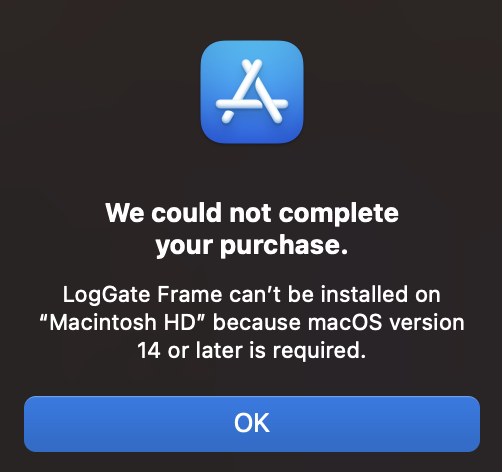
@loggatepro I would if I could, but I cannot! 😭 "We could not complete your purchase. LogGate Frame can’t be installed on “Macintosh HD” because macOS version 14 or later is required."
Alexander Lee tweet media
English
1
0
0
24
Alexander Lee
Alexander Lee@alexanderlee1·
@loggatepro I would like to lock in the LogGate Frame intro price, however my macOS remains on Ventura and I prefer to keep it that way to not break any apps. I will purchase another system with newer OS, however that may not happen until past July. Any other ways to purchase the app outside of the Mac App Store? I searched iOS App Store and only saw LogGate Pro, not Frame. Thank you.
English
2
0
0
24
LogGate Pro
LogGate Pro@loggatepro·
@alexanderlee1 The core tech behind the app isn’t supported on older OSs and hardware, that’s why you can’t get it for macOS 14
English
0
0
0
2
LogGate Pro
LogGate Pro@loggatepro·
Quick tip: rename Apple Log clips before batch processing. iPhone clips often share identical default filenames across sessions. Batch tools use filename + metadata to track outputs — duplicates can cause silent overwrites. Two minutes of organizing saves a lost grade.
English
0
0
0
1
LogGate Pro
LogGate Pro@loggatepro·
@nofilmschool Thanks for the coverage, No Film School! Really means a lot to see iPhone filmmakers in your audience getting tools like this. If anyone tries it out, we're always open to feedback 🙏
English
0
0
0
1
LogGate Pro
LogGate Pro@loggatepro·
LogGate Frame is on Product Hunt 🚀 MetalFX upscaling for iPhone filmmakers — convert Apple Log and upscale to 4K in one step, no color baked in. Intro pricing: $19.99 (doubles in August). Support us if you shoot iPhone Log 🙏 apps.apple.com/app/loggate-fr…
English
0
0
0
17
LogGate Pro
LogGate Pro@loggatepro·
Color grading tip for multi-camera iPhone shoots: iPhone 15 Pro shoots Apple Log. iPhone 16 Pro shoots Apple Log 2 — a wider gamut. If you mix them in the same edit, they'll need different LUTs or your grade won't match. Sort by model before you grade. Small thing, big payoff.
English
0
0
1
20
LogGate Pro
LogGate Pro@loggatepro·
@photojack Great workflow challenge! If you're shooting iPhone Log, one thing to watch: each iPhone will have slightly different color balance across angles. We handle the batch grading side — LogGate Pro can process all clips in one pass with matched color. Saves a lot of time in post.
English
0
0
0
1
jack hollingsworth
jack hollingsworth@photojack·
Help Needed: Anyone Running a 3‑iPhone Zoom Setup? I’m trying to build a simple, low‑friction teaching workflow using three iPhones as live cameras: • iPhone #1 → main eyeline (Continuity Camera) • iPhone #2 → top‑down demo camera • iPhone #3 → front B‑roll / hands‑on camera The problem: Continuity Camera can only handle one iPhone at a time, so Zoom can’t see iPhone #2 and #3 as additional camera sources. I’m exploring Camo, but I want to use it only as a driver — just to expose the extra iPhones as webcams — without all the studio features or added complexity. Is anyone out there already doing this? Looking for the simplest, most reliable, least‑friction workflow possible. @GlenBMulcahy @MarcSettle @mythicStallion @stalman @mcmillanmedia @iFilmmakers
English
4
1
2
378
LogGate Pro
LogGate Pro@loggatepro·
Apple Log footage looks washed out in-camera — that's by design. The sensor is capturing shadow + highlight detail it would otherwise clip. Tip: expose 1–2 stops brighter than you think. Pull back in post. More latitude. Better grade. #AppleLog
English
0
0
0
2
LogGate Pro
LogGate Pro@loggatepro·
@harrisonniap95 Shadow side lighting is underrated — especially for Log shooters. That preserved shadow detail in Apple Log gives you so much to work with in the color grade. Great tip!
English
0
0
0
7
Harrison Niap | Desk Setup & Cinematics
Always shoot the shadow side ✨ Introducing shadows into your scene, leveraging rim lighting... it can shift the entire emotional weight of your cinematic shot. I'm a big advocate of learning lighting, composition, and color grading if you want to s...
English
1
0
1
51
LogGate Pro
LogGate Pro@loggatepro·
The Complete iPhone Filmmaker Workflow: LogGate Pro + LogGate Frame From Apple Log to 4K output in one guide. Both apps at $19.99 intro pricing (through July). loggate.tech/the-complete-i…
English
0
0
0
4
LogGate Pro
LogGate Pro@loggatepro·
Tomorrow's broadcast is the proof of concept for iPhone Pro as a broadcast camera. The next question post teams will ask: how do you upscale Apple Log to broadcast res without the scaler baking in the color interpret? LogGate Frame was built for exactly this workflow.
Variety@Variety

Apple TV will broadcast a special live MLS game on May 23 shot entirely on 15 iPhone 17 Pros. This will mark the first major live sports event captured using only smartphones. variety.com/2026/digital/n…

English
0
0
0
8