Закреплённый твит

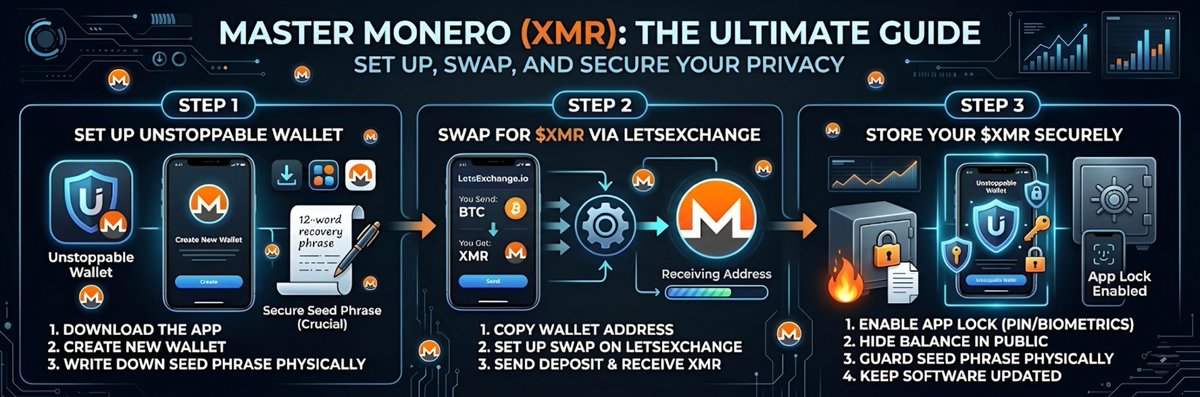
Here is a straightforward, guide to help you set up your wallet, get some Monero ( $XMR ), and lock it down safely.
📲 Step 1: Set Up Unstoppable Wallet
Unstoppable Wallet is an excellent open-source, non-custodial choice for privacy coins like Monero. Here’s how to get started:
1. Download the App: Go to your phone’s app store (Apple App Store or Google Play) or directly to [unstoppable.money](unstoppable.money) and download @unstoppablebyhs Wallet.
2. Create a New Wallet: Open the app and tap Create Wallet.
3. Secure Your Seed Phrase (Crucial): The app will generate a 12- or 24-word recovery phrase. Write this down on a physical piece of paper. Do not take a screenshot, and do not save it in your notes app. This phrase is the master key to your funds.
4. Enable Monero: Once you are on the main dashboard, tap the Add Coin (or manage) icon. Search for Monero / $XMR and toggle it on so it shows up on your home screen.
🔄 Step 2: Swap for $XMR via LetsExchange
LetsExchange is a fast, registration-free platform perfect for swapping other cryptos into Monero.
1. Get Your Receiving Address: Open Unstoppable Wallet, tap on Monero ($XMR), and hit Receive. Copy that long address (it starts with a '4' or an '8').
2. Set Up the Swap:* Head over to [LetsExchange.io](letsexchange.io) on your browser.
3. Choose Your Pairs: In the "You Send" box, select the crypto you currently have (like Bitcoin, USDT, or Litecoin) and enter the amount. In the "You Get" box, select Monero (XMR).
4. Enter Your Address: Paste the Monero receiving address you copied from Unstoppable Wallet into the destination field.
5. Send the Funds: @letsexchange_io will generate a deposit address for the coin you are sending. Send your exact deposit amount to that address from whatever exchange or wallet holds your current crypto.
6. Wait for the Magic: It usually takes a few minutes for the network to confirm the transaction. Once done, LetsExchange will route the newly swapped $XMR straight to your Unstoppable Wallet.
🔐 Step 3: Store Your $XMR Securely
Because Unstoppable Wallet is non-custodial, the moment the transaction completes on LetsExchange, your Monero is already sitting securely on your device. However, keeping it safe is entirely up to you.
Lock the App: Go into your Unstoppable Wallet settings and enable Face ID, Touch ID, or a strong PIN code. This stops anyone who borrows your phone from snooping on your balance or sending funds.
Hide Your Balance: If you open your wallet in public, use the app's feature to blur or hide your balances to prevent shoulder-surfing.
Guard the Seed Phrase: The paper you wrote your recovery phrase on in Step 1 is the *only* way to recover your $XMR if you lose your phone or delete the app. Keep it in a fireproof safe, a secure lockbox, or hidden somewhere only you know about. *Never* type it into a website or give it to someone claiming to be "support."
*Keep Software Updated:* Always keep both your phone's operating system and the Unstoppable Wallet app up-to-date to protect against newly discovered security vulnerabilities.
That's it! You are now set up, swapped, and secured. Welcome to the privacy layer of crypto.
English