Dami-Defi

30.3K posts

Dami-Defi banner
Dami-Defi

Dami-Defi

@DamiDefi

Former marketing lead at global Top 100 company. Crypto since 2018. Sharing strategies that actually work. @bitget Partner. All posts are NFA | DYOR.

เข้าร่วม Nisan 2012
618 กำลังติดตาม92.4K ผู้ติดตาม
ทวีตที่ปักหมุด
Dami-Defi
Dami-Defi@DamiDefi·
“AI is dead” is the laziest take in crypto right now. Look at these partnerships: - $SAHARA: Microsoft, Amazon, Snap - $KITE: PayPal Ventures, General Catalyst (backers) - $FET: Bosch, Deutsche Telekom - $RENDER: Apple - $TAO: Cerebras - $ICP: UNDP (UTC initiative with MAS) - $INJ: Google Cloud. - #VIRTUALS: Apple Health, Oura, Fitbit, Whoop (integrations) - $IO: NetMind.AI - $APT: Microsoft - $OCEAN: Mercedes-Benz (Acentrik) - $AKT: Equinix Metal - $FIL: Internet Archive, Smithsonian Institution, MIT Open Learning, Flickr Foundation; When the narrative has its run again, which coin are you betting on?
Dami-Defi tweet media
English
128
217
956
155.4K
Coin Bureau
Coin Bureau@coinbureau·
🚨GOLDMAN SACHS: OIL COULD STAY ABOVE $100 Goldman Sachs says oil prices are more likely to go up than down, both now and over the next few years. Ongoing supply disruptions mean oil could stay above $100 per barrel.
Coin Bureau tweet mediaCoin Bureau tweet media
English
19
9
60
6.8K
Watcher.Guru
Watcher.Guru@WatcherGuru·
JUST IN: 🇺🇸 63% chance President Trump signs crypto market structure legislation into law this year.
Watcher.Guru tweet mediaWatcher.Guru tweet media
English
320
306
2.6K
106.6K
Miles Deutscher
Miles Deutscher@milesdeutscher·
If you read just ONE article this weekend, make it this. A 5-minute read could genuinely change your career trajectory. While everyone else panics about AI job losses, this is the blueprint to ensure you thrive. I wrote this for friends & family first - now it's public:
AI Edge@aiedge_

x.com/i/article/2033…

English
14
35
244
61.4K
Dami-Defi
Dami-Defi@DamiDefi·
@WatcherGuru That’s how regulators see crypto now? Sounds too good
English
0
0
6
188
Watcher.Guru
Watcher.Guru@WatcherGuru·
JUST IN: 🇺🇸 CFTC Chair Mike Selig says crypto will power the "new frontier of finance" as markets "move on chain."
English
253
408
2.3K
99.8K
Dami-Defi
Dami-Defi@DamiDefi·
@cyrilXBT Learn and build. We’re moving at a really fast speed with AI
English
0
0
0
58
Dami-Defi
Dami-Defi@DamiDefi·
@MSBIntel Silver is literally saying “don’t get used to the pump”
English
0
0
0
25
MSB Intel
MSB Intel@MSBIntel·
BREAKING: Silver crashes under $70, falling over -5%.
MSB Intel tweet mediaMSB Intel tweet media
English
3
0
5
380
Deebs DeFi 🛰
Deebs DeFi 🛰@Deebs_DeFi·
If youre having fun You’ll be consistent If you’re consistent You’ll win
English
94
7
136
3.2K
Dami-Defi
Dami-Defi@DamiDefi·
@MSBIntel Maybe because everyone realized learning about investment is better than asking others to do it for you
English
1
0
0
20
MSB Intel
MSB Intel@MSBIntel·
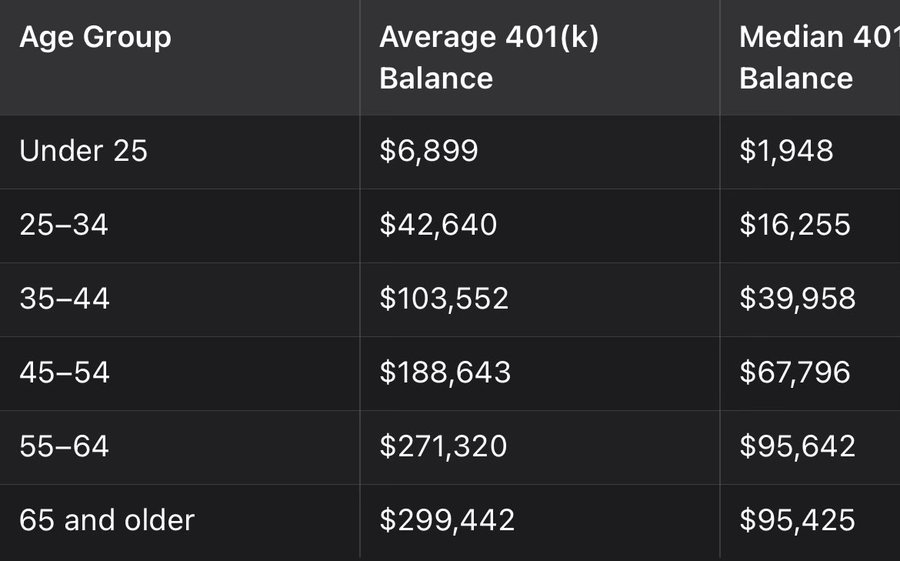
BREAKING: U.S. retirement savings remain critically low, per Vanguard Median 401(k) balances: • 18–24: $2K • 25–34: $16K • 35–44: $40K • 45–54: $68K • 55–64: $96K • 65+: $95K Can you even retire in this type of economy?
MSB Intel tweet media
English
4
3
6
351
Dami-Defi
Dami-Defi@DamiDefi·
@cyrilXBT That took building from idea to final product in one step
English
0
0
0
54
Cyril-DeFi
Cyril-DeFi@cyrilXBT·
Google just quietly dropped something insane in AI Studio. Vibe coding is now built directly into the platform, and it feels like cheating. You describe what you want to build. It writes the code. It previews it live. It iterates with you in real time. No IDE. No setup. No stack overflow at 2am. This is what building used to take weeks to do. Google just made it an afternoon project. The gap between people who can build and people who cannot just got a lot smaller. And most people still have not opened AI Studio once. What are you waiting for?
English
13
7
60
4.3K
MSB Intel
MSB Intel@MSBIntel·
BREAKING: Traders now see a 50% chance the Federal Reserve raises interest rates by October.
MSB Intel tweet media
English
2
0
4
379
MSB Intel
MSB Intel@MSBIntel·
BREAKING: White House releases national AI policy framework TLDR; • One national standard to override patchwork state AI laws • “Light-touch” regulation to accelerate innovation • AI training on copyrighted data framed as permissible • Focus on child safety, fraud prevention, and deepfakes • Massive energy + infrastructure push for AI data centers
MSB Intel tweet mediaMSB Intel tweet media
English
2
0
1
359
Big Wiz 🧸📈💰
Big Wiz 🧸📈💰@WisdomMatic·
ICYMI: There’s a 55,000 USDT reward pool for participants in the Perle Labs Discord. How to participate is simple: - Join Perle Discord - Post an original tweet on X - Include the hashtags: #PerleAI + #ToPerle - End your tweet with: “participating in @PerleLabs community campaign” - Submit your entry via this form ▶️ forms.gle/59CDQHKB6AAm5R… Important: Do not use a CEX wallet when submitting your wallet address. I’ve also submitted mine.
Big Wiz 🧸📈💰 tweet media
Perle Labs@PerleLabs

Something is happening in our community right now 👀 We just kicked off #ToPerle, an opportunity for the community to share their real thoughts on what we’re building, their perspective on Perle, and what this all means to them. People are already jumping in and creating. If you want to be a part of it, join our Discord family! discord.com/invite/joinper…

English
33
41
114
5K
CryptogemsX 🇵🇹
CryptogemsX 🇵🇹@bestcryptotoken·
Once again the @NakamotoGames Team showing everyone on CT how things should properly be done 🤝 Keep fading $NAKA at your own risk, boys! Bullish on the Roblox expansion!
Nakamoto.Games@NakamotoGames

👀🔥 ROBLOX EXPANSION - ENTERING A NEW DIMENSION 👀🔥 We’re moving fast, and what’s taking shape on Roblox is not just another integration, it’s the foundation for a completely new growth channel. To further strengthen our ecosystem and deeply engage the Web2 audience, we are building out our presence on @Roblox, bringing $NAKA and our entire ecosystem into a brand new, massive user base. This is how we begin 👇 Current Development Progress: • Old Thai Town and Farming Village zones fully implemented • 5 mini-game environments already live in development • Arcade systems, leaderboards, SFX, and mobile inputs integrated • Inventory system completed, drag and drop, character display, accessories • Offering systems and core gameplay loops taking shape In Progress: • Festival zone expansion • Arcade upgrades and scaling • Food stall and social interaction areas 👉 Roblox is becoming a major pillar of our ecosystem, unlocking access to millions of players and pushing #Play2Earn into entirely new territory. This is just the starting point. We’re building, expanding, and positioning $NAKA where the next generation of players already is. Stay tuned, this is going to scale. 🚀

English
6
1
31
415
Alovo
Alovo@ankitagmgr·
@DamiDefi From ai we can make money
English
1
0
0
16
Dami-Defi
Dami-Defi@DamiDefi·
How to use Claude Code to build your first AI product even if you’re not technical (full beginner course) 1. How to actually get good results from AI coding tools ➤ Why people get bad results * They start coding before planning. * They give vague prompts and expect great output. * They let the AI make too many decisions. * They ask for too much in one go. * They do not answer clarifying questions properly. * They do not test the output early. * They do not save progress, so one bad change can ruin momentum. ➤ What works better * Start in planning mode first * Use planning before execution. * Let the tool create a structure before it starts building. * Be clear about what you want * Say what you want built. * Say how it should work. * Say what matters most. * Say what to keep simple. * Give small, specific tasks * One feature at a time * One change at a time * One revision at a time * Answer clarifying questions * Claude asks follow-up questions before building. * Those questions reduce guessing and improve the output. * Test quickly * Run the file * Open it in the browser * See what actually works * Then revise ➤ Practical prompt lesson from the transcript Instead of: * “Make a game” Do this: * describe the type of game * explain controls * explain the style * explain features * explain what should stay simple Example: * top-down shooter * browser-based * 2D retro style * character with a gun * enemies coming from different angles * move with arrow keys * aim and click with the mouse * levels * menu screen * keep it relatively simple Best takeaway The more specific you are, the less the AI has to guess. 2. The setup most beginners skip before using Claude Code ➤ What Claude Code actually is * A terminal / command-line coding tool from Anthropic * You type instructions in plain language * It generates code, edits projects, debugs, and builds apps ➤ What you need before starting * A Claude subscription or API credits * A terminal environment: * PowerShell on Windows * Terminal on Mac/Linux ➤ Installation basics * Install Claude Code using the command for your operating system * Run claude in the terminal to test if it works * Authenticate in the browser * Trust the current folder when prompted ➤ Important beginner point * Claude Code is not a normal desktop app * It runs inside the terminal * Every time you want to use it, you reopen terminal and run claude ➤ Easier option for beginners If the terminal feels intimidating: * use the Claude desktop app * switch into code mode * choose project * prompt directly from the app * use asking / planning / coding modes there too ➤ From the transcript: * the desktop app is easier * but the CLI is better for serious work ➤ Best working environment I recommend: * open a project folder in Cursor, VS Code, or a similar editor * open the terminal inside the editor * run Claude there ➤ Why this matters: * you can see the files being created live * you can view the sidebar with project files * you can watch changes happen in real time * it is less confusing than using the terminal alone ➤ Useful setup actions from the transcript * create a dedicated folder for the project * open that folder in your editor * open terminal inside that folder * run claude * trust the folder * start building there Best takeaway Do not use Claude Code in a messy setup. Use a proper project folder inside an editor so you can see what the AI is doing. 3. Why Git and GitHub are non-negotiable when using AI agents ➤ Why Git matters Git gives you a way to: * checkpoint progress * save versions * revert mistakes * avoid losing working code ➤ I explicitly recommend installing Git before doing real work. Why this is especially important with AI agents * AI can make mistakes * AI can change many files quickly * AI can take the project in the wrong direction * without version control, it is harder to recover ➤ What I recommend * install Git * create a GitHub account * connect your local setup to GitHub * let Claude help with setup if needed ➤ What GitHub adds GitHub gives you: * remote backup of the code * access from another computer * easy sharing with others * a way to recover the project if the folder is deleted or the machine is lost ➤ Actionable workflow Tell Claude something like: * make a new Git repository for this project * create clean commit messages * save commits locally * push them to GitHub regularly * keep the project backed up so we can revert anytime ➤ Why this is a big deal Many tutorials skip this. But this is one of the most practical parts because: * it protects the work * it reduces fear when making changes * it makes longer projects safer ➤ Useful setup flow pulled from the transcript * install Git * create GitHub account * install GitHub CLI if needed * run login flow * authorize GitHub in terminal * let Claude create repo and start using Git/GitHub for the project Best takeaway AI agents are much more useful when every good version of your project is saved and recoverable. 4. The smartest workflow for building with Claude Code ➤ The workflow the transcript suggests Step 1: Set up the folder and environment * create a new folder for the project * open it in Cursor / VS Code * open terminal inside the editor * run claude ➤ Step 2: Start in planning mode * switch to planning mode * think through what you want to build first * stream your thoughts into Claude if needed ➤ Step 3: Describe the project in plain English You do not need to know the codebase first. * you do not need to know the languages * you do not need to have done research * it helps, but you can start from scratch ➤ Step 4: Ask Claude to create a plan * give the rough project idea * then explicitly say: create a plan ➤ Step 5: Answer follow-up questions Claude may ask about: * sound * size * other missing details Answering these helps it produce a tighter plan. ➤ Step 6: Approve execution * once the plan is ready * tell it to proceed * optionally auto-accept edits ➤ Step 7: Let it build the first version In the transcript, the first version was a playable web shooter game. ➤ Step 8: Run the output * open the generated file * test it in the browser * check if it matches the prompt ➤ Step 9: Revise in small steps Instead of rebuilding everything: * add one feature * improve one part * make one change at a time ➤ Step 10: Save with Git/GitHub * commit progress * push to GitHub * keep the project protected Extra workflow lesson from the transcript The most important part of AI coding is: * knowing what you want I specifically warn: * if you let the agent steer you, you get horrible crazy results * if you are clear and specific and do one small task at a time, you can get fantastic results ➤ Model selection workflow Use: * Opus for more complex work * Sonnet for middle-ground work * Haiku for fast, cheaper, simpler tasks ➤ This matters because: * usage can get expensive * you can run through credits quickly * not every task needs the most powerful model Best takeaway The real workflow is not “prompt once and hope.” It is plan, clarify, execute, test, revise, and save. 5. The Claude Code features that make power users better than beginners Core modes ➤ Claude Code has 3 important modes: 1. Ask mode * default mode * asks before doing things * safer for beginners 2. Code mode * automatically accepts edits * faster for building * better when you trust the direction 3. Plan mode * creates a detailed plan first * gives more structure * one of the best ways to improve output quality ➤ Useful commands and shortcuts from the transcript * /help * shows commands and available actions * /model * lets you switch between Opus, Sonnet, and Haiku * /tasks * shows background tasks currently running * /init * creates the CLAUDE.md file * /agents * opens agent functionality * /exit * exits the current session ➤ Useful keyboard shortcuts mentioned * Shift + Tab * cycle between modes * Escape twice * clear what is currently typed * Up / down arrows * cycle through previous prompts/commands * Alt/Option + Enter * add a line break without submitting * Ctrl + O * expand verbose view / logs * Ctrl + B * run as a background session * Ctrl + T * view tasks * Escape * interrupt execution ➤ Background tasks Claude can run long tasks in the background, such as: * web servers * ongoing processes * things that would otherwise block the terminal Why this matters: * you can keep working while the task runs * you do not lose your main workflow ➤ CLAUDE.md This is one of the most useful features. Why it matters: * Claude sessions do not keep unlimited memory * when you restart, session context is gone * CLAUDE.md gives Claude persistent project memory What it can store: * project overview * how to run the project * development setup * design patterns * workflow expectations * rules Claude should follow The speaker also updates it with: * commit regularly * push to GitHub * keep clean commit messages * do not lose work ➤ Agents, skills, MCP, hooks These are more advanced features mentioned near the end. Agents * specialized helpers for different tasks * can be delegated work Skills * repeatable tasks Claude can learn and run again MCP * lets Claude connect to outside services like Notion, Gmail, Google Drive, etc. Hooks * can trigger actions automatically Best takeaway Beginners use Claude like a chatbot. Power users use modes, commands, memory files, tasks, and workflows. Strongest overall TLDR If you want the cleanest possible summary of the whole video: * Claude Code works best when you use it inside a proper project folder and code editor * Start in planning mode before building * Be very clear about what you want * Let Claude ask clarifying questions * Build in small steps * Test every version * Use Git and GitHub from the start * Create a CLAUDE.md file so Claude remembers project rules * Use the right model for the right task * Treat AI coding like a workflow, not a magic prompt Thanks to @TechWithTimm for putting this video together.
English
3
23
111
10.2K
Hira
Hira@Hiraweb3·
@DamiDefi love how this breaks it down cleanly
English
1
0
0
18
Perry
Perry@perrykalshi·
@DamiDefi @worldlibertyfi institutional backing is key for this. curious to see how usd1 competes with the majors.
English
1
0
0
12
Dami-Defi
Dami-Defi@DamiDefi·
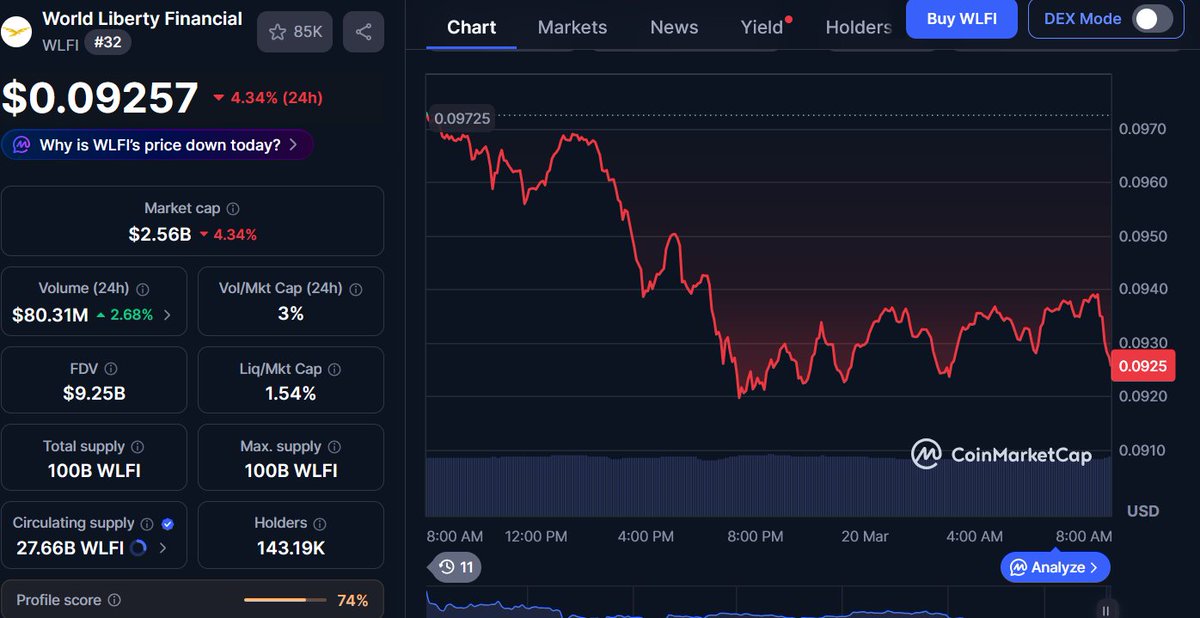
$WLFI | @worldlibertyfi is quietly becoming stablecoin infrastructure. While everyone watches price, here's what's moving: - $2.6B market cap – USD1 stablecoin sitting at #30 overall - $3.4B monthly volume - BitGo custody – institutional-grade infrastructure backing every USD1 - 1.86B circulating supply with 100,000+ on-chain transactions - Partnership pipeline: Apex Group ($3.5T AUM) piloting USD1 + Spacecoin bringing DeFi to unbanked via satellite The stablecoin wars are heating up & USD1 just entered the ring.
Dami-Defi tweet media
English
9
11
103
9K
Nomad Fulcrum
Nomad Fulcrum@nomadfulcrum·
@DamiDefi @worldlibertyfi Infrastructure-led growth in the stablecoin sector is often overlooked during price volatility. Institutional-grade custody and high volume suggest $WLFI is maturing into a core liquidity layer.
English
1
0
0
42
Raychi
Raychi@raychix·
@DamiDefi @worldlibertyfi quietly becoming stablecoin infra is a flex nobody gets till its obvious thats why it works
English
1
0
0
52