CreatorsKlub SEO expert รีทวีตแล้ว

#SEO Tip: when doing index coverage analysis for large sites (100K+ pages), one of my favourite and easiest methods to use is filtering by sitemap.
If the site has all of their XML sitemaps submitted individually in Google Search Console, you're able to see data for the total number of pages discovered.
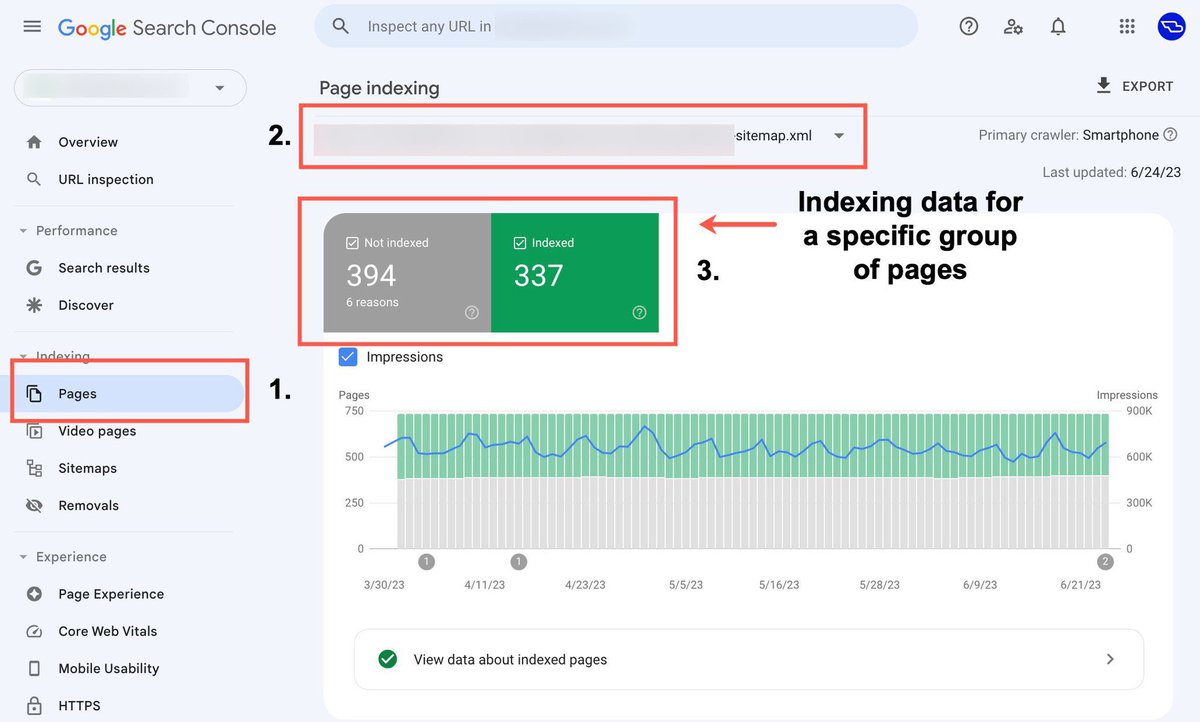
When segmenting by a specific sitemap, you're then able to see the breakdown for indexed vs. not indexed pages along with the reasons for why.
This of course does come down to how well sites organize their content within their sitemaps. If content is haphazardly grouped together at random, this approach won't be all that useful.
But if content is clearly grouped within clear sections by sub-folder and content type, then you've got a winning combo. You're then able to see exactly how many pages from different content segments are indexed by Google.
The easiest way of doing this is by selecting 'Pages', clicking the drop-down at the top and selecting the sitemap of interest, then scrolling down to assess the overview metrics and the reasons for exclusion.
Another method can also be verifying sub-folders of your site directly in GSC, which can also be a smart approach for working with the API. But I generally prefer using the sitemap filtering method for a quick view – if the correct setup is in place.
If you're working with a large site and all of their individual sitemaps haven't been submitted (which won't allow for filtering), then I would go ahead and add them to GSC. Note: you won't be able to see the historic data immediately as the data will start from the day its added.
When working with large sites and you're wanting to gain a quick understanding of the problem areas, use the sitemap filtering method. It's a smart approach for SEO analysis that not many are aware of in my experience.
English