
kucinglapar รีทวีตแล้ว
kucinglapar
14.2K posts


kucinglapar
@kucinglaparssss
Cuma pengamat sosial media
Bandung เข้าร่วม Haziran 2010
1.1K กำลังติดตาม226 ผู้ติดตาม


kucinglapar รีทวีตแล้ว

Pemerintah yang berkuasa akibat pemilu yang cacat adalah pemerintah yang tidak sah. Cepat atau lambat, rakyat bisa tidak patuh.
Indonesia
kucinglapar รีทวีตแล้ว

OptimizerDuck, open-source tool yang bikin lo uninstall CCleaner.
Ini bukan cuma "cleaner" biasa. Dia gabungin 30+ tweak Windows dalam satu app, dari matiin telemetry, block bloatware, sampai GPU registry tweaks yang biasanya lo harus edit manual.
Yang gue suka, dia kasih risk rating buat setiap tweak. Jadi lo tau sebelum apply, bukan asal pencet terus nyesel.
Fitur yang kerasa banget:
- Disable Windows telemetry, Cortana, Copilot, advertising ID
- Startup manager, lo bisa matiin semua app yang auto jalan pas boot
- Service host tuning based on RAM lo
- Custom high-performance power plan
- Keyboard latency reduction buat gaming
Dan semua reversible. Ga cocok? Balikin lagi.
Yang paling penting adalah, portable .exe. Download, langsung jalan. Ga install, ga registry sampah. Bisa di USB stick.
Dan dia open-source, bukan freemium yang nanti nagih. 2.3k stars, aktif dikembangin (commit terakhir 2 hari lalu). Support 8 bahasa termasuk Indonesia? Engga. Tapi EN, Vietnam, China, Korea, Prancis, Spanyol, Rusia ada.
Link: github.com/itsfatduck/opt…
CCleaner Pro $40/tahun buat apa kalau ini ada.

Indonesia
kucinglapar รีทวีตแล้ว

opencode published their real model usage data. what developers actually run when they're paying for it:
1. deepseek v4 flash: 32T tokens
2. deepseek v4 pro: 19T tokens
3. kimi k2.6: 6.5T tokens
deepseek is running more tokens than the next 16 models combined. it's actual usage from developers spending their own money.
glm-5.1 grew 419% too. the models winning on price and reliability aren't always the ones winning on twitter.

English
kucinglapar รีทวีตแล้ว

@buildwithhassan @CommandCodeAI we applied the same to fix design with /design bundled skill
x.com/MrAhmadAwais/s…
Ahmad Awais@MrAhmadAwais
how did we fix the ai design slop problem in llms - DeepSeek/Kimi/Qwen or Claude/GPT?! i've been thinking about "why do all ai-generated designs look the same?" is it a model problem or a harness problem? context: we're fixing the llm design problem with `/design` for @CommandCodeAI - atm it has 16 modes, 24 reference documents, ~4,500+ lines of encoded design taste from some of the best designers in the world. it reads your codebase, identifies what's broken, and edits real files. no figma. no markdown mockups. the output stops looking like ai slop. i've been staring at ai-generated uis for a while now and noticed something that i think is underappreciated: llms can write css fluently but have essentially zero design taste. and the failure mode is not random, it's a very specific, very small distribution. let me explain. when you ask a model to build a landing page, it reaches into the mode of its training distribution. the mode of all landing pages on the internet is: centered hero, gradient text, glassmorphism card, three identical feature tiles, indigo accent, Inter font, bounce animation. this is the "average website." the llm is doing exactly what we trained it to do - predicting the most likely next token given "build a landing page." the most likely landing page is the average landing page. the average landing page is mediocre by definition. this is not a capability problem. the model knows oklch(). it knows prefers-reduced-motion. it knows golden ratio. it knows how to set a 65ch measure. it just doesn't know when to use these things, because "when" is taste, and taste is not well-represented as a statistical prior over internet css. so we thought what if we gave every llm a design taste with `/design`. here's what we found: 1/ the failure design dataset is surprisingly small. we talked to a bunch of designers with great design taste and asked them to label AI-generated UIs. what are the tells? turns out there are basically ~10 and they account for ~90% of the "this looks AI-generated" signal: - tech gradient (blue-violet glossy energy on everything) - generic tech hue (indigo because "software" not purple btw) - feature tile grid (icon + heading + sentence x N, all equal weight, nothing prioritized) - accent rail (colored stripe on card edge = decoration pretending to be organization) - unearned blur (glassmorphism without a depth system) - stat monument (oversized numbers filling space where a product story belongs) - icon topper (rounded-square icon above every heading as template filler) - bounce everywhere (elastic easing because the API has it, not because it's purposeful) - default type (whatever font the training distribution likes this year) - center stack (everything centered because no composition decision was made) this is super similar to what we see in other llm tool failures. tool calling errors? 4-16 types. fixing that made deepseek outperform opus 4.7, i wrote about that before! so i started researching maybe a dozen common patterns are design tells? 10. the failure distribution is narrow and we could repair ai design. this means it's a tractable and deterministic problem. `/design smell` hunts all these and scores severity on a /10 scale. 2/ the deeper problem is compositional, not cosmetic. the more interesting thing i found was that most of these tells are symptoms, not causes. the actual bug is that the model chooses layout before it chooses purpose. a dashboard and a landing page have completely different jobs. a dashboard is a Monitor surface - status, alerts, metrics, live data. a landing page is a Decide surface - proof, risk reduction, one clear action. these need fundamentally different spatial compositions. but the LLM reaches for the same centered-hero-plus-cards layout for both, because that's the mode of the training distribution. so we built work-pattern-first composition. before the agent touches any visual property, it must identify which of 7 patterns the surface serves: - Monitor: status boards, alerts, metrics, live priority - Operate: command bars, canvases, inspectors, direct manipulation - Compare: tables, matrices, split views, ranked lists - Configure: grouped settings, forms, previews, commit areas - Learn: article flow, walkthrough rhythm, progressive sections - Decide: focused pitch, proof, risk reduction, one dominant action - Explore: search, filters, maps, galleries, reversible discovery this is essentially chain-of-thought for design - force the model to reason about the *purpose* of the layout before generating the layout. i think there's a general lesson here. when an LLM is generating something compositional (code, UI, writing), forcing it to commit to a structural frame *before* generating tokens within that frame helps a lot. it's the same reason chain-of-thought helps with math. you're reducing the entropy of the generation by conditioning on a high-level plan. this single constraint eliminated more generic-looking UIs than any aesthetic rule we wrote. many phenomenal skills exist in the space, i bet they had the taste for great design but didn't know they were fixing the chain-of-thought problem instead of the style problem. i think that's why their skills are super loopy instead of being reliably good. 3/ validate-then-repair, again. my first version tried to audit and fix design simultaneously. this what many design skills do and fail. it's the "preprocess" approach and it fails for the same reason it failed in tool calling: you're encoding a prior about what's broken, and you get false positives that silently corrupt things. it would recolor something that needed relayout, or polish typography on a composition that was fundamentally wrong. the thing that worked: separate diagnostic from treatment, but make them a mandatory pair. audit modes (`checkup`, `smell`, `review`) produce structured reports. treatment modes (`redesign`, `relayout`, `recolor`, `typeset`, `motion`, `interaction`, `responsive`) consume those reports before making changes. the audit localizes the problem. the treatment mode only spends "repair budget" where the audit actually disagreed. same shape as tool calling repair. let the design system complain first, then fix only what it complained about. the validator does the localization work for you. cheap-then-careful, fast-path-then-evidence. i keep seeing this pattern everywhere. treatment modes don't just do report cleanup. they run their own full pass after absorbing the report. the report is more context, it's not a todo list. 4/ why oklch() color fn matters for llms personally, i always struggled a bit with the oklch() css fn but llms understand it super well. this one is fun. llms default to hsl because that's what's in the training data. HSL lightness is perceptually nonlinear - hsl(60, 100%, 50%) (yellow) and hsl(240, 100%, 50%) (blue) have the same L value but look completely different to a human eye. so when the model tries to build a "consistent" palette by keeping L constant, the result looks wrong in ways the model can't diagnose from the css alone. oklch has perceptually uniform lightness. this means the model can reason about color mathematically and have the result match perceptually. equal steps in the number space produce equal steps in the visual space. it's the right abstraction for an llm to work in, because it makes the optimization landscape smooth small changes in the parameters produce small changes in the output. hsl has cliffs and plateaus everywhere. i think this generalizes: when you're designing an interface for an llm to work through (whether it's a color space, a schema, or an api), choose representations where the distance in parameter space correlates with the distance in output space. the model optimizes over parameters. if the mapping from parameters to outputs is nonlinear and full of discontinuities, the model will struggle even if it "knows" the right answer in principle. we go further: the agent picks emotion before hue. calm vs urgency vs trust vs momentum. then it builds the palette in oklch with constraints - clamp chroma at lightness extremes, tint neutrals toward brand hue, 60-30-10 distribution. the agent can't default to indigo. the system requires a reason before a hue. no more indigo slop. and it's indigo, not purple. 5/ state coverage is the most honest metric. the most quantitative signal we found: count the number of interaction states per component. a human designer ships 7-9 states (idle, hover, active, focus, loading, empty, error, disabled, overflow). an AI agent ships 1-2 (idle, maybe hover). this is a clean, measurable proxy for design quality that requires zero subjective judgment. we just... count. does this button have a focus state? does this form handle empty? does this list handle overflow? the median AI-generated component has 1.5 states. the median human-designed component has 6+. roughly an order of magnitude. the gap is enormous and trivially detectable. 6/ a meta-observation beats an infinite loop. the biggest failure mode of AI design tools i found is you detect problem → attempt fix → the fix creates a new problem → attempt fix → loops forever. the agent re-runs the same mode hoping for a different result. it never converges. we solved this by reward model written in plain English. after each mode completes, the system recommends 2-3 specific next modes: redesign → checkup, review (validate the change) smell → finish, refine (fix what was found) recolor → responsive, motion (test viewports, add transitions) finish → typeset, recolor (fine-tune the details) the flow is: build → audit → refine → style → frontend → ship. the agent knows what to do next instead of re-running what it just did. this is a trivial intervention - a lookup table, basically but it eliminated the looping problem almost entirely which is super common in most design skills out there. 7/ truthful completion is the hardest constraint. the most insidious AI design behavior: claiming work that isn't visible. "added hover states" when no hover CSS was written. "improved spacing" when margins didn't change. "enhanced motion" when no keyframes exist. every mode has a "bar" - the minimum visible change required for the mode to count as complete. `typeset` must change body text, heading scale, labels, button text, form text, metadata, and responsive behavior. changing only the hero headline is not enough. `motion` must add animation to at least 8 transition moments. changing one easing value is not enough. the agent can't claim "motion improved" because it changed a duration from 200ms to 250ms. the user must be able to see new or clearly better behavior. this is surprisingly hard to enforce and the single most important quality constraint in the system. 8/ finally here's my meta-observation about design taste in general what we built is basically a reward model for design, implemented as structured english instead of a neural network. it defines what good looks like across 24 reference documents, gives the llm a rubric, and lets it self-evaluate. the 10 smells are negative rewards. the 9 states are a completeness check. the 7 work patterns are a structural prior. i'm sure this will grow. this is taste engineering in the limit. you're not writing instructions. you're writing a curriculum. the model already has the capability (it can write any CSS). what it lacks is the policy on when to use which capability, and what "good" looks like. i find it interesting that the policy is so compact. ~4,500 lines to encode "design taste" well enough that the output passes designer review. that suggests taste (at least for UI design) is lower-dimensional than it feels. it's not an infinite space of subjective preferences. it's a finite set of principles, applied consistently, with a small catalog of common violations. the model didn't change. we told it what good taste looks like. same lesson as tool calling: "capability gap" is usually "contract gap." the model knows how to write css. it just hasn't been told what good css looks like for *this specific surface*. i now believe that different llms have different baseline design capabilities, but it's your coding agent, the harness, that makes the difference in the end. the model didn't get better at design. the harness taught it what designers actually look for. i'm sharing my learnings so every harness out there can benefit not just our agent. try it yourself with what we built in Command Code. `npm i -g command-code && cmd` then `/design smell` on any project. read the md or html report. i care about design more than most engineers do, and seeing this work feels super good. a lot of what looks like a model capability gap is actually a contract gap. fix your harness. design slop is your "coding agent skill issue," not the model's.
English
@CommandCodeAI Is that $1 Go Plan subsidized? Or it just promotional until some time?
English

Command Code is the only code agent that has:
1. $1 Go plan with 10x free credits (best overall)
2. optimizes for top open models
3. repairs open models tool calls free
3. doesn't charge 400% more on open models like DeepSeek/MiMo - almost every other coding agent does, check!

English
kucinglapar รีทวีตแล้ว
Kimi K2.7 Code is now in available in Command Code.
10x free credits in Go.
Our new #1 open mode in internal benchmarks.
cmd update to v0.37.0
select via /model
• 256K context 🍃
• 30% lower reasoning tokens than K2.6 ✅
• Open weights 1T-parameter MoE - 32B active ⚡

English
kucinglapar รีทวีตแล้ว

🌘 Kimi-K2.7-Code, our latest coding model, is now released and open-sourced!
🔷 Improved coding & agent performance over K2.6: +21.8% on Kimi Code Bench v2, +11.0% on Program Bench, and +31.5% on MLS Bench Lite.
🔷 Reasoning efficiency: Less overthinking, with 30% lower reasoning-token usage compared to K2.6.
🔷 Long-horizon coding: Improved instruction following, higher end-to-end coding task success rates.
⚡️ 6x High-Speed Mode coming soon!
🔌 Available today via Kimi API and Kimi Code.
🔗 Kimi Code: kimi.com/code
🔗 API: platform.moonshot.ai


English
kucinglapar รีทวีตแล้ว


kucinglapar รีทวีตแล้ว

English
kucinglapar รีทวีตแล้ว

50% off Qwen3.7-Max!
Limited on Qwen Cloud. Now, click into Qwen Cloud to try Qwen3.7-Max at half the price!
🔗link: click.qwencloud.com/m/20000000330/
#QwenCloud #Qwen

English
kucinglapar รีทวีตแล้ว
update: opencode published their full model pricing table. deepseek V4 pro still showing $1.74 input / $3.48 output on opencode.
deepseek official price after the permanent discount: $0.41 / $0.83.
that's 4x more expensive on opencode than going direct. still waiting on the sync.

English
kucinglapar รีทวีตแล้ว

kucinglapar รีทวีตแล้ว

Kimi Code, our open-source coding agent, just got a major upgrade!
🔹One-line CLI install, zero setup, fast startup
🔹Drag in videos as coding context: reference-to-LUT, long-video-to-short, screen-recording-to-code, and more
🔹Plugins for stocks, financial reports, academic papers, with more coming
🔹Supports the ACP protocol, and works with JetBrains, Zed, and more
🔹Hooks for custom tools and workflows
Try it with Kimi K2.6 👉 kimi.com/code
Issues, plugin ideas, and PRs welcome! Community feedback helps shape what ships next.🚀

English
kucinglapar รีทวีตแล้ว

here's how you can access minimax M3 for free without paying any subscription
first of all, what is minimax M3? it is a frontier level ai model developed by the ai company MiniMax.
it is highly regarded for its coding and agentic capabilities.
the simple & straightforward guide:
- install @opencode cli on your pc
- cd into your project older and run "opencode"
- once the gui loads up, type in "/" and select models
- scroll down to "opencode zen" and select minimax M3
- set model variant: high, medium or low
now you can enjoy free access to M3 (while it's active).
drop a like or RT if you found this helpful! ❤️

English
kucinglapar รีทวีตแล้ว

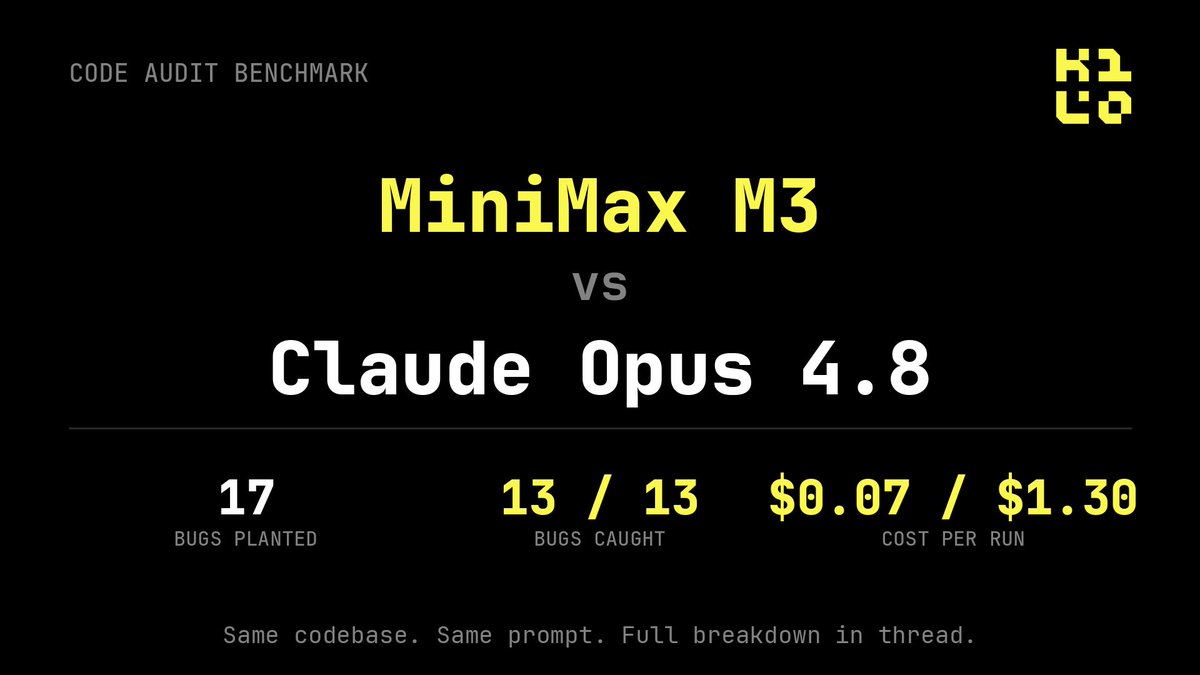
$0.07 for M3, $3.39 for Opus. Both caught 13 of 17 bugs.
Really interesting breakdown from @kilocode
Definitely worth the read
Kilo@kilocode
We gave the same code audit to Claude Opus 4.8 and MiniMax M3. Same codebase. Same prompt. 17 known bugs planted in advance. MiniMax M3 caught 13 of them for $0.07. The cheapest Claude run caught the same 13 for $1.30. Here's the breakdown. 🧵
English
kucinglapar รีทวีตแล้ว

Minimax M3 is FREE all weekend on Opengateway.
one of the strongest agentic models, running free until Monday.
no credit card,
no per-token bill.
point any openai-compatible client at the gateway and go
sponsored by @MiniMax_AI

English
kucinglapar รีทวีตแล้ว
kucinglapar รีทวีตแล้ว

Current Best Open Source Models right now:
1st: Kimi 2.6 > Best all-round model
2nd: Deepseek v4 pro > Best instruction following + API cost
3rd: Minimax M3 > Best OS coding agent
4th: GLM 5.1 > Great at long-horizon tasks
5th: MiMo v2.5 > Best harness integration
6th: Deepseek v4 flash > Great at long analysis + speed
7th: Qwen 3.7 Max > Best multimodal capabilities
8th: Qwen 3.6 27B > Best on-device dense model
9th: Gemma 4 12B > Best SLM on-device
10th: Minimax 2.7 > Best self-improvement agent
(Haven't tested Nemotron 3, Stepfun 3.7 ultra yet)
English
kucinglapar รีทวีตแล้ว

I just found out OpenAI gives you $50,000 in free API credits if you do one thing in settings. 🤯
It's called the Data Sharing Program. No free trial exists for the API. But this does.
Go to your OpenAI Dashboard → Data Controls → Sharing. Opt in.
You get $50,000 in credits for their latest models or 2.5 million tokens for the rest.
The catch: your data gets used by OpenAI for training and improvements.
So don't use this for client work or anything sensitive. Use it for learning, side projects, and experiments.
English