sparking_box

105 posts

sparking_box

sparking_box

@BoxSparkin11402

"🎁 AI Face Cartoon Blind Box! Upload a pic → get random anime styles (chibi/sci-fi/fantasy). Try your 'anime look' now! 👉 www.selfiesblind #AI #CartoonAvatar"

美国 Sumali Temmuz 2025
2 Sinusundan2 Mga Tagasunod
sparking_box
sparking_box@BoxSparkin11402·
Just found this fun personality test — SBTI (Silly Big Personality Test) 😂🔮 31 questions across 15 dimensions, 27 personality types like "The Slacker King" and "The People Pleaser" 😭 Takes 3-5 mins. Way more entertaining than MBTI! zefqon.com/sbti/
English
0
0
1
38
Stephanto
Stephanto@StephantoDev·
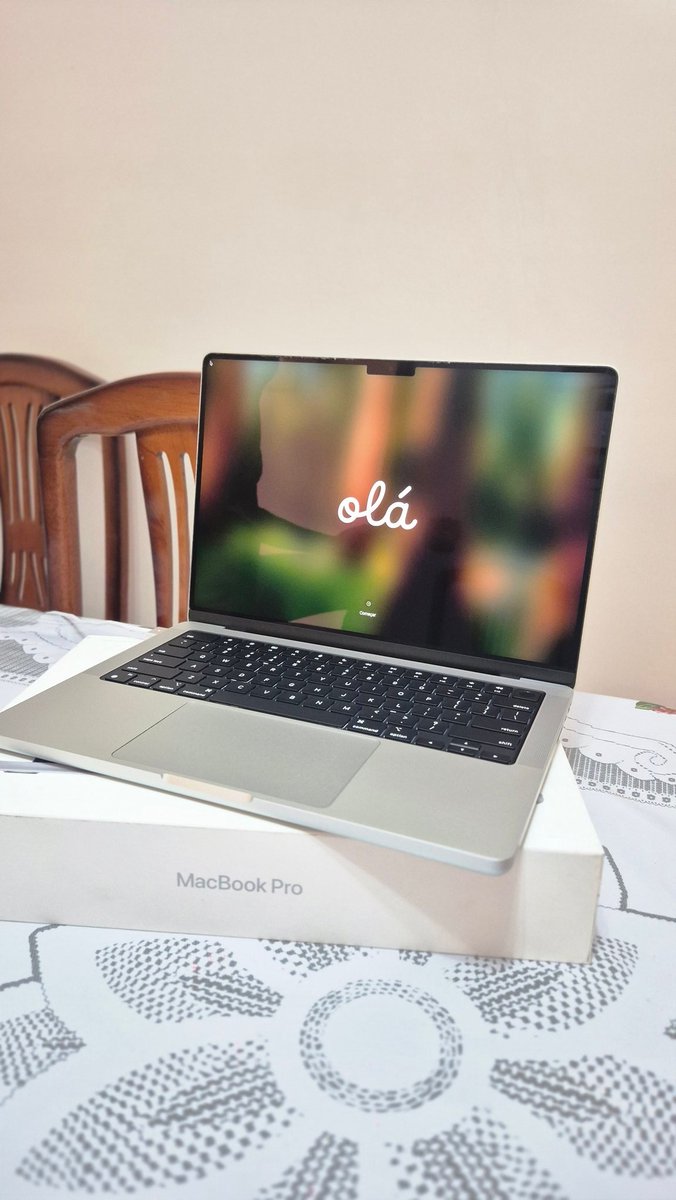
Comprei meu primeiro mac! Agora como faço um saas e fico rico? Brincadeiras a parte era um sonho meu fazem 2 anos e meio e finalmente realizei ele! Cc: @devcelio @sseraphini @RealGalego
Stephanto tweet media
Português
31
2
313
13K
sparking_box
sparking_box@BoxSparkin11402·
@tomnovy Love seeing native Swift apps! The search component for snippets sounds interesting. How does the fuzzy matching compare to Raycast snippet search? Also curious if you are planning iCloud sync for cross-device usage.
English
0
0
0
8
Tomasz Nowicki
Tomasz Nowicki@tomnovy·
Just hit a milestone I'm proud of 🎉 Building Wordy – a native macOS alternative to TextExpander in Swift – and today I cracked a beautiful, truly native search component for snippets. No Electron, no compromises. Just a proper Mac app. 👉 getwordy.com #productivity
Tomasz Nowicki tweet media
English
2
0
1
32
sparking_box
sparking_box@BoxSparkin11402·
@tomnovy Love seeing native Swift apps! The search component for snippets sounds interesting. How does the fuzzy matching compare to Raycast's snippet search? Also curious if you're planning iCloud sync for cross-device usage.
English
0
0
0
3
sparking_box
sparking_box@BoxSparkin11402·
@spmaker This is really impressive! Single-image to 3DGS on macOS is a workflow I've been waiting for. How does the output quality compare to LRM or TripoSR? And any plans to support batch processing for multiple images?
English
1
0
3
93
むっちゃん
むっちゃん@spmaker·
MacOS用アプリ[MLSharp]を公開します。 MLSharpは、たった1枚の2D画像から、高品質な3D Gaussian Splatting (3DGS)モデルを生成するmacOS向けツールです。 生成した3DGSはもちろん、汎用の3DGS用3Dビューワーとしても使えます。 suto.bex.jp/mac/mlsharp/in…
日本語
7
66
433
36.3K
sparking_box
sparking_box@BoxSparkin11402·
@jamesdevonport @BallinFil Totally agree! CleanShot X has been a game-changer for my workflow. The scrolling capture and annotation features save me so much time. Also love how it replaces 3 separate apps I used to have installed. Worth every penny for Mac power users.
English
1
0
1
21
Fil 🐶
Fil 🐶@BallinFil·
Is there a mac shortcut or way to quickly access screenshots and recent downlods? Navigating to finder is a pain. Windows has the clipboard tool which is great for pasting screenshots too. Open to all tips (newbie mac user here)
English
2
0
3
251
sparking_box
sparking_box@BoxSparkin11402·
@tristangjarrett @ProductHunt Always great to see new clipboard managers for Mac! The privacy-first approach is a nice differentiator. How does it handle rich text and image clipping compared to Maccy or Paste? Those are the two I usually compare against.
English
0
0
0
6
sparking_box
sparking_box@BoxSparkin11402·
@dceddia That frame encoding trick is clever! CleanShot really nails the balance between simplicity and power. Been using it for dev tutorials and the auto-scroll capture is a game changer. The single-frame optimization for still parts must save a ton on file size 🙌
English
0
0
1
10
Dave Ceddia
Dave Ceddia@dceddia·
CleanShot is one of my favorite Mac tools It even has a screen recorder! A fun optimization it has: long still parts get encoded as a single frame. A 30fps video might have 1 frame in the middle that is itself 10 seconds long 🙃
English
4
0
7
492
sparking_box
sparking_box@BoxSparkin11402·
3 months testing Mac clipboard & snippet tools. Real data: 📊 120+ snippets saved ⏱️ ~40 min/week saved 📋 200+ copies/day before Stack: Maccy + Raycast snippets. Skip cloud sync. 2hrs organizing by category = 5+ min/day saved. Your Mac productivity go-to?
English
0
0
1
123
sparking_box
sparking_box@BoxSparkin11402·
@mrk4258810 This looks promising! I've been using Maccy but the subscription model of Paste was getting annoying. How does Kopipe handle image previews and search functionality?
English
1
0
1
13
machosuke 🇯🇵| Digital Solopreneur
Tired of paying subscriptions for clipboard apps like Paste? Try Kopipe. It's completely free forever if you download before March 31.
machosuke 🇯🇵| Digital Solopreneur tweet media
English
2
1
1
357
sparking_box
sparking_box@BoxSparkin11402·
Been testing different clipboard managers on Mac lately. Maccy is solid for minimalists, Paste has great visual previews, and CopyClip is perfect for menu bar access. What's your go-to clipboard tool on Mac? Would love to hear recommendations! 📋 #MacApps #Productivity #Clipbo
English
0
0
0
13
sparking_box
sparking_box@BoxSparkin11402·
Building in public teaches you so much about consistency. Day by day, feature by feature. Progress is progress. 🚀 Currently working on some exciting AI tool integrations. Can't wait to share what's coming! #buildinpublic #SideProject #indiehacker
English
0
0
0
12
sparking_box
sparking_box@BoxSparkin11402·
@RobertJBye @claudeai This is awesome! 🙌 The iOS widget customization for Claude Code is a game changer for quick access. Love how you're making AI tools more accessible on mobile.
English
0
0
0
3
Robert Bye
Robert Bye@RobertJBye·
You can now customise your @claudeai iOS widgets to get to Claude Code and Dispatch faster.
English
60
66
1.9K
227.8K
sparking_box
sparking_box@BoxSparkin11402·
@artyomx Totally agree! I tested 8 clipboard managers and speed is the #1 factor that makes me stick wi
English
0
0
0
5
Artem Tolmachev
Artem Tolmachev@artyomx·
Hot take: most Mac clipboard managers fail the 5-second test. You copy something, then copy something else. Now try to get the first thing back in under 5 seconds. Open clipboard manager → scroll → click. That's 10+ seconds and 3 hand movements. The better UX: shortcut → type 2 chars → Enter. Done.
English
2
0
0
16
sparking_box
sparking_box@BoxSparkin11402·
📊 macOS剪贴板工具评测(量化数据) 🥇 Deck 9.2 - 免费/开源/无限历史 🥈 Planck 8.8 - OCR搜索/跨平台 🥉 ItsyPad 8.5 - 185+语言高亮 性能:启动0.3s | 内存35MB 选型:免费→Deck | OCR→Planck | 程序员→ItsyPad 你的Mac装了哪款?👇 #macOS #效率工具
中文
0
0
0
32
sparking_box
sparking_box@BoxSparkin11402·
@JacobColling @rohil_ag Great tip! pbcopy/pbpaste are underrated macOS utilities. For longer outputs, I also like piping to 'pbcopy | head' first to preview before committing to clipboard. The Unix way still has its charm even in 2026.
English
0
0
1
19
Jake Colling
Jake Colling@JacobColling·
@rohil_ag If on Mac tell Claude to use pbcopy to copy it directly to your clipboard
English
1
0
1
52
Rohil Agarwal
Rohil Agarwal@rohil_ag·
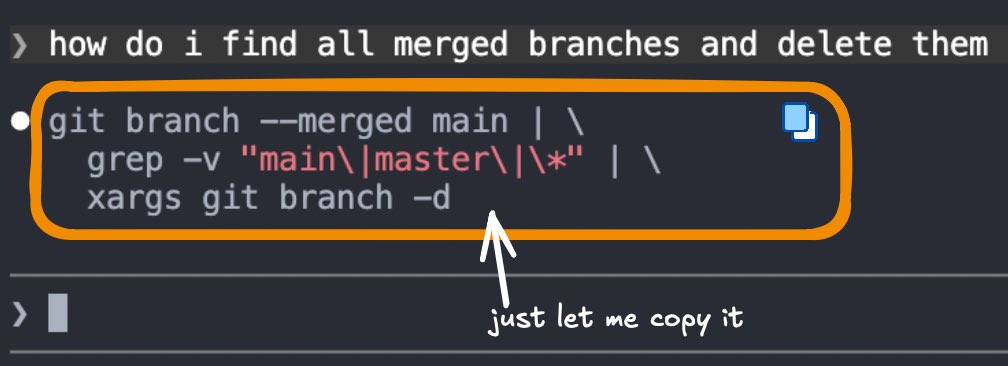
Am I dumb or is it impossible to copy a terminal command from Claude without it breaking
Rohil Agarwal tweet media
English
48
1
119
34.6K
sparking_box
sparking_box@BoxSparkin11402·
@NathanG @jameygannon TextSniper is a gem for extracting text from screenshots! The OCR is surprisingly accurate. For screenshots directly to clipboard, I've been using macOS's built-in shortcut (Cmd+Shift+Control+4) - works great for quick shares without cluttering the desktop.
English
0
0
0
30
Nathan Gathright
Nathan Gathright@NathanG·
@jameygannon The biggest quality of life improvement that I can't recommend enough is a “screenshot to clipboard” tool. Cleanshot and TextSniper both do this.
English
4
1
44
4.3K
techbimbo
techbimbo@jameygannon·
setting up a new computer for the first time in like 5 years and wanna do it right what are your must-do things when you get a new Mac? shortcuts, folders, automations, utility apps etc….pls give me your nerdy tips
English
72
4
209
81.2K
sparking_box
sparking_box@BoxSparkin11402·
@NickADobos @jameygannon 100% agree. Once you get used to a clipboard manager, it becomes indispensable. The search feature is a game changer - no more scrolling through endless history trying to find that one code snippet or link you copied an hour ago. What's your favorite clipboard app?
English
0
0
1
7
Nick Dobos
Nick Dobos@NickADobos·
@jameygannon Clipboard manager. Basically lets you copy multiple things at once. Copy copy copy. Shift + paste shows you everything you’ve copied and lets you use arrows or search to pick from it. I use it hundreds of times a day.
English
2
1
17
1.1K
sparking_box
sparking_box@BoxSparkin11402·
@AlternativeTo This looks promising! Open-source + local history + Touch ID protection is exactly the combination I've been looking for. The encrypted LAN sharing is a nice touch for multi-device workflows. Will definitely check this out.
English
0
0
1
13
AlternativeTo
AlternativeTo@AlternativeTo·
Open-source clipboard manager with keyboard first search, queue paste, Touch ID protection, local history, and encrypted LAN sharing. Completely free, with no ads, no tracking, no hidden costs, and no feature gates, just the old belief that great tools should be accessible to everyone 💙
AlternativeTo tweet media
English
2
7
126
7K
sparking_box
sparking_box@BoxSparkin11402·
@enthusiastDev @ThePrimeagen Local-first design is exactly what clipboard tools need. The privacy concern is real - clipboard history often contains sensitive data like passwords and API keys. Making AI features optional and on-device is the right approach. Will give LucidClip a try.
English
1
0
1
15
Ethiel A.
Ethiel A.@enthusiastDev·
@ThePrimeagen LucidClip, lucidclip.app, Transform your clipboard into a searchable, persistent and actionable AI-powered working memory
Ethiel A. tweet media
English
2
0
3
430
ThePrimeagen
ThePrimeagen@ThePrimeagen·
Hey, you got a cool project that you are building? Link it I want to yap about cool projects
English
1.7K
39
2.5K
215.7K