DrunKev🍺

19.5K posts

DrunKev🍺 banner
DrunKev🍺

DrunKev🍺

@RealDrunKev

🖥️Dual PC/Stream Setup :: ✨PC Optimizing :: 🛠️Tech Support Lead Tech @PowerGPU Book a session: https://t.co/jqjKKzZdDZ

Québec, Canada Tham gia Haziran 2012
1.8K Đang theo dõi6.4K Người theo dõi
Tweet ghim
DrunKev🍺
DrunKev🍺@RealDrunKev·
🎆IT'S OFFICIAL!🎆 I have officially joined the @PowerGPUcom team as tech support and stream setup specialist! I'm very excited to help grow this business and help gamers and streamers to a seamless journey to success. Tailored PCs and stream configurations to the TOP!
English
23
15
460
0
DrunKev🍺
DrunKev🍺@RealDrunKev·
For a single PC setup on twitch, 8k bitrate (you need to check "ignore stream service setting recomendation" in OBS Settings > Stream. For resolution you can go to the Video tab, set the Output resolution to 1664x936 (you'll have to type it, it should still say 16:9 ratio next to it). and use the bicubic filter. This will stay reasonablt sharp like 1080p during static scenes but reduce pixelation significantly during motion for most games.
English
3
0
7
469
Xen Ulusoka
Xen Ulusoka@ulusoka·
STREAMER FRIENDS! What cameras do you guys use so your face looks not like a blob of pixels whilst playing a game? Ive bought expensive webcams and they just all fail me at the end of the day lol send help Sincerely, your friend who looks like a blob a pixels when streaming a game LOL
English
85
5
98
33.1K
PowerGPU
PowerGPU@PowerGPU·
Let’s see if you all know what you have inside your PC. What are your PC specs?
English
112
3
75
13.2K
DrunKev🍺
DrunKev🍺@RealDrunKev·
@iamExpel @BearPigCentral @GorgoKnight Just want to add that you want to also force vsync for OBS in the nvidia control panel > manage 3d settings > program settings > OBS, especially if you force vsync off globally in the global manage 3d settings. Otherwise the projection will have tearing.
English
1
0
4
215
Expel
Expel@iamExpel·
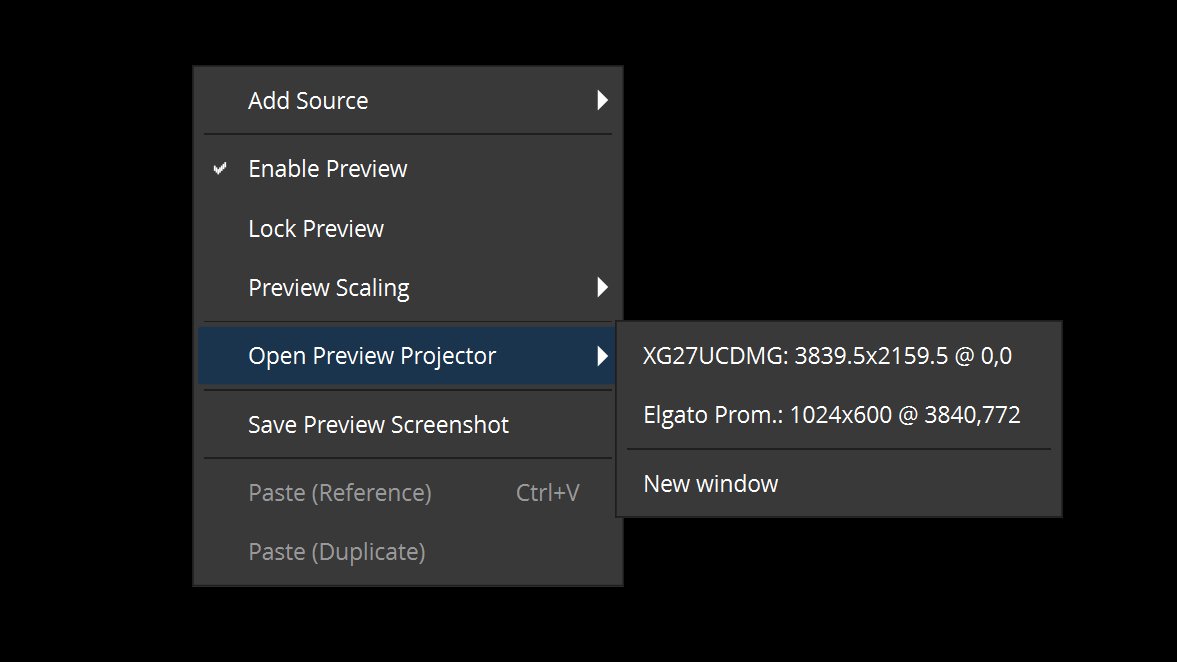
@BearPigCentral @GorgoKnight Yeah, you just right click the Preview, then Choose 'Open Preview Pojector,' and choose the Elgato. No screen tearing as long as you stay above 60FPS in game.
Expel tweet media
English
2
0
3
217
knight
knight@GorgoKnight·
I currently use an elgato 4KX cap card and everytime I tab out my game crashes. I want to swap back to OBS projection but wanted to know if anyone notices input delay more on one than the other.
English
7
0
9
12.7K
DrunKev🍺
DrunKev🍺@RealDrunKev·
Usually a sign of DPC latency spiking up caused by one or multiple low-level drivers taking up too much CPU time. Can often be mitigated or completely resolved by turning off various power-saving features spanning across bios and windows settings. c-states, dram power down, USB power management to name a few
English
1
1
23
10K
100T lidyuh
100T lidyuh@itslidyuh·
HEY PC COMPANIES, ANYONE FEELING #GENEROUS . MY PC IS BREAKING AND HAVING SUPER BAD AUDIO ISSUES. CANT SPLIT AUDIO OR STREAM ON DISCORD WITHOUT IT CRUNCHING OUT MEGAMIND STYLE. #thanks
English
20
2
625
112.6K
DrunKev🍺
DrunKev🍺@RealDrunKev·
@JeseMartinez To be fair... if someone saying that was enough to dissuade you, then they were right.
English
0
0
0
580
Jese (Founder)
Jese (Founder)@JeseMartinez·
Back when YouTube had DMs I remember I sent a message to a tech YouTuber asking for advice. There advice was don’t get started I won’t go anywhere in this industry with my videos…
English
10
3
79
13.7K
DrunKev🍺 đã retweet
Joseph
Joseph@tufshott·
Hugeeeeee shoutout to @RealDrunKev for getting my PC dialed after putting it off for years. If you wanna get your PC optimized for an extremely fair cost, hit him up and he’ll take care of you
English
0
1
5
708
DrunKev🍺
DrunKev🍺@RealDrunKev·
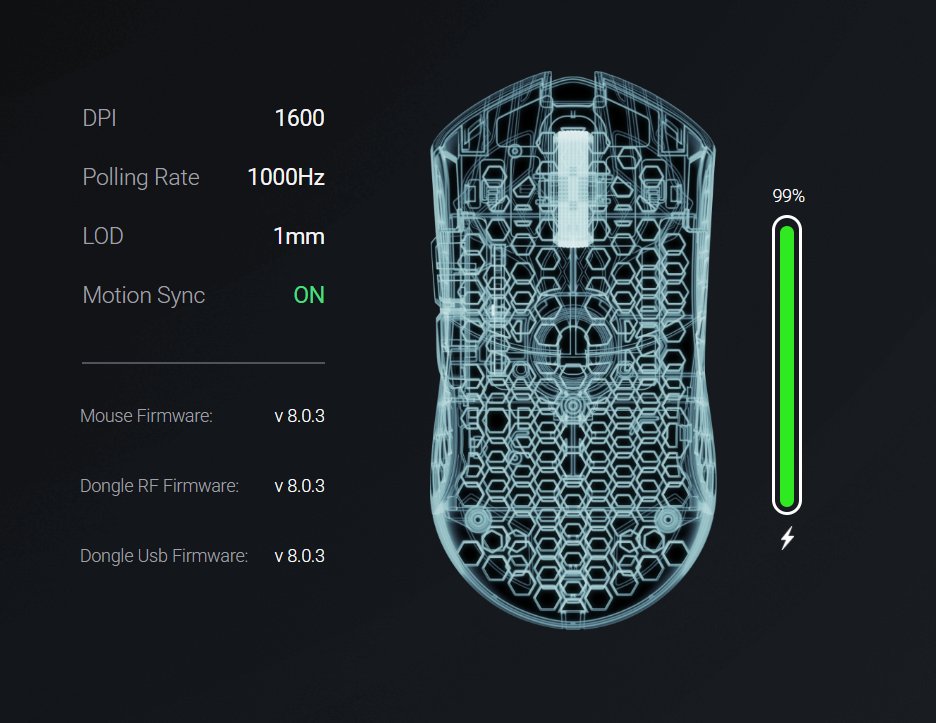
@RawDogg209 If they've improved motion sync sure but it does have a bit of delay added. Not bad for consistency though if you don't mind the extra latency.
English
0
1
1
137
Raw
Raw@RawDogg209·
Thoughts?
Raw tweet media
English
3
1
10
853
Rhabby_v
Rhabby_v@Rhabby_V·
You don’t know how awesome a 2 PC set up is until it’s Ripped from your hands
English
2
1
86
9.3K
Naaackers
Naaackers@Naaackers·
i've read through all your recent posts to try and get an idea of the issues that you're having. If you're having the same problem with a completely new computer and it's happening with two different GPUs, my assumption is this is power related. but as you know there are so many factors... Has anyone recommended/have you tried running an extension cord from another room so that your PC isn't plugged into the same wall outlet or surge protector? basically keep everything plugged in where it is but just plug your computer into an extension cord that runs to another room. The further away the better so you can try and get on a different circuit/breaker. One other thing to test that I'm not sure I saw recommended, trying to perform the same action that normally creates these crashes, but unplug every single USB device that isn't a keyboard and mouse and see if it happens. I know there's lots of people throwing a bunch of different information at you, and while I can't tell you exactly what the issue is, I can tell you it's not the software you're using or your Internet service provider lol.
English
9
0
31
1.7K
WATCHHOLLIE
WATCHHOLLIE@WATCHHOLLIE·
My stream has crashed every stream Ive done for the last year and a half. I dont know what to do and im about to quit. I have a job- just my hobby is being destroyed ): Here are more videos. Please help. -started with OBS and now a bit less crashes in SLOBS - Nothing in the logs / event viewer says anything is wrong. - Ive reseated my ram. - All gamebar/overlays are off. - no overheating (CPU 38°, Mobo 42°, GPU 53°) -6 month old thermal paste -3 month old bios - all updated firmware on everything/storage/mobo/ram - power hub USB - no plugins - HAGS off - nvidia audio devices off - max game fps set to 60 /playing at low quality - NO overclocking - meld wont work - anker surge protector+2 outlets I cant play games on my powerhouse of a PC, only Playstation is working to avoid lags. Still crashes though. Specs below
English
73
6
50
25.4K
Sasha Grey
Sasha Grey@SashaGrey·
Are you a streamer? Share pics of your cable management: top down of your desk, and under it too 🫣
English
52
9
355
165.6K
DrunKev🍺 đã retweet
Zach Bussey 🇨🇦
Zach Bussey 🇨🇦@zachbussey·
Twitch will no longer enforce against streamers who display a Combined Chat.
English
322
530
5.1K
2.6M
DrunKev🍺
DrunKev🍺@RealDrunKev·
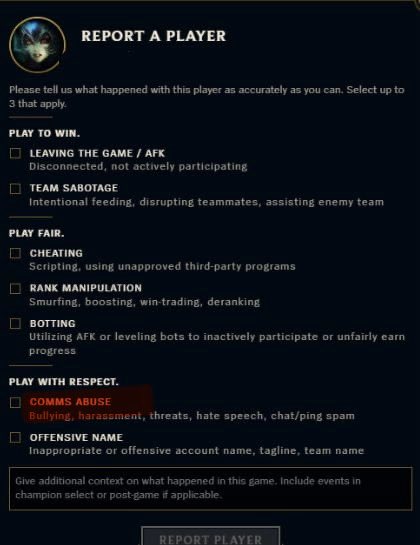
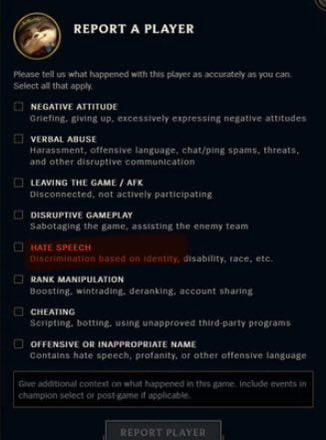
@drewlevin @settintiaras Piggybacking on this because the image clearly showcases this: Is there any specific reason for the different report options and descriptions in and out of game?
English
1
0
0
3.1K
Drew Levin
Drew Levin@drewlevin·
Our recent reporting changes in no way are intended to erase or downplay that sexism and racism exist, or to imply that they are no longer considered violations of our policies or "lesser" than other types of potential abuse. Internally, we still have the same (and in some cases, even better) mappings of how different forms of comms abuse translate to penalties. Our recent changes were made to simplify what category players could select for general comms abuse, as we've seen players who straight-line all of them. As with many UX tradeoffs, some nuance can get lost - but sexism and racism are considered hate speech in our books, which is why that descriptor is still there.
English
19
3
762
31.6K
DrunKev🍺
DrunKev🍺@RealDrunKev·
@PowerGPU Solid reminder. Just helped someone yesterday that had their 280hz monitor still set to 60hz. They only had their PC for a few days though
English
0
0
0
286
PowerGPU
PowerGPU@PowerGPU·
Reminder to set your monitor refresh rate in Windows settings. Still have clients that never change their refresh rate.
PowerGPU tweet media
English
18
8
148
17K
DrunKev🍺
DrunKev🍺@RealDrunKev·
and if it IS rendering lag or encoding lag, then you can use this OBS profiler plugin to determine which source, scene, filter or asset is using up more GPU/CPU. Some third-party stuff is really inefficient and should be used sparingly. This avoids the guessing game if you a lot of scenes and sources: github.com/exeldro/obs-so…
English
0
0
0
350
DrunKev🍺
DrunKev🍺@RealDrunKev·
@iiSamWise If you are specifically "dropping frames" and not having "rendering lag or skipped frames" then it's strictly network-related. Either unstable internet connection or connection to the server you are streaming. It cannot be caused by any local assets.
English
2
0
0
358
iiSamWise
iiSamWise@iiSamWise·
WHY AM I STILL DROPPING FRAMES IN OBS?!
English
12
1
12
4.8K
DrunKev🍺 đã retweet
Windows Latest
Windows Latest@WindowsLatest·
Nvidia is investigating reports of gaming issues (black screen and artifacts) after the Windows 11 January 2026 Update (KB5074109). In a forum post, Nvidia staff confirmed reports of artifacts in certain games. "Even though it started after a Windows 11 update, we are looking into it. As far as I know, the only way to resolve it appears to be uninstalling KB5074109," staff wrote. On the other hand, the black screen issue, which we first found in our tests, has already been addressed in the optional update (KB5074105). "This update addresses black screen issues in isolated multiuser environments, typically after a Windows upgrade," Microsoft confirmed in the release notes of KB5074105.
Windows Latest tweet media
English
30
53
435
162.5K
DrunKev🍺
DrunKev🍺@RealDrunKev·
@JuzuLive If CPU is overheating, check the CPU cooler and swap if it's defective. Thermal paste check is a good idea and if that doesn't fix it, the cooler is defective. Case fans are unlikely to be the problem. CPU is very likely to be fine.
English
0
0
1
369
juzu
juzu@JuzuLive·
well, I got the most unfortunate thing that could happen to a streamer/gamer in 2026, my pc just shutdown twice due to cpu overheating and I believe it's kinda over I will buy new pc-case & fans and also repaste the cpu again but I don't know how long it'll last considering my cpu is 6 years old alongside whole pc not only it's the worst timing with Highguard ranked coming soon AND me not being able to stream/play, it's also god damn prices for pc parts being incredibly high nowadays, I unfortunately can't afford that right now streams are on pause for some time but hopefully I can fix it till ranked releases, I really don't wanna miss the start bruhh 😭
English
17
0
48
10.7K
DrunKev🍺 đã retweet
ioki
ioki@i0ki_LoL·
Im not part of this community, but I HATE when people get caught cheating and pull the "i just have really high standards for myself 🥺" No, you dont. If you held yourself to a high standard you wouldnt have cheated. Cheating is for losers. You cheated because youre a loser.
English
25
30
810
47.8K