

Dr. Heinz Doofenshmirtz
24 posts

@robertrosenfeld I’ve had this option on my MY 2026 for months
English
Well this is new!
“Require Phone Key for Profile”

English
@Carolineub6 @FoxNews bby girl i hate to break it to you but fox news isn’t pregnant
English

@FoxNews Congratulations on the new little one coming into your life! It also brings a lot more responsibility. Wishing you all the best, May everything go smoothly.
English

JUST IN: Karoline Leavitt speaks to the press for what is likely the last time before she has her second baby:
“This will likely be my last gaggle for some time.”
“As you can see, I’m about ready to have a baby any minute, so I’ll see you guys very soon.”
“I know all of you have the president’s phone number personally, so I have no doubt that you will have a shortage of statements and news from this building while I’m gone.”
English
@NowRollingOut @SamiraQueiroz 2026.2.9.8 has spring update too?
English

@SamiraQueiroz Since your vehicle is HW4 with FSD, this build is not meant for your car. The one to watch for is 2026.2.9.8 with FSD 14.3.2, which started rolling out yesterday. You are also not stuck. Many vehicles are still on 2026.2.9.1.
English
🚨 New wave for 2026.14.2 is now rolling out.
• This is the 4th wave
• Includes the Spring Update 2026

English

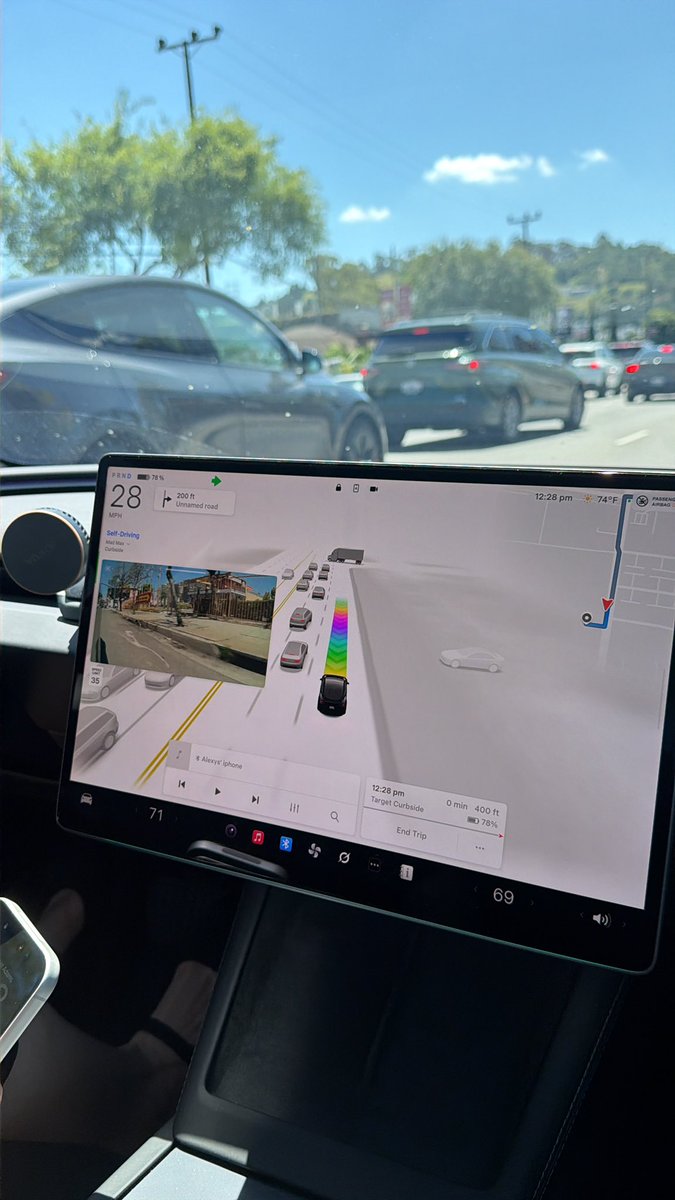
New UI in FSD V14.3.2 for interventions.
I think this is great, but one of the options should be navigation and as far as I can tell it doesn’t go away? I’m sitting here parked and it’s staying up on my screen.

English

🔥🚀 Tesla Spring Update 2026.14.1 is now rolling out to the 4th batch of vehicles (reaching ~3% of the fleet)!
✅ Self-Driving App [AI4]
With the new Self-Driving app, subscribe with a single tap, learn how to activate and use the feature, and view ongoing stats.
✅ "Hey Grok"
Launch Grok by saying "Hey Grok." Go to Grok > Settings to enable. You can also set location based reminders, like "remind me to pick up milk when I'm near home." Say "goodbye" to dismiss.
✅ Pet Mode
Choose and name your pet by going to Controls > Display > Customize Pet Mode.
✅ Visual Updates [New Model 3/Y]
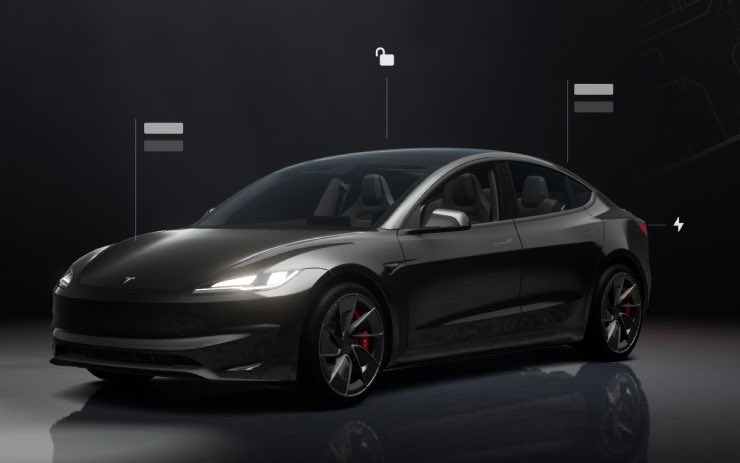
The center display now features higher quality images of your Tesla, and an enhanced park scene environment.
✅ Trips
Trips are now in the Energy app, where you can create and manage multiple trips to track energy usage across different drives, routes, or conditions. Go to App Launcher > Energy > Trips. For quick access to the Trips Card, swipe left on the Media Card.
✅ Sketchpad
Unleash your inner artist with the enhanced Sketchpad, now supporting stickers and emojis. Save your sketches to access them in the Mobile App and share. Requires Mobile App 4.55.6 or later.
✅ Custom Wraps and License Plates [S/X]
Model S & X owners can now personalize their Tesla avatar with window tints, custom wraps & license plates.
✅ Blind Spot Warning Accent Lights
Accent lights now turn red when an object is in your blind spot and your turn signal is engaged, or when an approaching object is detected while parked. To disable, go to Controls > Lights > Blind Spot Warning Accent Lights.
✅ Immersive Sound Upgrade [New Model 3 & Y w/ premium audio]
Premium Immersive Sound uses advanced sound extraction to place the listener in front of a detailed soundstage within an Immersive space. This enhancement works with all streaming sources.
Go to Settings > Audio > Tone > Immersive Sound to adjust.
✅ Music App Queuing
Swipe right on tracks in Apple Music or Spotify to add them to the queue. In Apple Music, tap and hold on a track to add or remove from Favorites. In Spotify, swipe left to add or remove from Liked Songs.
✅ Automatic Software Updates
Your Tesla can now automatically install downloaded software updates overnight. When enabled, updates will install while your Tesla is parked and not in use, ensuring you always have the latest features and improvements.
To enable, go to Controls > Software > Automatically Install Updates.
✅ Dashcam Viewer Updates
Recent Dashcam footage can now extend up to 24 hours, and you can save any clip for permanent storage on your Tesla or on your phone by going to App Launcher > Dashcam Viewer.
Clips downloaded to your phone now include details such as speed, steering wheel angle, and Self-Driving state. Downloads require Premium Connectivity and Mobile App 4.55.6 or later.
✅ Weather Maps Improvements
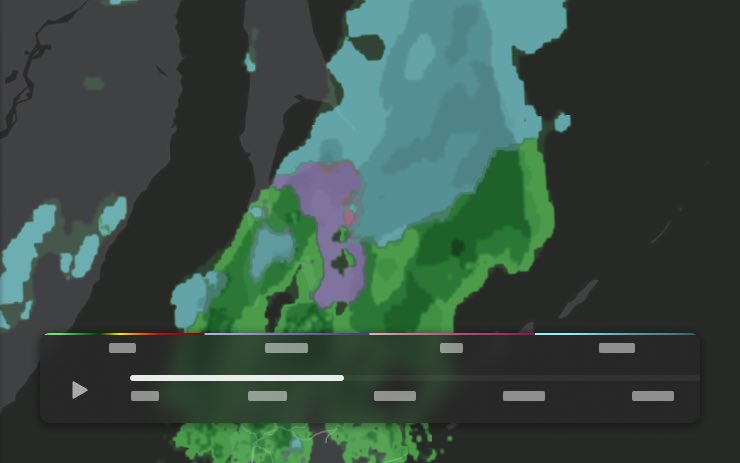
Weather maps now show snow and rain with improved colors that make it easier to distinguish between precipitation types. You can also view the past hour of weather data to see how conditions have been changing along your route. This feature requires Premium Connectivity. To view, tap the weather icon on the map.
✅ Supercharger Pricing Filter
You can now choose to route only to Superchargers with Tesla pricing. When enabled, Trip Planner will avoid locations where Tesla does not set charging prices or accept Free Supercharging credits.
✅ Keyboard
Your selected keyboard language will also select the language used for dictation. Tap the international keyboard button to change keyboard and dictation language, without changing voice command language. Tap the mic icon in the keyboard to dictate.
✅ Rear Display
Passengers in rear seats can now view and interact with maps on the rear display while your Tesla navigates a route. Tap the maps icon from the rear display to follow along.
✅ Security Improvements
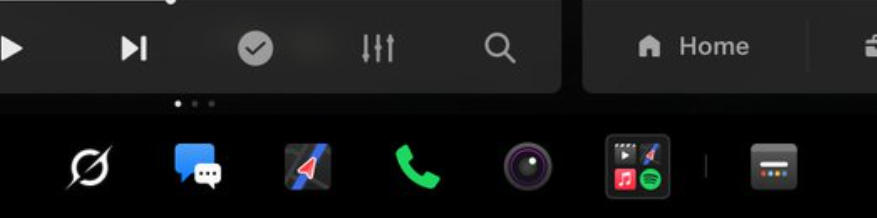
✅ Larger icons on the bottom bar [undocumented]
✅ Animated badge in software menu [undocumented]


The Tesla Newswire@TeslaNewswire
🔥🔥🚀 Tesla Spring Update 2026.14.1 has been detected and is now rolling out to the 1st batch of vehicles (<1% of the fleet)! ✅ Self-Driving App [AI4] With the new Self-Driving app, subscribe with a single tap, learn how to activate and use the feature, and view ongoing stats. To open, go to App Launcher > Self-Driving. ✅ "Hey Grok" Launch Grok by saying "Hey Grok." Go to Grok > Settings to enable. You can also set location based reminders, like "remind me to pick up milk when I'm near home." Say "goodbye" to dismiss. ✅ Pet Mode Choose and name your pet by going to Controls > Display > Customize Pet Mode. ✅ Visual Updates [New Model 3/Y] The center display now features higher quality images of your Tesla, and an enhanced park scene environment. ✅ Trips Trips are now in the Energy app, where you can create and manage multiple trips to track energy usage across different drives, routes, or conditions. Go to App Launcher > Energy > Trips. For quick access to the Trips Card, swipe left on the Media Card. ✅ Sketchpad Unleash your inner artist with the enhanced Sketchpad, now supporting stickers and emojis. Save your sketches to access them in the Mobile App and share. Requires Mobile App 4.55.6 or later. ✅ Custom Wraps and License Plates [S/X] Model S & X owners can now personalize their Tesla avatar with window tints, custom wraps & license plates. ✅ Blind Spot Warning Accent Lights Accent lights now turn red when an object is in your blind spot and your turn signal is engaged, or when an approaching object is detected while parked. To disable, go to Controls > Lights > Blind Spot Warning Accent Lights. ✅ Immersive Sound Upgrade [New Model 3 & Y w/ premium audio] Premium Immersive Sound uses advanced sound extraction to place the listener in front of a detailed soundstage within an Immersive space. This enhancement works with all streaming sources. Go to Settings > Audio > Tone > Immersive Sound to adjust. ✅ Music App Queuing Swipe right on tracks in Apple Music or Spotify to add them to the queue. In Apple Music, tap and hold on a track to add or remove from Favorites. In Spotify, swipe left to add or remove from Liked Songs. ✅ Automatic Software Updates Your Tesla can now automatically install downloaded software updates overnight. When enabled, updates will install while your Tesla is parked and not in use, ensuring you always have the latest features and improvements. To enable, go to Controls > Software > Automatically Install Updates. ✅ Dashcam Viewer Updates Recent Dashcam footage can now extend up to 24 hours, and you can save any clip for permanent storage on your Tesla or on your phone by going to App Launcher > Dashcam Viewer. Clips downloaded to your phone now include details such as speed, steering wheel angle, and Self-Driving state. Downloads require Premium Connectivity and Mobile App 4.55.6 or later. ✅ Weather Maps Improvements Weather maps now show snow and rain with improved colors that make it easier to distinguish between precipitation types. You can also view the past hour of weather data to see how conditions have been changing along your route. This feature requires Premium Connectivity. To view, tap the weather icon on the map. ✅ Supercharger Pricing Filter You can now choose to route only to Superchargers with Tesla pricing. When enabled, Trip Planner will avoid locations where Tesla does not set charging prices or accept Free Supercharging credits. Requires connectivity with Online Routing enabled. ✅ Keyboard Your selected keyboard language will also select the language used for dictation. Tap the international keyboard button to change keyboard and dictation language, without changing voice command language. Tap the mic icon in the keyboard to dictate. ✅ Rear Display Passengers in rear seats can now view and interact with maps on the rear display while your Tesla navigates a route. Tap the maps icon from the rear display to follow along. ✅ Security Improvements
English
@NowRollingOut @Chansoo so if you have FSD you won’t get this update?
English
@Chansoo It does not. The merge with the FSD branch should happen much later. FSD vehicles are currently still waiting on 2026.2.9.7 with FSD 14.3.1, and we’re only on wave 2 of that build.
English
✅ Confirmed details for 2026.14
• Includes the Spring Update
Now Rolling Out@NowRollingOut
‼️New Tesla software update 2026.14 was spotted. More details will follow as we learn more about this version.
English

@SawyerMerritt the bottom bar has a different design for the more apps button in the better park visualization screenshot but not in the other ones
English

Tesla's Spring software update has officially been unveiled.
Here's what's new:
• New Self-Driving App: Lets you subscribe with a single tap & learn about how to activate and use the feature. You can also view ongoing stats. AI4 hardware cars only.
• Blind Spot Warning Accent Lights: Accent lights now turn red when an object is in your blind spot and your turn signal is engaged, or when an approaching object is detected while parked.
• Launch Grok by saying "Hey Grok." You can also set location-based reminders, like "remind me to pick up milk when I'm near home." Say “goodbye” to dismiss Grok.
• Pet Mode: Choose from dog, cat or hedgehog to display when Pet Mode is active. Also optionally customize the screen with your pet's name by going to Controls > Display > Customize Pet Mode
• Car Visualization (New Model 3 & Y): A new park scene environment & higher quality car visualization.
• More Trips: Create multiple trips to track energy stats across drives. Quickly access your trip’s consumption by swiping left on the media player.
• Sketchpad: Now supports stickers & emojis. You can also save your sketches to access them in the Mobile App & share.
• Model S & X owners can now personalize their Tesla avatar with window tints, custom wraps & license plates.
• Immersive Sound (New Model 3 & Y w/ premium audio): Premium Immersive Sound uses advanced sound extraction to place the listener in front of a detailed soundstage within an Immersive space. This enhancement works with all streaming sources.
• Your Tesla can now automatically install downloaded software updates overnight. When enabled, updates will install while your Tesla is parked and not in use.
• Weather maps now show snow and rain with improved colors that make it easier to distinguish between precipitation types. You can also view the past hour of weather data to see how conditions have been changing along your route.
• Recent Dashcam footage can now extend up to 24 hours & you can save any clip for permanent storage on your Tesla
Other Improvements
• Swipe right on tracks in Apple Music or Spotify to add them to the queue.
• Passengers in rear seats can now view and interact with maps on the rear display while your Tesla navigates a route


Tesla@Tesla
English
@elonmusk test drove a demo cybertruck and it was filthy and the build quality was mid
English

Cybertruck is so awesome.
Until you’ve tried it out, you have no idea, because there’s nothing like it.
Best product Tesla has ever made to date.
Cybertruck@cybertruck
Cybertruck is extremely comfortable on long trips especially thanks to: – Minimal body roll – Comfort Mode on FSD (gentler acceleration & braking, softer damping, smoother handling) – Air suspension + self-leveling keeping the truck flat even with load
English


Comment vous vouliez que nos daronnes acceptent de mettre la carte quand tu voyais la dégaine du site ?
Web Design Museum@WebDesignMuseum
Minecraft website in March 2012
Français
Dr. Heinz Doofenshmirtz 已转推

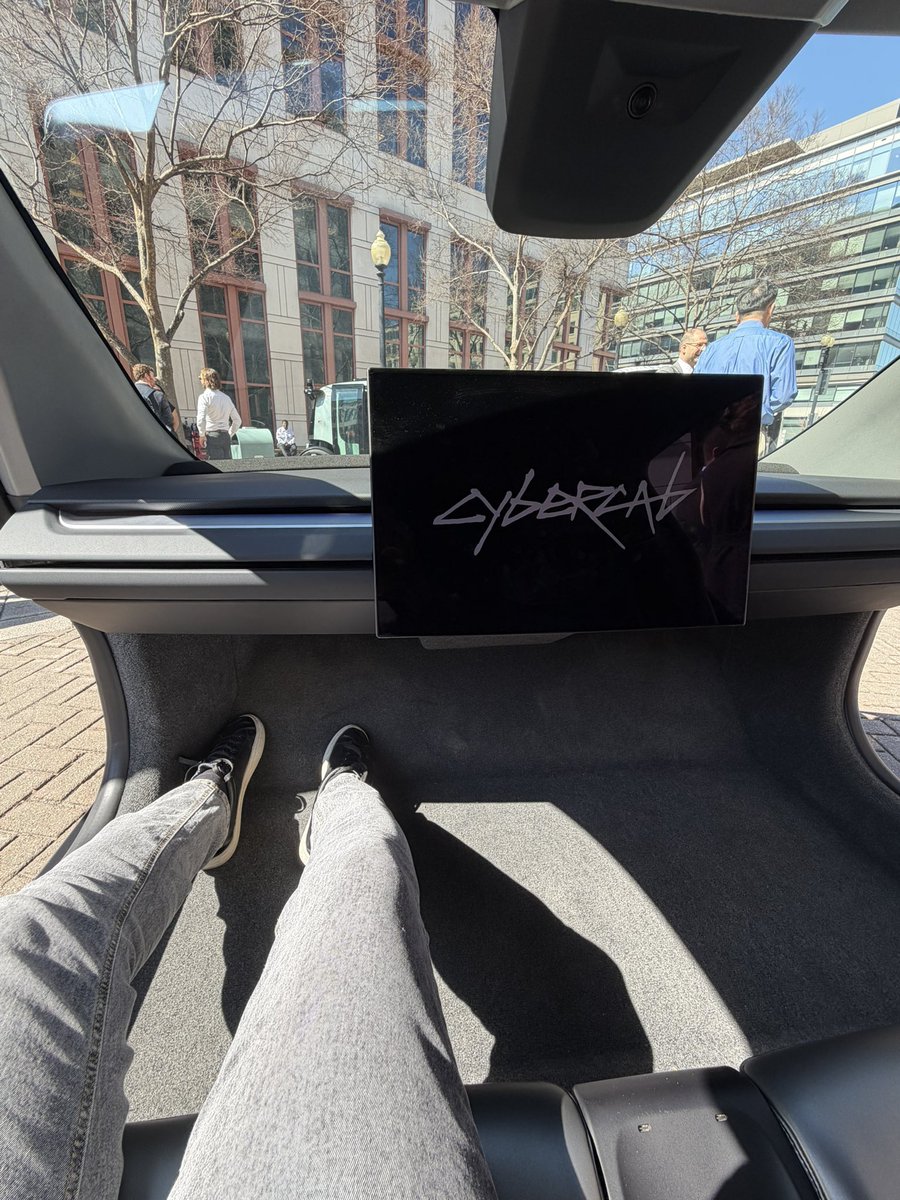
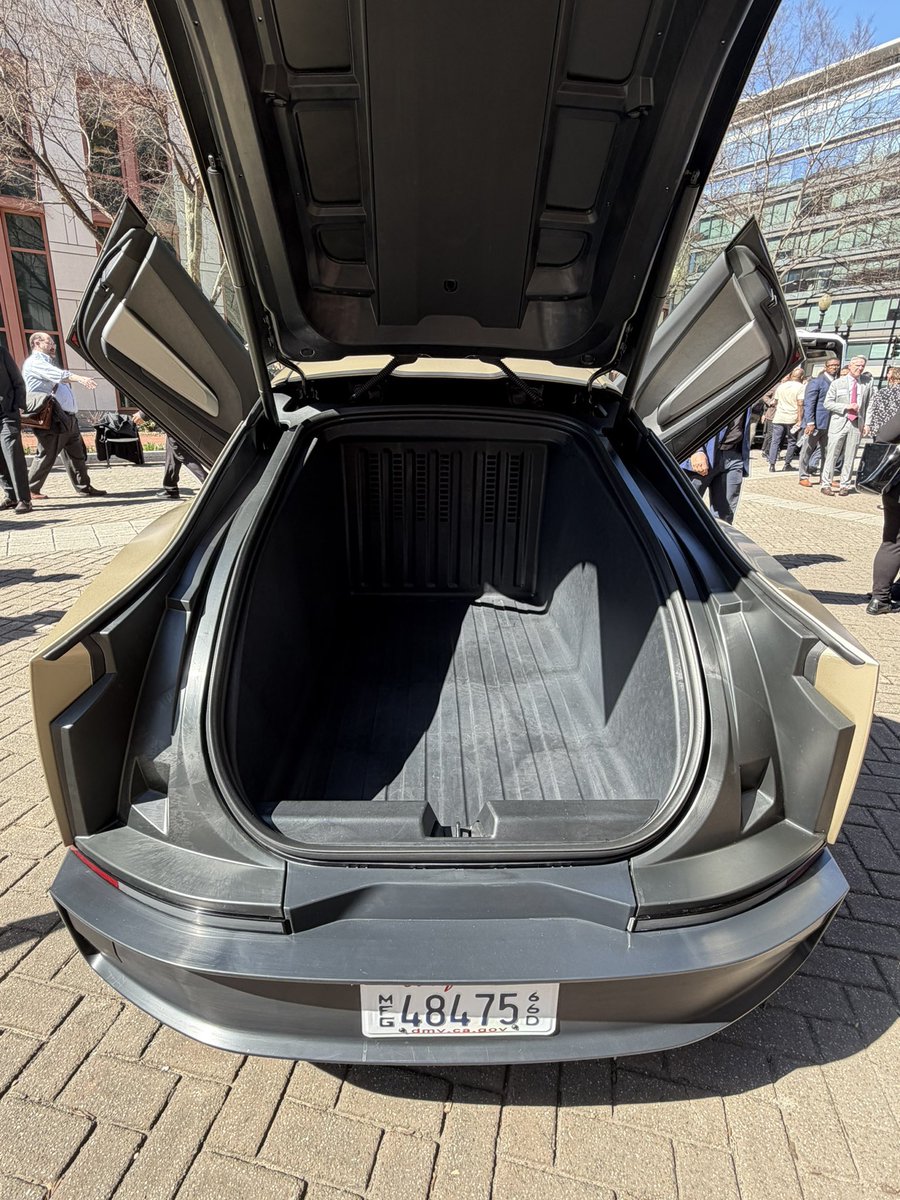
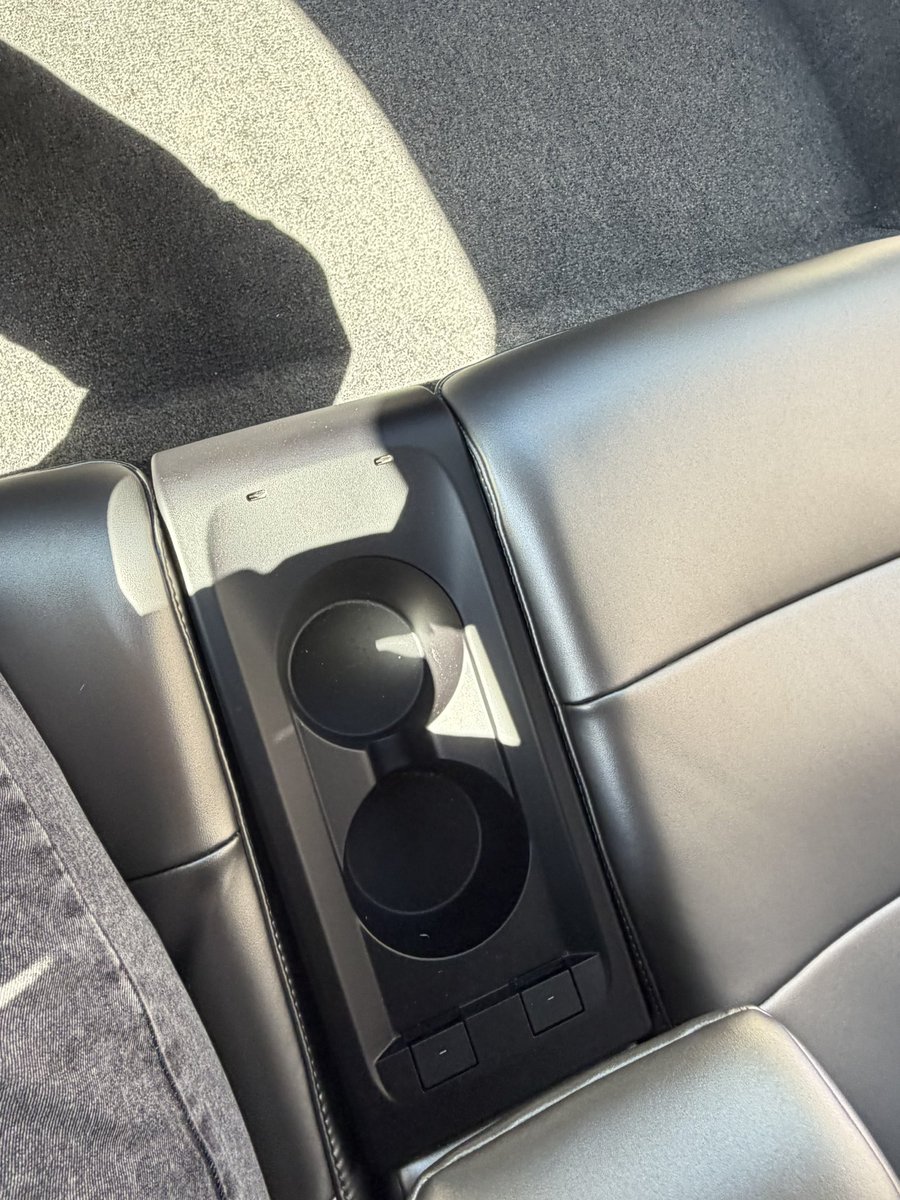
Interior of the production version of the Tesla Cybercab.
• ~21” screen
• Interior camera is much larger than Tesla’s existing vehicle fleet
• Leg room looks incredible
• Rear storage area is not carpeted (prototype version was)
• Two USB-C charge ports in center console

Tesla Owners of Maryland - Official Site@TeslaMaryland
@congressdj Confirmed, On Display at DOT in SE there till 4pm. Can also sit in it.
English

@ErisYoutuber @Krtzyy hahaha weed funny what are you 12? we're not talking about it being game defining or anything we're talking about it (at least whats shown in that video) being absolutely empty
English

This Minecraft Mod "Nirvana" adds growable weed that can be made into special bongs and joints that give you potion effects
watch out for "Reefers" which explode into a cloud of gas that makes you high on contact
English
Very nice. This should hopefully prevent having to clean the front camera regularly due to out gassing.
Cordt Courtin@CordtCourtin
Confirmed the new MYP has the new front camera housing.
English

Now the question is, why Feb 14?
Elon Musk@elonmusk
Tesla will stop selling FSD after Feb 14. FSD will only be available as a monthly subscription thereafter.
English
English

English
HOLY SMOKES
in 2026 @Rivian will roll out POINT TO POINT Universal hands free - allowing Rivian vehicle's to go from address to address.
FSD just got some legitimate competition.
English
@MissJilianne @JohnChapman what he is saying is it literally can’t be anything else
English

@JohnChapman The point is it could have been any type of update, it didn’t have to be an FSD update.
English
Whoever wrote this Community Note is either a liar or not familiar with FSD. My car has been stuck on FSD 12.6.4 for several months. However, I’ve received several updates with the download arrow which isn’t an FSD update. These updates in fact. 👇🏽
The Tesla community needs to do better and stop trying to mislead the public.
Dan O'Dowd@RealDanODowd
Watch @Tesla Full Self-Driving v14.2.1 fail to stop behind another vehicle, forcing the driver to disengage to avoid rear ending the car in front. @ElonMusk your defective software must be banned!
English
Dr. Heinz Doofenshmirtz 已转推

YES DONALD, PLEASE DO A SERIOUS REVIEW OF THIS. I HEAR DEAD PEOPLE VOTED AFTER BEING REVIVED WITH A COVID VACCINE. THEIR BALLOTS WERE THEN BLOWN BY WINDMILLS INTO THE HANDS OF MEXICAN ANTIFA WHO PASSED THEM TO A TEAM OF TRANS PIGEONS WHO FLEW THEM TO THE BALLOT BOX. TRUE STORY.

English