Post

PROGRAMANCER
PROGRAMANCER@Programancer·
So, bad wrapping typewriter text is a HUGE pet peeve of mine, and it seems like both AAA AND Indie devs fall into this trap, but with some very very simple code that checks the length of your next word you can solve the problem. I threw this together in < 10 minutes! #gamedev
English
57
596
3K
0
PROGRAMANCER
PROGRAMANCER@Programancer·
I'm not even that great of a coder and this is easy. You just break apart your string into an array of words, then when it's typing, you type each of the entries in the array out after you check the size of the whole string with the word, and if it's too wide you change rows.
English
0
0
0
0
PROGRAMANCER
PROGRAMANCER@Programancer·
Also I mentioned this years ago being a horrible horrible trend, and someone said it's "really difficult to make text properly wrap while typing", but that person is SUPER WRONG haha
English
0
0
0
0
PROGRAMANCER
PROGRAMANCER@Programancer·
Also I get that there isn't a 1 size fits all solution for every IDE, but surely most have libraries and functions to calculate what you need, regardless of font. If not, if you're working with mono fonts, you can fake it til you make it. GMS2 makes it easy to get string width
English
0
0
0
0
SolGutz
SolGutz@SolanaGuts·
@Programancer Woah this is interesting, think you could send me some information on how you are implementing this?
English
0
0
0
0
Olivier Galibert
Olivier Galibert@o_galibert·
@Programancer Arguably that’s simulating someone typing, and in that case the computer doesn’t know the length of the next word before it’s done
English
0
0
0
0
CyberMark
CyberMark@CyberMarkArts·
@Programancer Goes to show your level of attention to detail. I couldn’t tell the difference until after watching it 5 times in a row and I agree that it does look nicer and adds a bit of extra polish.
English
0
0
0
0
sam c 🐈
sam c 🐈@SweatersJPG·
@Programancer I don't play many text-heavy games so I just assumed the latter was the standard when I made my text-boxes 😳
English
0
0
0
0
@spillutvikler.com 🟦☁️
@spillutvikler.com 🟦☁️@spillutvikler·
@Programancer @AgeMarkus if you use textmeshpro with unity, you can also set the text, then update the maxVisibleCharacters variable on the component. this way you don't really type each character which affects wrapping, but you set the text THEN reveal each character which wont affect wrapping :)
English
0
0
0
0
Sinister Siamese
Sinister Siamese@SinisterSiamese·
@Programancer While I agree with you I’ve come to appreciate games that don’t use this effect at all and just type out the entire text at once. I don’t like waiting around for text to appear 😅
English
0
0
0
0
Smaxx
Smaxx@TheSmaxx·
@Programancer Guess it's so prevalent due to people taking shortcuts and simply shortening the input string. Manual word wrapping fixes it, translators or resolution screwing it over again, and you're ready for disaster. Also part of the reason I really like Godot's UI system.
GIF
English
0
0
0
0
Vulcan Dragon
Vulcan Dragon@MichaelCarmack_·
@Programancer @ultimadragons Heck, I did something like this on my Apple II in 1986 when I was a high school kid making Infocom clone wannabes. Made me learn assembler, it was too slow in BASIC.
English
0
0
0
0
Dusk Tactics
Dusk Tactics@DuskTactics·
@Programancer Little things like this really create a better experience for the player!
English
0
0
0
0
Ben Norris
Ben Norris@Norro21·
@Programancer 2nd superficially looks nicer but is actually much harder to follow because the move from one line to another draws your eye with it (don't forget a fresh reader doesn't know what word is coming next so doesn't know if it will fit)
English
0
0
0
0
✨Ika BakaKu - Dev: "The Shaded Abyss"
@Programancer I think my teacher even taught me this in our lessons when we covered the word wrap, and I thanked him even though I resisted early dev lol. I'm very OCD about design flaws myself!🤣
English
0
0
0
0
David
David@ASpookyDog·
@Programancer Just go the full chaos route and have words just bleed onto the next line
English
0
0
0
0
Niccy boi
Niccy boi@thebigoofboi·
@Programancer I unironically kind of like the text wrap if its purposefully used in some sort of effect, but other than that yeah bottom looks better, good work 👍
English
0
0
0
0
Alex Noir
Alex Noir@Aleks_Noir·
@Programancer YES, THANK YOU, SOMEONE ELSE WHO UNDERSTANDS I've been living with this pet peeve for ages and had to fix one program having this problem, it's nutssss
English
0
0
0
0
mad_archivist
mad_archivist@ArchivistMad·
@Programancer I am a product of my environment. I am so used to the ugly way that I would never have noticed the difference if it wasn't pointed out.
English
0
0
0
0
Jonas Clermont
Jonas Clermont@REALbluestone19·
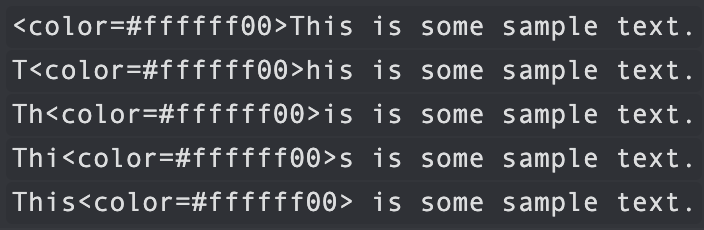
@Programancer In unity, my solution was to insert color tags mid text and change where they’re placed as it “types out”. That way the text is already there and wrapped correctly and I just reveal it as it goes. Not sure if mine is the ideal way, but it worked enough
English
0
0
0
0
a Fridge
a Fridge@SkaiSeal·
@Programancer Interesting, I always thought the first one was a stylistic choice and started to like it since it was sort of like if you were typing it out in real time on a word document or whatever lmao
English
0
0
0
0
NikuTreat
NikuTreat@Niku_Treat·
@Programancer There’s some stuff in text mesh pro that makes this even easier if you’re in Unity.
English
0
0
0
0
Mass Distraction
Mass Distraction@massaharhautus·
@Programancer I especially love it when the text starts from the middle of the screen and keeps bumping up when more lines appear. Feels like I'm climbing stairs with my eyes.
English
0
0
0
0
Karel Crombecq
Karel Crombecq@KarelCrombecq·
@Programancer Another super easy way to do this (if you can change the color of individual characters in a string) is to make the remaining, unseen characters transparent with alpha 0. No wrapping code necessary!
English
0
0
0
0
Josh Steinhauer-Li
Josh Steinhauer-Li@joshcamas·
@Programancer If using TextMeshPro in unity, another trick is to merely make all the text in the text box, but wrapping the hidden stuff with <alpha=0>. This will hide the text but it will still contribute to wrapping calculation
English
0
0
0
0
Paylaş