Post

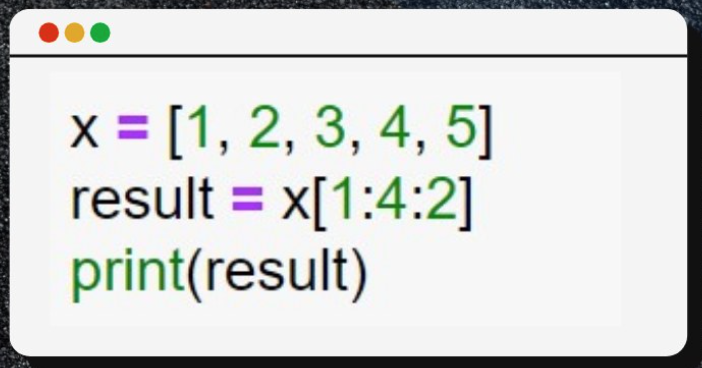
@PythonPr Answer: [2, 4] — because x[1:4:2] starts at index 1, stops before index 4, and picks every 2nd element.
English

@PythonPr Output [2,4]
See how slicing works 👇
x.com/i/status/20327…
PyBerry Tech 🐍🍓@PyBerryTech
Python slicing Explained ❤️🔥 SYNTAX - s[start:stop:step] ✅ s[1:4] → chars at index 1,2,3 not 4 ✅ s[:3] → first 3 ✅ s[-1] → last item ✅ s[::-1] → reversed 🔄 ✅ s[:] → copy 🔶stop is exclusive. 🔶step -1 reverses. 🔶omit any part = use default. Works on strings, lists & tuples. #Python #CodingTips #LearnToCode

English

@PythonPr Answer: [2, 4]
The code uses Python's slicing syntax: list[start:stop:step].
x = [1, 2, 3, 4, 5]: This is your initial list. Remember, Python indexing starts at 0.
Index 0: 1
Index 1: 2
Index 2: 3
Index 3: 4
Index 4: 5
start = 1: The slice begins at index
English

@PythonPr The slice says to start at index 1 and stop before index 4 (which is the 5) and do this in steps of 2. So index[1] is 2 and two steps gives us [2,4].
English

@PythonPr [2,4] as x[start index(inclusive), end inde(exclusive), stop]
English

@PythonPr I confused python slicing with MATALAB. 😅
In MATLAB step is between start and end indexes.
English

@PythonPr [2,4] as x[Start (inclusive) : stop (exclusive) : step ]
It start with index 1, value at index 1 is 2 and ending with index 4 and its print every second element, value at index 4 is 5 but 5 not included that's why answer is [2,4]
English

@PythonPr The answer is [2, 4].
Index 1 is the starting point, and that step of 2 skips right over the 3. Classic!
English