
Post

Code Monkey
Code Monkey@UnityCodeMonkey·
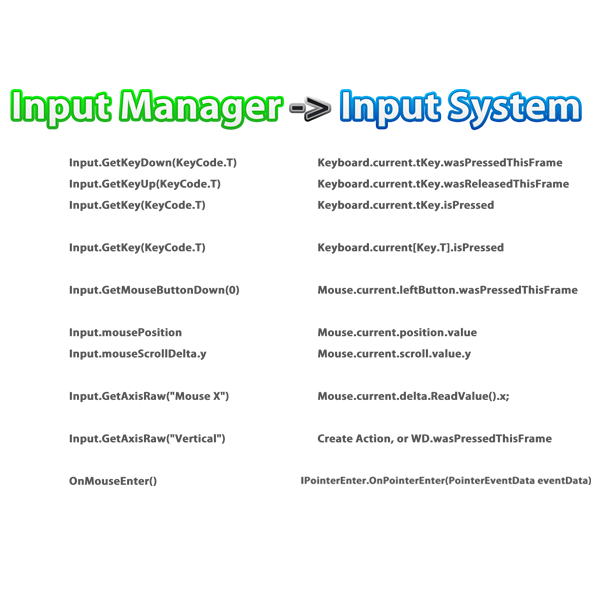
With Input Manager becoming deprecated after Unity 6.3, your scripts using Input.GetKey, Input.mousePosition, or GetMouseButtonDown will need to change. Modern Input System covers all these, and is just as simple for basic needs! Check out my cheat sheet to see how easy it is to convert your code to stay up to date. BUT for OnMouseEnter or similar MonoBehaviour callbacks they do NOT work with the Input System! You'll need to switch to event interfaces like IPointerEnterHandler, plus make sure you've got a Physics Raycaster & EventSystem in your scene. So upgrading that part is a bit trickier, but the rest are easy.
Code Monkey tweet media
English
19
28
331
18K
Lion
Lion@Lion_GameDev·
@UnityCodeMonkey Does that mean that the old InputSystem becomes unusable? I like to use it for debugging controls during development or writing Engine Tools. I dont like the new one at all, it's so much boilercode here. For real inputsystems I am still using Rewired though.
English
1
0
2
165
Game From Scratch
Game From Scratch@gamefromscratch·
@UnityCodeMonkey Deprecating these old Input systems is fine. Removing them, is not. Unity should bite the bullet and acknowledge this as tech debt they have to pay... or make a clean break & break everything. UE did a similar move with their input system and it broke way too many examples.
English
1
0
2
114
aintnoking
aintnoking@aintnoking·
@UnityCodeMonkey had to do this recently with old project, was pulling my hair trying to figure it all out 😭
English
0
0
0
40
Kris Schnee
Kris Schnee@KrisSchnee·
@UnityCodeMonkey I noticed in 6.3 that InputActions seem to be disabled by default and need explicit enabling, like, "action_click.Enable();" Going to be tricky to adapt my code after 6.3.
English
1
0
2
381
Koken Millen
Koken Millen@koken0·
@UnityCodeMonkey Thank you for keeping us updated with this kind of stuff! Some weeks ago I tried to set this up, with the on screen buttons that comes with the package, and I noticed it was changing between virtual gamepad, clicks and keyboard. Didn't work, so at the very end, I removed them.
English
0
0
2
271
Johann Ungerer
Johann Ungerer@Kaegun·
@UnityCodeMonkey This is bad advice. Setting up the input system with action maps isn’t all that hard, and a much more reliable way to use it. Rather show people how to use it properly. The benefits far outweigh the minimal extra complexity.
English
0
0
1
37
Tim Aksu
Tim Aksu@timaksu·
@UnityCodeMonkey I could be wrong but I believe you also need a null check before accessing as ie current keyboard could be null where it would’ve just returned false before
English
0
0
0
161
Paylaş