Tweet fijado
Piotr Staśkiewicz
360 posts

Piotr Staśkiewicz
@stskvc
🥋 Founder @archiegurudev | Software Architect Building the flight simulator for system design
Se unió Mart 2013
330 Siguiendo54 Seguidores

@rxhit05 archie.guru - system design evaluation platform, great for software engineers for a hands-on experience and interview prep
English

@ionleu If you're a software engineer - don't delegate thinking to AI and start thinking in systems to actually secure your job and be able to orchestrate agents like a real engineer would. archie.guru
English

@e_opore System design is not something one can learn from the books only - practice makes perfect archie.guru
English

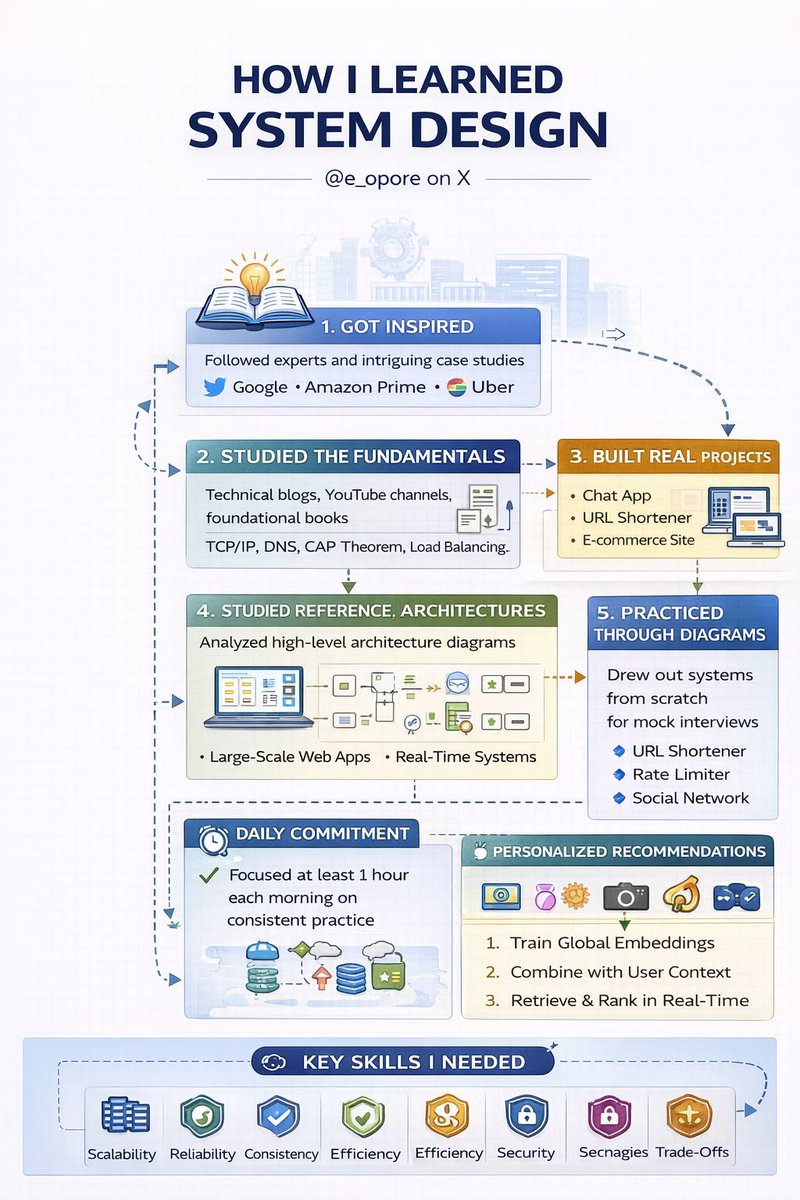
HOW I LEARNED SYSTEM DESIGN
THE HONEST JOURNEY FROM INTERVIEW FAILURE TO ARCHITECTING PRODUCTION SYSTEMS THAT ACTUALLY SCALE
I did not start with system design because I loved it.
I started because I failed it.
The first time I faced a system design interview, I froze. Not because I didn’t understand coding, but because I had never been taught how to think in systems. I knew how to build features. I didn’t know how to build systems that survive real users, real traffic, and real failures.
That failure changed everything.
THE WAKE-UP CALL
I walked into that interview confident. I walked out confused.
I was asked to design a scalable system.
I started writing code in my head. That was my first mistake.
System design is not about syntax.
It is about thinking.
What I lacked:
→ Understanding scale
→ Knowing trade-offs
→ Communicating architecture clearly
→ Breaking down vague problems
That moment forced me to rethink how I approached engineering.
STEP 1: I STOPPED THINKING LIKE A CODER
I had to unlearn something important.
Coding solves problems at a micro level.
System design solves problems at a macro level.
So I shifted my mindset:
→ From “How do I implement this?”
→ To “How does this system behave at scale?”
Instead of focusing on functions, I started focusing on:
→ Users
→ Traffic
→ Data flow
→ Bottlenecks
→ Failure points
That shift alone made a huge difference.
STEP 2: I LEARNED THE FUNDAMENTALS FIRST
Before jumping into complex architectures, I went back to basics.
I studied:
→ Load balancing
→ Caching strategies
→ Database design (SQL vs NoSQL)
→ Horizontal vs vertical scaling
→ CAP theorem
→ Consistency vs availability trade-offs
At first, it felt overwhelming.
But over time, patterns started repeating.
System design is not about memorizing solutions.
It is about recognizing patterns.
STEP 3: I STARTED BREAKING SYSTEMS DOWN
Instead of trying to design everything at once, I learned to decompose problems.
Every system I designed followed this structure:
→ Requirements (functional + non-functional)
→ High-level architecture
→ Core components
→ Data flow
→ Bottlenecks
→ Scaling strategy
→ Trade-offs
This gave me clarity.
And more importantly, it gave me confidence.
STEP 4: I STUDIED REAL SYSTEMS
This is where things started to click.
I stopped learning in isolation and started studying real-world systems:
→ How messaging systems handle millions of users
→ How streaming platforms deliver content globally
→ How marketplaces handle transactions and inventory
→ How social platforms manage feeds and notifications
I realized something powerful:
Every large system is just a combination of smaller, well-understood components.
STEP 5: I PRACTICED OUT LOUD
System design is not just about knowing.
It is about explaining.
So I practiced:
→ Speaking while designing
→ Justifying every decision
→ Explaining trade-offs clearly
→ Thinking under pressure
At first, it felt awkward.
But this is what transformed my interview performance.
Because in real interviews, clarity beats complexity.
STEP 6: I FAILED AGAIN (BUT BETTER)
I didn’t magically become perfect.
I failed again.
But this time, I understood why.
→ I missed edge cases
→ I didn’t estimate scale properly
→ I overcomplicated parts of the system
Each failure became feedback.
And slowly, I improved.
STEP 7: I STARTED THINKING LIKE AN ARCHITECT
This was the turning point.
I stopped trying to impress.
I started trying to design systems that actually work.
My approach became:
→ Start simple
→ Scale gradually
→ Optimize only when necessary
→ Always consider trade-offs
Because real systems are not perfect.
They are practical.
WHAT I LEARNED THE HARD WAY
If you are learning system design right now, understand this:
→ You don’t need to know everything
→ You need to think clearly
→ You need to communicate well
→ You need to understand trade-offs
And most importantly:
→ You need to practice consistently
System design is a skill.
And like any skill, it improves with time.
FINAL THOUGHT
Looking back, that failure was necessary.
It forced me to grow beyond writing code.
It pushed me to understand systems at scale.
It turned me from a developer into someone who can design real-world architectures.
If you are struggling with system design, you are not behind.
You are just in the process.
Keep going.
WANT TO MASTER SYSTEM DESIGN FASTER?
If you want a structured path that takes you from beginner concepts to real-world system architecture, I’ve put together a complete guide:
→ codewithdhanian.gumroad.com/l/ntmcf
It covers fundamentals, patterns, real-world systems, and practical breakdowns to help you design with confidence.
Build systems that scale.
Not just code that works.

English

@foxtomb232 System design evaluation platform, perfect for learning and tackling real work engineering challenges archie.guru/?v=2
English

@foxtomb232 Building a platform for system design interview prep and systems evaluation, backed by custom AI called Archie. You can get a hands-on practice instead of just watching videos, far better for actual learning archie.guru
English

@progXprog pewnie przeczytała w clean code, że dobra metoda to taka z maksymalnie dwoma parametrami
Polski

Kiedyś pisałem, że na rozmowie kwalifikacyjnej była pani która przekazywała parametry do metody jako słownik z parami klucz wartość a potem parsowala wszystko do zmiennych w metodzie.
Tak, była z Indii.
Wall Street Mav@WallStreetMav
36,000 engineering students from IT programs were tested in India. 95% were determined to be unfit for actually working in the field. Only 1.4% could write functionally correct and efficient code. India has a massive issue with cheating and scams in education. Fake degrees

Polski

@koziolek > 2026
> blokowanie ludzi z profili branżowych
wyższa szkoła robienia sociali
Polski

@system_monarch All of these ready for a hands-on practice archie.guru
English

Your system design knowledge, explaining:
- gRPC
- CDNs
- WebSockets
- Rate Limiting
- API Gateways
- Microservices
- Redis Caching
- Load Balancers
- Message Queues
- Database Sharding
- Consistent Hashing
- Eventual Consistency
- Distributed Tracing
- Horizontal Scaling
- Circuit Breakers
- Event Sourcing
- Reverse Proxy
- CAP Theorem
- Service Mesh
- Saga Pattern
- CQRS
- Kafka
Interview decision:
Sorry, we need someone who can explain why they'd use a database.
Knowing the name of a pattern doesn't mean you understand when to use it.
I've seen engineers confidently explain microservices architecture, then suggest splitting a 3-table CRUD app into 15 services.
They knew the pattern.
They didn't know the problem it solves.
Understanding fundamentals means asking better questions, for example:
1. Why would I choose PostgreSQL over MongoDB?
Not "what are the differences" but what specific requirements in my system make one a better fit.
Is it the transaction guarantees?
The query flexibility?
The team's expertise?
2. When should I NOT use Redis caching? Maybe your data changes too frequently.
Maybe cache invalidation becomes more complex than just hitting the database.
Maybe you're solving a performance problem that doesn't exist yet.
3. What's the real cost of event sourcing?
Sure, you get an audit trail and time travel.
But now you're debugging by replaying events, your storage grows unbounded, and your queries need projections.
Is that tradeoff worth it for your use case?
4. Do I actually need Kafka?
Or would a simple queue work fine for my 1000 requests per day?
Are you building for scale you have or scale you imagine?
The best engineers I know can explain why they'd choose a boring SQL database over the latest distributed system.
They understand the problems these patterns solve AND the problems they create.
That's what separates someone who memorized a list from someone who can actually architect systems.
English

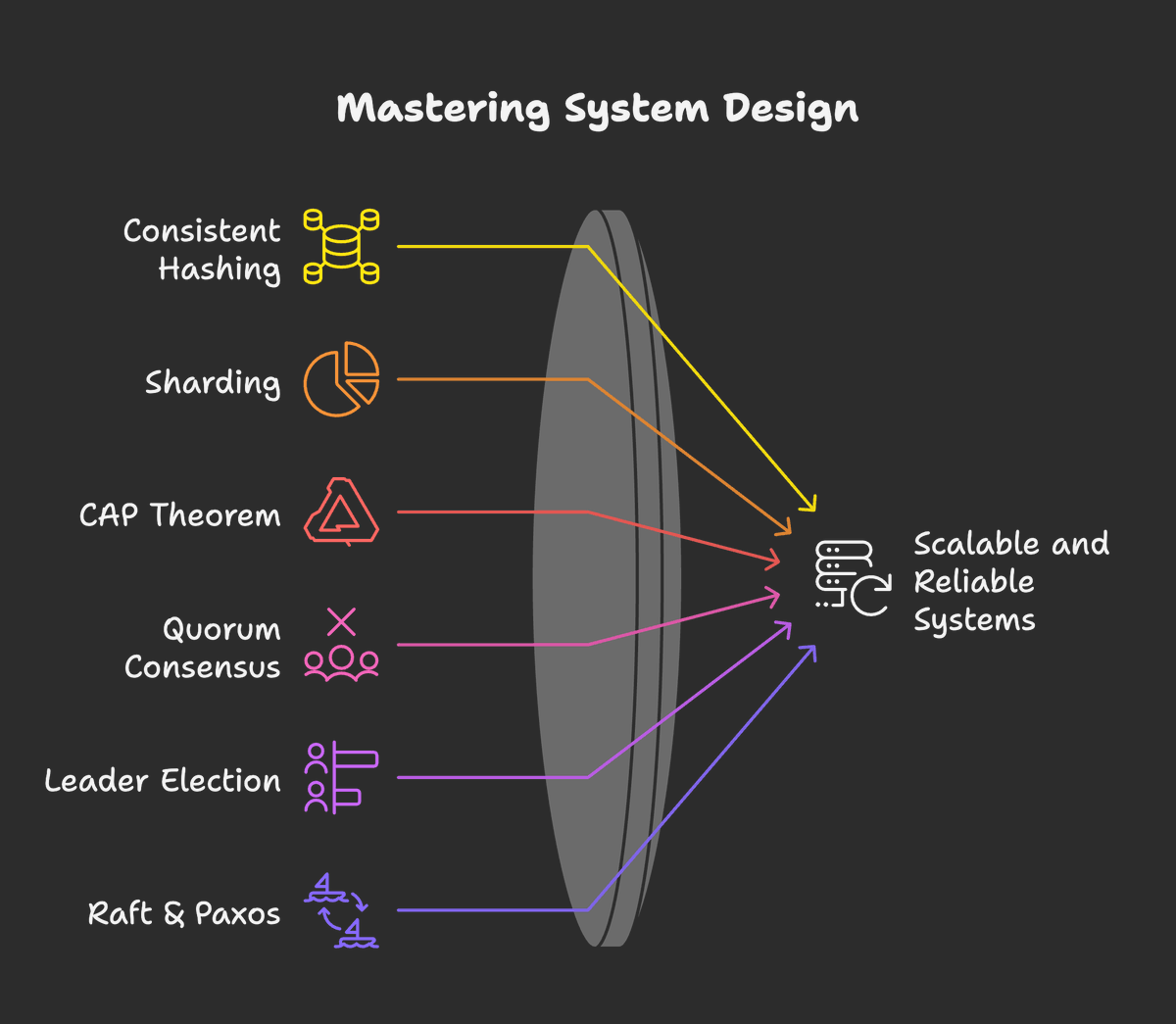
System design concepts I’d master if I wanted to crush it.
Bookmark this.
1.Consistent Hashing
2.Sharding
3.CAP Theorem
4.Quorum Consensus
5.Leader Election
6.Raft & Paxos
7.Gossip Protocol
8.Vector Clocks
9.Load Shedding
10.Circuit Breakers
11.Backpressure
12.Tail Latency Reduction
13.Bloom Filters
14.HyperLogLog
15.Reservoir Sampling
16.Split-Brain Resolution
Follow @asmah2107 to uplift your system design game.

English

@goyalshaliniuk it's not something one can learn overnight, but it's a process. @archieguruDEV can help with that
English

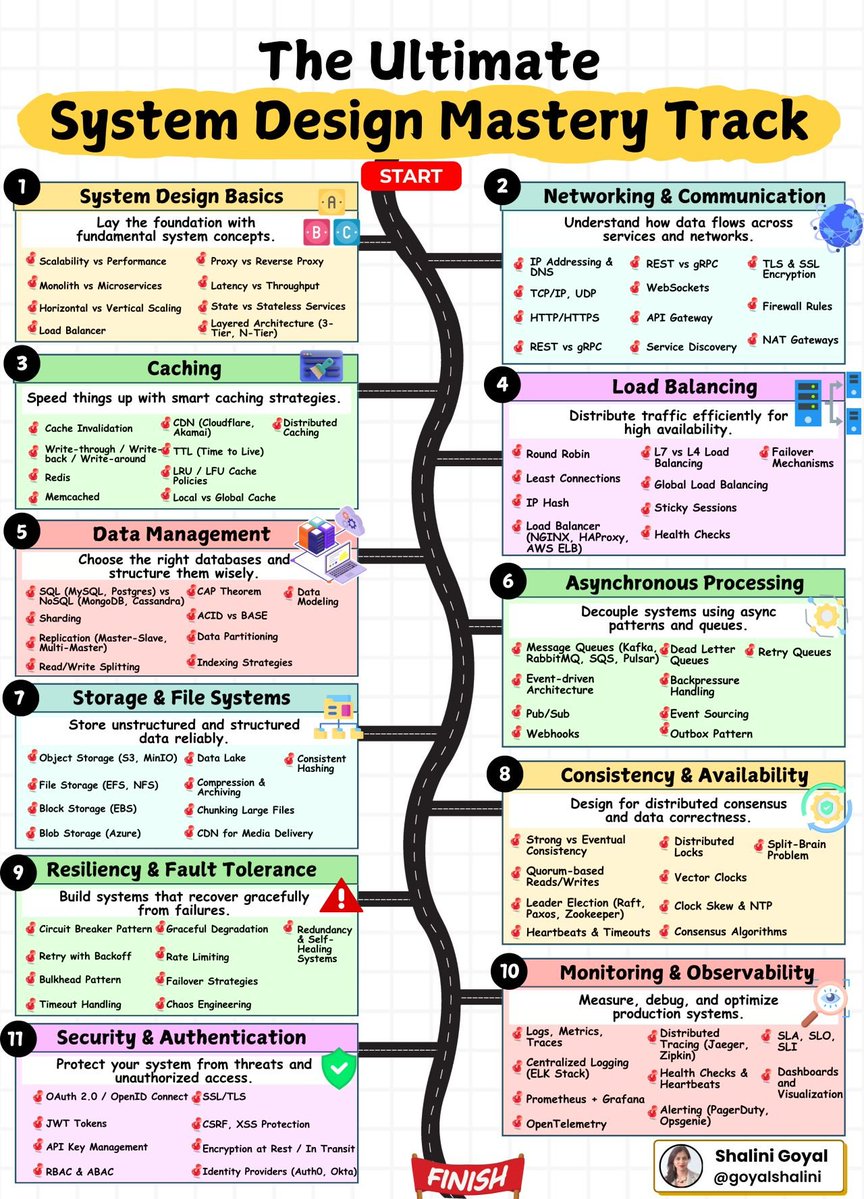
Building scalable, reliable systems isn’t about one skill.
It’s about mastering the end to end design journey. And so is the cracking a system design interview.
Here’s a break down of 11 key stages of system design, from architecture basics to observability — making it your perfect guide for interviews or real-world architecture.
Here’s what each phase brings to the table:
1. System Design Basics
Start with the fundamentals: scalability, architecture types, proxies, load balancers, and monolith vs microservices — this is your design foundation.
2. Networking & Communication
Understand how services talk — from IP addressing and firewalls to REST vs gRPC, TLS, API Gateways, and service discovery.
3. Caching
Speed up systems using smart caching strategies — learn about Redis, TTL, cache invalidation, CDN, and local vs global cache layers.
4. Load Balancing
Distribute traffic effectively using strategies like Round Robin, Least Connections, IP Hash, global LB, sticky sessions, and health checks.
5. Data Management
Choose the right database and schema with SQL/NoSQL, ACID vs BASE, sharding, replication, and data partitioning principles.
6. Asynchronous Processing
Decouple systems using queues, event-driven architecture, Pub/Sub, webhooks, retry queues, and patterns like outbox and event sourcing.
7. Storage & File Systems
Store unstructured and structured data with S3, EFS, BLOBs, chunking, compression, data lakes, and consistent hashing.
8. Consistency & Availability
Master distributed correctness with strong/eventual consistency, consensus protocols, distributed locks, vector clocks, and quorum.
9. Resiliency & Fault Tolerance
Design systems that heal themselves with retries, circuit breakers, bulkheads, chaos engineering, and graceful degradation strategies.
10. Monitoring & Observability
Track, debug, and optimize performance with metrics, traces, ELK stack, OpenTelemetry, health checks, and alerting tools.
11. Security & Authentication
Secure your systems with OAuth, JWTs, RBAC, CSRF/XSS protection, TLS, and identity providers like Auth0 and Okta.
📌 Save this as your ultimate reference for cracking system design interviews or building large-scale systems from the ground up.

English

@shub0414 @archieguruDEV is a great option for these who aim at system design jobs
English

@miroburn a próbowałeś Kimi w OpenCode? wydaje mi się, że to lepszy harness dla Kimiego niż ich KimiCode
Polski

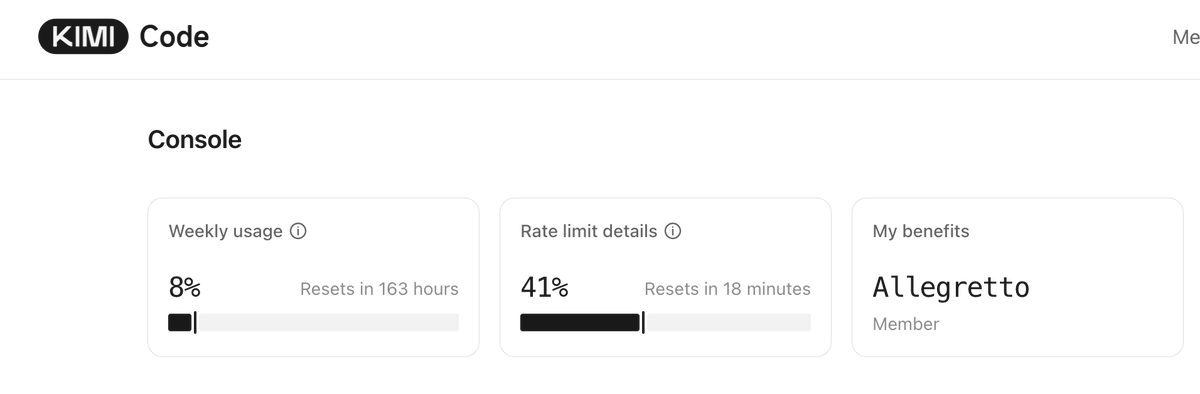
Zwiększyłem limit Kimi na $39/m.
Zrezygnowałem z walki z support OpenAI.
Dziś ani razu nie odpaliłem Claude Code. A wiecie, jakim jestem fanboyem CC + Opus 4.7.
Niech to będzie najlepsza reklama Kimi CLI z K2.6. IMO jest obłędne dobry w długich zadaniach backend. Subiektywnie popełnia mniej błędów niz GPT-5.4 i Opus 4.7. Ofkoz mało jeszcze działam.
Zrobiłem też proste zadanie frontend, ale nic z tworzeniem, tylko edycja. Poszło bezbłędnie.
CLI jest dopieszczone i świetnie się z nim pracuje.
Serio zachęcam potestowanie do pracy agentowej (w tym kodzik) + asystenckiej. Oczywiście minusem dla niektórych może być to, że chiński.
Projekty, które nimi realizuję to rozwój Lab Club i budowanie CLI/Skilli do Akademii.
Podziękowania dla @KajetanMastela, bo po Twoim poście postanowiłem spróbować.

Polski
Piotr Staśkiewicz retuiteado

Design. Iterate. Improve.
System design is a skill. Treat it like one.
We're live now @ archie.guru
English

@devXritesh Well put! @archieguruDEV offers architectural katas for building reliable API Gateways, might want to check it out as well
English

System Design Series - Day 8/30
API Gateway Patterns – The Front Door of Your Microservices
API Gateway is the single entry point for all your clients.
Without it:
- Mobile/web clients call 10+ different services directly
- Authentication is duplicated everywhere
- Rate limiting, CORS, logging → repeated in every service
- Services are fully exposed to the internet
With it:
- One clean URL for clients
- Centralized auth, rate limiting, routing, aggregation
- Backend services stay hidden and secure
Here’s everything you need to know about API Gateway patterns.
What is an API Gateway?
Think of it as the hotel front desk
Without a front desk:
- Guests wander around looking for rooms
- No security check
- Housekeeping and room service have no coordination
With a front desk:
- Single check-in point
- Routes guests to correct room
- Handles security, coordination, and requests
API Gateway does exactly that for your microservices.
The Problem It Solves
Before API Gateway:
Mobile app needs user profile + orders:
→ Calls User Service directly
→ Calls Order Service directly
→ Calls Payment Service directly
Problems:
- Client knows internal service URLs
- Multiple network calls (slow on mobile)
- Auth tokens sent to every service
- No centralized rate limiting or logging
- Services exposed to the internet
After API Gateway:
Mobile app calls one URL:
https://api.example. com/profile
Gateway handles everything internally:
- Authenticates once
- Routes and aggregates calls
- Returns combined response
Benefits:
- 1 network call from client
- Services completely hidden (security win)
- Centralized cross-cutting concerns
- Much better client experience
Core Responsibilities:
1. Routing
Maps external URLs to internal services
GET /api/users → User Service
GET /api/orders → Order Service
2. Authentication & Authorization
Validates JWT/OAuth once at the gateway.
Services trust the gateway.
3. Rate Limiting
Prevents abuse (e.g., 100 requests/min per user).
4. Request Aggregation
Combines multiple backend calls into one response for the client.
5. Protocol Translation
Client uses REST → Service uses gRPC (handled at gateway).
Advanced Patterns
- Circuit Breaker → Prevents cascading failures when a service is down
- Request/Response Transformation → Convert old → new API formats
- Caching → Cache frequent responses at the gateway level
- Logging & Monitoring → Centralized observability
When to Use API Gateway
Use it when:
- You have multiple microservices
- External clients (mobile, web, third-party)
- You need centralized auth, rate limiting, or aggregation
Don’t use it when:
- Simple monolith (overkill)
- Only internal service-to-service communication
- Ultra-low latency is critical (extra hop)
Popular Solutions
- Kong (open-source, powerful plugins)
- AWS API Gateway (managed, serverless)
- NGINX + Lua (DIY, lightweight)
- Traefik, Envoy, KrakenD
Summary
API Gateway is not just a proxy.
It is the security layer, traffic manager, and aggregator for your entire backend.
It simplifies client code, hides internal complexity, and centralizes cross-cutting concerns.
Trade-offs:
- Extra network hop (adds latency)
- Becomes a critical component (make it highly available)
Used correctly, it’s one of the most valuable pieces in any microservices architecture.
Tomorrow (Day 9): Inter-Service Communication Patterns
Questions about API Gateway?
Drop them below 👇
#SystemDesign #APIGateway #Microservices #Backend

English