

A
109 posts

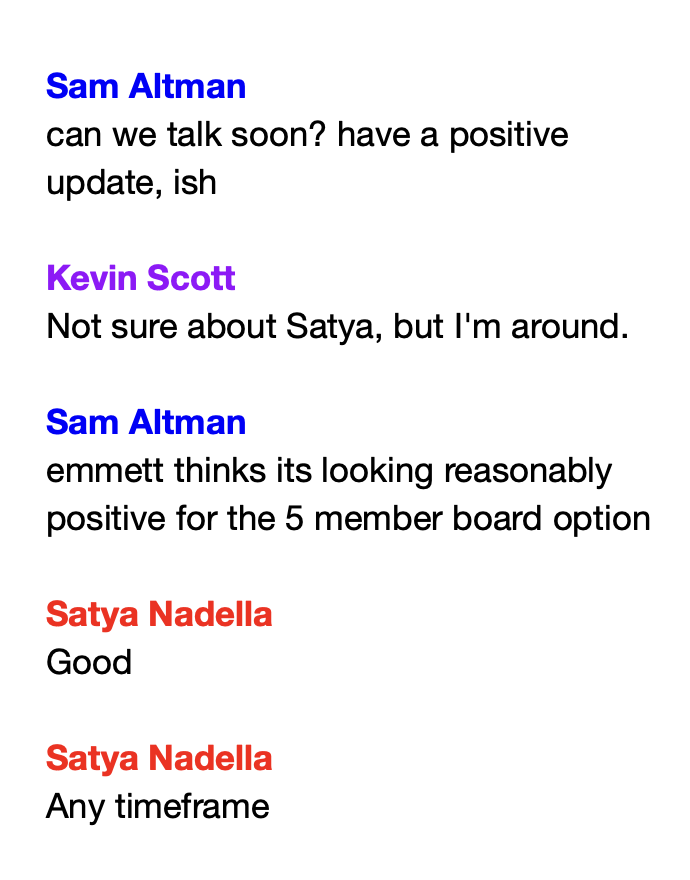
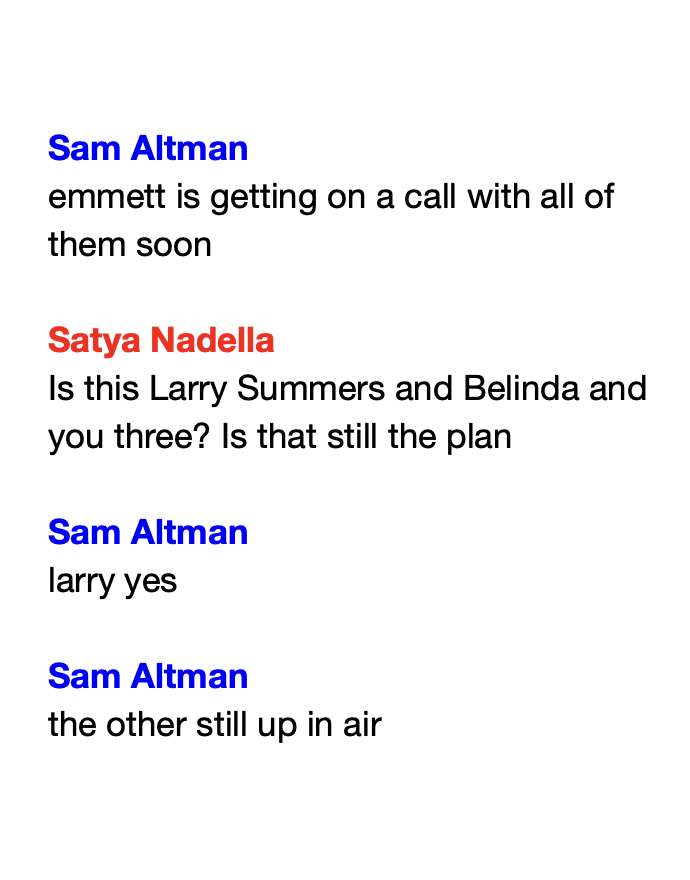
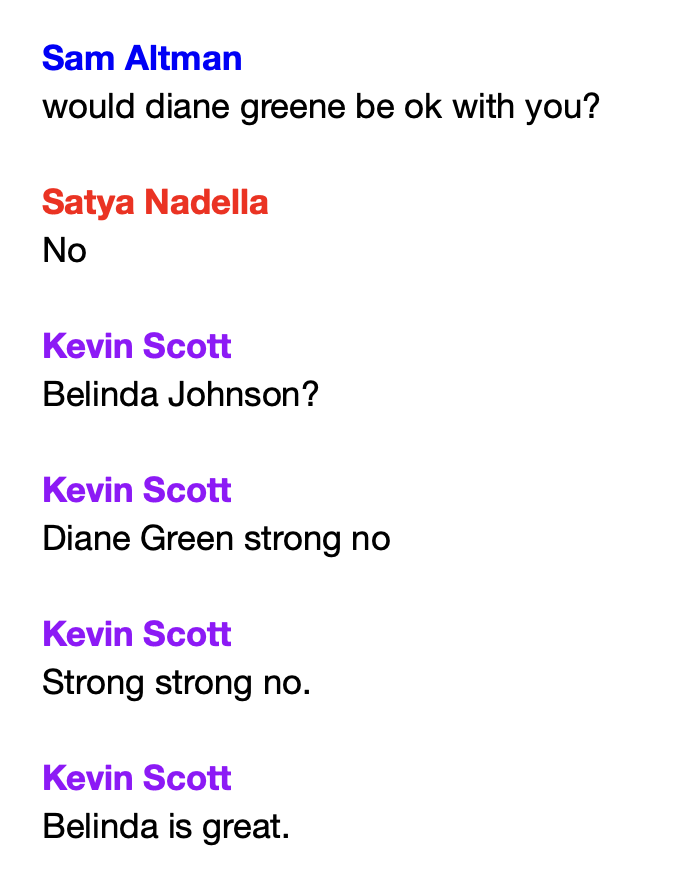
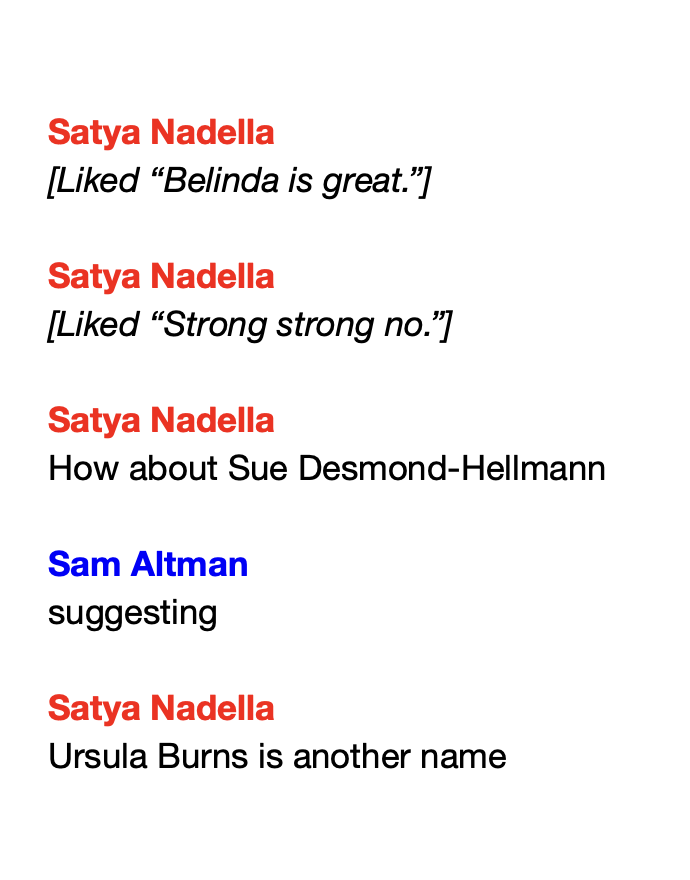
Sam Altman's group chat with Satya Nadella
November 21, 2023
English
chatgpt native integration for writing emails:
JZ@jamesfzhang
🆕 Writing blocks make it easier to craft the perfect email in ChatGPT. ∙Update & format text right in chat ∙Highlight to ask for changes, and accept or reject suggestions ∙Open in your email client once you’re ready to send Try it & please let us know what you think!
English

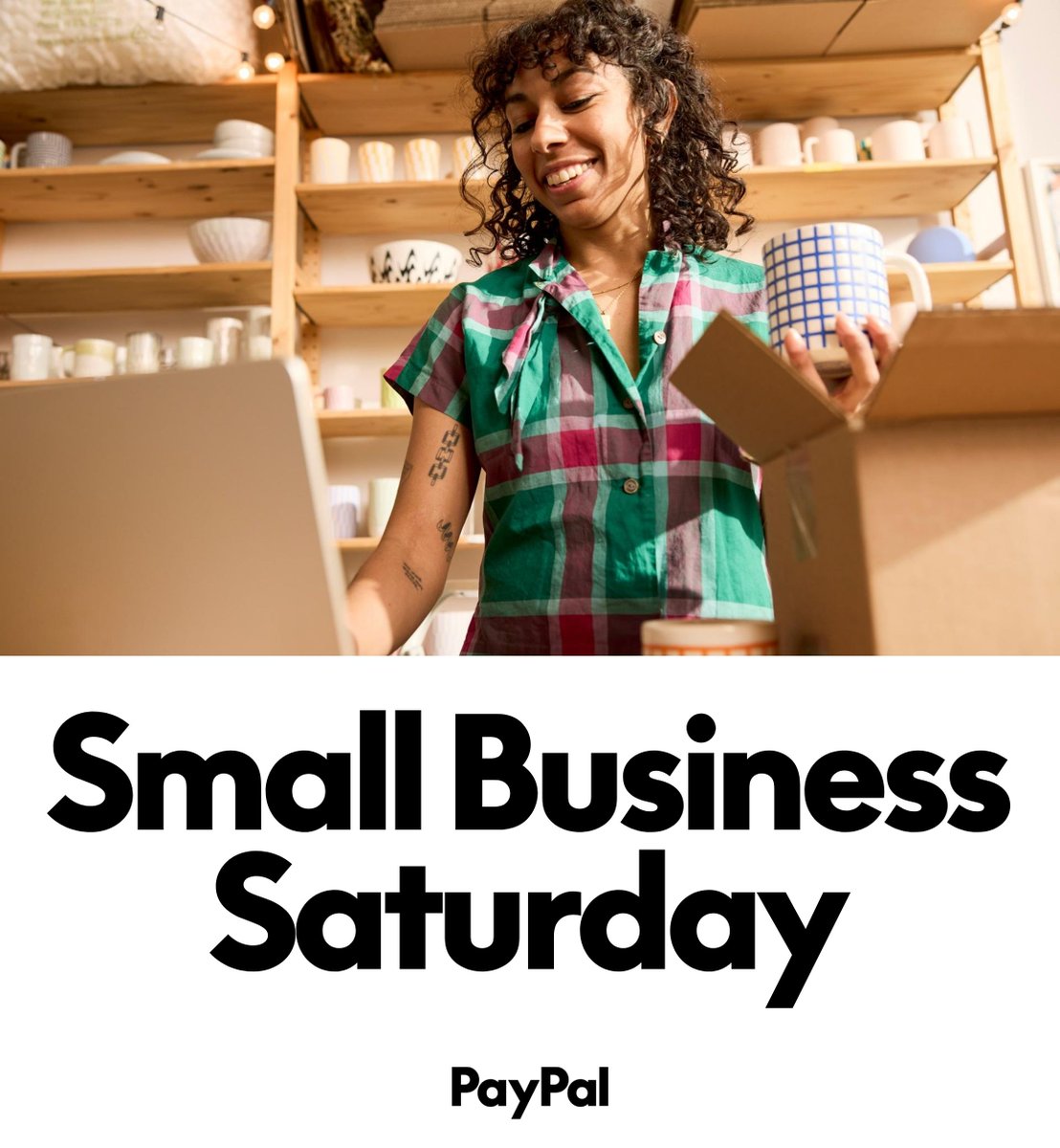
It’s #SmallBusinessSaturday! 🎉 Let’s celebrate the makers, creators, and entrepreneurs who fuel our communities. Shop small. Support local. Make a big impact.
English
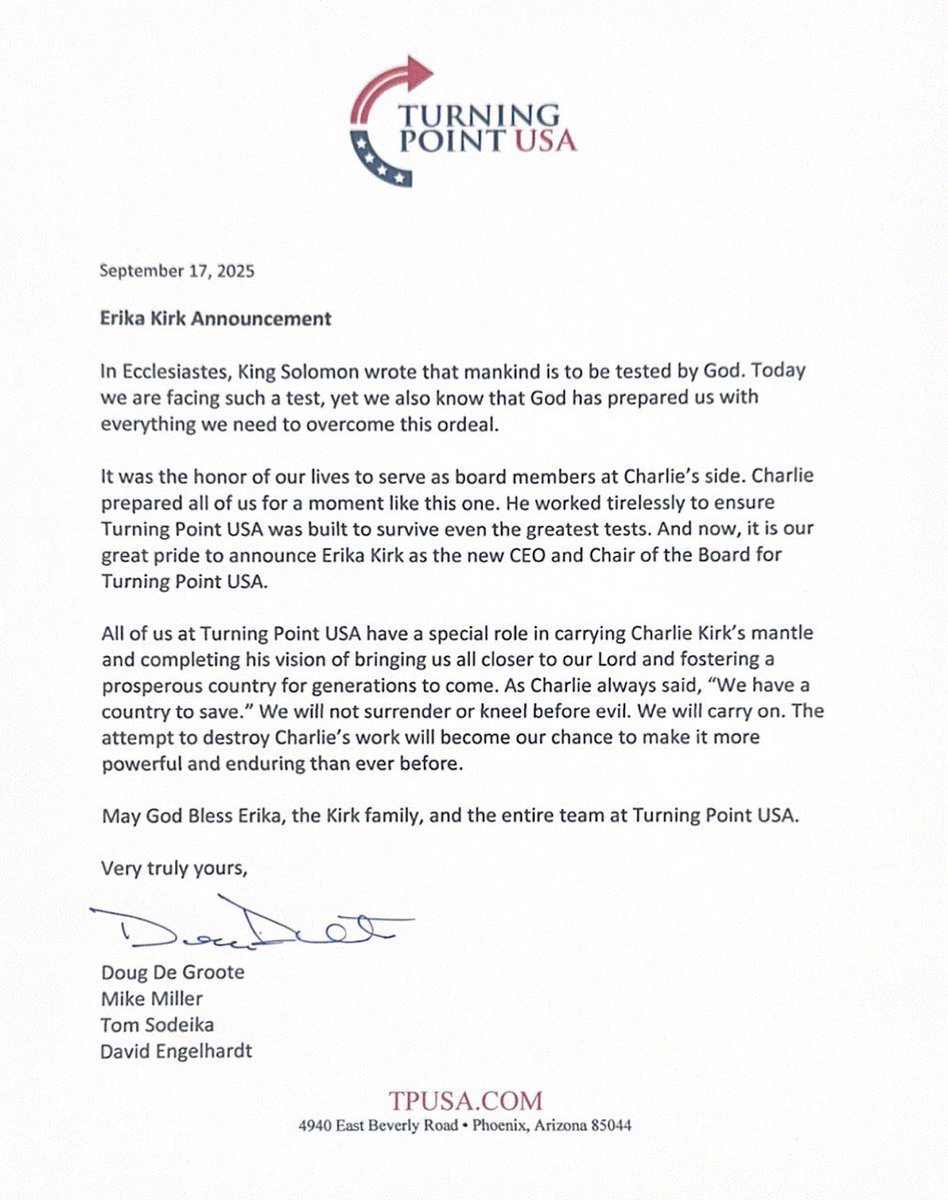
The Turning Point Board has unanimously elected Erika Kirk as the new CEO and Chair of the Board.
In prior discussions, Charlie expressed to multiple executives that this is what he wanted in the event of his death.
English

@visegrad24 I speak japanese. They are protesting for the increase of price of matcha tea.
English

Anti-immigration protests have erupted in many Japanese cities.
Here’s a video from tonight’s march in Osaka 🇯🇵
English
@SwipeWright LLMs have digested the entire internet and tons of other digitized texts, yet it still hallucinates unpredictably. To reach AGI transformer is not enough.
English
I just discovered that Grok can run basic and complex statistical tests on data I upload in a CSV file. Statistics software like SAS, SPSS, and JMP are now (or will very soon be) totally obsolete. Wow.
English


If you are hardcore into EE or Firmware you can literally just DM me a link to your code, schematics or PCBs. If they are good I'll give you an interview.
Neuralink@neuralink
Watch the latest update from the Neuralink team.
English
@FoxNews @DOGE @elonmusk @LaraLeaTrump @Tesla @X @SpaceX @MyViewFNC A Trump reporting on the White House, huh?
English

WATCH: @DOGE boss @elonmusk opens up to @LaraLeaTrump about what Americans can expect next from his companies, including @Tesla, @X and @SpaceX, on @MyViewFNC.
English
English

I am the 3rd person in the world to receive the @Neuralink brain implant.
1st with ALS. 1st Nonverbal.
I am typing this with my brain. It is my primary communication.
Ask me anything! I will answer at least all verified users!
Thank you @elonmusk!
English

I wrote a quick new post on "Digital Hygiene".
Basically there are some no-brainer decisions you can make in your life to dramatically improve the privacy and security of your computing and this post goes over some of them. Blog post link in the reply, but copy pasting below too.
Every now and then I get reminded about the vast fraud apparatus of the internet, re-invigorating my pursuit of basic digital hygiene around privacy/security of day to day computing. The sketchiness starts with major tech companies who are incentivized to build comprehensive profiles of you, to monetize it directly for advertising, or sell it off to professional data broker companies who further enrich, de-anonymize, cross-reference and resell it further. Inevitable and regular data breaches eventually runoff and collect your information into dark web archives, feeding into a whole underground spammer / scammer industry of hacks, phishing, ransomware, credit card fraud, identity theft, etc. This guide is a collection of the most basic digital hygiene tips, starting with the most basic to a bit more niche.
Password manager. Your passwords are your "first factor", i.e. "something you know". Do not be a noob and mint new, unique, hard passwords for every website or service that you sign up with. Combine this with a browser extension to create and Autofill them super fast. For example, I use and like 1Password. This prevents your passwords from 1) being easy to guess or crack, and 2) leaking one single time, and opening doors to many other services. In return, we now have a central location for all your 1st factors (passwords), so we must make sure to secure it thoroughly, which brings us to...
Hardware security key. The most critical services in your life (e.g. Google, or 1Password) must be additionally secured with a "2nd factor", i.e. "something you have". An attacker would have to be in possession of both factors to gain access to these services. The most common 2nd factor implemented by many services is a phone number, the idea being that you get a text message with a pin code to enter in addition to your password. Clearly, this is much better than having no 2nd factor at all, but the use of a phone number is known to be extremely insecure due to the SIM swap attack. Basically, it turns out to be surprisingly easy for an attacker to call your phone company, pretend they are you, and get them to switch your phone number over to a new phone that they control. I know this sounds totally crazy but it is true, and I have many friends who are victims of this attack. Therefore, purchase and set up hardware security keys - the industrial strength protection standard. In particular, I like and use YubiKey. These devices generate and store a private key on the device secure element itself, so the private key is never materialized on a suspiciously general purpose computing device like your laptop. Once you set these up, an attacker will not only need to know your password, but have physical possession of your security key to log in to a service. Your risk of getting pwned has just decreased by about 1000X. Purchase and set up 2-3 keys and store them in different physical locations to prevent lockout should you physically lose one of the keys. The security keys support a few authentication methods. Look for "U2F" in the 2nd factor settings of your service as the strongest protection. E.g. Google and 1Password support it. Fallback on "TOTP" if you have to, and note that your YubiKeys can store TOTP private keys, so you can use the YubiKey Authenticator app to access them easily through NFC by touching your key to the phone to get your pin when logging in. This is significantly better than storing TOTP private keys on other (software) authenticator apps, because again you should not trust general purpose computing devices. It is beyond the scope of this post to go into full detail, but basically I strongly recommend the use of 2-3 YubiKeys to dramatically strengthen your digital security.
Biometrics. Biometrics are the third common authentication factor ("something you are"). E.g. if you're on iOS I recommend setting up FaceID basically everywhere, e.g. to access the 1Password app and such.
Security questions. Dinosaur businesses are obsessed with the idea of security questions like "what is your mother's maidan name?", and force you to set them up from time to time. Clearly, these are in the category of "something you know" so they are basically passwords, but conveniently for scammers, they are easy to research out on the open internet and you should refuse any prompts to participate in this ridiculous "security" exercise. Instead, treat security questions like passwords, generate random answers to random questions, and store them in your 1Password along with your passwords.
Disk encryption. Always ensure that your computers use disk encryption. For example, on Macs this total no-brainer feature is called "File Vault". This feature ensures that if your computer gets stolen, an attacker won't be able to get the hard disk and go to town on all your data.
Internet of Things. More like @internetofshit. Whenever possible, avoid "smart" devices, which are essentially incredibly insecure, internet-connected computers that gather tons of data, get hacked all the time, and that people willingly place into their homes. These things have microphones, and they routinely send data back to the mothership for analytics and to "improve customer experience" lol ok. As an example, in my younger and naive years I once purchased a CO2 monitor from China that demanded to know everything about me and my precise physical location before it would tell me the amount of CO2 in my room. These devices are a huge and very common attack surface on your privacy and security and should be avoided.
Messaging. I recommend Signal instead of text messages because it end-to-end encrypts all your communications. In addition, it does not store metadata like many other apps do (e.g. iMessage, WhatsApp). Turn on disappearing messages (e.g. 90 days default is good). In my experience they are an information vulnerability with no significant upside.
Browser. I recommend Brave browser, which is a privacy-first browser based on Chromium. That means that basically all Chrome extensions work out of the box and the browser feels like Chrome, but without Google having front row seats to your entire digital life.
Search engine. I recommend Brave search, which you can set up as your default in the browser settings. Brave Search is a privacy-first search engine with its own index, unlike e.g. Duck Duck Go which basically a nice skin for Bing, and is forced into weird partnerships with Microsoft that compromise user privacy. As with all services on this list, I pay $3/mo for Brave Premium because I prefer to be the customer, not the product in my digital life. I find that empirically, about 95% of my search engine queries are super simple website lookups, with the search engine basically acting as a tiny DNS. And if you're not finding what you're looking for, fallback to Google by just prepending "!g" to your search query, which will redirect it to Google.
Credit cards. Mint new, unique credit cards per merchant. There is no need to use one credit card on many services. This allows them to "link up" your purchasing across different services, and additionally it opens you up to credit card fraud because the services might leak your credit card number. I like and use privacy dot com to mint new credit cards for every single transaction or merchant. You get a nice interface for all your spending and notifications for each swipe. You can also set limits on each credit card (e.g. $50/month etc.), which dramatically decreases the risk of being charged more than you expect. Additionally, with a privacy dot com card you get to enter totally random information for your name and address when filling out billing information. This is huge, because there is simply no need and totally crazy that random internet merchants should be given your physical address. Which brings me to...
Address. There is no need to give out your physical address to the majority of random services and merchants on the internet. Use a virtual mail service. I currently use Earth Class Mail but tbh I'm a bit embarrassed by that and I'm looking to switch to Virtual Post Mail due to its much strong commitments to privacy, security, and its ownership structure and reputation. In any case, you get an address you can give out, they receive your mail, they scan it and digitize it, they have an app for you to quickly see it, and you can decide what to do with it (e.g. shred, forward, etc.). Not only do you gain security and privacy but also quite a bit of convenience.
Email. I still use gmail just due to sheer convenience, but I've started to partially use Proton Mail as well. And while we're on email, a few more thoughts. Never click on any link inside any email you receive. Email addresses are extremely easy to spoof and you can never be guaranteed that the email you got is a phishing email from a scammer. Instead, I manually navigate to any service of interest and log in from there. In addition, disable image loading by default in your email's settings. If you get an email that requires you to see images, you can click on "show images" to see them and it's not a big deal at all. This is important because many services use embedded images to track you - they hide information inside the image URL you get, so when your email client loads the image, they can see that you opened the email. There's just no need for that. Additionally, confusing images are one way scammers hide information to avoid being filtered by email servers as scam / spam.
VPN. If you wish to hide your IP/location to services, you can do so via VPN indirection. I recommend Mullvad VPN. I keep VPN off by default, but enable it selectively when I'm dealing with services I trust less and want more protection from.
DNS-based blocker. You can block ads by blocking entire domains at the DNS level. I like and use NextDNS, which blocks all kinds of ads and trackers. For more advanced users who like to tinker, pi-hole is the physical alternative.
Network monitor. I like and use The Little Snitch, which I have installed and running on my MacBook. This lets you see which apps are communicating, how much data and when, so you can keep track of what apps on your computer "call home" and how often. Any app that communicates too much is sus, and should potentially be uninstalled if you don't expect the traffic.
I just want to live a secure digital life and establish harmonious relationships with products and services that leak only the necessary information. And I wish to pay for the software I use so that incentives are aligned and so that I am the customer. This is not trivial, but it is possible to approach with some determination and discipline.
Finally, what's not on the list. I mostly still use Gmail + Gsuite because it's just too convenient and pervasive. I also use 𝕏 instead of something exotic (e.g. Mastodon), trading off sovereignty for convenience. I don't use a VoIP burner phone service (e.g. MySudo) but I am interested in it. I don't really mint new/unique email addresses but I want to. The journey continues. Let me know if there are other digital hygiene tips and tricks that should be on this list.
Link to blog post version in the reply, on my brand new Bear ʕ•ᴥ•ʔ blog cute 👇

English

If you’re a hardcore software engineer and want to build the everything app, please join us by sending your best work to code@x.com.
We don’t care where you went to school or even whether you went to school or what “big name” company you worked at.
Just show us your code.
English

This is an essay version of what I just shared with the team @neuralink, where I highlight the importance of our long-term goal: "Understand and Expand Consciousness"—imo, humanity's greatest quest. If this resonates with you, consider joining our team!
--
Throughout history, humanity has wrestled with questions of existence and consciousness. Why are we here? What is the meaning of it all? These timeless inquiries have driven philosophy, art, and religion for millennia, yet they remain unanswered. Despite our profound personal experiences of life, the origins and mechanisms of consciousness elude us. This mystery, central to the human condition, has long been considered beyond the realm of science and technology. But today, for the first time in history, we stand on the brink of transforming these philosophical puzzles into tangible engineering challenges.
Advances in computing, sensing, control, materials, manufacturing, and many more have turned what once seemed like speculative dreams into tractable engineering problems. The concept of building an "oscilloscope for the brain" is no longer the stuff of science fiction but a concrete objective within our reach. Such a tool could provide unprecedented insights into the neural basis of consciousness, allowing us to map and interpret the intricate electrical symphony that underpins our thoughts, emotions, and identities. This technological leap has the potential to bridge the gap between subjective human experience and objective scientific understanding.
The impact of this breakthrough could rival humanity's greatest discoveries. Just as the mastery of fire revolutionized our species by enabling warmth, cooking, and protection, developing a high-bandwidth, generalized I/O to the brain represents a "fire-level" moment for the modern era. It is a transformative milestone that could unlock human potential in ways we’ve yet to imagine. By providing direct access to the brain's inner workings, we could tackle neurological diseases with precision, enhance cognitive capabilities, and enable entirely new forms of communication and creativity. The possibilities extend far beyond individual benefit, offering a path to collective advancements in understanding and expanding the human spirit.
For me, this mission is deeply personal. The knowledge that we have a real opportunity to understand consciousness and, by harnessing it, to empower humanity gets me excited to get out of bed every morning. This is not merely an intellectual challenge; it is a calling to contribute to humanity's greatest quest.
This endeavor is obviously much bigger than myself and any one of us—it is about advancing humanity's collective pursuit of knowledge and agency. The questions we seek to answer have driven human curiosity for millennia, and we now have the tools to confront them head-on. This is the work of a lifetime, one that has the potential to fundamentally redefine what it means to be human. It is our chance to move beyond speculation and create a future where the mysteries of consciousness are not only understood but harnessed for the betterment of all.
The path forward will not be easy. There are immense technical, scientific, societal, and ethical challenges to address. Building a device capable of interfacing seamlessly with the brain requires innovation at the intersection of technology and biology. Equally important are the ethical considerations—ensuring that this technology is developed responsibly and with safeguards to protect individual rights and privacy. But I am confident that, with a shared vision and commitment to collaboration, these challenges can be overcome.
In the end, this work is about more than technology. It is about humanity’s enduring drive to understand ourselves and our place in the universe. The opportunity before us is unprecedented, and the stakes could not be higher. By unlocking the mysteries of consciousness, we can illuminate the path to a future where human potential knows no bounds. This is the revolution I strive to be a part of, and it is what makes me believe that the best chapters of our story are still to be written.
English

"ALL FEDERAL SPENDING IS TAXATION."
Elon Musk
English
𝕏 is the only trusted news app I have.
English
Starlink is particularly great for remote locations. It works whether you’re at the top of a mountain in the Arctic or in a crater in Madagascar!
ALEX@ajtourville
NEWS: @Starlink installed yesterday in the Hebrides, Scotland🏴 ⬇️ 190Mbps ⬆️ 45 Mbps 🤩
English

My conversation with @elonmusk. Live today at 3pm ET. twitter.com/i/broadcasts/1…
English
Dear Sir/Madam,
I'd like to request a refund.
I purchased Premium+ on Feb 27, 2024 for the sole purpose of trying out Grok. However, only AFTER payment, I was informed that Grok was not available for my location.
When I was signing up for Premium+, all the webpages showed Grok would be available if I paid for Premium+. That was not true.
I didn't bother to request a refund back then. But today I found out that I've been charged 3 months' fees while I didn't use a single feature of Premium+. That's too much.
I'd like to request the refund of 3 months' fees.
Thank you very much.
English
Dear Sir/Madam,
I'd like to request a refund.
I purchased Premium+ on Feb 27, 2024 for the sole purpose of trying out Grok. However, only AFTER payment, I was informed that Grok was not available for my location.
When I was signing up for Premium+, all the webpages showed Grok would be available if I paid for Premium+. That was not true.
I didn't bother to request a refund back then. But today I found out that I've been charged 3 months' fees while I didn't use a single feature of Premium+. That's too much.
I'd like to request the refund of 3 months' fees.
Thank you very much.
English

Update: Passkeys is now available as a login option for everyone globally on iOS! Try it out.
help.x.com/en/managing-yo…
English