Sabitlenmiş Tweet

Let me present to you:
IPSW Tracker! (Early preview 0.0.1)
What's IPSW tracker?
IPSW tracker (or Apple IPSW firmware file tracker) is a all in one website, and also contains a feature that was permanently/temporarily stopped from 1conan. (It has been over 2 years since last seen.) The feature i'm talking about is SHSH saving! SHSH saving has been simplified now for you. Your SHSH blobs will be stored in the cloud and backed up regularly in case of loss.
Currently, a feature 1conan didn't offer was: Storing blobs to each account, instead of inputting an ECID, and being able to grab everybody's SHSH blobs. The blobs itself will be useless, but it's all about user privacy, at it's maximum. Currently, the SHSH blob saver uses 1conan's linux executable, tsssaver. I made the design close enough, so everyone who's familiar with 1conan's tsssaver will love it.
What you need to save your SHSH2 Blobs?
A12< devices:
ECID (Hex or dec)
Baseband serial number (by running ideviceinfo -k BasebandSerialNumber on macOS/Linux terminal while your device is connected, requires "brew install libimobiledevice")
Your board config (e.g: D421AP, you can find board configurations by writing your iPhone online, if you encounter any issues dm me)
Your device identifier (a menu, choose your iPhone model)
A12+ Devices
Same as the requirements for A12<
+ ApNonce (Can be grabbed from blobsaver)
+ generator (Also grabbed from blobsaver)
Once that's all saved, you input it in "Save SHSH Blobs"
and press "Save". That's it! From now on, you can only select your saved device and you will never have to pre fill this again.
What's also included?
- an IPSW signature checker provided by ipsw.me
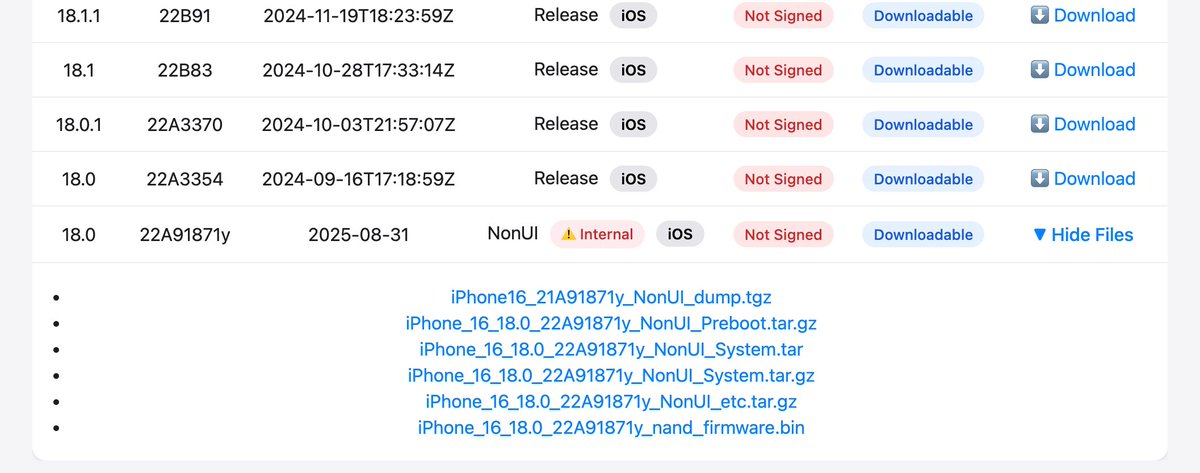
- links to internal iOS builds (scroll down until you find them: THEYRE NOT AVAILABLE FOR EACH DEVICE, AND BUILDS CANNOT BE INSTALLED ON NON-CHECKM8 DEVICES (A12+)!)
- ability to send me any custom ipsw for older (legacy) iPhones.
What's coming soon?
- automatic daily saver
- notifications from blob saver for un/successful blob saving
- Fixing an issue where Beta IPSW's signature DOES not seem to appear on render.
Notes:
- This tool, and any other tool requires setup for the first time after registration. Setup takes around 5-10 minutes.
- You're required to create an account and store your blobs in this account (Another layer of security)
- Legacy accounts (username accounts) are no longer supported.
- Website is NOT always on as i'm running on free hosting. When you open it, the site itself tries to restore, and it can take up to a few minutes. Reload if needed.
- Note that loading speeds can vary.
- If you see "Failed to fetch info: [Errno 2] No such file or directory: 'ideviceinfo' DO NOT PANIC as this library is used only locally for testing. I take a note to remove that with the next deploy.
- Internal builds are not fully uploaded (collected and uploaded into the server) so it may take a few days to have a full collection. Use applintrnl.app to get them.
- I have NOT personally checked if SHSH blobs themself are valid, but if they weren't they wouldn't have been pushed, will check tomorrow or so.
Special thanks to:
1conan for github.com/1Conan/tsschec…
ipsw.me for fetching ipsw signing state.
applintrnl.app for the iOS builds
t.me/purpleprojectn… for additional builds!
Why choose my SHSH blob saver instead of local ones?
- Always available online: meaning theyre stored securely even if something happens to your storing device.
- Presaved devices: Once you run the setup, all devices are saved and easily selectable.
- Automatic saving (coming soon)
No support links provided. I do it for the community.
Please check: chrissyx.xyz/ipsw !
All remaining features will be done shortly! Thank you for your support! (I might've forgotten to list something, if support needed don't hesistate to comment/dm)

English