Sabitlenmiş Tweet

Sarcastic Badger
212 posts

@Entropy_Badger
Building AI agents at 2am. Pre-sales Manager by day. 🇿🇦


One of the most meaningful milestones for Hermes Desktop: I’ve successfully replaced Cursor for myself. I was effectively a one-person, $20K–$40K/month Cursor enterprise customer for far too long. Now, Hermes’s parallelism and autonomy are genuinely better and faster for how I work. I think that’s because Hermes Desktop is built around a simple premise: coding is no longer about completing one or two tasks at a time. It empowers you to run multiple streams of work without getting in your way, losing the plot, or taking away control. What makes this especially exciting is how much room there still is to improve: context optimization, smarter built-in coding nudges, and so much more. There’s still a long way to go, but reaching the point where I genuinely prefer the product I built feels like a major milestone worth sharing. @NousResearch @Teknium


Hermes just broke its July record 137 PRs merged in a single day 🤯 Here’s the full breakdown: 🧵👇 DESKTOP IMPROVEMENTS • Stable macOS signing identity for permissions – macOS users won't be repeatedly prompted for Full Disk Access and other permissions after updates, saving permission grants across rebuilds • Event-driven live sync replacing constant polling – Desktop now receives real-time broadcasts from the gateway instead of continuous background polling, dramatically reducing system load and improving responsiveness when idle • Edit Models row hover consistency – Edit Models dialog now highlights on hover just like the model picker, creating visual consistency across the app • Overlay scrollbars on code blocks – Code blocks in conversations now use clean, fading overlay scrollbars that don't consume space, making long snippets easier to read • Fixed stale surface height variables – Chat message areas now correctly adjust spacing when status bars disappear, eliminating unexpectedly large bottom padding gaps • Searchable timezone picker – Settings now offer a dropdown timezone selector instead of free text, preventing typos and making timezone selection faster • Session list auto-reorder – Recent conversations now automatically move to the top when you send a message, making it quicker to find and continue your latest chat • Default 90% zoom level – New installations now default to 90% zoom for a more comfortable viewing experience, and zoom shortcuts consistently work • Floating pane placement – New floating pane support allows plugins to display information like HUDs without consuming main window space • Brand icons on known domain links – Links to major websites now show their brand icons, making it easier to identify destinations at a glance • Composer image attachments open in lightbox – Images attached in the composer now open in full-size preview instead of the document rail • Inline image download button anchoring – Image download buttons are now positioned directly on images for cleaner, more intuitive interaction • Tab shortcuts follow focused zone – Command-W and Command-T now target the active chat tab, making tab management more intuitive with multiple conversations • Fixed thin scrollbars on macOS – Desktop scrollbars on macOS are now consistently thin and visually appealing across all platforms • Chromeless markdown code blocks – Code blocks now appear as simple tinted areas with syntax highlighting, blending naturally with conversations • Camera capture support – Desktop renderer can now access your camera for features requiring video input with proper permission prompts • WebSocket token validation before ready – Desktop checks WebSocket token validity before declaring backend ready, ensuring secure connections from the start • Right-click parity on cron and profile rows – You can now right-click on cron, webhooks, and profile rows to edit or delete, matching existing menu button functionality • Database permission recovery at startup – Hermes now auto-fixes read-only database files at startup or provides clear recovery instructions • Tab strip keeps add button visible – When many tabs are open, the add tab button always stays in view without manual scrolling • Message edit send button works – The send button in the message editor now correctly sends edited messages on desktop • Tips wait before appearing – Tooltip delays are now honored, preventing them from flashing and cluttering the screen as you move your cursor • Keep tab and add button in view – Tab scrolling now ensures the active tab and add button stay visible when you have many tabs • Keep pinned sessions out of unpinned lists – Pinned conversations no longer appear twice in the sidebar, keeping it clean and organized



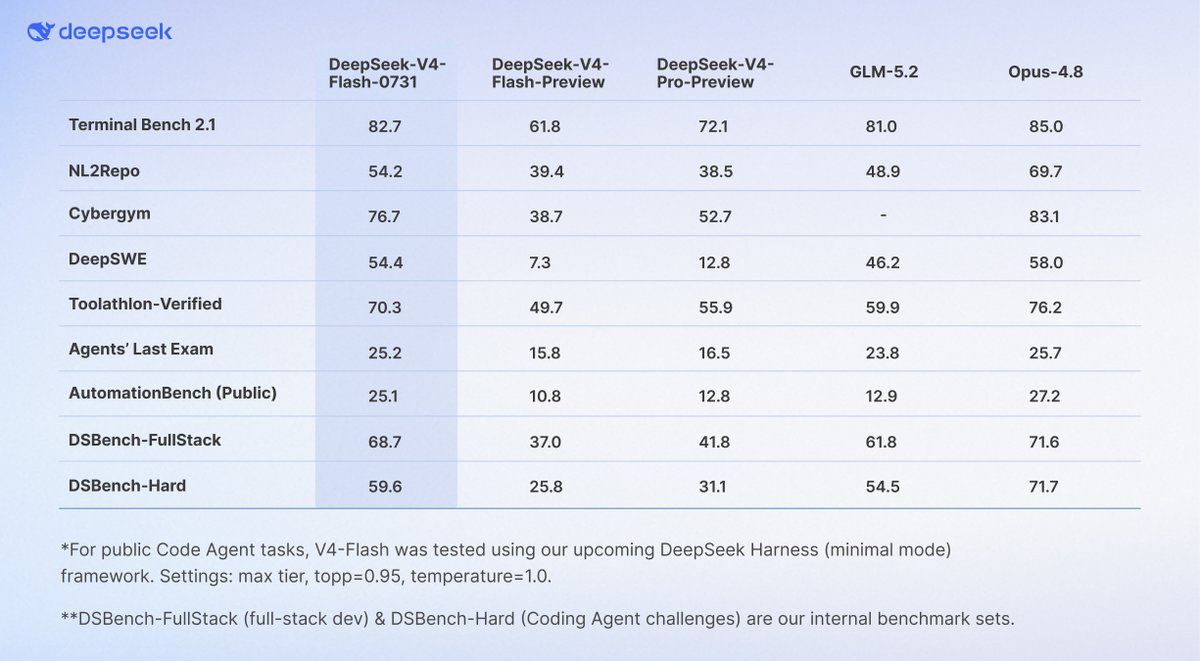
Deep Seek v4 Flash Is BEATING PRO AND GLM 5.2. Models that run on 4+ Sparks. Why use ALL 4 Sparks to Run GLM when you can run 2 Instances of DS4 or better yet run one instance and have 2 Sparks to go do other things with... This is Wild !