Sabitlenmiş Tweet
Mike_BeastCode 🇸🇪
3.3K posts

Mike_BeastCode 🇸🇪
@Mike_BeastCode
Turning coffee into Angular Enterprise Applications. Co-Organizer @ngSeattle Creator of the Angular BeastCode Snippet plugin for VSCode https://t.co/DAipfiBuLM
Seattle, WA Katılım Temmuz 2010
1.2K Takip Edilen512 Takipçiler
Mike_BeastCode 🇸🇪 retweetledi

Stop wasting hours trying to learn AI. 📘📚
I have already done it for you.
With one list. Zero confusion. And no fluff
📹 Videos:
1. LLM Introduction: t.co/kyDon6qLrb
2. LLMs from Scratch: t.co/2hyMhuKoiI
3. Agentic AI Overview (Stanford): t.co/FXu6cAqITC
4. Building and Evaluating Agents: t.co/ZigR1tdOFL
5. Building Effective Agents: t.co/uYwfwO55mO
6. Building Agents with MCP: t.co/4arFTW1b3i
7. Building an Agent from Scratch: t.co/eOmveyM9Hz
8. Philo Agents: t.co/zLu7x1tx9m
🗂️ Repos
1. GenAI Agents: t.co/eXCl2YaRPv
2. Microsoft's AI Agents for Beginners: t.co/3CSW4zPAwf
3. Prompt Engineering Guide: t.co/GVzvxPYDVO
4. Hands-On Large Language Models: t.co/0rgDvhx3pI
5. AI Agents for Beginners: t.co/3CSW4zPAwf
6. GenAI Agentshttps://lnkd.in/dEt72MEy
7. Made with ML: t.co/9z5KHF9DMe
8. Hands-On AI Engineering:t.co/dldAj5Xkr6
9. Awesome Generative AI Guide: t.co/U2WZhT4ERV
10. Designing Machine Learning Systems: t.co/sYAZX34YdQ
11. Machine Learning for Beginners from Microsoft: t.co/NjFxHbC9jZ
12. LLM Course: t.co/N34YTPu1OK
🗺️ Guides
1. Google's Agent Whitepaper: t.co/bW3Ov3vMW0
2. Google's Agent Companion: t.co/wredwWAbBA
3. Building Effective Agents by Anthropic: t.co/fxtE4alVrJ.
4. Claude Code Best Agentic Coding practices: t.co/lLSwJ9pG7C
5. OpenAI's Practical Guide to Building Agents: t.co/xgkEIogGfh
📚Books:
1. Understanding Deep Learning: t.co/CjcKpTemmV
2. Building an LLM from Scratch: t.co/DaWBxOx8o3
3. The LLM Engineering Handbook: t.co/ZA1n0N41Mf
4. AI Agents: The Definitive Guide - Nicole Koenigstein: t.co/boLkl1VlKb
5. Building Applications with AI Agents - Michael Albada: t.co/H1Xf5EkJLL
6. AI Agents with MCP - Kyle Stratis: t.co/JI3ELQZE6a
7. AI Engineering: t.co/Xk0JzMIf7o
📜 Papers
1. ReAct: t.co/QNqE4UU55w
2. Generative Agents: t.co/CwEpoJgY1U.
3. Toolformer: t.co/5m9xZd5teZ
4. Chain-of-Thought Prompting: t.co/KjVlgdWi77.
🧑🏫 Courses:
1. HuggingFace's Agent Course: t.co/7FSUYKxIdG
2. MCP with Anthropic: t.co/IkZGiWm2yS
3. Building Vector Databases with Pinecone: t.co/2YRoMfLdXd
4. Vector Databases from Embeddings to Apps: t.co/23A50ixbHJ
5. Agent Memory: t.co/uc3L9BrNF7
Repost for your network ♻️

English
Mike_BeastCode 🇸🇪 retweetledi

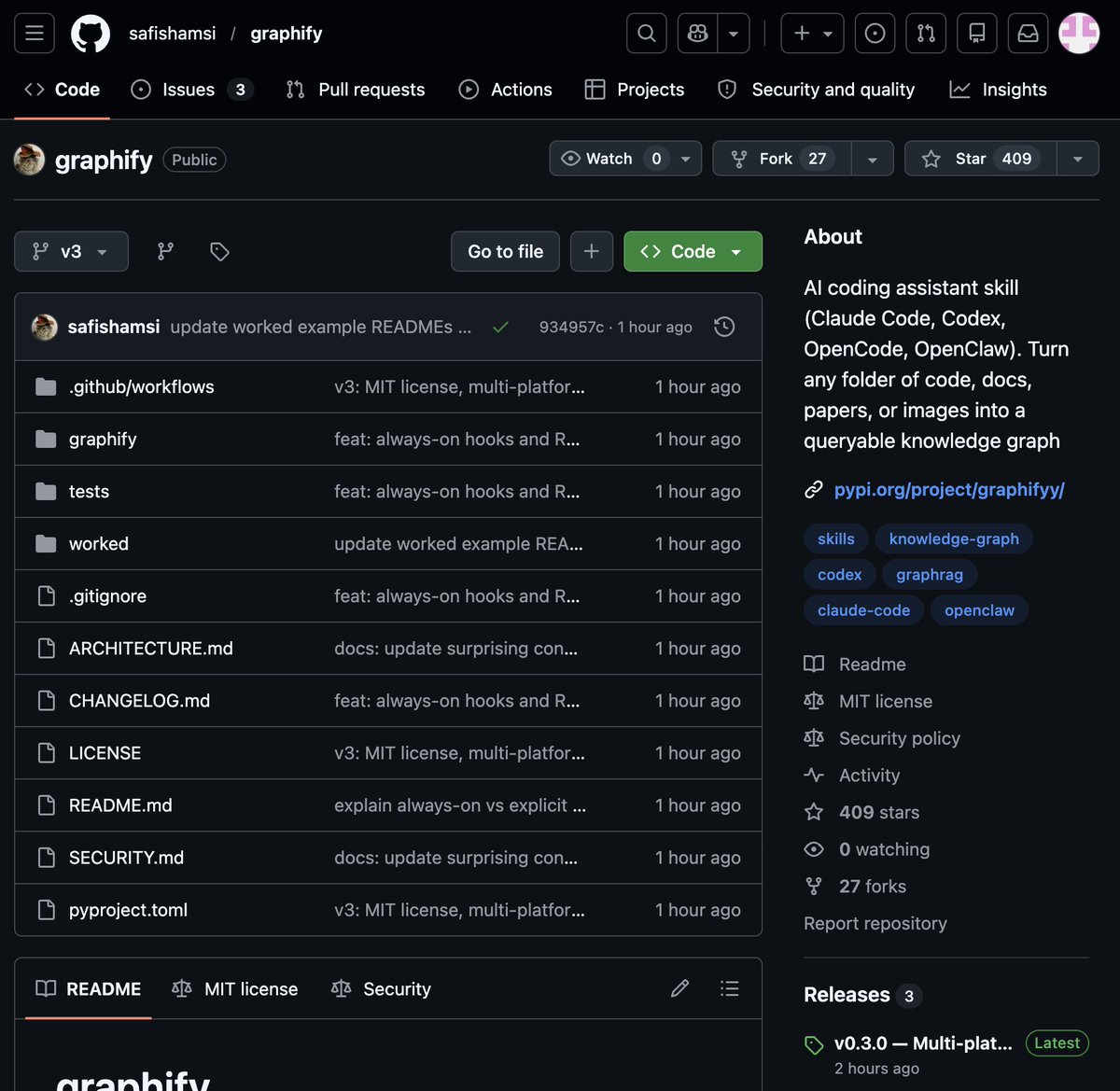
🚨 BREAKING: Someone just built the exact tool Andrej Karpathy said someone should build.
48 hours after Karpathy posted his LLM Knowledge Bases workflow, this showed up on GitHub.
It's called Graphify. One command. Any folder. Full knowledge graph.
Point it at any folder. Run /graphify inside Claude Code. Walk away.
Here is what comes out the other side:
-> A navigable knowledge graph of everything in that folder
-> An Obsidian vault with backlinked articles
-> A wiki that starts at index. md and maps every concept cluster
-> Plain English Q&A over your entire codebase or research folder
You can ask it things like:
"What calls this function?"
"What connects these two concepts?"
"What are the most important nodes in this project?"
No vector database. No setup. No config files.
The token efficiency number is what got me:
71.5x fewer tokens per query compared to reading raw files.
That is not a small improvement. That is a completely different paradigm for how AI agents reason over large codebases.
What it supports:
-> Code in 13 programming languages
-> PDFs
-> Images via Claude Vision
-> Markdown files
Install in one line:
pip install graphify && graphify install
Then type /graphify in Claude Code and point it at anything.
Karpathy asked. Someone delivered in 48 hours.
That is the pace of 2026.
Open Source. Free.

English
Mike_BeastCode 🇸🇪 retweetledi

🚨 Screen Studio charges $89 for this. Someone open sourced the entire thing for free.
It's called OpenScreen. 8,400+ GitHub stars.
You record your screen. It automatically transforms it into a polished, professional demo video.
Auto-zoom into clicks. Smooth cursor animations. Motion blur. Custom backgrounds with wallpapers, gradients, and shadows. Webcam overlays. Annotations. Timeline editing. Export in any aspect ratio.
The exact workflow that Screen Studio sells for $89 and Loom sells as a subscription. Free. No watermarks. No accounts. No subscriptions.
Here's what you get out of the box:
→ Full screen or window capture with system audio and mic
→ Automatic zoom that follows your cursor and clicks
→ Manual zoom with customizable depth and timing
→ Smooth motion blur on pan and zoom transitions
→ Animated cursor rendering with motion effects
→ Webcam bubble overlay with drag-and-drop positioning
→ Wallpapers, solid colors, gradients, or custom backgrounds
→ Text and arrow annotations layered over recordings
→ Timeline trimming and variable speed segments
→ Crop, resize, and export in any resolution or aspect ratio
→ Save and reopen projects anytime
Here's the wildest part:
A developer forked it and built an even more advanced version called Recordly. Full cursor animation pipeline. Native macOS and Windows recording. Zoom behavior that mirrors Screen Studio frame-for-frame. Audio tracks. Webcam overlays with zoom-reactive scaling.
Both are free. Both are MIT licensed. Both work on Windows, macOS, and Linux.
Download. Record. Export. Done.
100% Open Source. MIT License.
(Link in the comments)

English
Mike_BeastCode 🇸🇪 retweetledi

My dear front-end developers (and anyone who’s interested in the future of interfaces):
I have crawled through depths of hell to bring you, for the foreseeable years, one of the more important foundational pieces of UI engineering (if not in implementation then certainly at least in concept):
Fast, accurate and comprehensive userland text measurement algorithm in pure TypeScript, usable for laying out entire web pages without CSS, bypassing DOM measurements and reflow
English
Mike_BeastCode 🇸🇪 retweetledi

🚨Architects are going to hate this.
Someone just open sourced a full 3D building editor that runs entirely in your browser.
No AutoCAD. No Revit. No $5,000/year licenses.
It's called Pascal Editor.
Built with React Three Fiber and WebGPU -- meaning it renders directly on your GPU at near-native speed.
Here's what's inside this thing:
→ A full building/level/wall/zone hierarchy you can edit in real time
→ An ECS-style architecture where every object updates through GPU-powered systems
→ Zustand state management with full undo/redo built in
→ Next.js frontend so it deploys as a web app, not a desktop install
→ Dirty node tracking -- only re-renders what changed, not the whole scene
Here's the wildest part:
You can stack, explode, or solo individual building levels. Select a zone, drag a wall, reshape a slab -- all in 3D, all in the browser.
Architecture firms pay $50K+ per seat for BIM software that does this workflow.
This is free.
100% Open Source.
English

I’ve quantized the new Qwen 3.5 27B (distilled from Claude 4.6 Opus) into 4-bit MLX. @Alibaba_Qwen
🧠 Deep thinking with <think> tags ⚡️ 16 tok/s on M4 Pro 📉 55GB ➡️ 14GB (Fits on 24GB RAM!)
huggingface.co/BeastCode/Qwen…
#MLX #AppleSilicon #LocalLLM #Claude46 #Qwen35
English
Mike_BeastCode 🇸🇪 retweetledi

I'm Boris and I created Claude Code. I wanted to quickly share a few tips for using Claude Code, sourced directly from the Claude Code team. The way the team uses Claude is different than how I use it. Remember: there is no one right way to use Claude Code -- everyones' setup is different. You should experiment to see what works for you!
English

R.I.P lead gen agencies.
I just replaced an entire lead gen team with Claude agents.
(all working while I slept)
Most founders spend $10k-$20k/month on marketing teams that work 9-5.
Most agencies spend $30k+/mo on outreach.
Last night I built AI agents that run 24/7:
- Lead Magnet Engineer → builds viral lead magnets in minutes
- Social Media Expert → writes scroll-stopping hooks
- Creative Director → generates on-brand visuals
- Research Analyst → finds trending topics in your niche
- Performance Tracker → analyses and maps out content
The results after 24 hours:
- 32 lead magnets ready to launch
- 60 days of content mapped out
- 50+ scroll-stopping visuals created
While I was sleeping.
Follow + reply CLAUDE and I’ll send the full system + setup.
English
Mike_BeastCode 🇸🇪 retweetledi

5 AI projects that will get you hired in 2026:
save & retweet it.❤️
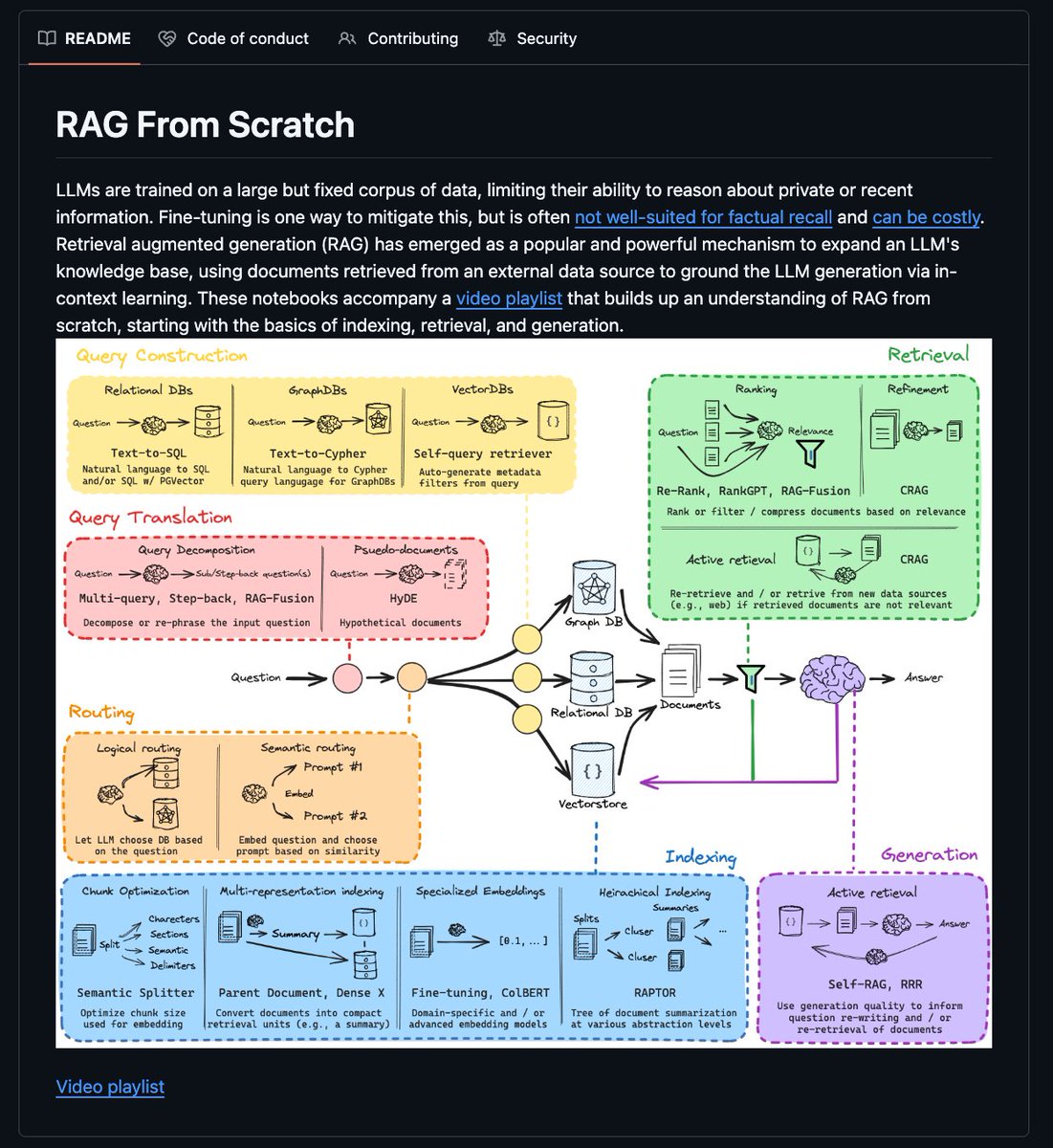
1. RAG from Scratch
GitHub: github.com/langchain-ai/r…
2. Al Social Media Agent
GitHub: github.com/langchain-ai/s…
3. Medical Image Analysis
GitHub: github.com/databricks-ind…
4. MCP Tool-Calling Agents
Notebook: docs.databricks.com/aws/en/noteboo…
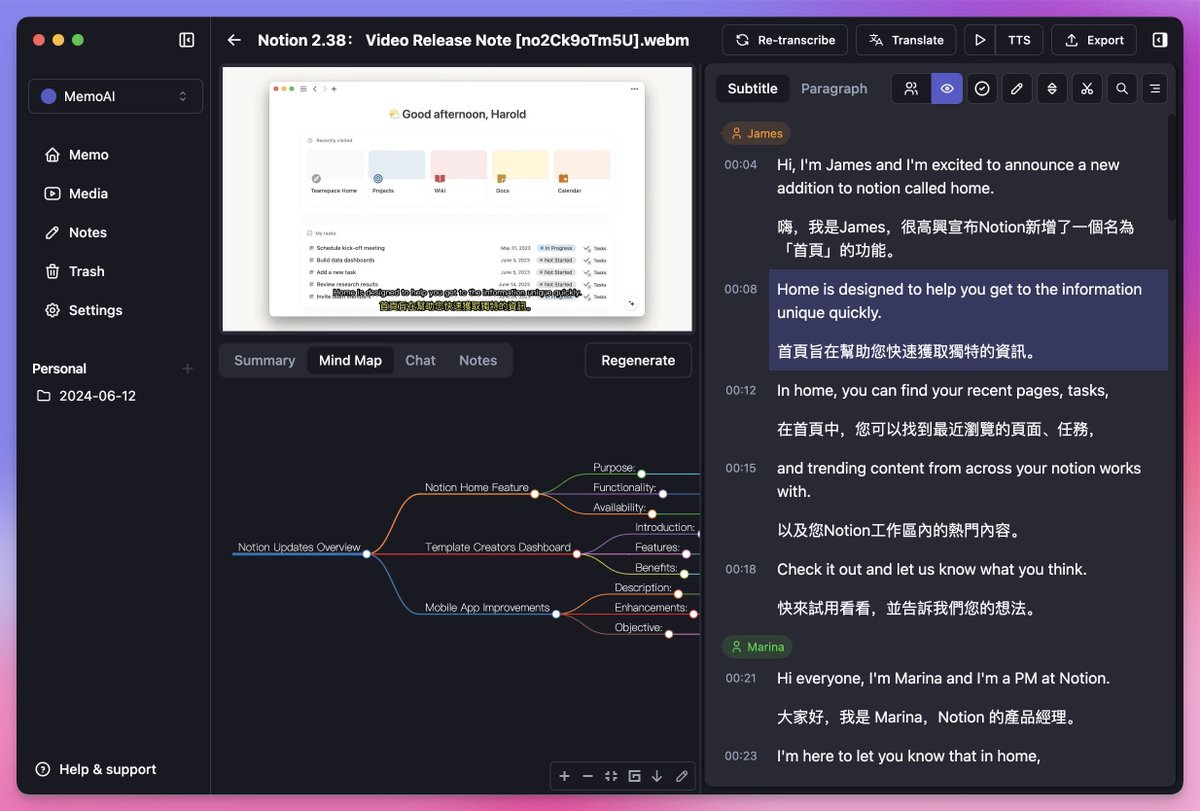
5. Al Assistant with Memory
GitHub: github.com/Makememo/MemoAI


English
Mike_BeastCode 🇸🇪 retweetledi

@Guygies Maybe Opus 4.5 good enough? I think we'll start to see a shift towards smaller and cheaper version of it for sub agents.
English

I can dig this. If the difference between Opus 4.5 and the next Opus release is even half of the difference between Opus 4.1 (or whatever) and 4.5 it will be in unexplored territory of greatness, considering where it is now.
And if it is 2x?
I lack the capacity to imagine it.
Nabeel S. Qureshi@nabeelqu
It’s dizzying to consider that in a mere *1 year* we went from o1-preview to Opus4.5/Claude Code, Gemini3, Codex etc. The “centaur chess” phase for computer-based work is fun and exhilarating, but at this rate of progress it’s not even clear it lasts through all of 2026.

English

@Mike_BeastCode @ishaansehgal Those were great times. What did you start with? I worked with a TRS-80 first then the Apple 2e, I think. And I actually had a mainframe teletype at my disposal for part of an afternoon in between. So much nerd!
My favorite language back then was Forth, that was a blast.
English