Ramón Andrés Sánchez Acosta

4.1K posts

Ramón Andrés Sánchez Acosta banner
Ramón Andrés Sánchez Acosta

Ramón Andrés Sánchez Acosta

@RaMonchi64

Con esperanzas de aprender algo mas sobre programación, inteligencia artificial, ciberseguridad y sobre todo por el bendito chisme


Katılım Nisan 2022
2.2K Takip Edilen225 Takipçiler
Python Daily
Python Daily@ThePythonDailyz·
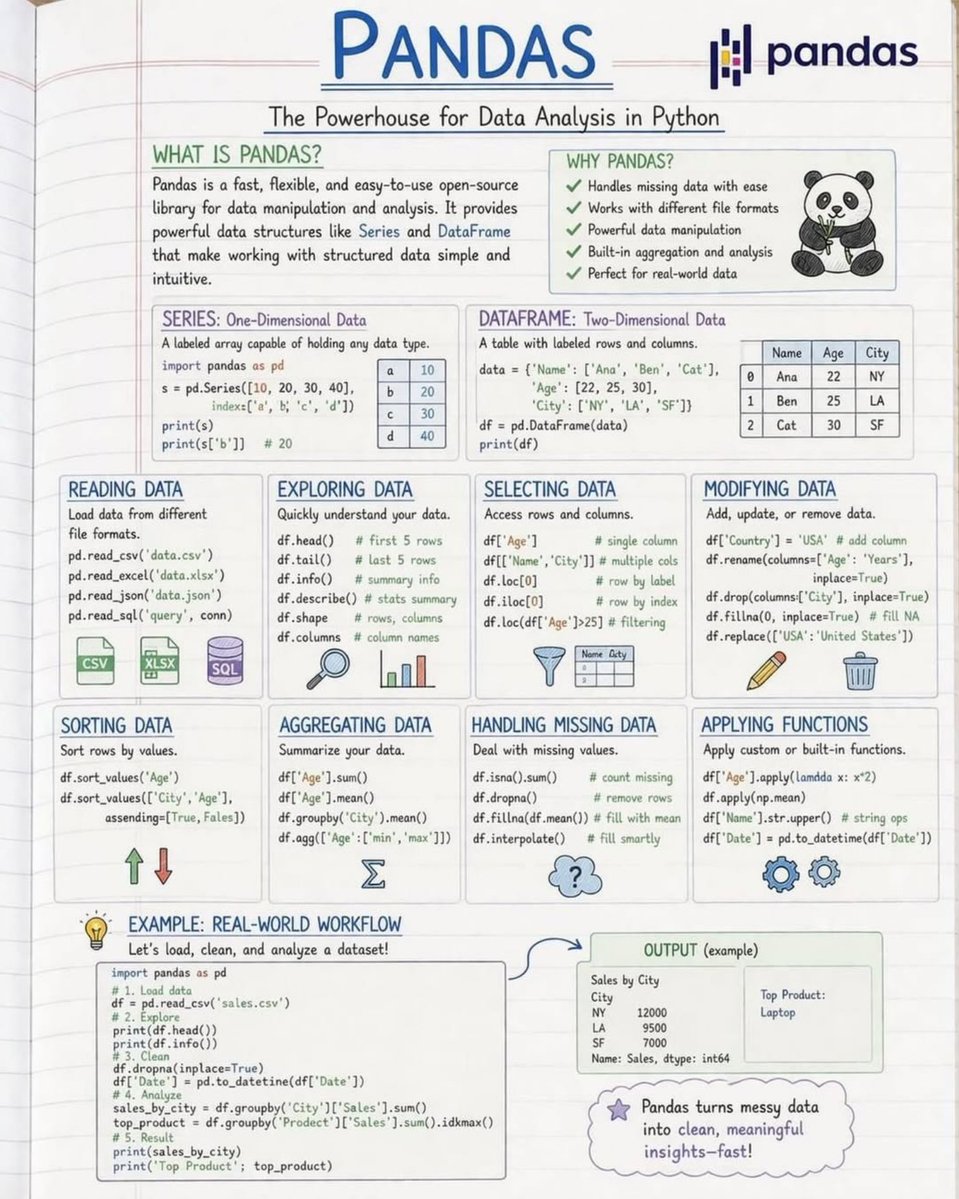
Master Pandas Basics in One Page 🚀
Python Daily tweet media
English
3
19
106
2.7K
Python Programming
Python Programming@PythonPr·
Python Dictionary Methods Every Developer Must Know
Python Programming tweet media
English
3
26
174
8.6K
Ramón Andrés Sánchez Acosta
@_axtone Bueno, un detalle sin importancia, por ejemplo tu belleza siempre está contigo, no la pierdes porque vivas cerca de la costa
Español
0
0
0
156
Dhanian 🗯️
Dhanian 🗯️@e_opore·
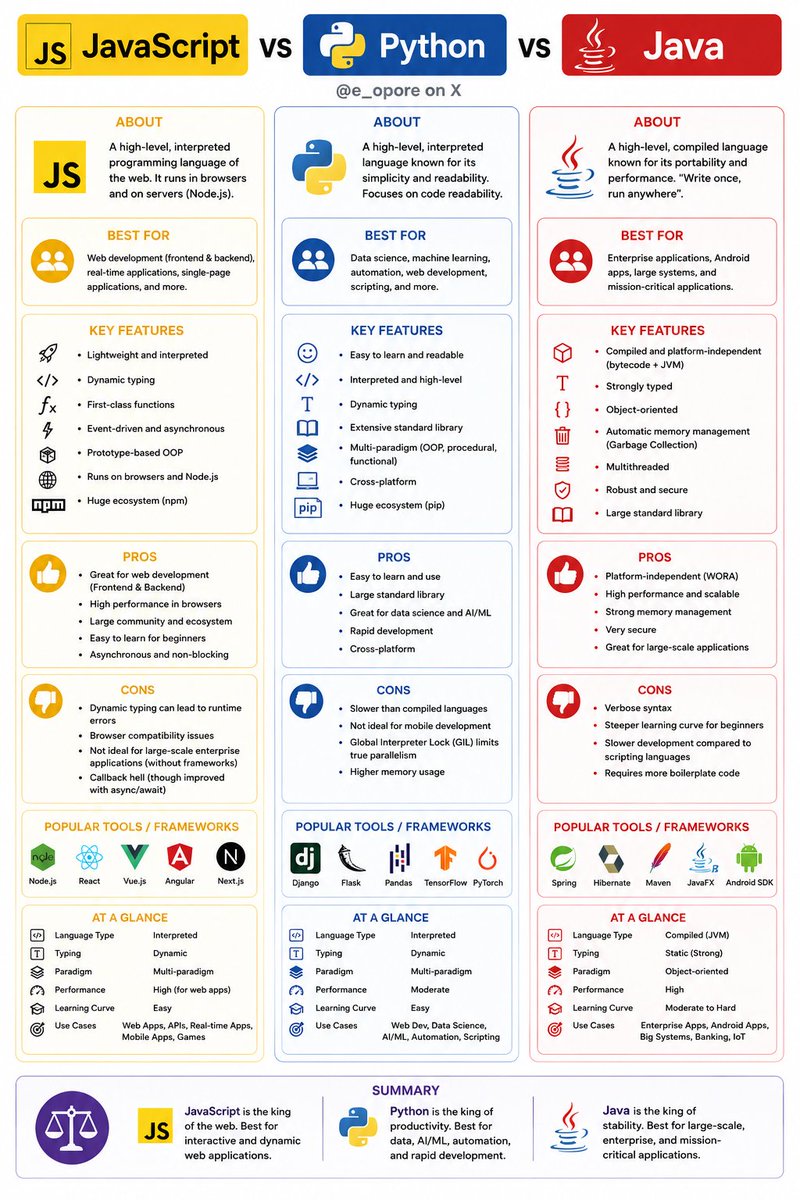
JavaScript vs Python vs Java
Dhanian 🗯️ tweet media
Français
5
19
90
3.3K
Dhairya
Dhairya@dkare1009·
Type of database 📘📚
Dhairya tweet media
English
2
3
44
937
PyzVibe
PyzVibe@PyzVibe·
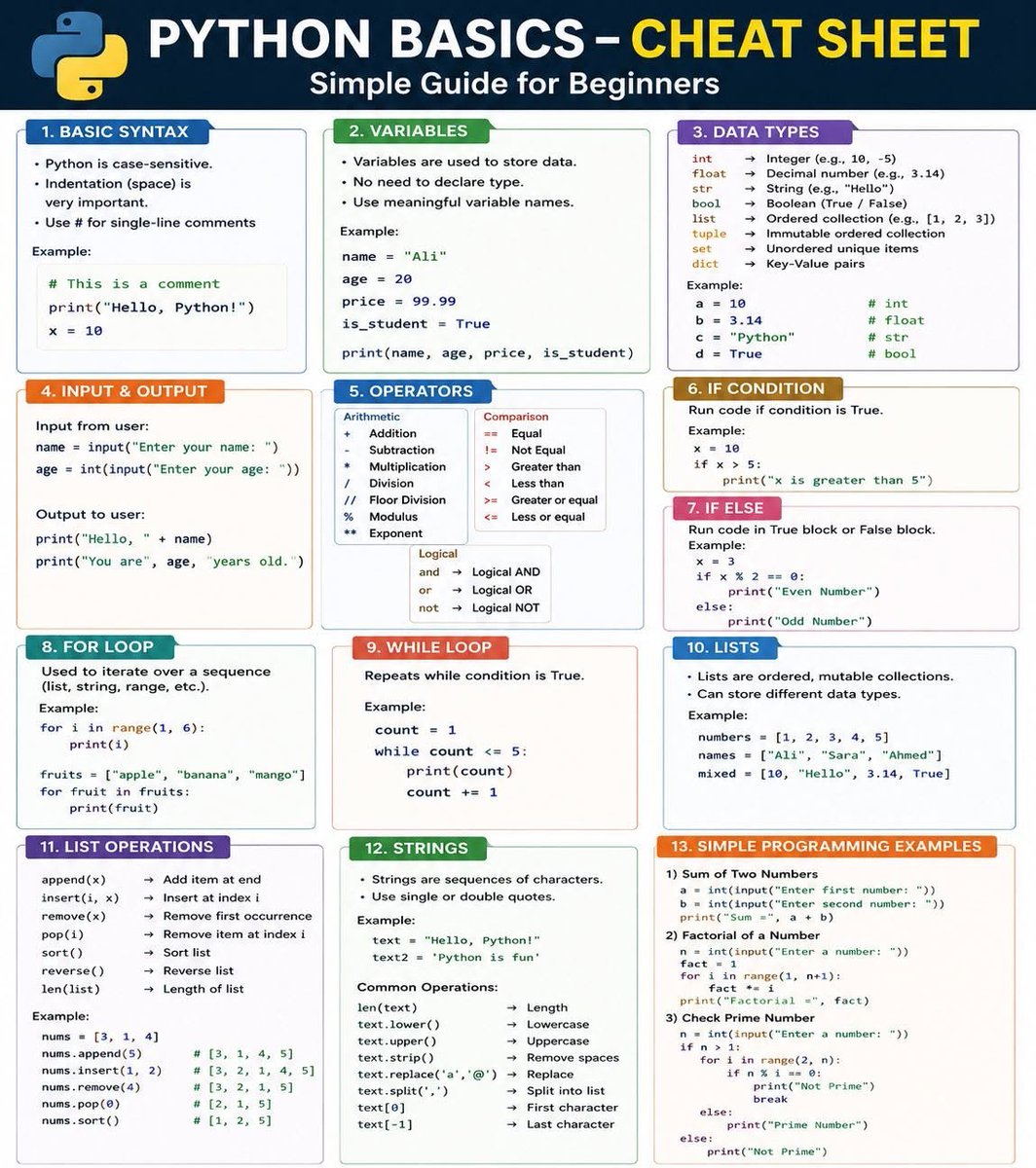
Python Cheat Sheet
PyzVibe tweet media
English
1
17
92
4.1K
Tech Fusionist
Tech Fusionist@techyoutbe·
Backend Engineering isn't just APIs. You need databases, caching, authentication, system design, DevOps, microservices, and scalability. Here's the complete roadmap. 👇
Tech Fusionist tweet media
English
9
35
142
9.5K
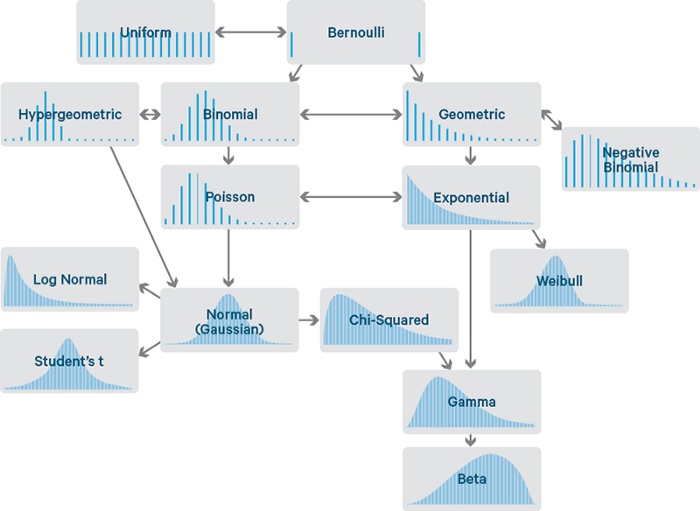
Matt Dancho (Business Science)
Understanding probability is essential in data science. In 4 minutes, I'll demolish your confusion. Let's go!
Matt Dancho (Business Science) tweet media
English
2
86
476
23.9K
Cyber_Racheal
Cyber_Racheal@CyberRacheal·
Which layer of the OSI model interacts directly with software applications, such as web browsers and email clients? A. Application Layer B. Session Layer C. Presentation Layer D. Network Layer
English
34
9
58
5K
𝐋𝐚𝐮𝐫𝐚
𝐋𝐚𝐮𝐫𝐚@phavlovah·
de verdad los hombres piensan que esto es suficiente para vivir bien ???
𝐋𝐚𝐮𝐫𝐚 tweet media
Español
1.8K
456
14.5K
4.8M
Dhanian 🗯️
Dhanian 🗯️@e_opore·
𝗗𝗮𝘆 𝟮𝟳/𝟲𝟬 𝗼𝗳 𝗦𝗤𝗟 𝗦𝗲𝗿𝗶𝗲𝘀 — 𝗦𝘂𝗯𝗾𝘂𝗲𝗿𝗶𝗲𝘀 𝗶𝗻 𝗦𝗘𝗟𝗘𝗖𝗧 𝗮𝗻𝗱 𝗙𝗥𝗢𝗠 – 𝗗𝗲𝗿𝗶𝘃𝗲𝗱 𝗧𝗮𝗯𝗹𝗲𝘀 Subqueries aren't limited to the WHERE clause. You can also use them in the SELECT list to calculate values and in the FROM clause to create temporary result sets known as derived tables. These techniques make complex SQL queries cleaner, more modular, and easier to maintain. Today’s lesson explores these advanced subquery patterns 👇 1️⃣ 𝗦𝘂𝗯𝗾𝘂𝗲𝗿𝗶𝗲𝘀 𝗶𝗻 𝘁𝗵𝗲 𝗦𝗘𝗟𝗘𝗖𝗧 𝗰𝗹𝗮𝘂𝘀𝗲 A subquery in the SELECT clause returns a value for each row produced by the outer query. Example: SELECT name, ( SELECT COUNT(*) FROM orders WHERE orders.customer_id = customers.customer_id ) AS total_orders FROM customers; This displays each customer alongside the number of orders they have placed. 2️⃣ 𝗦𝗘𝗟𝗘𝗖𝗧 𝘀𝘂𝗯𝗾𝘂𝗲𝗿𝗶𝗲𝘀 𝗰𝗮𝗻 𝗯𝗲 𝗰𝗼𝗿𝗿𝗲𝗹𝗮𝘁𝗲𝗱 The inner query can reference values from the current row of the outer query. This allows SQL to calculate row-specific values dynamically. 3️⃣ 𝗪𝗵𝗮𝘁 𝗶𝘀 𝗮 𝗗𝗲𝗿𝗶𝘃𝗲𝗱 𝗧𝗮𝗯𝗹𝗲? A derived table is a subquery placed inside the FROM clause. Its result behaves like a temporary table that can be queried further. 4️⃣ 𝗗𝗲𝗿𝗶𝘃𝗲𝗱 𝗧𝗮𝗯𝗹𝗲 𝗘𝘅𝗮𝗺𝗽𝗹𝗲 SELECT department, average_salary FROM ( SELECT department, AVG(salary) AS average_salary FROM employees GROUP BY department ) AS dept_stats; The outer query works with the aggregated results as though they came from a regular table. 5️⃣ 𝗗𝗲𝗿𝗶𝘃𝗲𝗱 𝗧𝗮𝗯𝗹𝗲𝘀 𝗺𝘂𝘀𝘁 𝗵𝗮𝘃𝗲 𝗮𝗻 𝗮𝗹𝗶𝗮𝘀 Every subquery in the FROM clause requires a table alias. Example: FROM ( ... ) AS dept_stats; Without an alias, most SQL databases will return an error. 6️⃣ 𝗪𝗵𝘆 𝘂𝘀𝗲 𝗗𝗲𝗿𝗶𝘃𝗲𝗱 𝗧𝗮𝗯𝗹𝗲𝘀? Derived tables help: • Simplify complex queries • Break large problems into smaller steps • Reuse calculated results • Improve query readability 7️⃣ 𝗖𝗼𝗺𝗯𝗶𝗻𝗶𝗻𝗴 𝗗𝗲𝗿𝗶𝘃𝗲𝗱 𝗧𝗮𝗯𝗹𝗲𝘀 𝘄𝗶𝘁𝗵 𝗝𝗢𝗜𝗡𝘀 Derived tables can be joined with other tables. Example: SELECT d.department, d.average_salary, m.manager_name FROM ( SELECT department, AVG(salary) AS average_salary FROM employees GROUP BY department ) AS d JOIN managers m ON d.department = m.department; 8️⃣ 𝗦𝗘𝗟𝗘𝗖𝗧 𝘀𝘂𝗯𝗾𝘂𝗲𝗿𝗶𝗲𝘀 𝘃𝘀. 𝗗𝗲𝗿𝗶𝘃𝗲𝗱 𝗧𝗮𝗯𝗹𝗲𝘀 SELECT subqueries return individual values. Derived tables return complete result sets that can be filtered, joined, and sorted. 9️⃣ 𝗪𝗵𝗲𝗻 𝘁𝗼 𝘂𝘀𝗲 𝘁𝗵𝗲𝗺 Common use cases include: • Customer order summaries • Department salary reports • Sales analytics • Ranking and reporting • Preparing intermediate datasets 🔟 𝗗𝗲𝗿𝗶𝘃𝗲𝗱 𝗧𝗮𝗯𝗹𝗲𝘀 𝗮𝗿𝗲 𝗮 𝘀𝘁𝗲𝗽 𝘁𝗼𝘄𝗮𝗿𝗱 𝗖𝗧𝗘𝘀 Understanding derived tables makes it much easier to learn Common Table Expressions (CTEs), which offer an even cleaner way to structure complex SQL queries. 💡 𝗞𝗲𝘆 𝘁𝗮𝗸𝗲𝗮𝘄𝗮𝘆: Subqueries can appear in the SELECT clause to calculate row-level values and in the FROM clause as derived tables. These techniques help organize complex queries into smaller, reusable components, making your SQL easier to read and maintain. Grab SQL Playbook: codewithdhanian.gumroad.com/l/hjmix Do you prefer using derived tables or Common Table Expressions (CTEs) when writing complex SQL queries?
Dhanian 🗯️ tweet media
Dhanian 🗯️@e_opore

𝗗𝗮𝘆 𝟮𝟲/𝟲𝟬 𝗼𝗳 𝗦𝗤𝗟 𝗦𝗲𝗿𝗶𝗲𝘀 — 𝗖𝗼𝗿𝗿𝗲𝗹𝗮𝘁𝗲𝗱 𝗦𝘂𝗯𝗾𝘂𝗲𝗿𝗶𝗲𝘀 𝘃𝘀. 𝗡𝗼𝗻-𝗖𝗼𝗿𝗿𝗲𝗹𝗮𝘁𝗲𝗱 𝗦𝘂𝗯𝗾𝘂𝗲𝗿𝗶𝗲𝘀 Not all subqueries work the same way. Some execute only once, while others execute repeatedly for every row processed by the outer query. Understanding the difference between correlated and non-correlated subqueries is essential for writing efficient SQL. Today’s lesson breaks down these two powerful techniques 👇 1️⃣ 𝗪𝗵𝗮𝘁 𝗶𝘀 𝗮 𝗡𝗼𝗻-𝗖𝗼𝗿𝗿𝗲𝗹𝗮𝘁𝗲𝗱 𝗦𝘂𝗯𝗾𝘂𝗲𝗿𝘆? A non-correlated subquery is independent of the outer query. It executes once, and its result is passed to the outer query. Example: SELECT name FROM employees WHERE salary > ( SELECT AVG(salary) FROM employees ); The average salary is calculated once before filtering employees. 2️⃣ 𝗛𝗼𝘄 𝗡𝗼𝗻-𝗖𝗼𝗿𝗿𝗲𝗹𝗮𝘁𝗲𝗱 𝗦𝘂𝗯𝗾𝘂𝗲𝗿𝗶𝗲𝘀 𝘄𝗼𝗿𝗸 Execution order: ✔ Run the inner query ✔ Return the result ✔ Execute the outer query using that result This makes them efficient when the inner result doesn't depend on each row. 3️⃣ 𝗪𝗵𝗮𝘁 𝗶𝘀 𝗮 𝗖𝗼𝗿𝗿𝗲𝗹𝗮𝘁𝗲𝗱 𝗦𝘂𝗯𝗾𝘂𝗲𝗿𝘆? A correlated subquery depends on values from the outer query. It executes once for every row processed by the outer query. 4️⃣ 𝗖𝗼𝗿𝗿𝗲𝗹𝗮𝘁𝗲𝗱 𝗦𝘂𝗯𝗾𝘂𝗲𝗿𝘆 𝗘𝘅𝗮𝗺𝗽𝗹𝗲 SELECT e.name, e.salary FROM employees e WHERE salary > ( SELECT AVG(salary) FROM employees WHERE department_id = e.department_id ); The subquery calculates the average salary for each employee's department. 5️⃣ 𝗖𝗼𝗿𝗿𝗲𝗹𝗮𝘁𝗲𝗱 𝗦𝘂𝗯𝗾𝘂𝗲𝗿𝗶𝗲𝘀 𝗿𝗲𝗳𝗲𝗿𝗲𝗻𝗰𝗲 𝗼𝘂𝘁𝗲𝗿 𝗰𝗼𝗹𝘂𝗺𝗻𝘀 Notice the condition: WHERE department_id = e.department_id The inner query uses a value from the current row of the outer query. 6️⃣ 𝗣𝗲𝗿𝗳𝗼𝗿𝗺𝗮𝗻𝗰𝗲 𝗱𝗶𝗳𝗳𝗲𝗿𝗲𝗻𝗰𝗲𝘀 Non-correlated subqueries generally perform better because they run once. Correlated subqueries may be slower since they execute repeatedly for each matching row. 7️⃣ 𝗪𝗵𝗲𝗻 𝘁𝗼 𝘂𝘀𝗲 𝗖𝗼𝗿𝗿𝗲𝗹𝗮𝘁𝗲𝗱 𝗦𝘂𝗯𝗾𝘂𝗲𝗿𝗶𝗲𝘀 They are useful when each row requires its own comparison. Examples include: • Employees above their department average • Customers with their latest order • Products above their category average price 8️⃣ 𝗖𝗼𝗿𝗿𝗲𝗹𝗮𝘁𝗲𝗱 𝗦𝘂𝗯𝗾𝘂𝗲𝗿𝗶𝗲𝘀 𝗮𝗻𝗱 𝗘𝗫𝗜𝗦𝗧𝗦 EXISTS is commonly used with correlated subqueries. Example: SELECT c.name FROM customers c WHERE EXISTS ( SELECT 1 FROM orders o WHERE o.customer_id = c.customer_id ); The subquery checks for matching orders for each customer. 9️⃣ 𝗖𝗼𝗻𝘀𝗶𝗱𝗲𝗿 𝗝𝗢𝗜𝗡𝘀 𝗮𝗻𝗱 𝗪𝗶𝗻𝗱𝗼𝘄 𝗙𝘂𝗻𝗰𝘁𝗶𝗼𝗻𝘀 Some correlated subqueries can be rewritten using JOINs or window functions for improved readability and performance. Choosing the right approach depends on the database engine and use case. 🔟 𝗠𝗮𝘀𝘁𝗲𝗿𝗶𝗻𝗴 𝗯𝗼𝘁𝗵 𝘁𝘆𝗽𝗲𝘀 𝗶𝘀 𝗶𝗺𝗽𝗼𝗿𝘁𝗮𝗻𝘁 Understanding when a subquery runs once versus once per row helps you write faster, cleaner, and more scalable SQL. 💡 𝗞𝗲𝘆 𝘁𝗮𝗸𝗲𝗮𝘄𝗮𝘆: A non-correlated subquery executes independently and runs only once. A correlated subquery depends on the outer query and executes once for each row. Knowing the difference helps you optimize performance and choose the best solution for complex SQL problems. Grab SQL Playbook: codewithdhanian.gumroad.com/l/hjmix Have you ever replaced a correlated subquery with a JOIN or window function for better performance?

English
3
5
53
4.5K
Dhanian 🗯️
Dhanian 🗯️@e_opore·
📂 SQL Roadmap (Mastering Relational Databases & Query Optimization) ┃ ┣ 📂 SQL Fundamentals ┃ ┣ 📂 What is SQL? ┃ ┣ 📂 Database Concepts ┃ ┣ 📂 RDBMS vs NoSQL ┃ ┣ 📂 Installing PostgreSQL / MySQL ┃ ┗ 📂 SQL Syntax Basics ┃ ┣ 📂 Database Design ┃ ┣ 📂 Tables, Rows & Columns ┃ ┣ 📂 Data Types ┃ ┣ 📂 Primary & Foreign Keys ┃ ┣ 📂 Constraints (NOT NULL, UNIQUE, CHECK) ┃ ┗ 📂 Normalization (1NF, 2NF, 3NF) ┃ ┣ 📂 CRUD Operations ┃ ┣ 📂 CREATE Statements ┃ ┣ 📂 INSERT Data ┃ ┣ 📂 SELECT Queries ┃ ┣ 📂 UPDATE Records ┃ ┗ 📂 DELETE Records ┃ ┣ 📂 Filtering & Sorting ┃ ┣ 📂 WHERE Clause ┃ ┣ 📂 ORDER BY ┃ ┣ 📂 LIMIT & OFFSET ┃ ┣ 📂 DISTINCT ┃ ┗ 📂 LIKE, IN & BETWEEN ┃ ┣ 📂 SQL Functions ┃ ┣ 📂 Aggregate Functions (COUNT, SUM, AVG) ┃ ┣ 📂 String Functions ┃ ┣ 📂 Date & Time Functions ┃ ┣ 📂 Mathematical Functions ┃ ┗ 📂 NULL Handling Functions ┃ ┣ 📂 Joins & Relationships ┃ ┣ 📂 INNER JOIN ┃ ┣ 📂 LEFT JOIN ┃ ┣ 📂 RIGHT JOIN ┃ ┣ 📂 FULL OUTER JOIN ┃ ┗ 📂 SELF JOIN ┃ ┣ 📂 Advanced SQL ┃ ┣ 📂 Subqueries ┃ ┣ 📂 Common Table Expressions (CTEs) ┃ ┣ 📂 Window Functions ┃ ┣ 📂 CASE Expressions ┃ ┗ 📂 UNION & UNION ALL ┃ ┣ 📂 Transactions & Optimization ┃ ┣ 📂 ACID Properties ┃ ┣ 📂 Transactions & Rollbacks ┃ ┣ 📂 Indexes ┃ ┣ 📂 Query Optimization ┃ ┗ 📂 Execution Plans ┃ ┣ 📂 Stored Logic ┃ ┣ 📂 Views ┃ ┣ 📂 Stored Procedures ┃ ┣ 📂 Functions ┃ ┣ 📂 Triggers ┃ ┗ 📂 Sequences ┃ ┣ 📂 SQL in Applications ┃ ┣ 📂 SQL with Node.js ┃ ┣ 📂 SQL with Python ┃ ┣ 📂 ORMs (Prisma, Sequelize, SQLAlchemy) ┃ ┣ 📂 SQL in REST APIs ┃ ┗ 📂 Database Migrations ┃ ┣ 📂 Cloud & Modern Databases ┃ ┣ 📂 PostgreSQL ┃ ┣ 📂 MySQL ┃ ┣ 📂 SQLite ┃ ┣ 📂 Managed Cloud Databases ┃ ┗ 📂 Database Backups & Replication ┃ ┣ 📂 Real-World Projects ┃ ┣ 📂 Student Management System ┃ ┣ 📂 E-commerce Database ┃ ┣ 📂 Banking Database ┃ ┣ 📂 Inventory Management System ┃ ┗ 📂 Analytics Dashboard Backend ┃ ┣ 📂 Practice & Growth ┃ ┣ 📂 SQL Coding Challenges ┃ ┣ 📂 Query Optimization Exercises ┃ ┣ 📂 Build Portfolio Projects ┃ ┣ 📂 Technical Documentation ┃ ┗ 📂 Interview Preparation ┃ ┗ 📂 Career & Monetization ┣ 📂 Backend Developer ┣ 📂 Database Administrator (DBA) ┣ 📂 Data Analyst ┣ 📂 Data Engineer ┗ 📂 Continuous Learning Follow this consistently for 2–4 months and you'll build strong SQL and database engineering skills that are valuable across backend, data, and cloud development. Grab the SQL Ebook: codewithdhanian.gumroad.com/l/hjmix
Dhanian 🗯️ tweet media
English
9
55
254
9.4K