Sabitlenmiş Tweet

This is the only post you'll need to start sourcing A2A (Amazon to Amazon) without spending money on any new tools.
A2A is the process of buying product from Amazon and turning around the reselling them for a higher price back on Amazon. I have spent almost $1,000,000 doing this and here is how you can start today.
We are going to leverage the Keepa Deals section. To find this area navigate to Keepa and click deals in the top toolbar.
You'll be presented with a number of filters, here is what each one does and how to use them to source some products.
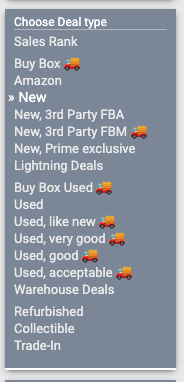
First we need to choose our deal type. This will change
how Keepa decides what type of price drops to show us. For instance if we choose "new" then Keepa will use the lowest "new" price on a listing as its determining factor. We can also focus on Buy Box price, or even just the price Amazon is selling the product for. I recommend starting with either Buy Box or New. (This is also how you can find some killer warehouse deals)
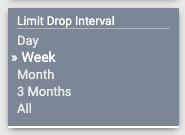
Next we need to choose over what time period we want Keepa to report on. This is going to take the average price over this drop interval and compare it to the current price to find the difference. You will get different results depending on what you choose here so play around to find what feels best for you.
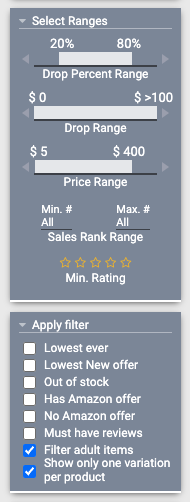
This is our most important filter set, so bear with me. The drop percent range is how we will filter what % drop the product must have (over our decided time period). So if we choose 60% and 1 week we will only see products that are currently 60% cheaper right now vs the average price they have been over the last week.
Drop range is how big or small the product price drop can be, I recommend setting the minimum to $5 and the maximum to the most it will go.
Price range is the current price point of the item. This will be up to you to decide how much you're willing to spend on a product.
Sales rank range is just that, what is the maximum sales rank you're willing to see.
The bonus filters are the bottom are important if you want to say only see the products at their all time low, products where Amazon is not in stock, or even if the product has reviews.
From here you'll click load and see:
Now you can look through the products shown and make some buying decisions!
Some notes: Keepa will not auto refresh so you will need to reload the page every now and then to see new products. You can get shadow banned if you refresh too often.
Products that fit your criteria and then sellout will disappear from your results, so if you don't see a ton based on your filters it doesn't necessarily mean they are a bad set, it could mean all the good items sold out already.
If you do see something good that is now sold out you should 100% add it to your keepa tracker to updates on the next restock.
I hope this helps! Shameless plug that if you want to learn more about A2A or get access to some cool tools to help make this even easier they are available in @thebuyboxio, however this method above will absolutely allow you to source and profit from A2A with a bit of effort.
Let me know if you have any questions in the comments and I am happy to help.

English