hann-solo

4.3K posts

hann-solo banner
hann-solo

hann-solo

@_hnsol

けんきう領域:3Dプリント(P1P,Gridfinity)キーボード(Atreus,Planck)テキストワーク(Emacs,Vim,LLM)世界の編み直し(Obsidian初期日本語化,待庵写茶室,珈琲焙煎,菌ちゃんウネ作り屋,布想)ゲーム文化(MinUI,plumOS,RGB30,Pyxel,Steam Deck)

Katılım Haziran 2023
218 Takip Edilen157 Takipçiler
Sabitlenmiş Tweet
hann-solo
hann-solo@_hnsol·
Obsidianって、始めるハードルが高いとおもったので、入門用のリンク集を作成しました。 知人に送るためにまとめたのですが、もったいないので記事にしました。 #Obsidianqiita.com/hann-solo/item…
日本語
1
37
169
18.7K
hann-solo retweetledi
kepano
kepano@kepano·
Flexoki 2.0 introduces 88 new colors that feel like watercolor pigments on paper. This is a continuation of my attempt to bring the feeling of analog color to digital emissive screens. Flexoki 1.0 only provided the a range of values for the grayscale colors. What I have been working to solve since then is how to expand the palette to a full range of values for every color, without desaturating the pigment effect. I'm very happy with how this turned out. Flexoki is open source under the MIT license, and already available for most text editors, terminals, and many other apps. Flexoki 2.0 makes it into a more capable color system for UIs and more complex projects.
kepano tweet media
English
62
165
3.1K
209.2K
hann-solo retweetledi
梶谷健人
梶谷健人@kajikent·
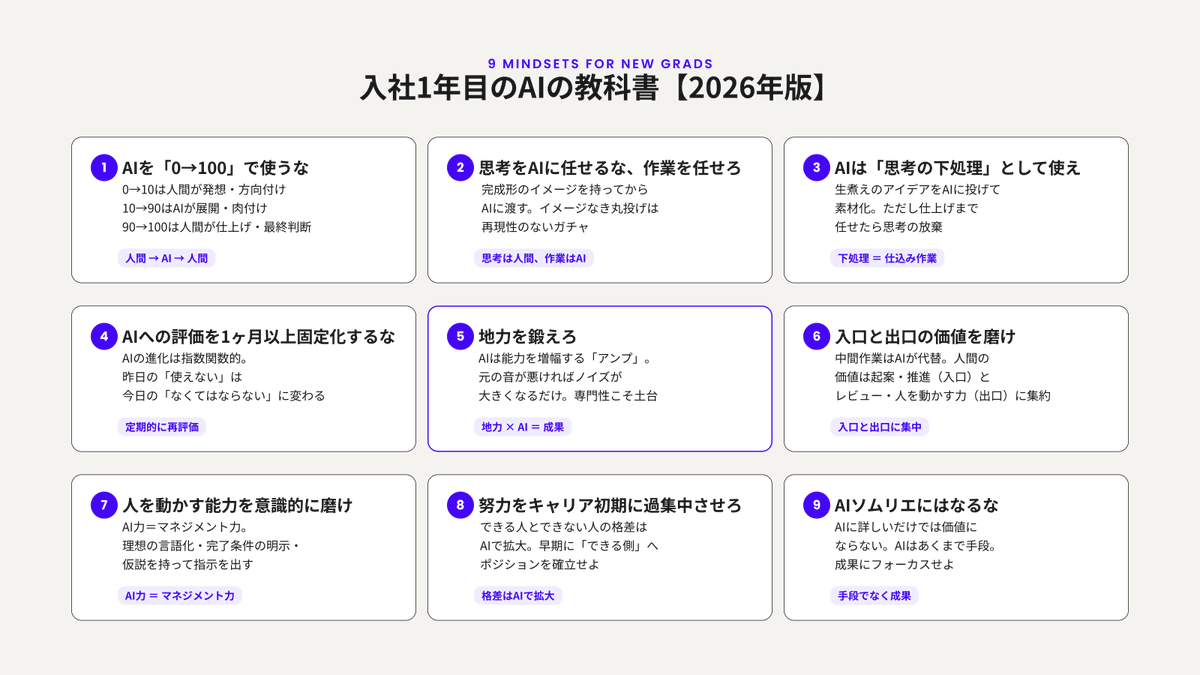
4月から入社した新卒の皆さんに向けて「入社1年目の生成AIの教科書」を無料で公開しました。 今や必須ツールとなったAI。その力を最大限引き出す上で一番大切な「9つのマインドセット」について解説しています。 新卒を部下に迎えたマネージャーの方も含めてぜひ。 note.com/kajiken0630/n/…
梶谷健人 tweet media
日本語
0
78
616
72.4K
hann-solo retweetledi
Kanika
Kanika@KanikaBK·
🚨 JUST IN: MICROSOFT just open sourced a VOICE AI THAT TRANSCRIBES 60 MINUTES OF AUDIO in a single pass. 100% FREE. It knows who spoke. It knows when they spoke. It knows exactly what they said. All in one shot. No chunking. No context loss. It's called VibeVoice. Not a transcription tool. Not a basic speech to text wrapper. A frontier voice AI family with ASR, TTS, and real time streaming. All open source. All free. Here's what it actually does 👇 VibeVoice ASR - Speech Recognition: → Processes 60 minutes of continuous audio in a single pass → Never slices audio into chunks so global context is never lost → Identifies WHO spoke, WHEN they spoke and WHAT they said simultaneously → Supports customized hotwords for domain specific accuracy → Works in 50+ languages natively → Already adopted by Hugging Face Transformers library → Already being built on by the open source community BY PEOPLE WHO HAD NO IDEA THIS LEVEL OF ACCURACY WAS ALREADY FREE. VibeVoice TTS - Text to Speech: → Generates up to 90 minutes of speech in a single pass → Supports up to 4 distinct speakers in one conversation → Natural turn taking and speaker consistency throughout → Expressive speech that captures emotional nuances → Supports English, Chinese and multiple other languages VibeVoice Realtime - Streaming TTS: → Only 300 millisecond first audible latency → Streams text input in real time → 0.5B parameters so it actually deploys anywhere → Robust long form generation up to 10 minutes → Lightweight enough for production use today The core innovation nobody is talking about: Most voice AI models slice long audio into short chunks. Every time they slice, they lose context. Speaker tracking breaks. Semantic coherence breaks. Accuracy drops. VibeVoice uses continuous speech tokenizers running at an ultra low frame rate of 7.5 Hz. This preserves audio fidelity while dramatically boosting computational efficiency. The entire 60 minutes stays in context. Nothing gets lost. Nobody gets misidentified. The numbers: → VibeVoice ASR 7B - available now on Hugging Face → VibeVoice Realtime 0.5B - try it on Colab right now → 50+ supported languages → 11 distinct English voice styles → 9 multilingual speaker voices → Already integrated into Hugging Face Transformers → Finetuning code now available The wildest part? A voice powered input method called Vibing just built itself on top of VibeVoice ASR. Available on macOS and Windows right now. The open source community is already shipping products on top of this. 100% Open Source. Free to use. Free to fine tune. Free to build on. 🔖 Save this before your competitors find it first. 👇
English
49
370
2.6K
214.8K
hann-solo retweetledi
(株)ケイブ
(株)ケイブ@cavegames·
開発中のSteam向け弾幕シューティング『新約・怒首領蜂大復活』の情報を公開しました。 ティザーサイトとSteamストアページを本日公開し、ウィッシュリストの登録も開始しておりますので是非ご確認ください! ▼ ティザーサイト cave.co.jp/gameonline/shi… #新約怒首領蜂大復活 #怒首領蜂 #ケイブ
【公式】新約・怒首領蜂大復活|Reignite@shinyaku_cave

幾度も挑み、幾度も散る。 それでも立ち上がる。 『新約・怒首領蜂大復活』公式X、始動。 Steamストアページ、ティザーサイト公開&ウィッシュリスト受付中。 NOT DEAD YET. THE BATTLE CONTINUES. #新約怒首領蜂大復活 #怒首領蜂 #Steam


日本語
22
1K
1.5K
128.9K
hann-solo
hann-solo@_hnsol·
"2Dシューティングは...まだ伸びしろがあると信じています" そうだそうだ! (個人的には一度クリアしちゃうと満足して、リプレイ欲が弱くて悩んでる)
びっくりソフトウェア@BikkuriSoftware

「ゲーム人生の中で「何を楽しく思ったか?」「何が不愉快だったか?」という経験に対する答え・思想を集約した」横スクロールSTG『Revolgear Zero』【開発者インタビュー】 gamespark.jp/article/2026/0… リボルギア・ゼロの思想が詰まっているぞ これが『非常に好評』を得られる秘訣だ!(多分ね)

日本語
0
0
0
67
hann-solo retweetledi
⚡Game*Spark⚡
⚡Game*Spark⚡@gamespark·
「ゲーム人生の中で「何を楽しく思ったか?」「何が不愉快だったか?」という経験に対する答え・思想を集約した」横スクロールSTG『Revolgear Zero』【開発者インタビュー】 gamespark.jp/article/2026/0… 実は、2P側をAIに任せてプレイ可能な1人マルチモードも存在。
⚡Game*Spark⚡ tweet media⚡Game*Spark⚡ tweet media⚡Game*Spark⚡ tweet media
日本語
0
87
205
26.5K
hann-solo retweetledi
電ファミニコゲーマー
電ファミニコゲーマー@denfaminicogame·
『新約・怒首領蜂大復活』のSteamストアページが公開。ケイブの弾幕シューティング『怒首領蜂大復活』をリファインシリーズとして再起動 news.denfaminicogamer.jp/news/2604082m かつての熱いシステムはそのままに、追加ステージ・新キャラクター・新BGMにくわえ、アシスト機能を始めとする追加機能を搭載
電ファミニコゲーマー tweet media電ファミニコゲーマー tweet media電ファミニコゲーマー tweet media電ファミニコゲーマー tweet media
日本語
7
912
1.5K
205.7K
hann-solo retweetledi
How To AI
How To AI@HowToAI_·
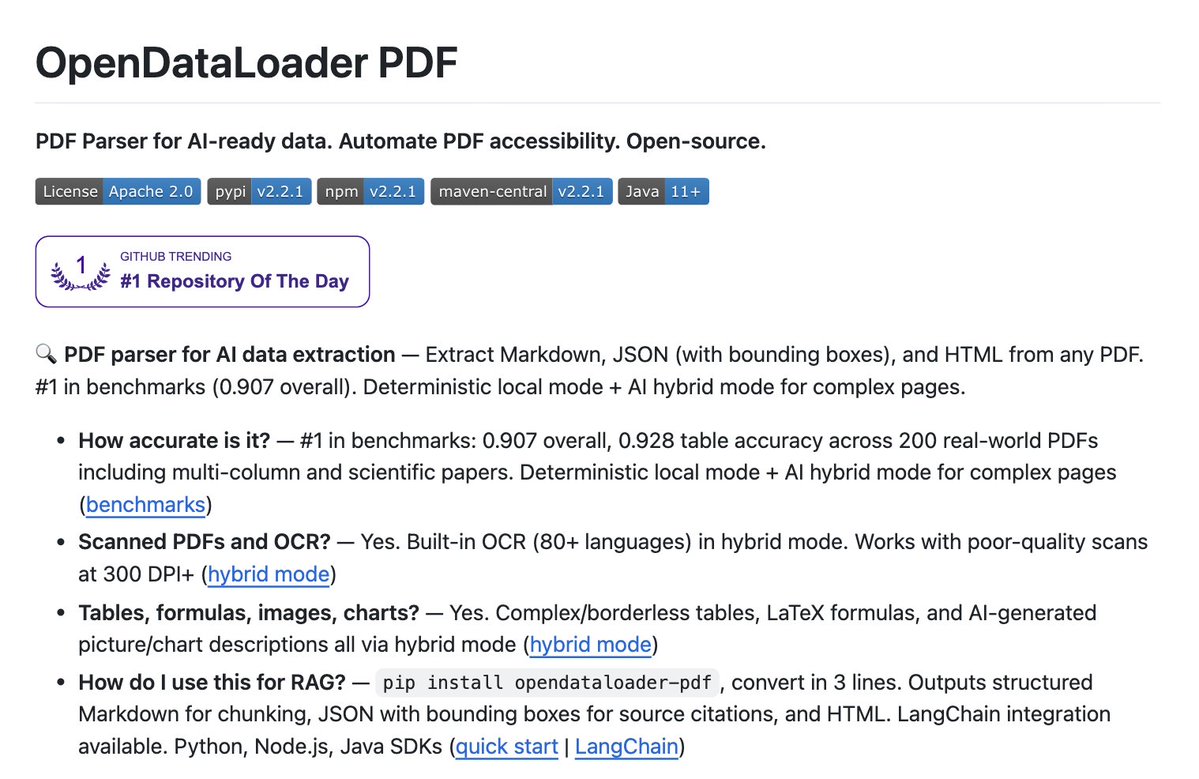
🚨 Someone just open-sourced a tool that converts pdfs to markdown at 100 pages per second. It's called OpenDataLoader. It runs entirely on CPU and handles complex layouts, tables, and nested structures like a senior dev 100% Free.
How To AI tweet media
English
40
350
2.6K
174.9K
hann-solo retweetledi
CR1337
CR1337@CR1337·
When Andres Freund, Linux kernel contributor & Microsoft engineer was debugging slow SSH logins on his Debian machine in March 2024, he noticed something weird: liblzma (part of XZ Utils) was using way too much CPU power, so he kept digging, and what he uncovered was a multi-year supply-chain attack! An attacker using the name “Jia Tan” had spent two years slowly infiltrating the tiny XZ Utils project, a compression library used by virtually every major Linux distribution. The backdoor wasn’t in the source code. It was hidden deep inside the build scripts. It would have given the attacker remote root access on millions of servers the moment a specially crafted SSH key was used. Freund caught it days before it would have shipped in Debian, Fedora, Ubuntu and more. One man, one anomaly, one routine debug session saved the internet from a potential catastrophe. Respect!
CR1337 tweet media
English
189
2.3K
17.4K
498.9K
hann-solo retweetledi
むらさん(Murasan)
むらさん(Murasan)@murasametech·
「ラズパイでサーバー動かしてる」と言うと、必ず聞かれることがあります🤔 よく聞かれる質問TOP5(と、実際の答え): ① 「それ、何に使うの?」 → ファイル共有、写真バックアップ、PDF編集、ダッシュボード…日常の便利ツールが全部動きます。 ② 「電気代すごくない?」 → 3台24時間稼働で月500円ほど。電球1個分です。 ③ 「壊れたらデータ消えるんじゃ…」 → 自動バックアップ設定済み。壊れたら新しいSDに書き戻すだけ。 ④ 「難しくないの?」 → Docker使えばコマンド1行でサービスが動きます。一番難しいのは「何を動かすか選ぶこと」。 ⑤ 「普通にクラウド使えばよくない?」 → データが全部手元にある安心感は、使ってみないとわかりません。 この5つで「へぇ、面白そう」と言ってもらえること多いです。 皆さんは「ラズパイ何に使ってるの?」と聞かれたら、何と答えていますか? #RaspberryPi #自宅サーバー
むらさん(Murasan) tweet media
日本語
71
487
4.7K
539.6K
hann-solo
hann-solo@_hnsol·
やっぱりそうなんだ!
kepano@kepano

I like @karpathy's Obsidian setup as a way to mitigate contamination risks. Keep your personal vault clean and create a messy vault for your agents. I prefer my personal Obsidian vault to be high signal:noise, and for all the content to have known origins. Keeping a separation between your personally-created artifacts and agent-created artifacts prevents contaminating your primary vault with ideas you can't source. If you let the two mix too much it will likely make Obsidian harder to use as a representation of *your* thoughts. Search, bases, quick switcher, backlinks, graph, etc, will no longer be scoped to your knowledge. Only once your agent-facing workflow produces useful artifacts would I bring those into the primary vault.

日本語
0
0
0
41
hann-solo retweetledi
kepano
kepano@kepano·
I like @karpathy's Obsidian setup as a way to mitigate contamination risks. Keep your personal vault clean and create a messy vault for your agents. I prefer my personal Obsidian vault to be high signal:noise, and for all the content to have known origins. Keeping a separation between your personally-created artifacts and agent-created artifacts prevents contaminating your primary vault with ideas you can't source. If you let the two mix too much it will likely make Obsidian harder to use as a representation of *your* thoughts. Search, bases, quick switcher, backlinks, graph, etc, will no longer be scoped to your knowledge. Only once your agent-facing workflow produces useful artifacts would I bring those into the primary vault.
Andrej Karpathy@karpathy

LLM Knowledge Bases Something I'm finding very useful recently: using LLMs to build personal knowledge bases for various topics of research interest. In this way, a large fraction of my recent token throughput is going less into manipulating code, and more into manipulating knowledge (stored as markdown and images). The latest LLMs are quite good at it. So: Data ingest: I index source documents (articles, papers, repos, datasets, images, etc.) into a raw/ directory, then I use an LLM to incrementally "compile" a wiki, which is just a collection of .md files in a directory structure. The wiki includes summaries of all the data in raw/, backlinks, and then it categorizes data into concepts, writes articles for them, and links them all. To convert web articles into .md files I like to use the Obsidian Web Clipper extension, and then I also use a hotkey to download all the related images to local so that my LLM can easily reference them. IDE: I use Obsidian as the IDE "frontend" where I can view the raw data, the the compiled wiki, and the derived visualizations. Important to note that the LLM writes and maintains all of the data of the wiki, I rarely touch it directly. I've played with a few Obsidian plugins to render and view data in other ways (e.g. Marp for slides). Q&A: Where things get interesting is that once your wiki is big enough (e.g. mine on some recent research is ~100 articles and ~400K words), you can ask your LLM agent all kinds of complex questions against the wiki, and it will go off, research the answers, etc. I thought I had to reach for fancy RAG, but the LLM has been pretty good about auto-maintaining index files and brief summaries of all the documents and it reads all the important related data fairly easily at this ~small scale. Output: Instead of getting answers in text/terminal, I like to have it render markdown files for me, or slide shows (Marp format), or matplotlib images, all of which I then view again in Obsidian. You can imagine many other visual output formats depending on the query. Often, I end up "filing" the outputs back into the wiki to enhance it for further queries. So my own explorations and queries always "add up" in the knowledge base. Linting: I've run some LLM "health checks" over the wiki to e.g. find inconsistent data, impute missing data (with web searchers), find interesting connections for new article candidates, etc., to incrementally clean up the wiki and enhance its overall data integrity. The LLMs are quite good at suggesting further questions to ask and look into. Extra tools: I find myself developing additional tools to process the data, e.g. I vibe coded a small and naive search engine over the wiki, which I both use directly (in a web ui), but more often I want to hand it off to an LLM via CLI as a tool for larger queries. Further explorations: As the repo grows, the natural desire is to also think about synthetic data generation + finetuning to have your LLM "know" the data in its weights instead of just context windows. TLDR: raw data from a given number of sources is collected, then compiled by an LLM into a .md wiki, then operated on by various CLIs by the LLM to do Q&A and to incrementally enhance the wiki, and all of it viewable in Obsidian. You rarely ever write or edit the wiki manually, it's the domain of the LLM. I think there is room here for an incredible new product instead of a hacky collection of scripts.

English
82
163
2.9K
454.4K
hann-solo retweetledi
kepano
kepano@kepano·
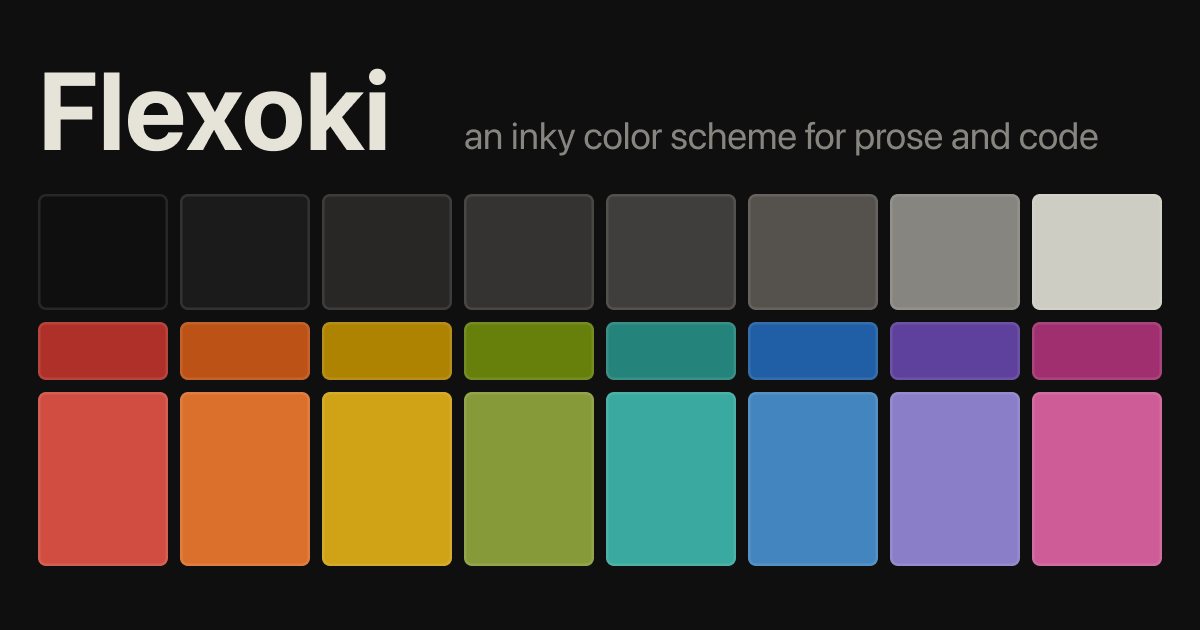
Flexoki is an inky color scheme for prose and code that I created for my personal site. It's now open source. Flexoki is designed for reading and writing on digital screens. It is inspired by analog printing inks and warm shades of paper. The name Flexoki comes from flexography — a common printing process for paper and cardboard. I spent many years working with dyes and inks particularly for my companies Inkodye and Lumi. I also have a fascination with digital paper. I wanted to bring the comfort of analog color to emissive digital screens. One challenge is that ink on paper is a subtractive process whereas LCD and OLED screens use additive color. Replicating the effect of mixing pigments digitally is difficult. Mixing blue and yellow paint creates green, whereas digital color mixing results in a brownish hue. Watercolors retain their saturation when you dilute them, whereas reducing the opacity of digital colors makes them look desaturated. Another challenge with digital color is human perception across color spaces. Ethan Schoonover’s color scheme Solarized (2011) was an important inspiration for Flexoki. His emphasis on CIELAB lightness relationships helped me understand how to find colors that appear cohesive. I found that choosing colors with perfect perceptual consistency can be at odds with the distinctiveness of colors in practical applications like syntax highlighting. If you adhere too closely to evenness in perceptual lightness you can end up with a palette that looks washed out and difficult to parse. Solving for all of these problems is how I arrived at Flexoki. I wish it could have been more science than art, but it wasn’t. Some day, I hope to arrive at a more reliable way to generate digital color palettes that respect the constraints I laid out. In the meantime, I hope you find this iteration of Flexoki useful.
kepano tweet media
English
47
271
4K
1M