

Byte86
6.9K posts

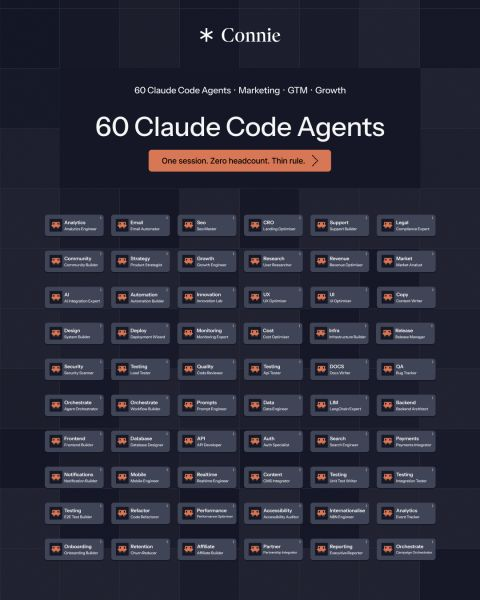
Claude Agents are a revenue machine.
You can use it to replace your entire outbound, marketing, product, RevOps, and customer success operation from one Claude Code session.
Like + reply 'AGENTS' and I'll send you my complete 60-agent B2B SaaS directory 100% FREE.
Must be following me to get the guide in DM.
FREE for the next 48 hrs only.
English

HERMES AGENT SUPPORTS 7 TYPES OF AI AGENTS.
EACH ONE TAKES LESS THAN 90 SECONDS TO SET UP.
MOST PEOPLE ONLY BUILD THE FIRST ONE.
HERE ARE ALL SEVEN AND WHEN TO USE EACH.
1. BASIC AGENT WITH TOOLS
your agent with access to terminal, browser,
file system, web search, and calendar.
it plans and executes tasks on its own.
this is what you get on day one.
"find flights to Lisbon under $400"
"check my calendar and flag conflicts"
"search the web for competitor pricing"
set in Desktop app / Dashboard: Tools → enable what you need.
when to use: single tasks that need tool access.
2. AGENT WITH MCP SERVERS
connect your agent to external services.
Notion, Google Drive, GitHub, Slack,
databases, APIs, any MCP-compatible service.
the agent doesn't scrape these services.
it interacts through structured APIs.
reads your Notion pages. creates GitHub issues.
queries your database. sends Slack messages.
set in Desktop app / Dashboard: MCP → Add Server.
when to use: your workflow lives across multiple platforms.
3. SEQUENTIAL AGENTS (pipeline)
one agent finishes. passes output to the next.
assembly line for AI.
agent 1: scans inbox for leads.
agent 2: qualifies leads against criteria.
agent 3: drafts outreach emails.
in Hermes: cron jobs with wakeAgent gates.
agent 1 writes output to a file.
agent 2 wakes only when that file has new data.
agent 3 wakes when agent 2 is done.
each agent = a separate profile with its own model.
when to use: multi-step workflows where each step
depends on the previous one finishing.
4. PARALLEL EXECUTION AGENTS
multiple agents working at the same time.
results merge when all finish.
"research these 5 competitors in parallel"
in Hermes: delegate_task with batch mode.
up to 3 sub-agents running in parallel by default.
each gets its own clean context.
only summaries return to the parent.
delegation:
model: "deepseek/deepseek-v4"
children run cheap. parent synthesizes.
when to use: independent tasks that don't depend
on each other. research, data gathering, analysis.
5. AGENTS WITH ROUTERS
conditions that send tasks down different paths
based on the input.
"if sales email → SDR profile.
if support ticket → support profile.
if calendar invite → EA profile."
in Hermes: Kanban decompose.
the decomposer reads profile descriptions
and routes each task to the best-fit agent.
or: Chief of Staff profile that triages
and assigns to other profiles.
when to use: incoming work that needs different
specialists based on type.
6. HUMAN IN THE LOOP
the agent does the work.
asks for your approval before executing.
"I drafted this email. approve before I send?"
"this command will delete 3 files. proceed?"
in Hermes: approvals.mode: manual (default).
every dangerous action needs your confirmation.
60-second timeout. fails closed.
or smart mode: LLM assesses risk.
safe actions auto-approved.
dangerous ones ask you.
uncertain ones escalate.
when to use: tasks where a mistake has
real consequences. emails, deployments,
financial transactions, public posts.
7. DYNAMIC SUB-AGENT SPAWNING
your main agent realizes it needs help
and spawns specialized sub-agents on the fly.
"build this feature" → parent delegates:
→ sub-agent 1: research the API docs
→ sub-agent 2: write the code
→ sub-agent 3: write the tests
in Hermes: delegate_task with role: orchestrator.
raise max_spawn_depth for nested delegation.
delegation:
max_spawn_depth: 2
orchestrator_enabled: true
depth 2 with concurrency 3 = up to 9 parallel workers.
each level multiplies the spend.
raise depth only when you need multi-level trees.
when to use: complex tasks where the agent
discovers what help it needs during execution.
THE PROGRESSION:
start with 1 (tools) and 6 (approvals).
add 2 (MCP) when you need external services.
add 4 (parallel) when tasks take too long one at a time.
add 3 (sequential) when you build multi-step pipelines.
add 5 (routing) when you run multiple profiles.
add 7 (dynamic) when single-agent reasoning falls short.
seven types. each under 90 seconds to configure.
the value compounds as you stack them.
comment AGENTS and I'll send you
3 ready-to-build agent setups
that combine these types into real workflows.
YanXbt@IBuzovskyi
English

Everyone’s talking about AI loops.
But most people are still just using AI for one-off tasks.
A real AI loop has 7 parts:
1) State
Know what’s happening right now. You need a clear picture of your current reality before the loop starts.
2) Target
Define exactly where you’re trying to go. The goal needs to be specific and measurable.
3) Observe
Measure the gap between your current state and your target.
4) Action
Change one thing at a time so you can actually understand what caused the result.
5) Eval
Measure whether the action worked. Did it move you closer to the target or not?
6) Trace
Record what happened so the system can learn from previous actions and improve over time.
7) Stop Rule
Define when the loop stops, when it keeps going, and when it needs human approval.
Miss one of these and you don’t really have a loop.
The bigger idea is that AI shouldn’t just complete a task once.
It should: Observe → Act → Evaluate → Learn → Repeat.
That’s how AI starts compounding instead of waiting for the next prompt.
Want to start building AI loops that make your business more money?
Like and comment “LOOPS” and I’ll send you the Loops Creator skill + repo template 100% FREE.
Must be following me to get the DM now.
FREE for the next 48 hours only!!

English

BYE BYE six-figure content teams
Here's mine running on Fable 5 (50 free agents)
50 agents. 150 prompts. 30 plug-and-play skills.
The exact stack running inside our scaling method right now.
Inside:
- Market Research (10 agents)
- Competitor Research (10 agents)
- Customer Research (10 agents)
- Marketing Strategy (10 agents)
- Creative Strategy (10 agents)
PLUS 30 Fable 5 skills and 150 done-for-you prompts.
Every agent solves one specific marketing problem. From sizing your market to writing the hook that stops the scroll.
You still make every call. Fable 5 does the research, the analysis and the first draft behind each one.
You don't need us to use any of it. Steal the system.
Want the full ai powered ecom scaling playbook?
1. Like this post
2. Comment "FABLE"
And I'll send it straight to your DMs.
PS. Repost for priority access.

Surfside, FL 🇺🇸 English
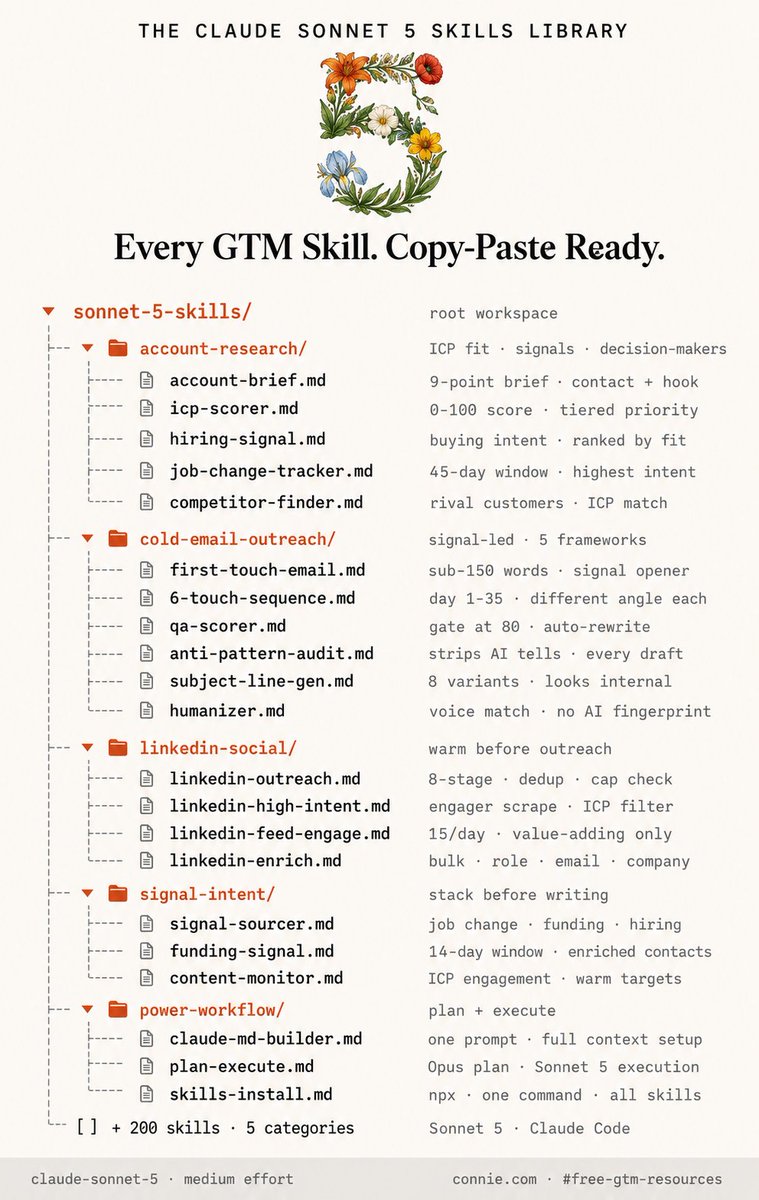
Sonnet 5 is here.
But you don't need a Max subscription to run a complete outbound stack on Claude.
Sonnet 5 at medium effort on a standard plan is enough for 80% of GTM execution work.
I've compiled every GTM skill, copy-paste ready, into one free library.
These are the exact account research, cold email, LinkedIn outreach, signal sourcing, and QA scoring skills I use to run outbound without rebuilding prompts from scratch every session.
Like this post + comment "SONNET" and I'll DM it to you for free.
Deleting this in 24 hours.
English

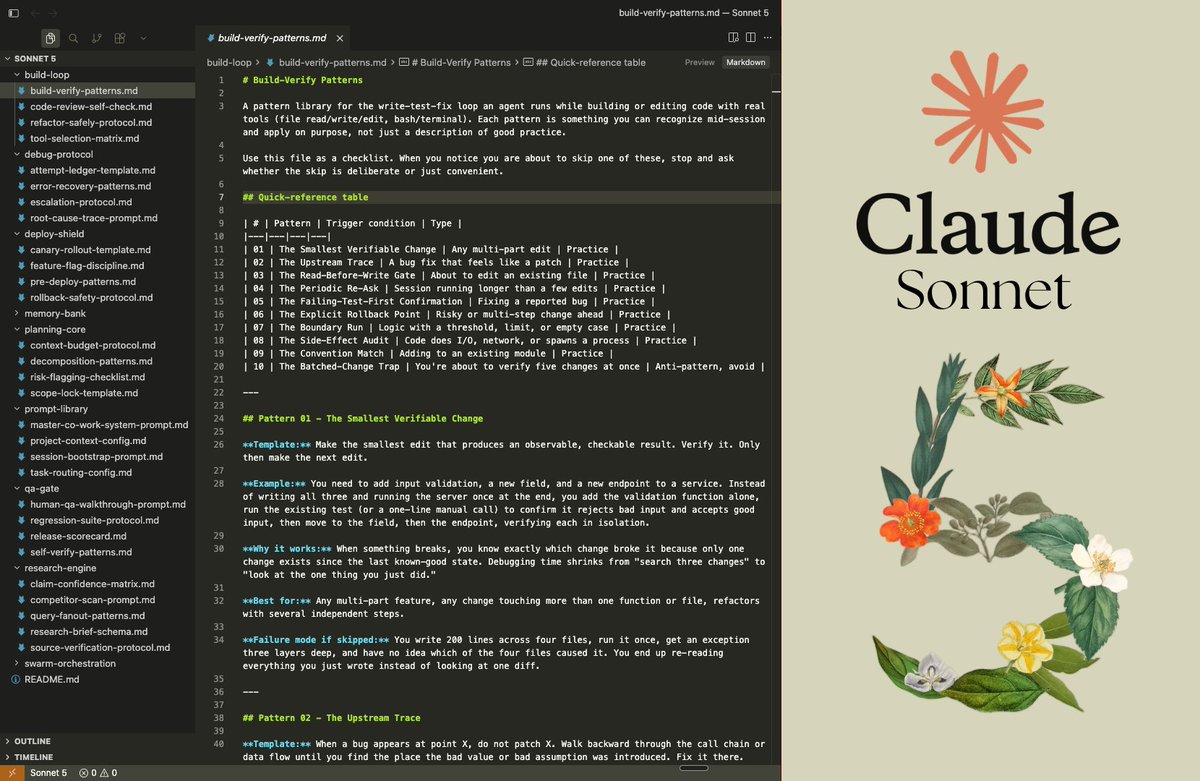
🚨 Sonnet 5 just replaced your $150K/year developer.
What used to take a senior dev a 2-week sprint now ships before your morning coffee.
→ No more 2-week sprints for features that should ship in hours
→ No more $150K/year salary sitting on a single bottleneck
→ No more sessions that forget everything and restart cold
→ No more broken code shipping because no one actually ran it
Just 67 agents. 9 folders. 38 files. Drop into Cursor or Claude Code.
Here's how it works:
→ Prompt Library (15+ routing rules. Every request lands in the right folder.)
→ Research Engine (5-tier confidence rubric. Verified beats plausible.)
→ Planning Core (scope locked before a single tool opens.)
→ Build Loop (proven by running the code, not reading it back.)
→ Debug Protocol (5-whys trace. No fix gets tried twice.)
→ QA Gate (8-dimension scorecard. Ship, fix, or rebuild on the spot.)
→ Memory Bank (session memory on disk. Never starts cold.)
→ Swarm Orchestration (independent tasks run in parallel, not in line.)
→ Deploy Shield (rollback tested, not just designed.)
Same output. Half the token cost of Opus 4.8.
67 agents carrying Fortune 500 and hedge fund work.
$150K/month operation. Zero dev team.
Results:
- $150K/year developer replaced completely
- 50% token cost reduction vs Opus 4.8
- 67 agents running simultaneously, zero dev overhead
Your developer costs $150K a year. This costs a comment.
Like + comment "VAULT" + repost, and I'll DM it to you.
(must be following)
English
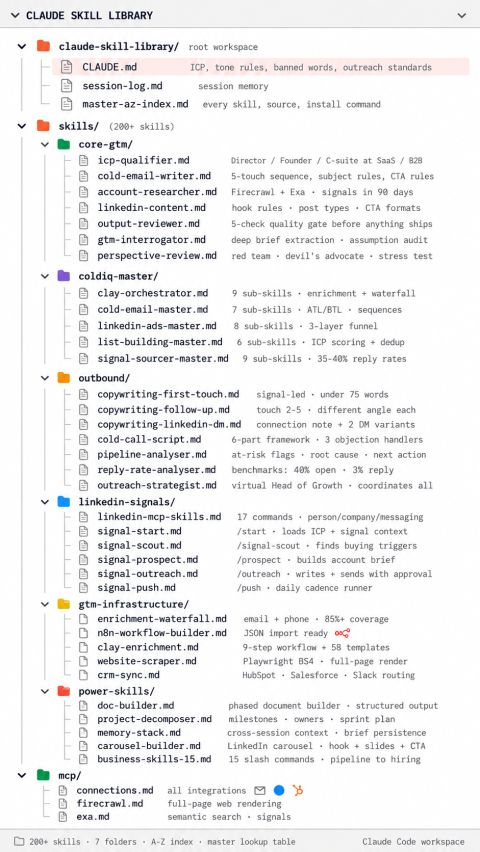
I debated keeping this to myself, but screw it...
With the Complete Claude Skills Library, anyone can replace hours of manual outbound, pipeline management, and client reporting with a single session setup.
If you start now, you can have all 215 skills installed, your CLAUDE.md built, and your first agentic workflow running by end of this week.
So I put together every SKILL.md file across all 8 groups, written out in full and copy-paste ready. GTM operations, outreach, agents, SDR, business, Claude Code installs, plugin skills, and LinkedIn carousels. Nothing abbreviated. Nothing left for you to figure out.
Like this + Comment "SKILLS" & I'll DM the guide to you
Must Follow
English
BREAKING: Anthropic released Skills for Claude.
Most GTM teams will use them like fancy prompts.
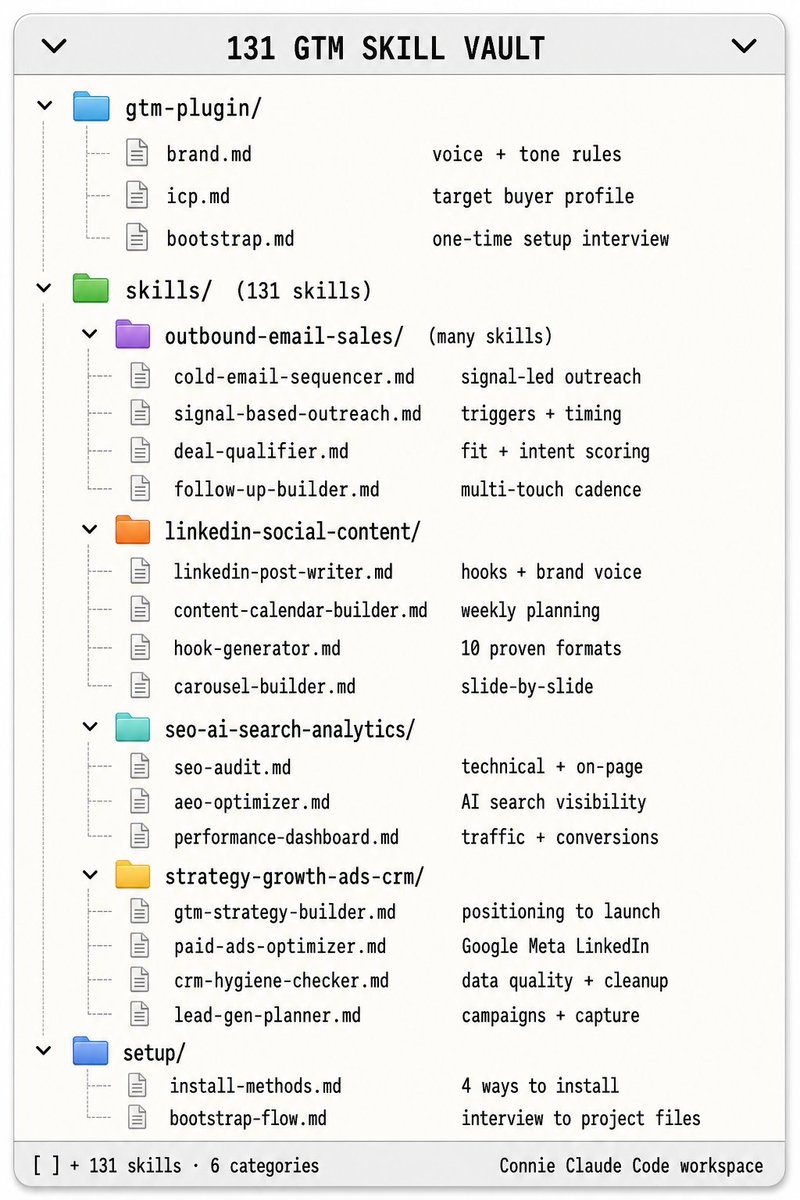
We built them into an operating system that runs outbound, content, and growth for an entire GTM function.
Here's the difference:
A prompt is something you retype every week. A skill is a module Claude already knows. You call it by name, point it at a task, and it runs.
Built on Opus 4.8, so it handles the longer, multi-step work a real GTM motion actually needs.
Here's what's in the system right now:
Outbound, Email & Sales modules:
→ cold-email-sequencer, signal-based-outreach, deal-qualifier
LinkedIn, Social & Content modules:
→ linkedin-post-writer, content-calendar-builder, hook-generator
SEO, AI Search & Analytics modules:
→ seo-audit, aeo-optimizer, performance-dashboard
Strategy, Growth, Ads & CRM modules:
→ gtm-strategy-builder, paid-ads-optimizer, crm-hygiene-checker
And here's what makes it a system, not a folder of prompts:
We call one module, point it at the task, and it runs. Reads the data, does the job, returns the fix.
No retyping the prompt. No re-explaining the brand. No copy-paste from twenty docs. The same brand voice, the same ICP, the same standards, every single time.
The shift nobody has priced in yet:
A prompt works once. A skill works every time, the same way, forever.
That is the line between using Claude and building with it.
Want the full GTM operating system, all 131 skills plus how to wire it? It's free:
Comment "GTM" below
Add me
Like this post
Then it will auto send. (Make sure you are following)
English
R.I.P. switching tabs every time your GTM team needs an answer from Claude.
A properly configured Claude Tag setup turns Slack into a multiplayer AI teammate your entire team delegates to.
It is not as easy as just adding a bot to your workspace and hoping it figures out the context.
But if you start today, you can have Claude wired into your Slack channels, connected to 9,000+ tools via Zapier MCP, and running async tasks unsupervised by end of this week.
I usually charge $99 for access to this guide but today, it's free.
Like this post + comment 'TAG' and I'll DM you the full guide for free.
The guide covers three things.
How to set up Claude Tag in Slack in under 10 minutes, connect it to your live tool data, and give it channel scope so it only acts where you tell it to.
How to run multiplayer mode so one Claude instance serves your entire GTM team across channels without anyone re-explaining context twice.
How to delegate async work to Claude - the GTM use cases by channel type, the ambient alert setup that flags issues before you're tagged, and the copy-paste prompts to run this week.
(Must be following, or I can't message.)
Taking this down in 48 hours.

English
Claude is INSANE for getting more out of Claude Code.
I've documented 6 slash commands that make every session faster, cheaper, and less likely to waste work.
Type / in any Claude Code session and dozens of built-in commands appear immediately. Most engineers ignore them. These 6 are the ones worth using every session.
Inside the guide:
- /clear: wipes the context window between tasks so Claude stops dragging old sequence work into your account research. Run it every time you switch from one task to a completely different one. Faster, cheaper, cleaner.
- /btw: add context while Claude is mid-task without stopping it. Running account research across 20 companies and you remember two are already in your CRM? Use /btw to pass that in. Claude notes it and continues without restarting.
- /statusline: customise the status bar to show model name, context window percentage used, estimated real cost, and how many agents are active in parallel. Set it once per project. No more hitting limits mid-task blind.
- /plan: Claude researches the task and returns a plan before building anything. You review and approve. Then it builds. No more finishing a 5-touch sequence and realising it assumed the wrong persona.
- /rewind and /resume: /rewind rolls back to a checkpoint inside your current session when Claude goes in the wrong direction. /resume brings back a conversation you cleared or closed hours ago. Different commands for different situations.
- /goal: you define the task and exactly what done looks like. Claude works until it meets the condition. A second evaluator agent checks the output before marking it complete. Set 20 account briefs as the goal, walk away, come back to verified output.
Want a copy? Like + Comment "COMMANDS" and I'll send it over ASAP
(Must be following)

English

After building 250+ apps and scaling a full AI agency, I turned everything into a system where agents do the work and humans just review.
I'm giving away the full playbook.
This is the exact infrastructure we use to send client proposals, draft emails, and run routines without a human touching the keyboard.
What's inside:
- Brain folder architecture (brain, brand, clients, SOPs, decisions)
- README .md routing prompt that saves hours every week
- Skill chain template (website, copy, QA)
- Global "skill that creates skills" prompt
- Proposal skill chain example end to end
- Routines and cron templates for self-maintaining context
- Tracing log template so your agent learns from every run
Comment "NATIVE" and follow. I'll DM it to you.

English
Deleting this in 48 hours.
I'm finally giving away the exact 5 Claude skills I use to run my entire GTM system without rebuilding context every session.
These are not prompts. They are full SKILL.md files you drop into Claude Code once and they load automatically forever.
Skill 1: The GTM Interrogator. Forces Claude to interview you before writing anything. Kills generic output at the source.
Skill 2: The Perspective Review. Runs your deliverable through 3 stakeholder lenses before it ships. CFO, client, board. Under 10 minutes.
Skill 3: The Phased Document Builder. Brief, research, outline, full draft. Each phase validated before the next begins. The output reads like a team produced it.
Skill 4: The Project Decomposer. Feed Claude any GTM project. It sequences every task, flags every dependency, identifies what can run in parallel. 90 seconds.
Skill 5: The Memory Stack. One interview builds your full CLAUDE.md. Every session after that starts with Claude already knowing your ICP, your voice, your clients, and your tools.
Comment "Skills" and I'll DM you all 5 SKILL.md files for FREE.
You must be following me to receive the DM.
For next 48 hours only.

English
Fable 5 just changed GTM.
All you need is:
A laptop
A Claude Max subscription
60 minutes to set this up once
That's enough to run a complete outbound system using Fable 5.
No coding. No expensive tools. No years of GTM experience.
Most people still use Claude for one-off prompts...
But the GTM engineers pulling pipeline are quietly using Fable 5 to:
- Research any account in 2 minutes flat
- Write reviewed sequences without touching a keyboard
- Run pipeline health checks while they sleep
- Quality-gate every output automatically
- Build a GTM system that gets smarter every week
Usually, I sell this detailed skill bank for $97...
But today you can get it FREE.
Inside you'll discover:
40+ GTM skills with every install command copy-paste ready
5 master skill orchestrators that route any GTM task automatically
7 outbound agents that chain from company list to reviewed sequence
The exact CLAUDE.md block that connects every skill in one place
How to chain skills so one brief triggers research, copy, and quality review in sequence
Want it?
Like this post
Comment "Agents"
Follow me to receive it in DM
Available FREE for 48 hours only.

English

Hermes agent has been the single best remedy to my ADHD. I created a random thoughts vault in Obsidian and now whenever the flood of a million invasive thoughts come I just add them to this folder via speech to text.
I then created a markdown called life priorities that explain to Hermes exactly what’s important for me by order of priority personally and professionally. I’ve instructed Hermes to review the Obsidian vault multiple times a day and map to calendar, email, projects in progress, etc and then cross reference the priorities and deliver to me a few things.
1. A cron that acts on all of this context to deliver a beginning of day and end of day (prep for tomorrow) newsletter
2. An agent that also uses this context to send me texts throughout the day as relevant things I may need to consider (this has taken a ton of tweaking but better now)
What I want to build next? A listener, coach
A tool that has access to my screen 24/7 and is watching what I am doing and delivering proactive insights via voice/audio as I’m working
English
Claude just DESTROYED the old way of writing positioning, ads, and sales copy from scratch.
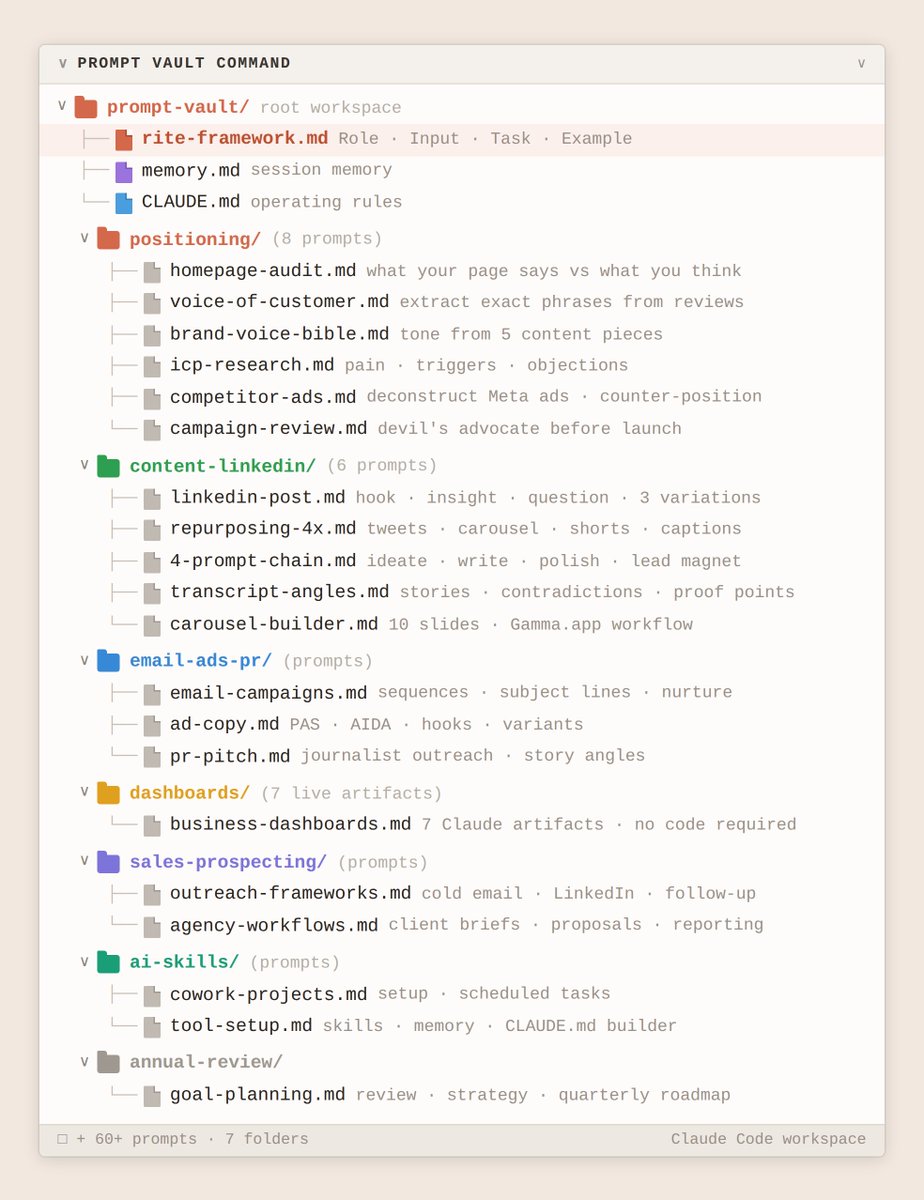
I put together my AI Prompt Vault.
With 60+ fully written prompts across every business function, it is BY FAR the best tool for going from blank page to publish-ready output without re-explaining what you need every time.
I speak to founders, marketers, and agency owners every week. Every single one is writing the same brief over and over, getting generic output, and spending hours editing AI copy that does not match their brand or buyer.
These prompts fix that.
I use these to go from a blank page to live copy, live dashboards, and a full content plan in one session:
- Homepage Copy Audit Prompt (Claude identifies your customer from your page before any visitor does)
- Voice of Customer Mining Prompt (paste reviews, extract exact phrases for ads and landing pages)
- LinkedIn Engagement Machine Prompt (4-prompt chain: ideation, writing, polish filter, lead magnet)
- ICP Research Document Prompt (full customer profile with pain points, triggers, and objections)
- Devil's Advocate Campaign Review Prompt (Claude plays a cynical critic before anything goes live)
- Live Business Dashboard Prompt (7 interactive artifacts built and refreshed in Claude, no code)
- Competitor Ad Deconstruction Prompt (paste Meta library screenshots, get emotional triggers and counter-positioning)
- Bonus: The RITE prompt framework that makes every future prompt 3x more effective
Want access?
→ Comment "VAULT"
→ Follow me and I'll DM you the vault
English
Claude For Small Business is INSANE.
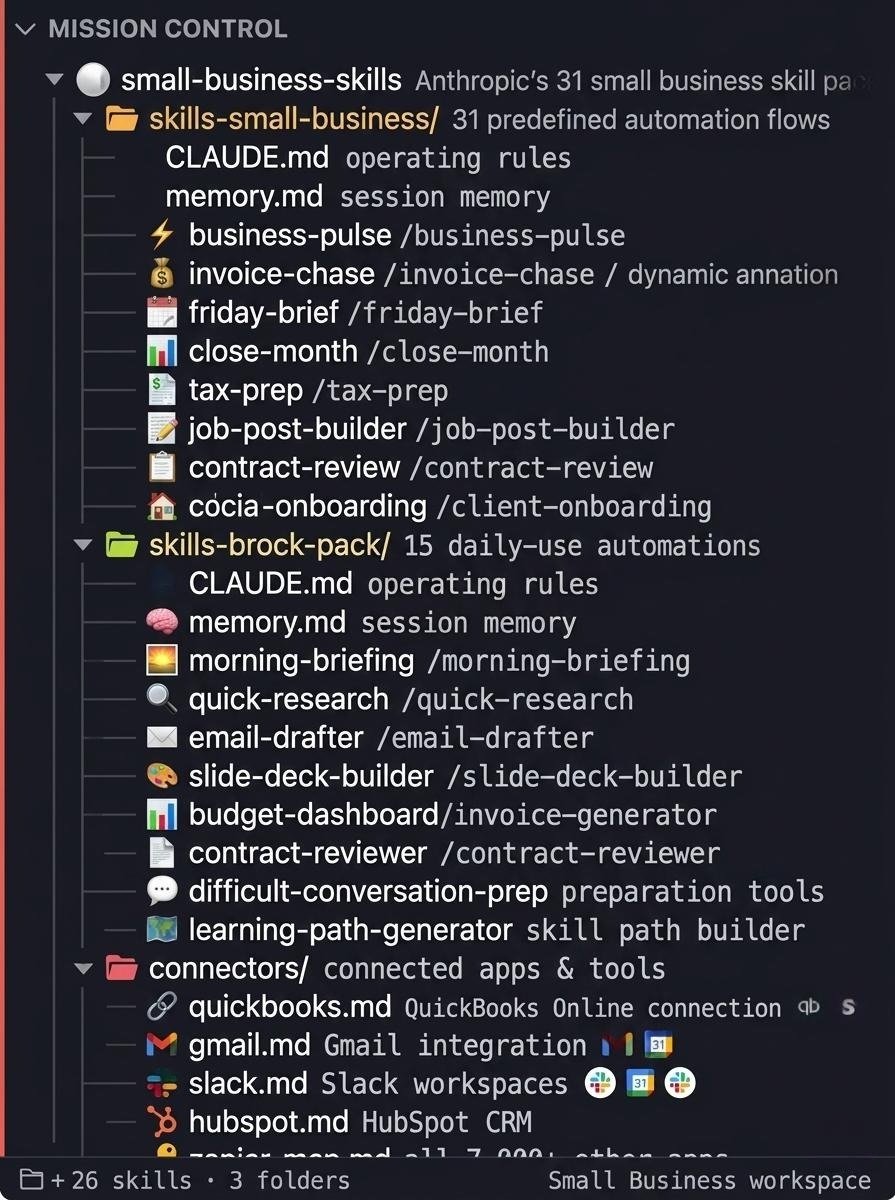
I've built a complete breakdown of all 31 Anthropic Small Business skills that maps every workflow, connector, and automation in under 10 minutes.
The same skill stack that had 382,000 downloads on its first day.
Financial operations, sales and client work, HR and hiring, marketing and growth, reporting and dashboards.
Inside the breakdown:
- All 31 skills organised by function with the 5 to run first
- The 12 connector setup guide in priority order with permission settings for every sensitive action
- Worked examples for Business Pulse, Invoice Chase, and Job Post Builder with real output shown
Want a copy? Like + Comment "31" and I'll send it over ASAP
(Must be following)
English

Claude is used by 11 million people every day.
I've created a guide with the 100 real skills that separate the pros from the amateurs:
→ Writing, Automation, Business, Productivity, Programming, AI and Prompting, E-commerce, Finance, and Research
FREE for 24 hours only!
Just:
1. → Like this post
2. → Comment "SKILLS"
3. → Follow me to receive a DM.
English

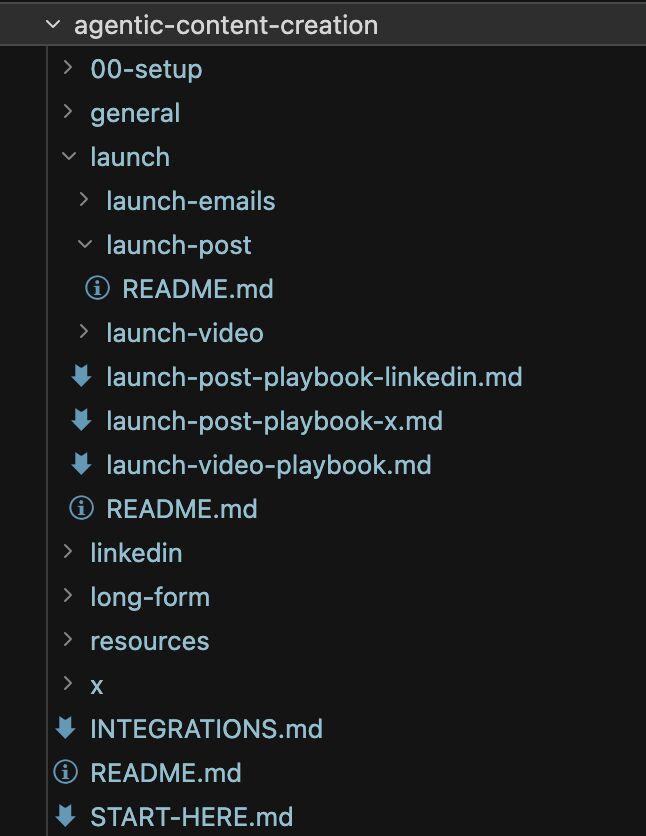
spent like 20hrs making a massive zip file of skills and agents for content creation
linkedin, X, longform, launch videos, etc all a prompt away. I used it to write our next launch script.
lmk if you want to try it and ill send it over.
English

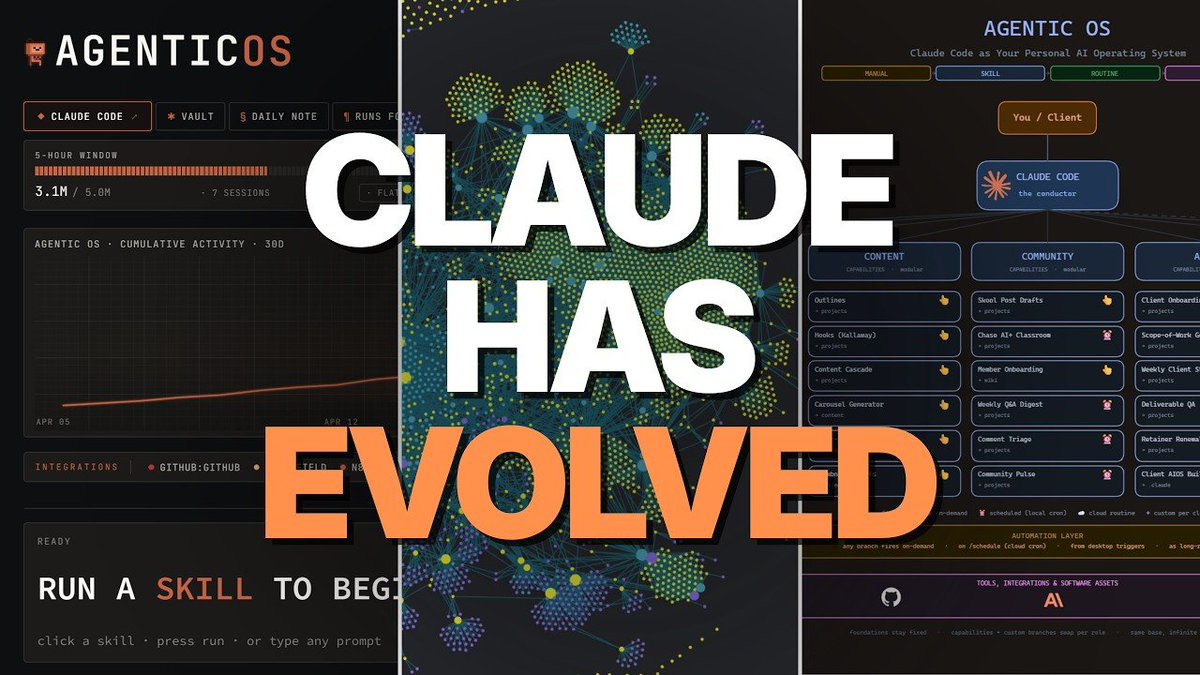
I just built a Claude Code agentic OS that runs your entire GTM operation from a single terminal session every week.
Feed it your CLAUDE.md context, your skill library, and your GTM workflow brief → it studies your business rules, your tool stack, and your recurring tasks → orchestrates agents across lead generation, content, outreach, and reporting while you review outputs and approve actions.
All inside Claude Code.
Perfect for GTM engineers and founders who are still triggering the same Claude sessions manually every week, running one task at a time when parallel agents should be handling the whole stack simultaneously, and rebuilding context from scratch every session because nothing is encoded into a permanent operating system.
If you're running GTM in 2026, you already know the math - the teams producing the most aren't the ones prompting harder, they're the ones with an agentic OS where every task knows the business context, every agent knows its job, and every output lands in the right place automatically. Most teams trigger five manual sessions a week if they're lucky.
This stack solves it:
→ CLAUDE.md encodes your entire GTM operating context - ICP, voice, tool stack, hard rules, and workflow logic - so every agent in every session starts with full business context already loaded
→ Skill library built once and triggered by slash commands so lead scoring, outreach writing, content generation, and client reporting run the same way every time without re-explaining the process
→ Sub-agents handle heavy parallel tasks independently - each gets a clean context window, does the work, and returns a clean summary to the main session without bloating the parent context
→ MCP connections give agents direct access to your CRM, inbox, calendar, and outreach tools so tasks execute against live data not manually pasted exports
→ Hooks trigger automatically before and after tool use - Slack pings when parallel sessions finish, writes blocked to sensitive files, quality gates before anything goes live
→ Modal deployment turns any skill into a live URL so your entire team can trigger GTM workflows from a form without opening a terminal
No triggering the same sessions manually every week. No losing context halfway through a long session and watching outputs degrade. No rebuilding the same workflow from scratch every time you start a new project.
What you get:
- CLAUDE.md template: the exact structure that encodes your GTM context, ICP, voice, tool stack, and hard rules so every session starts already knowing your business
- Skill library starter pack: lead scoring, outreach sequence writing, content generation, and client reporting skills each triggered by a slash command
- Sub-agent configuration: three cases where sub-agents earn their cost and the exact setup for parallel research, QA, and variant exploration
- MCP integration guide: CRM, inbox, and outreach tool connections with token cost checks so you only keep what earns its weight
- Modal deployment setup: any skill as a live URL in under two minutes with a form interface your whole team can trigger
Built 100% in Claude Code with MCP integrations and Modal deployment.
I put together a full playbook with the CLAUDE.md template, the skill library, the sub-agent configuration, and the Modal deployment setup to get your full GTM agentic OS running from one terminal session.
Want it for free?
> Like this post
> Comment "OS"
And I'll send it over (must be following so I can DM)
English

Hermes + Claude + Higgsfield MCP + ViralBuilder = 💰💰💰
Four tools. One prompt chain. Hook to finished video in 10 minutes.
I built a Claude skill that writes shot-by-shot Higgsfield prompts from a single creative brief.
ViralBuilder tells you what's winning. The skill turns it into a production-ready prompt. Higgsfield renders it.
No creative director. No guessing. No separate tools.
Here is the setup:
Higgsfield MCP
→ Open Claude Code
→ Settings → Connectors
→ Enter: mcp.higgsfield.ai/mcp
→ Connect your account
Hermes
→ The agent layer running underneath Claude Code
→ It holds your skills, crons, memory, and routing rules
→ When you prompt Claude, Hermes feeds it the context it needs
ViralBuilder (like Gethookd)
→ The winning ecom video database
→ Scrapes top performing ecom videos across platforms
→ Claude reads the data and extracts what styles, hooks, and formats are actually scaling
The skill: video-prompt-builder
→ Installed inside Claude via Hermes
→ Takes a creative brief and outputs a full shot-by-shot prompt
→ Covers camera work, effects, transitions, pacing, and energy arc
→ Every output is structured for Higgsfield to render without ambiguity
No switching apps. No export steps. Everything runs from one place.
▸ FIND WINNING CREATIVE ANGLES
ViralBuilder tells you what the market already validated. Claude reads it and extracts the pattern.
Prompts to run:
"Search ViralBuilder for the top performing ecom videos in [niche] over the last 21 days. Extract the 3 dominant hook styles and rank by view velocity."
"Pull the winning video formats in [niche] from ViralBuilder. Which opening 3 seconds appears most across videos spending over $10k?"
"Find what video style is scaling right now in [niche] for the US market. UGC, talking head, or product demo. Filter for videos with over 1M views."
"Pull the last 30 days of viral ecom hooks in [niche] from ViralBuilder. Cluster by emotional trigger. Which cluster has the most longevity?"
You are not guessing at angles.
You are reading what the market already spent money validating.
▸ BUILD THE PROMPT WITH THE SKILL
This is where the video-prompt-builder skill takes over.
You give Claude the winning angle. The skill outputs a complete shot-by-shot prompt with effects, transitions, pacing, and energy arc ready to fire into Higgsfield.
Prompts to run:
"Use the video-prompt-builder skill. Brief: 15-second UGC ad for [product] in [niche]. Hook style: [style from ViralBuilder]. Tone: direct to camera, US English. Output the full shot-by-shot effects timeline, effects inventory, density map, and energy arc."
"Use the video-prompt-builder skill. The dominant hook in [niche] this week is [hook]. Build a 10-second product video prompt that opens with a speed ramp into a close-up product reveal. Include a signature visual effect and a low-density CTA landing."
"Use the video-prompt-builder skill. Brief: replicate the pacing and energy of a [style description] video for [product]. Target duration: 20 seconds. Output all four sections. Then generate the video with Higgsfield using the shot-by-shot prompt."
The skill outputs four sections every time:
→ Shot-by-shot effects timeline with camera, movement, and transitions per shot
→ Master effects inventory showing every technique used and where
→ Effects density map showing high, medium, and low intensity across the timeline
→ Energy arc describing how the video opens, builds, and lands
That output goes directly into Higgsfield. No rewriting. No translating.
▸ GENERATE THE CREATIVE
Claude writes the brief via the skill. Higgsfield MCP builds the video. Both happen in the same session.
Prompts to run:
"Use the video-prompt-builder skill to write a 15-second UGC prompt for [product]. Hook in the first 3 seconds, speed ramp into product reveal, slow-motion CTA landing. Then generate with Higgsfield in 9:16 format."
"Build 3 prompt variations on this winning angle: [angle]. Each variation opens with a different effect — speed ramp, digital zoom, whip pan. Use the video-prompt-builder skill for each. Then generate all three with Higgsfield."
"Use the video-prompt-builder skill. Brief: problem-solution ad for [product], 20 seconds, US market. Problem shot at high density, product reveal at medium, result and CTA at low. Generate with Higgsfield in 9:16."
No separate tool. No file transfer. The video comes back in the same thread.
▸ CHAIN THE WHOLE STACK
One prompt. All four tools firing together.
"You are my ad creative director. Hermes has loaded my brand context. Pull the top performing video style in [niche] from ViralBuilder this week. Use the video-prompt-builder skill to write a full shot-by-shot prompt for [product] that replicates that style — 20 seconds, 9:16, US market, hook in the first 3 seconds. Output the effects timeline, inventory, density map, and energy arc. Then generate the video with Higgsfield."
That single prompt replaces a half-day of production.
The math before this stack:
Brief: 30 minutes
Script: 1 hour
Creative production: 2 to 3 hours
Agency or freelancer cost: $500 to $2,000 per creative
With this stack:
Hook to finished creative: 10 minutes
Cost per creative: tool subscription, a fraction of agency rate
5 product tests in the time it used to take to brief one
Bad product tests are where US ad budget disappears.
$600 to $1,500 per failed test, before you even know if the angle works.
This stack shows you what the market already validated before you spend a dollar on production.
Hermes = your context layer. Brand, goals, past performance. Claude is always informed.
ViralBuilder = your winning video database. See exactly what styles, hooks, and formats are scaling before you produce anything.
video-prompt-builder skill = the translation layer. Turns a creative brief into a structured, production-ready Higgsfield prompt every time.
Claude = the brain. Reads the market, writes the brief, chains the tools.
Higgsfield MCP = the output. Video generated directly from the prompt. No export step.
Four tools. One session. 10 minutes.
Comment + RT "STACK" and I'll DM you the full workflow + the video-prompt-builder skill file.
English