
Bluesky : @deepblu.bsky.social Dave Proffer retweetledi
Bluesky : @deepblu.bsky.social Dave Proffer
6K posts


Bluesky : @deepblu.bsky.social Dave Proffer
@deeptwit
Hatched : 316.18 ppm LEED AP Aging In Place Health Info Tech Wireless Microcontroller iOS Android IoT Data Science Bluesky: @ https://t.co/YevAmebc43
Santa Barbara Katılım Ocak 2008
5.3K Takip Edilen2.9K Takipçiler
Bluesky : @deepblu.bsky.social Dave Proffer retweetledi

Looks like yesterday’s bounty has the bot network shook. Trying to cover their tracks with ‘new’ graphics. Hot off the presses…

English
Bluesky : @deepblu.bsky.social Dave Proffer retweetledi

This TED Talk by @CarissaVeliz should be seen by everyone. Please watch it.
She also has a brilliant new book out on the same subject. It is called Prophecy. Link in the next post.
ted.com/talks/carissa_…
English
@HeroDividend Bought a used 2024 Ford F150 via Amazon Jan. 2026. It's in my purchase history along with everything else (had a 'return this item' button just like rest, albeit shorter window). Great experience, great truck.
English

car dealerships should not exist
I should be able to go to Amazon dot com, add a truck to my cart, and checkout with Klarna
Kalshi@Kalshi
JUST IN: Amazon expands car sales business to include Jeep, Kia, Mazda, Subaru and Chevrolet
English
Bluesky : @deepblu.bsky.social Dave Proffer retweetledi

Christian nationalist pastor Dale Partridge declares that "one of America's biggest threats is white liberal women," which is why "we must, as a nation, repeal the 19th Amendment": "The majority of women are not capable of responsible voting."
English
Good 2 read @davidallen909 : Curtain falls on Laemmle Claremont 5, an indie movie theater gem dailybulletin.com/2026/01/30/cur…
English
Bluesky : @deepblu.bsky.social Dave Proffer retweetledi

Number of people who go bankrupt a year due to medical debt:
Germany: 0
France: 0
UK: 0
Japan: 0
Norway: 0
Denmark: 0
Finland: 0
Sweden: 0
Italy: 0
Australia: 0
Canada: 0
Spain: 0
Portugal: 0
Iceland: 0
Netherlands: 0
United States: 530,000
Yes. We need Medicare for All — NOW.
English
Bluesky : @deepblu.bsky.social Dave Proffer retweetledi

📢 #NewArrival Alert: Ready to dive into the world of #ESP32P4? Elecrow's All-in-one ESP32-P4 Starter Kit is here! Packed with 16 sensors and 19 AI lessons, it's the perfect way to master embedded development and AI through fun, hands-on projects. Grab your kit today and start your coding adventure! 👇
elecrow.com/all-in-one-sta…
English
Bluesky : @deepblu.bsky.social Dave Proffer retweetledi

The United States is no longer negotiating with Canada because its Republican President does not understand his predecessor's view of tariffs.
Forget the clip that worries the President. Reagan was consistent, and here's a different speech where he made his case.
Commentary Donald J. Trump Posts From Truth Social@TrumpDailyPosts
Donald J. Trump Truth Social Post 10:39 PM EST 10/23/25 The Ronald Reagan Foundation has just announced that Canada has fraudulently used an advertisement, which is FAKE, featuring Ronald Reagan speaking negatively about Tariffs. The ad was for $75,000. They only did this to interfere with the decision of the U.S. Supreme Court, and other courts. TARIFFS ARE VERY IMPORTANT TO THE NATIONAL SECURITY, AND ECONOMY, OF THE U.S.A. Based on their egregious behavior, ALL TRADE NEGOTIATIONS WITH CANADA ARE HEREBY TERMINATED. Thank you for your attention to this matter! President DJT
English
Bluesky : @deepblu.bsky.social Dave Proffer retweetledi
Still explaining: How do tariffs work, and who pays?
English
Bluesky : @deepblu.bsky.social Dave Proffer retweetledi


Worth watching :
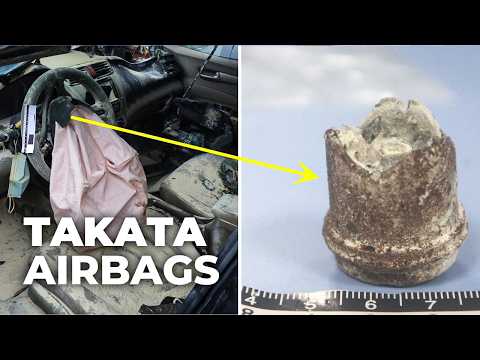
Best Documentary : Former Takata Engineer Exposes Airbag Scandal
youtube.com/watch?v=cr5Pmk…
nhtsa.gov/vehicle-safety…
nhtsa.gov/recalls
YouTube
English
Bluesky : @deepblu.bsky.social Dave Proffer retweetledi

I wrote a quick new post on "Digital Hygiene".
Basically there are some no-brainer decisions you can make in your life to dramatically improve the privacy and security of your computing and this post goes over some of them. Blog post link in the reply, but copy pasting below too.
Every now and then I get reminded about the vast fraud apparatus of the internet, re-invigorating my pursuit of basic digital hygiene around privacy/security of day to day computing. The sketchiness starts with major tech companies who are incentivized to build comprehensive profiles of you, to monetize it directly for advertising, or sell it off to professional data broker companies who further enrich, de-anonymize, cross-reference and resell it further. Inevitable and regular data breaches eventually runoff and collect your information into dark web archives, feeding into a whole underground spammer / scammer industry of hacks, phishing, ransomware, credit card fraud, identity theft, etc. This guide is a collection of the most basic digital hygiene tips, starting with the most basic to a bit more niche.
Password manager. Your passwords are your "first factor", i.e. "something you know". Do not be a noob and mint new, unique, hard passwords for every website or service that you sign up with. Combine this with a browser extension to create and Autofill them super fast. For example, I use and like 1Password. This prevents your passwords from 1) being easy to guess or crack, and 2) leaking one single time, and opening doors to many other services. In return, we now have a central location for all your 1st factors (passwords), so we must make sure to secure it thoroughly, which brings us to...
Hardware security key. The most critical services in your life (e.g. Google, or 1Password) must be additionally secured with a "2nd factor", i.e. "something you have". An attacker would have to be in possession of both factors to gain access to these services. The most common 2nd factor implemented by many services is a phone number, the idea being that you get a text message with a pin code to enter in addition to your password. Clearly, this is much better than having no 2nd factor at all, but the use of a phone number is known to be extremely insecure due to the SIM swap attack. Basically, it turns out to be surprisingly easy for an attacker to call your phone company, pretend they are you, and get them to switch your phone number over to a new phone that they control. I know this sounds totally crazy but it is true, and I have many friends who are victims of this attack. Therefore, purchase and set up hardware security keys - the industrial strength protection standard. In particular, I like and use YubiKey. These devices generate and store a private key on the device secure element itself, so the private key is never materialized on a suspiciously general purpose computing device like your laptop. Once you set these up, an attacker will not only need to know your password, but have physical possession of your security key to log in to a service. Your risk of getting pwned has just decreased by about 1000X. Purchase and set up 2-3 keys and store them in different physical locations to prevent lockout should you physically lose one of the keys. The security keys support a few authentication methods. Look for "U2F" in the 2nd factor settings of your service as the strongest protection. E.g. Google and 1Password support it. Fallback on "TOTP" if you have to, and note that your YubiKeys can store TOTP private keys, so you can use the YubiKey Authenticator app to access them easily through NFC by touching your key to the phone to get your pin when logging in. This is significantly better than storing TOTP private keys on other (software) authenticator apps, because again you should not trust general purpose computing devices. It is beyond the scope of this post to go into full detail, but basically I strongly recommend the use of 2-3 YubiKeys to dramatically strengthen your digital security.
Biometrics. Biometrics are the third common authentication factor ("something you are"). E.g. if you're on iOS I recommend setting up FaceID basically everywhere, e.g. to access the 1Password app and such.
Security questions. Dinosaur businesses are obsessed with the idea of security questions like "what is your mother's maidan name?", and force you to set them up from time to time. Clearly, these are in the category of "something you know" so they are basically passwords, but conveniently for scammers, they are easy to research out on the open internet and you should refuse any prompts to participate in this ridiculous "security" exercise. Instead, treat security questions like passwords, generate random answers to random questions, and store them in your 1Password along with your passwords.
Disk encryption. Always ensure that your computers use disk encryption. For example, on Macs this total no-brainer feature is called "File Vault". This feature ensures that if your computer gets stolen, an attacker won't be able to get the hard disk and go to town on all your data.
Internet of Things. More like @internetofshit. Whenever possible, avoid "smart" devices, which are essentially incredibly insecure, internet-connected computers that gather tons of data, get hacked all the time, and that people willingly place into their homes. These things have microphones, and they routinely send data back to the mothership for analytics and to "improve customer experience" lol ok. As an example, in my younger and naive years I once purchased a CO2 monitor from China that demanded to know everything about me and my precise physical location before it would tell me the amount of CO2 in my room. These devices are a huge and very common attack surface on your privacy and security and should be avoided.
Messaging. I recommend Signal instead of text messages because it end-to-end encrypts all your communications. In addition, it does not store metadata like many other apps do (e.g. iMessage, WhatsApp). Turn on disappearing messages (e.g. 90 days default is good). In my experience they are an information vulnerability with no significant upside.
Browser. I recommend Brave browser, which is a privacy-first browser based on Chromium. That means that basically all Chrome extensions work out of the box and the browser feels like Chrome, but without Google having front row seats to your entire digital life.
Search engine. I recommend Brave search, which you can set up as your default in the browser settings. Brave Search is a privacy-first search engine with its own index, unlike e.g. Duck Duck Go which basically a nice skin for Bing, and is forced into weird partnerships with Microsoft that compromise user privacy. As with all services on this list, I pay $3/mo for Brave Premium because I prefer to be the customer, not the product in my digital life. I find that empirically, about 95% of my search engine queries are super simple website lookups, with the search engine basically acting as a tiny DNS. And if you're not finding what you're looking for, fallback to Google by just prepending "!g" to your search query, which will redirect it to Google.
Credit cards. Mint new, unique credit cards per merchant. There is no need to use one credit card on many services. This allows them to "link up" your purchasing across different services, and additionally it opens you up to credit card fraud because the services might leak your credit card number. I like and use privacy dot com to mint new credit cards for every single transaction or merchant. You get a nice interface for all your spending and notifications for each swipe. You can also set limits on each credit card (e.g. $50/month etc.), which dramatically decreases the risk of being charged more than you expect. Additionally, with a privacy dot com card you get to enter totally random information for your name and address when filling out billing information. This is huge, because there is simply no need and totally crazy that random internet merchants should be given your physical address. Which brings me to...
Address. There is no need to give out your physical address to the majority of random services and merchants on the internet. Use a virtual mail service. I currently use Earth Class Mail but tbh I'm a bit embarrassed by that and I'm looking to switch to Virtual Post Mail due to its much strong commitments to privacy, security, and its ownership structure and reputation. In any case, you get an address you can give out, they receive your mail, they scan it and digitize it, they have an app for you to quickly see it, and you can decide what to do with it (e.g. shred, forward, etc.). Not only do you gain security and privacy but also quite a bit of convenience.
Email. I still use gmail just due to sheer convenience, but I've started to partially use Proton Mail as well. And while we're on email, a few more thoughts. Never click on any link inside any email you receive. Email addresses are extremely easy to spoof and you can never be guaranteed that the email you got is a phishing email from a scammer. Instead, I manually navigate to any service of interest and log in from there. In addition, disable image loading by default in your email's settings. If you get an email that requires you to see images, you can click on "show images" to see them and it's not a big deal at all. This is important because many services use embedded images to track you - they hide information inside the image URL you get, so when your email client loads the image, they can see that you opened the email. There's just no need for that. Additionally, confusing images are one way scammers hide information to avoid being filtered by email servers as scam / spam.
VPN. If you wish to hide your IP/location to services, you can do so via VPN indirection. I recommend Mullvad VPN. I keep VPN off by default, but enable it selectively when I'm dealing with services I trust less and want more protection from.
DNS-based blocker. You can block ads by blocking entire domains at the DNS level. I like and use NextDNS, which blocks all kinds of ads and trackers. For more advanced users who like to tinker, pi-hole is the physical alternative.
Network monitor. I like and use The Little Snitch, which I have installed and running on my MacBook. This lets you see which apps are communicating, how much data and when, so you can keep track of what apps on your computer "call home" and how often. Any app that communicates too much is sus, and should potentially be uninstalled if you don't expect the traffic.
I just want to live a secure digital life and establish harmonious relationships with products and services that leak only the necessary information. And I wish to pay for the software I use so that incentives are aligned and so that I am the customer. This is not trivial, but it is possible to approach with some determination and discipline.
Finally, what's not on the list. I mostly still use Gmail + Gsuite because it's just too convenient and pervasive. I also use 𝕏 instead of something exotic (e.g. Mastodon), trading off sovereignty for convenience. I don't use a VoIP burner phone service (e.g. MySudo) but I am interested in it. I don't really mint new/unique email addresses but I want to. The journey continues. Let me know if there are other digital hygiene tips and tricks that should be on this list.
Link to blog post version in the reply, on my brand new Bear ʕ•ᴥ•ʔ blog cute 👇

English
@pduan @DBurkland @TesLatino @Tesla_AI @aelluswamy @pduan spd lmts r laws not opins! I want my car 2 follow laws as default. Software should have 2 setting : > 35 then spd_lmt +/- (% or mph/kph) & <=35 then spd_lmt +/- (% or mph/kph) . Ur current attempts r really poor UI and safety!
English

@DBurkland @TesLatino @Tesla_AI @aelluswamy That’s a separate problem. Highway speed and lead vehicle following distance will be improved with 13.3.
English

Bluesky : @deepblu.bsky.social Dave Proffer retweetledi
History/facts get their strength over time. Do google 'Alexander Smirnov' and 'Burisma'. Ready 4 your next four years? What will this Friday's news brings to this four year circus?
Ex-FBI informant who fabricated claims about Biden gets 6 yrs.
reuters.com/legal/ex-fbi-i…
English

"Men, their rights, and nothing more; women, their rights, and nothing less."-Susan B. Anthony
"God is a politician; so is the devil."-Carrie Nation
"2022, women in US registered to vote at higher rate than men. Approx 70% women registered, compared to about 68% of men." - CAWP
English
Bluesky : @deepblu.bsky.social Dave Proffer retweetledi

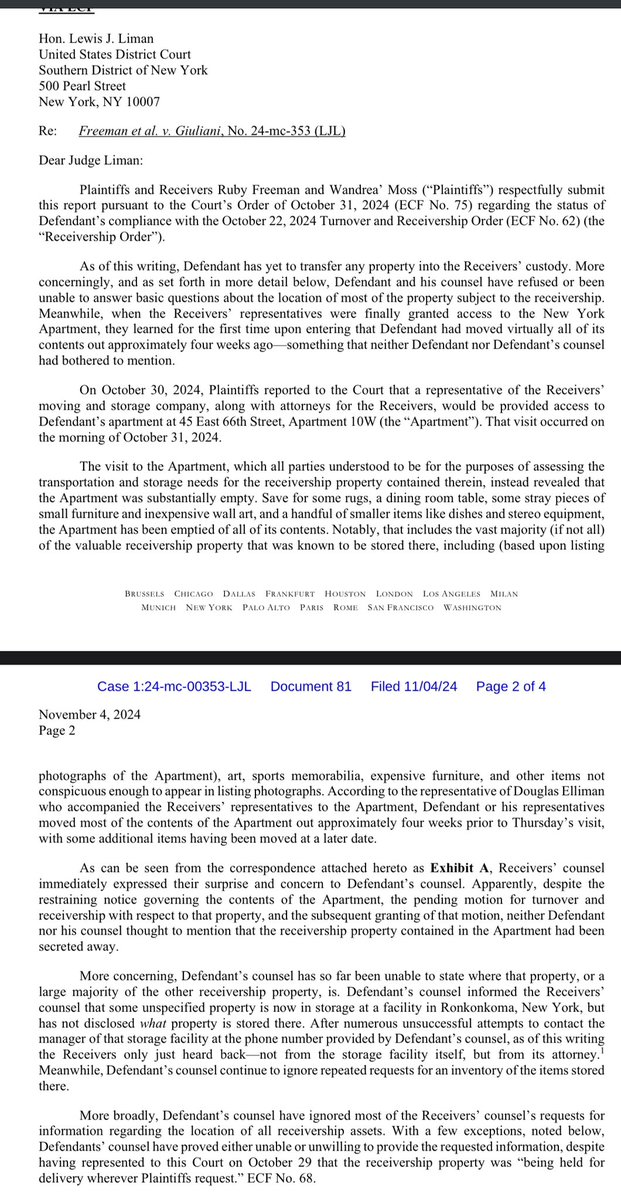
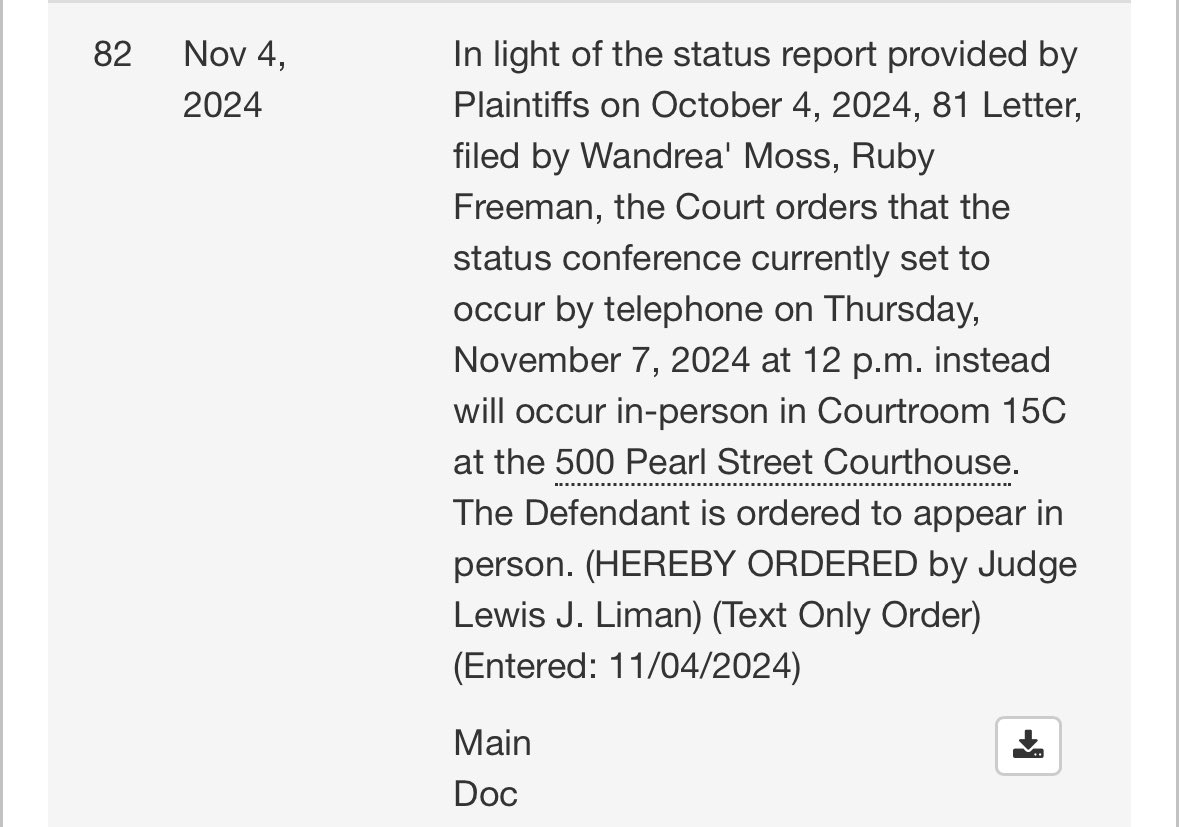
JUST IN: Ruby Freeman and Shaye Moss say they think Rudy Giuliani is hiding his property from them in violation of court orders (left). Now the judge in their case is demanding Rudy show up in person for a hearing Thursday (right).
English