

dfo
872 posts
dfo
@dfowler_
Email Architect but my Interests include Dogs, Email Security, M365, Powershell, pellet grills and DAD JOKES
United States Katılım Aralık 2011
351 Takip Edilen86 Takipçiler

Try doing this in orgs with over 50k SharePoint sites. Welcome to my world :P
learn.microsoft.com/en-us/copilot/…
English
@techspence My pain from exchange to m365 was chasing Outlook password prompts. Uuuuugh
English



Good news: I’m starting a new company, which means that at some point in the future everyone is getting another hoodie.
English
@paulsanders87 I can’t sit down because there’s no room on the couch between wife, kids, toys and clothes 🤣
English

ISO27001 and SOC2 aren’t perfect, but you’re fooling yourself if you think your CISO’s vendor assessment process is better.
English
@romualpiecyk @mderooij Servers/systems connecting must trust it. Things like third party email gateways, servers where the trust list is not automatically updating.
English


PSA: In 1 month, Exchange Online requires trusting DigiCert Root G2 CA chain to avoid disruption xf.ms/DigiCertRootG2
English
I’m going to make a video explaining why skills scanners are dumb then never talk about skills again because I hate this topic so much and it’s beyond stupid that it’s getting this much attention.
English

This is why arc raiders is honestly one of the craziest games ever built. The variance in lobbies, what you can do - just an incredible game lol. Amazing 🤣🤣
ARC Raiders Informer@ArcRaidersInfo
The ENTIRE LOBBY came together to eliminate an exfill camping rat in solos… BEAUTIFUL 😆
English
@IAMERICAbooted @NathanMcNulty Gemini has been doing good enough. Guess it’s time to try Claude tho 😬
English
@dfowler_ @NathanMcNulty Copilot sucks. It takes hours or days compared to what I can do with other AI solutions
English
It really is. I have my bots write me fully functional scripts now with very little revision just using generic prompts.
Nathan McNulty@NathanMcNulty
Compared to a year ago, it's amazing what AI assisted development can do now Probably best to not vibe code a full CRM and try to sell it... But if you aren't experimenting because it's sucked in the past, I encourage you to try it again :) Pick something fun, play and learn
English
@NathanMcNulty @IAMERICAbooted Which are you guys using? M365 Copilot has been a crapshoot for Powershell so far but it’s all I have for work 😄
English

@IAMERICAbooted And the logging, output, and error handling are 100x better than anything I've ever written, because I never do those things 🤣
English


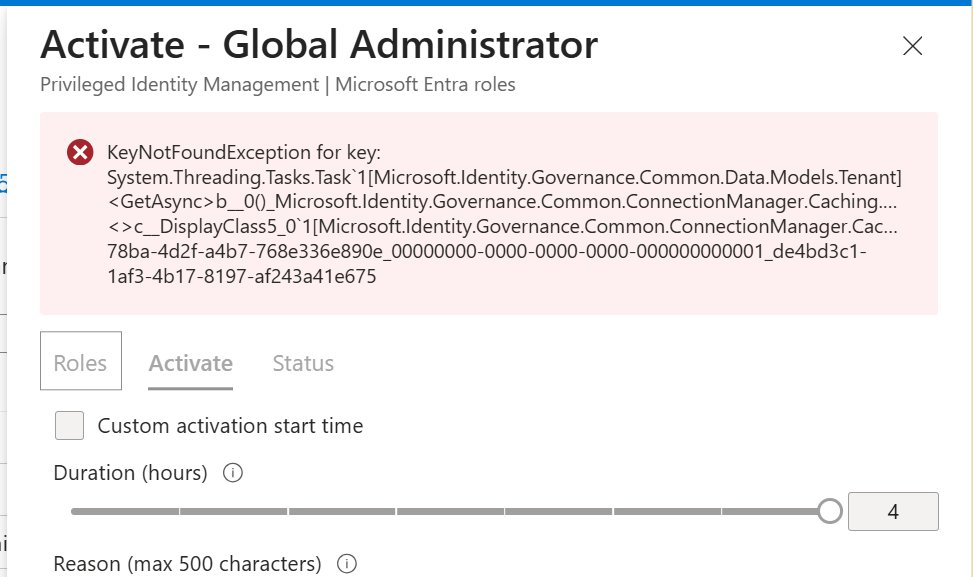
Sam posted this two days ago, and was still a problem this morning. Some of our admins can't PIM up at all.
Sam Erde@SamErde
Anyone else getting persistent errors while trying to activate some roles in #EntraID PIM?
English

@ITguySoCal Loop the results through Get-EXOMobileDeviceStatistics to see if the device is actually syncing recently.
English

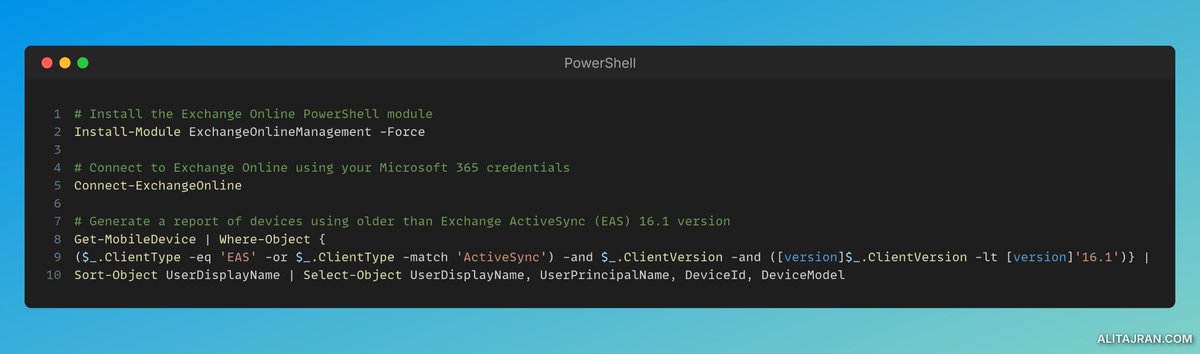
Run this before 3/1/26 to identify which users won't be able to connect to Exchange Online after Microsoft Blocks ActiveSync versions less than version 16.1
Get-MobileDevice | Where-Object {($_.ClientType -eq 'EAS' -or $_.ClientType -match 'ActiveSync') -and $_.ClientVersion -and ([version]$_.ClientVersion -lt [version]'16.1')} | Sort-Object UserDisplayName | Select-Object UserDisplayName, UserPrincipalName, DeviceId, DeviceModel
BleepingComputer@BleepinComputer
Microsoft to block Exchange Online access for outdated mobile devices - @serghei bleepingcomputer.com/news/microsoft… bleepingcomputer.com/news/microsoft…
English
@alitajran The script can return a lot of old devices. Loop through and run Get-EXOMobileDeviceStatistics to get the LastSuccessSync to see if the devices are even connecting anymore.
English

Starting March 1, 2026, devices using Exchange ActiveSync (EAS) versions lower than 16.1 will no longer be able to connect to Exchange Online!
Microsoft is making a change to improve security and reliability in Exchange Online for ActiveSync devices! EAS 16.1 was introduced in June 2016 and provides enhanced compatibility and security.
𝐖𝐡𝐞𝐧 𝐭𝐡𝐢𝐬 𝐰𝐢𝐥𝐥 𝐡𝐚𝐩𝐩𝐞𝐧:
This change begins taking effect on March 1, 2026.
𝐇𝐨𝐰 𝐭𝐡𝐢𝐬 𝐚𝐟𝐟𝐞𝐜𝐭𝐬 𝐲𝐨𝐮𝐫 𝐨𝐫𝐠𝐚𝐧𝐢𝐳𝐚𝐭𝐢𝐨𝐧:
Organizations using mobile devices with native email apps to access Exchange Online mailboxes via EAS protocol.
Apple devices added support for EAS 16.1 in iOS 10 and are unlikely to be affected.
The Gmail app and Samsung Mail will have updated versions available before the deadline.
For other apps, you should contact your device or application vendor if they are using EAS versions lower than 16.1.
𝐖𝐡𝐚𝐭 𝐰𝐢𝐥𝐥 𝐡𝐚𝐩𝐩𝐞𝐧:
- Devices running EAS versions lower than 16.1 will no longer connect to Exchange Online.
- Devices using Outlook Mobile are not impacted because they do not use EAS.
- This change applies only to Exchange Online, not Exchange Server.
𝐖𝐡𝐚𝐭 𝐲𝐨𝐮 𝐜𝐚𝐧 𝐝𝐨 𝐭𝐨 𝐩𝐫𝐞𝐩𝐚𝐫𝐞:
- Verify that all mobile devices and applications are updated to EAS version 16.1 or higher before March 1, 2026.
- Admins can generate a report of devices using older EAS versions with the following PowerShell command:
Get-MobileDevice | Where-Object {($_.ClientType -eq 'EAS' -or $_.ClientType -match 'ActiveSync') -and $_.ClientVersion -and (version$_.ClientVersion -lt version'16.1')} | Sort-Object UserDisplayName | Select-Object UserDisplayName, UserPrincipalName, DeviceId, DeviceModel
- Communicate this change to your helpdesk and end users, and ask them to update if possible.
- Update internal documentation as needed.
- For assistance, contact your device or application vendor.
#Microsoft365 #ExchangeOnline #ActiveSync
English