

BanhMy
1.8K posts

Deleting in 24 hrs.
Followers who like and say #BinanceAfrica might just get a surprise DM.
English
BanhMy retweetledi

Trước giờ mình chỉ dùng MetaMask và Phantom.
Hai cái đó work tốt, không có vấn đề gì. Nhưng càng chơi nhiều chain thì mọi thứ càng bị phân tán.
Check balance ở ví này, switch network ở ví kia, mở thêm tab để xem DeFi position. Cứ lặp đi lặp lại như vậy mỗi ngày.
Rồi thấy một ví cá mập đang dùng Zerion. Tò mò thử luôn.
Toàn bộ danh mục trên nhiều chain trong một màn hình. Swap, bridge, theo dõi ví cá mập tất cả trong app, không cần mở thêm gì.
Thấy rõ sự khác biệt ngay.
👇 download.zerion.io/bottrangg

Tiếng Việt
BanhMy retweetledi

Thì ra Jane Street, Goldman Sachs & J.P. Morgan cũng có Github Repo giá trị
Đây là thứ các quỹ tài chính nghìn tỷ đô đang "giấu" trên Github mà phần lớn các dev ít chú ý.
Điều thú vị là những công ty như Jane Street, Goldman Sachs hay J.P. Morgan thật ra đã open-source rất nhiều công cụ nội bộ cực mạnh liên quan đến quant trading, pricing và hạ tầng xử lý dữ liệu thời gian thực.
Trước đây muốn học mấy thứ này gần như phải:
- vào quỹ lớn
- học tài chính định lượng
- hoặc làm trong môi trường rất đóng
Còn bây giờ chỉ cần Github là đã có thể chạm trực tiếp vào stack công nghệ của họ.
Ví dụ Jane Street có magic-trace, một công cụ debug hiệu năng cực điên dùng Intel Processor Trace để ghi lại gần như toàn bộ luồng chạy CPU ở mức nano giây. Đây không còn là kiểu profiler thông thường nữa mà gần như là “kính hiển vi” để soi xem chương trình đang nghẽn chính xác ở đâu.
github.com/janestreet/mag…
Goldman Sachs thì có gs-quant, một bộ công cụ Python dùng để định giá phái sinh và quản lý rủi ro. Bên trong có sẵn rất nhiều mô hình pricing cho options, swaps và các bài toán tài chính mà trader tổ chức dùng mỗi ngày.
github.com/goldmansachs/g…
Trong khi đó J.P. Morgan từng phát triển Perspective, một hệ thống trực quan hóa dữ liệu thời gian thực cực mạnh dành cho market data streaming. Tool này cho phép build dashboard theo dõi dữ liệu thị trường với tốc độ rất cao và xử lý lượng dữ liệu realtime khổng lồ.
github.com/perspective-de…
Mấy ông lớn đã dám chia sẻ, ngại gì không mang về học ✍️
Nguồn: WEB3_furture

Jack Vĩ@jackvi810
💯 Danh sách các app free và opensource cho anh em khám phá github.com/offa/android-f… github.com/unicodeveloper… github.com/mustbeperfect/… github.com/piotrkulpinski… github.com/topics/free-an… github.com/topics/open-so…
Tiếng Việt
BanhMy retweetledi

BanhMy retweetledi

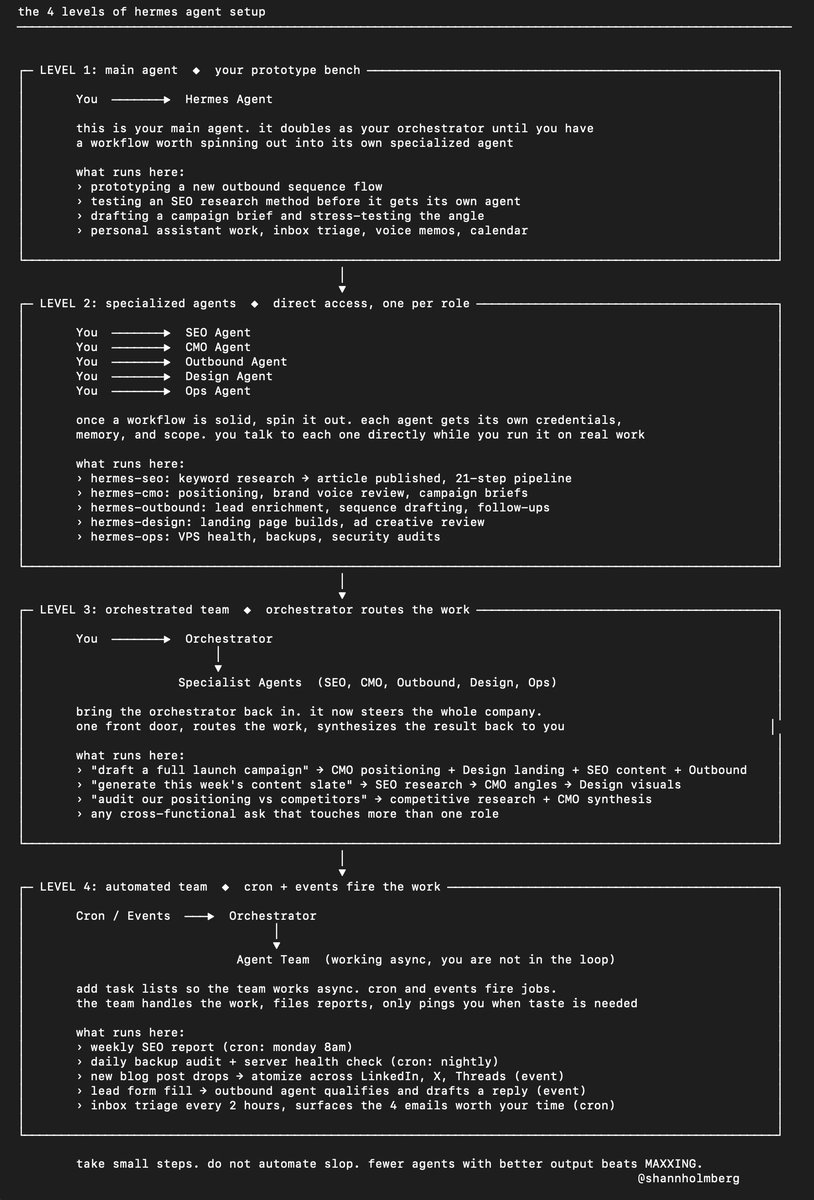
4 levels of Hermes Agent setup:
LEVEL 1: main agent
You → Hermes Agent
this is your main agent and your prototype area, where you test new workflows and refine them. it doubles as your orchestrator until you have something worth breaking out
----
LEVEL 2: specialized agents
You → SEO Agent
You → CMO Agent
You → Ops Agent
once a workflow is solid, break it out into its own agent with its own credentials, memory and scope.
---
LEVEL 3: orchestrated team
You → Orchestrator
↓
Specialist Agents
bring the orchestrator back in. it now steers the company of agents you have built.
----
LEVEL 4: automated team
Cron / Events → Orchestrator
↓
Agent Team
add task lists so the team works async. cron and events fire jobs, the orchestrator routes them through the task bus, the team handles the work without you
----
take small steps, you DO NOT want to automate slop.
if your output at level 1 is mediocre, you are about to scale mediocrity. 20 agents shipping low quality work at speed is worse than 3 shipping great work slowly.
I would rather run fewer agents with better output than MAXXING the agent count and spitting out more of the same.
Shann³@shannholmberg
English
BanhMy retweetledi

BanhMy retweetledi

BanhMy retweetledi

99% of Claude users don't know these features of Claude
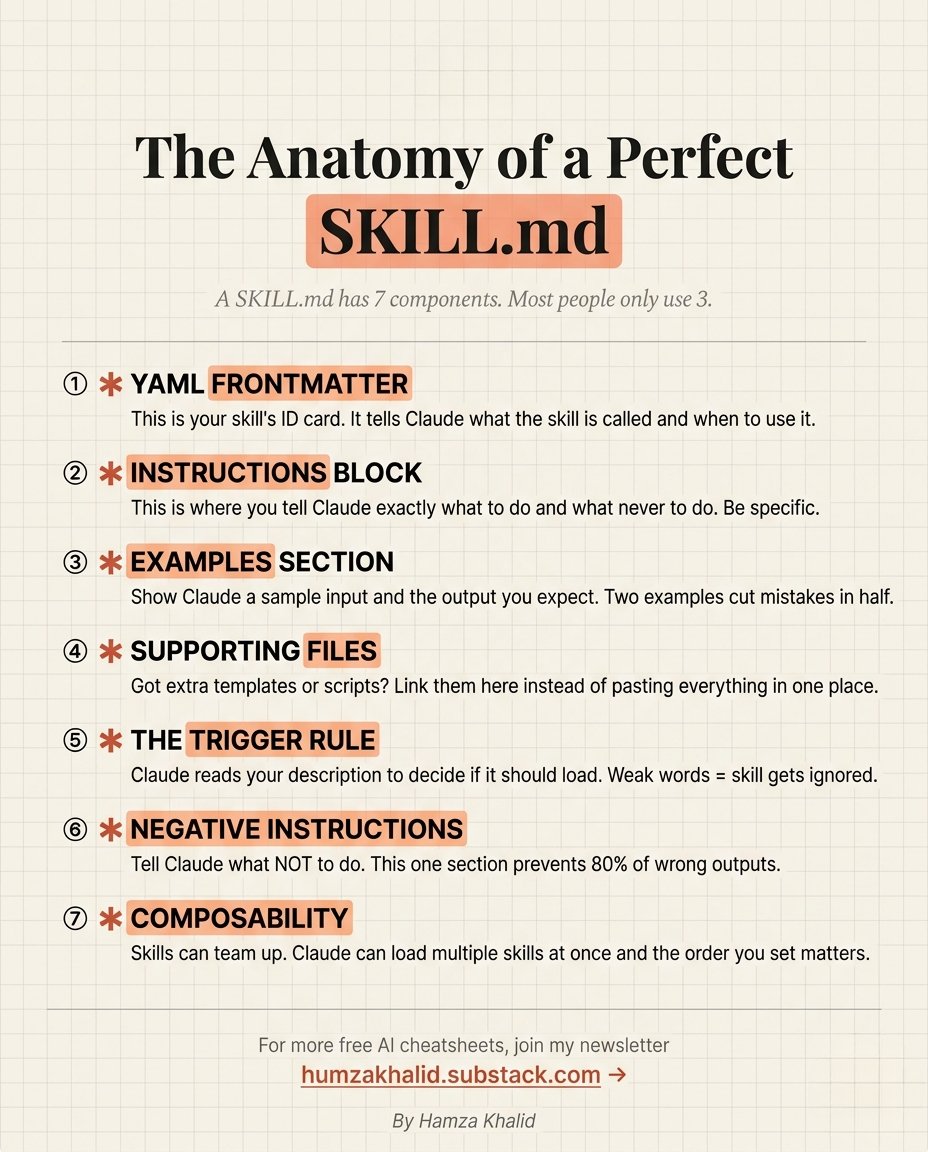
Claude Skill. MD has 7 Components, and I bet you don't know all of them
Most people only use 3.
Here is exactly how to build one that actually works:
☑ 1. YAML Frontmatter (Your Skill's ID Card)
→ This tells Claude what the skill is called and when to load it.
→ Weak frontmatter = Claude ignores your skill completely.
☑ 2. Instructions Block (The Brain)
→ Tell Claude exactly what to do inside this skill.
→ Tell Claude exactly what never to do.
☑ 3. Examples Section (The Shortcut)
→ Show Claude a sample input and the exact output you expect.
→ Two examples cut mistakes in half.
☑ 4. Supporting Files (The Context Layer)
→ Got extra templates, scripts, or reference docs?
→ Link them here instead of pasting everything in one block.
☑ 5. The Trigger Rule (The Most Ignored Part)
→ Claude reads your description to decide if it should load.
→ Weak words = skill gets skipped every single time.
☑ 6. Negative Instructions (The Error Killer)
→ Tell Claude what NOT to do.
→ This one section prevents 80% of wrong outputs.
☑ 7. Composability (The Power Move)
→ Skills can team up.
→ Claude can load multiple skills at once.
If you want to learn Claude for FREE, consider these Free Guides:
1. Claude 101
🔗 anthropic.skilljar.com/claude-101
2. AI Fluency: Framework & Foundations
🔗 anthropic.skilljar.com/ai-fluency-fra…
3. Claude Code In Action
🔗 anthropic.skilljar.com/claude-code-in…
4. Master Claude Inside Excel
🔗 open.substack.com/pub/humzakhali…
5. How to stop hitting Claude's limits
🔗 humzakhalid.substack.com/p/i-stopped-hi…
5. Introduction to Model Context Protocol
🔗 anthropic.skilljar.com/introduction-t…
6. Model Context Protocol: Advanced Topics
🔗 anthropic.skilljar.com/model-context-…
7. Introduction to Agent Skills
🔗 anthropic.skilljar.com/introduction-t…
8. Claude With Amazon Bedrock
🔗 anthropic.skilljar.com/claude-in-amaz…
9. Claude With Google Cloud's Vertex AI
🔗 anthropic.skilljar.com/claude-with-go…
For more free AI cheatsheets like this: 👇
→ Go to Substack. com/@humzakhalid
→ Subscribe to my free newsletter (don't pay anything)
→ Get more free and daily cheatsheets
Which component were you missing before seeing this? Drop it below.
♻️ Repost to give your network an unfair advantage.
Hamza Khalid@humzaakhalid
English
BanhMy retweetledi

BanhMy retweetledi

/goal is f*cking insane.
You can literally turn your AI agents into 24/7 employees that work for HOURS with zero manual intervention.
This has to be the most powerful AI feature release of the month.
If you try one thing in AI this week, make it this.

AI Edge@aiedge_
English
BanhMy retweetledi

this guy literally breaks down the exact Claude + Obsidian playbook to build your own AI employee in a single afternoon 🤯


Fraser Cottrell | Ad Creative For Meta & TikTok@sourfraser
English
BanhMy retweetledi

Andrej Karpathy: "90% of your AI coding bill is paying for context you didn't need to send"
Here are 10 things senior AI engineers stopped wasting tokens on:
1. Auto-context loading 50 files for a 30-line fix: $1.20/turn for tokens you'll never read. 80% input waste, every session
2. Running Opus on lint, format, and rename tasks: $0.60 for what Haiku nails at $0.02. 30x overpay on the cleanup tier
3. Tool call loops that re-send the full repo on every retry: 5x context cost per agentic flow. fixing these alone cuts 30-50% of bills
4. Sonnet as the default model: Kimi 2.6 matches its quality on most coding tasks at 1/6 the cost. defaulting to Sonnet in 2026 is leaving 60-70% on the table
5. Streaming responses on stable-prefix workflows: kills your prompt cache. you pay 10x for tokens that should have cost cents
6. "Just in case" file includes: 80,000-token prompts that should be 3,000. context bloat is the silent budget killer
7. Per-session knowledge rebuilding: 10 min writing a SKILL.md once vs paying agents to re-figure out your environment every run. $4 vs $0.30 per execution
8. Single-model setups: premium tier on every task is the most expensive mistake in AI coding right now
9. Asking 10 small questions one at a time: 10 separate input prefix charges vs one batched call. 70-90% savings on routine workflows
10. Buying Claude Pro + ChatGPT Plus + Cursor Pro: you seriously use one. the other two are habit, not utility
what actually compounds instead:
- context discipline (grep before fetching, always)
- prompt caching on every stable prefix
- multi-model routing (Kimi 2.6 default, Opus for the 10%)
- graduated skills via SKILL.md files
- profiling tool calls before optimizing prompts
- the routing mindset (right model for right task)
in 12 months, the gap between developers shipping on $200/month and $4,000/month budgets won't be skill
it'll be how well they route
study this.
Ronin@DeRonin_
English
BanhMy retweetledi

COMPLETE CLAUDE CODE COURSE OF 4 HOURS
This is the most comprehensive Claude guide I've seen on the internet.
Bookmark it before you forget it.
4 hours. Build tools. Automate your work.
Khusboo Tayal@KhusbooT14835
Learn AI for free directly from top companies 𝟭 - 𝗔𝗻𝘁𝗵𝗿𝗼𝗽𝗶𝗰: anthropic.skilljar.com 𝟮 - 𝗚𝗼𝗼𝗴𝗹𝗲: grow.google/ai 𝟯 - 𝗠𝗲𝘁𝗮: ai.meta.com/resources/ 𝟰 - 𝗡𝗩𝗜𝗗𝗜𝗔: developer.nvidia.com/cuda 𝟱 - 𝗠𝗶𝗰𝗿𝗼𝘀𝗼𝗳𝘁: learn.microsoft.com/en-us/training/ 𝟲 - 𝗢𝗽𝗲𝗻𝗔𝗜: academy.openai.com 𝟳 - 𝗜𝗕𝗠: skillsbuild.org 𝟴 - 𝗔𝗪𝗦: skillbuilder.aws 𝟵 - 𝗗𝗲𝗲𝗽𝗟𝗲𝗮𝗿𝗻𝗶𝗻𝗴𝗔𝗜: deeplearning.ai 𝟭𝟬 - 𝗛𝘂𝗴𝗴𝗶𝗻𝗴 𝗙𝗮𝗰𝗲: huggingface.co/learn ❤️ Like 🔁 Retweet 🔖 Bookmark 💬Comment - "AI" Follow @KhusbooT14835 for more AI Posts #AI #ArtificialIntelligence #AISkills #AIAgents #RAG #LLM #PromptEngineering
English
BanhMy retweetledi

BanhMy retweetledi

Claude vs. Claude Code vs. Cowork.
Anthropic offers three distinct ways to interact with Claude, and each one targets a fundamentally different workflow. Think of it as: Chat for thinking, Code for building, and Cowork for doing.
Here's a quick breakdown:
1️⃣ Claude Chat
This is the conversational AI assistant most people already know. You type a prompt, Claude responds, and you iterate together.
- Turn rough ideas into structured plans through conversation
- Write emails, reports, essays, and long-form content
- Research and summarize complex topics in minutes
- Analyze documents, PDFs, and images
- Build interactive prototypes through Artifacts
The key here is that everything happens through conversation. You're thinking with Claude, not delegating work to it.
It's available on every device, has a free tier, and supports persistent memory across sessions.
The tradeoff is that it has no direct access to your local files (upload only), and it can't generate raster images natively.
2️⃣ Claude Code
This is a terminal-native coding agent. You describe what you want in plain English, and Claude reads your codebase, writes code, runs tests, fixes errors, and ships the result.
- Build and debug entire features across the full codebase
- Write, run, and fix tests automatically
- Manage git workflows and create pull requests
- Spawn multiple parallel agents working on different parts of a task simultaneously
It handles the full development cycle end to end, from planning to execution to testing. With the CLAUDE(.)md configuration file, you can teach it your project's conventions, patterns, and constraints so it writes code the way your team expects.
The tradeoff is a steeper learning curve compared to Chat, and token costs can add up during heavy sessions.
3️⃣ Claude Cowork
This is the newest addition. Anthropic describes it as Claude Code for the rest of your work.
It's an agentic desktop assistant that automates file management and repetitive tasks through a GUI. You describe an outcome, and Claude plans, executes, and delivers finished work: formatted documents, organized file systems, spreadsheets with working formulas, and synthesized research.
- Direct local file access and editing (no upload/download cycle)
- Schedule recurring tasks automatically
- Assign tasks remotely via Dispatch from your phone
- Computer Use lets Claude control your screen directly
It runs inside a sandboxed virtual machine on your computer, so Claude can only access folders you explicitly grant. You don't need to know how to code to use it.
The tradeoff is that your computer must stay awake for tasks to run, and it's still in research preview.
Here's how to think about choosing between them:
→ If you need to think through a problem or get writing/research help, use Chat
→ If you're building software and want an autonomous coding partner, use Code
→ If you have a clearly defined deliverable that involves local files and desktop workflows, use Cowork
All three are included in the same subscription starting at $20/month, which makes it one of the highest-leverage subscriptions in productivity software right now.
I've put together a visual below that maps the workflow of each product side by side.
Also, if you want to go deeper into Claude Code specifically, my co-founder wrote a detailed article covering the anatomy of the .claude/ folder, a complete guide to CLAUDE(.)md, custom commands, skills, agents, and permissions, and how to set them all up properly.
Read it below.
GIF
Akshay 🚀@akshay_pachaar
English
BanhMy retweetledi
BanhMy retweetledi

Learn Coding by playing games
1. Kubernetes
k8sgames.com
2. DevOps
devops.games
3. Linux
overthewire.org
4. Git
ohmygit.org
5. Python
codecombat.com
6. CSS & HTML
codepip.com
7. Cybersecurity
picoctf.org
8. Mobile Coding (like Duolingo)
sololearn.com
9. For Complete Beginners
scratch.mit.edu
10. 25+ Programming Languages
codingame.com
Follow @ai_explorer25 for more such insightful content

English
BanhMy retweetledi

BanhMy retweetledi

BanhMy retweetledi
