JuanOS

20K posts

JuanOS banner
JuanOS

JuanOS

@jcfrayre

Geek, Linux, Coleccionista y más. ❝Tú me enseñaste que la intimidad no es tocarse la piel, sino el corazón. .❞

en tu cama Katılım Temmuz 2009
344 Takip Edilen63 Takipçiler
JuanOS retweetledi
Es Geeks
Es Geeks@EsGeeks·
🐧 10 comandos Linux que separan al pentester del script-kiddie: ss -tulpn nmap -sV -sC tcpdump -i any find / -perm -4000 curl -s ifconfig.me lsof -i :4444 dig axfr history | grep rlwrap nc -lvnp iptables -L -n -v Más allá de ls y cat. ¿Cuál falta? #linux #commands
Es Geeks tweet media
Català
1
37
162
3.3K
Agcemo
Agcemo@agcemo·
@learning_yohei If you put food on a tortilla, it is a taco. If you put Ketchup on a tortilla, it's a ketchup taco. We eat tortillas every day. Some eat their food in tacos, some break the tortilla into 4 pieces and make small cones to eat. Others just roll up the tortilla and eat it
English
1
0
0
18
Yohei from Japan🇯🇵
Yohei from Japan🇯🇵@learning_yohei·
Hello from Japan 🇯🇵♥️ My Mexican friends, can I ask you a question?🇲🇽🤭 Is it true that people in Mexico eat tacos every Tuesday? 🌮😳
Yohei from Japan🇯🇵 tweet media
English
3K
266
6.6K
648.5K
Ross_co_Jones 
Ross_co_Jones @anonimo_jones·
Pago ínternet por estás cosas 🤣🤣🤣🤣
Español
178
2.1K
10.7K
482.6K
ຸLaura Bennett
ຸLaura Bennett@NefflynB·
HOMBRES, sean honestos, ¿realmente piensan que está bien vivir de esta manera ??
ຸLaura Bennett tweet media
Español
4.4K
1.4K
33.3K
2.6M
RossRadio
RossRadio@cqcqcqdx·
ahh back in the day!
RossRadio tweet media
English
226
326
4.2K
393.2K
Piyush
Piyush@piyush784066·
Linux users, What is your favourite Linux Command?
Piyush tweet media
English
89
2
82
7.7K
Piyush
Piyush@piyush784066·
Be honest — what OS are you running right now? 💻
Piyush tweet media
English
82
1
72
4.4K
JuanOS retweetledi
Dhanian 🗯️
Dhanian 🗯️@e_opore·
Linux Complete Roadmap | | | |-- Fundamentals | |-- Introduction to Linux | | |-- What Linux is | | |-- Linux distributions | | |-- Open source concepts | |-- Linux Installation | | |-- Dual boot setup | | |-- Virtual machines | | |-- Cloud Linux servers | |-- Linux File System | | |-- Directories and paths | | |-- File hierarchy structure | | |-- Navigation basics | | |-- Command Line Basics | |-- Essential Commands | | |-- ls, cd, pwd | | |-- cp, mv, rm | | |-- mkdir, touch, cat | |-- File Viewing | | |-- less, head, tail | | |-- grep and find | |-- Permissions | | |-- chmod | | |-- chown | | |-- User groups | | |-- Shell & Scripting | |-- Bash Shell | | |-- Variables | | |-- Aliases | | |-- Environment variables | |-- Shell Scripting | | |-- Loops and conditions | | |-- Functions | | |-- Automating tasks | | |-- System Administration | |-- User Management | | |-- adduser and passwd | | |-- sudo privileges | |-- Process Management | | |-- ps, top, htop | | |-- kill and jobs | |-- Package Management | | |-- apt | | |-- yum / dnf | | |-- snap and flatpak | | |-- Networking | |-- Network Basics | | |-- IP addresses | | |-- DNS concepts | | |-- SSH basics | |-- Networking Commands | | |-- ping | | |-- netstat | | |-- curl and wget | |-- Remote Access | | |-- SSH keys | | |-- Secure connections | | |-- Storage & File Management | |-- Disk Management | | |-- df and du | | |-- Mounting drives | |-- Compression & Archives | | |-- tar | | |-- zip and unzip | |-- Backups | | |-- rsync basics | | |-- Automated backups | | |-- Security | |-- Linux Security Basics | | |-- Firewalls | | |-- UFW and iptables | |-- File Permissions Security | |-- Secure SSH configuration | |-- Monitoring suspicious activity | | |-- Server Management | |-- Web Servers | | |-- Apache | | |-- Nginx | |-- Database Servers | | |-- MySQL | | |-- PostgreSQL | |-- Service Management | | |-- systemctl | | |-- journalctl | | |-- DevOps & Cloud | |-- Linux for DevOps | | |-- Docker basics | | |-- Kubernetes basics | |-- Cloud Linux Servers | | |-- AWS EC2 | | |-- Azure VM | | |-- Google Cloud VM | |-- CI/CD basics | | |-- Monitoring & Performance | |-- System Monitoring | | |-- top and htop | | |-- vmstat | |-- Log Management | | |-- Log files | | |-- journal logs | |-- Performance Optimization | | |-- Resource usage analysis | | |-- System tuning | | |-- Advanced Linux Topics | |-- Cron Jobs | |-- SELinux basics | |-- Linux Kernel basics | |-- Virtualization | |-- Containers and namespaces | | |-- Real World Projects | |-- Setup Linux web server | |-- Build automated backup scripts | |-- Configure secure SSH server | |-- Host Docker applications on Linux | |-- Create monitoring dashboard | | |-- Interview Preparation | |-- Linux interview questions | |-- Shell scripting challenges | |-- Troubleshooting exercises | |-- Networking scenarios | | |-- Community and Growth | |-- Contribute to open source | |-- Build Linux projects | |-- Share scripts on GitHub | |-- Write technical blogs | |-- Stay updated with Linux ecosystem Grab this ebook to Master Linux codewithdhanian.gumroad.com/l/hqtbxt
Dhanian 🗯️ tweet media
English
10
104
502
9.9K
Elorm Daniel
Elorm Daniel@elormkdaniel·
VMware or VirtualBox
Elorm Daniel tweet mediaElorm Daniel tweet media
Dansk
195
40
838
75.2K
Ray🫧
Ray🫧@ravikiran_dev7·
as a Programmer, how much RAM is enough for you ? 1. 8 GB 2. 16 GB 3. 24 GB 4. 32 GB 5. 64 GB 6. 128 GB 7. 256 GB 8. 512 GB+
Ray🫧 tweet media
English
778
26
1K
201.8K
JuanOS retweetledi
Elorm Daniel
Elorm Daniel@elormkdaniel·
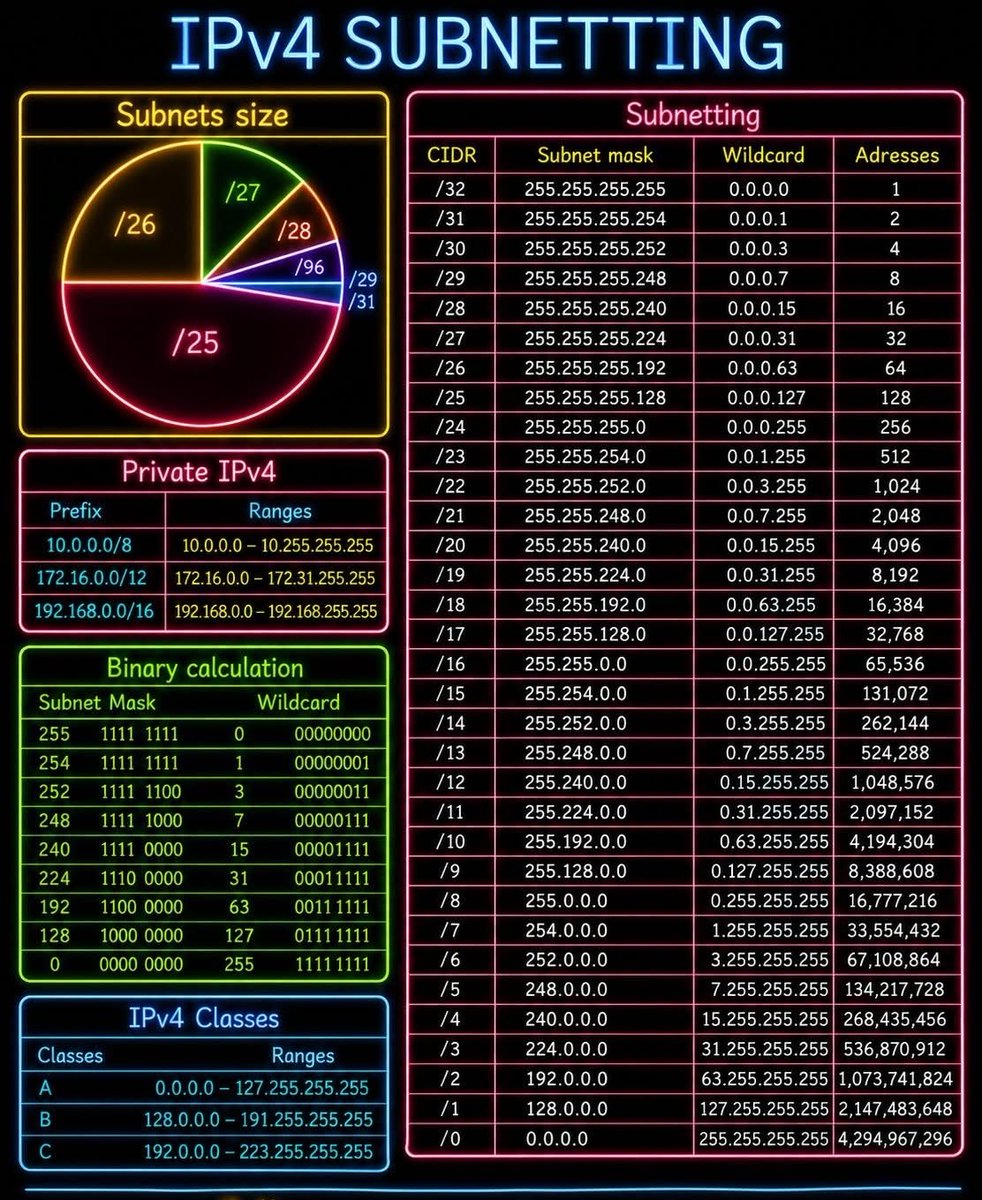
🌐 IPv4 SUBNETTING MADE SIMPLE 🔥 Mastering IPv4 subnetting is one of the most important skills for every Network Engineer and IT Professional. This neon-style infographic provides a quick and easy reference guide for subnet masks, CIDR notation, wildcard masks, binary calculations, private IP ranges, and IPv4 classes — all in one place! 🚀 📌 Topics covered: ✅ CIDR & Subnet Mask Reference ✅ Wildcard Mask Calculations ✅ IPv4 Address Capacity per Subnet ✅ Binary Subnetting Basics ✅ Private IPv4 Address Ranges ✅ IPv4 Address Classes ✅ Subnet Size Visualization 🔹 Perfect for learning: ⚡ Fast subnetting calculations 📚 CCNA / CCNP exam preparation 🛠️ ACL wildcard mask configuration 🌍 Network design & IP planning 🔒 Enterprise network segmentation Perfect for: 👨‍💻 Network Engineers 🎓 CCNA / CCNP / CCIE Students 🛡️ Cybersecurity Professionals 📚 Networking Beginners & Learners
Elorm Daniel tweet media
English
8
131
634
13.8K
Agcemo
Agcemo@agcemo·
Test de edad. #StarWars A. Sable de luz B. Tanque Bacta
Agcemo tweet media
Español
1
0
0
198
JuanOS retweetledi
Dhanian 🗯️
Dhanian 🗯️@e_opore·
Linux Cheatsheet (Beginner to Advanced) System Information → uname → Display system information → uname -a → Show all system details → hostname → Display system hostname → whoami → Current logged-in user → id → User and group IDs → uptime → System uptime and load → date → Current date and time → cal → Display calendar File & Directory Navigation → pwd → Print current directory → ls → List files and folders → ls -la → Detailed hidden file listing → cd → Change directory → mkdir → Create directory → rmdir → Remove empty directory → tree → Show folder structure → find → Search files and directories → locate → Quickly locate files File Operations → touch → Create empty file → cp → Copy files and folders → mv → Move or rename files → rm → Remove files and folders → shred → Securely delete files → cat → View file contents → less → Scroll through file content → head → View beginning of file → tail → View end of file → nano → Terminal text editor → vim → Advanced text editor Permissions & Ownership → chmod → Change file permissions → chown → Change file owner → chgrp → Change group ownership → umask → Default permission settings → sudo → Run command as administrator Process Management → ps → Show running processes → top → Real-time process monitor → htop → Interactive process viewer → kill → Terminate process → killall → Kill processes by name → jobs → Show background jobs → bg → Run job in background → fg → Bring job to foreground Disk & Storage → df -h → Disk space usage → du -sh → Folder size usage → mount → Mount file systems → umount → Unmount file systems → fdisk → Disk partition manager → lsblk → List block devices Networking → ping → Test network connectivity → ifconfig → Network interface details → ip addr → IP address information → netstat → Network statistics → ss → Socket statistics → curl → Transfer data from URLs → wget → Download files from internet → ssh → Secure remote login → scp → Secure file copy Package Management → apt → Debian/Ubuntu package manager → yum → RHEL/CentOS package manager → dnf → Fedora package manager → pacman → Arch Linux package manager → snap → Snap package manager → flatpak → Flatpak package manager Compression & Archives → tar → Archive files → gzip → Compress files → gunzip → Decompress .gz files → zip → Create ZIP archive → unzip → Extract ZIP archive Users & Groups → useradd → Create new user → passwd → Change password → userdel → Delete user → groupadd → Create new group → groups → Show user groups → su → Switch user account System Services → systemctl → Manage systemd services → service → Manage services → reboot → Restart system → shutdown → Power off system → journalctl → View system logs Shell & Scripting → echo → Print text output → alias → Create command shortcuts → export → Set environment variables → history → Command history → bash → Bash shell → sh → Shell interpreter → chmod +x → Make script executable Advanced Tools → grep → Search text patterns → awk → Pattern scanning & processing → sed → Stream editor → xargs → Build command arguments → cron → Schedule tasks → crontab → Manage cron jobs → rsync → Sync files and directories → tmux → Terminal multiplexer → screen → Persistent terminal sessions 📘 Learn Linux deeper with commands, projects, scripting, and structured guidance: codewithdhanian.gumroad.com/l/dynwdc
Dhanian 🗯️ tweet media
English
14
86
462
9.6K
JuanOS retweetledi
Linux Inside: The Ideal Blog for Sysadmins & Geeks
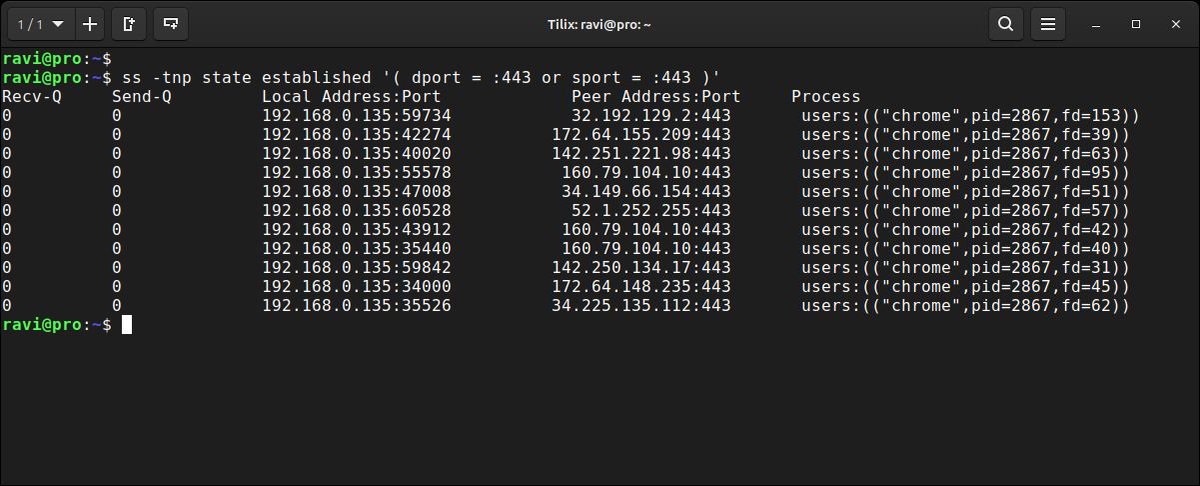
Quick Linux tip: ss with state filters is far more powerful than netstat for diagnosing connection issues on production servers. $ ss -tnp state established '( dport = :443 or sport = :443 )' Shows only active HTTPS connections with the process name attached. Useful when tracking connection leaks or unexpected traffic spikes. Follow @tecmint for more #Linux tips...
Linux Inside: The Ideal Blog for Sysadmins & Geeks tweet media
English
2
91
479
21.7K