

John Pavone
1.3K posts

John Pavone
@johnpavone
Developer of custom software solutions for 40 years! Founder of Lunch and Learn Academy. A provider of corporate training and custom AI solutions to business.
Michigan Katılım Nisan 2010
85 Takip Edilen273 Takipçiler

I cracked how to sell AI outreach agents to financial services companies (investment banks, m&a, etc.)
Built a playbook on my strategy, and actual cold emails and scripts that closed >$4M for a client of mine in 60 days.
Like + comment and I will send the link to you.
English

I just built a complete Claude Code system for GTM teams.
It runs lead scrapes, writes LinkedIn posts, manages your CRM, and processes 100 emails in 36 seconds.
Here's everything inside:
I've spent the last several months refining how GTM engineers can plug their existing stack straight into Claude Code.
✓ Install and configure Claude Code in under 10 minutes
✓ Build a CLAUDE.md that keeps every session fully aligned with your ICP and tone rules
✓ Create reusable skills that run lead scrapes, write cold email sequences, and push content cards to Notion automatically
✓ Connect MCP servers for HubSpot, Gmail, Slack, and Google Sheets without burning your context window
✓ Run 3-4 parallel sessions simultaneously so 4 tasks take the time of 1
And I turned the entire system into a step-by-step bible you can copy.
Claude Code - the fastest way to turn plain language instructions into GTM automation.
Combined with your existing stack - a full agentic GTM engine.
And I'm giving you the whole framework for free.
Here's what's inside:
✅ Setup and installation guide
Every install command for Mac, Windows, and Linux. Native installer vs Homebrew tradeoffs. VS Code and Cursor extension setup. What to do first in any new project.
✅ CLAUDE.md mastery
How to write rules Claude actually follows. ICP definitions, tone rules, guardrail structure, and the primacy bias fix that stops Claude from ignoring your most important instructions.
✅ Skills library with 7 pre-built GTM workflows
Lead scraper and classifier (60-90 minutes down to 87 seconds). LinkedIn post writer. Cold email sequence writer. Content calendar card writer. Morning pulse check. Asset brief generator. Boosting comment generator.
✅ MCP integration guide
Notion, HubSpot, Gmail, Slack, GitHub, Google Sheets. Which MCPs to keep, which to convert to direct API skills, and how a single bloated MCP can eat 40% of your context window before you type a single message.
✅ Context management and model selection
When to use Opus vs Sonnet vs Haiku. The dynamic switching pattern that gets Opus-quality decisions at Sonnet-level cost. How to use /compact, /context, and /clear to keep sessions fast.
And here's the full workflow you'll learn:
- Plan Mode before every new workflow - a 5-minute plan prevents 30 minutes of undoing mistakes
- Explore-plan-execute pattern for building internal tools without a developer
- Subagent setup for research, QA, and review tasks that keeps your main session clean
- Hooks that play a chime when parallel sessions finish and block writes to sensitive files
- Modal deployment to turn any skill into a URL your whole team can trigger
This is the same system GTM engineers are using to:
→ Scrape and classify 1,000 leads in under 2 minutes
→ Process and label 100 emails in 36 seconds using direct Gmail API calls
→ Generate LinkedIn posts, boosting comments, and asset briefs in a single session
→ Build client-facing reports in 20 minutes instead of 2 hours
All without hiring a developer.
All inside Claude Code.
All free.
Want the full Claude Code Bible for GTM Engineers?
Reply BIBLE and I'll DM it to you.
English
John Pavone retweetledi

@RoundtableSpace Soon there won't be 'tech companies' and 'regular companies'. Just companies that use AI, and companies that no longer exist.
English
Time-Starved Executives
You don’t have time for another full-day training that pulls your best people offline.
Yet you know AI is the difference between thriving and surviving.
Here’s the executive-friendly solution:
Recurring 1-hour Lunch & Learn AI sessions from Lunch and Learn Academy. Your team eats lunch while gaining practical skills across the most relevant tools — no extra meetings, no schedule chaos.
Weekly or monthly cadence keeps momentum high and skills sharp. Tailored to your industry. Backed by real results from real companies.
Turn your lunch break into your biggest competitive advantage.
lunchandlearnacademy.com

English

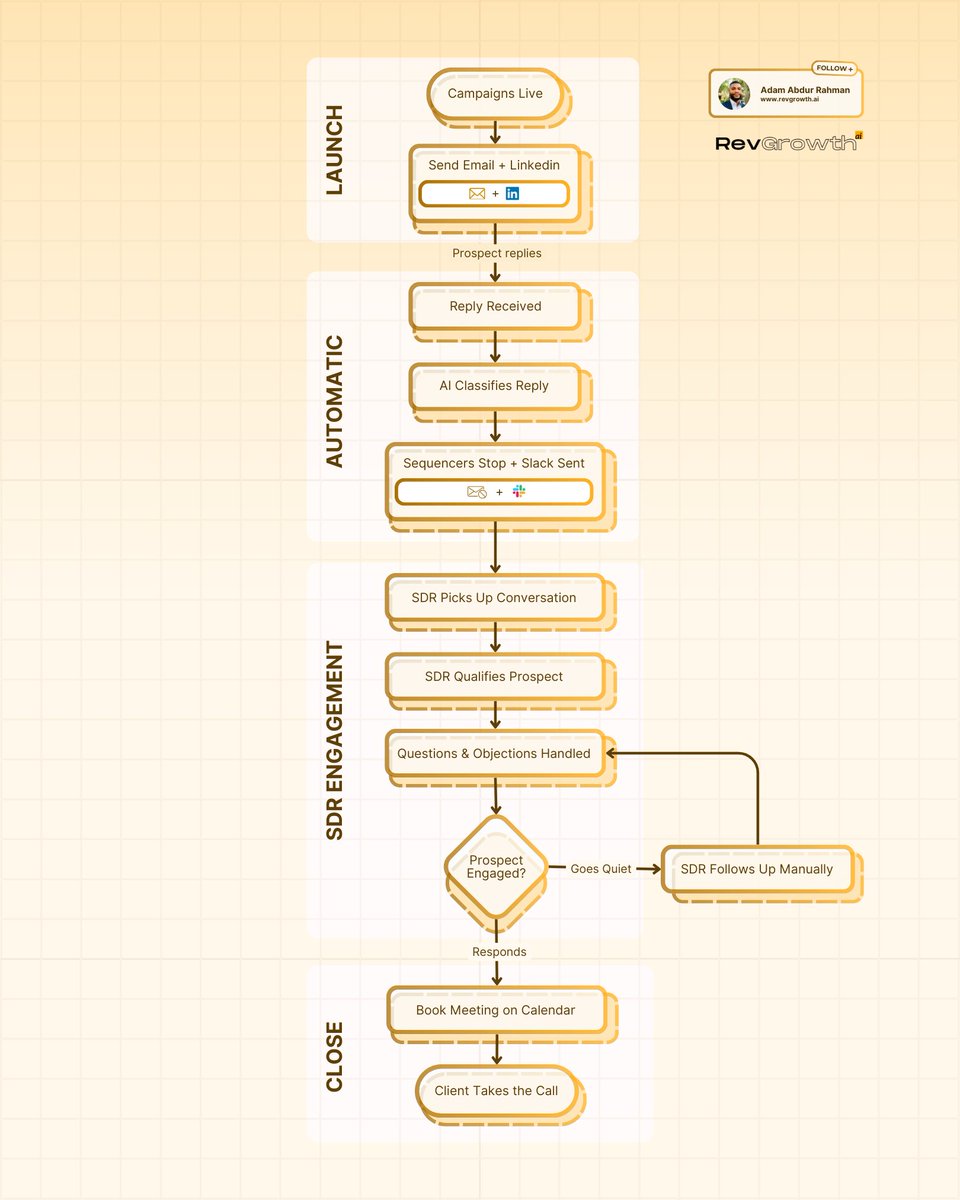
Meetings booked from cold outbound =
Multichannel launch (email + LinkedIn, not just one)
+ AI reply classification (instant, not manual inbox scanning)
+ Sequence auto-kill (stop selling after they respond)
+ Real-time SDR notification (Slack, not "check your inbox later")
+ Human qualification (not a chatbot)
+ Manual follow-up when prospects go quiet
Remove the AI layer and your SDR drowns in admin.
Remove the human layer and your pipeline dies at "interested."
Speed to lead is the multiplier. Human in the loop is the closer.
English

This Google Maps Lead Gen Agent is absolutely insane 🤯
Enter a keyword, city, & state → get back names, phone numbers, emails, websites, & reviews.
All inside Google Antigravity + Claude Code.
Perfect for agencies and lead gen operators who need prospecting data without paying insane SaaS fees.
Here's the problem:
You're manually searching Google Maps.
Clicking through listings one by one, copy-pasting phone numbers into a spreadsheet.
It takes hours to build a decent lead list.
This scraper solves it:
→ Enter your keyword (plumber, dentist, realtor, etc.)
→ Pick your city and state
→ Set the number of results you want
→ Hit search and let Apify do the scraping
→ Save leads you like to a bookmark list
No manual searching, no copy-pasting, no paying $200/month for a lead gen tool.
What you get:
- Full search results with business info
- Bookmark feature to save your best leads
- Search history to track past scrapes
- Option to host it on Replit so your team can use it
Built 100% with Claude Code & Antigravity.
I recorded a full walkthrough showing exactly how I built this from scratch, plus all the prompts I used.
Want all the prompts I used for Claude Code so you can build it yourself?
> Like this post
> Comment "LEADS"
And I'll send it over (must be following so I can DM)
English

i'm gonna regret leaking this but fuck it
15 lead sources that ARENT apollo
took me 4 hours to put together 40 pages of where i actually find leads
- tweet scraper (40K emails → 355 opportunities from ONE source)
- the shopify app review trick
- how to find leads who just raised money
- the google maps play for local
- sources for ecom, agencies, SaaS, local
after sending 1,000,000+ emails these are the sources that ACTUALLY work
like + comment "LEADS" and i'll send it over
(must follow + RT for priority access)
English

We've done four $150,000+ deals recently by keeping it stupid simple.
English first cold callers at $4.50 / hour. 30 leads/month per agent, and it's all managed for me.
We just hired our 15th. If you want the same agents at $4.50 / hour, comment "Caller" & I'll DM you.
English
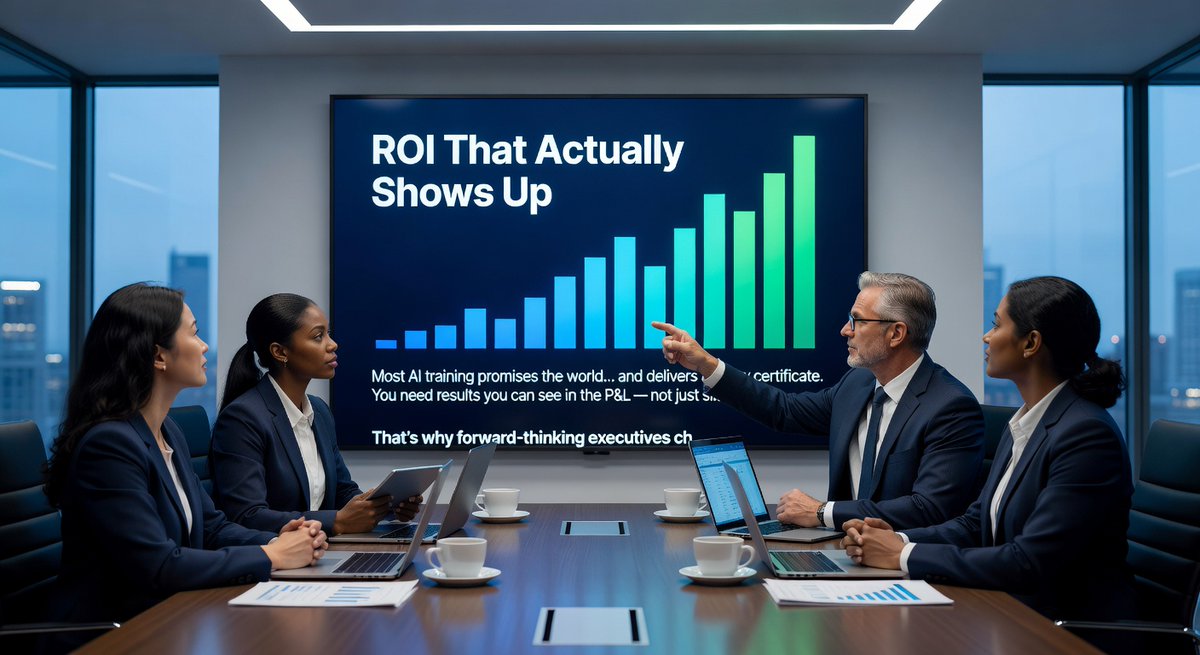
ROI That Actually Shows Up
Most AI training promises the world… and delivers a fancy certificate.
You need results you can see in the P&L — not just slides.
That’s why forward-thinking executives choose our recurring Lunch & Learn Academy.
Short, consistent sessions (weekly/monthly) that deliver immediate productivity gains and documented ROI.
Your team learns exactly what to use, when to use it, and how it drives real business outcomes.
No fluff. No forgotten lessons. Just compounding value every single month.
If you’re done with training that disappears into the void, this is your move.
Estimate your ROI with the tool below 👇
lunchandlearnacademy.com/roi-estimator
English

Claude just made cold email ops fully autonomous.
And most people running Instantly or Smartlead have no idea this exists.
Here is what cold email used to look like:
- You wrote copy with AI
- You logged into your sending tool manually
- You checked metrics yourself
- You made changes by hand
Here is what it looks like now:
- Claude logs in
- Claude checks performance
- Claude makes changes
- You review the results
With Computer Use, Claude can see your screen, move your mouse, click buttons, navigate dashboards, and update live campaigns.
For cold email, that means Claude can:
→ Pause sequences under 1% reply rate after 500 sends
→ Increase daily send volume on sequences booking meetings
→ Edit subject lines and first lines on losing steps
→ Duplicate and spin winning variants
→ Clean lead lists
→ Pull reply and booking reports
→ Organize everything into spreadsheets
Here is the system I built:
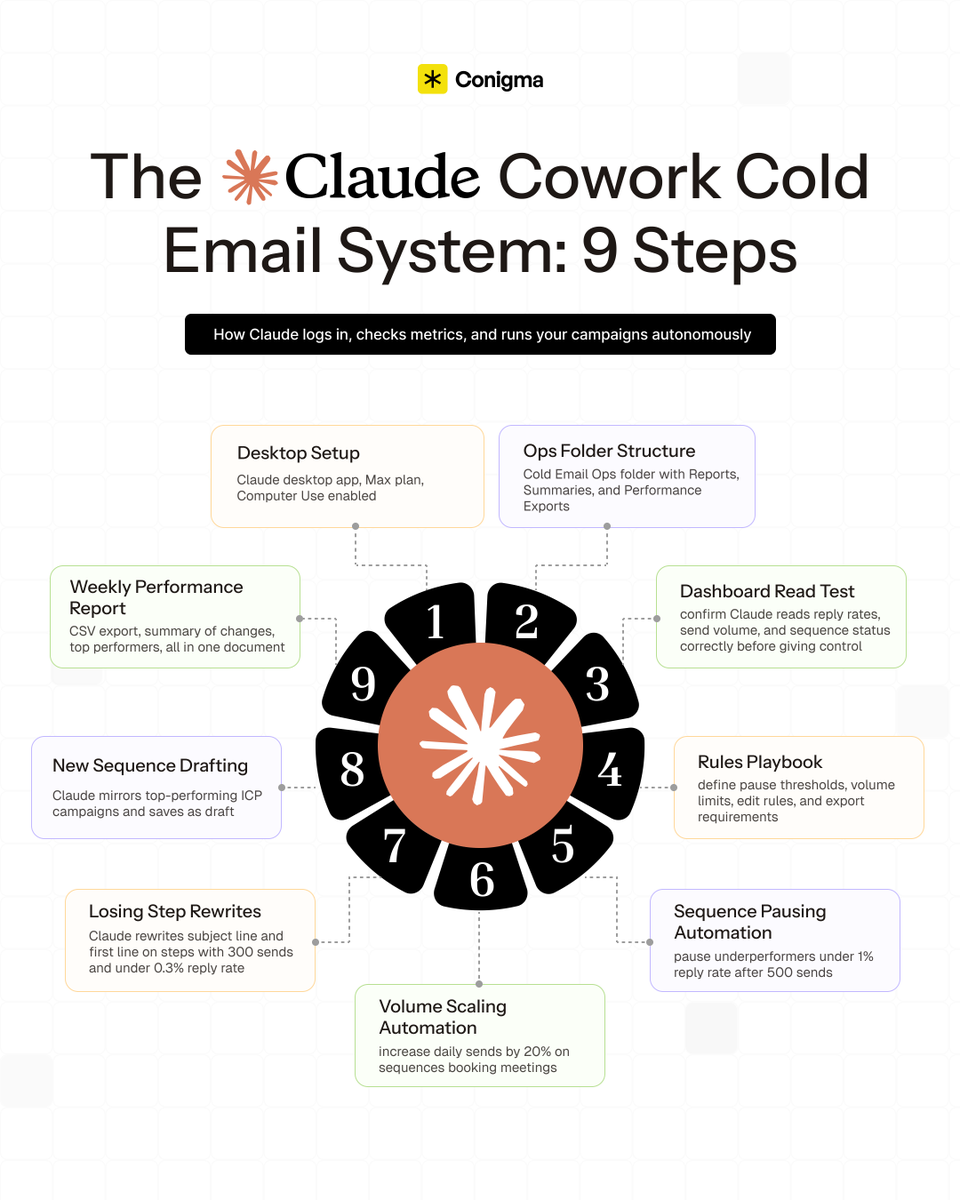
1) Desktop Setup
→ Mac with Claude desktop app
→ Claude Max plan or approved waitlist access
→ Computer Use enabled in settings
2) Ops Folder Structure
→ Create a "Cold Email Ops" folder on your desktop
→ Inside: Reports, Daily Summaries, Performance Exports
→ Tell Claude: "You have access only to this folder for saving files"
3) Dashboard Read Test
→ Before automating anything, prompt Claude to walk through your dashboard without making changes
→ Confirm it correctly reads reply rate, send volume, and sequence status
→ Fix any misreads before giving it control
4) Rules Playbook
→ Pause sequences under 1% reply rate after 500 sends
→ Increase volume only on sequences booking meetings
→ Never edit copy on campaigns under 200 sends
→ Always export reports before any changes
5) Sequence Pausing Automation
→ Prompt: "Review all active sequences. Pause any with reply rate under 1% and over 500 sends. Export a report first and ask for confirmation."
→ Saves 30 minutes of manual work per session
6) Volume Scaling Automation
→ Prompt: "Find sequences booking meetings in the last 7 days. Increase daily send volume by 20%. Cap at safe limits and confirm before applying."
7) Losing Step Rewrites
→ Identify steps with 300+ sends and under 0.3% reply rate
→ Claude rewrites only the subject line and first line
→ Creates a new variant and leaves the original untouched
8) New Sequence Drafting
→ Claude scans your highest reply rate campaigns for a given ICP
→ Mirrors subject line length, first line style, and CTA format
→ Saves as draft inside your ESP
9) Weekly Performance Report
→ Claude pulls last 7 days data, saves CSV to your ops folder
→ Writes a summary: reply rate changes, paused sequences, top performers
→ One document instead of five dashboard tabs
This is the same system we use at Conigma to run cold email ops without manual micromanagement.
If you want the full Claude Cowork Cold Email System:
Follow me
Reply "COWORK"
I'll DM you the complete guide.
English

I just built a free GPT that writes your LinkedIn posts AND builds your content strategy for April/ May.
Most people struggling with LinkedIn content make the same mistake.
They assume that growing on LinkedIn is just:
→ Posting more often
→ Using trending hashtags
→ Writing longer posts
→ Copying what big creators do
→ Scheduling content in batches
That's the part you can see.
What actually drives real results tends to go unnoticed.
Behind the scenes, consistent LinkedIn growth usually means:
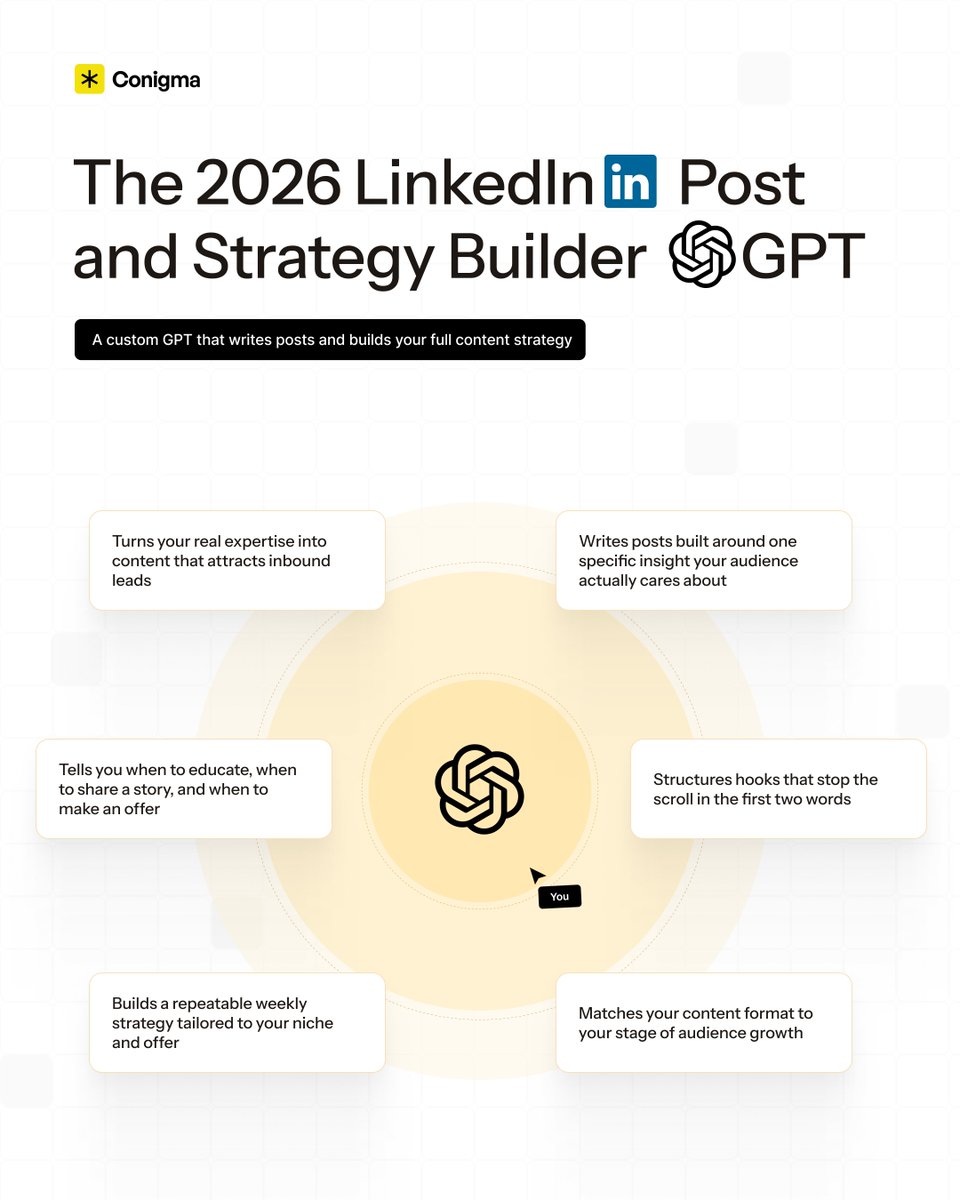
→ Writing posts built around one specific insight your audience actually cares about
→ Structuring hooks that stop the scroll in the first two words
→ Matching your content format to your stage of audience growth
→ Building a repeatable weekly strategy - not just one-off posts
→ Knowing when to educate, when to share a story, and when to make an offer
→ Turning your real expertise into content that attracts inbound leads
None of this is flashy.
Most of it doesn't sound cool on social media.
But it's the difference between posting into the void and building a pipeline.
The creators who grow on LinkedIn aren't just more talented writers.
They're more strategic.
They make it easy for their ideal buyers to understand:
- What problem you solve
- Why you are the right person to solve it
So I built something to remove the guesswork entirely.
The 2026 LinkedIn Post and Strategy Builder GPT.
It's a custom GPT that helps you write high-performing posts AND build a strategy around them - tailored to your niche, your offer, and your audience.
No generic templates.
No random prompts.
Just a repeatable system that actually works.
Want access?
Reply STRATEGY below and I'll send you the link directly.
English

I built a complete LinkedIn funnel that brings in 100+ leads a month
(and I'm giving you the entire system)
Most people think posting on LinkedIn is enough…
Yeah it’s not.
You need a full conversion system that takes someone from seeing your post to becoming a paying client.
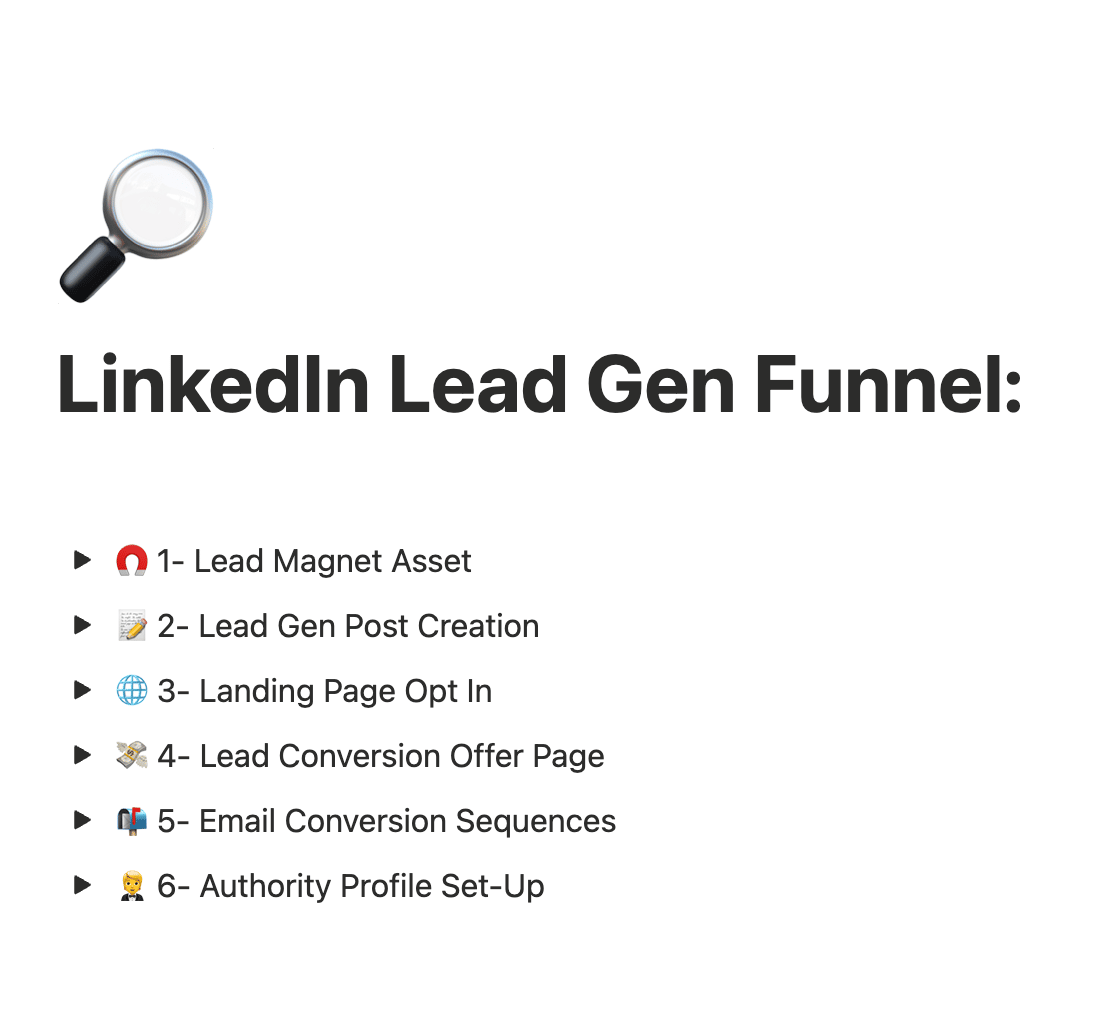
I've mapped out the exact 6-step funnel that turns LinkedIn engagement into revenue:
→ Lead Magnet Creation: How to build high-value assets using ChatGPT
→ Viral Lead Gen Posts: Templates that get thousands to comment
→ Landing Page Setup: Capturing emails automatically
→ Conversion Offer Pages: Turning leads into buyers immediately
→ Email Sequences: Nurturing prospects into clients
→ Authority Profile: Optimizing your LinkedIn to close deals
I've packaged everything into a complete guide with video walkthroughs for each step.
Want the full LinkedIn Lead Gen Funnel system?
1. Follow me
2. Comment "FUNNEL"
I'll send it directly to your DMs.
English
Falling Behind on AI?
While you’re still figuring out which AI tools matter, your competitors are already 6 months ahead.
Teams are overwhelmed. Leaders are frustrated. Growth is stalling.
The fix is simpler than you think. Join the growing list of smart executives using our recurring corporate AI training — convenient 1-hour Lunch & Learn sessions that keep your entire organization advancing every week or month.
Customized curriculum. Immediate application. Proven ROI.
No more guesswork. No more lag. Just steady, measurable AI momentum.
Executives: DM “LUNCH & LEARN” if you want your team to stop falling behind.
lunchandlearnacademy.com/benefits
English
John Pavone retweetledi

I mapped every AI automation opportunity across 25 industries.
10-15 pain points each. With the exact positioning, pricing range, and who to sell to.
This took me 4 years and 80+ client engagements to figure out.
A lot of AI agencies pick a niche and pray.
They don't know the actual pain points.
They don't know who the buyer is.
They don't know what these companies are already paying for broken solutions.
They don't know what the realistic project size is.
So they end up competing on price for generic "AI automation" gigs.
I've worked with marketing agencies, recruiting firms, e-commerce brands, law firms, real estate companies, healthcare practices, financial services, SaaS companies, manufacturing, construction, logistics, and more.
Every single one has 10-15 processes that are bleeding money because they're still done manually.
Here's what the guide covers for each industry:
→ The top 10-15 automation pain points (ranked by ROI)
→ Who the actual buyer is (CEO, COO, ops manager, etc.)
→ What they're currently paying for manual labor or broken SaaS
→ Realistic project pricing ($5K-$60K+ depending on scope)
→ The discovery questions that unlock the deal
→ How to position yourself as the expert even if you've never worked in that industry
→ Red flags to avoid (industries and company sizes that aren't worth it)
25 industries and 300+ specific automation opportunities.
This is the cheat code for picking your niche and knowing exactly what to sell before you ever get on a call.
Like + RT + reply "NICHE" and I'll send you the full guide (Must be following so I can DM)

English

If I wanted to quit my job & replace my salary by Summer, here's exactly what I'd do:
1. Set up a simple website with AI before the week is over. Not next month. Not after you "research more." This week.
English
Claude Code is the most powerful GTM execution tool right now.
But 90% of GTM teams are still skipping strategy and going straight to prompting.
That's why I made The B2B GTM Playbook: 5 Modules from GTM Strategy to Claude Code Agent Teams:
→ The 6-step GTM strategy framework built from zero to $450M ARR that most founders never build before hiring an agency
→ How Vercel replaced 10 SDRs with 1 agent at $1K per year with conversion rate held flat
→ The full Claude Code agent team setup that lets teammates queue tasks and agents execute by priority without you at the keyboard
Comment "GTM" and I'll DM it free.

English
@Mike_Scully_ Corporate training AI Solutions. lunchandlearnacademy.com
English

I cracked how to sell AI outreach agents to marketing agencies.
Built a playbook on my strategy, and actual cold emails and scripts that closed >$200k for an agency for me last month.
Like + comment and I will send the link to you.
English
AI does 90% of our initial GTM strategy formulation all in just these 6 prompts.
This has been a MASSIVE unlock for speed to winning GTM for our diverse client base.
(Comment "Prompts" and I'll DM you a document with all of the prompts.)
Here’s what these prompts cover:
1/ Deep Market Research
This prompt pulls all relevant information specific to what would be useful for GTM knowledge for the company you're looking to develop a GTM strategy for.
The purpose of generating this information is to use it as context for future prompting.
2/ TAM Mapping
This prompt will discover all relevant industries & sub-industries that your company could work with, plus statistics on general market size, industry value, and industry growth rates.
Outputs from this prompt will also be useful context for other prompts.
3/ ICP Validation
This prompt will develop ICPs from the industries uncovered from the TAM Mapping output.
It will score each industry segment from highest to lowest priority, find the best fit personas from each industry segment, outline their specific needs & pain points, and craft some messaging ideas around this information.
4/ Company Account Sourcing
This deep research prompt will find unique databases for any set of company data that you are looking for.
From online directories, to scraping methods, to other niche paid databases - this prompt will give you a list of best fit options for your particular targeting case.
5/ Targeting Keywords Generation
This prompt will generate a list of relevant industry and persona keywords to use for specific database filtering for when your developing lists in tools like Apollo.
These keywords are typically a lot more accurate than using the general industry filtering.
6/ Messaging Creation
This prompt will create multiple email script variations based on the context generated from previous prompts.
It'll create unique variations on length of the emails, different offers, pain points, case studies, and complexity.
Want these copy-and-paste prompts for yourself?
Comment "Prompts" and I'll DM you a document with all of the prompts.
(Must be following to receive)

English