@smratitiwa86867 Finally found a tracker that doesn't feel like a chore. Focusd just runs locally and builds a timeline of my actual work vs distractions. No more guessing where my day went, thanks.
🚨 This AI tool tracks your work better than you do…
Most people think they’re productive.
They’re not.
Meet Focusd — an open-source AI productivity coach 👇
→ Automatically tracks what you're doing on your desktop
→ Separates deep work vs distractions (Slack, social media)
→ No timers. No manual tracking. Just real data
It literally gives you a “receipt” of your day.
No guessing. No fake productivity.
⏱️ If you're serious about improving focus, this is insane.
🔗 github.com/video-db/focusd
Follow @smratitiwa86867 Tiwari for more AI tools that actually work
Bookmark this 🔖
@ashu_trv I’ve tried so many productivity timers, but I always forget to start and stop them. An app that runs locally and just understands when I'm working vs getting distracted is huge. The actionable recaps are going to save me so much mental overhead. ✨
The modern work stack is a distraction machine.
Slack buzzes. A notification slides in. Your flow is gone — and you can’t even remember what you were doing 30 seconds ago.
I wanted to fix this for myself. So my teammate built Focusd. Open-sourcing it today.
@ashu_trv@videodb_io Context switching completely kills my focus and I can never track how much time I actually lose to it. Love that this distinguishes coordination from actual work. Having it all indexed locally as a personal intelligence layer is brilliant. Going to install this tonight 🔥
Every few seconds it captures your desktop and indexes the frame — projects, code, docs, the Slack thread that pulled you away, the tab you opened “for one second.”
Built on @videodb_iogithub.com/video-db/focusd
@ashu_trv Finally, an AI that doesn't just chat, but actually researches for me. My daily financial briefing is now 100% agent-generated and delivered to my WhatsApp while I have coffee LMAO. Game changer 👏
We built a way to get off feeds.
Instead of scrolling apps, a personal agent researches the internet for you and ships video briefings on a schedule.
We call it Agentic Streams.
No feeds. No ranking algorithms. Just signal.
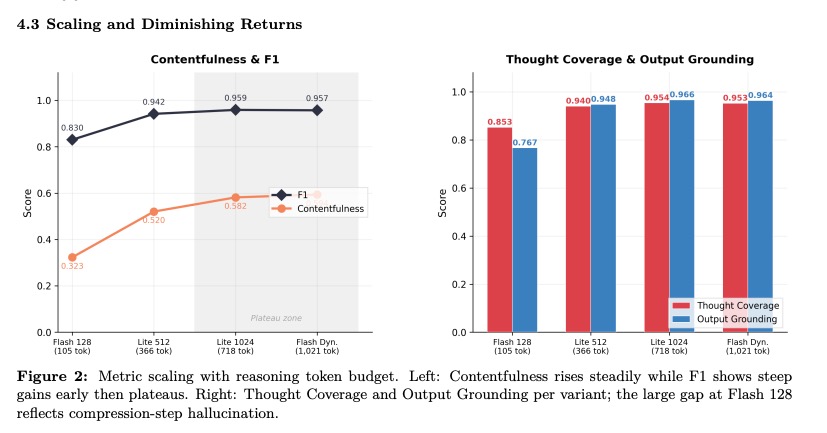
1/ Diminishing Returns: Quality gains plateau remarkably fast. Most improvements happen within the first few hundred tokens. Beyond ~700 tokens, you’re often just paying for "filler" reasoning
We just released a new benchmark looking inside the "black box" of Gemini 2.5 reasoning for video understanding.
Does "thinking more" always lead to better results?
The answer is more nuanced than you’d think 💭
🚨SEO agencies are going to lose it.
An open-source tool just replaced $2K–$12K/month retainers—free.
It’s called GEO-SEO Claude, built on Claude.
→ Audits your site for AI search (ChatGPT, Perplexity, Gemini, AI Overviews)
→ Finds why you’re not getting cited—and fixes it
→ Generates reports, llms.txt, and crawler insights instantly
Only 11% of sites get cited by both ChatGPT + Google AI Overviews.
This shows you exactly how to get there.
RT+ Like + reply “SEO” — I’ll send it + pick a few people for a bonus giveaway.
The issue is that agents are built on text primitives. LLMs, RAG, tool outputs — all text.
There's no native concept of a visual moment,
a tone of voice, or what was on screen at 2:34.
Found a solid breakdown on this if you want to go deeper: videodb.io/blog/why-ai-ag…
When an agent hits a video, it has 3 options:
1. Ignore it entirely, massive knowledge gaps
2. Transcribe everything, expensive, loses visual context
3. Hallucinate, sounds confident, completely wrong
Text-only agents hallucinate 3x more on questions about video content.
AI agents can summarize 50 pages, write production code and reason through complex problems.
But ask one "what did the client say about the budget in last week's call?" and it completely falls apart.
80% of enterprise data is video and audio.
Agents are basically blind....
@Suryanshti777 This is on point
The gap isn’t AI access, it’s thinking quality + how people use it
“Depth over tool hopping” is probably the most underrated one here
AI isn’t making people smarter.
It’s exposing who knows how to think.
Most people type one prompt,
get average output,
and blame the tool.
Meanwhile, a few people are becoming unfairly good.
Here are 7 AI skills to master in 2026:
1. Stay updated — but only with useful AI
Unfollow noise.
Follow people who show workflows.
Every post you read → try one thing.
Execution beats awareness.
2. Pick ONE AI and go deep
Stop switching between 10 tools.
Choose one and use it for:
• writing
• strategy
• research
• planning
Depth creates leverage.
3. Set context before prompting
Tell AI:
who you are
who you write for
your tone
examples you like
AI without context = generic
AI with context = dangerous
4. Teach AI your taste (most skip this)
Let AI ask you questions about:
• your niche
• opinions
• audience
• style
Now AI thinks like you — not like everyone else.
5. Talk to AI like a collaborator
Don’t just ask.
Challenge it.
Push it.
Ask what's missing.
Ask for better angles.
Conversation is the skill.
6. Ship fast with AI
Use AI for rough drafts.
Post early.
Refine later.
Speed compounds.
Perfection delays.
7. Lead AI. Don’t follow it
Give AI execution.
Keep strategy.
Keep voice.
Keep judgment.
AI is powerful.
But direction is everything.
Most people will read this.
Few will apply it.
Those few will look 10x better in 30 days.
@startupideaspod Programmatic SEO works, but distribution + indexing is the real bottleneck
Most people can generate pages, few can get them ranked
Starting with 100 pages first is actually the smartest part here
10,000 SEO pages in 48 hours.
Here's how programmatic SEO actually works:
Keyword pattern: Pick "best X for Y" or "service in city"
Example: "best CRM for dentists"
Data set: Scrape structured data with tools like Firecrawl
Real info.
Real value per page.
Template: Build one page layout using Claude Code or Codex
- Every page follows the same structure.
AI content: Generate unique paragraphs per page
- Not variable swaps. Actual quality.
The math:
- 10,000 pages × 30 visits/month = 300,000 visitors
- 2% conversion = 6,000 conversions
- $10 each = $60,000/month
From pages you built once.
Start with 100 pages as your MVP.
Monitor indexation.
Then scale.
@k1rallik Token efficiency is the real game most people miss
If you stop re-reading context, limits basically disappear
Though $134k in 48h sounds impressive, I’d be cautious about sustainability
GitHub + Claude token limits = free 24/7 sports AI agent
Someone figured out what most people ignore about Claude.
Claude doesn't block you because you sent too many messages.
It blocks you because you wasted too many tokens re-reading the same history.
They fixed that.
Then pointed it at sports markets.
Then spent a weekend building something.
Now they have a $20/month AI agent that:
→ monitors every major sports news source 24/7
→ tracks live odds on prediction markets
→ calculates probability shifts using their own custom formulas
→ never hits usage limits
→ never sleeps
All the data sources? Found on GitHub. Free repos. Community-maintained.
The agent ran non-stop for 48 hours.
In those 2 days - $134,000.
From a probability model they built themselves, cross-referenced with live market odds in real time. The agent caught moves the market hadn't priced in yet.
He uses Kreo → @trader" target="_blank" rel="nofollow noopener">kreo.app/@trader
Public profile. Every trade visible. Every number verifiable.
One article about token compression changed how they thought about AI.
The math is simple. The results aren't.
@akshay_pachaar Great analogy
The “OS layer” is where most of the real differentiation is happening now
Models are converging, but orchestration is still wide open
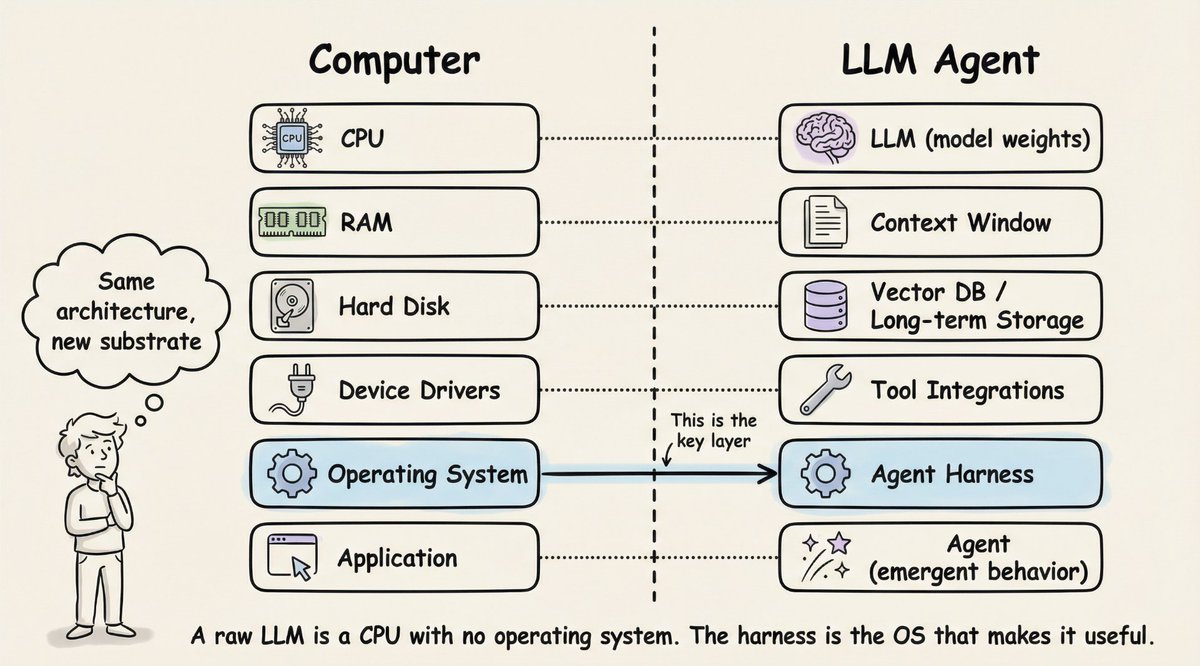
A raw LLM is just like a CPU without OS.
It can compute. But it can't do anything useful on its own.
This analogy is the clearest way I've found to understand what an agent harness actually does.
Here's the mapping:
• 𝗖𝗣𝗨 → 𝗟𝗟𝗠 (model weights). The raw compute engine. Powerful, but useless without infrastructure around it.
• 𝗥𝗔𝗠 → 𝗖𝗼𝗻𝘁𝗲𝘅𝘁 𝘄𝗶𝗻𝗱𝗼𝘄. Fast, always available, but limited. When it fills up, you start losing things.
• 𝗛𝗮𝗿𝗱 𝗱𝗶𝘀𝗸 → 𝗩𝗲𝗰𝘁𝗼𝗿 𝗗𝗕 / 𝗹𝗼𝗻𝗴-𝘁𝗲𝗿𝗺 𝘀𝘁𝗼𝗿𝗮𝗴𝗲. Large capacity, but slow to access. You retrieve from it, not compute in it.
• 𝗗𝗲𝘃𝗶𝗰𝗲 𝗱𝗿𝗶𝘃𝗲𝗿𝘀 → 𝗧𝗼𝗼𝗹 𝗶𝗻𝘁𝗲𝗴𝗿𝗮𝘁𝗶𝗼𝗻𝘀. The interfaces that let the model interact with the outside world. Code execution, web search, file I/O.
• 𝗢𝗽𝗲𝗿𝗮𝘁𝗶𝗻𝗴 𝘀𝘆𝘀𝘁𝗲𝗺 → 𝗔𝗴𝗲𝗻𝘁 𝗵𝗮𝗿𝗻𝗲𝘀𝘀. This is the key layer. It manages everything: which tools to call, what fits in memory, when to retrieve, how to recover from errors, and when to stop.
And then there's the 𝗮𝗽𝗽𝗹𝗶𝗰𝗮𝘁𝗶𝗼𝗻 layer. That's the "agent" itself. Not a piece of software you install, but emergent behavior that arises when the OS does its job well.
This is why two products using the exact same model can perform completely differently. LangChain changed only their harness infrastructure (same model, same weights) and jumped from outside the top 30 to rank 5 on TerminalBench 2.0.
The model didn't improve. The operating system around it did.
The article below is a deep dive on agent harness engineering, covering the orchestration loop, tools, memory, context management, and everything else that transforms a stateless LLM into a capable agent.
@HowToAI_ 100 pages/sec on CPU is crazy
If it handles tables + layout well, this could replace a lot of paid parsers
Curious how it performs on messy real-world PDFs though
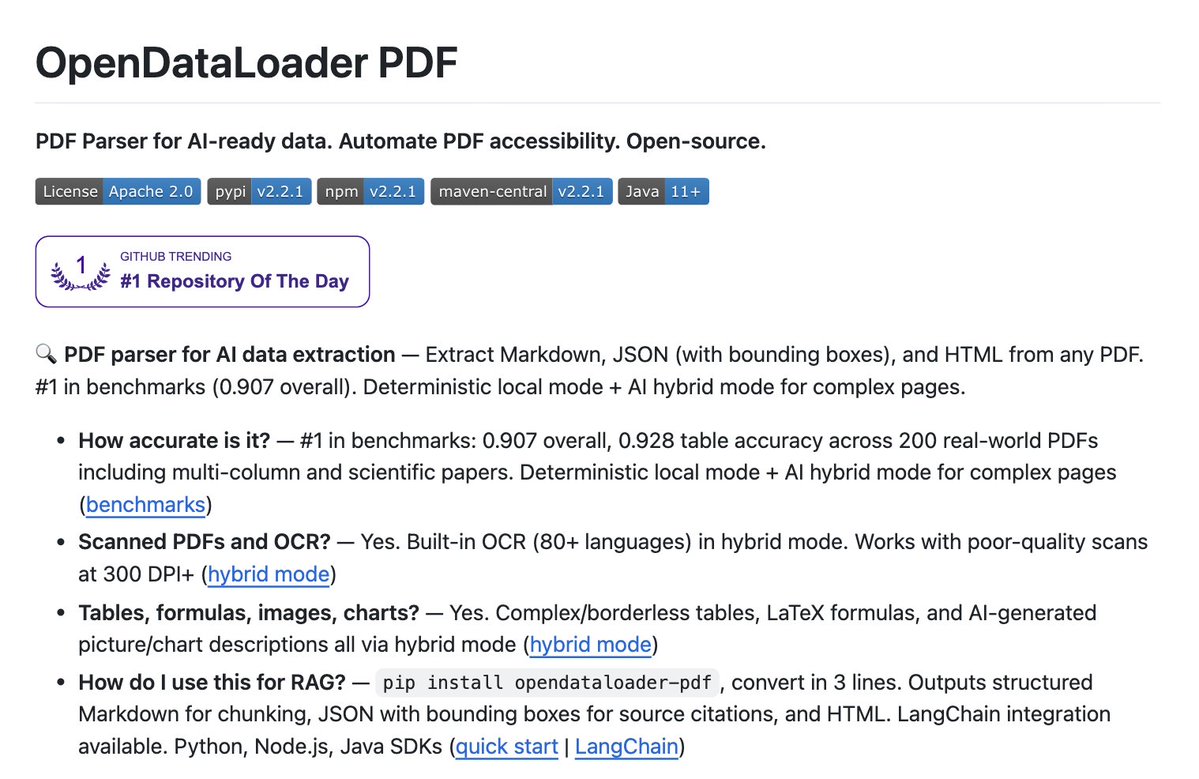
🚨 Someone just open-sourced a tool that converts pdfs to markdown at 100 pages per second.
It's called OpenDataLoader. It runs entirely on CPU and handles complex layouts, tables, and nested structures like a senior dev
100% Free.
@MetaMorpehus This is powerful
The visualization part works, but consistency is what actually rewires things
Feels less like a “hack” and more like daily training for your mind
How to fix your self-image:
Close your eyes. Become aware of the sensations in your body. Focus on how it feels to breathe slower. Do this as you slowly relax every muscle in your body. Head to toe.
Within five minutes you'll notice a tingling sensation in your palms while you relax.
Once that sensation arrives, you will be able to visually go within yourself to create permanent changes in the subconscious: transforming who you believe yourself to be.
Now for the next few minutes, allow yourself to mentally recall a time where you won. The first time you felt truly loved. A risk you took that paid off. The first time you realized you were capable of more than you thought.
Experience the scene fully.
You might notice warm feelings in your chest as you replay these memories.
This is the good part.
Fly to the future and imagine the greatest version of you. Notice how ASSERTIVE they stand. Notice how they appear. Sense their confidence.
They've overcome the things that keep you up at night. They've built what you've only imagined. They live life knowing exactly who they are.
Allow the image to become bigger, brighter...
Time will slow as your subconscious examines every detail.
Now imagine how it would feel if this was you right now. Picture yourself in their shoes. Can you feel it?
Linger there for five minutes.
You find yourself softly smiling knowing this is the happiest and most relaxed you have felt in a long time.
Lie there for a while. Enjoy this moment. Know that you can return here whenever you wish, exactly to this place, where you feel exactly as you do now.
All you have to do is close your eyes and imagine yourself back here. You feel rejuvenated by that thought.
Open your eyes and interact with the world from this state.
Believe it or not this is what you are eventually supposed to feel every single day. You will begin to notice that all the things you want to be are already within.
Few take the time to practice this.
Do this daily and you begin to rewire your mind. Change your beliefs. Think, act, and become the person you've seen glimpses of throughout your life.
This is Self-Hypnosis.
This is Psycho-Cybernetics.
This is how you do it.
—Cogito Ergo Sum
@gkisokay Good breakdown
The real edge is in mixing tiers smartly, not just picking the “best” model
Most people overspend on frontier when 80% of tasks don’t need it
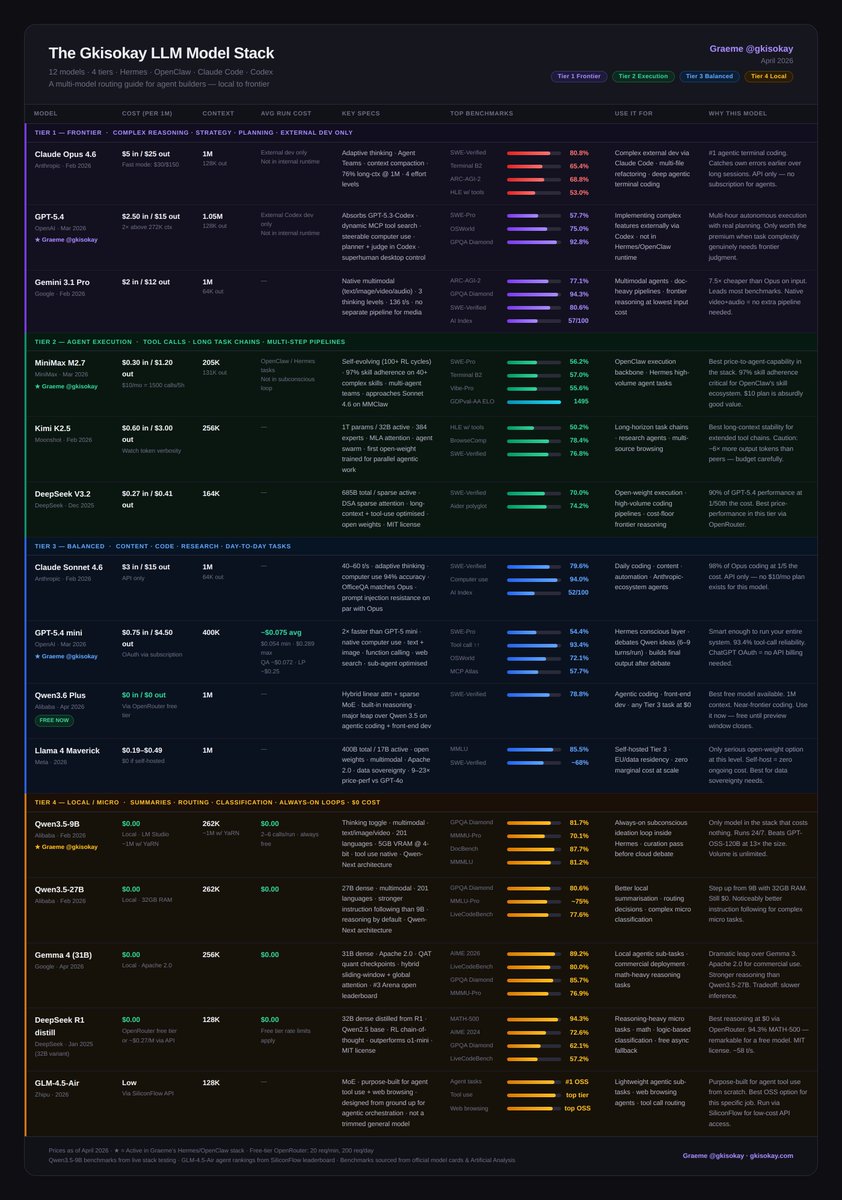
The LLM Cheat-Sheet for OpenClaw and Hermes agents
The goal is to choose the right models that best fit your agents' needs for as little cost as possible.
Do this and you can build a proficient agent that will never die.
Here's the full landscape on popular models for AI agents: 12 models, 4 tiers, every one earning its place.
Tier 1 - Frontier Models
- Claude Opus 4.6: #1 agentic terminal coding
- GPT-5.4: superhuman computer use, real planning
- Gemini 3.1 Pro: best price/intelligence at frontier, native multimodal
Tier 2 - Execution
- MiniMax M2.7: 97% skill adherence, built for agents
- Kimi K2.5: long-horizon stability, agent swarm
- DeepSeek V3.2: frontier reasoning at 1/50th the cost
Tier 3 - Balanced
- Claude Sonnet 4.6: 98% of Opus at 1/5 the cost
- GPT-5.4 mini: 93.4% tool-call reliability
- Qwen3.6 Plus: near-frontier coding, completely free
- Llama 4 Maverick: open-weight, self-host at zero marginal cost
Tier 4 - Local / $0
- Qwen3.5-9B: always-on subconscious loop, 16GB RAM, beats models 13x its size
- Qwen3.5-27B: stronger instruction following, 32GB RAM
- Gemma 4 31B: best local reasoning, Apache 2.0, commercial-ready
- DeepSeek R1 distill: best chain-of-thought at $0
- GLM-4.5-Air: purpose-built for agent tool use and web browsing, not a trimmed general model
Full breakdown with benchmarks, costs, and use cases in the table 🔽
@rubenhassid This is a solid workflow
The .md files replacing repeated prompts is actually the biggest unlock here
Though the funnel at the end feels a bit heavy, the core idea is useful.
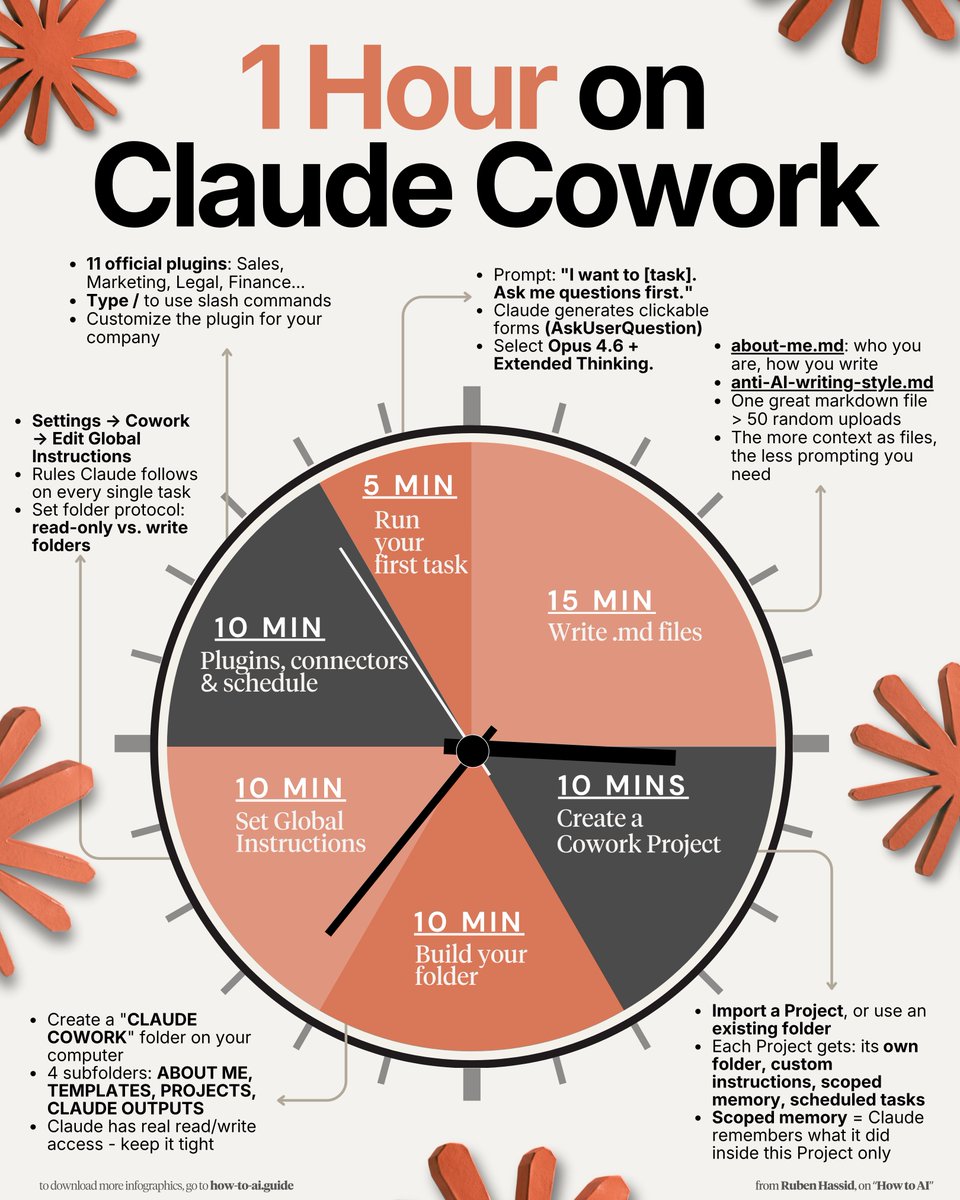
How to set up Claude Cowork completely in 1 hour:
(duplicate my exact folder, files, and prompts)
1. Download the Claude desktop app.
2. Click the Cowork tab at the top.
3. You need a Pro plan ($20/mo). Worth it.
-----
→ 0-10 min: Build your 'Claude Cowork' folder.
Create "CLAUDE COWORK" on your computer.
Inside: About me, Projects, Templates, Output files.
To download mine, go here: how-to-ai.guide.
Don't pay anything. It's free in the welcome email
(The most important step, don't skip it)
→ 10-25 min: Write your .md files.
about-me .md = who you are, how you work.
anti-ai-style .md = every word you'd never use.
To download my files, go to how-to-ai.guide.
(These two files replace 500-word prompts forever)
→ 25-35 min: Set Global Instructions.
Go to Settings → Cowork → Edit Global Instructions.
Folder rules. Naming conventions.
What Claude must read before every task.
(You write this once. It runs every time)
→ 35-45 min: Create your first Cowork Project.
Cowork tab → Projects → +.
Pick a task you do every week.
Scoped memory = it remember what it did last week
(You stop re-explaining yourself)
→ 45-55 min: Run your first real task.
Prompt: "I want to [task]. Ask me questions first."
Claude generates clickable forms to prompt you.
It creates a real .docx in your folder.
(Stop prompting. Start directing)
→ 55-60 min: Schedule a task.
"Every Monday at 7am, create my weekly briefing."
You wake up to a finished doc. That's the endgame.
Pro tip: Always add "Use AskUserQuestion" to every prompt. Claude prompts you instead.
To download all of my other Claude infographics:
Step 1. Go to how-to-ai.guide.
Step 2. Subscribe for free. Don't pay anything.
Step 3. Open my welcome email (most skip this).
Step 4. Hit the automatic reply button inside.
Step 5. Download my infographics from my Notion.
Bonus. Enjoy my best copy-paste prompts, too.
Works with Cursor, Claude Code and Codex.
Fully open source, demo's in the repo.
Honestly one of those tools where you wonder why nobody built it sooner.
It records your screen, mic and system audio in real time and makes it all searchable in natural language.
So instead of copy-pasting error messages and writing paragraphs of context, your agent already knows what you're looking at.
Been using Cursor and Claude Code a lot lately and the most annoying part is always the same thing.
Explaining what's on my screen.
Found an open source tool that just... fixes that.
github.com/video-db/pair-…