Automationsbygomez

307 posts

Automationsbygomez banner
Automationsbygomez

Automationsbygomez

@mrgomezdotskr

Katılım Kasım 2025
430 Takip Edilen53 Takipçiler
Sabitlenmiş Tweet
Automationsbygomez
Automationsbygomez@mrgomezdotskr·
a new season, dropping web3 hits one tweet at a time nft ..... defi ..... prediction markets .... memes ...... blue chip pjs ..... mrgomez is here watch out 👀 👀 👀
English
0
0
0
17
F.O.L.A
F.O.L.A@folaoftech·
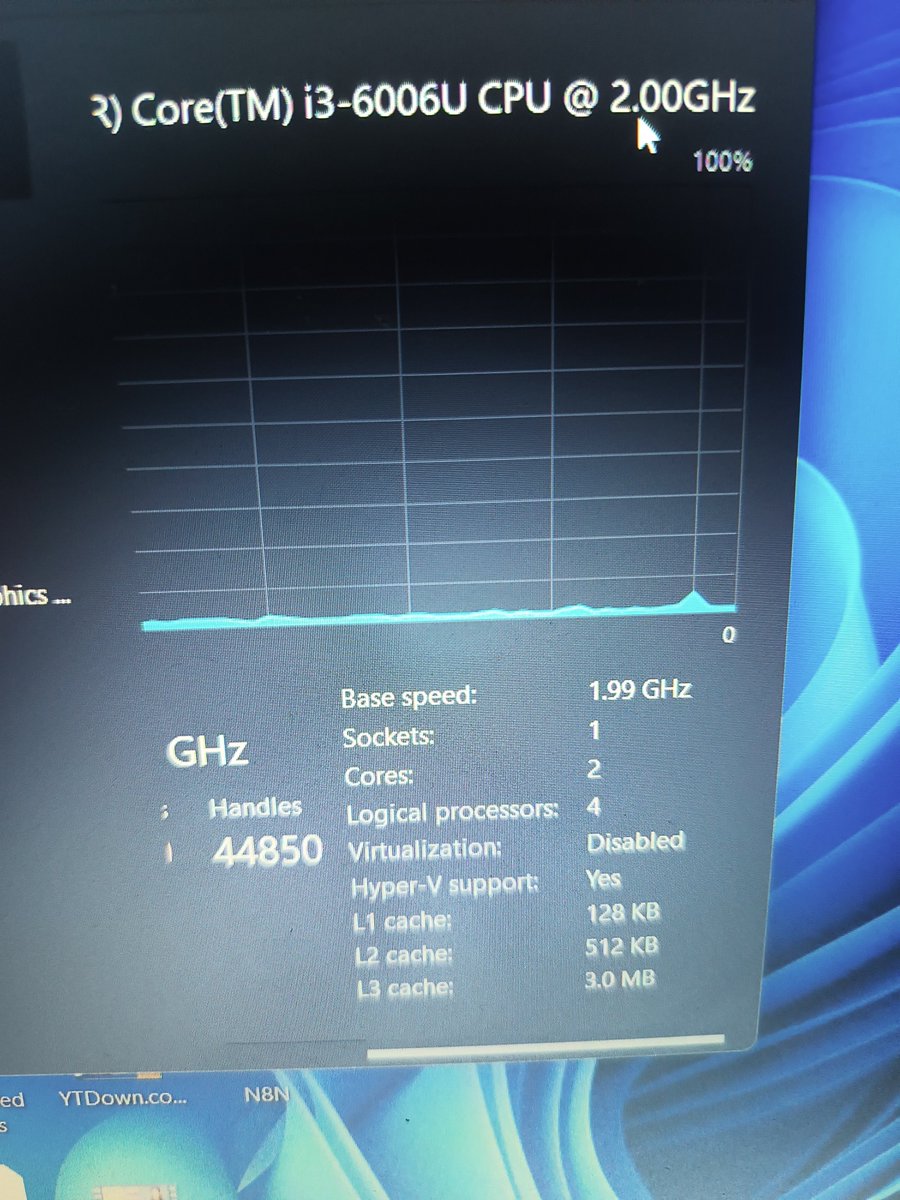
Before buying that used laptop, remember not every spec you see tells the real story 👀
English
171
1.3K
4.8K
255.1K
Makanaki_GfG
Makanaki_GfG@makanaki_GfG·
@mrgomezdotskr @folaoftech But fastest way just go to task manger , then performance , click cpu tab ex Intel® Core™ i7-12700H"). Usally the next digit after the -dash tells the generation but Usally prefer the detailed information
English
1
0
1
129
Onomen Oamen
Onomen Oamen@Nomski_101·
@mrgomezdotskr @folaoftech easiest way is to give to a bios engineer in computer village. long way, you will do it yourself by going to the board and look for the bios to bridge the first two pins with a needle or screwdriver while you turn on the computer. you can check youtube for your model though.
English
2
0
4
214
Automationsbygomez
Automationsbygomez@mrgomezdotskr·
How's everyone doing? A beautiful day it is. Go and WIN!!!
English
0
0
0
12
Automationsbygomez retweetledi
Ayomide
Ayomide@ayomide_ayeh·
What if scheduling a meeting was as simple as sending a message and your chat assistant handled everything else? Twenty five days into my 30-day automation challenge and today's build is one of those workflows that immediately makes you question why you ever scheduled a meeting any other way. Day 25 of my 30-Day Automation Challenge (Tools: n8n, Google Calendar, Telegram) I built a Calendar Assistant on n8n. An AI-powered calendar scheduling agent living inside Telegram that checks your availability and books meetings directly into Google Calendar through a natural conversation. You tell it when you want to meet. It checks if you are free. It creates the event. Here is exactly how the workflow operates: ⚡ Receive message triggers when there is an incoming message in real time ✏️ Set Parameters node structures the incoming message and prepares it for the AI Agent 🤖 Calendar Agent receives the request and decides which tool to use based on what the user is asking 📅 Check_Availability tool queries Google Calendar in real time to verify whether the requested time slot is free or already booked 🗓️ Schedule_Meeting tool creates a new calendar event directly in Google Calendar once availability is confirmed 📤 Send a Reply node delivers the assistant’s response and booking confirmation back to the user on Telegram instantly What makes this build elegantly powerful is its simplicity relative to what it actually does. Five nodes on the surface. But underneath those five nodes is a fully functioning AI scheduling system that understands natural language, queries a live calendar, makes decisions based on real availability data and takes action by creating actual calendar events. That combination of conversational intelligence and real world action is what defines a true chat assistant. The two tools working in sequence is also worth noting. The agent checks availability before it books. It never creates a conflicting event. It verifies first and acts second. That logic is simple but it is exactly what makes this trustworthy enough to use for real scheduling. Think about who this serves every single day. Founders and executives managing packed calendars across multiple time zones. Freelancers coordinating client calls without a dedicated assistant. Teams where scheduling back and forth over email eats up time that belongs to actual work. Any individual or business where the friction of finding a mutual time slot is a daily irritation. You should not need to open your calendar, check your availability, draft an email, wait for a response and confirm a time. You should be able to say when you want to meet and have the meeting appear in your calendar. That is what this does. Twenty-five days in and five days to go. Looking at the full arc of this challenge is something I find genuinely difficult to summarize. Day 1 was formatting text in a five-step Zap. Day 25 is an agent that books meetings from a Telegram conversation using live calendar data. The distance between those two points was built one day at a time. No shortcuts. Just consistent daily building for twenty-five consecutive days. The final five days of this challenge are going to be the most intentional builds of the entire month. #WorkflowAutomation #n8n #30DayChallenge #AIAutomation #Productivity #BuildinPublic
Ayomide@ayomide_ayeh

A Leave Request Processor on n8n that validates employee identity, checks leave balances, makes an approval decision and notifies the employee automatically. No back-and-forth emails. No waiting for a manager to remember to respond. No HR team manually cross-checking spreadsheets. Day 24 of my 30-Day Automation Challenge (Tools: n8n, Gmail, Goggle Sheets) Here is exactly how the workflow operates: 📋 New Leave Request Trigger fires the moment a new leave request row is added to Google Sheets 🔍 Validate Employee ID and Calculate Leave Days node verifies the submission and calculates the number of leave days being requested ✅ Check if Employee ID is Valid node confirms whether the requesting employee exists in the system and routes accordingly If the Employee ID is Invalid: 📧 Send Mail for Invalid ID node immediately fires an email notifying the requester that their submission could not be processed due to an unrecognized employee ID. If the Employee ID is Valid: 📊 Get Leave Balance node reads the employee’s current leave balance from Google Sheets checking how many days they have remaining 🔀 If You Still Have Leave Days Accrued node checks whether the requested days fall within the available balance and routes to the correct outcome If Leave Balance is Sufficient: ✅ Leave Request Approved node sends a personalized approval email to the employee confirming their leave has been granted If Leave Balance is Insufficient: ❌ Leave Request Denied node sends a professional email informing the employee that their request cannot be approved due to insufficient leave days remaining Request submitted. Identity verified. Balance checked. Decision made. Employee notified. All automatically. What makes this workflow genuinely valuable is the logic chain. It is not simply approving or rejecting requests randomly. It is making a structured decision based on real data. Is this a valid employee? Do they have enough leave days? The answers to those two questions determine the entire outcome and the workflow handles both gracefully with appropriate communication at every stage. The Invalid ID path is the detail that most basic leave systems miss entirely. When an unrecognized submission comes through, the workflow does not stall or fail silently. It immediately notifies the requester so they can correct and resubmit. That kind of graceful error handling is what makes automation trustworthy in a real HR environment. Replicating @DDataknight build today was a reminder that learning by doing is always more valuable than learning by watching. Following the logic, connecting the nodes and making it run cleanly yourself is how the understanding becomes permanent. Think about every growing business managing leave requests manually. HR managers receiving WhatsApp messages asking for approval. Employees following up repeatedly because they are not sure if their request was seen. Managers cross-checking spreadsheets to remember how many days someone has left. All of that friction disappears with this workflow. Does your organization process leave requests manually or do you have a system that handles approvals automatically? I would genuinely love to know how your HR team currently manages this below. #WorkflowAutomation #n8n #Revobridge #30DayChallenge #HRAutomation #BuildinPublic


English
1
5
12
1.7K
TRiX
TRiX@trix_mrkt·
Running an experiment on Solana Claiming actual Solana (not a coin) through TRiX to the first 1,000 wallets that comment in the next 24 hours (must have a TRiX profile) Curious what price action and holder behavior look like when the top of the distribution isn't dominated by people who farm every launch. Drop your wallet address
English
1.3K
692
1K
25.1K
Banana Zone App
Banana Zone App@BananaZoneApp·
🍒 something for the early ones 🍌 we’ve just sent the Chief Banana Crayon NFT to the first 1,000 in our @cherrydotfun group if you’re holding it… you know you are early more coming 🍌🍌🍌
Banana Zone App tweet media
English
60
25
129
4.1K
Mango
Mango@mango_·
The time has come... Introducing Mango Inner Circle, my first, free, public channel on Cherry Expect alpha and news across DeFi, RWA, stablecoins, consumer, and all things Solana. No slop. > And we are giving away 5 sol to 50 winners: • Join @mango" target="_blank" rel="nofollow noopener">chat.cherry.fun/@mango • Tap airdrop & Сomplete the steps to join the raffle See you inside 🫵
Mango tweet media
English
766
154
385
19.6K
Automationsbygomez
Automationsbygomez@mrgomezdotskr·
Just signed up for BuildAnything and got my student card 🎓 Join me to start building anything! 🚀 buildanything.so
English
0
0
0
5
Automationsbygomez retweetledi
Banana Zone App
Banana Zone App@BananaZoneApp·
introducing banana kernel 🍌 founder origin story (4/6) kernel lives alone in the woods with high speed internet but zero supervision this is the run-up to SKR season starting monday 🍌🍌🍌 *Chief Banana Peeler has fallen deep into an AI rabbit hole pumping out these origin vids
English
14
12
52
1.8K
ThePMtribe
ThePMtribe@ThePMtribe·
I have over 150 people in our WhatsApp group ahead of Saturday's session. Trust me, this is a session that you don't want to miss, especially if you're just starting out as a Project Manager. If you'd like to join the class, send me a DM and you'd be added.
English
56
8
105
4.8K