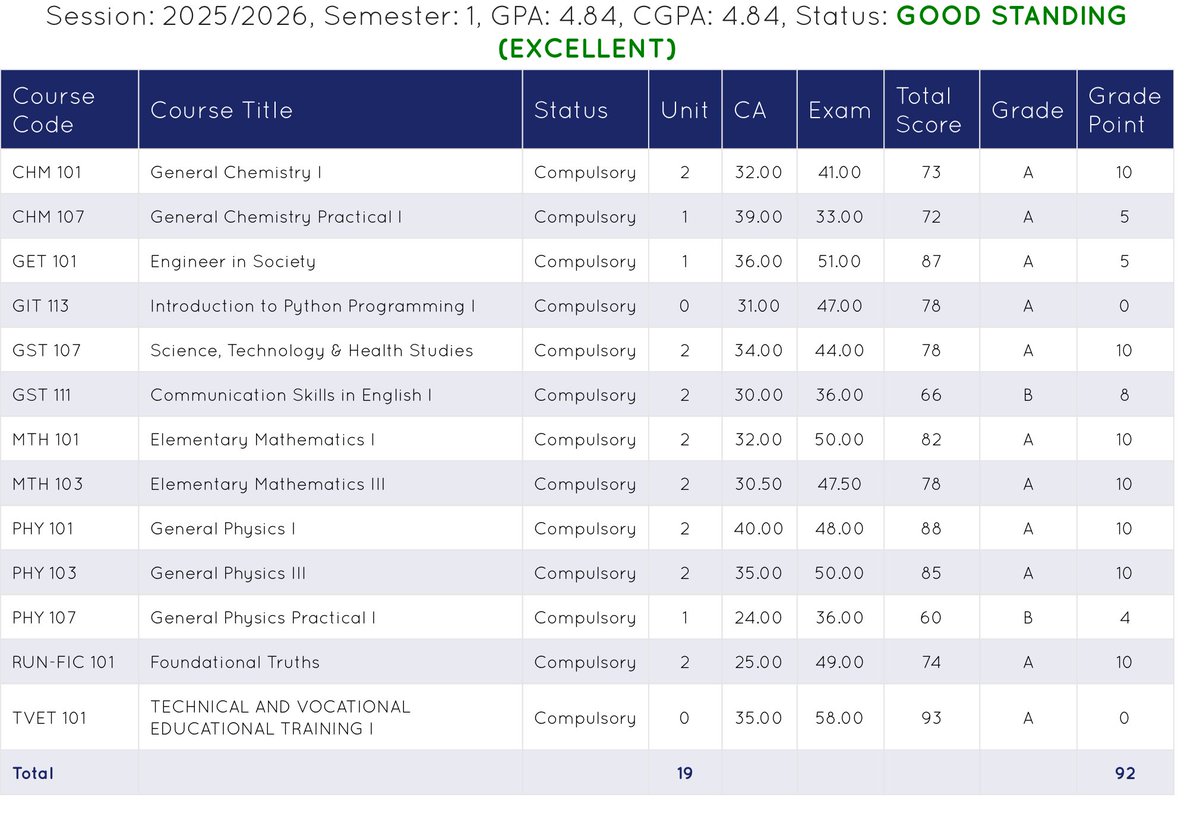
NotebookLM

1.6K posts

NotebookLM banner
NotebookLM

NotebookLM

@NotebookLM

Think smarter, not harder. Meet your brain's new best friend 📒

Katılım Ekim 2024
16 Takip Edilen249.6K Takipçiler
Sabitlenmiş Tweet
NotebookLM
NotebookLM@NotebookLM·
Happy anniversary to our beloved Tailwind 🎂 1.5 billion notebooks, audio overviews, and slide decks later… we are so grateful for the love and support from this incredible, one-of-a-kind community. We can’t wait to show you what’s next! 👀
English
55
34
700
65.9K
NotebookLM retweetledi
Chubby♨️
Chubby♨️@kimmonismus·
I met a lot of really cool people at Google I/O, but the most exciting was @LizzieTao the genius behind the @notebooklm X account 🥰🤯
Chubby♨️ tweet media
English
22
7
323
30.3K
NotebookLM
NotebookLM@NotebookLM·
@PSInvestor We're so sorry! We are back to normal now— let us know what we can do to help!
English
4
0
2
507
Patient Investor
Patient Investor@PSInvestor·
@NotebookLM Yes, please. I actually deleted books to make space and now I am cooked. Guys!!!! Not on such an eventful day! 😭😭
Patient Investor@PSInvestor

@joshwoodward I keep getting this error I don't even have more than 100. Pro user and still getting this error and I have also deleted some books. Still no help.

English
3
0
13
5.7K
NotebookLM
NotebookLM@NotebookLM·
We're currently experiencing some system issues 🛠️ If you are on a paid plan, you might notice temporary restrictions on your usage and limits. We're working to get this resolved and bring your quotas back to normal ASAP! Thank you so much for your patience and understanding 🙏
English
85
98
829
145.5K
Mark Pors 🦖
Mark Pors 🦖@pors·
Before you know it, we reinvent @NotebookLM
Andrej Karpathy@karpathy

This works really well btw, at the end of your query ask your LLM to "structure your response as HTML", then view the generated file in your browser. I've also had some success asking the LLM to present its output as slideshows, etc. More generally, imo audio is the human-preferred input to AIs but vision (images/animations/video) is the preferred output from them. Around a ~third of our brains are a massively parallel processor dedicated to vision, it is the 10-lane superhighway of information into brain. As AI improves, I think we'll see a progression that takes advantage: 1) raw text (hard/effortful to read) 2) markdown (bold, italic, headings, tables, a bit easier on the eyes) <-- current default 3) HTML (still procedural with underlying code, but a lot more flexibility on the graphics, layout, even interactivity) <-- early but forming new good default ...4,5,6,... n) interactive neural videos/simulations Imo the extrapolation (though the technology doesn't exist just yet) ends in some kind of interactive videos generated directly by a diffusion neural net. Many open questions as to how exact/procedural "Software 1.0" artifacts (e.g. interactive simulations) may be woven together with neural artifacts (diffusion grids), but generally something in the direction of the recently viral x.com/zan2434/status… There are also improvements necessary and pending at the input. Audio nor text nor video alone are not enough, e.g. I feel a need to point/gesture to things on the screen, similar to all the things you would do with a person physically next to you and your computer screen. TLDR The input/output mind meld between humans and AIs is ongoing and there is a lot of work to do and significant progress to be made, way before jumping all the way into neuralink-esque BCIs and all that. For what's worth exploring at the current stage, hot tip try ask for HTML.

English
1
1
6
4.7K
noah
noah@no4core·
cinematic video overview on @NotebookLM is way too good. what the helly.
English
1
0
3
193
K.P👑
K.P👑@Karlitoswave·
Thank you @NotebookLM you've been a life saver 😭
English
3
0
8
2.4K
NotebookLM
NotebookLM@NotebookLM·
@salvomic Our source organization feature will come to mobile soon!
English
2
0
2
372
Salvo Micciché
Salvo Micciché@salvomic·
@NotebookLM Hi, please, help with iOS app for NotebookLM: the last upgrade (v. 1.38.7) still doesn't contain "auto-label" option. There is that option if the Notebooks are opened via Gemini app, but not in the standalone app.
English
1
0
0
244
TheArgumentAbuser
TheArgumentAbuser@Alp764021·
@NotebookLM @stevenbjohnson I noticed, it was really convenient to just paste source as text and then notebookLM automatically naming it. The names tend to be too long tho.
English
1
0
3
1.5K
NotebookLM
NotebookLM@NotebookLM·
Friend of the pod @stevenbjohnson explains the magic behind our new source organization feature
Steven Johnson@stevenbjohnson

Major new feature for @NotebookLM power users: in the tradition of Mind Maps, Notebook can now auto-label your sources, making it much easier to manage notebooks with many sources. I’ve been using it for weeks and it is amazingly versatile with big notebooks. Details below. Here’s how it works. If you have more than 5 sources in a Notebook, you’ll see a new “auto-label” button above the source list on the left side. Click on that and Notebook will review the content of all your sources and organize them into high-level categories. Each source can have multiple labels if there is overlap in the subject matter. Once the labels have been applied, you’ll see a new tidy view of your sources where you see only the top level categories, but you can easily expand to see all the sources associated with each label. Click the three dot menu next to each to rename or delete the label. (Sources won’t be deleted.) Or add emojis to visually differentiate between labels. You can click the three dot menu next to each source to assign different labels to the source. Having that organized label view in the source panel makes it much easier to find a specific source you’re looking for, but that’s just the beginning. You can also focus the AI on specific categories using the selection buttons on the right hand of the source panel. Select one category and all the responses in chat will be grounded exclusively in the sources assigned to that label. This can be helpful if you’re worried about the AI getting distracted by information in other categories, and it can speed up your chat response times because there are fewer sources to load into the context. Selecting by label is also super helpful for generating studio artifacts. If you want a podcast focused only the sources about the civil war in your American History notebook, just select that label and click the audio overview button in Studio. Label view also greatly enhances Fast and Deep Research in a notebook with many existing sources. In the past, if one of the research agents added a batch of sources (up to 40 or 50 with Deep Research) all the sources would be scattered through your source panel alphabetically with no way to tell which ones were the new additions. But now, if all your pre-existing sources are neatly filed away in the appropriate labels, when you pull down new research sources they all appear in alphabetical list below the label categories. That makes it easy to review those new sources to see which ones you really want to keep, and you can manually select them (and de-select all the labels) to explore the new information you’ve just added to your notebook. Let’s say you want to add new information specifically about the Battle Of Gettysburg to your American History notebook—run a Fast Research query, import ten new sources, select those new unlabelled sources and hit the Slide Deck button to do a focused review of the history of Gettysburg. Once you’ve explored those new sources, you can always hit the original auto-label button in the top left and choose “Reorganize unlabeled sources.” Notebook will automatically assign the appropriate labels to the new arrivals. If you want to switch back to the full alphabetical list of sources, just choose “Return to list view” to return to the traditional source panel layout. Notebook will remember your labels so it's easy to switch back and forth between the two views. The feature should be rolling out to all users over the next few days. Enjoy!

English
23
41
367
73.4K
Taha ⵣ
Taha ⵣ@mlnomadpy·
lowkey i think @NotebookLM is still the best ai tool ever created ngl
English
13
3
86
6.7K
NotebookLM
NotebookLM@NotebookLM·
@sierracatalina @ifeanyi_we PDFs are one of our most popular source inputs! But hey, what do we know? We just specialize in turning them into audio, video, and graphic AI overviews 😊
English
2
0
3
405
⚪️ sierra catalina
⚪️ sierra catalina@sierracatalina·
oh man video overviews of long form text content is my new favorite thing. elon please let us get PDF exports of our 𝕏 articles so I can make video overviews of everything.
English
13
2
54
4.9K