ohhwesley 🛡️🟦

15.1K posts

ohhwesley 🛡️🟦 banner
ohhwesley 🛡️🟦

ohhwesley 🛡️🟦

@ohhwesley89

wagmi - 40% $COIN, 30% $BTC, 9% $ETH, 10% $TSLA, 5% $CIFR, 2.5% $IREN, 2.5% $AMD, 1% $PLTR, 0% LEVERAGE.

San Francisco, CA Katılım Kasım 2017
943 Takip Edilen2.5K Takipçiler
Sabitlenmiş Tweet
ohhwesley 🛡️🟦
ohhwesley 🛡️🟦@ohhwesley89·
My DCA. Same day. Every week. $FXAIX 26% · $NVDA 13% · $BTC 12% · $SCHD 12% · $CEG 11% · $IREN 9% · $FSPSX 9% · $GOOG 4% · $STRC 3% Foundation. Conviction. Thesis. Rain or shine. Every week. 🧵
English
1
0
0
168
ohhwesley 🛡️🟦 retweetledi
Michael Saylor
Michael Saylor@saylor·
$MSTR announces Q1 2026 results: - 818,334 $BTC held - 9.4% BTC Yield achieved YTD 2026 - $STRC scaled to $8.5 billion in 9 months - Largest US equity issuer, raised $11.6 billion YTD 2026 strategy.com/press/strategy…
English
341
761
6.1K
257.5K
ohhwesley 🛡️🟦 retweetledi
Ruben Hassid
Ruben Hassid@rubenhassid·
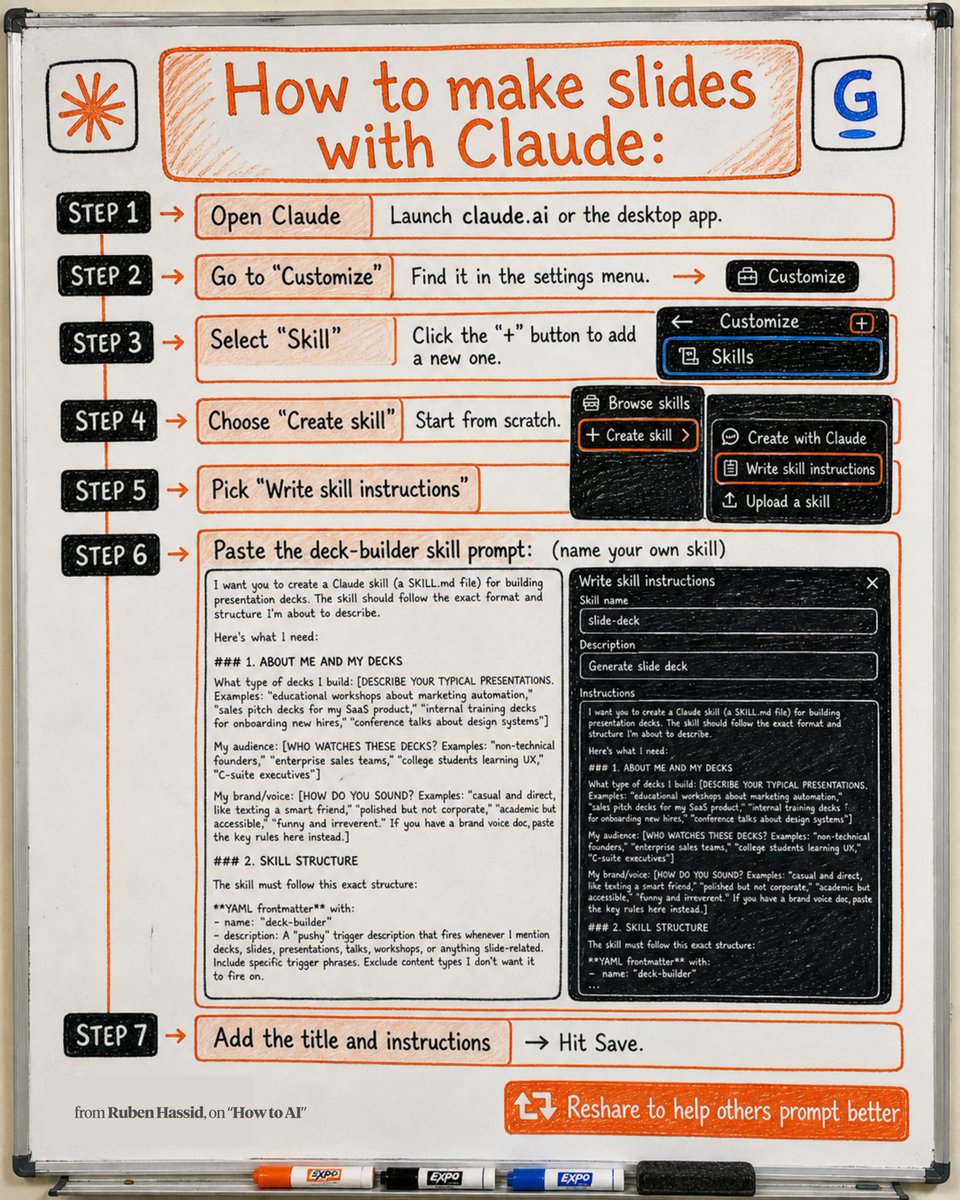
How to make slides with Claude: Step 1. Open Claude & build your first Claude skill. Step 2. Go to "Customize." Step 3. Select "Skill" → click "+". Step 4. Choose "Create skill." Step 5. Pick "Write skill instructions." Step 6. Paste this deck-builder prompt: "I want you to create a Claude skill (a SKILL .md file) for building presentation decks. The skill should follow the exact format and structure I'm about to describe. Here's what I need: ### 1. ABOUT ME AND MY DECKS What type of decks I build: [DESCRIBE YOUR TYPICAL PRESENTATIONS. Examples: "educational workshops about marketing automation," "sales pitch decks for my SaaS product," "internal training decks for onboarding new hires," "conference talks about design systems"] My audience: [WHO WATCHES THESE DECKS? Examples: "non-technical founders," "enterprise sales teams," "college students learning UX," "C-suite executives"] My brand/voice: [HOW DO YOU SOUND? Examples: "casual and direct, like texting a smart friend," "polished but not corporate," "academic but accessible," "funny and irreverent." If you have a brand voice doc, paste the key rules here instead.] ### 2. SKILL STRUCTURE The skill must follow this exact structure: YAML frontmatter with: - `name`: deck-builder - `description`: A "pushy" trigger description that fires whenever I mention decks, slides, presentations, talks, workshops, or anything slide-related. Include specific trigger phrases. Exclude content types I don't want it to fire on. The skill body must have these sections in this order: Section: Overview — One paragraph. What this skill does and how the process works. Keep it direct. Section: Reference files (OPTIONAL) — [IF YOU HAVE VOICE/STYLE DOCS YOU WANT THE SKILL TO READ, LIST THEM HERE WITH THEIR FILENAMES AND A ONE-LINE DESCRIPTION OF EACH. Example: "BRAND_VOICE .md — Hard rules for tone and vocabulary" / "BEST_DECKS .md — Examples of decks that performed well." IF YOU DON'T HAVE THESE, DELETE THIS SECTION.] Section: Step 1 — Gather the brief. Before writing anything, the skill must collect these inputs from me. Ask for anything missing: Required inputs: - Topic (one core idea) - Audience (who's in the room) - Length (slide count or talk duration) - Key takeaways (what the audience should be able to DO after) Optional inputs: - Tone note - Existing content to pull from (blog posts, docs, notes) - Visual style preference for Gamma - [ADD ANY OTHER INPUTS YOU ALWAYS NEED. Examples: "Brand colors," "Whether to include a Q&A slide," "Client name for title slide"] Section: Step 2 — Build the outline. This is the core of the skill. Rules: ...." PS: I couldn't paste the entire prompt here. Access the full prompt at how-to-ai.guide Don't pay anything. It's free in the welcome email. Open the 'How to AI' library. Click "Claude Cowork". Pick from 5 skills. Save them & share with your team. ♻️ Repost to help anyone make slides faster.
Ruben Hassid tweet media
Ruben Hassid@rubenhassid

x.com/i/article/2030…

English
22
100
567
30.4K
Bitcoin Magazine
Bitcoin Magazine@BitcoinMagazine·
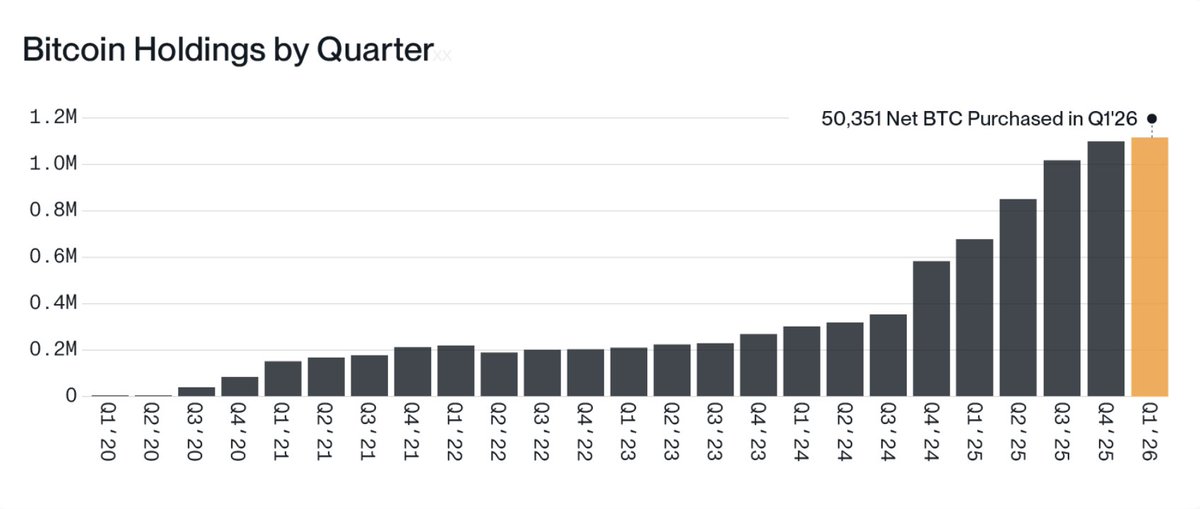
JUST IN: Companies bought 50,351 bitcoin in Q1 this year, the most amount ever 🤯 🚀
Bitcoin Magazine tweet media
English
144
484
2.7K
118.9K
ohhwesley 🛡️🟦 retweetledi
Coinbase 🛡️
Coinbase 🛡️@coinbase·
Your daily crypto habit just got a million dollar upgrade. Build a 14-day streak this month and earn your share of $1,000,000 in Bitcoin. Oh, and first to finish their streak wins a VIP experience to this summer’s World Football Final ⚽️
English
86
59
367
2.3M
ohhwesley 🛡️🟦 retweetledi
Ruben Hassid
Ruben Hassid@rubenhassid·
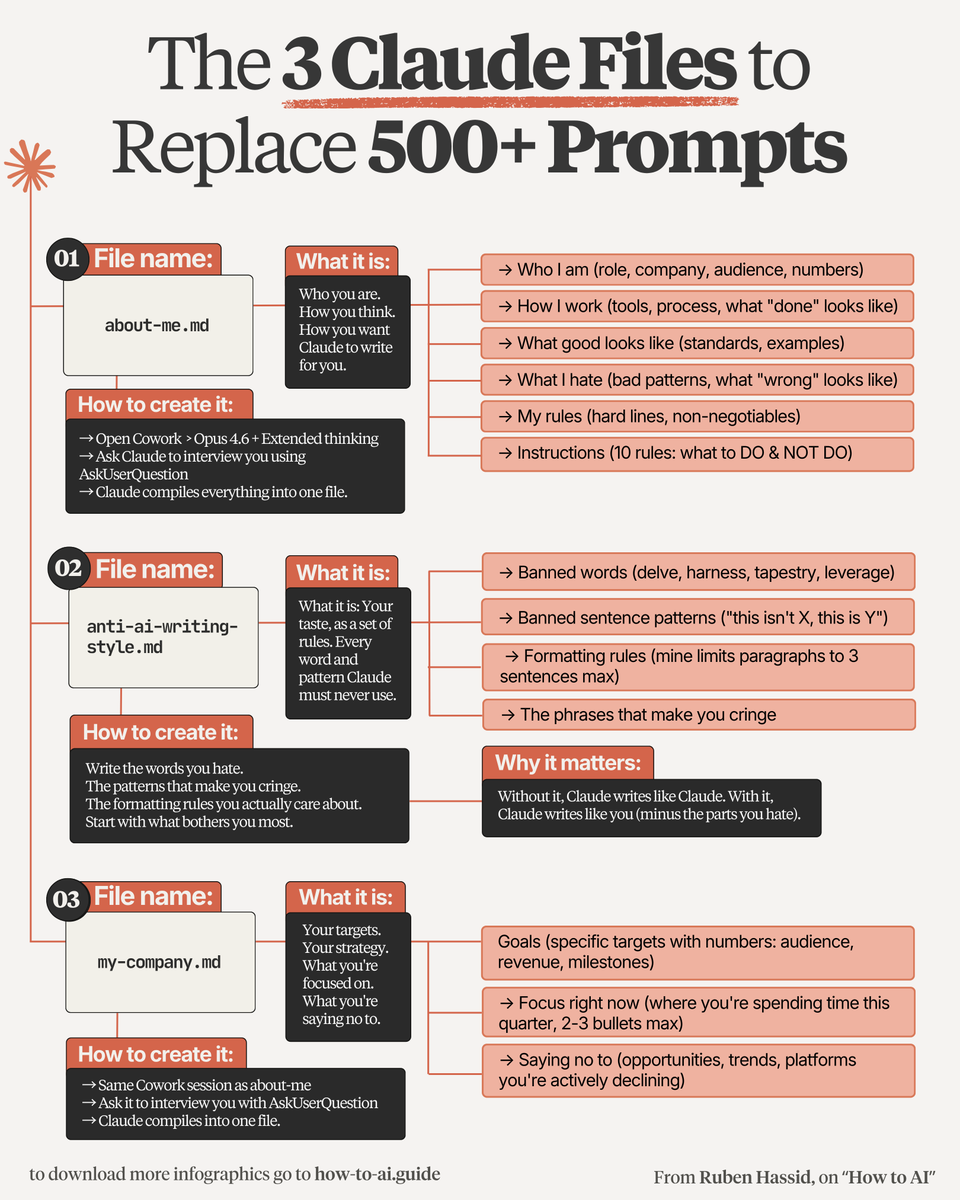
Delete every prompt template you ever saved. You only need these 3 files: 1. Folder ☑ A folder on your computer called "Cowork": This is where your 3 files live, forever. ↳ Claude reads them before every single task. 2. about-me .md ☑ Who you are. How you think. How you write: Open Claude. Run a 100-question interview. Then compress the answers into one .md file. ↳ Now Claude sounds exactly like you. 3. anti-ai-writing-style .md ☑ Every word, pattern, and tone you HATE: "Delve." "Tapestry." "This isn't X, this is Y." 80% of this file is what you REJECT. ↳ Without it, Claude writes like AI. With it, like you. 4. my-company .md ☑ Your targets. Your focus. Your hard No's: Specific numbers (audience, revenue, milestones). 2-3 bullets on where you spend time this quarter. ↳ Claude stops giving you generic advice. 5. Dictate, don't type ☑ Use Wispr . ai (free). Voice is faster: You answer 100 questions in 90 minutes. Voice is also more honest than typing. ↳ Vagueness won't survive Claude's follow-ups. 6. Edit it (Obsidian) ☑ You change. Your taste changes. So must the file: Download Obsidian (free). Open your Cowork folder. Now editing your .md feels like a Google Doc. I teach you how Claude works at claude-co.work. Copy my folder & download my 3 personal .md files: Step 1: Subscribe for free at how-to-ai.guide Step 2: You will have two choices: free or paid. Step 3: Choose the free tier. Don't pay for anything. Step 4: Open your welcoming email. Reply to it. Step 5: Trace the Notion link. Open '.md files' folder. Step 6: Access my entire folder + 3 files template. Step 7: Send this image to your team's channel. Step 8: Read 2x newsletter per week (for free). Step 9: Become the "AI guy" at work, forever.
Ruben Hassid tweet media
Ruben Hassid@rubenhassid

x.com/i/article/2050…

English
48
187
1.1K
90.6K
ohhwesley 🛡️🟦 retweetledi
Ruben Hassid
Ruben Hassid@rubenhassid·
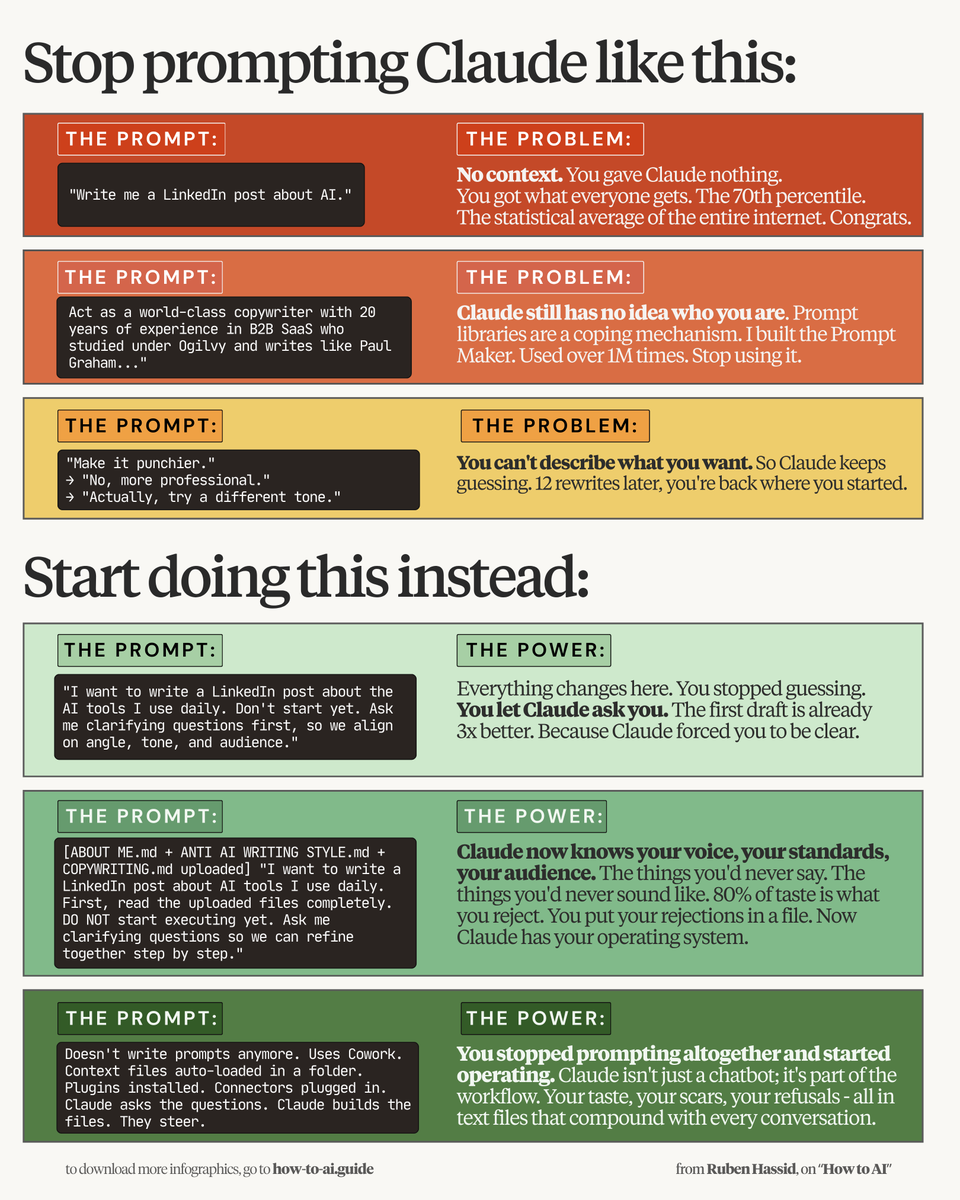
Prompting is dead. Here's what to actually do instead (in one image): 1. Download the Claude desktop app (free). 2. Create a folder names "Claude Cowork". 3. Create 3 subfolders: about-me, output, templates 4. In about-me, create 3 .md files: about-me, anti-ai-writing-style, my-company. 5. Fill them with your tone, rules & non-negotiables. 6. Download my files (for free) here how-to-ai.guide 7. Don't pay anything. Reply to the welcome email. 8. Open Notion link → .md files folder → download. 9. Go to Claude app → Cowork. Select your folder. 10. Go to Settings → Cowork → Global Instructions. 11. Type: "Always read about-me first." 12. Now write 1-line prompt. It already knows you. By the way, here's the red flags to know you're still prompting like it's 2025: 1. Your prompts are 500 words. Cowork needs 5. 2. You re-upload the files. They auto-load now. 3. "Act as a copywriter…" Stop. Claude needs files. 4. You created Projects. Cowork is one folder 5. No anti-AI file. So Claude sounds like Claude. 6. You re-explain your tone. Put it in a .md once. 7. Your outputs sound generic. Lack of context. 8. You blame Claude. The problem is missing files. 9. You copy prompts. They don't know your voice. 10. You think "prompting" is a skill. It's already over. 11. You never tried Cowork. The biggest feature. 12. You're still in chat. The top 1% are operating. 13. You never read this: ruben.substack.com/p/youre-just-a… People still type 500-word prompts in 2026. You want to help your network upgrade? ♻️ Repost this so they finally try Cowork.
Ruben Hassid tweet media
Ruben Hassid@rubenhassid

x.com/i/article/2050…

English
46
311
1.7K
124.7K
ohhwesley 🛡️🟦 retweetledi
Mike Alfred
Mike Alfred@mikealfred·
Most can't see it yet but I am watching up close as IREN positions itself to make a run at being one of the largest companies on the planet. There are no guarantees of anything in life but IREN has all the right ingredients. Let's freaking go.
English
166
152
2.4K
572.6K
ohhwesley 🛡️🟦 retweetledi
CODIFY
CODIFY@codi_fyy·
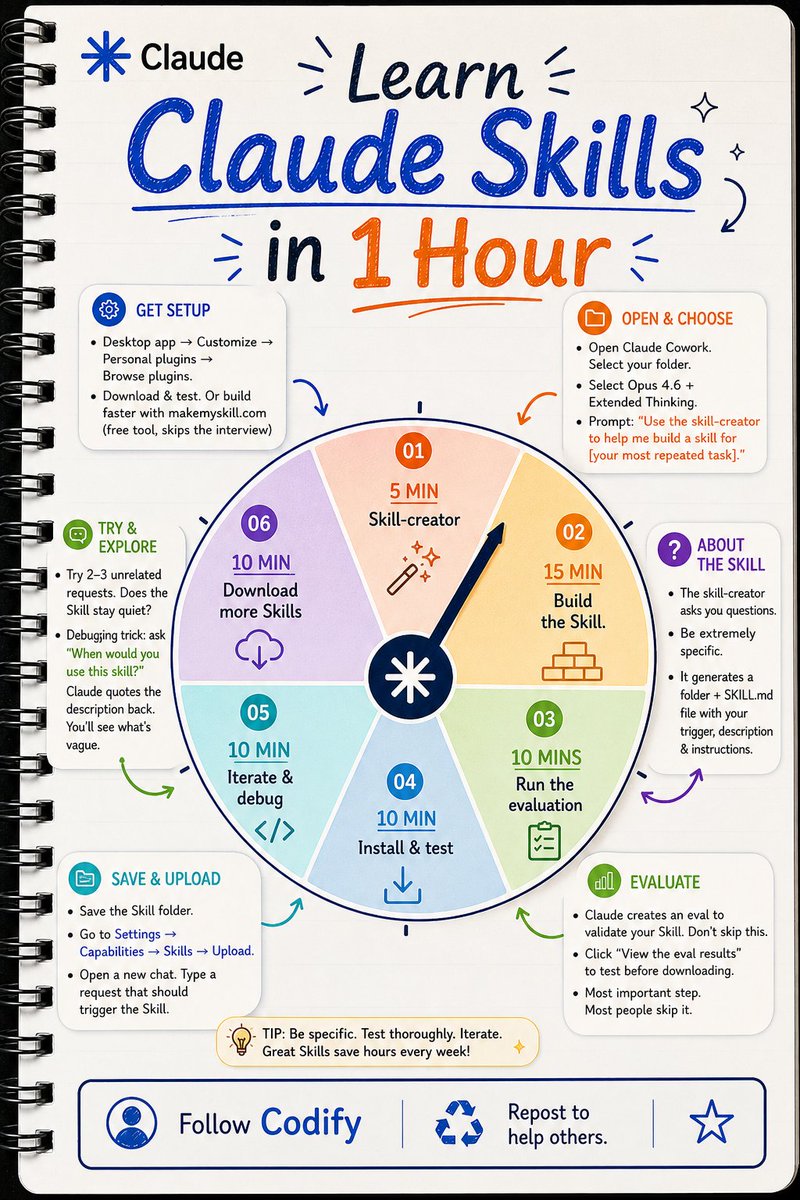
How to build your first Claude Skill in under 60 minutes. I used to repeat the same prompts every single day. Same instructions. Same formatting. Same corrections. Over and over. Then I discovered Claude Skills. Now Claude already knows what I want before I even finish typing. Here's the 6-step system to build yours today: 𝗦𝘁𝗲𝗽 𝟭: 𝗢𝗽𝗲𝗻 𝗦𝗸𝗶𝗹𝗹-𝗰𝗿𝗲𝗮𝘁𝗼𝗿 (𝟱 𝗺𝗶𝗻) ↳ Open Claude Cowork. ↳ Select your project folder. ↳ Choose Opus 4.6 + Extended Thinking. ↳ Type: "Use the skill-creator to help me build a skill for [your most repeated task]." This starts the entire process. 𝗦𝘁𝗲𝗽 𝟮: 𝗕𝘂𝗶𝗹𝗱 𝘁𝗵𝗲 𝗦𝗸𝗶𝗹𝗹 (𝟭𝟱 𝗺𝗶𝗻) ↳ Skill-creator will ask questions. ↳ Answer with extreme detail. ↳ It generates a folder with a SKILL. md file inside. ↳ Contains your trigger, description, and instructions. Be specific here or pay for it later. 𝗦𝘁𝗲𝗽 𝟯: 𝗥𝘂𝗻 𝘁𝗵𝗲 𝗲𝘃𝗮𝗹 (𝟭𝟬 𝗺𝗶𝗻) ↳ Claude auto-creates an eval. ↳ Click "View the eval results." ↳ This tests your Skill before you install it. Most people skip this step. That's why their Skills break. 𝗦𝘁𝗲𝗽 𝟰: 𝗜𝗻𝘀𝘁𝗮𝗹𝗹 & 𝘁𝗲𝘀𝘁 (𝟭𝟬 𝗺𝗶𝗻) ↳ Save the Skill folder. ↳ Settings → Capabilities → Skills → Upload. ↳ Open a brand new chat. ↳ Type something that should trigger your Skill. ↳ Did it activate? You're live. 𝗦𝘁𝗲𝗽 𝟱: 𝗜𝘁𝗲𝗿𝗮𝘁𝗲 & 𝗱𝗲𝗯𝘂𝗴 (𝟭𝟬 𝗺𝗶𝗻) ↳ Try 2-3 unrelated requests. ↳ Your Skill should stay quiet. ↳ If it activates on wrong tasks, your description is too vague. ↳ Ask: "When would you use this skill?" ↳ Claude reads the description back. ↳ Now you see exactly what to fix. 𝗦𝘁𝗲𝗽 𝟲: 𝗗𝗼𝘄𝗻𝗹𝗼𝗮𝗱 𝗺𝗼𝗿𝗲 (𝟭𝟬 𝗺𝗶𝗻) ↳ Desktop app → Customize → Personal plugins → Browse plugins. ↳ Download community Skills. ↳ Or use makemyskill. com to build even faster. Total time: under 60 minutes. You go from repeating prompts daily to a custom AI system that just works. That's the difference between using Claude and mastering Claude. Save this for later. I hope this post helped you today. Follow Muhammad Ayan ♻️ Repost to help others
CODIFY tweet media
English
33
56
230
7K
The ₿itcoin Therapist
The ₿itcoin Therapist@TheBTCTherapist·
Michael Saylor is not diluting the common stock $MSTR to buy Bitcoin because he knows that $STRC will allow him to buy billions of dollars in Bitcoin over the next 2 weeks. Less dilution of MSTR means higher demand for shares which means higher prices while still buying Bitcoin.
English
29
54
944
24.2K
ohhwesley 🛡️🟦 retweetledi
Vaidehi
Vaidehi@Ai_Vaidehi·
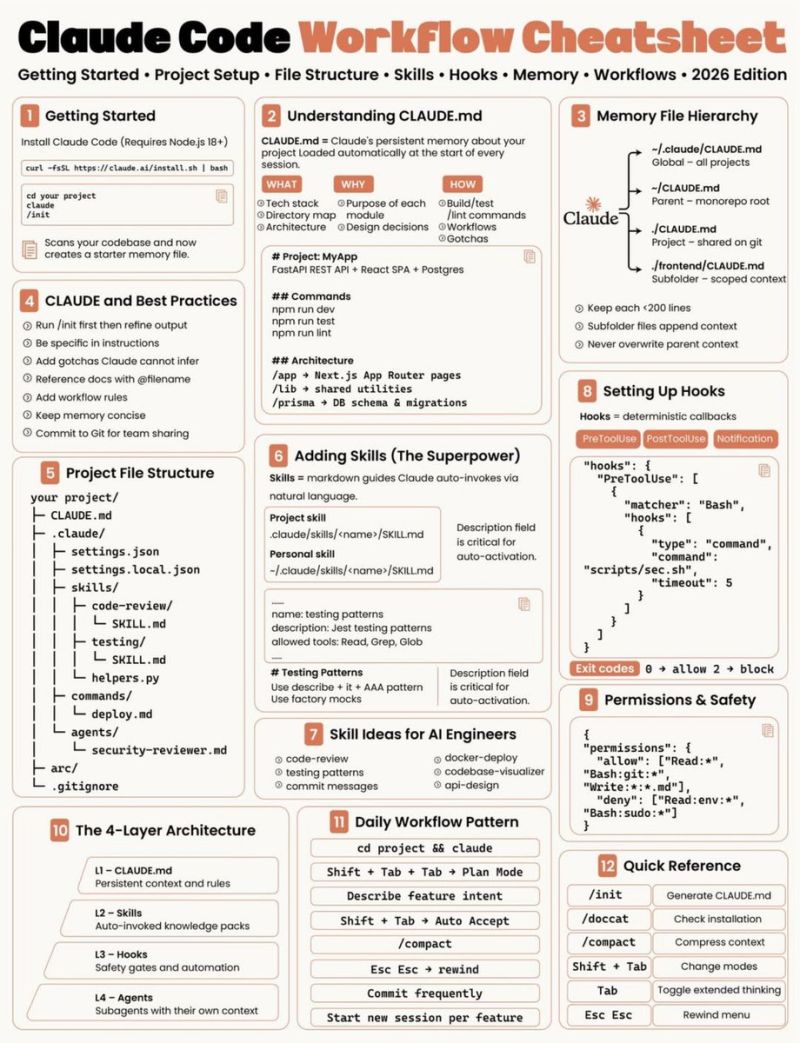
If your Claude Code feels weaker than expected, it's probably because the setup around it is too thin. The .claude/ setup is not just config. It’s where a lot of the real leverage starts to live: - instructions, guardrails, reusable workflows, local preferences, and project-specific behavior. A good setup helps with a few common problems: → repeating the same instructions every session → mixing team rules with personal preferences → forgetting important commands or conventions → having no reusable workflow for common tasks → giving the agent too much or too little permission The most useful parts to set up: 📌 𝐂𝐋𝐀𝐔𝐃𝐄.𝐦𝐝 Use this for stable project context: tech stack, folder structure, architecture notes, coding conventions, important commands, and review expectations. 📌 𝐥𝐨𝐜𝐚𝐥 𝐟𝐢𝐥𝐞𝐬 Keep your personal preferences separate from team-wide instructions, especially if the repo is shared. 📌 𝐜𝐨𝐦𝐦𝐚𝐧𝐝𝐬 / 𝐫𝐮𝐥𝐞𝐬 / 𝐬𝐤𝐢𝐥𝐥𝐬 Turn repeated prompts into reusable workflows. Useful for things like code review, testing patterns, deployment steps, commit messages, or API design. 📌 𝐬𝐞𝐭𝐭𝐢𝐧𝐠𝐬 / 𝐩𝐞𝐫𝐦𝐢𝐬𝐬𝐢𝐨𝐧𝐬 Set clear boundaries for what Claude can read, edit, and run. This matters a lot once it starts working across files or running commands in your project. 📌 𝐡𝐨𝐨𝐤𝐬 Use hooks when you want deterministic checks or callbacks around tool use, instead of relying on the model to remember every safety step. The simple rule: If you keep telling Claude the same thing, it probably belongs somewhere in your setup.
Vaidehi tweet media
English
2
16
110
2.6K
ohhwesley 🛡️🟦 retweetledi
Krishna Agrawal
Krishna Agrawal@Krishnasagrawal·
99% of people use Claude like a chatbot. The top 1% use it as a workflow. The difference? A 30-minute setup nobody does. Here's how to turn Claude into your entire stack: 1. Pay for Pro ($20/mo or $17 annual) ↳ Free tier won't show what Claude actually is 2. Download desktop app at claude.com/download ↳ Web-only is training wheels 3. Open Cowork (not Chat) ↳ This is what separates Claude from ChatGPT ↳ Reads local files, drafts docs, runs while you walk away ↳ Desktop, all paid plans. This is the actual product. 4. Pick your model first: ↳ Opus 4.7 for thinking/writing/planning ↳ Sonnet 4.6 for coding/fast work ↳ Haiku 4.5 for bulk tasks 5. Turn on Extended Thinking in Opus ↳ Model dropdown → toggle on ↳ Forces Claude to think before answering 6. Build 3 folders in Cowork: ↳ ABOUT ME/ (who you are, how you talk, what you sell) ↳ TEMPLATES/ (patterns Claude reuses) ↳ OUTPUTS/ (where finished work lands) This is the shift from prompting to systems. 7. Set Global Instructions once ↳ Settings → Cowork → Edit Global Instructions ↳ Paste: "Read ABOUT ME first. Save to OUTPUTS. Use AskUserQuestion when unclear." Your 500-word prompts become 10 words. 8. Use the 29-word prompt template ↳ "I want to [task] so that [goal]. Read the files first. Ask me questions via AskUserQuestion before executing." ↳ That's it. 9. Turn on Connectors (200+ available) ↳ Settings → Connectors → Browse → Add ↳ Slack, Gmail, Drive, Notion, Figma, Canva, Granola, Calendly ↳ Claude reads your inbox and messages mid-conversation ↳ Zero copy-paste 10. Install Claude in Excel (takes 3 minutes) ↳ Excel → Insert → Get Add-ins → search "Claude by Anthropic" → Add ↳ Shortcut: Ctrl+Alt+C (Win) or Ctrl+Option+C (Mac) ↳ Now Claude knows what cell D14 actually contains 11. Install plugins from claude.com/plugins ↳ 100+ official plugins for sales, marketing, legal, finance, data, support ↳ Each adds skills and slash commands ↳ Type / in chat to see them 12. Know what Claude isn't for: ↳ Photoreal images → ChatGPT ↳ Real-time search → Grok ↳ Video generation → Google Veo ↳ Right tool, right job --- The gap between chatbot and workflow? This operator-level setup. Cc : eric
Krishna Agrawal tweet media
English
7
17
91
2K
ohhwesley 🛡️🟦 retweetledi
Ruben Hassid
Ruben Hassid@rubenhassid·
How to make AI sound exactly like you (forever): 1. Open a new Google Doc. 2. Paste the prompt below: 3. Name it 'anti-ai-writing-style.' 4. Save the file (.md format). This is your voice. 5. Upload the .md file to Claude. 6. To download mine, go here: how-to-ai.guide. 7. Subscribe for free. Open my welcome email. 8. Hit the automatic reply button inside. 9. Go to Notion link. Download the '.md files' folder. Prompt: "# WRITING RULES Read this before writing to me or for me. Goal: write with context, taste, and a reason to speak. Apply with judgment. Spirit over letter. Clean natural writing wins. --- ## 0. Rule priority Use this order when rules collide: 1. Be accurate. 2. Be clear. 3. Be specific. 4. Sound human. 5. Use style only when it improves the sentence. Do not follow a style rule so strictly that the result gets awkward. --- ## 1. Default voice Write directly, specifically, and naturally. Start with the useful answer. Use short paragraphs. 1 or 2 sentences by default. 3 or 4 sometimes. Vary rhythm. Short sentence. Longer sentence. Fragments are allowed when they sound natural. Do not write in a steady medium-length pattern. Use contractions naturally: don't, can't, won't, it's, you're. Use I and you when natural. Talk to people. Prefer active voice. Be specific. Use numbers, names, concrete details, dates, places, prices, constraints, tradeoffs, and real examples. Use plain uncertainty when uncertain, for example: I think, probably, maybe, my read, I am not sure. Do not use vague hedging to avoid taking a position. Take a stance when the evidence supports one. Do not pad output to seem thorough. Short and accurate beats long and padded. If the point is made, stop. --- ## 2. Context modes Match the job. ### Chat Direct. Warm enough. No assistant performance. Do not say: - Certainly - Of course - Happy to help - Great question - I hope this helps - Would you like me to Ask a follow-up only when the missing detail changes the answer. ### Editing Name the problem. Give the fix. Show a better version. Do not praise weak writing before editing it. ### Published writing Remove chat phrases. No meta commentary. No explanation of what the piece is about to do. ### Technical writing Clarity beats personality. Define terms. Show steps. Avoid decorative language near important details. ### Sensitive topics Calm beats punchy. Be direct, gentle, and exact. ### Sales or persuasion Proof beats hype. Specific claims beat adjectives. --- ## 3. Formatting Use formatting only when it improves reading. Short paragraphs by default. Use digits for numbers: 3 years, 10 tools, 500 users. No em dashes. Use periods, commas, colons, semicolons, or parentheses. Bold sparingly. 1 or 2 moments per section max. Use headers only when they help. Use bullets only when scanning matters. Use code blocks for ...." PS: I couldn't paste the entire prompt here. Access the full prompt: ruben.substack.com/p/its-not-x-it….
Ruben Hassid tweet media
Ruben Hassid@rubenhassid

x.com/i/article/2049…

English
60
330
2.2K
245.9K
ohhwesley 🛡️🟦 retweetledi
Poonam Soni
Poonam Soni@CodeByPoonam·
Anthropic has published a 33-page guide on how to build skills for Claude. Every developer building with Claude needs to read this. Save this before you forget. Guide link 👇
English
19
107
783
64.6K
ohhwesley 🛡️🟦 retweetledi
Ruben Hassid
Ruben Hassid@rubenhassid·
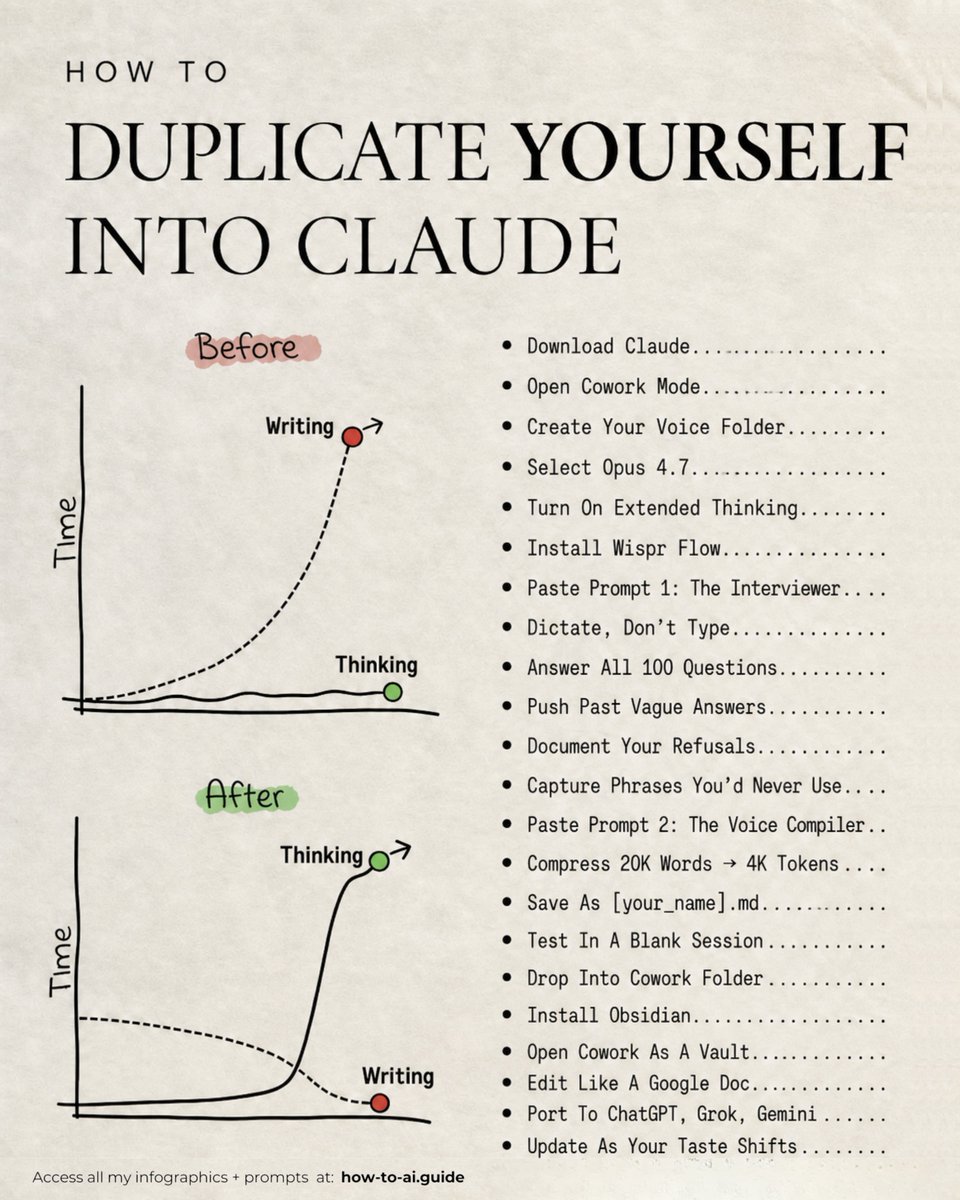
How to duplicate yourself into Claude in a weekend: (even if you've never written a prompt before) 1. Download the desktop app. ☑ Go to claude .com/download ☑ Set Opus 4.7 as default ☑ Turn ON Extended Thinking 2. Open Cowork mode. ☑ Cowork = where your voice lives ☑ Click the top left tab ☑ Create your "Voice" folder inside 3. Install Wispr Flow (it's free). ☑ Turns your voice → text ☑ Voice = faster and more honest ☑ Typing kills the truth. 4. Run the interview. ☑ Paste Prompt 1 from ruben.substack.com/p/youre-just-a…. ☑ 100 questions, 7 categories ☑ Push past every vague answer 5. Compress the dump. ☑ Paste prompt 2 from ruben.substack.com/p/youre-just-a…. ☑ 20K words → 4K tokens ☑ Save as [your_name] .md 6. Test it in a blank chat. ☑ Open a fresh Claude chat ☑ Run a prompt only you would write ☑ If it sounds like you → ship it 7. Drop it into Cowork. ☑ Move [your_name] .md into your folder ☑ Claude now reads it on every turn ☑ Every draft = your voice, automatically 8. Port it everywhere. ☑ Upload to ChatGPT, Grok, Gemini ☑ Same file = same voice in every AI ☑ Hand it to your team or ghostwriter 9. Edit it forever. ☑ Install Obsidian (free) ☑ Open Cowork as a vault ☑ Update as your taste shifts Full guide + prompts at ruben.substack.com/p/youre-just-a…. (save this to clone yourself into any AI)
Ruben Hassid tweet media
Ruben Hassid@rubenhassid

x.com/i/article/2050…

English
97
652
5K
677.6K
ohhwesley 🛡️🟦 retweetledi
Sonal Shukla
Sonal Shukla@sonalshukla3377·
✦ EVERY CLAUDE COMMAND ✦ The Complete Reference | 89 Commands Your go-to cheat sheet for using Claude efficiently Save time and get better outputs with the right commands 1. START & CREATE • /new → Start a new chat • /project → Create a project • /upload → Upload files • /paste → Paste from clipboard • /template → Use a template • /import → Import from file • /scan → Scan documents • /voice → Use voice input 2. FOCUS & CONTEXT • /focus → Set main objective • /context → Add background • /details → Provide more details • /examples → Give examples • /clarify → Ask follow-up questions • /define → Define terms • /assumptions → List assumptions • /priorities → Set priorities • /constraints → Set constraints 3. THINK & SOLVE • /analyze → Break it down • /compare → Compare options • /pros-cons → List pros & cons • /evaluate → Evaluate ideas • /recommend → Get recommendations • /brainstorm → Brainstorm ideas • /solve → Solve the problem • /challenge → Challenge assumptions 4. WRITE & EDIT • /write → Generate content • /edit → Edit for clarity • /rewrite → Rewrite better • /shorten → Make it concise • /expand → Add more detail • /improve → Improve writing • /summarize → Summarize text • /paraphrase → Paraphrase text • /proofread → Proofread text 5. ORGANIZE & STRUCTURE • /outline → Create an outline • /structure → Organize content • /bullet → Make bullet points • /numbered → Make numbered list • /table → Create a table • /summary → Summarize content • /key-points → Extract key points • /mindmap → Create mind map • /flowchart → Create flowchart 6. CODE & TECH • /code → Write code • /debug → Fix issues • /explain → Explain code • /optimize → Improve performance • /refactor → Refactor code • /test → Write tests • /convert → Convert formats • /documentation → Write docs • /review → Review code 7. DATA & ANALYSIS • /analyze-data → Analyze data • /visualize → Create charts • /insights → Extract insights • /forecast → Make predictions • /report → Generate report • /stats → Calculate statistics • /clean → Clean data 8. AUTOMATE & INTEGRATE • /workflow → Create workflow • /automate → Automate tasks • /api → Use API • /integrate → Connect tools • /schedule → Set reminders • /trigger → Set triggers • /tasklist → Create task list • /checklist → Create checklist 9. PERSONALIZE & CONTROL • /preferences → Set preferences • /memory → Manage memory • /tone → Adjust tone • /style → Change writing style • /length → Change length • /format → Change format • /reset → Reset conversation • /clear → Clear context 10. LEARN & RESEARCH • /search → Search the web • /research → Deep research • /learn → Explain a topic • /tldr → TL;DR summary • /sources → Find sources • /fact-check → Fact check • /explore → Explore topics 11. COLLABORATE & SHARE • /share → Share conversation • /export → Export content • /download → Download file • /copy → Copy to clipboard • /email → Email content • /publish → Publish content • /feedback → Send feedback BONUS: POWER SHORTCUTS • Use / + command for quick access • Combine commands for better results • Add context early for better answers • Be specific and clear • Iterate and refine • Save and reuse what works ❤️ Like 🔁 Retweet 🔖 Bookmark Follow @sonalshukla3377 for more such posts
Sonal Shukla tweet media
English
46
137
572
14.5K
TFTC
TFTC@TFTC21·
Saylor: "There's gonna be an explosion in prosperity because a billion robots will do all the work and a billion cars will drive themself. Then I think you'll see a socialist wave of entitlements. Universal healthcare, universal basic income, universal housing, universal entitlements." "People worry that there won't be enough. That's not the problem. There'll be too much. Too much music, too much entertainment, too much food, too much alcohol, too much sugar, too much stimulation. Different civilizations will be distinguished by how they react to it."
English
108
162
1.8K
74.8K
ohhwesley 🛡️🟦 retweetledi
Jami
Jami@expertwith_AI·
This guy shares Claude's most effective prompt structure.
Jami tweet media
English
36
630
5.6K
178.8K
ohhwesley 🛡️🟦 retweetledi
Mr. Buzzoni
Mr. Buzzoni@polydao·
ANDREJ KARPATHY WAS RIGHT. THIS 40-MINUTE Y COMBINATOR LECTURE PROVES IT we're in the 1960s of LLMs most people using Claude have the wrong mental model Software 3.0. LLMs as operating systems how to actually think about and work with them save this 👇
Mr. Buzzoni@polydao

x.com/i/article/2044…

English
28
129
1.1K
308.7K