

Alex Rudenko
1.6K posts

Alex Rudenko
@orKoN
SWE @ChromeDevTools @[email protected]
Munich, Germany Katılım Şubat 2009
230 Takip Edilen394 Takipçiler

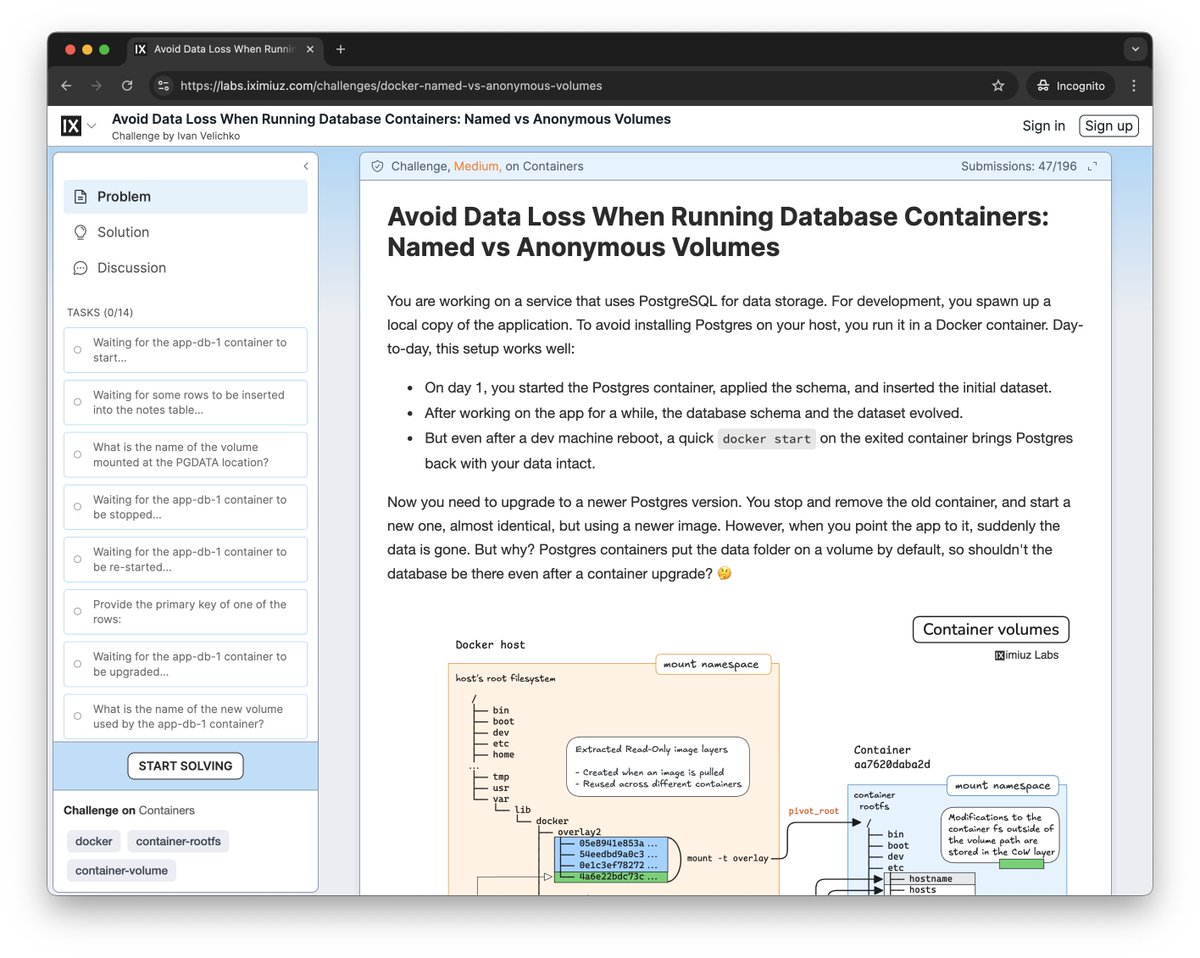
Claude Code and I have just redesigned all content pages on iximiuz Labs:
- Challenges got a functional sidebar
- Courses get a handy navigation widget
- Skill Paths and Trainings got a nice linear structure
- All content types got a "normal/wide" view toggle
It would have taken me weeks to ship such a change if I were writing this code myself, but Claude Code and Opus, combined with Chrome DevTools MCP, made it all happen in an insane 48-hour-long marathon.
Fun fact: I wrote close to 0 lines of code, but at the same time, I was extremely focused and busy directing the changes and coming up with ideas during these ~48 hours (minus sleep, when Claude Code took a break, too).
The quality (and sanity) of the generated code has definitely made a significant leap in the past few weeks, and nevertheless, the overall workflow is still very far from being called autonomous.
English
Alex Rudenko retweetledi

Now you can automate many kinds of browser activity using the new Chrome DevTools MCP. In the other retweets of the base post, many people are already thinking of lots of great use cases for this functionality!
Chrome for Developers@ChromiumDev
Announcing our public preview of Chrome DevTools MCP! Experience the full power of DevTools in your AI coding agent → goo.gle/4pDE6Tk With Chrome DevTools MCP, your AI agent can run performance traces, inspect the DOM, & perform real-time debugging of your web pages.
English
Alex Rudenko retweetledi

Announcing @ChromeDevTools MCP! 🚀
Connect your AI coding agent to Chrome's powerful automation & debugging capabilities with ease.
Key features:
✅ Reliable automation: It can programmatically handle clicks, form fills, dialogs, and page navigation with ease.
✅ Performance insights: Go beyond simple audits. Instruct your agent to record a performance trace and extract actionable insights to optimize your web apps.
✅ Advanced debugging: Empower your AI to analyze network requests, list console messages, take screenshots, and even evaluate scripts in the browser context.
✅ Browser emulation: Easily test different conditions by emulating CPU slowdowns, network throttling, or various screen sizes.
Works well with modern web apps and believe this will unlock new workflows for automated testing, AI-driven debugging, and interactive web development.
And there's much more to come!
English
Alex Rudenko retweetledi

📝 Put your pencils down—now you can annotate traces directly in the performance panel!
+ Label time ranges
+ Label individual entries
+ Connect entries together
@varkki_alina walks you through all of the new features in today's blog post 👇
developer.chrome.com/blog/devtools-…
English
Alex Rudenko retweetledi

Say goodbye to the limitations of the History API. Discover the Navigation API and unlock a new era of smooth, dynamic single-page applications.
Check it out: goo.gle/3XlCoIW
English

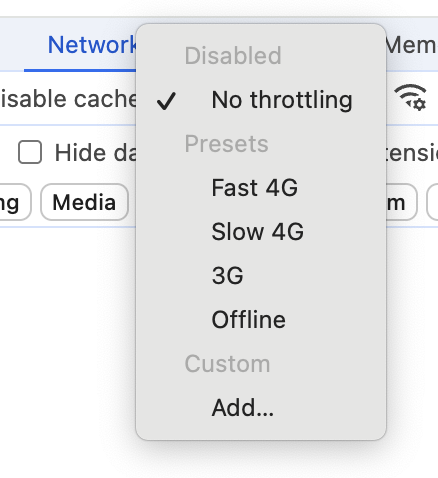
3G is so last 2010s 🥱 Even "Fast 3G" feels too slow for many performance traces in Chrome DevTools.
So we decided to rename "Fast 3G" to "Slow 4G" to match Lighthouse, and also add a "Fast 4G" setting for your pleasure.
In Chrome Canary already and should be in Chrome 127.
English
Alex Rudenko retweetledi

🚀 Firefox is deprecating CDP support and embracing WebDriver BiDi for a more robust automation experience! ℹ️ Learn more about the transition and how it benefits web testing: fxdx.dev/deprecating-cd… #Firefox #WebDriverBiDi #WebTesting
English
Alex Rudenko retweetledi
We're thrilled to share that the next generation of test automation is now a reality with Puppeteer and Firefox, thanks to the implementation of the WebDriver BiDi standard. 🚀 Read more: hacks.mozilla.org/2023/12/puppet… #WebTesting #Puppeteer #Firefox #WebDriverBiDi
English
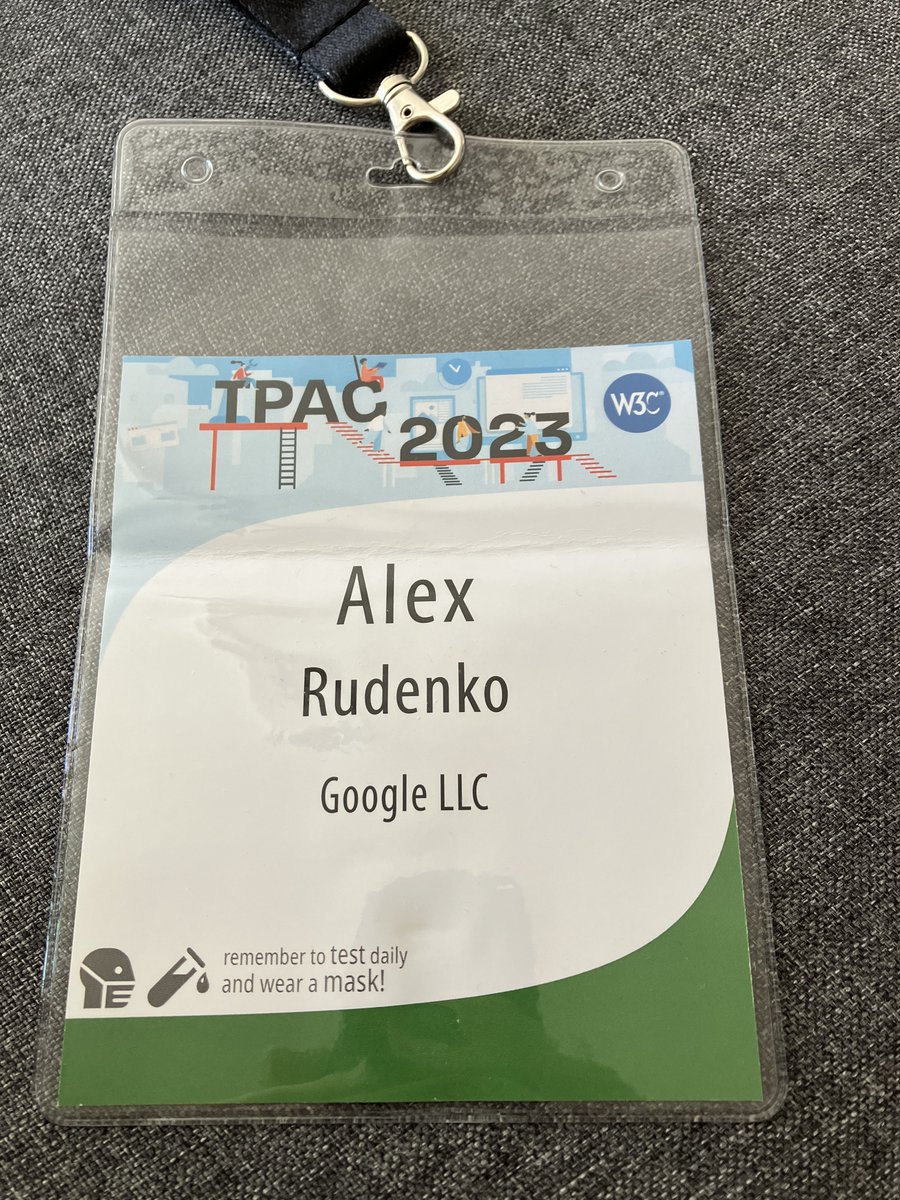
TPAC 2023 was fantastic, and it was my first time attending! I learned a lot, and, more importantly, I had the opportunity to meet many people in person whom I had only met online previously.
English
Alex Rudenko retweetledi
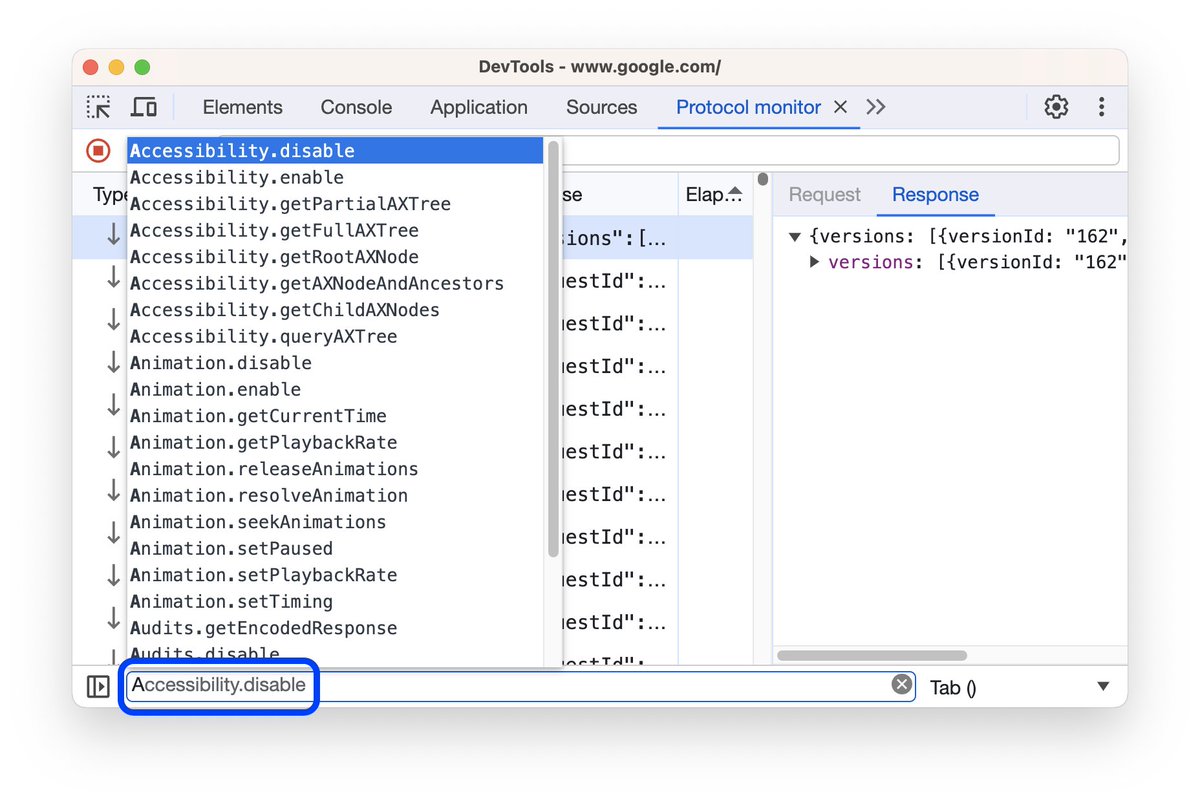
A niche panel in #ChromeDevTools - The Protocol Monitor got an upgrade! What's New:
🤖 Auto-complete suggestions
📝 Command editor
💌 edit & resend
...and more! 👉🏽 developer.chrome.com/blog/cdp-comma…
English
Alex Rudenko retweetledi
Alex Rudenko retweetledi

Chrome for Testing: reliable downloads for browser automation developer.chrome.com/blog/chrome-fo…
English
@TweetsOfSumit Das verstehe ich auch nicht! Basically, a hidden tax.
Deutsch

Warum geben wir der IHK nochmal Geld?
Was haben digitale Startups von der Mitgliedschaft? Warum MUSS ich da Mitglied sein und bezahlen ohne irgendeine Art von Gegenleistung?
Bekomme das ganze Jahr nichts zu hören außer eine Rechnung.
Und das auch noch Prozentual vom Gewinn.
GIF
Deutsch
Alex Rudenko retweetledi
PSA: We open sourced Chrome DevTools' Recorder panel. Head over to chromium.googlesource.com/devtools/devto… to see how it works and how you can contribute.

English
Alex Rudenko retweetledi
Well, this is unbelievable, folks 💙 I created this Patreon page just five months ago, and four out of them, I've been heads down building iximiuz Labs. I was so focused on the development that my newsletter and the blog got (temporarily!) abandoned. And nevertheless, so many people decided to support me - trusting that I would deliver something in the end. And I will!
Truly looking forward to getting back to my writing and education activities, this time reinforced with a full-blown learning-by-doing platform.

English
Excited about the new selector syntax for querying open shadow roots in Puppeteer: pptr.dev/guides/query-s…
It is also possible to add your own extensions and use them in selectors. 🎉 It makes e2e testing apps with web components so much easier.

English
Any other actions can now be edited without stopping the recording. For example, you can change the type field to "waitForExpression" and specify a JavaScript expression to wait for instead of waiting for elements.
Updating selectors for any action is possible as well
English
The latest version of DevTools Recorder allows you to add assertions without stopping the recording:
1. Click "Add Assertion" to add an element assertion.
2. Use the Element Picker to select the element that needs to be present.
3. Edit the attributes you expect on the element.
GIF
English
Did you know that DevTools Recorder supports extensions? You can also build your own and use the recorded information to generate test cases for your project/test runner/code style.
Chrome DevTools@ChromeDevTools
Learn how to install #Cypress extension, view and export test script from DevTools. @Cypress_io 👉🏽 cypress.io/blog/2023/04/1…
English
Recorder lets you configure recorded selectors. ARIA/Text selectors aren't always computable, so include a backup type.
For test attributes like data-test-id, Recorder detects them and uses these IDs for CSS/XPath selectors automatically. If you can customize selector attr too.
English
Recorder offers 5 selector types:
- CSS (ideal for non-auto-generated, semantic IDs/classes)
- ARIA (utilizes accessibility tree for name/role queries)
- Text (locates elements by DOM text match)
- XPath
- Pierce (for Shadow DOM, like CSS but shorter)

English
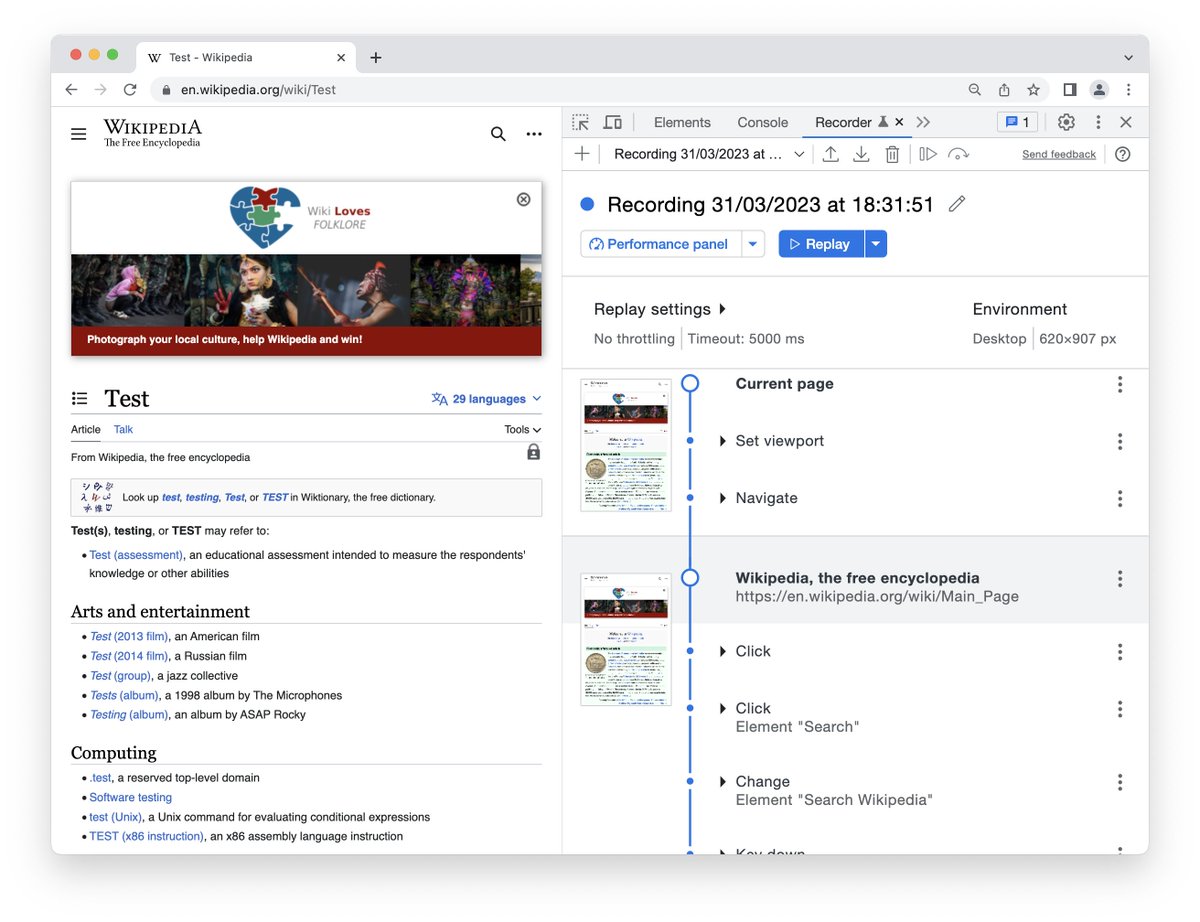
🤔Did you know Chrome DevTools has a Recorder panel?
🎥 Capture mouse/keyboard/navigation events & replay or export (e.g. to Puppeteer)
🔄 Meant for creating simple test cases📋, bug repro🐞 and site performance measurements📏
#ChromeDevTools
English