Prasad Lvv

4.6K posts

Prasad Lvv banner
Prasad Lvv

Prasad Lvv

@prasad_lvv

Every next level of your life will demand a different you

Yanam, India Katılım Ağustos 2017
577 Takip Edilen65 Takipçiler
Prasad Lvv retweetledi
Ayaan 🐧
Ayaan 🐧@twtayaan·
Essential Kubernetes YAML Files 📄 A quick cheat sheet of the most important Kubernetes YAML manifests every DevOps engineer should know. → Pods & Deployments → Services & Ingress → ConfigMaps & Secrets → RBAC & Service Accounts → Volumes & Storage Classes → HPA, ResourceQuota & LimitRange
Ayaan 🐧 tweet media
English
7
53
248
7.8K
Prasad Lvv retweetledi
yourclouddude
yourclouddude@yourclouddude·
AWS Roadmap for 2026 (skip overwhelm, get hired): 1️⃣ Basics first Linux • Networking • Git • Python 2️⃣ Cloud fundamentals Regions • AZs • Pricing IaaS vs PaaS vs SaaS 3️⃣ Master THESE 7 services EC2 → compute S3 → storage IAM → access RDS → database Lambda → serverless VPC → networking CloudWatch → monitoring (ignore the 200+) 4️⃣ Learn connections (this is key) EC2 ↔ RDS S3 ↔ CloudFront Lambda ↔ API Gateway VPC ↔ everything 5️⃣ Build 3–5 projects • Static site (S3 + CloudFront) • App on EC2 • Serverless API • Monitoring system 6️⃣ Security basics IAM • least privilege • encryption 7️⃣ Deployment basics SSH • setup • CI/CD (GitHub Actions) 8️⃣ (Optional) Cert path CLF → SAA 9️⃣ Portfolio GitHub + simple case studies 🔟 Apply smart Cloud • DevOps • Support roles Don’t learn AWS. Build with AWS. ☁️
English
4
27
254
10.6K
Prasad Lvv retweetledi
Ayaan 🐧
Ayaan 🐧@twtayaan·
8 GitHub Repos to Learn Kubernetes 1. Kubernetes The Hard Way github.com/kelseyhightowe… 2. Awesome Kubernetes github.com/ramitsurana/aw… 3. Kubernetes Examples github.com/kubernetes/exa… 4. CKAD Exercises github.com/dgkanatsios/CK… 5. Kubernetes Hands-On Projects github.com/techiescamp/ku… 6. Kubernetes Practical Exercises github.com/seifrajhi/Kube… 7. Kubernetes Learning Path github.com/techiescamp/ku… 8. Fast Kubernetes github.com/omerbsezer/Fas…
Ayaan 🐧 tweet media
English
9
78
353
15.9K
Prasad Lvv retweetledi
Dhanian 🗯️
Dhanian 🗯️@e_opore·
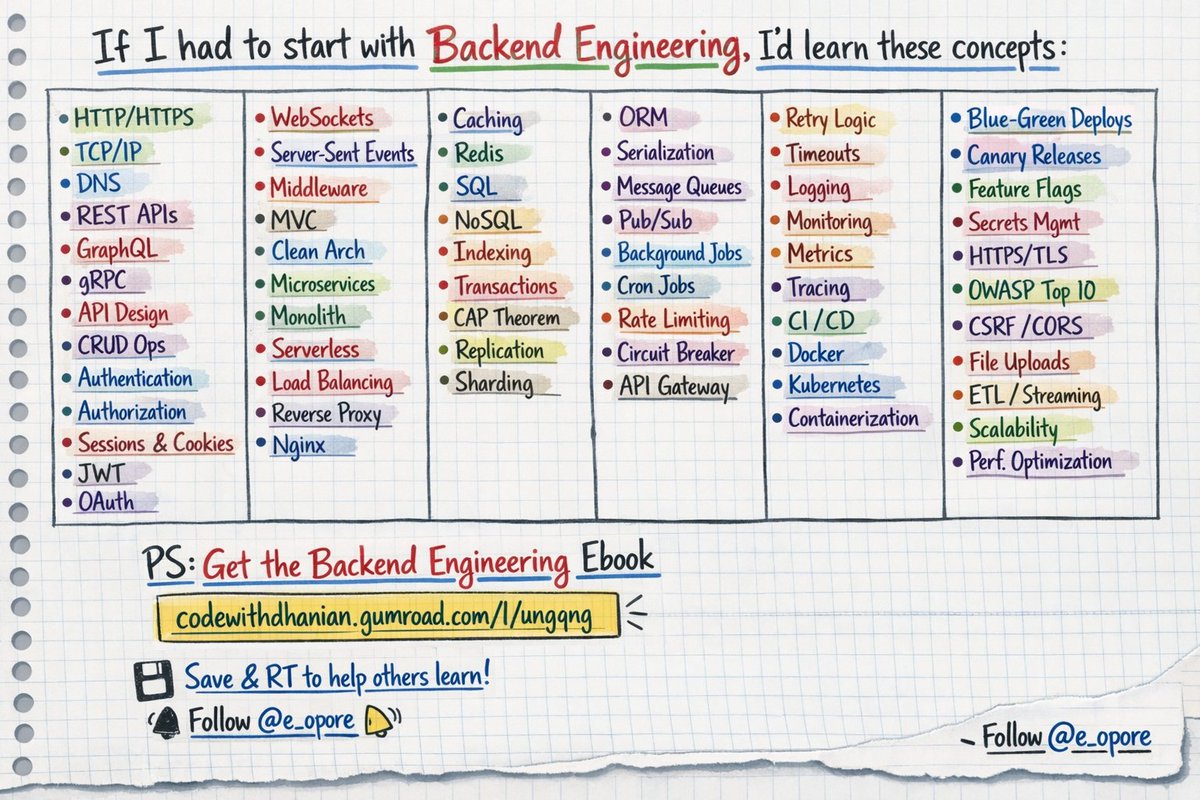
If I had to start with backend engineering, I'd learn these concepts: 1. HTTP/HTTPS 2. TCP/IP 3. DNS 4. REST APIs 5. GraphQL 6. gRPC 7. API Design 8. CRUD Operations 9. Authentication 10. Authorization 11. Sessions & Cookies 12. JWT 13. OAuth 14. WebSockets 15. Server-Sent Events 16. Middleware 17. MVC Architecture 18. Layered Architecture 19. Clean Architecture 20. Microservices 21. Monolith 22. Serverless 23. Load Balancing 24. Reverse Proxy 25. Nginx 26. Caching 27. Redis 28. Memcached 29. Database Design 30. SQL 31. NoSQL 32. Indexing 33. Query Optimization 34. Transactions 35. ACID 36. CAP Theorem 37. Replication 38. Sharding 39. Connection Pooling 40. ORM 41. Data Validation 42. Serialization 43. Deserialization 44. Message Queues 45. Pub/Sub 46. Event-Driven Architecture 47. Background Jobs 48. Cron Jobs 49. Rate Limiting 50. Throttling 51. API Gateway 52. Service Discovery 53. Circuit Breaker 54. Retry Logic 55. Timeout 56. Fault Tolerance 57. Logging 58. Monitoring 59. Metrics 60. Tracing 61. Observability 62. Error Handling 63. Debugging 64. Testing 65. Unit Testing 66. Integration Testing 67. End-to-End Testing 68. CI/CD 69. Docker 70. Kubernetes 71. Containerization 72. Deployment Strategies 73. Blue-Green Deployment 74. Canary Releases 75. Feature Flags 76. Secrets Management 77. Environment Variables 78. Encryption 79. HTTPS/TLS 80. Security Best Practices 81. OWASP Top 10 82. Input Sanitization 83. CSRF 84. CORS 85. XSS 86. Data Compression 87. File Upload Handling 88. Streaming 89. CDN Integration 90. Storage Systems 91. Object Storage 92. Data Pipelines 93. ETL 94. Batch Processing 95. Stream Processing 96. Scalability 97. High Availability 98. Performance Optimization (...and more concepts) === 👋 PS - Want a detailed breakdown of each concept? Read right now: → Get the Backend Engineering Ebook Link: codewithdhanian.gumroad.com/l/ungqng === 💾 Save this for later & RT to help others learn backend engineering. 👤 Follow @e_opore + turn on notifications.
Dhanian 🗯️ tweet media
English
31
312
1.7K
64.6K
Prasad Lvv retweetledi
Akshay 🚀
Akshay 🚀@akshay_pachaar·
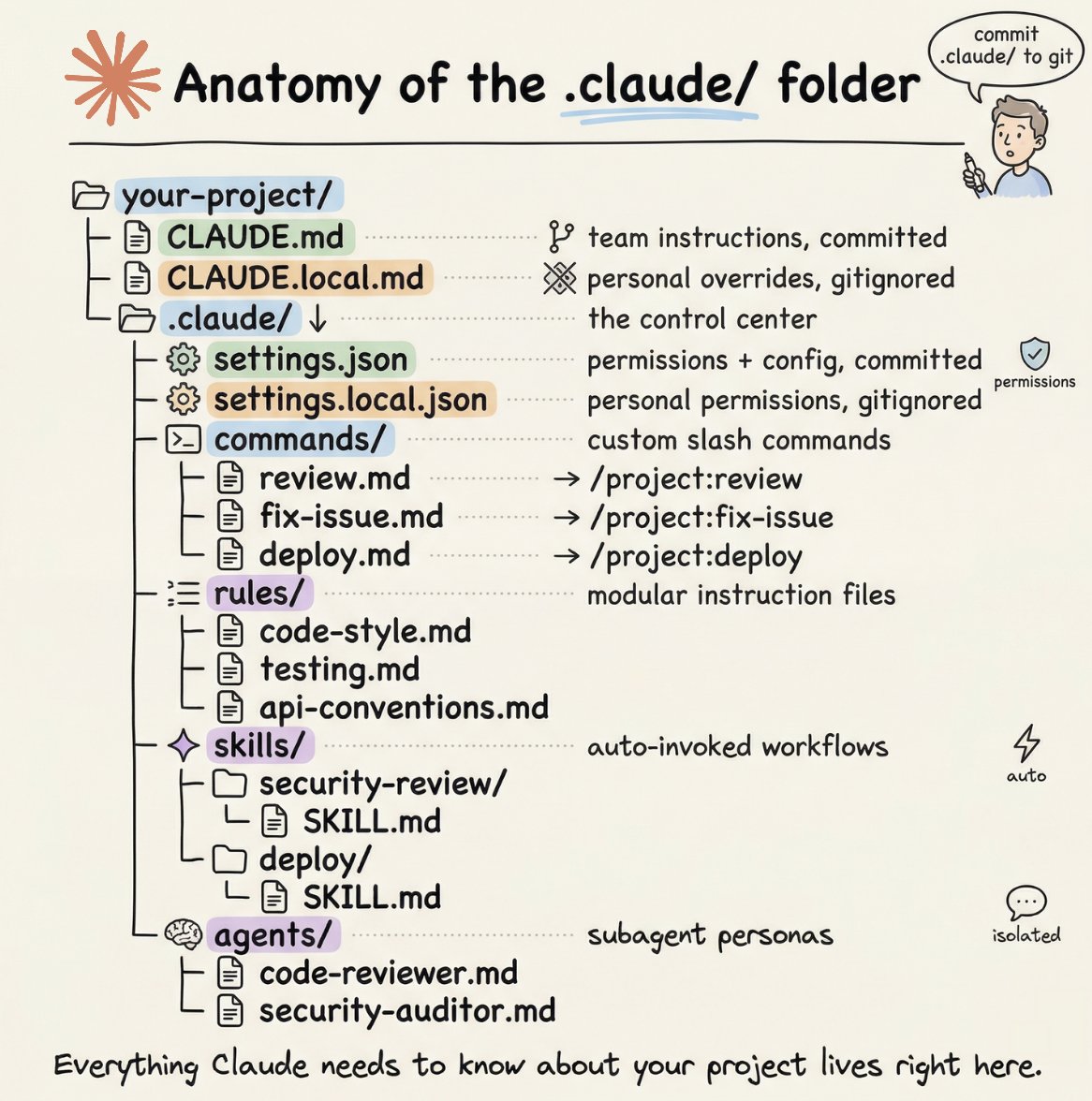
How to setup your Claude code project? TL;DR Most developers skip the setup and just start prompting. That's the mistake. A proper Claude Code project lives inside a .𝗰𝗹𝗮𝘂𝗱𝗲/ folder. Start with 𝗖𝗟𝗔𝗨𝗗𝗘.𝗺𝗱 as Claude's instruction manual. Split it into a 𝗿𝘂𝗹𝗲𝘀/ folder as it grows. Add 𝗰𝗼𝗺𝗺𝗮𝗻𝗱𝘀/ for repeatable workflows, 𝘀𝗸𝗶𝗹𝗹𝘀/ for context-triggered automation, and 𝗮𝗴𝗲𝗻𝘁𝘀/ for isolated subagents. Lock down permissions in 𝘀𝗲𝘁𝘁𝗶𝗻𝗴𝘀.𝗷𝘀𝗼𝗻. There are two .𝗰𝗹𝗮𝘂𝗱𝗲/ folders: one committed with your repo, one global at ~/.𝗰𝗹𝗮𝘂𝗱𝗲/ for personal preferences and auto-memory across projects. The .𝗰𝗹𝗮𝘂𝗱𝗲/ folder is infrastructure. Treat it like one. The article below is a complete guide to 𝗖𝗟𝗔𝗨𝗗𝗘.𝗺𝗱, custom commands, skills, agents, and permissions, and how to set them up properly.
Akshay 🚀 tweet media
Akshay 🚀@akshay_pachaar

x.com/i/article/2034…

English
212
1.5K
12.2K
2.1M
Prasad Lvv retweetledi
sysxplore
sysxplore@sysxplore·
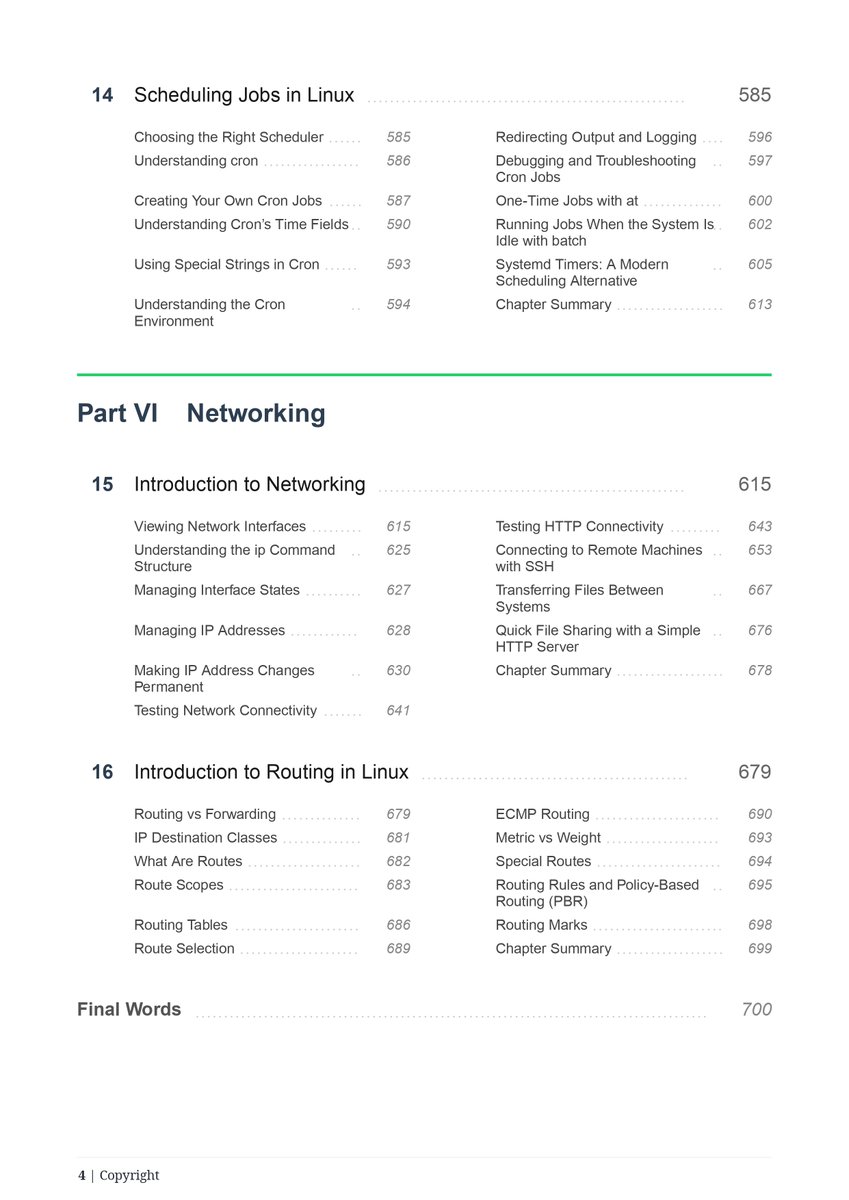
Nearly 700 pages of awesome Linux content. Almost ready. 🔥
sysxplore tweet media
English
8
47
489
26.8K
Prasad Lvv retweetledi
Raul Junco
Raul Junco@RaulJuncoV·
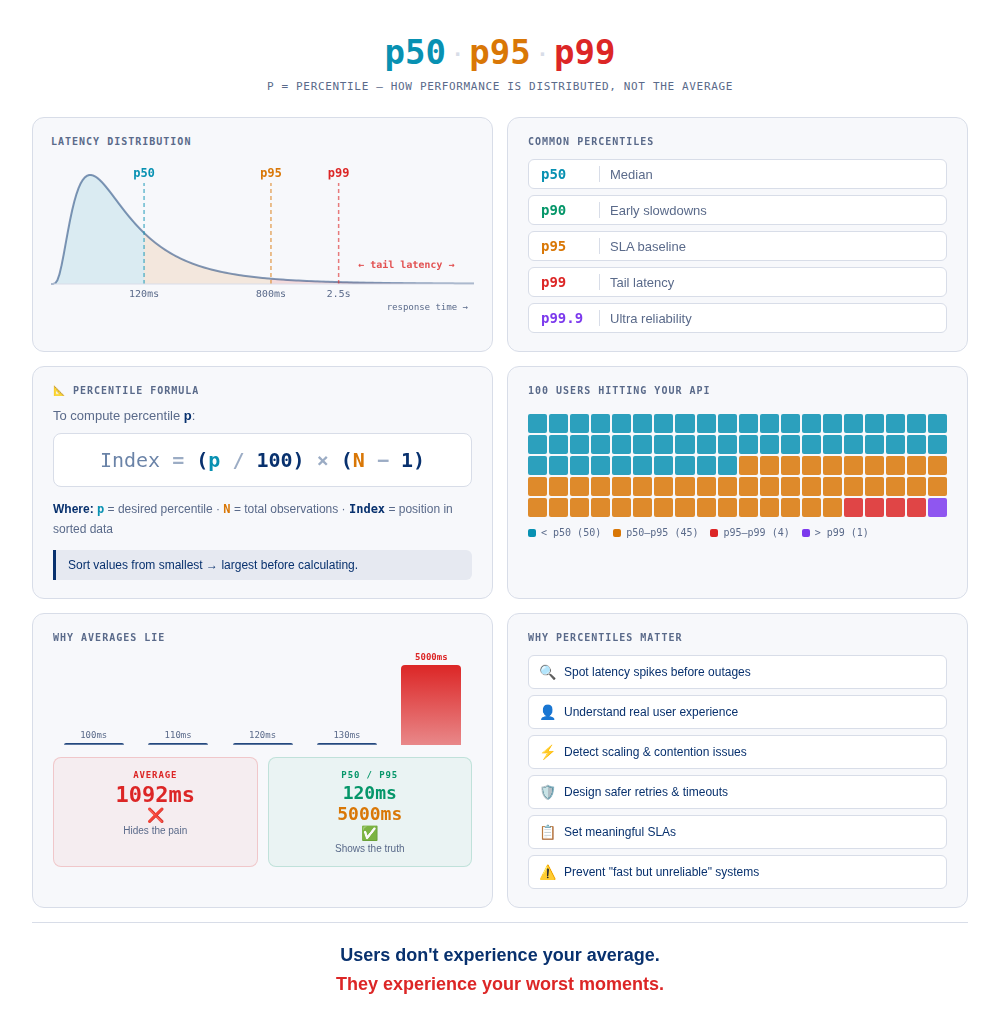
p50, p95, and p99. How many p's are there, and what do they mean? Short answer: p = percentile. It shows how performance is distributed, not the average. How many “p’s” exist? There are percentiles from p0–p100; in practice we usually look at : • p50 → median • p90 → early slowdowns • p95 → SLA baseline • p99 → tail latency • p99.9 → ultra reliability systems (Google and Amazon watch p99.9) Imagine 100 users hitting your API p50 = 120ms → 50 users were at or faster than 120ms, 50 were slower. p95 = 800ms → 5 users were at or faster than 800ms, 5 were slower. p99 = 2.5s → 99 users were at or faster than 2.5s, 1 was slower (this is where frustration lives). Why track percentiles instead of averages? Average latency hides pain. Example: 100ms 110ms 120ms 130ms 5000ms Average ≈ 1,092ms ❌ p50 = 120ms p95 = 5000ms ✅ Knowing p50, p95, and p99 helps you: • spot latency spikes before outages • understand real user experience • detect scaling and contention issues • design safer retries, timeouts, and backpressure • set meaningful SLAs • prevent “fast but unreliable” systems Users don’t experience your average. They experience your worst moments. Ignore the tail, and production will remind you. When did p99 last surprise you?
Raul Junco tweet media
English
14
106
753
45K
Prasad Lvv retweetledi
Nandkishor
Nandkishor@devops_nk·
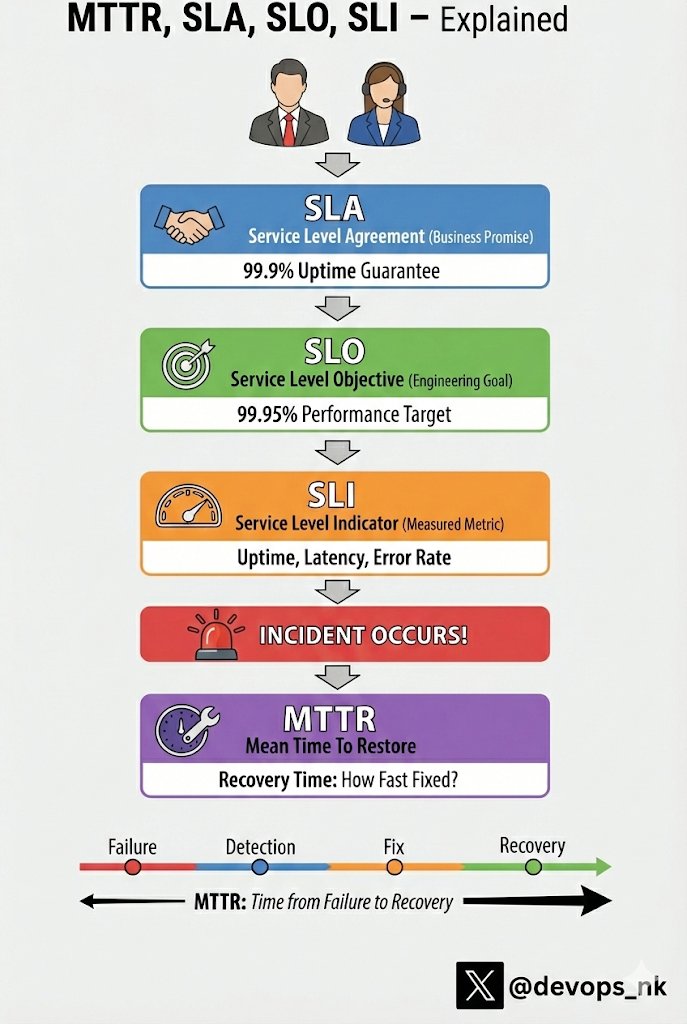
🚨 Production went down - what actually matters next ? Not that it failed. But how fast you detected it, fixed it, and recovered. That’s where SLI, SLO, SLA, and MTTR quietly decide whether users stay or leave. These terms come up a lot in DevOps, SRE, and Production Support, but they’re often misunderstood. Let’s break them down with real-world clarity 👇 1️⃣ SLI (Service Level Indicator) - What we measure a metric that shows how well a service performs. - API availability = 99.95% - Error rate < 0.1% - Page load time < 2 seconds 👉 Think of SLI as the speedometer of your service. 2️⃣ SLO (Service Level Objective) - The target we aim for, defined using SLIs. - “Our API should be available 99.9% of the time in a month.” 👉SLO is the target speed you want to maintain. 3️⃣ SLA (Service Level Agreement) - The business promise made to customers. - “We guarantee 99.9% uptime, or we provide service credits.” - Miss it → penalties or credits apply. 👉SLA is a contract, not just a technical goal. 4️⃣ MTTR (Mean Time To Restore/Recover) - How fast we recover after failure. - Incident at 2:00 AM and Service restored at 2:30 AM then MTTR = 30 minutes 👉Lower MTTR = faster recovery = happier users. 📢One-line summary (perfect for interviews) SLI → What we measure SLO → What we aim for SLA → What we promise MTTR → How fast we recover High availability isn’t about never failing. It’s about detecting issues fast and recovering even faster. If you work in Prod as an SRE or DevOps this mindset matters. #devops #sre
Nandkishor tweet media
English
10
75
363
17.1K
Prasad Lvv retweetledi
Nandkishor
Nandkishor@devops_nk·
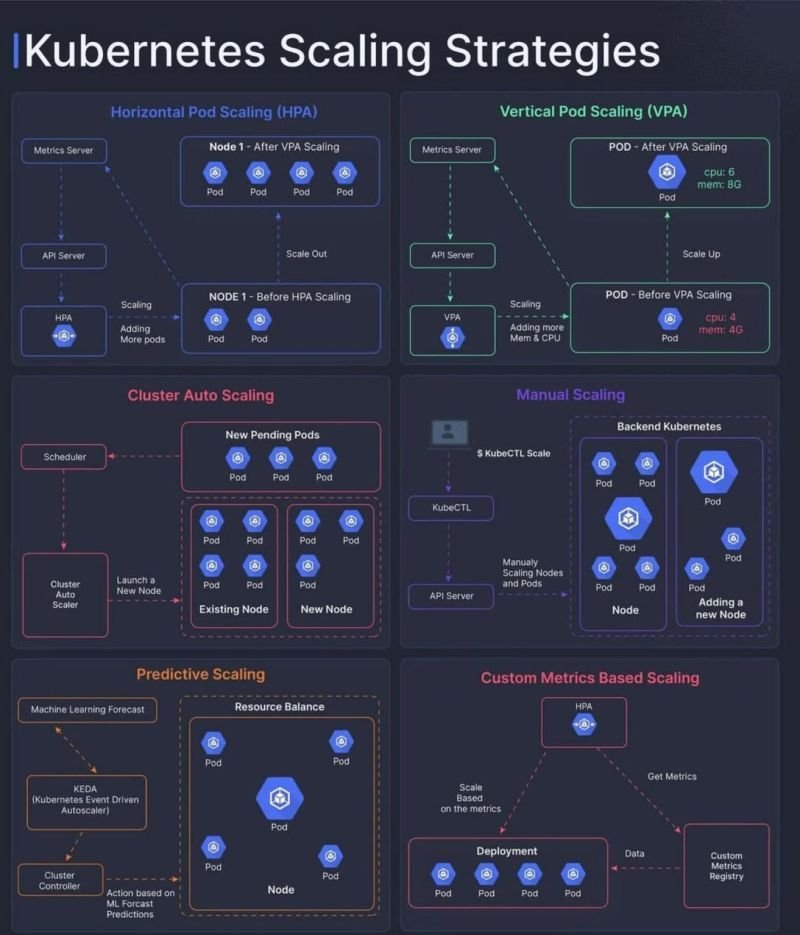
Kubernetes Scaling Strategies: Every DevOps Engineer Must Understand Scaling isn’t just “add more pods.” It’s about choosing the right strategy at the right time. Here’s how Kubernetes actually scales 👇 1️⃣ Horizontal Pod Autoscaling (HPA) - Scale OUT • Adds more pods • Based on CPU / Memory / Custom metrics • Ideal for stateless applications When traffic spikes → More pods are created. Most commonly used in production. ━━━━━━━━━━━━━━━━━━━ 2️⃣ Vertical Pod Autoscaling (VPA) - Scale UP • Increases CPU / Memory of existing pods • Good for steady workloads • Not ideal for rapid spikes Best when app needs more power, not more replicas. ━━━━━━━━━━━━━━━━━━━ 3️⃣ Cluster Autoscaler - Scale NODES • Adds new worker nodes • Triggered when pods are Pending • Works with cloud providers Pods need space → Cluster grows. No nodes = No scheduling. ━━━━━━━━━━━━━━━━━━━ 4️⃣ Manual Scaling • kubectl scale • Increase replicas manually • Mostly used for testing Not recommended for production automation. ━━━━━━━━━━━━━━━━━━━ 5️⃣ Predictive Scaling • Uses historical data • ML-based forecasting • Prepares cluster before traffic spike Advanced teams use this for peak events. ━━━━━━━━━━━━━━━━━━━ 6️⃣ Custom Metrics Scaling • Scale based on queue length • Requests per second • Business metrics This is where real DevOps maturity shows. ━━━━━━━━━━━━━━━━━━━ Production Reality: - HPA scales pods. - Cluster Autoscaler scales nodes. - Both must work together. Scaling is not about reacting fast. It’s about designing systems that don’t panic under load. Which one you are using in your project ?
Nandkishor tweet media
English
3
76
356
16.1K
Prasad Lvv retweetledi
AsyncTrix
AsyncTrix@asynctrix·
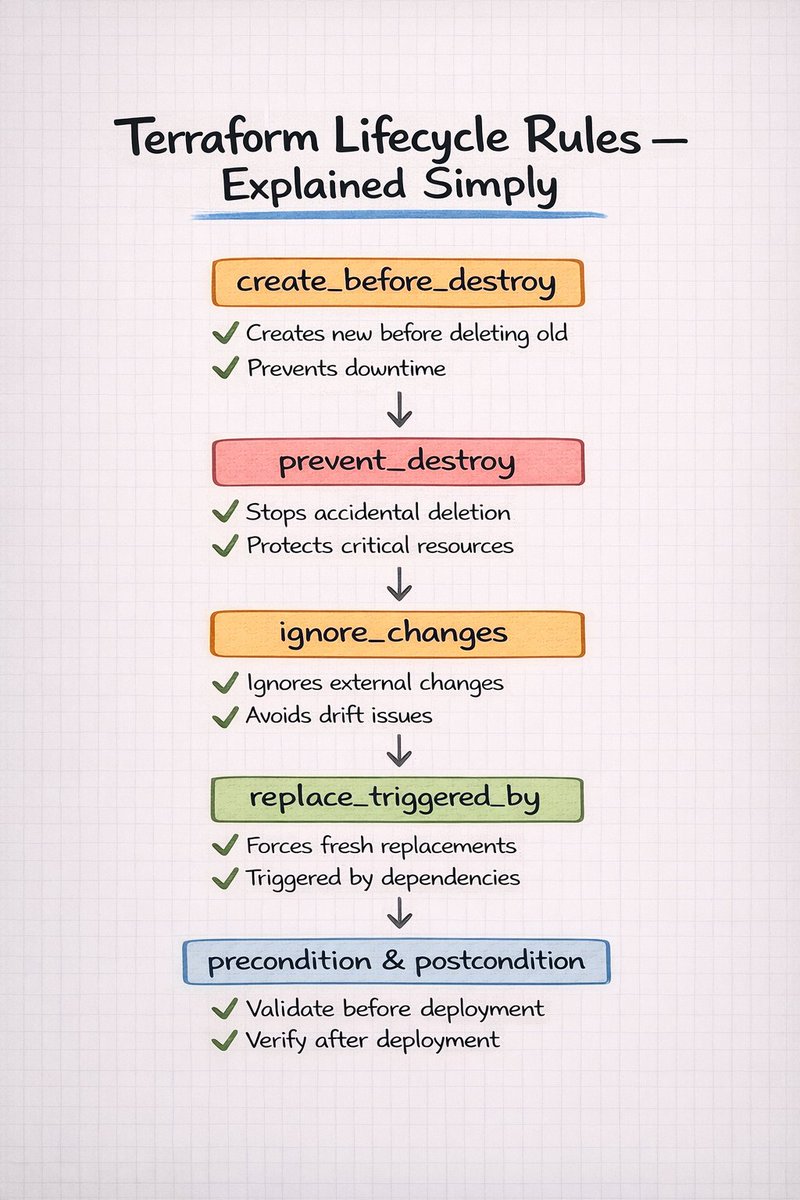
Terraform Lifecycle Rules - Explained Simply 🧠 Infrastructure problems rarely happen because Terraform is wrong. They happen because resource changes are not controlled properly. Lifecycle rules give you that control. create_before_destroy → Create new before deleting old → Prevent downtime during replacements prevent_destroy → Protect critical resources → Stop accidental deletions ignore_changes → Ignore external modifications → Reduce unnecessary drift noise replace_triggered_by → Force safe replacements → Rebuild when dependencies change precondition & postcondition → Validate before deployment → Verify after deployment Master these rules. And Terraform becomes predictable not scary.
AsyncTrix tweet media
English
4
24
121
3.6K
Prasad Lvv retweetledi
AsyncTrix
AsyncTrix@asynctrix·
Kubernetes — In Plain English ☸️ Pod → Smallest unit where your app runs Deployment → Manages replicas & updates StatefulSet → Stable identity + persistent storage DaemonSet → One Pod on every node Service → Stable internal access Ingress → External HTTP/HTTPS access ConfigMap → Non-sensitive configuration Secret → Sensitive data Node → Machine that runs Pods Control Plane → Brain of the cluster RBAC → Controls permissions Namespace → Logical isolation Understand the building blocks → Kubernetes becomes simple.
AsyncTrix tweet media
English
4
98
467
27.3K
Prasad Lvv retweetledi
Akhilesh Mishra
Akhilesh Mishra@livingdevops·
Packaging apps → Docker Running containers at scale → Kubernetes Scanning container images → Trivy Infrastructure as code → Terraform Config management → Ansible Devops automation → Python CI/CD → Github Action/Jenkins/Gitlab GitOps → ArgoCD/Flux Service mesh → Istio If it’s monitoring metrics → Prometheus Monitoring dashboard → Grafana Centralised logging → ELK Stack Distributed tracing → Jaeger Secrets management → Vault Policy enforcement → OPA Cost optimisation → Kubecost Load testing → K6 Kubernetes IDE → Free-lens IDE → Vscode + Claude API gateway → Kong If it’s serverless → AWS Lambda Real world Devops → Akhilesh Mishra Stop overengineering. Use what solves the problem.
English
5
12
99
4.7K
Prasad Lvv retweetledi
Dhanian 🗯️
Dhanian 🗯️@e_opore·
𝗔𝗪𝗦 𝗥𝗼𝗮𝗱𝗺𝗮𝗽 𝟮𝟬𝟮𝟲 𝟭. 𝗖𝗹𝗼𝘂𝗱 𝗙𝘂𝗻𝗱𝗮𝗺𝗲𝗻𝘁𝗮𝗹𝘀 Start with understanding how cloud computing works. 🔹 IaaS, PaaS, SaaS 🔹 Shared Responsibility Model 🔹 Regions, Availability Zones, Edge Locations 🔹 Pricing models & billing basics 𝟮. 𝗖𝗼𝗺𝗽𝘂𝘁𝗲 𝗦𝗲𝗿𝘃𝗶𝗰𝗲𝘀 Learn how AWS runs applications. 🔹 EC2 (Virtual servers) 🔹 Lambda (Serverless compute) 🔹 ECS & EKS (Containers) 🔹 Elastic Beanstalk 🔹 Auto Scaling Groups 𝟯. 𝗦𝘁𝗼𝗿𝗮𝗴𝗲 𝗦𝗲𝗿𝘃𝗶𝗰𝗲𝘀 Understand how data is stored and managed. 🔹 S3 (Object storage) 🔹 EBS (Block storage) 🔹 EFS (File storage) 🔹 S3 lifecycle policies 🔹 Glacier for archival 𝟰. 𝗡𝗲𝘁𝘄𝗼𝗿𝗸𝗶𝗻𝗴 Networking is critical in AWS architecture. 🔹 VPC, Subnets, Route Tables 🔹 Internet Gateway & NAT Gateway 🔹 Security Groups & NACLs 🔹 Route 53 (DNS) 🔹 Elastic Load Balancer (ALB/NLB) 𝟱. 𝗗𝗮𝘁𝗮𝗯𝗮𝘀𝗲𝘀 Choose the right database for your workload. 🔹 RDS (MySQL, PostgreSQL, Aurora) 🔹 DynamoDB (NoSQL) 🔹 ElastiCache (Redis) 🔹 OpenSearch 🔹 Redshift (Data warehouse) 𝟲. 𝗜𝗻𝗳𝗿𝗮𝘀𝘁𝗿𝘂𝗰𝘁𝘂𝗿𝗲 𝗮𝘀 𝗖𝗼𝗱𝗲 Automate everything. 🔹 CloudFormation 🔹 AWS CDK 🔹 Terraform 🔹 Parameter Store & Secrets Manager 𝟳. 𝗦𝗲𝗰𝘂𝗿𝗶𝘁𝘆 & 𝗜𝗔𝗠 Secure your cloud properly. 🔹 IAM users, roles & policies 🔹 Multi-Factor Authentication (MFA) 🔹 KMS encryption 🔹 AWS WAF & Shield 🔹 Cognito for authentication 𝟴. 𝗠𝗼𝗻𝗶𝘁𝗼𝗿𝗶𝗻𝗴 & 𝗟𝗼𝗴𝗴𝗶𝗻𝗴 Keep track of performance and activity. 🔹 CloudWatch (metrics & alarms) 🔹 CloudTrail (API auditing) 🔹 AWS Config 🔹 X-Ray tracing 𝟵. 𝗖𝗜/𝗖𝗗 & 𝗗𝗲𝘃𝗢𝗽𝘀 Automate builds and deployments. 🔹 CodeCommit 🔹 CodeBuild 🔹 CodeDeploy 🔹 CodePipeline 🔹 Blue/Green deployments 𝟭𝟬. 𝗦𝗲𝗿𝘃𝗲𝗿𝗹𝗲𝘀𝘀 & 𝗘𝘃𝗲𝗻𝘁-𝗗𝗿𝗶𝘃𝗲𝗻 Build scalable modern systems. 🔹 Lambda 🔹 API Gateway 🔹 SNS & SQS 🔹 EventBridge 🔹 Step Functions 𝟭𝟭. 𝗗𝗮𝘁𝗮 & 𝗔𝗻𝗮𝗹𝘆𝘁𝗶𝗰𝘀 Handle big data and streaming. 🔹 S3 + Athena 🔹 Glue 🔹 Kinesis 🔹 Redshift 𝟭𝟮. 𝗔𝗜 & 𝗠𝗮𝗰𝗵𝗶𝗻𝗲 𝗟𝗲𝗮𝗿𝗻𝗶𝗻𝗴 Integrate AI into AWS applications. 🔹 SageMaker 🔹 Rekognition 🔹 Comprehend 🔹 Bedrock 𝟭𝟯. 𝗛𝗶𝗴𝗵 𝗔𝘃𝗮𝗶𝗹𝗮𝗯𝗶𝗹𝗶𝘁𝘆 & 𝗦𝗰𝗮𝗹𝗮𝗯𝗶𝗹𝗶𝘁𝘆 Design reliable systems. 🔹 Multi-AZ deployments 🔹 Auto Scaling 🔹 Disaster recovery strategies 🔹 Backup & restore solutions 𝟭𝟰. 𝗥𝗲𝗮𝗹-𝗪𝗼𝗿𝗹𝗱 𝗣𝗿𝗼𝗷𝗲𝗰𝘁𝘀 Practice is key to mastery. 🔹 Deploy full-stack apps on AWS 🔹 Build serverless APIs 🔹 Configure CI/CD pipelines 🔹 Implement secure VPC architecture 🔹 Optimize cloud costs Get the AWS Handbook here: codewithdhanian.gumroad.com/l/tbpasf
Dhanian 🗯️ tweet media
English
21
249
956
30.2K
Prasad Lvv retweetledi
clovis
clovis@clovisdsdo·
Maturity in DevOps is when you realize this: Terraform, Pulumi, CloudFormation, and other IaC tools bring value when you’re dealing with: - Multiple environments - Reproducibility - Large teams - Scalable infrastructure You cannot spend hours writing modules, variables, remote state, and backends. Just to launch one temporary EC2. #terraform #DevOps
English
3
10
55
3K
Prasad Lvv retweetledi
Ayaan 🐧
Ayaan 🐧@twtayaan·
The Ultimate Kubernetes Cheatsheet ☸️ ➛ Pod Essentials: • kubectl get pods -o wide - Show pod IP and node location • kubectl logs -f {pod} - Stream pod logs in real-time • kubectl exec -it {pod} -- sh - Open interactive shell inside container • kubectl describe pod {pod} - Show detailed status and events • kubectl delete pod --grace-period=0 - Force delete a pod immediately ➛ Node & Cluster: • kubectl get nodes - List all nodes and their status • kubectl top nodes - Show CPU and memory usage of nodes • kubectl drain {node} - Safely evict all pods for maintenance • kubectl cordon {node} - Mark node as unschedulable • kubectl cluster-info - Display cluster master and service info ➛ Deployment & Scaling: • kubectl create deployment - Create a new deployment • kubectl scale --replicas=3 - Update the number of running pods • kubectl rollout restart - Restart deployment with new pods • kubectl rollout undo - Revert to the previous version • kubectl rollout status - Watch the progress of a deployment ➛ Networking: • kubectl get svc - List services and external IPs • kubectl expose deploy - Create a service for a deployment • kubectl port-forward - Access a pod port from your local machine • kubectl get ingress - List ingress rules and addresses • kubectl get endpoints - List backend pod IPs for services ➛ Debugging & Fixes: • kubectl edit {resource} - Edit live configuration in text editor • kubectl apply -f {file} - Create or update resources from file • kubectl diff -f {file} - Compare file config with live state • kubectl auth can-i - Check permissions for an action • kubectl api-resources - List all available resource types ➛ Cleanup: • kubectl delete -f {file} - Delete resources defined in a file • kubectl delete pod --all - Delete all pods in current namespace • kubectl delete evictions - Delete failed eviction records • kubectl prune - Remove resources not present in file
English
5
34
178
7.6K
Prasad Lvv retweetledi
AsyncTrix
AsyncTrix@asynctrix·
Kubernetes Objects You Actually Use Every Day ☸️ • Pod → runs containers • Deployment → replicas & updates • Service → stable access • ConfigMap → app config • Secret → sensitive data • Ingress → HTTP routing • Namespace → isolation • Node → worker machine • PVC → storage request Master these → 80% of real-world Kubernetes work is covered. If you're learning Kubernetes, you're in the right place.
English
6
27
123
4.4K
Prasad Lvv retweetledi
Nandkishor
Nandkishor@devops_nk·
𝗕𝘂𝗶𝗹𝗱 𝗧𝗵𝗶𝘀 𝗘𝗻𝗱-𝘁𝗼-𝗘𝗻𝗱 𝗔𝗪𝗦 𝗗𝗲𝘃𝗢𝗽𝘀 𝗣𝗿𝗼𝗷𝗲𝗰𝘁 (𝗥𝗲𝗮𝗹 𝗣𝗿𝗼𝗱𝘂𝗰𝘁𝗶𝗼𝗻 𝗘𝘅𝗽𝗼𝘀𝘂𝗿𝗲) You will learn more by building one hands-on project from scratch than by watching 10 YouTube tutorials. Project Description: An OpenTelemetry-based E-commerce microservices app deployed on AWS with full CI/CD + GitOps. 🟢 Project Architecture (Industry Style) User → Domain (GoDaddy) → Route53 → Load Balancer → EKS → Kubernetes Services → 20+ Microservices If you build this once interviews become easy. 🟢 Step 1: Infrastructure as Code (Terraform) Use Terraform to provision everything. What you will implement: ✅ VPC (public + private subnets) ✅ Internet Gateway ✅ Route Tables ✅ NAT Gateway ✅ Security Groups ✅ EKS Cluster using Amazon EKS ✅ S3 backend for remote state ✅ DynamoDB for state locking 👉 What you will learn: - Real VPC networking design - How production EKS clusters are created - Remote state management best practices - Terraform backend configuration - State locking (why it matters in teams) - This alone gives you real DevOps exposure. 🟢 Step 2: CI/CD with GitHub Actions Use GitHub Actions Pipeline Stages You Should Create: 🔹 Build - Checkout code - Setup Go - Install dependencies - Run unit tests 🔹 Code Quality - Integrate golangci-lint - Perform static analysis 🔹 Docker - Build images - Push to Docker Hub 🔹 Update Kubernetes Manifests - Auto-update image tag - Commit back to repo 👉 What you will learn: - Automated CI pipelines - Docker image tagging strategy - Version control in pipelines - Secure secret handling - Production-grade workflow design This is exactly what companies expect. 🟢 Step 3: Containerization Use Docker What you will implement: - Containerize 20+ microservices - Multi-stage Docker builds - Lightweight production images - docker-compose for local testing 👉 What you will learn: - Microservice packaging - Build optimization - Local vs production environment differences - Dependency management 🟢 Step 4: Kubernetes on AWS Deploy everything on Kubernetes using Amazon EKS What you will implement: ✅ Deployments ✅ Services (ClusterIP, LoadBalancer) ✅ Ingress ✅ Service Accounts (IAM roles for service accounts – IRSA) ✅ Resource limits & requests 👉 What you will learn: - Pod scheduling - Service-to-service communication - Ingress + ALB integration - Secure workload identity - Real cluster debugging - This is real production experience. 🟢 Step 5: GitOps with ArgoCD Use Argo CD What you will implement: - Connect GitHub repo to EKS - Enable auto-sync - Maintain desired state = actual state 👉 What you will learn: - GitOps workflow - Declarative deployments - Drift detection - Production-grade release strategy - Modern companies are moving toward GitOps. 🟢Step 6: Domain + Traffic Routing Use: - Amazon Route 53 - GoDaddy domain Flow: User → Route53 → AWS Load Balancer → Ingress → Service → Pod 👉 What you will learn: - DNS configuration - Hosted zones - A records / CNAME - Real internet traffic routing Now your project becomes public and production-like. 🎯Final Outcome If you build this project fully: You will understand: ✔ Networking ✔ CI/CD ✔ GitOps ✔ Kubernetes ✔ IAM & Security ✔ Terraform Backend ✔ Production troubleshooting ✔ Real DevOps workflow I have documented everything in my GitHub repository. You can follow it step by step, and if you get stuck, feel free to take help from ChatGPT but make sure you truly understand the concepts. 𝗠𝗮𝗶𝗻 𝗣𝗿𝗼𝗷𝗲𝗰𝘁 𝗥𝗲𝗽𝗼: github.com/I-am-nk/ultima… 𝗧𝗲𝗿𝗿𝗮𝗳𝗼𝗿𝗺 𝗥𝗲𝗽𝗼: github.com/I-am-nk/ultima… If you found this helpful, feel free to like, retweet, and share it with aspiring DevOps engineers. Signing off @devops_nk 🫡
English
33
81
465
77K
Prasad Lvv retweetledi
Akhilesh Mishra
Akhilesh Mishra@livingdevops·
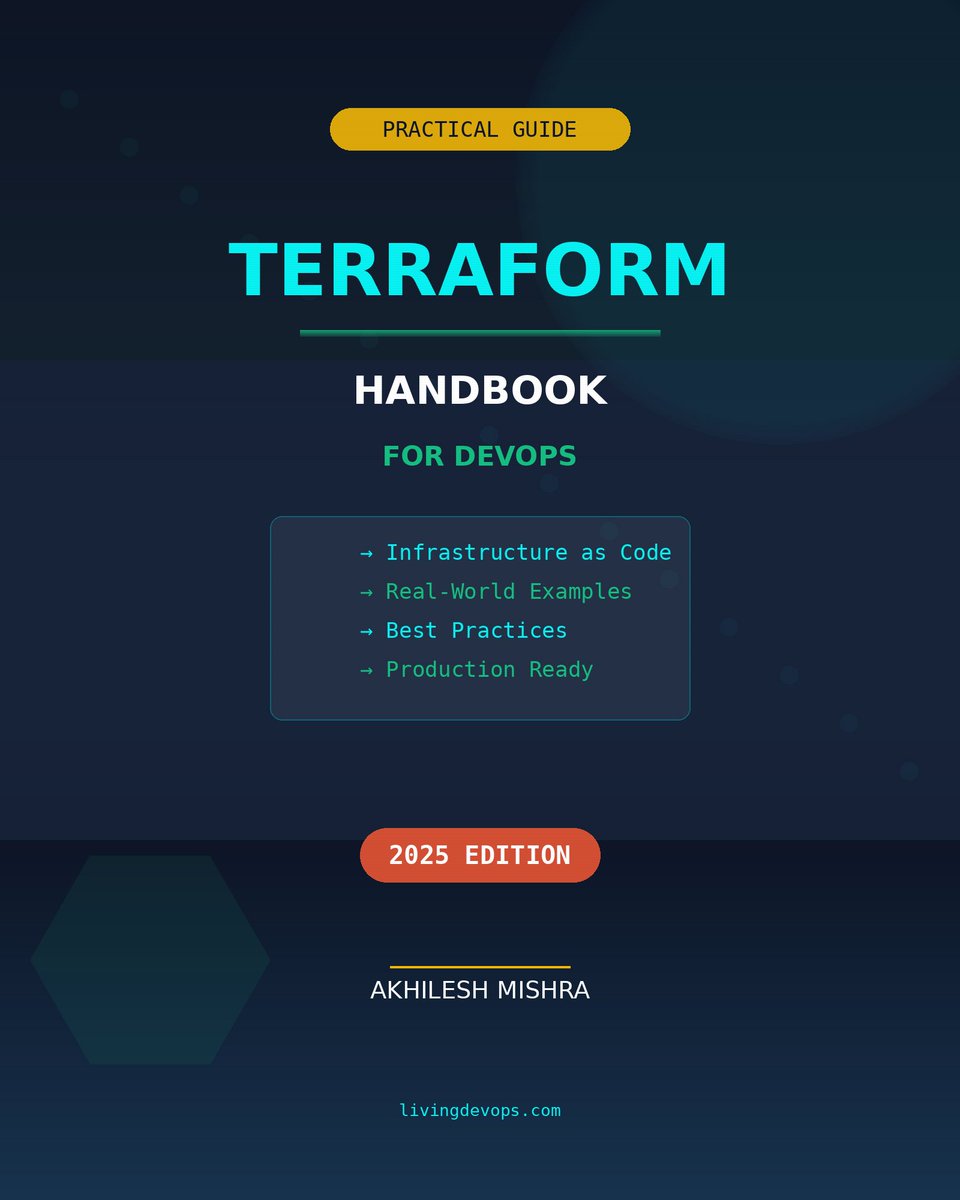
Terraform is the one skill that separates DevOps engineers who click through consoles from those who deploy infrastructure in seconds. I've had written a comprehensive "Terraform Handbook for DevOps Engineers" ebook that thousands of people loved and I'm giving it away for free. To get it for free, just do 3 things. ✓ Follow me (for DM access) ✓ Retweet this post ✓ Comment "Terraform" And I will personally send you that. P.S. If i missed sending you due to some issues, just DM me and I will share
Akhilesh Mishra tweet media
English
403
325
490
30K
Prasad Lvv retweetledi
Swati
Swati@Heymaxi01·
Don't overthink....just start Your 2026 DevOps Roadmap 👀🔥 Step-1: Learn Linux Fundamentals Step-2: Master Git and Version Control Step-3: Understand Networking Basics Step-4: Learn Scripting (Bash, Python) Step-5: Master CI/CD Concepts (Jenkins, GitLab) Step-6: Learn Containerization (Docker) Step-7: Master Orchestration (Kubernetes) Step-8: Learn Cloud Platforms (AWS, Azure, GCP) Step-9: Understand Infrastructure as Code (Terraform, Ansible) Step-10: Learn Monitoring and Logging Tools (Prometheus, ELK) Step-11: Practice Automation Everywhere! Step-12: Stay updated on DevOps best practices Congratulations, you're a DevOps Engineer! 🔥
English
7
29
217
7.1K